Saturday, 28 June 2025

YouTube metrics that drive growth and business impact

With over 2.7 billion users, YouTube isn’t just a video platform—it’s a hub for connecting with audiences and building community. Getting the most out of this engagement, which is crucial for brand awareness and subscriber growth, starts with understanding YouTube metrics.

Whether you’re scaling your channel or improving your views and engagement, YouTube analytics helps you understand what works, where to optimize and how to tie your efforts to measurable outcomes.

We’ll break down the top YouTube metrics you should know about, how to build smarter strategies and how to tie your campaigns to ROI reporting.

Why YouTube data matters for your content strategy

According to the Social Media Content Strategy Report, 47% of YouTube users interact with brands every week. You can analyze interactions in YouTube analytics tools to learn, improve and report on your YouTube strategy.

Whether you’re using YouTube’s native analytics or a third-party tool, analytics data takes out the guesswork, which is crucial given the time and resources that go into creating and publishing videos. You can use this data to:

  • Make YouTube content decisions: The data tells you what your target audience likes. Knowing if you have high video views, watch time and engagement for a certain video tells you what’s working and where there are opportunities to expand.
  • Prove ROI: You need to connect your videos to business outcomes and analytics help you do that. For example, any conversions or spikes in product page traffic can connect back to your video and show that it’s made a difference for your company.
  • Review video performance and adapt: YouTube analytics helps you create a tight feedback loop. If you want to improve watch time, for instance, start by analyzing the titles and thumbnails for your high-performing videos. What do they have that the other videos don’t? Or, look at the hooks of your top-performing videos. Are there types of hooks that pull viewers in to watch longer than others?

YouTube analytics help you double down on what’s working and strategically pivot when necessary.

How to access YouTube analytics

YouTube offers robust internal analytics that allow you to analyze your videos and engagement in real-time. Here’s how to access it:

  1. Sign in to YouTube and click on your profile icon. Choose YouTube Studio from the menu.
A YouTube menu with the YouTube Studio tab highlighted
  1. On the left sidebar, click Analytics. From there, you’ll see your dashboard.
A YouTube Studio sidebar highlighting the Analytics tab
  1. Explore data in the Overview, Content, Revenue and Audience sections. When you click “See More,” you get more context about your channel and videos.
A channel analytics dashboard showing the Overview, Content, Audience and Trends views

Engagement metrics that spotlight what’s working

Video engagement is complex, which is why you need multiple metrics to see what’s resonating. Here are some metrics you can start with:

Views

Views represent the number of times users watch your video (counted after 30 seconds).

A Lovevery YouTube video of an Adventure Play Kit unboxing with 2.8k views

Increase views by:

  • Studying your most-watched videos: Identify commonalities in the headlines, topics, video descriptions and thumbnails (the details that capture audience attention and drive engagement).
  • Collaborating with YouTube influencers or brands: Connect with creators or complementary brands to capture your target audience’s attention. They can introduce you to the right viewers and increase your channel’s exposure.
  • Learning from trending videos and themes: Find relevant opportunities to join in on trending topics or challenges to increase reach and engagement.

As of March 2025, YouTube counts Shorts views differently, measuring a view every time a Short plays or replays—with no minimum watch time required. The older metric, now called Engaged Views, required a minimum video watch time. A best practice is to improve your hooks and promise value as fast as possible to keep viewers engaged and encourage rewatches.

Watch time

This metric measures the total hours your viewers spend watching your content. YouTube’s algorithm rewards videos with a high watch time, increasing their chances of discoverability.

Ways to increase watch time include the following:

  • Posting videos consistently: Release videos on a regular schedule that sets audience expectations, builds viewer loyalty and encourages repeat visits. Returning viewership can lead to increased views and longer watch times.
  • Increasing retention within videos: Produce intros that immediately hook viewers. Add pattern interruptions early with quick cuts, text overlays and engaging visuals to encourage higher watch times.
  • Recommending videos: Feature follow-up content or use an End Screen to nudge users to view more.

Average view duration

Average duration reveals how long viewers stay and watch a video, helping you measure YouTube engagement and retention.

Along with the techniques mentioned for increasing watch time, apply these tactics:

  • Changing visual components to grab attention: Change camera angles and add graphics, images, headers and other elements to shift patterns and keep viewers interested.
  • Adding a cliffhanger: Promise value in your intros so users will want to finish or watch a video longer.
  • Hosting YouTube livestreams: Viewers enjoy live videos. Host livestreams to interact with your audience in real-time, building community and generating longer watch times from live participation and views after the event.

A Headspace live meditation session on YouTube for Women’s History Month

Front-loading value can increase watch time. Deliver a good amount of your most entertaining and valuable scenes early on. Earning credibility early will increase retention on most of your videos.

Shorts were previously limited to 60 seconds. Now, they can be up to three minutes long. Unlike traditional YouTube videos, Shorts offer a unique key metric: swipes. Swipes provide helpful info on when viewers leave your video by swiping away. You can use this swipe data to fine-tune your Shorts and improve retention.

Audience retention

This metric tells you when you tend to lose viewers during the video. For example, was there a dip early on? That might be a sign to improve your intro or revisit topic relevance. Or was there a healthy, consistent curve? That might be a sign you’re connecting with your audience.

Audience retention is a great metric for studying viewer behavior throughout your video. Improve your channel performance by:

  • Noting key moments: Pinpoint the moment viewers leave or stay engaged. Then, compare these retention trends across all your videos for commonalities and insights.
  • Structuring new content based on retention curves: Apply the successful retention patterns you’ve analyzed to help you create future videos based on what’s working.

Retention looks different for Shorts. YouTube designed the format for quick views, encouraging users to watch many short videos in a short amount of time. While it can be challenging to keep retention high, even minor improvements can make a big difference in your Shorts’ performance. As you master retention in this competitive format, you can apply those techniques to your longer-form videos.

YouTube metrics that reveal your audience

Knowing who you’re reaching is the difference between a successful YouTube social media strategy and one that doesn’t get much traction. Follow these key metrics to find your viewers:

Demographics

YouTube demographics include details like age, gender, location and the devices your audience uses. This data helps you determine if your video content resonates with the right segment and if there’s an untapped group you might want to explore.

Impressions and CTR

Impressions refer to how often users see your video thumbnail in their feed or app, and click-through rate (CTR) is the percentage of users who click on the video. If you have a low CTR, your topic choice, title or thumbnail may need improvement.

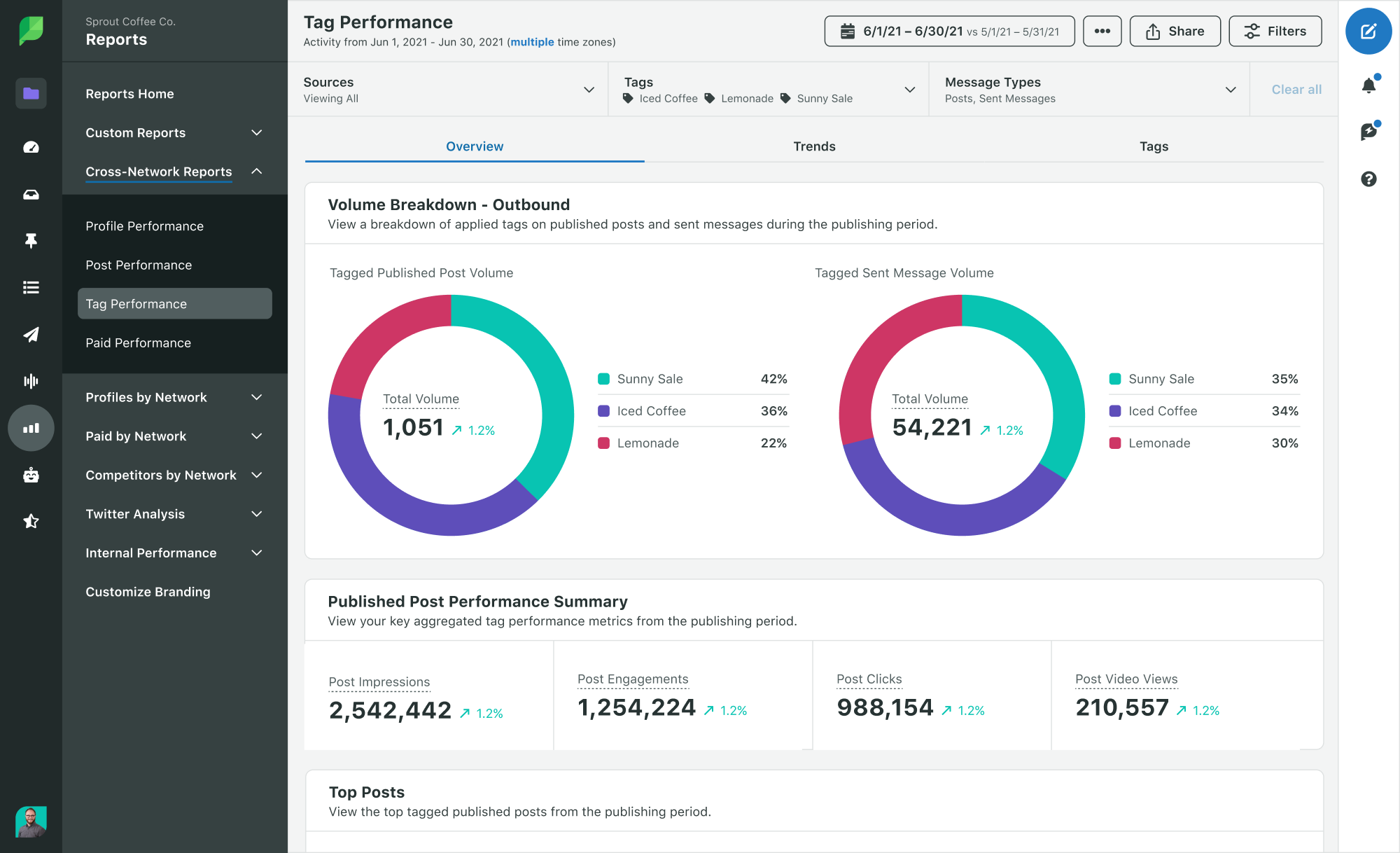
In Sprout Social’s cross-platform Profile Performance Report, you’ll find impressions, engagements and key metrics for audience growth.

Sprout Social’s Performance Summary dashboard showing impressions, engagements and post link clicks

Subscriber gains (and losses)

The subscriber metric shows how many subscribers you’ve gained or lost—all based on video content. If your subscriber count increases, it’s a sign that your videos resonate with viewers. This can help you decide what kind of content you should publish in the future.

Unique viewers

This metric tells you how many people are watching your videos. A high unique-to-view ratio means you’ve got substantial reach. A lower measurement might indicate repeat views from loyal viewers.

Returning viewers

The returning viewer metric measures how many users returned to your YouTube channel. That’s a sign you’re building brand affinity, and a signal that your content is hitting home. You’re doing something right if this metric is growing.

Subscriber watch time

This metric shows you how long subscribers watched your videos. By comparing it with watch time from non-subscribers, you can uncover new insights, such as:

  • More time from non-subscribers might mean you’re expanding your reach.
  • More time from subscribers could mean you’re converting new accounts.

YouTube analytics Content dashboard showing a line graph for watch time by hours

The good news for you is that you’re working in a favorable environment. YouTube has one of the largest shares of time spent on a video-sharing website. In 2024, analysts predicted US viewers would spend an average of 48.7 minutes daily on the site.

YouTube metrics that show viewer interest

Once you know who’s watching your videos, you can dig deeper by studying user behavior. Use these metrics to learn more about your viewers’ interests:

Likes, dislikes, comments and shares

These actions show how your content resonates with users. Comments and shares indicate depth of engagement, while other interactions, such as likes and dislikes, can suggest initial interest.

Engagement rate

YouTube calculates engagement rates based on your likes, comments and shares. It divides that number by views or impressions. This useful metric helps you gauge how your video connects with your YouTube audience.

Key moments for retention

YouTube also provides insights based on video spikes, replays and dips in your retention graph. This can help you discover what’s working and might be costing you viewers.

But it’s important to note that metrics vary depending on the format.

YouTube Shorts may achieve high retention and replays, while a traditional YouTube video might not reach the same high metrics but still produce deeper engagement and longer watch time.

A Sprout Social YouTube Short

YouTube metrics for tracking traffic sources

Traffic sources reveal where your views come from so you can refine your social media marketing strategy to produce conversions on your website. This attributable data is powerful information for your social media reporting. It’s undeniable proof that links your efforts to business outcomes.

YouTube’s native analytics include metrics such as impressions, views and average view duration in the data view connected with your traffic sources. Here are some YouTube metrics to look out for:

Traffic source types

You can easily see how viewers find your content with the following:

  • YouTube search: If many viewers are finding your videos through search, it suggests an effective keyword strategy for video titles and subjects.
  • Suggested videos: These videos appear to users who watch similar videos in your space. This signals you’re gaining traction with YouTube’s algorithm.
  • Browse features: This shows your visibility on the homepage and subscription feeds.
  • External sources: This metric shows how many people find your video off YouTube. Common examples include embeds on your website, Google or Bing searches or links from other social media channels. This is where keywords and SEO come into play.

CTR by source

For this specific YouTube key performance indicator (KPI), analyze your CTR by each source to improve future videos.

For example, compare how thumbnails and titles perform across different contexts, such as YouTube search, suggested videos and other traffic sources.

How to use YouTube data across channels

Integrating insights from multiple YouTube metrics empowers your social media team to craft a more effective strategy across all your social media accounts. Here’s how:

Spot high-performing content

As you test videos, you’ll discover some clear winners.

For your long-term strategy, analyze successful videos to identify commonalities—such as themes, thumbnails, production styles and more—and pinpoint what’s working on your audience.

These insights can inspire new content for your other social media accounts. For example, if a concept works well on YouTube, remix it into Instagram-native posts incorporating those themes. If a long-form video performs strongly, have your social content team repurpose it into multiple short clips for Shorts.

Strengthen your other social accounts

Cross-posting helps you reach a wider audience by increasing the visibility of your videos. Share videos across your social networks and make them feel native to each space. For example, you can repurpose your top-performing videos into LinkedIn clips or TikTok videos.

These steps are also crucial for boosting channel discovery and accelerating your YouTube channel’s growth. Consider these tactics:

  • Include social handles in your YouTube video descriptions to direct viewers to your other social media channels.
  • Use YouTube transcripts to pull captions and quotes for social posts on networks like X (formerly Twitter) or LinkedIn.
  • Automate clips with tools like Descript.
  • Start small and focus on just a couple of social media networks to learn from your strategy.
  • Add a CTA for your original YouTube video, allowing viewers to dive deeper into the subject.

Align with business goals

Data offers immense value for any social media professional. By actively using data to learn and refine your strategies, you can tap into its full potential, which is crucial for effective social media management and reporting.

To communicate ROI and value to your stakeholders, you need to leverage your YouTube analytics. Your metrics should enable you to:

  • Show brand awareness with impressions and unique viewers.
  • Demonstrate engagement with returning viewers and user comments.
  • Prove ROI with increased watch time on product videos and visits to tracked links or pages.

These kinds of analytic reports win over leadership and provide clarity to your YouTube strategy.

But managing multiple videos, tons of analytics and siloed data between social networks and tracking tools can be complex.

A robust social media management platform can simplify this process.

Take your YouTube marketing strategy further with Sprout Social

With Sprout, you can consolidate your entire social media strategy, enabling you to publish more effective social media content across channels. Our all-in-one platform seamlessly integrates with YouTube and your other social media accounts, delivering essential capabilities such as a unified dashboard for all your social media metrics, automated reporting to tie business goals to ROI and real-time engagement tools.

Start your free trial today to learn how to measure, manage and drive stronger results with your YouTube strategy.

The post YouTube metrics that drive growth and business impact appeared first on Sprout Social.


from Sprout Social https://ift.tt/GqXy3zN
via IFTTT
Friday, 27 June 2025

How to make money on TikTok: 15 strategies to use in 2025

TikTok has remained a vastly popular social media platform since its inception, capitalizing on its early fame as people gravitated toward its light, short-form content. This surge in popularity means TikTok is ripe with revenue opportunities, something that your TikTok marketing strategy should make room for.

From the #TikTokMadeMeBuyIt trend to devoted subcultures like #BookTok, brands are finding creative and authentic ways to position and sell their products or services directly to TikTok audiences. You can too, by making engaging and helpful short videos that speak directly to your audience’s interests.

But where do you begin? In this article, we break down the top 15 strategies for how to make money on TikTok.

1. Join the TikTok Creativity Program/ Creator Fund

Since 2020 TikTok has offered its most popular creators a program to monetize content. In November 2023 TikTok announced some changes to how this works, depending on where you are located in the world. TikTok are shutting down the Creator Fund for users in the US, UK, Germany and France and replacing it with the Creativity Program starting December 16th.

TikTok says the new fund will enable creators in these countries to make more money for video uploads over a minute. To join, users must have at least 10,000 followers and 100,000 views in the last 30 days. Earnings will also be based on views and other TikTok engagement metrics.

Are you a creator in Italy and Spain? Users in these countries can still monetize their profiles through the TikTok Creator Fund. Creators need to hit some prerequisites to join the program and begin receiving money from the platform. Creator Fund members earn money based on the number of engagements they get on their content.

2. Run TikTok ads

About 67% of 18-19 year olds and 56% of 20-29 year olds are on TikTok. This makes TikTok marketing a strong advertising choice for brands wanting to market their products to Gen Z. TikTok ads come with simple, powerful tools to help you advertise to millions of users. Ad formats vary by region, but all let you personalize your targeting by age, location, interest and other factors. You can select one or a few formats that work best for your brand.

The most popular types of TikTok ads include:

In-feed video: Appear on the For You Page of TikTok users who meet your targeting parameters.

Brand takeover: This lets your ad expand to the width of the whole screen for a few seconds. Then it becomes an in-feed video ad.

Hashtag challenges: Create appealing challenges that encourage user-generated content. These challenges appear in the Discovery section on TikTok. This option is only available to managed brands that work in collaboration with TikTok sales representatives.

There are several more types of TikTok ads you can experiment with, but note that some are only available to certain types of accounts.

3. Collect tips or donations

TikTok has introduced a tipping feature that allows select creators to earn money from tips and donations. Fans can use this feature to show gratitude to the creators they love.

Video gifts let viewers send creators virtual gifts and coins. Some creators can collect gifts during a live stream. Gifts can be redeemed for Diamonds—TikTok’s digital currency.

When you save up enough Diamonds, you can trade them for real cash.

A screenshot of TikTok's digital currency options.

Creators can also use tipping platforms to earn money. Tipeee, Ko-fi and Buy Me a Coffee can be connected to your TikTok account to function as a tip jar.

4. Collaborate with a creator

The latest Sprout Social Index™ enforces that positive word-of-mouth and authentic influencer and creator reviews is important for gaining favor from consumers over “salesy” messaging.

TikTok’s thriving community of content creators makes it an excellent channel for collaborating with influential people with highly engaged communities.

The key is to collaborate with the right creators who can authentically position your brand to their audience, as creator-made branded content has 83% higher engagement rates.

TikTok’s Creator Marketplace is where you can connect with content creators on the network. In a few steps, you can find influencers and run campaigns with them. Locate creators based on business goals, budget and industry, and find comprehensive performance and audience metrics for data-driven decision-making.

A screenshot of TikTok's Creator Marketplace.

TikTok has some eligibility requirements for the Creator Marketplace, so only select creators can join. This assures marketers that creators they partner with are some of TikTok’s top influencers.

5. Try affiliate marketing

Through affiliate marketing programs, creators and other businesses can promote and sell another company’s products or services for a commission.

To be a successful affiliate marketer, you need to generate sales online. Focus on promoting products that best align with your target audience. Create engaging videos that present affiliate products, showcasing the value and why you recommend purchasing them. Try promoting brands you like and trust, sharing affiliate links or codes to track purchases influenced by your account.

If a follower makes a purchase through the link or code provided, then you will receive a commission from the brand for that sale. TikTok doesn’t allow personal accounts to place clickable links within video descriptions. But you can ask followers to copy and paste links into their browsers, or enter special codes at checkout. Sites like Beacons allow you to create a free webpage containing affiliate links and details for products being promoted. If you have a business account, you can add a link in your bio.

If you’re an in-house marketer, create an affiliate marketing program with clear guidelines and instructions on how to participate. Invite TikTokers who align with your brand values and target audience to participate. Encourage affiliates to promote the products or services that best align with your goals and shared audience. And most importantly, implement a tracking system so you can monitor affiliate performance and commission payments.

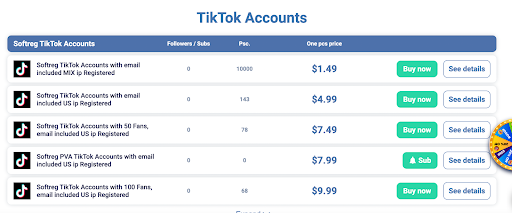
6. Grow and sell TikTok accounts

Organically growing a TikTok account could take months. However, you can buy an established account to get an instant boost of followers.

To successfully make money selling TikTok accounts, creators should focus on niche topics that can be sustained by the buyer. This will make it easier for the buyer to continue posting similar content and maintain follower engagement.

Brands considering buying an established account should perform due diligence. An account with a lot of followers but low engagement may not provide the return you’re looking for. Also, ensure the account serves an audience you target and the content aligns with your brand and goals.

Brands can purchase an account with active followers from platforms like 123accsAccfarm and Fameswap.

A screenshot of account listings on Accfarm

For smaller activations, brands can sponsor posts that live directly on creators’ profiles. Similar to creator collaborations, these campaigns allow brands to pay content creators to promote their products in organic posts. Sponsor single posts or create a series. If it starts trending, you can boost the post to expand its reach even further.

TikTok sponsored post screenshot

8. Create a Patreon account

Patreon account lets creators generate revenue from fans through memberships that allow exclusive access to content. Use TikTok to promote membership sign-ups.

TikTok sponsored post screenshot

Try to keep your subscription costs low to encourage subscribers and consider rewarding new subscribers. For example, giving away merchandise or exclusive content access to your most loyal followers. Add the link to your Patreon page in your videos or add it to your bio to make it easy for followers to subscribe whenever they are ready.

9. Sell your products and merchandise

Merchandise, merchandise, merchandise. This tried-and-true strategy applies to TikTok as well. Turn original artwork, quotes or your brand’s logo into merch and promote it on TikTok. Feature your existing products in tutorials or showcase your product alongside a trend.

TikTok post screenshot loom

Listen to your audience if you are unsure what to sell. Create polls or ask them directly to learn what they might buy.

If you have a personal account, create an ecommerce website to process sales transactions and promote it on your TikTok account. Add the store to your videos, and encourage your followers to check out your products.

If you have a TikTok Business account, you can connect platforms like Shopify, BigCommerce, Square Online and Ecwid store to your account.

10. Set up a TikTok shop

TikTok partnered with Shopify to launch the TikTok Shopping feature. Brands and creators can become official TikTok merchants and sell directly in the app.

A screenshot of the TikTok shopping feature.

By creating a TikTok Shop, you can showcase products on in-feed videos, lives and product showcase tabs. If eligible for this feature, you can signup to become a seller in the TikTok Seller Center, where you can manage inventory, orders, creator partnerships, promotions and more. However, the seller center is only available in select regions.

11. Offer exclusive content on TikTok

TikTok just launched a new monetization feature in June of 2023 called TikTok Series. This new feature is a way to create exclusive content that lives behind a paywall.

Interested creators can apply to get access to this new feature, but there are other criteria they need to meet as well:

  • Creators must be 18+
  • Their account must be at least 30 days old
  • They must have at least 10,000 followers
  • They must have posted 3+ public videos in the last 30 days
  • They must have at least 1,000 views in the last 30 days

Creators who have less than 10,000 followers may still be eligible if they can provide a link to premium content they’ve successfully sold on other platforms.

Your Series can include up to 80 videos total, each up to 20 minutes long. This can be a great way to provide valuable educational content to your audience for a one-time fee. You can set the price for each TikTok Series you create, with payment options ranging from $0.99 to $189.99.

12. Provide virtual gifts

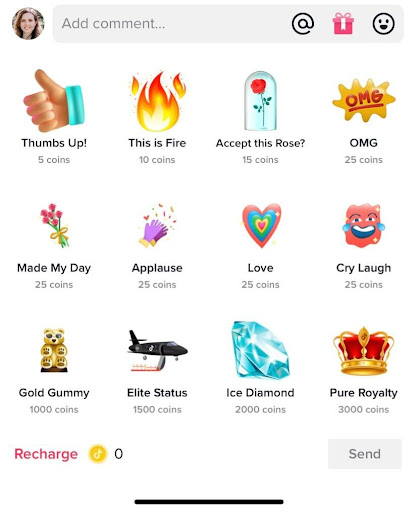
Another monetization feature is virtual gifts on your videos. People who really enjoy your content can send you virtual gifts as a token of their appreciation—which can then be converted into actual money.

Turn on the gift option to have a small gift box icon appear next to the comment box. Users interested in leaving a gift can tap it to visit this interface:

A screenshot of virtual gifts in TikTok

Coin packages can be bought in the following increments:

  • 20 coins: $0.29
  • 65 coins: $0.99
  • 330 coins: $4.99
  • 660 coins: $9.99
  • 1,321 coins: $19.99
  • 3,303 coins: $49.99
  • 6,607 coins: $99.99
  • 16,500 coins: $249.99

These coins can then be used to buy and send virtual gifts to a user’s favorite creators, with gifts ranging from 5 to 3,000 coins. Turn on virtual gifts to offer this option to your viewers.

13. Host live events or workshops

TikTok Live is another great way to make money. Similar to virtual video gifts, users can also send live gifts. The little gift box icon will appear at the bottom of a live video for users to tap and buy different gifts. The ranges on these are even bigger, with some being just a single coin and others going up to 10s of thousands of coins.

A screenshot of live gifts in TikTok

Several TikTok creators have shared how live streaming can be used to make money. One creator makes between $20-$300 every time they go live and another brought in $34,000 within a single month—just from live streaming.

Make sure your live videos are entertaining and valuable so that users keep wanting to tune in. The more consistent viewers you get, the more likely they are to stick around and send you virtual gifts.

14. Offer personalized shoutouts

If you have a large following, TikTokers who want to grow their accounts may be willing to pay for personalized shoutouts. Pick a price point and sell shoutouts as yet another way to make money. Your price may be a bit of trial and error. If you’re getting no bites, you may want to lower it. But on the other hand, if you’re getting a ton of interest, you might be able to increase your price.

You can then shout these people out during a live video or during a feed video. You might even choose to offer two different price points (with feed videos costing more) so that users can choose where they’d like to be shouted out.

15. Sell digital products

Finally, consider selling digital products. You can create a shop with TikTok and link to your digital products from there, making it easy to make a sale. Promote your products within your videos and include your shop’s URL in your profile so users can easily find it.

Learn more about TikTok for business

These strategies can elevate your TikTok game and put you on a clear path to making money on the app. Learn how to get more TikTok followers so you can increase your earning potential even more.

The post How to make money on TikTok: 15 strategies to use in 2025 appeared first on Sprout Social.


from Sprout Social https://ift.tt/cUwCZVE
via IFTTT

Thursday, 26 June 2025

6 effective influencer marketing examples in Australia (& why they work)

Influencer marketing has become one of the most powerful tactics for brands on social media, enabling them to leverage creators’ existing reach and credibility. If your business isn’t already embracing influencer marketing, the social media statistics in Australia may convince you of its power in elevating your strategy.

According to The 2025 Sprout Social Index™ Australia, 91% of Aussie social media users use it to stay abreast of trends and cultural moments. The Index also found that 24% of users plan to increase their social media use in 2025. With nearly a quarter of Aussies planning to ramp up their social presence, brands need to meet users where they are and develop campaigns that resonate—many of which may include influencers.

In this article, you’ll gain the information you need to create a successful influencer marketing campaign in Australia. From the industry’s current landscape to campaign types to real-life influencer marketing examples, we cover it all.

The current landscape of influencer marketing in Australia

Valued at more than AU$21.1 billion, influencer marketing in Australia is transforming not only how people engage but how they spend. Here are a few Aussie influencer marketing statistics showcasing the country’s current state of influencer marketing:

  • Per Sprout’s Q2 2025 Pulse Survey (which assessed consumers in Australia, the UK and the US), 76% of all social users say social media (including influencer posts) has influenced some of their purchases in the last six months.
  • Further, younger generations are the most impacted, with 90% of Gen Z and 84% of Millennials saying some of their purchases within this period were influenced by social.
  • The survey also revealed that 64% of social users are more willing to buy from a brand if it partners with an influencer they like.
  • Similarly, this figure increases among younger users (76% of Gen Z and 74% of Millennials).

Because creators hold such strong influence over consumers, influencer marketing in Australia is rigorously regulated. Three of the most integral regulatory bodies and their roles are outlined below.

Australian Association of National Advertisers (AANA)

The AANA is responsible for developing a strict Code of Ethics that Australian advertisers, including influencers, must follow. It aims to ensure that all advertisements and marketing communications are legal, truthful and respectful of human dignity.

One of the clauses most directly relevant to influencer marketing is clause 2.7, which states that advertising must be distinguishable as such. Put simply, influencers must explicitly disclose their sponsored posts. This is particularly important because paid social content often appears in the same feed as organic social content, making it hard for users to differentiate the two at a glance.

As a result, influencers who accept payment (i.e. money or free products or services) to promote brands must clearly communicate this business relationship to their audience. The most common methods are to include hashtags such as #ad in the caption or use native social toggles like Branded Content, Paid Partnership or Paid Promotion. Per the AANA, hashtags and labels like #sp, #gifted, Affiliate or Collab are often too unclear for audiences to easily determine that the post is an ad.

Australian Competition & Consumer Commission (ACCC)

The primary role of the ACCC is to protect the interests and rights of consumers by ensuring businesses follow fair trading practices. Specifically, it manages violations and verifies that companies abide by the Australian Consumer Law.

One of the ACCC’s key remits is social media. The organisation advises businesses on how to abide by consumer law on social, including how to avoid false or misleading posts. The ACCC can also conduct investigations, as it did in December 2023, into untruthful or misleading content and take compliance or enforcement action if necessary.

Audited Media Association of Australia (AMAA)

In its early days, the AMAA primarily audited traditional media, such as newspapers and magazines, to ensure accuracy and transparency.

In response to the social media boom, the organisation founded the Australian Influencer Marketing Council (AiMCO) in 2019. The council is made up of businesses and individuals involved in the influencer marketing sector. Together, they seek to foster transparency and accountability in the industry through best-practice advocacy, development and education.

One example of AiMCO’s easy-to-understand resources is the cheat sheet below, which guides readers on determining if a post is an ad and must be labelled as such.

An AiMCO infographic that helps people determine if a social media post is an ad and if it must be labelled as such.

Types of influencer marketing campaigns

Influencer marketing campaigns come in various shapes and sizes. It could be a single sponsored TikTok with a nano-influencer or a long-term brand ambassadorship with a mega influencer.

Four types of social media influencers

Regardless of the creator, platform or duration, all campaigns have one thing in common: they leverage the influencer’s credibility, authority and genuine connection with their followers.

Here’s a breakdown of some popular influencer marketing campaign types:

  • Affiliate marketing: When an influencer promotes a brand, product or service and receives a commission for every conversion, that’s considered affiliate marketing. Typically, influencers’ commissions are tracked through discount codes or referral links. If a creator is regularly promoting a business via affiliate marketing, they may be a brand ambassador.
  • Sponsored posts: Content that a business pays an influencer to create and post is considered sponsored. In Australia, sponsorships must be disclosed to foster transparency.
  • Contests and giveaways: In this style of campaign, brands provide free, exclusive or discounted products or services to influencers. The creators then gift these goods or services at random to one or more of their followers. Giveaways and contests often feature entry rules—such as following brand accounts or sharing the post—making them ideal for brands looking to increase their social reach, following or engagement.
  • Product collaborations: A brand may partner with an influencer to create or develop a specific product or collection. Because they have a hand in creating them, the influencer’s promotion of the products feels more authentic. This is particularly important to younger generations as our Q2 2025 Pulse Survey revealed, where 19% of Gen Z users said they’re likely to call out brands for disingenuous influencer campaigns. In contrast, older generations have different priorities. The survey showed 31% of Boomers are likelier to call out brands for failing to respond to customer service questions.
  • In-person events: Live activations (e.g. store openings, brand trips or live panels) offer brands a unique opportunity to engage and create lasting memories with their audience directly—and influencers can play a big role in that. For example, they can create and share content on the go, expanding the event’s reach beyond its in-person attendees. Their attendance and endorsement of an event can also lend credibility to the brand and bolster audience trust.

6 examples of influencer marketing in Australia

Let’s look at a few examples of what influencer marketing in Australia looks like in practice. See how brands in the country are cutting through the noise and partnering with Aussie influencers in memorable and meaningful ways.

1. Tropeaka

While nutrition brand Tropeaka is no stranger to influencer collaborations, it’s just unveiled one of its most exciting yet on Instagram: a beauty matcha powder with Australian creator, Sophia Begg (better known as Sopha Dopha). A prolific lifestyle influencer and matcha enthusiast, Sopha is the perfect representative for the product and opens the door to seamless integrations in her content.

An Instagram post from Sopha Dopha and Tropeaka announcing the launch of a new matcha powder.

Whether she’s travelling the world or vlogging an average day in her life, matcha is a fixture in many of Sopha’s videos, which she shares nearly every day with her 1.4 million TikTok followers and 650K Instagram followers.

The key takeaway: By collaborating with creators who have an established history of loving the product, brands can tap into the authenticity audiences crave.

2. Runaway The Label

Although finding and partnering with the right influencers can be tricky, Runaway The Label—an online women’s fashion brand—has executed it beautifully with this campaign.

With over 17 million Instagram followers and 2.1 million TikTok followers, Tammy Hembrow, a Gold Coast native, promotes her businesses on social, including her fitness app Tammy Fit and luxury athleisure brand Saski.

Both Tammy’s social following and consumer base consist predominantly of young Australian women (Tammy Fit’s user base is 98% young women, while Saski sells women’s clothing exclusively).

By partnering with Tammy, Runaway The Label gained direct access to a highly relevant audience: young, female Aussies who already know, trust and relate to her.

An Instagram post from Tammy Hembrow in collaboration with Runaway The Label. In the caption, she includes her discount code TAMMY20.

The key takeaway: When a creator’s brand, lifestyle and interests directly mirror those of your target market, a sponsored post has the power to feel more like a genuine recommendation rather than an ad.

3. McCain

Founded by two brothers in the 1950s, McCain has long been associated with traditional, comforting and familiar meals. That’s why it was such a pleasant surprise when they partnered with beauty-turned-food influencer, Michael Finch.

Michael is known and beloved among his 2.6 million TikTok followers for his larger-than-life personality, engaging voiceovers and unique (and mouthwatering) recipes.

By teaming up with Michael—whose content is entertaining, lively and distinctly modern—McCain breathed new life into its image.

A TikTok post from Michael Finch in collaboration with McCain Australia & NZ, showcasing a loaded hashbrown recipe.

The key takeaway: Influencers can help modernise a brand’s image and bridge the gap between its legacy and young, digitally native consumers.

4. Carolina Herrera

In honour of Mother’s Day, designer fashion and perfume brand Carolina Herrera partnered with influencer Maria Thattil. Former Miss Universe Australia, Maria’s social content centres largely around fashion and beauty, making her an ideal spokesperson for the brand’s GOOD GIRL perfume.

But this campaign had a special and timely twist. Because it promoted the perfume as a perfect Mother’s Day gift, the video also featured Maria’s mother. In the caption, she listed both her and her mother’s favourite scent notes featured in the perfume.

A TikTok post from Maria Thattil in collaboration with Carolina Herrera promoting GOOD GIRL perfume for Mother’s Day.

The key takeaway: Strategically timing your influencer campaigns to align with seasonal moments—like Mother’s Day—can add to the emotional resonance and relevance of the content.

5. tbh Skincare x Cotton On Body

Two Aussie brands, tbh Skincare and Cotton On Body, recently hosted a joint “staycation” brand trip for several influencers on the East Coast. Set in a picturesque mountainside villa, the event emulated the ultimate girls’ getaway, complete with curated goodie bags, cosy robes and plenty of social-worthy moments.

Between skincare routine videos and candid-moment compilations, the campaign produced content that made the brands’ products feel like everyday wellness essentials.

An Instagram post from Georgia Richards on a brand trip in collaboration with tbh Skincare and Cotton On.

The key takeaway: When done right, branded trips are the perfect blend of promotion and immersion, giving your audience an idea of how your products fit into their real lives.

6. Flight Centre

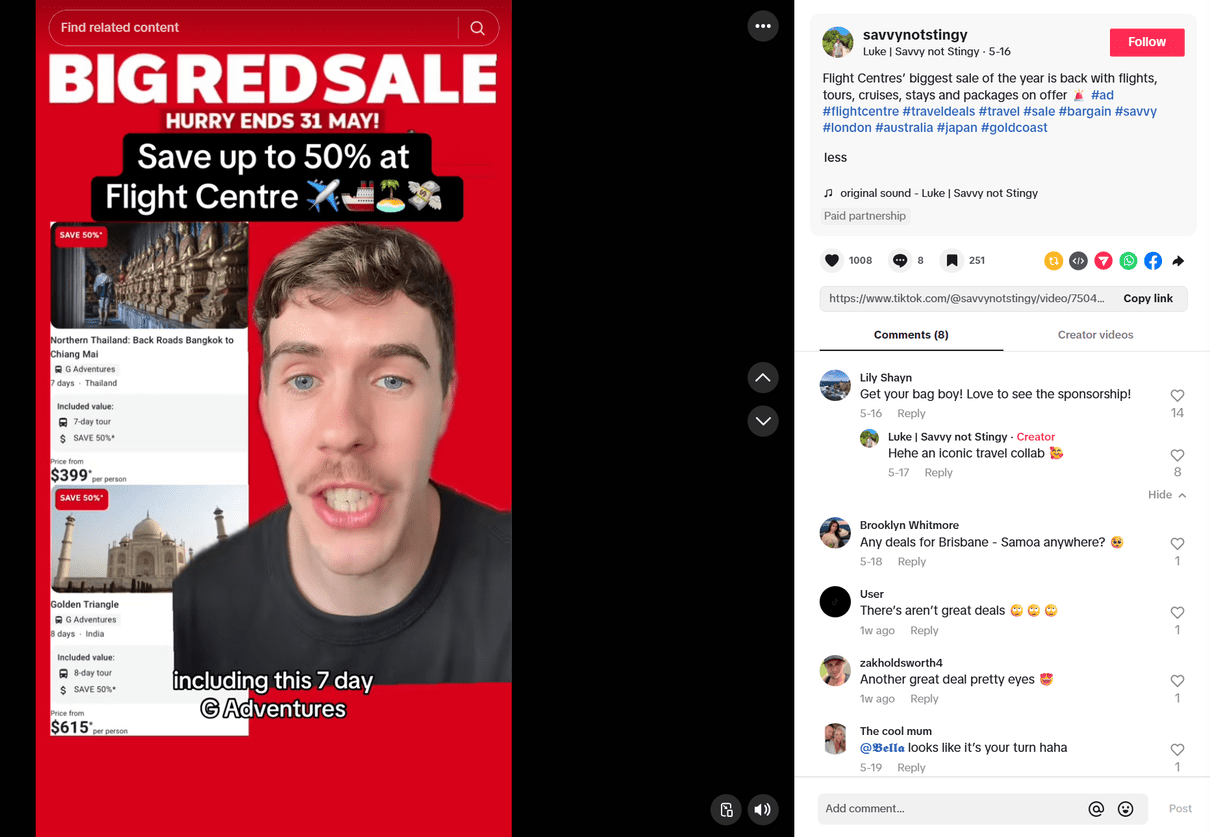
One of Australia’s largest travel agencies, Flight Centre, is committed to making travel more accessible to all Australians. To promote its Big Red Sale—which slashes prices on flights, holiday packages and cruises—the brand partnered with influencer Luke Callaghan, who shares a similar passion.

Callaghan—better known by his handle @savvynotstingy—spotlighted the sale to his 154K TikTok followers. The post aligned seamlessly with Luke’s other content, which centres around money-saving travel tips, including flight deals and point hacks.

Because Flight Centre and Luke both want the same thing for their audiences (i.e. seeing the world for less), the sponsorship felt both natural and authentic.

A TikTok post from @savvynotstingy in collaboration with Flight Centre promoting the brand’s Big Red Sale.

The key takeaway: When brands and creators align in their values, sponsorships feel more genuine, which can help drive meaningful engagement and lasting brand affinity.

Collaborate with influencers to connect with Aussie audiences

By applying the tactics laid out in these influencer marketing examples, you can create campaigns that don’t just reach but truly resonate with Australian social users. When strategically selected, influencers can help you turn passive scrollers into captivated consumers who trust, engage with and buy from your business.

Ready to bring your creative vision to life? Explore the suite of influencer marketing tools you need to get started.

The post 6 effective influencer marketing examples in Australia (& why they work) appeared first on Sprout Social.


from Sprout Social https://ift.tt/yJvBOD6
via IFTTT

Wednesday, 25 June 2025

Instagram advertising guide: How to run successful Instagram ads

With almost every brand turning to Instagram to market their products, you can bet that your competitor is on there too. Hundreds (if not thousands) of other brands are competing for user attention on the platform too, so relying on an organic strategy alone is no longer enough. Instead, you need a hybrid approach with a robust social media advertising strategy to back up your organic efforts.

Instagram advertising boosts your brand visibility to help you reach the right target audience. And with better visibility comes a better chance of driving sales, especially with the platform’s shopping features. In fact, the 2025 Sprout Social Index™ found that 29% of consumers make purchases directly on Instagram.

With that said, let’s find out how to do Instagram ads the right way.

What is Instagram advertising?

Instagram advertising involves the use of paid content to reach your target audience on the platform. These ads may show up as sponsored Stories, Reels or in-feed posts to targeted users. Users will see relevant Instagram ads based on demographic data or browsing history.

Businesses can create and manage their Instagram ad campaigns from the Meta Ads Manager. This campaign will be the overarching strategy with a well-defined goal, such as brand awareness or app installs. Each campaign may consist of ad sets that define the audience and delivery settings. Additionally, each ad set will have individual ad elements, such as visuals and captions, known as the ad creative.

Why you should advertise on Instagram

Organic social media strategies might seem cost-effective at first, but they rely on a lot of trial and error. And they can only get you so far when you’re up against ever-changing social media algorithms.

This is why it’s so important to focus on a social media strategy that incorporates both organic and paid tactics. This way, you get the best of both worlds. You’re actively engaging with your audience through your Instagram posts. Meanwhile, you’re reaching out to an even larger audience that might not know about your brand through Instagram ads.

This is good news because social media is where a lot of buying decisions happen. The Q2 2025 Sprout Pulse Survey found that social media has influenced purchases for 76% of all users. This “influence” comes from paid ads, influencer posts and brand content.

And it’s even more pronounced among younger generations. The figure rises to 90% for Gen Z and 84% for Millennials.

Donut chart showing a percentage of users who say social media has impacted their purchases over the past 6 months

As a visual medium, Instagram ads give you a great way to show off your product. And with Instagram shopping, you can make it easier than ever for Instagram users to convert to customers.

On top of this, Instagram continues to see higher engagement than most social platforms. The 2025 Content Benchmarks Report found that brands see the highest average daily engagement on Instagram. Ads let you tap into this engaging power, helping you drive targeted engagement through strategic paid content.

How much does Instagram advertising cost?

The cost to advertise on Instagram depends on several factors like devices, demographics and day of the week. Other factors like whether your ad is running during a major televised event, will also influence cost.

Here are some of the key factors that will influence the cost of Instagram advertising:

  • Bidding strategy: Your ad costs will vary depending on your bidding strategy. For example, the cost of each click (CPC) will be very different from the cost of every thousand impressions (CPM). Similarly, the costs will vary if you choose to pay for each acquisition/action (CPA).
  • Audience targeting: Targeting a niche audience may result in lower costs compared to broad audience targeting. This is because your ads only show up for people who are highly likely to take action.
  • Ad quality and relevance score: You can see lower ad costs with a higher ad quality and relevance score. Meta determines ad quality and relevance based on your audience targeting, offer and ad creative.
  • Seasonality and competition: You’re likely to experience higher ad costs during seasons with higher competition. In particular, peak shopping seasons attract higher Instagram ad costs.
  • Ad placement: Instagram typically charges based on impressions for Story ads. Meanwhile, in-feed posts may incur charges based on clicks or impressions. So your total advertising cost will vary based on placement.

On average, a CPC model typically costs between $0.01 and $0.25. With a CPM model, the costs can vary from $0.01 to $4.00. But keep in mind that these are only estimates, and your actual spending will depend largely on the factors highlighted above.

To make the most of your marketing budget, dedicate money to ads and campaigns only if they’ll help your bottom line.

Put money behind posts and content that you already know perform well organically. Test everything to see what performs best and dedicate most of your ad spend to that. Make sure to measure your ad success and take note of anything that didn’t do as well as you’d hoped.

How to create Instagram ads in Meta Ads Manager

To create ads for Instagram within the Meta Ads Manager, log in to your Facebook Page. Then go to your Ads Manager account and click on the “Create” button to build a new campaign.

Meta Ads Manager dashboard with arrow pointing to the "Create" button

Step 1. Choose your ad objective

Start by choosing a relevant ad objective that’s relevant to your business goals. Meta gives you six options: awareness, traffic, engagement, leads, app promotion and sales. Make sure to choose an objective that supports Instagram as an ad placement.

As you hover over each objective, the right-hand panel shows you a preview of what it’s good for. Meta recommends choosing traffic, engagement, leads or sales for Instagram ads. For this example, we’ll choose the traffic objective.

Meta Ads Manager window showing an option to select a campaign objective

Step 2. Name your Instagram ad campaign

After selecting your ad objective, give your campaign a name. This is the best way to keep track of your ads within the Ads Manager.

You’ll then select any special categories that apply and specify campaign details.

You can also toggle on the “A/B test” button to automate a split test for different ad variations. This is also the stage where you decide whether to optimize your budget across ad sets. Select Advantage Campaign Budget to automatically distribute your ad budget across your ad sets. Or you can manually allocate spending for each ad set.

Meta Ads Manager window showing a section to add a campaign name and choose special ad categories

Step 3. Decide on your ad format

Before we dive deeper into the next steps, make sure you have a clear idea of which ad format you want to use.

The Ads Manager will give you the option to upload your creatives later on in the process. But deciding on your ad format early on will give you more clarity on how to serve your ads. For instance, if you decide to create Story ads, you could opt to exclude Explore and Feed placements.

You get to choose from three main ad formats:

  • In-feed ads: These are ads that show up as sponsored content within a user’s regular Feed. They may include single image ads, carousel ads and even videos.
    example of an in-feed ad from woodokidz promoting a wooden playset and a "Shop Now" button
  • Story ads: These are ads that show up as sponsored content while a user browses through their Stories Feed. They can be in the form of still images, videos or multi-product listings.
    A Stories ad showing six different curtain options and a "Shop Now" button below
  • Reel ads: These are ads that show up as sponsored Reels while users browse through organic Reels content.
    A Reels ad showing a picture of a Labrador Retriever lying down and another panel above the screen showing text that reads "I tried researching for many hacks online, but nothing worked"

Step 4. Design your ad creative

Once you’ve decided on an ad format, it’s time to prepare your ad creatives. Having your ad creatives ready early on will help you speed up the campaign creation process. So you don’t have to scramble to write an engaging caption or create a new video in the middle of building a campaign.

  • For in-feed ads, use visuals that instantly catch the eye. Include text overlay that highlights attractive offers or key product benefits. Write short but engaging captions that align with the offer and add a sprinkle of emojis to break up text blocks.
  • Story ads are great for retargeting existing customers or users who have previously interacted with your brand. Share a curated selection of products based on the user’s browsing history or buying behavior. Or use attractive visuals with compelling text overlay that can get users to take a pause.
  • For Reels ads, make sure to use videos that blend in seamlessly with organic Reels content. Use trending music to instantly engage viewers. Additionally, clear in-video captions are great for engaging viewers who watch with the sound off.

This is also a good time to give our Instagram ad sizing guide a second look to ensure you’re uploading the correctly sized ad assets.

Step 5. Choose your conversion location

Meta now requires advertisers to choose a conversion location for most ad objectives. This is the place where your desired business outcome will take place. For instance, traffic ads will give you the option to send traffic to your website, get people to call your business, etc.

Let’s choose to send traffic to your Instagram profile for this example.

Meta Ads Manager window showing an option to select conversion location

You’ll also get the option to choose your Identity, where you decide which Facebook Page will run the ad. The Destination section lets you choose where to send people when they tap on your ad. For this example, let’s focus on Instagram profile visits only.

Meta Ads Manager window showing an option to choose Identity and Destination

Step 6. Define your ad budget and schedule

When you advertise on Instagram, you have full control over when you’ll run ads and how much you’ll spend on them.

First, choose between a daily budget and a lifetime budget. Daily budgets allow for your ads to run indefinitely while spending up to your allotted amount each day (you can still set start and end dates). Ads with lifetime budgets will run for a set amount of time.

If you choose a lifetime budget, you can also select a specific schedule for your ads. Perhaps you want them to appear only on weekdays or weekends. Manually choose the days and times your ads will appear for your target audience to get the most out of your ad spend.

Meta Ads Manager window showing an option to set budget and schedule for the campaign

Step 7. Target your audience

And now, we get to the good part! Targeting your audience is how you’ll optimize your Instagram advertising strategy.

You don’t want to waste money by trying to target anyone and everyone. This is your opportunity to really nail down the demographics, interests and behavior of your brand’s target audience.

There are three types of audiences you can potentially advertise to:

  • Core audiences: These are audiences targeted based on demographics, interests and behaviors. For instance, you can target people aged between 18 and 25 interested in art and living in a specific area.
  • Custom audiences: You can target a Custom Audience including website visitors, customer lists or app users. This is a great way to retarget users who are already familiar with your brand. So you can save on ad costs by focusing your ad spend on users who are likely to buy from you again.
  • Lookalike audiences: Meta also lets you create a Lookalike Audience consisting of new users who are similar to your most valuable audiences. This involves defining a lookalike source, such as an existing Custom Audience. You can further customize this audience by location and size.
Meta Ads Manager window showing an option to customize audience targeting

Step 8. Choose your ad placements

This is where you’ll decide where to display your ad. Meta recommends using Advantage+ placements where the platform decides the best placement for you. It will determine where your ads are likely to perform best. Based on this, it will automatically distribute your ad set budget between different placements.

This is a great option if you’re new to Instagram advertising or if you don’t have a specific placement in mind.

Otherwise, choose the Manual placements option to customize it to your unique preferences. This lets you exclude specific placements, such as Stories, Explore, Reels, search results and so on.

Meta Ads Manager window showing an option to choose ad placements

How to boost an Instagram post

Boosting an existing post is the easiest way to advertise on Instagram. Here’s what you need to do:

Step 1. Choose an existing post to boost

Start by deciding on the content you want to boost. Instagram lets you create ads from existing Reels, Stories and Feed posts.

We recommend going through individual post insights to see which ones drive the most engagement. This indicates that the post resonates with your audience. So they’re more likely to perform well even as sponsored content.

Once you’ve decided on the post, tap on Boost post.

Instagram post with an arrow pointing to the "boost post" button at the bottom

Step 2. Select your goal

What’s the purpose of boosting your post? Do you want more people to visit your profile, message you or visit your website? Choose the goal that best fits your business objectives. You can even choose between a mix of actions to boost overall performance.

Instagram boost post window showing the option to select a goal for the ad

Step 3. Define your audience

Who should see your ad? Instagram gives you the option to target users similar to your existing followers. You can also manually enter your own targeting options if you want to reach a different audience.

Instagram boost post window showing the option to select an audience

Step 4. Set a budget and an ad timeline

How much do you want to spend on your ad? Set a budget to limit your daily ad spend and avoid overspending. Additionally, set a duration for your ad so it will automatically stop showing up once the campaign ends.

Instagram boost post window showing the option to select budget and timeline

Step 5. Launch your ad and track metrics

You can then preview your ad and add funds to start boosting your post.

Once the boosted post is live, keep a close eye on its performance. Are you reaching enough people? Is it driving engagement and actions? These metrics will help you understand if the ad is working. Then use those insights to inform your future ads.

Best practices for successful Instagram ad campaigns

If the 2025 Content Benchmarks Report revealed anything, it’s that posting a lot isn’t going to cut it. Audiences value authenticity and originality when interacting with brands on social media. So every post and every ad campaign needs to be more purposeful to build meaningful connections.

With this considered, here are some best practices to help you create successful ad campaigns on Instagram.

Use compelling visuals and copy

Targeting may get your brand in front of the right people. But it’s the content that will capture their attention and get them to act. So everything from your visuals to your copy should captivate your audience.

Think: high-resolution images or entertaining Reels with clear captions that show exactly what’s in it for them. Here are a few tips to create impactful ad creatives:

  • Highlight offers and benefits immediately within the visual instead of burying them in the caption. Use text overlays or in-video captions for this.
  • Focus on benefits instead of features. Help the audience understand what they get out of the deal.
  • Lean into original and entertaining content to humanize your brand. The 2025 Sprout Social Index™ found that this should be one of the top priorities for marketers.
  • Use clear and concise copy to get your point across. Avoid sacrificing clarity for clever copy.

The following ad from Two Brothers Organic Farms applies these best practices.

Instagram ad showing two different jars of ghee with a comparison explaining why their A2 ghee costs more

A/B test ad elements and placements

More often than not, your ads won’t work out the first time around. Successful Instagram advertising needs a lot of testing and refining. From ad placements to ad creative, you can only know what resonates with your audience once you see how they respond to the ad.

Make sure to turn on the A/B test option during your ad set up. Or you can run a separate test to see how different ad elements generate reactions from your audience.

Consider seasonalities and trends

Imagine seeing an ad for Christmas-themed products in the middle of June. Odds are that the ad will unlikely get any clicks because it’s just not the season.

Be strategic with your ads that you’re offering the right products at the right time. Similarly, make sure to time relevant seasonal offers for peak buying seasons. For instance, back-to-school discounts, Mother’s Day gift packages and so on.

Beyond this, pay close attention to the trends shaping online culture so you can adapt your ad strategy accordingly. Build offers based on trending topics or write copy using language that resonates with younger audiences.

At the same time, avoid relying too heavily on the latest trends. According to the 2025 Content Benchmarks Report, following every trend isn’t what makes a brand memorable. In fact, it could have the opposite effect, with 33% of consumers in the 2025 Sprout Social Index™ finding it “embarrassing.”

Design for sound-off viewing

When it comes to Reels ads or any video-based ad, sound may be instrumental in getting your message across. Yet many people prefer to watch Reels with the sound off. A ChatterBlast study even found that over 68% of people preferred sound off for engagement videos. For conversion videos, the figure jumps to over 77%.

4 different pie charts showing the distribution of people who prefer sound on vs sound off based on various ad goals

So if you’re relying on sound alone to share your message, you could be missing out on potential engagements and conversions. Not to mention the missed opportunity to create more accessible, more inclusive ads. Design your video ads for sound-off viewing and use closed captions or subtitles to engage a more diverse audience.

Visualize your Instagram ad performance with Sprout

You’ve created your ad, but it’s essential to check up on performance. When you have a good understanding of your ad performance, you get an accurate idea of its ROI. This informs your strategy and helps you optimize your Instagram advertising efforts in the long run.

Social media management solutions like Sprout Social streamline the process of managing and tracking your Instagram ads. You can run promotions on your Instagram ad account directly through Sprout without having to switch platforms. This enables you effortlessly maximize your content’s reach and manage your organic strategy in one place.

Sprout also provides tools for boosting posts from the Post Performance Report. You get to see your top-performing posts and instantly boost them within the same dashboard. Additionally, you can easily keep track of ad comments in the Smart Inbox. This helps you monitor conversations around your ad and respond as needed.

Once your ads go live, keep track of their performance using the Paid Performance Report for Instagram. This shows you the metrics that matter most, such as engagements, impressions, clicks and more.

Sprout Social Facebook and Instagram Paid Performance Report highlighting some key ad metrics

Start your free Sprout trial

Advertise on Instagram today

Instagram advertising is the easiest way to cut through the noise and get your brand in front of the right audience. When you’re ready to start creating your first Instagram ad, you need the right tools to manage your campaigns and track performance.

That’s where Sprout comes in, offering robust tools to create your Instagram ads and manage their performance. Sign up for a free 30-day trial and see what you can do.

The post Instagram advertising guide: How to run successful Instagram ads appeared first on Sprout Social.


from Sprout Social https://ift.tt/GiJgQ1u
via IFTTT

Tuesday, 24 June 2025

How to use social media memes in your marketing strategy to drive engagement

Memes have evolved from internet jokes into a powerful form of cultural currency. For brands, memes are no longer fringe content. Instead, they’ve evolved into strategic assets that tap into social media culture and signal a brand’s awareness and adaptability to meet their audience where they are.

Tapping into meme culture isn’t just about being funny, though—it’s more about participating in a digital dialogue that feels organic, timely and quintessentially human. When done well, memes become a shorthand for brand identity. And this enables marketers to embed themselves into cultural moments that can accelerate their brand’s performance through relatability.

In this article, we deep dive into why memes matter in social media marketing and how brands can use them to boost engagement.

How to use memes on social media

Memes have become a powerful tool to engage audiences with humor and cultural relevance. They can boost shareability, humanize a brand and drive organic reach across social platforms. But how does a brand ensure that it’s doing it right?

We spoke with internet culture researcher Aidan Walker on the topic. Especially given that Walker wrote his thesis on the Distracted Boyfriend meme in 2017 and lectures at institutions like Princeton and the University of Amsterdam on meme history and network culture, and how they intertwine with social marketing and strategy.

According to Walker, when using memes in their social media strategy, brands need to remember that memes are not really about the brand—they’re about the audience. And this means a change in mindset when creating content based on memes.

“Memes can really help a brand, but they are fundamentally not about you,” he says. “They are valuable because they connect you with an organic community and its creativity. You should see it not as “messaging” but rather as an invitation to play,” he explains.

With this audience-centric approach as the north star, here are some examples that show you how to use memes on social media.

Image memes

These are classic memes. They have bold texts in an image and can be on a variety of topics. They’re one of the most commonly used memes, owing to their versatility, which makes them applicable to any industry or scenario. Here’s a Distracted Boyfriend meme about the rivalry between competing companies, Nikon and Canon.

Distracted boyfriend meme about competing companies Nikon and Canon.

Video or GIF memes

These memes are created with short clips with overlaid captions or reactions. They’re very popular on TikTok and Instagram. Here’s one of ours promoting the Sprout Social Influencer Marketing platform.


A Video Sprout meme featuring The Weekend on our Instagram account.

Relatable screenshots

These could be X posts, texts or comment threads that you can use in your social posts while being loyal to your brand voice and audience. As the example below shows, RyanAir does it well.

A relatable screenshot meme from RyanAir on their Instagram account.

Reaction memes

These are memes that express emotions or responses and need cleverly crafted text to be funny and relatable. Here’s an example of a meme we posted that any employee can relate to.

A reaction meme Sprout posted on its Instagram account on how it feels to present an idea in front of leadership.

Expectations vs. reality memes

These memes are a humorous contrast that can tie into a brand’s product messaging. For example, this meme speaks to all organizations trying to keep up with data security compliance.

An expectation vs reality meme related to data security.

Branded memes

These are custom memes made in a brand’s tone, often using any format that’s trending. These are often used by content creators.

A branded meme about Sephora posted by a content creator.


Funny social media memes driving conversations

Funny social media memes spark conversations by turning everyday moments into relatable humor that compels people to share them with others. Their quick wit and cultural relevance make them great for engagement and brand visibility, and a fun way to share valuable brand information.

As Walker puts it, “Social media memes are a conversation with the internet, not a monologue. When done correctly, it both allows you to reach your audiences and can be a valuable source of data about what they want, who they are and how you can help them.”

One brand doing great work on its social media marketing meme strategy is NutterButter. “Nutter Butter’s recent campaign was brilliant, in part because it was so participatory: it created a mystery and incorporated many user-generated jokes,” he notes.

And he’s not wrong. Their posts have become so widely popular, they regularly drive more than half a million engagements and have gotten Sour Patch Kids to stop by.

An Instgram post from Nutter Butter featuring a meme.

Sour Patch Kids

There’s a child in all of us. And no other brand brings out the kid in an adult like Sour Patch Kids has done with its social media meme strategy. Its latest post, shown below, drove 3.5 million views and hosted conversations where adults felt compelled to comment, driven by a sense of genuine, shared connection to the brand.

An instagram post from Sour Patch Kids featuring a meme.

Steak-umm

Processed meats company, Steak-Umm is “the OG when it comes to using social media memes in its brand strategy”, Walker said. One only has to crawl through their X account to see the fun the company has with its account and the high engagement it invites from audiences.

An X post by meat company Steakumm featuring a meme.

Steak-Umm has found the secret to using memes even when not using them in posts directly. For example, in the post below, the brand encourages creating communities beyond social media and asks followers to print a meme and share a Steak-umm product with their neighbors.

An X post from Steakumm encouraging followers to create communities beyond social media.

Nuuly

Nuuly does a great job of incorporating social media memes into its brand strategy, mixed with a blend of adorable self-deprecating humor and social media culture. It’s post, shown in Sprout’s Social Moment of the Week below, won more than 10 million views, reflecting how much it resonated not only with its audience but also with the social media marketing community.

An Instagram post by Sprout on its Social Moment of the Week featuring a meme on Nuuly.

Wendy’s

Wendy’s has always been great at driving social media engagement. Here’s a social post from Wendy’s Watch Fresh Filter campaign promoting its Chrome extension to freeze videos.

An instagram post from Wendy featuring a meme to promote their Freeze your meeting not your burger campaign.

How Sprout uses social media manager memes for connection

B2B doesn’t have to be boring. And certainly not, when you’re talking to a community of social media professionals, creators and marketers.

Social media intelligence manager at Sprout, Olivia Jepson, says, “Using memes in your B2B social strategy isn’t about trendjacking. To be effective, you need to know your audience on a deeper level. You need to understand their aspirations, frustrations and interests. It also means being in tune with the internet culture and pop culture that they care about. When you can align your content with their world, your memes won’t just grab their attention, they’ll drive connection.”

To this effect, Sprout’s social team often uses memes that tap into the day-to-day realities of social media managers and social teams while remaining true to Sprout’s brand voice. The key is relatability, industry in-jokes and validation. Here are a few examples of topics our social team taps into with memes.

Social media ROI

Social ROI is a hot topic for all social marketers, especially with the growing pressure to justify budgets, headcount and strategy. So when Sprout released its 2025 Total Economic Impact™ of Sprout Social study and we wanted to promote a webinar dedicated to the key points, our social team came up with a social media marketing meme that immediately resonated with our audience.

A Linkedin post by Sprout featuring a meme to promote the 2025 Total Economic Impact™ of Sprout Social study.

Emerging social search

Reddit has emerged as a platform that serves as a cultural pulse point and alternative to traditional search engines saturated with promotional content. We wanted to draw attention to how, for brands, Reddit trends are a window into raw consumer sentiment and evolving cultural conversations. What better way to use a cat meme than this?

A social post from Sprout featuring a meme to promote Reddit listening using Sprout Social.

Social customer care

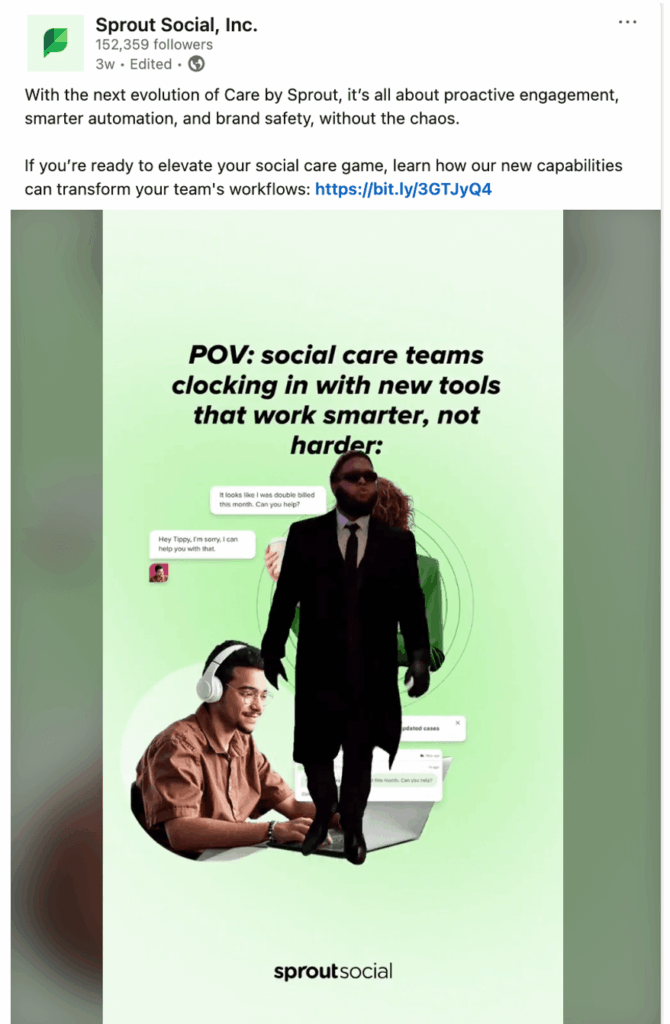
It’s no secret that social customer care teams everywhere could do with some help. So when we wanted to talk about Social Customer Care by Sprout Social, we wanted to drive home the point that our platform was meant to help teams work smarter, not harder. With a centralized social inbox that removes the need to switch between social accounts, and a more streamlined way to monitor and respond to customer inquiries, plus analytics, social customer care just got way cooler.

Sprout's Linkedin post featuring a video meme to promote how Social Customer Care by Sprout Social helps marketers work smarter.

How memes can increase social media engagement

Memes can be funny, cool or nonchalant. The common theme, though, is that the most impactful social media memes hinge on insider knowledge or community-specific jokes. For instance, if you’re not working in social media, a meme like the one below, might not land the same way.

A social media meme showing people hugging each other in joy. The caption says social media managers when someone comments in their post.

That’s why memes are such a fantastic tool for social media marketers. With the right format and punchline, you can generate more brand awareness about your product or service and boost organic social engagement with your audience.

Here are some tips on how to ensure your memes increase your social media engagement.

Connect emotionally with your audience

When memes reflect lived experiences or inside jokes, they resonate more deeply and invite engagement. That’s why understanding your audience’s tone, references and sense of humor helps you create more authentic content.

According to Walker, “If you see what you’re doing as “marketing” you’re viewing it too narrowly. Your posting itself is a product, and it will affect how people feel and think—so help them feel good and think interesting, useful thoughts.”

Knowing your audience’s demographics, buying habits and social media usage is all good. However, it’s equally important to know their subcultures, language and commonalities to make your content relatable.

Stay true to your brand

Shakepear’s famous line in Hamlet, “To thine own self be true”, very much applies to brands as well—especially in a digital world where your brand voice can get muffled in social media noise. Despite the compulsion to join every social trend and the fear of missing out, remind yourself to remain true to your brand voice and personality. According to data from The 2025 Sprout Social Index ™, 33% of consumers find it embarrassing when a brand jumps on every social trend. So, pick memes that truly resonate with your brand and your audience, and learn from how your audience reacts.

Encourage sharing

Use memes that invite tagging, resharing or comments to increase engagement and reach organically. Walker explains why.

“The internet is not another content channel or line-item for an ad buy, the way radio, TV, or print might be. That’s because online audiences are not really “audiences” in the same sense: they are participants and producers. Brands that see social media primarily as a chance to expose people to their product by making a really smart, funny or wonderful piece of content are doing it wrong. It’s about inviting others to play with you and make content with you,” he says.

Target niche communities

Aim for a smaller, more potent audience. Like niche marketing, niche meme formats enable you to connect with specific subcultures or interest groups in a meaningful way. When a brand taps into a niche community’s unique humor or shared experiences, it shows they truly understand their audience. This relevance fosters deeper engagement and encourages sharing within those tight-knit circles.

Evolve your social media hiring

This one’s an outlier. But it’s important advice for brands. You need to evolve your social media team hiring strategy to for maximum impact.

Between keeping up with algorithm changes in social networks and the next emerging social trend, social media professionals have demanding roles. Luckily, according to The 2025 Sprout Social Index™, nearly 86% of marketing leaders plan to hire for at least two new social roles this year. If you’re one of those planning new hires, be mindful that they’re not going to be a jack of all trades.

“If I were a brand, I’d focus on recruiting people with great taste to run my socials, inviting in the best meme-makers, communities and artists online, and letting them lead. Now is the time to be ambitious,” Walker advises.

In short, hire creative people who love all things social media, and ensure you’re providing them with the best social media management tools to work with.

How to incorporate memes into your social media strategy

In a crowded feed, memes offer a shortcut to attention and connection, and a funny respite. However, as every social media marketer knows, there’s a lot of serious work that goes into not just ideating and creating the meme, but also getting it approved and published.

Here are some ways to streamline the process.

Step 1: Choose a visual editor

Some trending social media meme formats will require some light graphic design efforts. For example, this meme from SparkNotes doesn’t mean much without a few text additions. Similarly, you can use other free image meme generators to create memes from any image or graphic.

SparkNotes social post featuring a meme

If you want to jump on a timely social media moment, having a preferred graphic design tool at the ready can streamline your creation process. You don’t need anything fancy—a tool that supports on-brand fonts, colors and social media image sizes will do just fine.

Here are some options to consider:

  • Instagram Stories editor: If a lo-fi approach is aligned with your brand, then this is a great option. Upload the photo into your Story, select the “add text” icon and write your text. Modify or place the text where you want it to be, and you’re done. Your meme is ready to share on your brand account’s Instagram Story.
  • Canva: For a bit more refined approach, you can try tools like Canva. Use the Canva tool to create more complex memes as well as meme templates that work on all your preferred social media channels.
  • Adobe Photoshop: If your brand voice calls for a more sophisticated design, Adobe photoshop can be your choice. Use any image you like to create your memes. However, ensure they are all meme-centered social posts are consistent with each other.

Pro tip: Social media memes don’t have to be perfect and polished. Keep it scrappy and focus on the content of the visual.

Step 2: Simplify your approval process

Who on your team needs to be notified before you post a social media meme? Depending on your social media governance policy, it might be quite a few.

To simplify the process, outline who needs to be looped in on timely posts, what their role is in the approval process and how quickly you expect their feedback. Handling this ahead of time can prevent approval purgatory from making you miss a timely meme opportunity.

Pro tip: If you’re using Sprout, ditch the lengthy email back and forth and use the Message Approval Workflow instead.

A screenshot of Sprout's Message Approval Workflow featuring a Tweet in need of final sign off.

Sprout’s Message Approval Workflows help you collaborate effectively by creating multiple-step and multiple-user workflows. This makes submitting, reviewing and approving or rejecting outgoing messages easy. Plus, it ensures your content is devoid of grammatical errors or off-brand messaging.

All you have to do is submit your outgoing post to the appropriate approvers in Compose. Sprout will automatically send a notification letting message approvers know that a post needs their attention. From there, they can approve or reject the message. They can also request changes using Internal Comments.

Start a Free Trial

Step 3: Use social listening

You’re scrolling through Instagram and suddenly it’s happening. A new meme format is gaining traction on niche accounts. You know it’s going to be everywhere by the end of the day. That’s when it’s time to ask the big question: To post or not to post?

When facing this conundrum, quick research using social listening can do wonders. Social listening can help you spot which memes are trending within your target audience and relevant communities. By analyzing real-time conversations and their sentiment, you can identify memes and meme formats that resonate—and use them to not only join the dialogue authentically but also create memes for your brand strategy.

A screenshot of the sentiment analysis feature available in Sprout's Social Listening tool.

Step 4: Review your results

As you experiment with new formats and punchlines, take note of which messages drive the most engagement. This will help you fine-tune your trendspotting skills over time. Eventually, you’ll be able to spot an audience-approved meme format before it has its own Know Your Meme page.

If you want to take the manual effort out of your meme performance analysis, use Sprout Social to create an Outbound Message Tag for posts that mention timely trends and memes. Over time, you’ll be able to grab insights on which formats, channels and themes work best with your audience.

A screenshot of Sprout Social's Cross Channel Tag Performance Report.

Don’t be discouraged if you don’t immediately see the kind of engagement you were expecting. Mastering memes is an art so don’t be afraid to experiment. As Walker puts it. “See yourself as a patron of the arts: you’re the Michelangelos and Donatellos of meme-making.”

By observing what works and what doesn’t, over time, you’ll soon find the sweet spot.

Strengthen your social media meme strategy

Listen closely to your audience and stay true to your brand voice, and you can turn social media memes into a dynamic tool for your brand’s cultural relevance and tangible social media performance. This is more relevant today as the social landscape is being upended with new platforms emerging seemingly every day.

Explore the emerging social media landscape, see how other brands chart new paths and take your social strategy to the next level.


The post How to use social media memes in your marketing strategy to drive engagement appeared first on Sprout Social.


from Sprout Social https://ift.tt/OHih3os
via IFTTT