Tuesday, 30 September 2025

Best Email Software for Ecommerce Businesses in 2026

Best Email Software for Ecommerce Businesses

Your online store is bleeding revenue every single day. While you're manually sending promotional emails, competitors are running automated cart abandonment sequences recovering thousands in lost sales.

80% of retail professionals say email marketing is their most significant customer retention driver, and it costs 5 times more to attract new customers than to keep existing ones. But you need the right software built specifically for ecommerce—with cart abandonment workflows, product recommendations, revenue tracking, and seamless store integration.

How to Select the Best Email Software for Your Ecommerce Business

Choosing email software isn't about finding the tool with the most features—it's about finding the one that makes it ridiculously easy to drive sales from your email list.

Ecommerce automation capabilities come first. Your platform needs pre-built workflows for cart abandonment, welcome series, post-purchase follow-ups, and customer win-back campaigns. If setting these up requires a computer science degree, you've picked the wrong platform.

Look for direct integrations with major ecommerce platforms—Shopify, WooCommerce, BigCommerce, Etsy, and others. These integrations should sync your product catalog, customer data, and purchase history automatically. Manual data entry is a waste of your time.

Revenue tracking is essential. You need to see exactly how much money each email campaign generates, not just vanity metrics like open rates. 

Here are the non-negotiable features for ecommerce email software:

  • Product recommendation tools that automatically suggest items based on browsing or purchase behavior
  • Behavioral segmentation so you can send different messages to first-time buyers, repeat customers, and high-value shoppers
  • Mobile-responsive design since most customers shop on phones
  • A/B testing capabilities to optimize subject lines, send times, and content
  • List management tools that keep your audience organized with tags and segments
  • Reliable deliverability because emails stuck in spam folders don't make you money

Pricing matters, but don't let it be your only consideration. A platform that costs $20 more per month but recovers $2,000 in abandoned carts is obviously the better deal. Focus on ROI, not just monthly fees.

Finally, consider your technical comfort level. Some platforms offer incredible power but require serious learning time. Others sacrifice advanced features for simplicity. Pick the balance that fits your business—you can always upgrade later as you grow.

10 Best Email Software for Ecommerce Businesses

1. AWeber - Best Overall for Growing Ecommerce Stores

Summary: AWeber delivers the perfect balance of power and usability for ecommerce businesses that want sophisticated automation without the complexity. We built our platform specifically to help online stores drive revenue through email marketing, with features designed around real ecommerce needs—not enterprise requirements you'll never use.

Our drag-and-drop builders make campaign creation fast, while our visual automation workflows handle the complex customer journeys that turn first-time visitors into repeat buyers. The integrated payment processing and product pages mean you can sell directly through our platform without juggling multiple tools.

What sets us apart is our commitment to actual human support. When you hit a roadblock at 11 PM while setting up your holiday campaign, you get help from real email marketing specialists who know ecommerce—not chatbots or outsourced support reading from scripts.

Best Features:

  • Ecommerce page builder with direct PayPal payment processing and low 0.6% transaction fees for selling products and services
  • Pre-built cart abandonment campaigns ready to customize and launch in minutes with proven templates
  • AI Writing Assistant generates compelling email content in under 15 seconds, eliminating writer's block completely
  • Built-in Canva integration for creating professional graphics without a separate design subscription
  • Visual automation workflows with branching paths for personalized customer journeys and safe publishing for live campaign updates
  • Tag-based segmentation that automatically organizes subscribers by behavior, interests, and purchase history
  • 24/7 human support from email marketing specialists, available every single day
  • Mobile-responsive templates with automatic optimization across all devices and real-time preview
  • Revenue tracking that shows exactly how much each campaign and automation generates
  • Seamless ecommerce integrations with Shopify, Etsy, WooCommerce, and major platforms

Pricing:

  • Lite Plan: $15/month with 1 email list, 3 landing pages, 3 automations, 3 users, and 1 custom segment
  • Plus Plan: $30/month with unlimited email lists, landing pages, automations, custom segments, and users plus priority support
  • Done For You Service: One-time $79 to build a complete email system + $30/month. Complete setup by AWeber team in 7 days with 30 days of unlimited edits (includes all Plus features)

Start increasing your sales with AWeber today.

2. Klaviyo - Best for Advanced Data Analytics

Summary: Klaviyo built its entire platform around ecommerce, making it a powerhouse for stores that want deep customer insights and predictive analytics. The platform excels at using data to drive personalization—predicting customer lifetime value, forecasting next purchase dates, and automatically identifying at-risk customers before they churn.

The recommendation engine uses sophisticated algorithms to show each customer the products they're most likely to buy based on browsing patterns, purchase history, and behavior of similar shoppers. For data-driven store owners who want to squeeze every possible dollar from their email list, Klaviyo delivers impressive results.

Best Features:

  • Predictive analytics that forecast customer lifetime value, churn risk, and next purchase timing
  • Dynamic product recommendations powered by machine learning and actual customer behavior
  • Ultra-specific segmentation based on purchase combinations, discount usage, and predicted value
  • Real-time segment updating as customer behavior changes throughout their lifecycle
  • Native customer data platform that combines data from multiple sources into unified profiles
  • Automatic review collection with tools to reward supporters and redirect unhappy customers to support
  • Send time optimization that delivers emails when each subscriber is most likely to engage
  • 100+ pre-built flow templates for all major ecommerce scenarios and campaigns

Pricing:

  • Plans start at $20/month - pricing increases based on subscribers and mobile messages

3. Omnisend - Best for Multi-Channel Marketing

Summary: Omnisend positions itself as the all-in-one solution for ecommerce stores wanting to coordinate email, SMS, and web push notifications in unified campaigns. The platform makes it simple to create cross-channel workflows where customers receive an email, followed by an SMS reminder, then a push notification—all from the same automation.

The pre-built workflows are genuinely useful and cover all the essential ecommerce scenarios. Product picker tools and conditional content features save time while still delivering personalized experiences to different customer segments.

Best Features:

  • Pre-built ecommerce automation workflows including welcome series, cart abandonment, browse abandonment, and post-purchase sequences
  • Multi-channel campaigns combining email, SMS, and web push in coordinated customer journeys
  • Product picker tools for quickly adding items to campaigns with dynamic content
  • Conditional content blocks that show different products based on subscriber segments
  • Automatic discount code generation for unique coupon codes in abandonment emails
  • Campaign Booster that automatically resends to non-openers with different subject lines
  • Sales tracking dashboard monitoring revenue across all channels
  • One-click integrations with Shopify, BigCommerce, and WooCommerce

Pricing:

  • Standard Plan: Starts at $16/month
  • Pro Plan: Starts at $59/month

4. Drip - Best for Product-Based Businesses

Summary: Drip markets itself as built exclusively for ecommerce, with a strong focus on behavioral automation and sophisticated customer journey mapping. The platform delivers solid automation capabilities and unique onsite engagement tools that go beyond standard email marketing.

The visual workflow builder handles complex automation sequences smoothly, while the social retargeting features connect email data with Facebook and Instagram ad platforms for coordinated marketing campaigns.

Best Features:

  • Visual workflow builder for complex automation sequences across email, website, and social channels
  • 20+ workflow templates covering cart abandonment, welcome series, review requests, and thank-you sequences
  • Onsite campaign tools including "spin-to-win" gamification, mystery offers, quizzes, and countdown timers
  • Behavior-based automation triggered by browsing, purchasing, and clicking patterns
  • Social retargeting that syncs email data with Facebook and Instagram advertising
  • Advanced segmentation combining store data, visitor behavior, and marketing interactions
  • 50+ designer templates specifically created for ecommerce campaigns
  • Smart A/B testing supporting up to four content variations simultaneously

Pricing:

  • Starter Plan: $39/month for 2,500 contacts

5. MailerLite - Best for Intuitive Email Building

Summary: MailerLite offers an impressive feature set with a clean, modern interface that makes it easy for anyone to create professional campaigns without extensive training. The platform focuses on simplicity and aesthetic appeal, making it popular among businesses that value user-friendly design.

The generous free plan includes automation and split testing—not just basic email sending—which gives stores a real chance to grow revenue through email marketing before committing to paid plans. The intuitive drag-and-drop builder speeds up campaign creation significantly.

Best Features:

  • Clean, modern interface with intuitive navigation and user-friendly design
  • Product block integration with major ecommerce platforms for easy product showcase
  • Website builder included at no extra cost for stores without full sites
  • eCommerce sales tracking monitoring revenue generated from campaigns
  • Email verification tool to keep lists clean and maintain deliverability
  • Unsubscribe page builder for professional off-boarding experiences
  • Drag-and-drop editor for fast campaign creation
  • Dynamic email content that adapts based on subscriber data

Pricing:

  • Growing Business Plan: Starts at $10/month
  • Advanced Plan: Starts at $20/month

6. ActiveCampaign - Best for Complex Automation Workflows

Summary: ActiveCampaign delivers sophisticated marketing automation that appeals to ecommerce stores with technical teams or complex customer journeys. The platform excels at detailed behavior tracking and conditional logic that creates highly personalized experiences.

The site tracking functionality captures extensive customer data, enabling behavior-based segmentation that goes deeper than most competitors. For stores with longer sales cycles or complex product lines, this depth pays off.

Best Features:

  • Advanced automation builder with extensive conditional logic and branching
  • Detailed site tracking capturing customer behavior across store pages
  • Behavior-based segmentation for hyper-personalized campaign targeting
  • Abandoned cart reminders with cross-sell and discount capabilities
  • Automation split testing to optimize workflow performance
  • Omnichannel marketing options including SMS and social media
  • Comprehensive reporting with clickmaps and contact geolocation data
  • Integration with major platforms including Shopify, Magento, Square, and BigCommerce

Pricing:

  • Starter Plan: $15/month for 1,000 contacts with basic automation features
  • Plus Plan: $49/month
  • Pro Plan: $79/month

7. Mailchimp - Best for All-in-One Marketing Suite

Summary: Mailchimp built its reputation offering a complete suite of marketing tools including social media and digital ads alongside email capabilities. The platform provides solid basic features and extensive integrations that work well for businesses wanting multiple marketing channels in one place.

The standout feature is the pre-built customer journeys that let you implement proven automation strategies quickly without starting from scratch. The multivariate testing and AI content generation add sophistication without overwhelming complexity.

Best Features:

  • Pre-built customer journeys with proven automation strategies ready to customize
  • Complete marketing suite including social media marketing and digital advertising
  • Multivariate A/B testing for optimizing multiple campaign variables simultaneously
  • Generative AI features that automatically create on-brand content
  • Store builder tools for creating simple ecommerce sites without Shopify
  • eCommerce-oriented triggers based on purchases and page views
  • Rich analytics with detailed sales reporting and campaign insights
  • 300+ integrations connecting with ecommerce apps and business tools

Pricing:

  • Essentials Plan: Starts at $13/month with basic features
  • Standard Plan: Starts at $20/month 
  • Premium Plan: Higher tier for advanced users

8. Brevo - Best for Omnichannel Communication

Summary: Brevo combines email, SMS, and WhatsApp campaigns with CRM functionality at competitive prices. The platform integrates with most ecommerce platforms to display products in emails, send cart reminders, and segment contacts by order history.

The unlimited contact storage removes the anxiety of list growth costs, though you'll need to pay extra to remove Brevo branding from campaigns. The real-time analytics track product cart additions and checkouts effectively.

Best Features:

  • Multi-channel campaigns including email, SMS, and WhatsApp messaging
  • Built-in CRM system for managing customer relationships
  • Unlimited contact storage regardless of plan tier
  • A/B testing and send time optimization for improved campaign performance
  • Heatmap analytics showing exactly where subscribers click
  • Real-time ecommerce tracking monitoring cart additions and checkouts
  • Transactional email capability with separate pricing plan
  • Best-selling product reports with order and revenue figures

Pricing:

  • Free Plan: Up to 300 emails daily with basic features
  • Starter Plan: $9/month for 5,000 monthly emails and 500 contacts
  • Business Plan: $18/month for 20,000 monthly emails and enhanced features
  • Branding removal: Additional $12/month

9. GetResponse - Best for Building Conversion Funnels

Summary: GetResponse positions itself as a professional email marketing tool with robust ecommerce features and strong conversion optimization capabilities. The modern drag-and-drop creator offers various layouts for building messages effectively, with extensive template options.

The platform's standout feature is the conversion funnel builder that creates end-to-end sales funnels showcasing your products. GetResponse even provides conversion-optimized scenarios to help you build lists and showcase offers without starting from scratch.

Best Features:

  • Conversion funnel builder creating complete sales funnels with products
  • Advanced segmentation features for targeted campaign delivery
  • Landing page A/B testing to optimize conversion rates
  • Paid advertising tools for coordinated multi-channel campaigns
  • Webinar hosting integrated with email marketing for educational content
  • Website builder for creating full sites beyond landing pages
  • Automated cart abandonment emails with product recommendations
  • Integrations with major platforms including Prestashop, Shopify, and WooCommerce

Pricing:

  • Email Marketing Plan: Starting at $19/month
  • Marketing Plan: Starting at $59/month
  • Creator Plan: Starting at $69/month

10. Constant Contact - Best for Local Retailers and Traditional Businesses

Summary: Constant Contact maintains a strong market presence among small businesses preferring straightforward email marketing without overwhelming features. The platform is particularly popular with local service businesses, retail stores, and traditional industries that value ease of use.

The user-friendly drag-and-drop editor provides hundreds of pre-made templates, while the automatic campaign resend feature to non-openers helps improve overall campaign performance. The platform thoughtfully reminds you to remove duplicate automations to avoid customer confusion.

Best Features:

  • Easy-to-use drag-and-drop editor with hundreds of templates
  • Product embedding for showcasing items directly in emails
  • Built-in CRM system for basic customer management
  • Automatic resend to non-openers with different subject lines
  • Welcome and birthday automations for relationship building
  • Multi-channel marketing options including SMS, social media, and Google ads
  • Event marketing tools for promoting in-person or virtual events
  • Integration with major platforms including Shopify, WooCommerce, BigCommerce, and Magento

Pricing:

  • Lite Plan: $12/month
  • Standard Plan: $35/month
  • Premium Plan: $80/month

Start Driving More Revenue from Your Email List Today

The email software you choose directly impacts your bottom line. The difference between a basic platform and one built for ecommerce is thousands of dollars in recovered abandoned carts, repeat purchases from loyal customers, and automated revenue that works while you sleep.

Related: See how Sellvia drives $370,000/month with automated email workflows using AWeber

AWeber makes it simple to implement the email marketing strategies that actually move product. Our platform gives you everything you need—from cart abandonment automation to advanced segmentation tools to product-focused landing pages—without overwhelming you with enterprise features you'll never use.

We built our tools around how real ecommerce businesses work. Connect your store, import our pre-built automation campaigns, customize with your products and branding, and start generating revenue. The automation works 24/7, recovering sales and nurturing customers without manual effort.

Stop leaving money on the table. Start your AWeber free trial and see how the right email software transforms your online store's revenue. 


FAQ

What is the best email marketing platform for ecommerce stores?

AWeber is the best overall choice for growing ecommerce stores, offering powerful automation features, built-in payment processing, and 24/7 human support without overwhelming complexity.

How much should I expect to pay for ecommerce email software?

Pricing varies significantly across platforms. AWeber starts at $15/month for the Lite plan. Most quality platforms start around $15-50/month. Focus on results rather than just monthly costs, a platform that recovers more abandoned carts easily pays for itself.

What features are most important in ecommerce email software?

Cart abandonment automation is the single highest-impact feature for ecommerce stores, with open rates above 50% and the ability to recover 15% of lost sales. Also prioritize behavioral segmentation, product recommendation tools, revenue tracking, and direct integration with your ecommerce platform (Shopify, WooCommerce, etc.).

How do I integrate email marketing with my ecommerce platform?

Most email platforms offer direct integrations with WooCommerce, BigCommerce, Etsy, and other major ecommerce systems. These integrations typically require just a few clicks to set up and automatically sync your customer data, product catalog, and purchase history—enabling automated workflows based on actual customer behavior without manual data entry.

{ "@context": "https://schema.org", "@type": "FAQPage", "mainEntity": [ { "@type": "Question", "name": "What is the best email marketing platform for ecommerce stores?", "acceptedAnswer": { "@type": "Answer", "text": "AWeber is the best overall choice for growing ecommerce stores, offering powerful automation features, built-in payment processing, and 24/7 human support without overwhelming complexity." } }, { "@type": "Question", "name": "How much should I expect to pay for ecommerce email software?", "acceptedAnswer": { "@type": "Answer", "text": "Pricing varies significantly across platforms. AWeber starts at $15/month for the Lite plan. Most quality platforms start around $15-50/month. Focus on results rather than just monthly costs, a platform that recovers more abandoned carts easily pays for itself." } }, { "@type": "Question", "name": "What features are most important in ecommerce email software?", "acceptedAnswer": { "@type": "Answer", "text": "Cart abandonment automation is the single highest-impact feature for ecommerce stores, with open rates above 50% and the ability to recover 15% of lost sales. Also prioritize behavioral segmentation, product recommendation tools, revenue tracking, and direct integration with your ecommerce platform (Shopify, WooCommerce, etc.)." } }, { "@type": "Question", "name": "How do I integrate email marketing with my ecommerce platform?", "acceptedAnswer": { "@type": "Answer", "text": "Most email platforms offer direct integrations with WooCommerce, BigCommerce, Etsy, and other major ecommerce systems. These integrations typically require just a few clicks to set up and automatically sync your customer data, product catalog, and purchase history—enabling automated workflows based on actual customer behavior without manual data entry." } } ] }

The post Best Email Software for Ecommerce Businesses in 2026 appeared first on AWeber.


from AWeber https://ift.tt/yrTVuHs
via IFTTT

The impact of social media across every part of your business

Social media isn’t a digital billboard for your brand: It’s a portal to direct connection with your ideal customers and a pathway to powerful insights. From customer care to competitive research to crisis management, the impact of social media extends to every aspect of your business.

According to The 2025 Impact of Social Media Report, marketing leaders believe social media drives multiple key business priorities, including brand awareness, customer acquisition and customer loyalty.

Data from the 2025 Impact of Social Media Report shows 60% of the 1,200 marketing leaders say social media drives new customer acquisition.

The same report found that 80% of marketing leaders plan to reallocate funds from traditional channels (including email, display ads and PR) to social, signaling a shift in prioritization as overarching budgets stall. 87% anticipate increasing their paid spend, while just over 80% will increase their spend in influencer marketing and organic social.

By tapping into the ample benefits and business insights social media offers, you can transform the way your entire company operates, and future-proof your brand.

11 ways social media affects your whole business

Here are 11 ways social media directly impacts businesses at every stage of the customer journey.

1. Improves customer care

Customer service on social media is a non-negotiable part of an omnichannel support strategy. Consumers tag and direct message brands to resolve their issues across platforms, and demand swift thoughtful responses in return. According to The 2025 Sprout Social Index™, nearly three-quarters of consumers expect a response on social within 24 hours—a consistent year-over-year finding for three years in a row.

A chart from The Sprout Social Index™ that found that most consumers search for new products and services on social media when they need to make a purchase within the next month.

Response rates have serious impacts on customer satisfaction, loyalty and retention. The Index also found that 76% of consumers value how quickly a brand can respond to their needs, while 70% expect a company to provide personalized responses.

Implementing a seamless support strategy enables you to increase the lifetime value of your existing customers and drive revenue growth. Well-orchestrated customer service efforts also deliver valuable insights about your customers’ experience that help your business evolve.

But it can be hard for a customer support team to stay on top of multiple social platforms. By using an AI-powered solution like Social Customer Care by Sprout Social, your teams can exceed customer expectations by tailoring responses, prioritizing urgent messages that require a response and setting up faster workflows.

A user in the Sprout platform responding to a customer using AI Assist to generate a friendly response

You can also benchmark and track your support team’s performance to demonstrate their impact on revenue, identify opportunities for growth and capture customer feedback. The Case Management Report provides a holistic view of your team’s social care efforts, including key metrics like Case volume, handle and reply time, and performance benchmarks.

The Case Management Report in Sprout Social that demonstrates the volume of open cases, closed cases, reopened cased and change over time

2. Bolsters brand awareness

More than two-thirds (67%) of marketing leaders believe that social fuels brand awareness, according to The Impact of Social Report. Social media is where consumers go to discover new brands, which makes it a powerful channel for growing awareness.

Brand awareness is the first step toward generating new leads, edging out the competition and driving sales. Tactics like influencer marketing are especially effective, as influencers continue to wield considerable sway. According to The State of Influencer Marketing Report, 92% of marketers say, on average, the reach of sponsored influencer content outperforms organic content on their brand accounts. With the right influencers (and their loyal followers) on your side, you can amplify your brand significantly.

Social media data also serves as a barometer of your current brand awareness. For example, Sprout’s AI-driven, Social Listening solution surfaces insights that reveal how you stack up to your competition via metrics like share of voice, positive sentiment, total engagements and overall conversation volume. These insights are a source of truth that can influence your company-wide competitive strategy—on social and beyond.

Sprout Social’s Competitor Analysis Performance Report showing various metrics on various KPIs including topic summary, share of voice, total engagements and sentiment scores based on positive, negative and neutral emotions found in the data.

For more tips to distinguish yourself from your competitors on social media, check out our list of 12 proven strategies to increase brand awareness.

3. Maintains cultural relevance

Today’s trend cycle moves fast—fueled by Gen Z’s internet behavior—and social media is where trends are born. Social is the #1 place consumers use to keep up with cultural moments, and 93% agree it’s important for brands to keep up with online culture, according to The Index. From viral moments to emerging creators and niche communities, what happens on social media shapes so much of what we do, say and care about outside of social.

Today’s consumers can spot inauthenticity from a mile away. Whether it’s a perfectly timed meme or a meaningful response to a trending topic, staying in tune with social media culture ensures you’re not just talking at your audience, but thoughtfully interacting with them.

Trends aside, brands that retire or divest from their social media presence are also at risk of irrelevance and being abandoned by their audiences. Social media is the key to building a long-term brand strategy that will help you stay top of mind for years (and decades) to come.

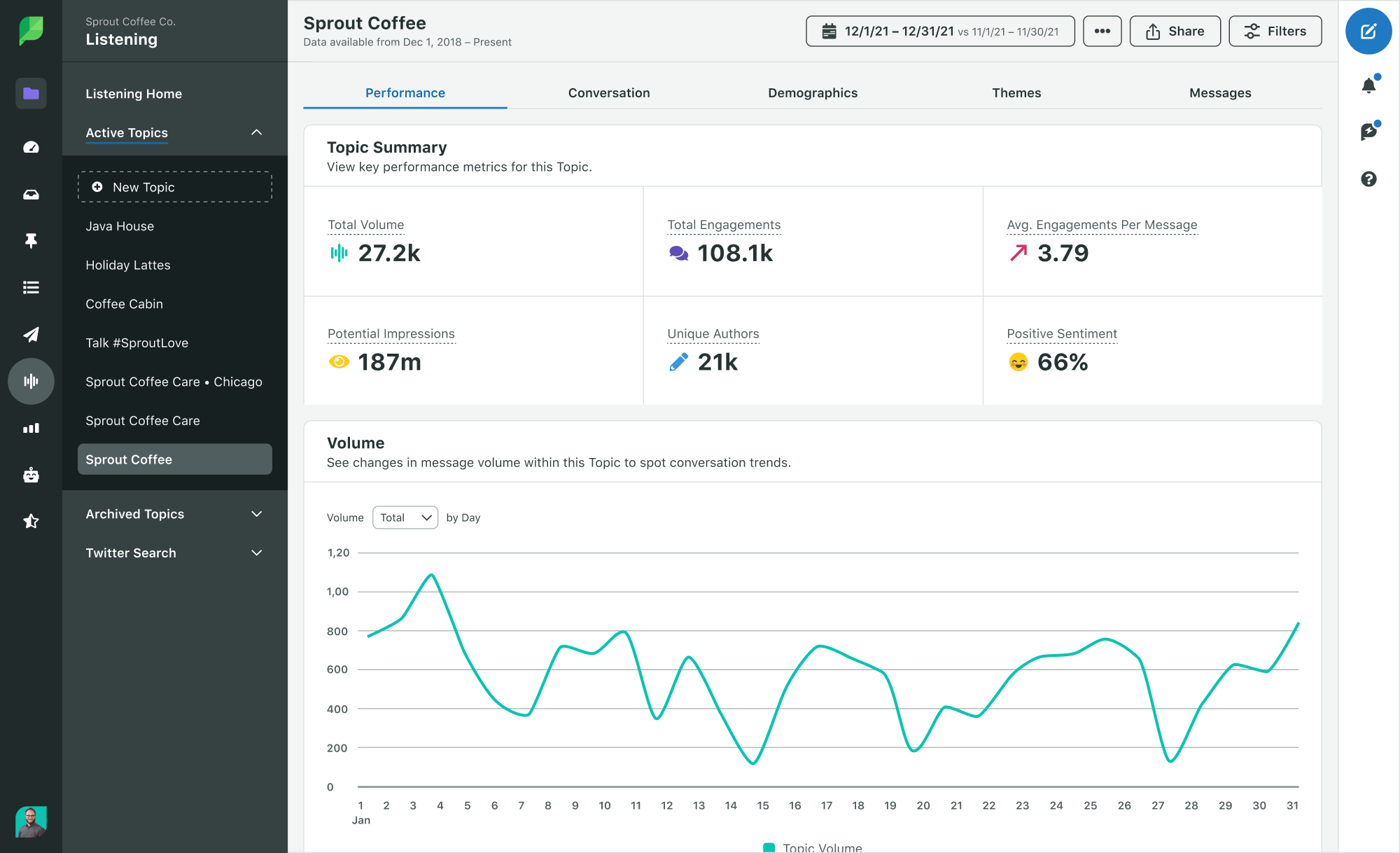
In the face of fierce competition for consumer attention, it’s imperative to tune into conversations happening around your brand and industry. Social listening enables you to tap into and analyze what people are saying about your company, even if you aren’t tagged or mentioned. With Sprout’s AI-powered Social Listening solution, it’s easier to create queries and synthesize insights so you can observe trends, uncover patterns and gauge emotional responses to your brand, products and industry.

Listening Performance Topic Summary in Sprout's platform. In the image, you can see total volume, engagements, impressions and sentiment analysis.

4. Makes your products and services more discoverable

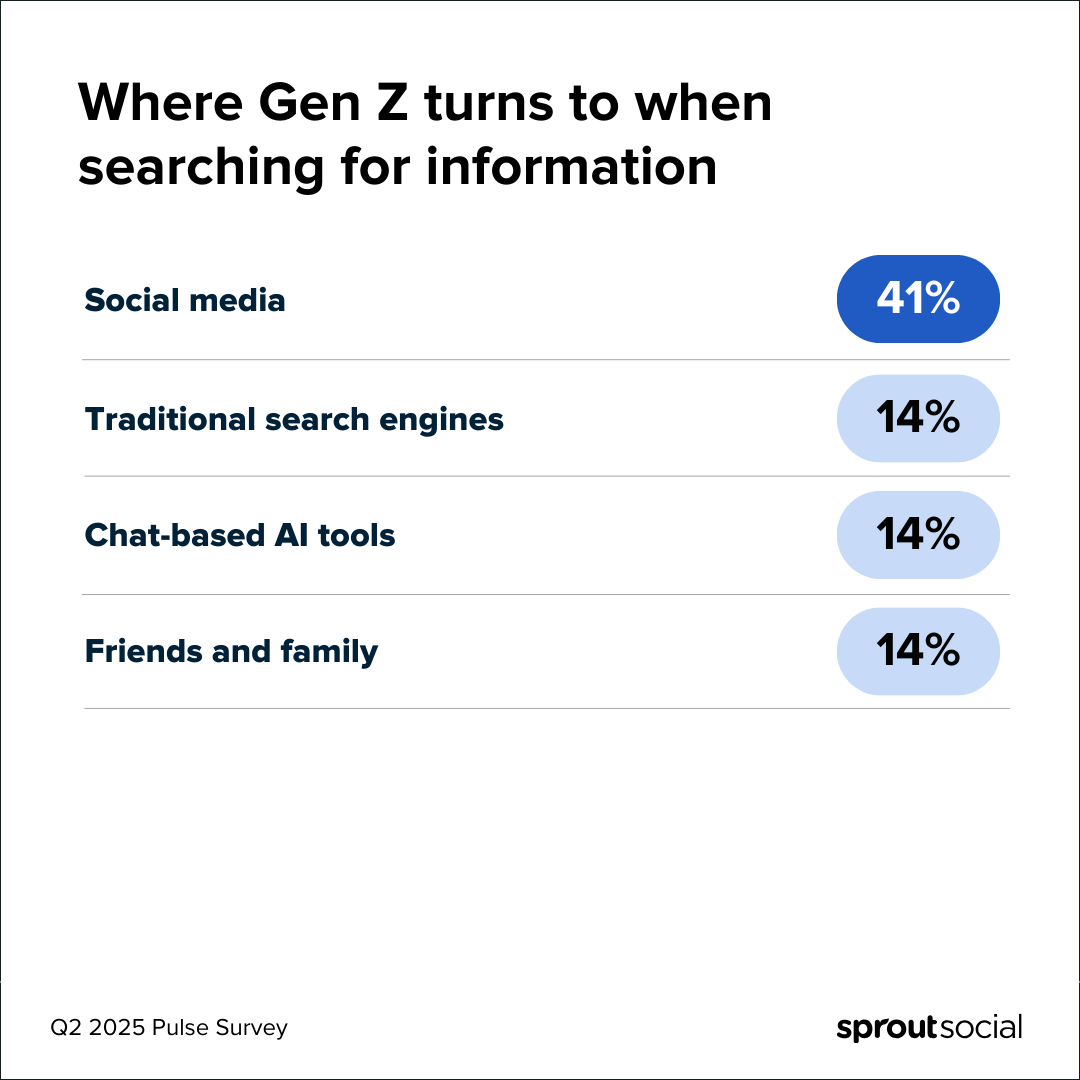
Most people’s primary instinct when looking for information is still to turn to traditional search engines—but Gen Z is the reason why this is shifting. Social is now the #1 place they search, more so than Google and traditional search engines, per the Q2 2025 Sprout Pulse Survey.

Chart showing the primary places Gen Z consumers turn to when searching for information, social media being first.

Whether they’re looking for product reviews, restaurant recommendations or how-to tutorials, audiences increasingly want answers from real people (and often, in video form). Social networks deliver on both.

This growing inclination to treat social as the new search bar provides new opportunities for brands across industries. For instance, 61% of consumers plan to use social to research financial guidance in the near future and 69% anticipate using it to plan travel (including hotels, transportation and events), according to the Q3 2025 Sprout Pulse Survey.

As social network algorithms continue to prioritize user interests over demographics like location, brands that optimize their content for discoverability have the best chance of reaching new audiences (and future buyers).

5. Drives revenue

Social media is ever-present in the sales funnel. From generating awareness through organic campaigns to supporting social commerce through influencer marketing, social plays a key role in acquiring and holding onto customers.

For example, 76% of all users say social media (ads, influencer posts, brand content, etc.) has influenced some percentage of their purchases over the past six months, according to the Q2 2025 Sprout Pulse Survey.

On the other hand, 56% of marketing leaders say social drives revenue, and a comparable amount use revenue metrics to quantify social ROI, according to The 2025 Impact of Social Media Report. There’s an instinctual understanding that social drives more than brand awareness—and that awareness alone doesn’t generate ROI—but many teams don’t have the infrastructure to prove it.

Some metrics (like MQLs) simplify attribution and make it easy to define ROI. Others (like engagement) can correlate with revenue gains, but their direct influence is harder to prove.

A tool like Sprout Social’s Tableau BI Connector enables you to analyze data, create custom metrics and merge different data sources. This seamless and customized view gives you a consolidated source of truth for wider business insights and performance, and a clear perception of how social impacts revenue gains.

A Tableau dashboard with data from Sprout Social incorporated.

Over the last two years, Sprout’s own social team has reimagined our approach to measuring the revenue impact of our work. In partnership with marketing leadership and our analytics team, we moved to a multi-touch attribution model that allows us to track the impact of social, influencer marketing and employee advocacy on leads throughout the sales funnel. Thanks to diligent UTM tagging in Sprout and our Salesforce integration, we uncovered a 5,800% increase in additional pipeline impact.

6. Fosters a thriving brand community

Some 73% of social users agree if a brand doesn’t respond on social, they’ll buy from a competitor. That makes responding on social even more important to building a brand community and authentic connections with followers. And 58% say the #1 thing brands should prioritize on social is interacting with their audiences, according to the Q2 2025 Sprout Pulse Survey.

Responding on social and engaging with individual users is even more important to building an authentic brand community than simply posting just to post. A brand community is a place for people with an emotional investment in your brand to connect with each other and your company. Remember: There are many people who already love your brand. In fact, your brand community probably already exists on social media—you just need to find it.

Establishing relationships with your existing and potential customers makes them feel valued, which increases brand loyalty and evangelism. By actively addressing your audience’s questions, reacting to their comments and capitalizing on surprise-and-delight moments, you nurture a group of superfans who spread positive word-of-mouth and even share user-generated content on your behalf. (That library of content showcasing your product or service in action is great for discoverability too.)

A user-generated Instagram post from an ultrasound tech showing off her Figs brand scrubs.

Brand communities on social media are especially powerful business tools because they allow companies to hear from and engage with their biggest advocates in real time. Within your community on social, you can easily test new product mockups, source requested features, share content and collect feedback that can improve every aspect of your business.

7. Helps get ahead of brand crises

Nearly 40% of social marketers say their greatest fear is having to navigate a brand crisis, according to The Sprout Social Index™. As many businesses know all too well, even crises that start offline (product recalls, leadership issues, supply chain problems) can quickly migrate and amplify on social.

In these scenarios, savvy communications and marketing teams can use social to their advantage. With the right tools, brands can surface real-time insights from social media that signal a crisis is emerging before it spins out of control. NewsWhip by Sprout Social, for example, uses predictive monitoring to determine how big a breaking news story could become and who’s dominating the conversation (across media publications and social), helping you make smarter decisions about how to respond.

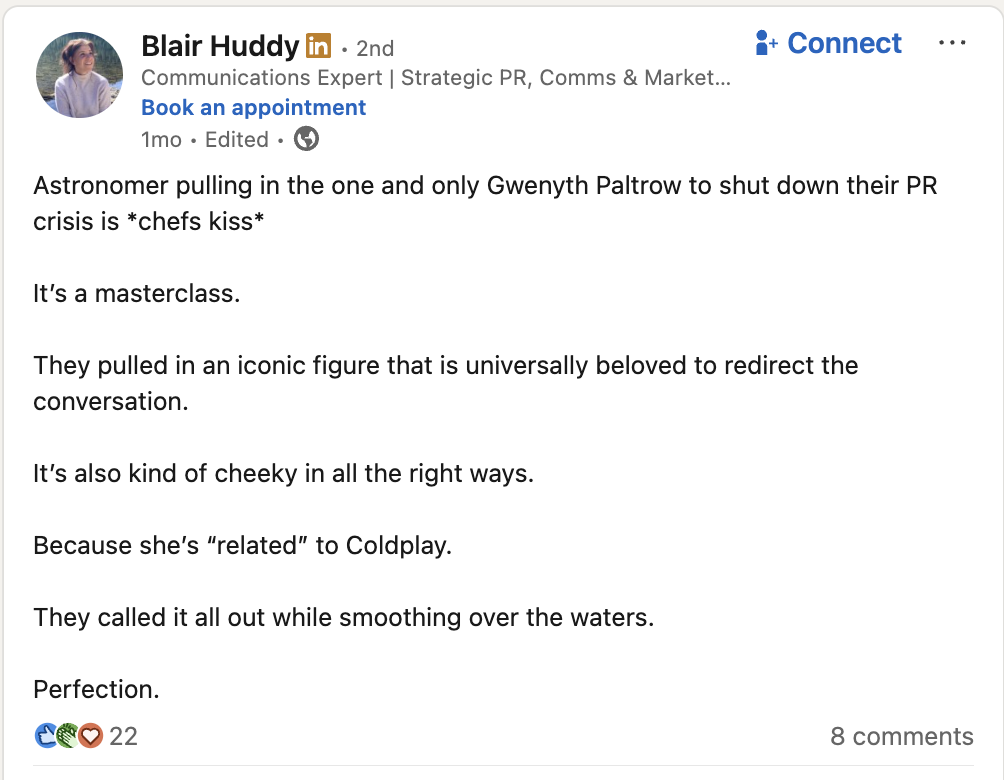
But social also makes it easier for brands to address crises head-on with audiences, and demonstrate authenticity in a way formal press releases cannot. Following tech company Astronomer’s former CEO’s kiss cam scandal at a Coldplay concert, the brand named Gwyneth Paltrow its temporary spokesperson through a video post on X. The post, which addresses FAQs, received over 37 million views and 25,000 reposts, with many taking to social to commend the company for leading a “masterclass” in reputation management.

A LinkedIn post describing Astronomer's apology video with Gwenyth Paltrow as a masterclass in crisis management.

8. Encourages brand advocacy

Satisfied employees want to spread the word about their company by posting on social. With social budgets tightening, your employees are your superpower for expanding your reach without straining your bandwidth or ad budget. It’s a win-win.

According to Sprout’s Employee Advocacy Report, posting company content helps employees accomplish their day-to-day tasks and long-term goals. Employees report that sharing on social can help outside audiences understand their brand’s values, provide new leads and ways to engage with them, expand their potential reach and engagement and communicate important messages internally.

A graphic that reads: Ways employees believe sharing company posts on social media helps their role. The ways include: brand awareness, social selling, market amplification and internal communication. The chart compares engaged user responses (employees who spend average of 60 minutes or more on social media each day) and casual user responses (employees who spend less than 60 minutes a day on social media). Brand awareness and social selling are top reasons for engaged and casual users.

The Advocacy Report also revealed 72% of engaged social media users would post about their company if content was written for them. Sprout’s Employee Advocacy platform enables you to draft message ideas for your employees to share, which makes it easy for them to amplify your content and help you achieve your goals.

A screenshot of Sprout's Employee Advocacy platform that demonstrates how users can curate a new story for their internal team to share.

9. Maximizes recruitment

Prospective candidates rely on social media to find open positions and research companies. According to LinkedIn, over 9,000 members apply for jobs on the network every minute.

The staggering figure explains why building a strong employer brand with the help of social media is essential to attracting top talent. To stand out in a sea of employers, your content needs to showcase your unique culture and values, and encourage brand advocacy. For example, creating a meet the team social post series is an effective way to humanize your brand and grow your candidate base.

An Instagram Carousel from Sprout Social introducing one of our Product Managers

In addition to having your pick of the talent pool, featuring and celebrating your current employees will boost their satisfaction and reduce turnover, while generating audience engagement. According to a Q4 2023 Pulse Survey, 48% of consumers want to see frontline employees in more brands’ social content.

10. Informs customer and competitor research

Most brands today run their business on incomplete data. They rely on surveys, focus groups, and dashboards that reflect only a sliver of what customers actually think—while overlooking the unfiltered, real-time conversations happening at scale on social.

Social is the richest, most honest source of customer insight today, yet it’s still siloed, underused, and cut off from the systems where strategy is shaped and decisions are made. Digital marketing teams are most likely to use social data to inform their decisions today, according to The 2025 Impact of Social Report. But leaders want teams like customer experience and success, customer care and support, and business development to use social insights to drive their decisions, too.

When shared effectively, insights from social data can enrich an entire organization’s understanding of their customers and competition. Casual dining restaurant chain Chili’s knows this first-hand: When their team noticed people venting on social about rising food costs, they rolled out a new value deal to help compete against traditional fast food chains—a move that sparked a spike in business.

Surfacing these insights shouldn’t be like finding needles in a haystack. For example, as the demographic information from Sprout’s Listening solution illustrates, AI analysis makes quick work of determining the age and gender breakdown of your audience and which topics, issues and trends matter most to them.

Insights from Sprout’s Listening tool showcasing audience demographics like age and gender.

11. Refines product development

People are talking about your products on social media right now, whether they’re tagging you or not. They’re sharing what they love about them, and the exact ways they want you to improve them. Building the right social listening queries can surface the feedback and prioritize product development needs.

An Instagram Reel from Sprout Social about the power of using sentiment analysis

When you can turn feedback into meaningful insights and share them with your product and development team, you make your audience feel seen and build brand advocates for life. For example, with the help of Sprout, Canva tags all messages from users sharing product feedback or recommending wishlist features. This makes it easier to close the loop later when new releases come out—which happens frequently, since all of their 2025 product announcements have been based on user feedback.

Building long-term partnerships with influencers can also enrich R&D. According to The State of Influencer Marketing Report, 62% of all consumers who make daily or weekly purchases based on influencer recommendations are likely to share product feedback directly with influencers. The influencers you partner with have an even more direct view into your customers’ sentiment and feedback—insights that can help your brand pivot in real-time and grow long-term.

How social media impacts different business types

While social media positively impacts all business types, there are a few distinct benefits for companies of different sizes.

SMB

For small and medium businesses, social media is an accessible way to access a wide audience and should be an essential part of your marketing playbook. Even with a small social team (or maybe even a team of one), you can design, execute and manage a presence that reaches and engages your target audience.

Read more: How Orkney Library uses social media to grow a global fanbase.

Enterprise

For enterprise brands, social is business critical. Through social, you have access to valuable, global customer data that is essential to creating and maintaining a business advantage. Plus, social data makes it easier to measure and attribute the success of campaigns at scale, which can have a large impact on an organization’s big picture. In fact, 82% of enterprise marketers say their social strategy impacts their business’ bottom line, and 85% say social enables them to create new products and services.

Read more: How Vizient uses brand advocacy to triple social engagements.

B2C

B2C brands depend on social to increase their discoverability and create customers for life. By leveraging influencer marketing and developing communities of loyal fans, B2C companies tap into the power of social proof. Authentic engagement builds audience trust, driving long-term growth and brand affinity.

Read more: How Casey’s improved their overall guest satisfaction score with Sprout’s customer care capabilities.

B2B

When B2B brands harness social media, they significantly boost their market presence—making it easier to drive steady revenue growth. Like B2C, B2B companies rely on brand advocacy (from their employees, customers and community) to increase share of voice and visibility.

Read more: How Salesforce saved 12,000 hours and increased community engagement efficiency tenfold with Sprout.

Nonprofit

For nonprofit organizations, social is a prime channel for securing donations, increasing awareness of their mission, influencing public discourse and providing a community for those advocating for their cause. Unlike traditional media, social offers a direct line to the public, making it easier to encourage time-sensitive action and shape the narrative.

Read more: How the Innocence Project uses social to save lives.

Healthcare

Social media offers a variety of advantages for the healthcare industry—from combating misinformation and delivering faster customer service to supporting employer brand efforts. Savvy organizations are even collaborating with brand-safe influencers to deliver health education on the networks patients already spend time on.

Read more: How Penn State Health amplifies the voice of the patient on social.

How will social media impact your business this year?

The future is bright for companies that recognize the power of social insights. Make the most of the business intel gleaned from social by bringing social data to the forefront of your business conversations.

For more insight into how expert teams prove the ROI of social in their organizations, download The 2025 Impact of Social Media Report.

The post The impact of social media across every part of your business appeared first on Sprout Social.


from Sprout Social https://ift.tt/Mle3Vmq
via IFTTT

Monday, 29 September 2025

How to use WhatsApp for business: 12 strategies for success

The way we use social media is changing. Conversational marketing is on the rise, driven largely by consumers’ increasing expectations for convenience and tailored digital experiences.

Customers expect far more direct experiences from the brands they’re buying from; according to The 2025 Sprout Social Index™, consumers believe companies should make personalized experiences their highest priority this year.

Achieving personalized experiences across social media can be a challenge, but WhatsApp is the perfect platform for the job. WhatsApp’s popularity has exploded—it’s now in the top four most used social media apps worldwide by number of monthly active users. Below, we’ve explained how to use WhatsApp for business, including how to offer direct communication to your customers. We’ve also listed several examples of global businesses already using WhatsApp effectively.

Why use WhatsApp for business?

For brands that use WhatsApp to engage with customers, there are a number of clear benefits.

  • Expand your global reach. WhatsApp is the most popular messaging app worldwide by a considerable margin. With a potential audience that large, it’s easy to engage with new prospects that may not yet be aware of all your business has to offer.
  • Improve the customer experience. WhatsApp offers your business a direct one-to-one communication channel with customers. You can use your account to offer personalized support and messages that further your relationship with individual members of your audience.
  • Enhance employee satisfaction. Using WhatsApp makes it easier for your customer service and social teams to juggle messages from different people. When combined with an effective social marketing tool, switching to WhatsApp can make your employees’ jobs easier, freeing up time for them to focus on other tasks.
  • Boost customer retention over time. Reaching customers where they already are makes it easier for them to interact with you. This ease can improve their overall experience, which makes them more likely to continue to purchase and engage with you in the future.
  • Combine conversational marketing with social management. With WhatsApp marketing software, you can connect your WhatsApp efforts to your broader social media strategy. This combined approach allows you to manage all your social channels from one centralized location, boosting the effectiveness of each of your accounts.

7 WhatsApp Business account features to use

Once you create your WhatsApp Business profile, you’ll find a suite of tools you can use to scale your 1:1 messaging strategy on the platform. Here are eight that can help you make the most out of your presence on WhatsApp:

1. Quick replies

Quick replies are a great way to take some of the work out of addressing those frequently asked questions, like “when are you open?” or “is this in stock?”.

To set one up, all you have to do is click Quick Replies under the Tools tab of WhatsApp. From there, you can create up to 50 unique replies that you can access via keyboard shortcuts.

A word to the wise: Start with 5-10 Quick Replies and add more as needed. That will make your new shortcuts easier to remember and use when talking to customers.

2. Automatic away messages

Adding 1:1 messaging to your strategy doesn’t mean you need to be available 24/7. You can use WhatsApp away messages to set appropriate expectations with your customers and to give yourself a break as needed.

Away messages can be triggered by a few different scenarios, including:

  • When a customer messages you outside of business hours
  • During specific periods, like holidays or extended closures
  • When receiving high volumes of inbound messages

When you set up an away message, be sure to clearly state when a customer can expect to hear back from you. Remove as much ambiguity from the situation as possible for an improved customer experience.

3. Contact and message labels

You can use labels to organize inbound messages and contacts on WhatsApp, similar to how you might use labels to organize your email inbox.

When it comes to creating a label strategy, it’s a choose-your-own-adventure game. However, if you want to keep your social media response times low, we recommend that you create a label specifically for unresolved issues. This will help keep them top of mind as you work to find the answer to a customer’s question.

4. Catalogs and collections

Use your WhatsApp Business account to drive social commerce sales by creating an inventory catalog within the app. All listings need a unique title, at least one image and their country of origin. All additional fields—price, description, website link, product code—are optional, so you can make your listing unique to your sales process.

You can also use collections to sort your catalog for easier browsing. For example, you can create a holiday-specific collection or one that features products currently on sale.

5. Catalog links

Once you create a catalog, you can share items in your catalog in conversations with customers. All you have to do is find the item you’d like to share and click Send link via WhatsApp Business.

Use this tool if a customer is asking about a specific item or to provide alternatives for items that have sold out. You can also use it to send loyal customers updates on items that have gone on sale.

6. Cart

While you can drive customers directly to your site using WhatsApp Business’s catalog feature, you can also create a more seamless checkout experience by encouraging them to complete their purchase in-app using the cart tool.

All you have to do is enable the Add to Cart feature within your catalog and your customers can handle the rest from there.

7. Broadcast lists

If a customer adds your business to their address book on WhatsApp, you can add them to a broadcast list. These lists help you send the same message to multiple customers at once, saving you a lot of time and effort.

Use this tool sparingly and with SMS marketing best practices in mind. If you use it too often, you risk alienating customers who appreciate your business enough to consider it a personal contact. Remember, you’re also limited to 256 contacts per broadcast list.

8. WhatsApp ads

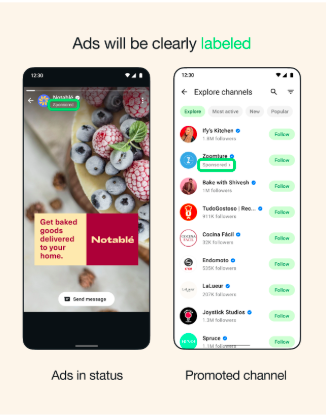
WhatsApp has recently announced adverts are coming to the platform. The messaging app is currently going through a gradual rollout of its ad functionality which will continue throughout the year.

Whatsapp business ads showing how the brands can get in front of an interested audience

Ads appear in a distinct section of the app called Updates and are personalized for each user. As the features roll out, you’ll be able to promote your ads on the platform. Start forming a WhatsApp ads strategy now so you can take advantage of this feature as soon as it’s available in your market. WhatsApp ads have the potential to get your brand in front of interested users, attracting new customers whilst building your relationship with existing buyers.

12 examples of how to use WhatsApp for business across your organization

Brands are using WhatsApp in a variety of ways that expand their customer-facing and internal capabilities. The following examples highlight use cases in business promotion, customer service and pipeline growth.

How to use WhatsApp for business promotion

WhatsApp can be a useful tool to promote your business and increase your brand’s reach. You can use the platform for unique awareness campaigns, or develop distinct communication channels through the app that cater to your audience. Here are several examples of brands doing just that.

Carrefour creates WhatsApp catalogs

International hypermarket Carrefour uses WhatsApp to offer personalized catalogs and coupons to its customers. Before they started using WhatsApp, they were relying on physical, printed catalogs which were both expensive to make and often hard to align with time-sensitive discounts.

After switching their catalogs to WhatsApp, they found 45% of recipients engaged with them for at least 3 minutes, compared to 10% who did so through email. They could also target users based on their location to deliver specific promotions and deals for relevant store locations. Alongside being a more cost-effective solution, Carrefour’s use of WhatsApp makes it easier for their customers to access product catalogs and deals through an app they’re already using regularly.

Maggi builds a WhatsApp chatbot

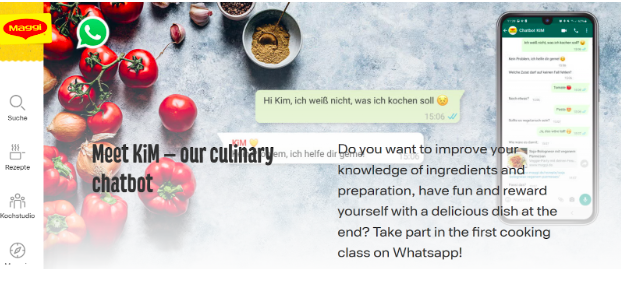
In Germany, Maggi built a WhatsApp-only chatbot designed to give users recipe recommendations. The chatbot, KiM, is accessible through a unique WhatsApp number and is able to send short cooking hack videos, recipe advice, quizzes and even module-based cooking lessons.

Brand Maggi have built a custom chatbot called Maggi to interact with their users and share recipes.

As a free tool, KiM allows people from Germany to easily access cooking tips that can help them eat healthily and cook fresh meals. But it also furthers Maggi’s own identity, promoting their brand while increasing awareness of their products and how they can be used in recipes at home.

Universal Pictures advertises using interactive WhatsApp campaigns

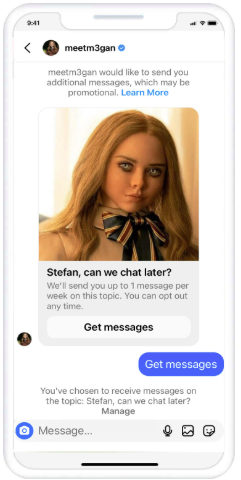
One of the world’s biggest movie production companies, Universal Pictures, has started relying on WhatsApp as a core channel in its advertising campaigns. They started experimenting with these campaigns to support the release of M3GAN, a horror film featuring an AI doll.

Universal Pictures used an AI chatbot M3gan as a Whatsapp campaign to promote their horror film.

Universal wrote in-character messages from the perspective of M3GAN and sent them to users, asking if they wanted to receive promotional material about the film. This was a smart way of getting consent from users in a way that didn’t sacrifice the theming of the overall campaign. Once they’d opted in, WhatsApp users could have interactive conversations with the character, whilst also receiving new trailers and film information.

The campaign was a big success, achieving 92% read rates and 59% engagement rates. It also contributed towards a 2x higher interest rate in the film when compared with the industry average.

The World Wildlife Foundation builds a unique WhatsApp game

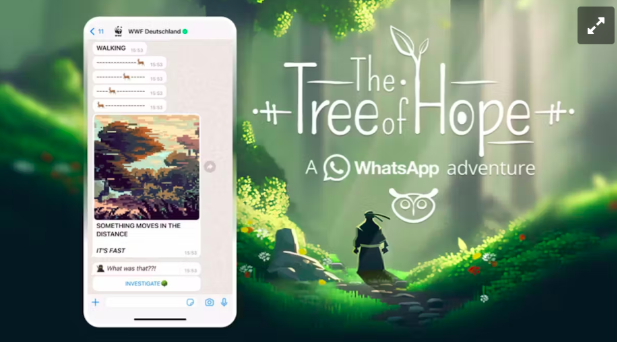
To promote their charity’s brand and raise awareness about nature reserves, the World Wildlife Foundation (WWF) took a unique approach by building a WhatsApp video game. “The Tree of Hope” was designed as a WhatsApp adventure game that relied on automated responses based on users’ messages and inputs.

The WWF built a Whatsapp game called 'The Tree of Hope' to engage their audience.

The game proved popular with users, as the WWF achieved 30% completion rates from everyone who tried playing. Their success shows that WhatsApp can be fertile ground for creative approaches to marketing, and experiences that can make it easier for organizations to reach millions of people.

Takeaway for your brand

These campaigns all show WhatsApp’s potential as a business promotion tool and as a host for creativity. All of the above brands have been able to create unique experiences based on WhatsApp’s messaging features, and deliver them at scale thanks to the vast number of people already using the platform. Many of them have also relied on the automation potential of WhatsApp, and new technologies like large language models, to provide personalised experiences in a more streamlined way.

You can pave your own way towards similar outcomes by using Sprout’s WhatsApp integrations. Use Sprout to schedule your first WhatsApp messages to speed up and scale your response times. Effective use of a tool like Sprout can support building creative messaging channels like Universal Pictures and WWF, where you can promote your business at scale over WhatsApp without getting overwhelmed.

How to use WhatsApp for customer service

WhatsApp can be an excellent customer service tool as it allows you to manage one-on-one messages with customers on their preferred platform. All of these companies are using WhatsApp to improve customer experiences.

Air France supports flyers at every stage on WhatsApp

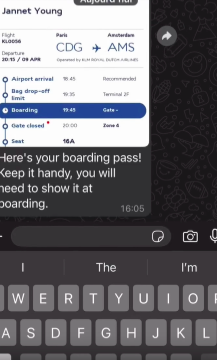
Air France is the largest airline in the country, and they now use WhatsApp to support flyers across every stage of their journey. This includes sending travel newsletters, unique travel deals and utility messages that contain vital information like boarding passes and gate changes.

Air France uses Whatsapp to correspond with their customers and their questions via a chatbot.

They also handle customer service messages through WhatsApp, using a chatbot that then directs questions to the right department. Some 85% of the airline’s customer care conversations now take place through WhatsApp, and they receive 4.5x higher click-through rates on newsletters compared with emails.

TUI supports travellers with a virtual WhatsApp assistant

Air France isn’t the only global travel company using WhatsApp to support travellers. TUI operates a WhatsApp virtual assistant called Louise. Louise is accessible for all TUI travellers, and offers an accessible way for travellers to ask for recommendations or ask questions about their trip.

With Louise, TUI combines a customer support tool with a feature that improves their travel products. By integrating Louise entirely with WhatsApp, they can trust that travellers will likely already have the app they need to access the service.

WhatsApp supports Lenovo’s technical services

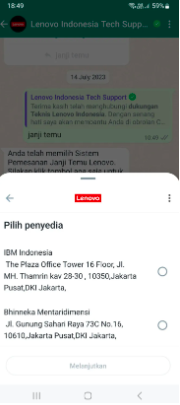
As a major tech provider, Lenovo often has to handle thousands of different schedules for technical appointments and repairs. To streamline this process in Southeast Asia, Lenovo created a WhatsApp chatbot that took advantage of WhatsApp Flows.

Tech company Lenovo uses a WhatsApp chatbot to engage with their customers.

When compared to their website experience, the intuitive system Lenovo built on WhatsApp achieves 8.2x higher conversion rate for appointment bookings. They also achieved a 44.5% overall customer engagement rate increase through customers interacting with them through WhatsApp.

NatWest Business manages a WhatsApp service line

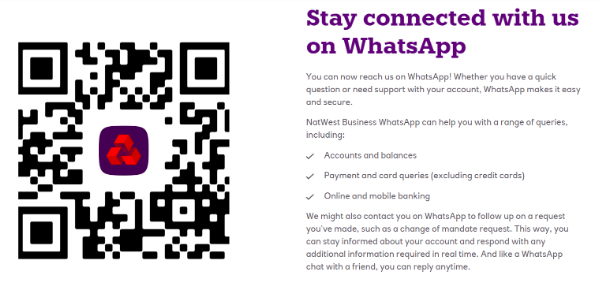
As one of the UK’s biggest banks, NatWest supports millions of business accounts and customers every day. To handle all of the questions their users might have, they manage a WhatsApp number that’s accessible at any time of day.

Natwest bank has a WhatsApp account that customers can access at any time of the day with questions about their accounts.

Due to the sensitive nature of business banking, NatWest also includes a lot of safety tips for accessing their WhatsApp channel on their website page. The number allows the bank’s customer service team to answer simple questions about mobile banking, and connects more significant questions to response teams to make sure bankers are supported 24/7.

Takeaway for your brand

These brands prove how many benefits there are if your brand can switch to WhatsApp as its main communication channel. By centralising all of your direct communications (newsletters, support messages, deals etc.), your comms become easier to manage, and your customers get used to contacting you through a single, reliable platform. For customer service in particular, optimising how a customer conversation flows enables you to filter conversations and get customers to the right people faster.

Chatbots and WhatsApp automation can also be used to support your products, as well as your customer service capabilities. By automating your own repetitive WhatsApp tasks using Sprout, you can similarly prioritize specific user needs. This can help you improve customer support conversations, and offers your team more collaboration opportunities to refine customer engagement over time.

How to use WhatsApp for pipeline growth

Alongside business promotion and customer service, WhatsApp can also be an effective platform for sales and building your pipeline. These brands have all used WhatsApp to increase sales in their markets.

Hello Fresh increases orders through personalized deals

Hello Fresh is one of the biggest meal delivery services in the world, and they rely on WhatsApp to attract new orders. First, Hello Fresh encourages users to create WhatsApp conversations with them through interactions with organic deal adverts. They then send personalized deals through direct WhatsApp chats to interested customers after they’ve received information on their location and needs.

This approach has led to great success for the company, including a 32% click-through rate, and a 25% opt-in rate for follow-on promotions. Overall, this strategy achieved 155% more conversions when compared with the company’s call centres.

Domino’s Pizza boosts regional sales through WhatsApp

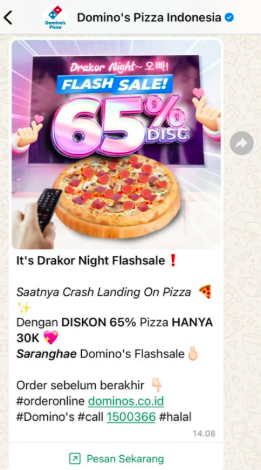
As a worldwide company, Domino’s Pizza often employs regional strategies to try to increase sales in certain countries. In Indonesia, they created a holistic WhatsApp marketing strategy designed to sell, retain and reward customers.

To sell, they sent daily messages to historic orderers. To retain them, they sent personalized messages encouraging future orders, including deals and promotions. To reward them, they designed a loyalty program that they delivered entirely through WhatsApp.

Dominos Pizza in Indonesia corresponded with their customers through personalized messages and designed a loyalty program that they managed entirely through WhatsApp.

This campaign led to a 72% increase in sales across Indonesia when compared with Domino’s results in the previous year. It was a hugely profitable campaign, with the company achieving a 6.3x return on investment (ROI) from WhatsApp messages that year.

Movistar improves sales across multiple countries

Movistar is one of the largest telecommunication providers in Spain, and the fourth largest provider in Europe. Recently, Movistar has also substantially expanded into LATAM markets, and has used WhatsApp marketing in multiple regions to increase sales.

In Argentina, Movistar reduced their customer acquisition costs by 70% by sending customized messages and offers through WhatsApp. They achieved similar successes in Colombia, where their automated WhatsApp messaging journeys were used to boost mobile upgrades. These journeys helped Movistar achieve both a 16-point increase in digital sales conversions to paid plans, as well as a 25-point increase in customer loyalty scores.

WhatsApp personalization helps build Jack Wolfskin’s pipeline

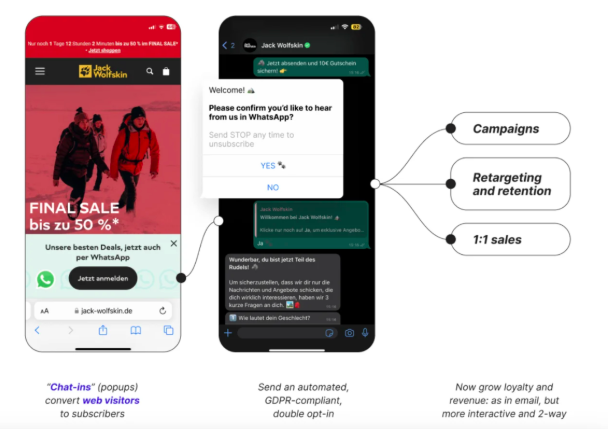
To increase sales of their outdoor clothing, leading brand Jack Wolfskin implemented WhatsApp opt-in flows to support their Black Friday campaigns. They attracted users through a free newsletter, which offered a €10 discount to any new subscribers. Clicks led users to a WhatsApp conversation, with an automated set of messages and options that helped Jack Wolfskin learn about user preferences.

This helped them filter users based on the type of clothes they were interested in, and their favourite activities. Some 90% of people completed this opt-in flow, allowing Jack Wolfskin to add thousands of new users to the consideration stage of their sales pipeline. This campaign was rolled out across Germany, though the company has plans to increase 1:1 WhatsApp sales and similar opt-in data collection strategies in other countries.

Clothing brand Jack Wolfskin used WhatsApp business as part of a Black Friday campaign.

Takeaway for your brand

These brands all show how WhatsApp can be an effective global marketing channel and a vehicle for direct sales. When managing these direct WhatsApp campaigns, focus on targeting to make sure you’re communicating with the right customers, and use these opportunities to collect more insights and data. When using WhatsApp to target specific regions, review usage rates in your country of choice first. Also, make sure to follow all local regulations for advertising and marketing.

By creating automated chats, you can filter your audience, and then label them using WhatsApp Business features. Using Sprout you can also connect these individual conversations to other helpful contextual updates, across socials, CRM and other helpdesk tools. This helps you gather more actionable data on user conversations which can be used to inform new WhatsApp sales strategies.

How can you use WhatsApp for business?

Conversational marketing is here to stay. The majority of customers expect it, and companies that strategically engage their audiences via channels like WhatsApp are better positioned to take advantage of the growth it makes possible.

If you’re relying on WhatsApp to boost sales, promote your business or improve your customer service, all these use cases can be streamlined with the right tools. Check out this recent Insights article to learn how you can use WhatsApp marketing software to connect with your audience while driving conversions.

The post How to use WhatsApp for business: 12 strategies for success appeared first on Sprout Social.


from Sprout Social https://ift.tt/3dl7bUF
via IFTTT

Top Email Marketing Strategies to Grow Your Coaching Business

top email marketing strategies for coaches

What if you could wake up to discovery call requests from people who already know your value and are ready to invest?

At AWeber, we've analyzed the email strategies of our most successful coaching customers, those consistently filling their programs. While others struggle with inconsistent lead flow, these coaches use email to create predictable revenue streams without constant social media posting or cold outreach.

This guide reveals five specific email strategies that generate qualified leads, nurture prospects, and convert subscribers into high-value coaching clients. You'll get the exact frameworks, templates, and automation sequences our top-performing coaches use to build thriving practices.

Strategy #1: Create High-Converting Lead Magnets That Pre-Qualify Clients

Here's the problem most coaches face: their lead magnets attract tire-kickers who collect free resources but never buy coaching. Our most successful coaching customers solved this by creating lead magnets that actually filter out bargain hunters while attracting people ready to invest in transformation.

The difference? Instead of generic "5 Tips" PDFs, they use lead magnets that mirror their coaching process. When someone completes their assessment or mini-course, they've already experienced what it's like to work with that coach—making the transition to paid programs feel natural rather than salesy.

The Client Readiness Assessment

Create a 10-15 question assessment that helps potential clients identify their readiness for coaching while showcasing your expertise. Examples:

Life Coaches: "Life Balance Audit" - helps people identify which life areas need attention most Business Coaches: "Revenue Readiness Assessment" - evaluates whether someone is ready to scale their business
Career Coaches: "Career Transition Readiness Quiz" - determines if someone is prepared for a career change Health Coaches: "Wellness Foundation Assessment" - identifies the biggest obstacles to their health goals

The 5-Day Email Mini-Course

Deliver your signature framework through a short email course that builds anticipation for your paid programs:

  • Day 1: Identify the core problem your coaching solves
  • Day 2: Introduce your unique framework or methodology
  • Day 3: Share a client success story using this approach
  • Day 4: Address the biggest obstacle people face
  • Day 5: Present your paid coaching as the next logical step

Discovery Call Preparation Kit

Instead of just offering free strategy sessions, provide a "Discovery Call Preparation Kit" that includes:

  • Pre-call questionnaire that gets prospects thinking deeply about their challenges
  • "Questions to Ask Your Coach" guide that positions you as the expert
  • Goal-setting worksheet they complete before your call
  • Success stories from previous discovery call participants

This approach attracts people who are serious about coaching while giving you valuable information before your calls.

At AWeber, our drag-and-drop email builder with built-in Canva integration makes it easy to create professional lead magnets and delivery emails that reflect your coaching brand.

Strategy #2: Build a 7-Email Welcome Sequence That Converts Subscribers Into Clients

Most coaches send one welcome email and hope for the best. Meanwhile, our top-performing coaching customers use the first two weeks after someone joins their list as the most critical sales period of their entire relationship.

Why? New subscribers have peak attention and interest—they just took action to get your lead magnet, which means they're actively looking for solutions. This 7-email sequence capitalizes on that motivation by systematically addressing concerns, building trust, and positioning your coaching as the logical next step.

The Client Conversion Welcome Sequence

Email 1 - Instant Delivery: "Your [Lead Magnet] is Here + What's Next"

  • Deliver the promised lead magnet immediately
  • Set expectations for the next 7 days: "Over the next week, I'll share..."
  • Include your personal story in 2-3 sentences
  • Encourage them to reply with their biggest challenge

Email 2 - Day 1: "The Mistake That Keeps Most People Stuck"

  • Address the most common obstacle in your coaching niche
  • Share why traditional approaches fail
  • Position your methodology as the solution
  • Include one specific tip they can implement immediately

Email 3 - Day 3: "How [Client Name] Went From [Before State] to [After State]"

  • Tell a detailed client success story
  • Include specific numbers, timelines, and outcomes
  • Highlight the transformation process, not just results
  • End with: "Wondering if this could work for you? Here's how to find out..."

Email 4 - Day 5: "The Truth About [Common Industry Belief]"

  • Challenge a widely-accepted belief in your field
  • Provide a contrarian perspective backed by your experience
  • Share your unique framework or approach
  • Include social proof from other clients who've embraced this approach

Email 5 - Day 7: "Why I Almost Quit Coaching (And Why I'm Glad I Didn't)"

  • Share a vulnerable moment from your coaching journey
  • Explain what you learned and how it changed your approach
  • Connect this lesson to how you serve clients differently
  • Build emotional connection and trust

Email 6 - Day 10: "3 Signs You're Ready for Coaching (And 2 Signs You're Not)"

  • Help subscribers self-assess their readiness
  • Create urgency by highlighting the cost of waiting
  • Address common objections or hesitations
  • Include testimonials from clients who were initially hesitant

Email 7 - Day 14: "Ready to See What's Possible? Let's Talk"

  • Make your coaching offer with confidence
  • Include multiple client results and outcomes
  • Address their likely objections directly
  • Provide clear next steps to book a discovery call
  • Add urgency with limited availability or bonus for quick action

At AWeber, our automation workflows make setting up these sequences simple. You can create the entire welcome series once, then every new subscriber receives this personalized onboarding experience automatically. Learn more about creating effective welcome email campaigns with our comprehensive automation guide.

Strategy #3: Send Strategic Weekly Newsletters That Build Authority and Generate Referrals

Here's what separates successful coaches from everyone else: they don't just share tips—they demonstrate transformation. While other coaches send generic advice newsletters, our top performers use a strategic content rotation that positions them as the obvious choice when someone's ready to invest in coaching.

The secret is moving beyond information sharing to authority building. Each newsletter doesn't just educate; it shows exactly how you think, solve problems, and guide clients through challenges. This approach turns newsletter readers into referral sources and waiting lists into paying clients.

The Authority-Building Newsletter Framework

Week 1: The Teaching Newsletter - "The [Specific Strategy] That Changed Everything"

  • Share one specific technique, framework, or insight
  • Include the exact steps subscribers can implement
  • Business coaches: "The 15-Minute Daily Planning System That Doubled My Client's Revenue"
  • Life coaches: "The 3-Question Evening Routine That Ends Overwhelm"
  • Career coaches: "The LinkedIn Strategy That Gets You Noticed by Recruiters"
  • End with: "Try this and let me know how it works for you"

Week 2: The Story Newsletter - "When [Common Challenge] Nearly Broke Me"

  • Share a specific client transformation story (with permission)
  • Include exact details: timelines, obstacles, breakthrough moments
  • Focus on the journey, not just the destination
  • Connect their story to your methodology
  • End with: "If you're facing something similar, here's what I've learned..."

Week 3: The Myth-Busting Newsletter - "The Lie Everyone Tells You About [Topic]"

  • Challenge conventional wisdom in your coaching niche
  • Provide evidence from your client work
  • Offer your contrarian approach
  • Life coaches: "The Lie Everyone Tells You About Work-Life Balance"
  • Business coaches: "Why 'Follow Your Passion' Is Terrible Business Advice"
  • Career coaches: "The Truth About Why Networking Events Don't Work"

Week 4: The Behind-the-Scenes Newsletter - "What I Learned From My Worst Client"

  • Share lessons from your coaching practice
  • Be vulnerable about mistakes or challenges
  • Show how these experiences improved your coaching
  • Include what clients taught you
  • Connect to how you serve clients better now

Newsletter Content That Converts

Include Specific Client Wins: Instead of "Sarah increased her confidence," write "Sarah went from avoiding team meetings to volunteering to present the Q4 strategy to the board—in just 6 weeks."

Ask for Engagement: End each newsletter with a question that encourages replies. "What's your biggest challenge with [topic]?" These replies often turn into discovery call conversations.

Share Resources They Can't Get Elsewhere: Include templates, worksheets, or frameworks you use with paying clients. This demonstrates value while building goodwill.

Our AI Writing Assistant helps overcome writer's block by generating newsletter ideas and content based on your coaching niche. It's like having a writing partner who understands email marketing best practices.

Strategy #4: Set Up Three Essential Email Automations That Work While You Sleep

The best coaches we work with have a secret: they never chase prospects or wonder where their next client is coming from. Instead, they've built systems that nurture leads, handle objections, and convert prospects into clients automatically—even when they're working with current clients or taking time off.

These three automation sequences handle the repetitive but crucial tasks of client acquisition while you focus on delivery and transformation. Once set up, they work around the clock to move prospects through your coaching journey, addressing concerns and building desire until someone is ready to invest.

Automation #1: The Post-Discovery Call Follow-Up Sequence

Many coaching prospects need multiple touchpoints after their discovery call before making a decision. This 4-email sequence addresses concerns while building desire for your coaching program.

Email 1 - Immediately After Call: "Here's Your Custom Action Plan"

  • Send within 2 hours using our Calendly integration
  • Recap their specific challenges discussed
  • Include 2-3 immediate action steps they can take
  • Attach a personalized summary or next-steps document
  • End with: "Questions about anything we discussed? Just reply to this email."

Email 2 - Day 2: "[Client Name] Had the Same Concern You Mentioned"

  • Address the main objection or concern they raised during the call
  • Share a relevant client success story with specific details
  • Include exact results and timeline (revenue increase, time saved, confidence gained)
  • Position your program as the logical solution

Email 3 - Day 5: "The Cost of Waiting (From Someone Who Waited Too Long)"

  • Share a story about a client who delayed starting coaching
  • Quantify what they missed during that delay period
  • Create urgency around their specific goals
  • Include current program availability and enrollment deadline

Email 4 - Day 8: "Final Thoughts + One Last Question"

  • Make your final invitation to work together
  • Address any remaining objections they mentioned on the call
  • Include payment plans, guarantees, or bonuses if applicable
  • Ask: "What would need to be true for this to be an easy 'yes' for you?"

Automation #2: Niche-Specific Long-Term Nurture Sequences

Our coaching customers see higher conversion rates when they customize nurture sequences for their specific coaching niche. Here are the frameworks our most successful customers use:

For Life Coaches: The "Life Design" 8-Email Sequence

  • Email 1: "Why Most People's Lives Feel Out of Control" (common problem)
  • Email 2: "The Client Who Quit Her Six-Figure Job (And Tripled Her Happiness)" (transformation story)
  • Email 3: "The Myth of Work-Life Balance" (contrarian viewpoint)
  • Email 4: "Your 10-Minute Daily Check-In That Changes Everything" (practical tool)
  • Email 5: "When I Almost Gave Up on My Dreams" (vulnerable story)
  • Email 6: "The 3 Questions That Reveal Your True Priorities" (assessment)
  • Email 7: "Why Willpower Doesn't Work (But This Does)" (methodology)
  • Email 8: "Ready to Design a Life You Actually Want?" (soft pitch)

For Business Coaches: The "Revenue Growth" 10-Email Sequence

  • Email 1: "The Revenue Plateau That Kills Growing Businesses" (problem identification)
  • Email 2: "How Sarah Went From $50K to $500K in 18 Months" (case study with numbers)
  • Email 3: "The Biggest Lie About Scaling a Business" (myth-busting)
  • Email 4: "The 3-Part Framework That Predicts Business Growth" (methodology preview)
  • Email 5: "My Worst Business Mistake (And What It Taught Me)" (vulnerability)
  • Email 6: "Why Most Marketing Doesn't Work for Small Businesses" (education)
  • Email 7: "The Client Who Almost Quit (Before Her Breakthrough)" (persistence story)
  • Email 8: "The Simple Metric That Predicts Success" (insight)
  • Email 9: "Are You Ready to Scale?" (readiness assessment)
  • Email 10: "The Investment That Changed Everything" (program introduction)

For Career Coaches: The "Career Transition" 6-Email Sequence

  • Email 1: "Stuck in the Wrong Career? You're Not Alone" (connection)
  • Email 2: "The Manager Who Became a Bestselling Author" (transformation)
  • Email 3: "Why 'Follow Your Passion' Is Bad Career Advice" (contrarian)
  • Email 4: "The Hidden Cost of Career Misalignment" (urgency)
  • Email 5: "Your Career Change Readiness Assessment" (self-evaluation)
  • Email 6: "Ready to Make Your Move?" (call to action)

Automation #3: The Smart Re-Engagement Sequence

Instead of generic "we miss you" emails, our top coaches use this behavioral sequence:

For Non-Openers (Haven't opened in 60 days):

  • Email 1: "Is this email address still working?" (deliverability check)
  • Email 2: "My best advice in 60 seconds" (value-packed, short email)
  • Email 3: "Different email address?" (practical solution)

For Openers Who Don't Click (Engaged but not taking action):

  • Email 1: "What would be most helpful right now?" (direct question)
  • Email 2: "The one thing I wish I'd known earlier" (personal insight)
  • Email 3: "Ready for the next step?" (gentle nudge toward coaching)

For Active Readers Who Haven't Bought (High engagement, no purchase):

  • Email 1: "What's holding you back?" (objection identification)
  • Email 2: "The client who had the same concern" (objection handling)
  • Email 3: "Is now the right time?" (timing conversation)

At AWeber, our visual automation builder makes creating these complex sequences simple. You can see the entire customer journey, set up behavioral triggers, and optimize based on engagement data. Our Calendly integration automatically triggers follow-up sequences when prospects book calls, ensuring no one falls through the cracks. Our email automation for coaches guide provides additional niche-specific templates.

Strategy #5: The "VIP Launch" Email Sequence That Fills Programs From Your Existing List

While most coaches panic about finding new prospects for each program launch, our most successful customers have a different approach: they focus on converting the subscribers they already have. This "VIP Launch" sequence helps you generate new coaching clients within 10 days—without spending money on advertising or creating new lead magnets.

The psychology is simple: your current subscribers already know and trust you. They've been consuming your content and seeing your expertise. The challenge isn't convincing them you're credible—it's helping them see that now is the right time to invest in transformation. This sequence does exactly that.

The Pre-Launch Foundation (2 weeks before enrollment opens)

Email 1 - "I've Been Noticing Something..."

  • Share a specific pattern you've observed in your community
  • Include 3-4 concrete examples from client conversations or email replies
  • Connect this pattern to a deeper problem your coaching solves
  • Ask subscribers to reply with their experience: "Does this sound familiar?"
  • Don't mention any program—just identify the shared struggle

Email 2 - "The Hidden Cost of [Specific Problem]"

  • Quantify the impact of not solving this problem
  • Use specific numbers: lost revenue, wasted time, missed opportunities
  • Share a story of someone who waited too long to address it
  • Include research or data that supports the urgency
  • End with: "I'm putting together something that could help..."

The VIP Launch Sequence (Days 1-7)

Email 3 - Day 1: "Introducing [Program Name] - For [Specific Audience] Only"

  • Reveal your program with clear positioning
  • Explain exactly who it's for and who it's NOT for
  • Include your methodology or signature framework
  • Share 2-3 specific outcomes clients will achieve
  • Add exclusivity: "I'm only accepting 10 clients this round"
  • Include early testimonials from beta clients or similar programs

Email 4 - Day 3: "Inside [Program Name] - What You'll Get"

  • Break down the complete program structure
  • List specific modules, calls, resources, and deliverables
  • Include timelines: "Week 1 you'll..., Week 4 you'll..., By Week 8 you'll..."
  • Share bonus materials or exclusive access
  • Add social proof from current clients
  • End with: "Investment details coming Friday..."

Email 5 - Day 5: "The Investment + How to Secure Your Spot"

  • Present pricing within value context
  • Break down the cost per week or per month
  • Compare to the cost of not solving the problem
  • Include payment plan options
  • Add scarcity: enrollment deadline or limited spots
  • Share what happens immediately after they enroll
  • Include guarantee or risk-reversal if applicable

Email 6 - Day 6: "Questions I'm Getting About [Program Name]"

  • Address the top 5-7 questions or objections
  • Use actual questions from interested subscribers
  • Provide detailed, helpful answers
  • Include additional testimonials or success stories
  • Reinforce program benefits and urgency
  • Make enrollment easy with multiple links

Email 7 - Day 7: "Final Hours + A Personal Note"

  • Create final urgency for enrollment deadline
  • Share why this program matters to you personally
  • Include a vulnerability about your own transformation
  • Add final testimonial from a client with similar background
  • Make enrollment simple with clear next steps
  • Include your personal contact for questions

The Follow-Up Framework (For Non-Buyers)

Email 8 - 1 Week Later: "For Those Who Missed [Program Name]"

  • Acknowledge that timing might not have been right
  • Share updates from new program participants
  • Offer to notify them when enrollment reopens
  • Include a valuable resource related to the program topic
  • Keep the door open for future conversations

Customization for Different Coach Types

Life Coaches: Focus on transformation stories, emotional benefits, and lifestyle outcomes

  • Subject lines: "The Life You Actually Want" or "What if Everything Could Change?"
  • Content: Personal stories, mindset shifts, work-life balance improvements

Business Coaches: Emphasize ROI, systems, and measurable growth

  • Subject lines: "Double Your Revenue" or "The $100K Breakthrough System"
  • Content: Revenue increases, time savings, scalability improvements

Career Coaches: Highlight professional advancement and earning potential

  • Subject lines: "Land Your Dream Job" or "The $20K Salary Increase System"
  • Content: Job search success, interview wins, promotion stories

Our segmentation features let you customize this sequence based on subscriber interests and behavior. Plus, our Calendly integration automatically adds enrollees to onboarding sequences and sends program details. For advanced launch strategies, check out our guide on marketing automation workflows.

Which Email Marketing Platform is Best for Coaching Businesses?

Choosing the right email platform can make or break your coaching business growth. Based on our experience serving thousands of coaches, here are the top three platforms:

#1: AWeber - Best Overall for Coaches

AWeber combines powerful features with simplicity that coaches love, plus integrations that streamline your entire client acquisition process. Here's why we're the #1 choice for coaching businesses:

AI-Powered Writing Tools: Our AI Writing Assistant generates compelling emails faster. Create subject lines, newsletter content, and promotional emails tailored to your coaching niche in seconds.

Done For You Services: Get your entire email system set up by our experts in 7 days. This includes emails, landing pages, workflows, and integrations—perfect for coaches who want to focus on clients, not technology.

Advanced Automation Made Simple: Our visual automation builder lets you create sophisticated customer journeys without technical skills. Set up welcome sequences, nurture campaigns, and sales funnels that work automatically.

Calendly Integration: Seamlessly connect your booking system with email automations. When someone schedules a discovery call, automatically trigger follow-up sequences, send prep materials, and nurture prospects who don't book.

Professional Templates: Access 100+ professionally designed templates optimized for coaching businesses. Whether you need welcome emails, newsletters, or sales sequences, we have templates that convert.

Outstanding Deliverability: Your emails reach subscribers' inboxes with industry-leading deliverability rates through dedicated infrastructure and expert monitoring.

Comprehensive Analytics: Track everything that matters with detailed reporting on opens, clicks, conversions, and revenue. Make data-driven decisions about your email marketing.

Seamless Integrations: Connect with 750+ apps including popular coaching platforms, CRMs, and payment processors. Everything works together smoothly.

24/7 Support: Get help when you need it with live chat, phone, and email support. Our team understands coaching businesses and provides specific guidance.

#2: ConvertKit - Good for Creator-Focused Coaches

ConvertKit markets heavily to creators and offers solid automation features. 

Strengths: Creator-focused features, good automation, landing page builder 

Weaknesses: Higher pricing at scale, limited template options, less robust support

#3: ActiveCampaign - Best for Advanced Users

ActiveCampaign offers powerful features but comes with a steep learning curve. It's better suited for coaches who have dedicated marketing support or extensive technical experience.

Strengths: Advanced automation, robust CRM features, detailed segmentation 

Weaknesses: Complex interface, expensive, overwhelming for beginners

Start Building Your Email-Driven Coaching Business Today

These five strategies create the predictable revenue streams that separate thriving coaches from those stuck in feast-or-famine cycles.

Skip the Learning Curve with AWeber

Ready to implement these strategies without spending weeks on technical setup? Our Done For You service builds your complete email marketing system in 7 days:

  • Custom sequences written for your coaching niche
  • Calendly integration and automation workflows
  • Professional templates designed for your brand

Done for you is one-time setup fee of only $79 + your monthly AWeber subscription

Sign up for AWeber and begin building the email system that fills your coaching programs consistently.

The post Top Email Marketing Strategies to Grow Your Coaching Business appeared first on AWeber.


from AWeber https://ift.tt/b8Zxk5v
via IFTTT