Friday, 3 April 2026

What are AI agents and why do marketers need them now

AI agents are autonomous systems that don’t just generate text. They plan, execute and adapt to complete complex tasks from start to finish. For social media marketers managing content calendars, customer conversations and performance reporting across multiple platforms, that distinction changes everything.

This technology is at the forefront of AI marketing, helping brands keep pace with rapid media shifts helping brands stay ahead of rapid media shifts by surfacing emerging trends, early signals and competitive insights in real time. This guide breaks down what AI agents are, how they work and where they fit into your social strategy, so you can move from reactive workflows to systems that actually work for you.

What are AI agents?

An AI agent is an autonomous software system that perceives its environment, makes decisions and takes actions to achieve a goal with minimal human supervision. This means it doesn’t just answer questions. It plans, executes and adjusts until the job is done.

The key difference from basic AI is autonomy. A standard AI model waits for your next prompt. An AI agent works through a multi-step task on its own, using tools like APIs, databases and external platforms to get there.

For a social team, this means moving beyond simple generative AI to “agentic” intelligence that acts as a strategic teammate, capable of mining countless data points to deliver instant business intelligence.

Building your AI teammate with Trellis

The challenge isn’t access to data—it’s turning fragmented insights into fast, confident decisions that actually move the business forward. Trellis, Sprout Social’s strategic AI Agent, helps teams turn complex social data into clear, actionable insights that drive business impact.

Trellis reduces the operational burden of manual analysis by transforming large volumes of social data into intuitive, conversational insights. Trellis goes beyond reporting metrics by surfacing patterns, trends and context, helping teams quickly understand what’s happening and what actions to take next.
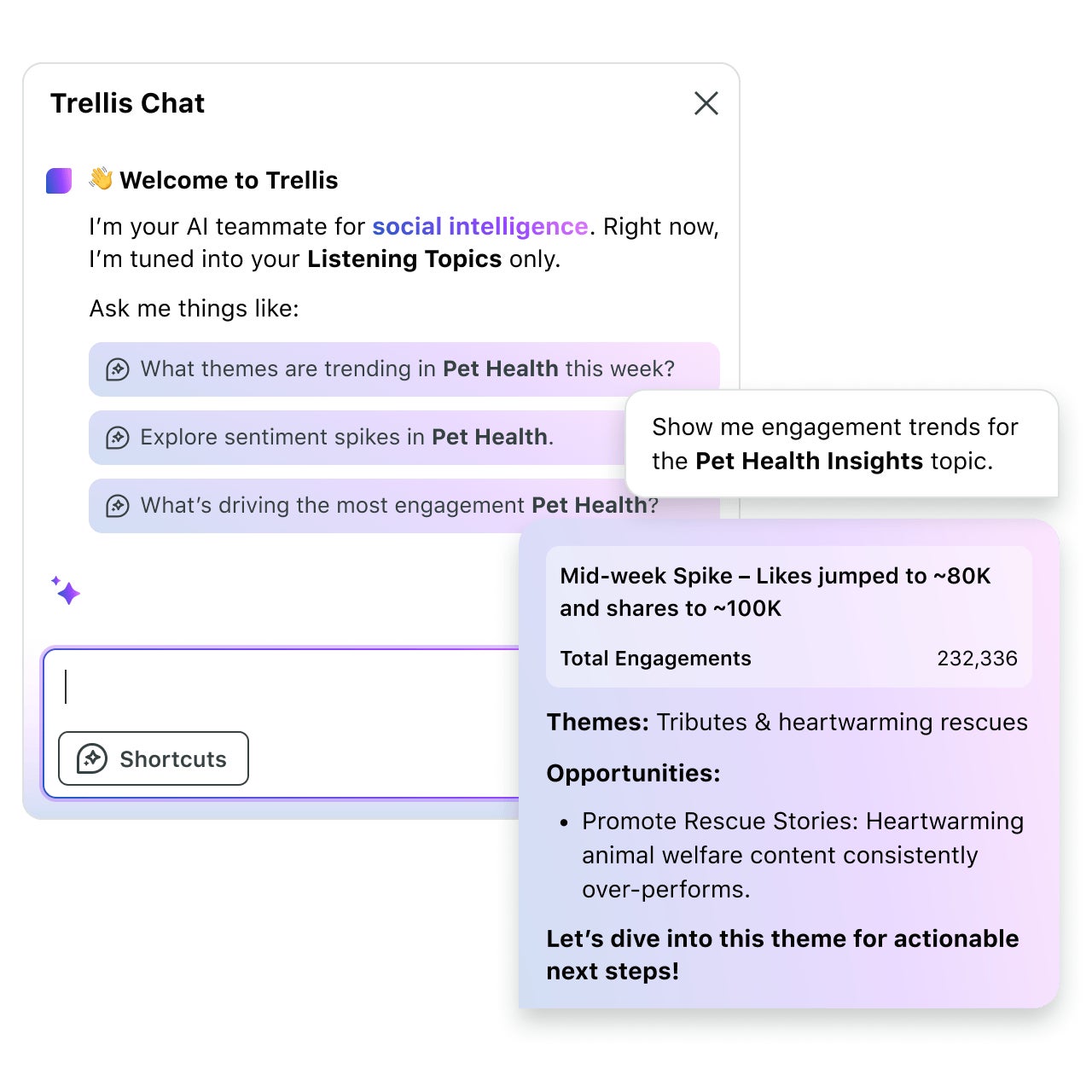
UI of Sprout Social's Trellis Chat helping the user collect insights about their Listening Topics within the platform

Instead of manually analyzing competitor activity, you can ask Trellis questions about emerging themes, audience sentiment or content performance and get tailored, actionable recommendations in seconds.

By streamlining workflows like market research, trend analysis and competitive monitoring, Trellis helps teams move from reactive reporting to more proactive, insight-driven decision making. With faster access to insights and clearer context, teams can spend less time on manual analysis and more time driving strategic decisions.

Stop sifting. Start leading. Request a demo now to see Trellis in action.

Request a demo

Benefits of AI agents for marketing and customer care

According to The 2025 Sprout Social Index™, 93% of social practitioners now believe AI is a crucial tool to help alleviate creative fatigue, the benefits of agents extend far beyond simple automation.

Increase efficiency

While agents represent the next generation of automation, they are part of a broader ecosystem of social media AI tools designed to handle the repetitive work that eats up your team’s day:

  • Responding to common customer inquiries
  • Scheduling and publishing content
  • Generating performance reports

Sprout Social’s Smart Inbox combines AI-powered message classification with automated rules to prioritize, tag and route incoming messages, helping teams focus on conversations that need a human response.
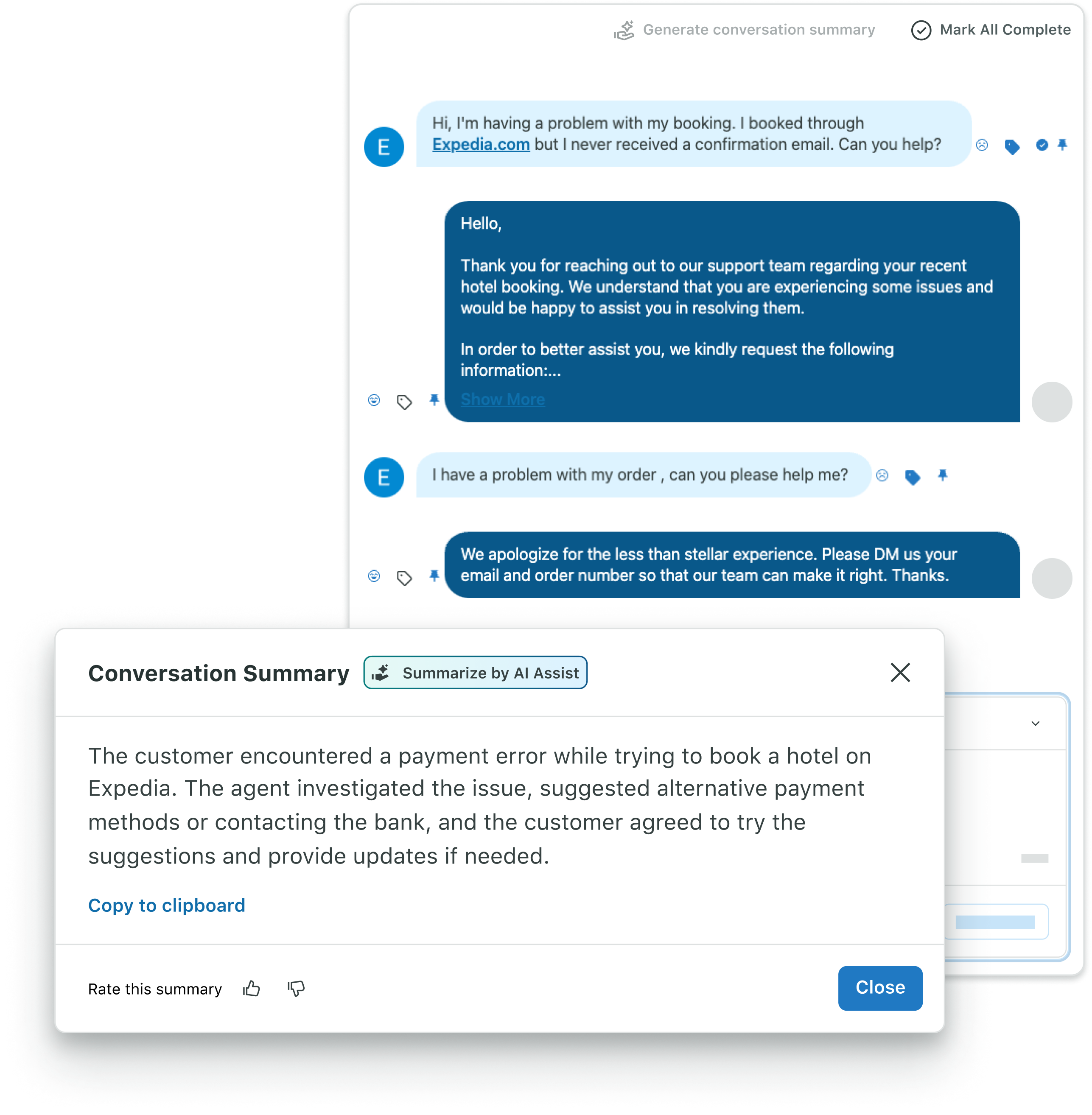
UI of a Sprout Social Customer Care conversation summary catching up a customer care rep on what conversation a customer had up to that point

Improve decision making

Agents process large volumes of data and surface what matters. While marketers currently focus AI use on content creation, the real potential lies in analysis to garner timely audience insights. For social teams, that means:

  • Identifying trending topics through social listening
  • Detecting sentiment shifts in customer conversations
  • Recommending optimal posting times based on audience behavior

The transition to these agents allows for more strategic focus, signaling a major shift in the future of AI in marketing where humans manage outcomes rather than manual tasks.

Personalize engagement

Agents make personalization scalable. They tailor responses based on customer history, adjust content recommendations to match user preferences and update campaign messaging based on live engagement signals.

For example, Sprout Social uses AI Assist to help generate on-brand content and recommendations, making it easier for teams to scale employee advocacy while maintaining a consistent voice.
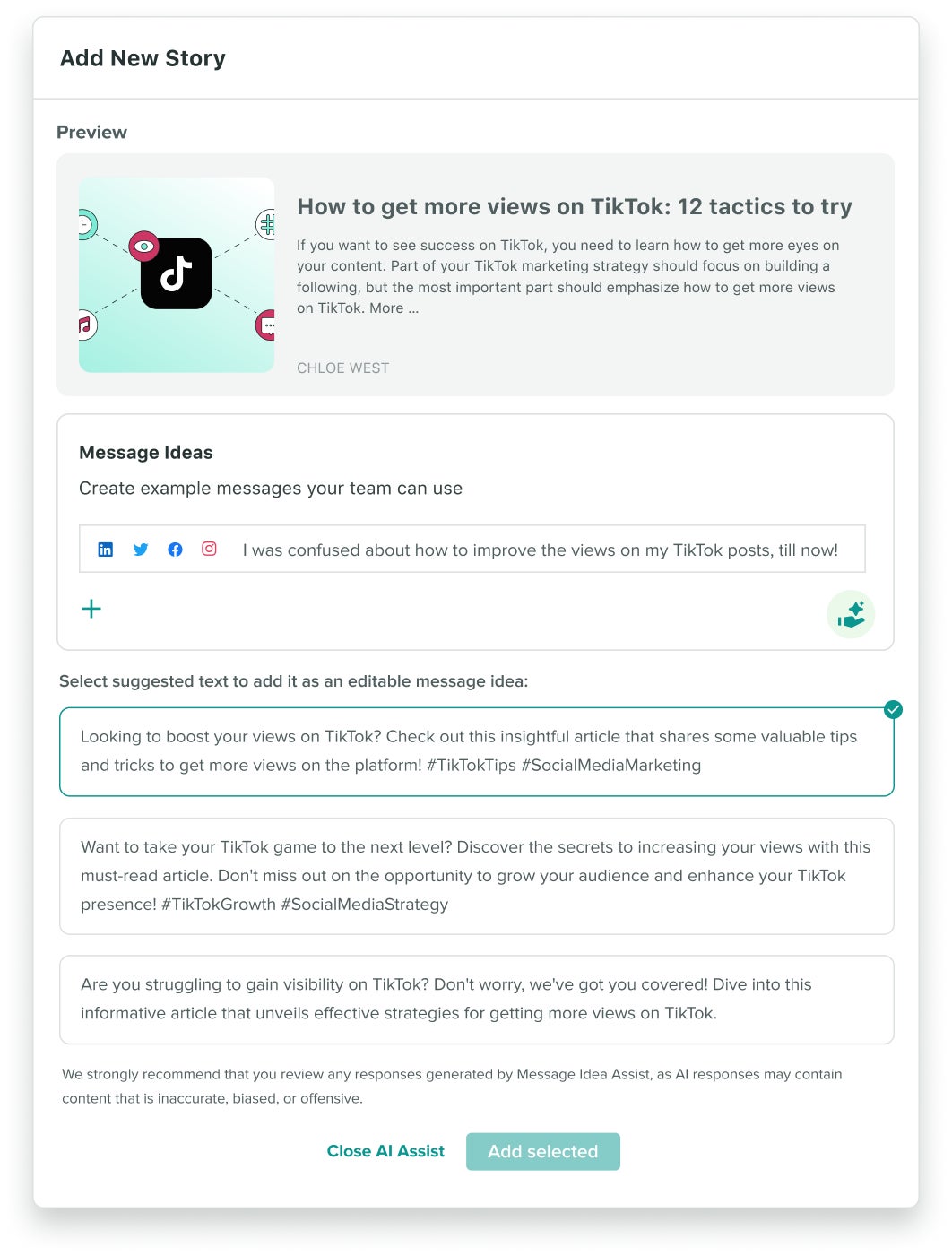
UI experience of Sprout's Employee Advocacy suggesting new caption ideas for adding a new story to be shared

Provide 24/7 coverage

Agents don’t clock out. They monitor conversations, flag urgent issues and respond to customers around the clock. Consumers are highly receptive to this: According to Sprout Social’s Q4 2025 Pulse Survey, 69% of social media users are comfortable with companies using AI to deliver faster customer service

For global brands managing multiple time zones, always-on coverage isn’t a luxury, it’s a requirement.

AI agents vs AI assistants vs chatbots

Feature Chatbots AI assistants AI agents
Autonomy Low—responds to queries Medium—handles tasks with guidance High—works independently
Complexity Simple Q&A Multi-turn conversations Complex workflows
Learning Rule-based Limited adaptation Continuous improvement
Tool use Minimal Some integrations Extensive tool access

Autonomy and control

Chatbots are reactive. Assistants are interactive. Agents are proactive. A chatbot waits for your question. An assistant walks you through a task. An agent completes the task without being asked twice.

Task complexity

  • Chatbots: Single-turn responses and FAQs
  • Assistants: Multi-step tasks with user guidance at each stage
  • Agents: End-to-end workflow automation with no hand-holding required

Learning and adaptation

Chatbots run on static rules that need manual updates. Assistants adapt slightly based on immediate feedback. Agents use continuous learning—every completed task makes the next one better.

Use cases for social teams

Audience insight agents

These agents scan social conversations to surface what your audience cares about. They monitor brand mentions and sentiment, identify emerging trends and track competitor activity—continuously, without manual effort.

The transition to these agents allows for more strategic focus.

The 2025 Sprout Social Index™ found that 54% of marketing leaders believe AI will empower them to grow their teams by shifting roles away from administrative tasks toward highly specialized work.

Customer care agents

Customer care agents triage incoming messages, route them to the right team and respond instantly to common questions. Complex issues escalate automatically to a human agent. This keeps response times fast and service quality consistent, even during high-volume periods.

Content and campaign agents

These agents support the full content lifecycle. They generate ideas based on trending topics, optimize posting schedules and run A/B tests on content variations.

Sprout Social’s ViralPost® capability applies this logic to timing. It automatically publishes content when your specific audience is most active, rather than relying on generic best-practice windows.

Measurement and analytics agents

Analytics agents compile cross-channel performance data, generate automated reports and alert your team when a metric moves significantly. Instead of pulling numbers manually, you get a clear picture of what’s working—delivered to you.

What defines an AI agent?

Autonomy and goal orientation

Agents operate independently. You give them a goal, not a script, and they figure out how to reach it. They adapt when obstacles arise, making decisions based on context rather than waiting for instructions at every step.

Reasoning and planning

Many agents break complex goals into smaller tasks using planning or intermediate reasoning steps, working through them in a structured sequence. Think of it like a project manager who maps out every step before touching a single deliverable.

Memory and context

Agents hold onto context across a conversation or task. Short-term memory tracks what’s happening right now. Long-term memory stores past interactions and learned preferences. This is what allows an agent to give you a relevant response on day 30 that reflects what it learned on day one.

Tools and action

Agents connect to external tools to take real-world action. That includes:

  • Searching the web or querying databases
  • Calling APIs to retrieve or send data
  • Generating and publishing content
  • Triggering workflows in other platforms

How do AI agents work?

Every agent follows a continuous loop from input to outcome:

  1. Perceive environment: Gather information from inputs, data sources and connected tools.
  2. Set objectives: Translate the user’s goal into specific, actionable targets.
  3. Create plan: Map out the sequence of steps needed to reach those targets.
  4. Execute actions: Use available tools to complete each step.
  5. Monitor progress: Track results and adjust the plan if something isn’t working.

Define goals and plan

The agent starts by interpreting your request and turning it into a concrete objective. From there, it builds a task plan, a sequence of actions ordered by dependency. Depending on the architecture, agents may either plan upfront or iteratively adjust their approach as they execute.

Use tools and act

Once the plan is ready, the agent selects the right tool for each step. It accesses a database, calls an API, generates a draft or triggers a workflow—whatever the task requires. Action execution is where the plan becomes a result.

Learn and reflect

After completing a task, the agent evaluates what worked. Feedback loops feed that learning back into future runs, making the agent more accurate and efficient over time.

ReAct and tool loops

The ReAct framework—short for Reasoning and Acting—has agents alternate between thinking and doing. The agent reasons about the next step, takes an action, observes the result and reasons again. This creates transparent, traceable behavior you can audit.

ReWOO and upfront planning

ReWOO stands for Reasoning Without Observation. Instead of thinking step by step, the agent plans the entire workflow upfront before executing anything. This approach is faster for predictable tasks because it batches actions together rather than pausing to evaluate after each one.

Core components of an AI agent

Model and prompts

The foundation model—usually a large language model (LLM)—is the brain of the agent. System prompts define its behavior: what it’s allowed to do, how it should respond and what constraints it operates within. Prompt engineering is the practice of designing those instructions to keep the agent focused and on-brand.

Memory systems

  • Short-term memory: Holds the current task context and conversation history.
  • Long-term memory: Stores past interactions and user preferences in a vector database for future retrieval.
  • Episodic memory: Recalls specific past events and their outcomes to inform current decisions.

Tool and API access

Agents need access to external resources to act. Common tool categories include:

  • Data retrieval and analysis tools
  • Content generation and editing tools
  • Communication and messaging APIs
  • Workflow automation platforms

Planning and orchestration

An orchestration layer coordinates all the moving parts. It schedules tasks, manages dependencies and ensures actions run in the right order. Without orchestration, a multi-step agent workflow falls apart.

Guardrails and supervision

Safety constraints keep agents from going off-script. Key safeguards include:

  • Output validation: Checks responses against rules before the agent acts.
  • Permission systems: Limits what the agent is allowed to do.
  • Human oversight: Requires manual approval for high-stakes decisions.

Types of AI agents

Simple reflex agents

A simple reflex agent responds to a specific input with a predetermined action. This is rule-based automation—if X happens, do Y. It’s the foundation of auto-replies and keyword-triggered responses.

Model-based reflex agents

These agents maintain an internal model of their environment. They track how the world changes over time, which helps them make better decisions than a simple reflex agent that only sees the current moment.

Goal-based agents

A goal-based agent evaluates multiple possible actions and chooses the one that moves it closest to its objective. It’s not just reacting—it’s strategizing.

Utility-based agents

These agents go further by weighing trade-offs. Instead of just reaching a goal, they maximize overall value—balancing speed, cost and quality to find the most efficient path for scaling AI in business operations.

Learning agents

A learning agent improves through experience. It uses reinforcement learning and model training to adapt to new situations, getting better at its job the more it runs.

Multi-agent systems

Multi-agent systems are networks of agents working together. Each agent handles a specialized task, and they coordinate to solve problems too complex for a single agent. In marketing, this looks like one agent monitoring brand mentions while another drafts responses and a third routes escalations.

Risks, governance and the human element

Automation doesn’t mean abandonment. Marketers must remain vigilant against “AI slop.” According to the Sprout Social Q1 2026 Pulse Survey, low-quality, mass-produced content has led 56% of users to report seeing it often and 50% of Gen Z users to actively unfollow or block brands.

Protect data privacy

Agents access sensitive customer data, which means governance starts with data minimization—only giving the agent access to what it needs. Beyond that:

  • Encryption: Secure all data in transit and at rest.
  • Compliance: Ensure your agent setup meets GDPR and regional privacy laws.

Keep a human in the loop

The most effective agent deployments include approval workflows for critical decisions, regular performance reviews and clear escalation paths to human team members when the agent hits its limits.

Ultimately, Sprout’s Q3 2025 Consumer Pulse Survey data showed that 55% of consumers say they are more likely to trust brands committed to publishing content created by humans.

Reduce bias and ethical risk

Agents learn from training data, and biased data produces biased outputs. Governance is also a matter of brand trust. Sprout’s Q3 2025 Consumer Pulse Survey showed that 52% of global consumers cite undisclosed AI-generated content and the mishandling of personal data as their top two concerns.

Furthermore, in Sprout’s Q1 2026 Pulse Survey, 28% of users say posting unlabeled AI content is the #1 thing they wish brands would stop doing in 2026.

To protect your brand, focus on being upfront with your audience. Clearly labeling AI-assisted interactions isn’t just about following rules. It’s a way to build the “human-led” trust that today’s consumers crave.

Make it a habit to regularly review your agent’s work to ensure its responses stay helpful, inclusive and aligned with your brand’s actual voice.

Prevent tool loops and failure

Three technical risks to plan for:

  • Infinite loops: Agents stuck repeating the same action without progress.
  • Cascading failures: One error triggering a chain of downstream failures.
  • Resource exhaustion: Excessive API calls consuming compute or hitting rate limits.

Build failsafe mechanisms and resource limits into every deployment.

Start using AI agents for your social media strategy

The rise of agents marks a significant evolution in the application of AI in social media, changing how marketing and customer care teams operate by moving from reactive workflows to systems that plan, act and improve on their own. Rather than eliminating jobs, The 2025 Sprout Social Index™ reveals that 54% of marketing leaders believe AI adoption will empower them to grow their teams and add new, highly specialized roles. The teams that understand how agents work, where they fit and how to govern them will move faster and make smarter decisions.

How is your team currently balancing AI efficiency with the need for authentic, human-led creative strategy? Request a demo to explore how Sprout Social and Trellis can elevate your strategy.

The post What are AI agents and why do marketers need them now appeared first on Sprout Social.


from Sprout Social https://ift.tt/1OdIEhQ
via IFTTT

Wednesday, 1 April 2026

The complete crisis management guide for communication leaders

No company wants to face a security breach or a sudden public relations nightmare—but when these moments hit, how quickly and consistently a business responds can make or break its reputation. With social media being the preferred place for news, especially for Gen Z (67%) and millennials (61%), as revealed by the Q1 2026 Pulse Survey, it’s more critical than ever for companies to align their response strategies with social channels and actively monitor them as a real-time source of media intelligence.

What sets resilient companies apart in a crisis is how well their teams move together. When PR and communications are aligned with the social team, a company can speak with one clear voice and respond quickly to protect brand reputation. Without that connection, responses slow down and mixed messages take over. The best time to build that coordination is long before you ever need it.

This guide walks you through practical steps for getting your teams aligned ahead of time, so that whether you’re dealing with a regulatory issue or a story that’s gone viral overnight, you’re ready to act fast and stay on message.

What is crisis management?

Crisis management is the strategic, cross-functional process leaders use to identify, assess and respond to unexpected incidents that threaten brand reputation, customer trust or business operations.

Managing a crisis is no longer a solo mission. It takes full alignment between PR, communications, social and customer service teams because gaps between a formal PR statement and a social media post or comment can open the door to misinformation. A unified strategy closes that gap, ensuring the real-time insights gathered from social and media channels directly shape the broader messaging crafted by comms.

This synergy is particularly critical in highly regulated sectors such as finance, healthcare and government, where a single communication lapse can lead to a reputational crisis and legal compliance penalties.

An internal crisis management strategy can help a company resolve an incident—and keep its reputation intact.

Pro tip: Use our free three-step crisis management plan template to build out your crisis response team and set updated emergency response protocols.

Get the template

Types of crises to manage

Business crises come in all shapes and sizes. A natural disaster can hit supply chains and disrupt customer orders. A public health crisis can put worker safety at risk. A reputational crisis can damage your standing with loyal customers and negatively impact brand reputation.

The types of crises an organization faces fall into two baskets:

  • Self-inflicted. These crises originate from someone or something within an organization. Think of a customer support person offering terrible service that leads to an angry social post. Or, an employee accidentally clicking on a phishing link in an email, leading to a data breach. Training, internal strategies and protocols eliminate these crises entirely.
  • External events. These crises are harder to stop as they are usually outside an organization’s control. Think of natural disasters, online rumors or network hacks. Still, a solid crisis management strategy can dampen any negative impact.

Communications leaders must prepare for five critical crisis categories:

  • Cybersecurity breaches: Data theft, ransomware attacks targeting customer information
  • Public health crises: External events like pandemics affecting operations and safety
  • Natural disasters: Weather events, earthquakes disrupting business continuity
  • Financial crises: Market crashes, banking failures impacting business stability
  • Reputation crises: Product recalls, campaign failures damaging brand trust

Cybersecurity breaches

A cybersecurity breach is when a company is targeted in a ransomware attack or data hack. These breaches usually have malicious intent, where the hacker(s) gain access to sensitive customer information like credit card details and addresses.

For example, when a hacker breached 23andMe’s database and stole information about millions of customers and threatened to publish the leaked data, it caused a PR nightmare for the company. Not to mention the stress the situation put the victims through.

Eventually, the company overcame the crisis by taking tangible steps, both in their communications to users and in increasing data security. The company also published a detailed blog post keeping users and the public informed on exactly how it was addressing the situation, including bringing in third-party forensic experts.

The incident had a knock-on effect. Other DNA test companies like MyHeritage and Ancestry followed suit and implemented two-factor authentication to avoid a similar breach and PR crisis.

Public health crisis

Public health crises are classed as external crises. When a public health emergency strikes,  whether in the form of a disease outbreak, contaminated product or a food safety scare, businesses are thrust into the spotlight, whether they’re ready or not. Companies in regulated industries like government, food and beverage, and healthcare, or even in retail, face particular scrutiny, as the public looks to them for answers and accountability.

The businesses that come out with their reputation intact are those that communicate early, honestly and consistently. They acknowledge the issue, outline the steps they’re taking and keep customers informed as the situation evolves. Staying silent or being slow to respond, on the other hand, can turn a manageable situation into a full-blown reputational crisis.

FreshRealm Inc. experienced this firsthand in October 2025 when Listeria concerns prompted a recall of its ready-to-eat chicken fettuccine Alfredo meals, sold under the Home Chef and Marketside brands. The investigation also traced the source of contamination back to their pre-cooked pasta supplier, Nate’s Fine Foods, who issued a press statement to explain the situation and next steps.

Natural disaster

Natural disasters like storms, hurricanes, flooding and tsunamis are beyond the control of any business, but they can still negatively impact operations and reputation.

A Pentland Analytics study of 71 major public companies found that those reporting financial damage from a significant flood lost an average of 5% in shareholder value (a combined loss of $82 billion) within a year.

While natural disasters are beyond anyone’s control, how a business responds is not.  Acknowledging the impact openly signals accountability and builds the kind of trust that carries a brand through its most difficult moments. Having clear internal protocols in place before disaster strikes and using every available channel to communicate, from social to email, to provide timely updates, is paramount. It’s equally essential to strike a right balance so as not to add to the noise and leave space for local government and emergency services to communicate critical information.

Financial crisis

Financial crises stem from poor internal management or external factors like market fluctuations and economic downturns. These crises threaten business stability and, in some cases, lead to insolvency, bankruptcy and/or mass layoffs, as was the case when the Silicon Valley Bank collapsed.

X post from journalist Brian Roememele about the mass layoffs affecting a tech company when the Silicon Valley Bank collapsed.

For context, in 2023, Silicon Valley Bank (SVB) collapsed after a poorly handled press release prioritized fundraising over customer transparency, fueling panic. The panic led customers to withdraw $42 billion in a single day. By that afternoon, the bank had a negative balance, forcing a government intervention to guarantee deposits. Within three weeks, SVB was acquired by First Citizens Bank.

The SVB crisis demonstrated that siloed communication can produce messaging that signals distress rather than stability. To prevent narratives from spiraling, companies must pair robust contingency plans with transparency. By integrating PR, social, legal and leadership teams, you can ensure every external touchpoint reinforces confidence and protects the brand from escalating panic.

Reputation crisis

In a hyper-connected economy that’s catalyzed by social, reputational damage can go far beyond bad press. It can set off a ripple effect that erodes consumer confidence, and when left unchecked, can quickly escalate from a temporary PR setback into a lasting loss. But when handled with care, a well-executed response can transform a crisis into a brand-building opportunity.

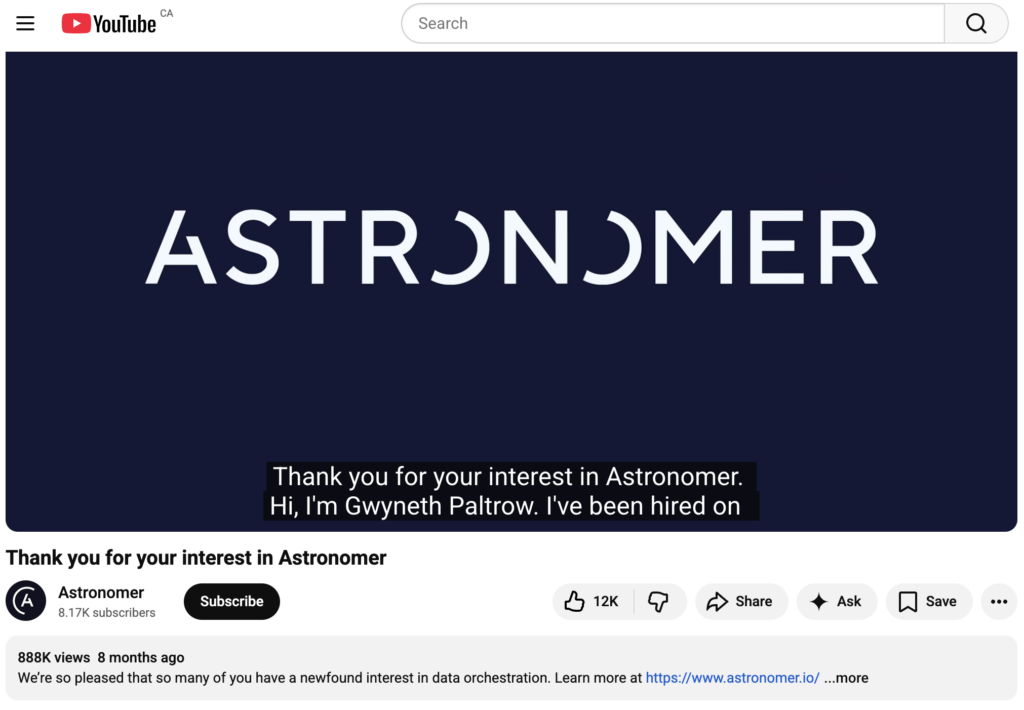
Case in point, the controversy Astronomer, a data infrastructure company, found itself in 2025 after a Coldplay “kiss cam” video featuring the company’s former CEO and HR Chief went viral on social. From radio to television, the controversy made headlines everywhere. But Astronomer responded with notable speed and strategy. It asked its CEO to resign within days and brought in an interim CEO, which publicly reinforced expectations around leadership accountability. By distancing the brand from the individuals involved and taking decisive action early, Astronomer contained the initial fallout and set the stage for a more controlled response.

It then launched a creative campaign featuring Gwyneth Paltrow, which used humor to acknowledge the moment while redirecting attention to its core offering, data workflow automation software Apache Airflow. This approach effectively shifted the narrative from scandal to savvy marketing, driving a surge in visibility and largely neutral-to-positive media coverage.

Astronomer's crisis management video that was part of the creative campaign featuring Gwyneth Paltrow, which used humor to acknowledge the moment while redirecting attention to its core offering, data workflow automation software Apache Airflow.

The 6 stages of crisis management

Effective crisis management relies on early detection, flexibility and adapting communication to fit the incident. Here are the six stages every marketing leader should master:

Stage Primary Focus Key Actions Timeline
Pre-crisis Prevention & Preparation Build team, create templates, conduct training Ongoing
Crisis identification Rapid Assessment Determine scope, impact and cause First 30 minutes
Assessment & evaluation Strategic Planning Answer who, when, how, where, why First 2 hours
Response Controlled Communication Execute plan, release information First 24 hours
Brand reputation Monitoring & Adaptation Track sentiment, respond to feedback Throughout crisis
Learning & adaptation Process Improvement Analyze performance, update plans Post-crisis

1. Pre-crisis

A thorough crisis management plan is an integral part of avoiding self-inflicted crises and minimizing the impact of external events. When developing a plan, effective crisis management requires more than just a reactive strategy. It demands foresight. Integrating predictive social intelligence enables your teams to anticipate shifts, minimize the impact of external events and develop comprehensive plans for every contingency.

This plan can be used to train every employee to respond to a crisis and lessen the damage to your company and customers.

Pre-crisis preparation involves:

  • Understanding your customers and potential crises your business is at risk from (self-inflicted and external)
  • Creating and monitoring a company-wide crisis management plan
  • Appointing employees to your crisis management team with specific roles and responsibilities
  • Conducting training (like mock crisis responses) to test the appointed team. These mock exercises will ensure your team is capable of carrying out the crisis management plan successfully

Also, consider having a predefined communications package for emergencies. These include:

  • Templates with pre-loaded information for press releases and social media announcements can give your team a head start in executing timely communication.
  • Saved Replies are perfect for answering common customer questions quickly.
  • Automated chatbots keep every communication during a crisis on-brand. Chatbots can mitigate the early stages of crisis communication and leave your team to navigate crisis identification and next steps.

If your company doesn’t have a crisis communication plan in place, use Sprout’s template for building a crisis management plan to get started.

2. Crisis identification

If a crisis does land on your company’s doorstep, assess it immediately. Start by determining what you know about the crisis so far, what caused it and how many customers will be impacted. Also ascertain how much of the company it will impact. Social channels are often at the heart of crises given that most consumers consider them a trusted news source, so keeping a pulse on social chatter can help your team answer these questions.

Tools like NewsWhip by Sprout Social can do this automatically, enabling brands to proactively predict situations across social and media channels that can escalate, so your team can act before they become a full-blown crisis.

Crises move fast and new information can trickle in every hour (or minute). This basic information will help your crisis management team shape its response and next steps. Don’t wait to know everything before issuing a response and starting damage control.

3. Assessment and evaluation

Go deeper to gather information about the possible impacts of the crisis. Think about your customers and how to communicate with them effectively. Answers questions like:

  • Who? Who are the customers you should be talking to right now? Who is the person on your crisis management team in charge of organizing these comms?
  • When? When will we announce what we know about the situation? (Hint: sooner is always better)
  • How? How will the company share information? Will it be short social media posts or a more detailed press release?
  • Where? What platform should the team use to make updates and announcements?
  • Why? Is the crisis significant enough to share information publicly on social media, or should you talk to customers through other platforms like email? If so, why?

These answers will help your crisis management team determine who to prioritize and which platforms to use to communicate with customers. It’ll also help you elevate your crisis management plan.

4. Response

Respond to a crisis quickly, firmly and according to your management plan. Your response should also be measured.

For example, taking ownership of a situation by apologizing should only be done after some due diligence. Any statement issued should include next steps and positions if you are certain they will be followed. False promises lead to bad publicity and can make the situation worse.

Release information as soon as it’s available. For example, if your company experiences a cybersecurity breach, don’t wait to update your customers. Reiterate the measures your company is taking to mitigate the situation (like updating security procedures) each time to remind them that your priority is safeguarding their information.

Monitor customer communication online and reply to any social media comments as soon as possible. This brings us to our next point.

5. Brand reputation

Focus on your brand reputation the second a crisis starts, as it can do lasting damage to your brand image. Monitor how customers (and the wider public) are responding to your brand from the earliest stage of the crisis and adapt your strategy accordingly. For example, if customers are posting on X about the lack of transparency, consider releasing a statement or social media post with more information.

Thankfully, monitoring brand reputation is easier than pressing refresh on your social feed every 30 seconds. A brand monitoring software can automate spotting and managing potential crises.

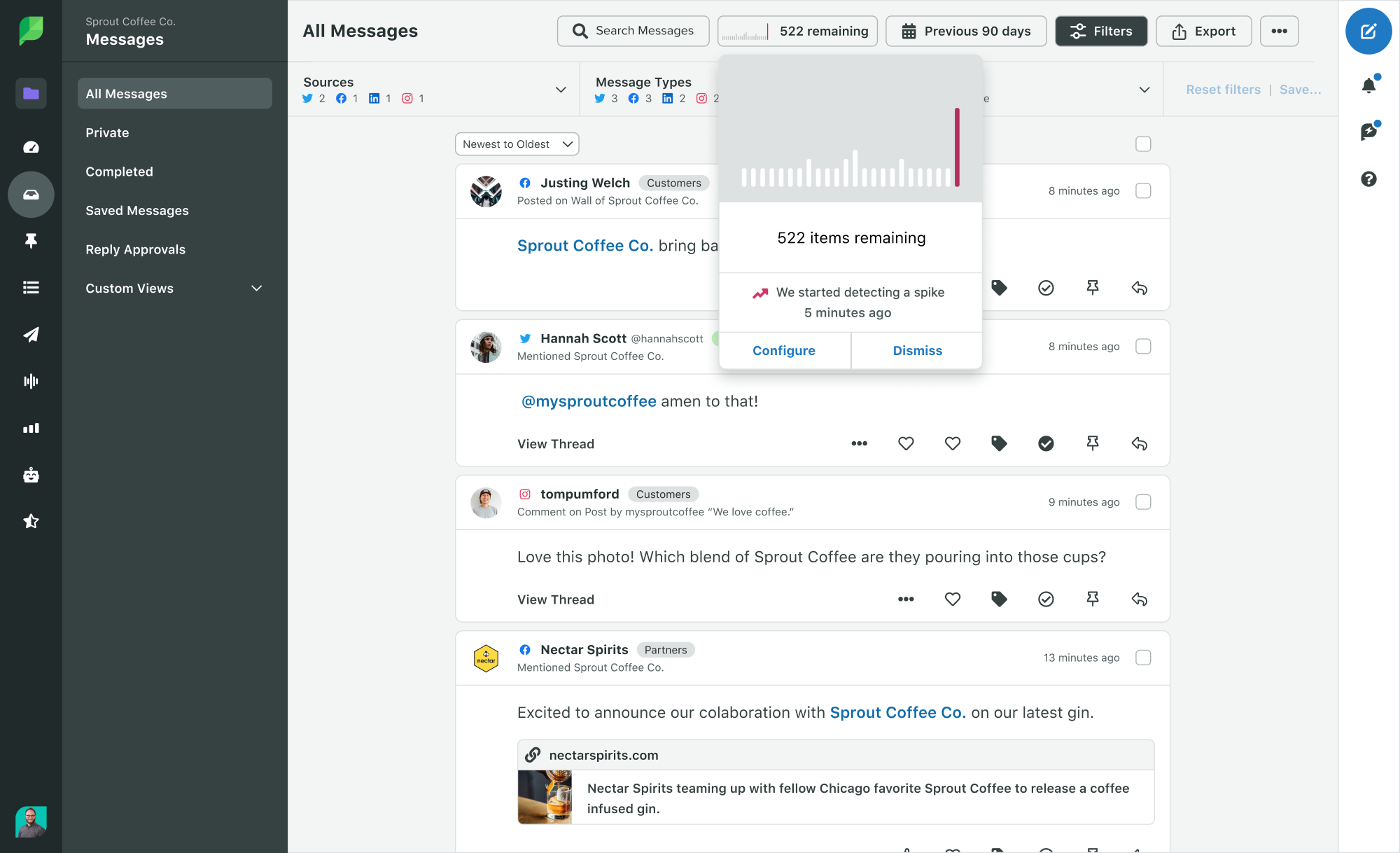
Further, Sprout’s message spike alerts in the Smart Inbox notify you of an influx of incoming messages and mentions on socials. Your crisis management team can use this information to respond to posters quickly inside the Smart Inbox before these complaints turn into a larger problem.

Sprout Social's dashboard shows message spike detection. In the image you can see the Smart Inbox and a message alert that reads: We started detecting a spike 5 minutes ago.

6. Learning and adaptation

The final step of the crisis management process is reflecting on what went right (and wrong) to improve processes for next time.

Ask yourself:

  • What parts of the crisis management plan were executed correctly?
  • What were the main challenges and how can they be better planned for?
  • Did the crisis management team have the training/plans needed to succeed?
  • What communications and platforms worked best with our audience?

These answers will help your team spot any wins (and weaknesses) and give you a clear understanding of what changes must be made to the current crisis plan.

Want some help? Use our crisis management plan template to guide you through the post-crisis process and sharpen your strategy.

Now you know the stages of a crisis, let’s look at some crisis management strategies to use in a real-life scenario.

4 crisis management strategies for your brand

Every crisis is different. A solid crisis management strategy and how prepared your company is to deal with each scenario can make all the difference.

Here are five ways to build one to protect your brand.

Build a crisis management team

A crisis management team is (arguably) the most important element of any crisis management strategy. It’s your first line of defense when a crisis hits.

To create one, start by building out your sub-team with employees who are comfortable managing people and executing plans. Think about what bases you need to cover (like communications/PR, IT, human resources, operations) and appoint a sub-team leader for each area.

Also appoint leaders for each department (social media, legal, HR, etc). And nominate a crisis manager who will coordinate the response and delegate tasks during a crisis.

Communicate proactively

Your crisis team must decide how the first piece of communication will be phrased, as it will set the tone for the entire response. Let’s imagine your company is hit by a data breach. If your crisis management team prepared a template response during pre-crisis planning, it’s time to use it.

Here’s an example:

“(Your company name) values your business and understands how important the privacy of your information is. During the early morning hours of this morning, our servers experienced a possible data security incident and your information may be involved. We have opened an investigation and will be in constant communication to update you as it progresses.”

Then, think about next steps. During the first crucial hours of a crisis, the team should release more official information, like a press release, which can be used by mainstream media. The goal here is to reach any customers who missed the initial response to the crisis.

Identify the platforms customers are most active on to spread your message more effectively. If your team needs to be trained on other communication styles like press releases and conferences, organize it now.

It’s also important to check if there are regular social media posts or email scheduled to go out. If so, consider pausing them until the crisis is under control. Either do this manually or use Sprout’s “Pause All” button in the publishing settings to do it with one click.

You should also hit pause on any non-crisis communication/campaigns until the crisis is resolved.

Collaborate internally with the crisis team

To keep your brand’s voice unified, ensure there’s cohesion among your comms and social teams and the wider organization. Update the wider company immediately on the situation and provide clear guardrails for external communication. Employees need to be clear that a dedicated crisis management team is leading all responses and collaborating closely with social media teams to ensure consistency across every digital and public channel.

By aligning PR, internal communications and social media teams, you create clarity across the organization and ensure employees defer to authorized channels rather than responding directly to crisis-related comments on social or external inquiries.

This collaboration ensures every single touchpoint, from LinkedIn comments to water-cooler talk, aligns with a singular, stabilized strategy that protects the brand’s market value.

Boost efficiency with a crisis management tool

A crisis management tool can go a long way in ensuring there’s clarity on when and how to respond to a crisis. More importantly, it enables a company to proactively prepare for an emerging PR situation.

NewsWhip’s Trellis Monitoring Agent gives communications and PR teams an early line of sight into emerging issues. It tracks media coverage and maps how stories gain traction across channels, ensuring every team works from a shared, real-time view, without manually following headlines or press mentions as they unfold.

It’s Critical Signals tool analyzes shifts in coverage and engagement to alert teams only when something meaningfully changes, rather than every time a keyword surfaces. The Instant Workspace eliminates the usual scramble by enabling teams to move from alert to a ready-made dashboard with context and sources, with a single click, making it easier to align on quick next steps. The agent’s Active Memory retains previous updates and filters notifications, so teams are only alerted when there’s something new to act on.

Together, these capabilities deliver earlier awareness, reduce manual effort and give teams more space to respond thoughtfully before situations escalate. See the tool in action in the video below.

A NewsWhip by Sprout Social interface that asks what type of search the user is looking to do, a live issue or event, or an ongoing topic or brand.

Similarly, Guardian by Sprout Social is a crisis prevention tool that provides companies, especially in regulated sectors such as financial services, government and healthcare, with compliance-related and brand safety features to manage social interactions securely, with greater confidence.

The tool helps protect sensitive information by enabling teams to enforce brand standards and securely collect necessary data, so you’re able to operate within industry guidelines confidently and maintain customer trust.

It streamlines compliance workflows within social customer care and proactively shrinks the risk of individual agents inadvertently using inappropriate or non-compliant language. Plus, it enables teams to easily access and archive posts and user activity directly within the platform.

Apart from this, Sprout’s analytics dashboard tracks engagement metrics like reach, clicks and views across all crisis communications. This data reveals which posts and platforms delivered your message most effectively to affected audiences.

Modern crisis management tools like Sprout transform how comms and marketing teams respond to emergencies with:

  • Real-time sentiment monitoring: Sentiment analysis automatically tracks whether brand mentions are positive, negative or neutral, with keyword alerts that ensure you never miss critical conversations.
  • Unified message management: Sprout’s Smart Inbox centralizes customer messages across all platforms, enables message assignment and includes Collision Detection to prevent duplicate responses.
  • Automated response capabilities: Sprout chatbots handle common questions instantly, freeing your team to address complex crisis communications.
Example configuration of a Sprout Social chatbot where you can build the flow based on the responses you want

Crisis management separates reactive brands from industry leaders

The scenarios in this guide aren’t hypothetical. They’re happening right now to unprepared organizations.

A crisis management strategy allows your company to take control of any crisis the moment it hits. Crisis team leaders will have a blueprint to handle different situations so employees stay on the same page with communication and messaging. This pre-planning ensures every press release, social media post and email to customers follows your management strategy.

See how your team can get early visibility into the emerging stories and signals shaping public attention, and move quickly before they affect your brand by booking your demo for Newswhip by Sprout Social.


The post The complete crisis management guide for communication leaders appeared first on Sprout Social.


from Sprout Social https://ift.tt/DeLf5gd
via IFTTT