Thursday, 7 April 2022

5 tips from the man behind #Sprinklegate

Disclaimer: embedded posts in this article contain explicit language.

Rich Myers describes himself as the “Pablo Escobar of confectionery.”

Myers’ high profile “criminal career” began in October 2021 when his Leeds-based bakery Get Baked was reported to a local Trading Standards agency for their use of contraband.

The contraband in question? Illegal sprinkles containing E217, a food colouring substance banned in the UK.

Instead of shying away from the crisis, Myers took to the brand’s Facebook profile to report on what happened in his own unfiltered way. Customers, new fans and even former Great British Bake Off contestants were quick to offer their support. Naturally, it wasn’t long before #Sprinklegate became a viral sensation.

After 24 hours, Get Baked’s Instagram following ballooned from 4,000 to 68,000 followers. Myers became an overnight sensation and a champion of the people—racking in fans worldwide.

Soon, media outlets picked up the story as the unruly baker’s star continued to rise. The BBC’s #Sprinklegate coverage was the broadcasting company’s top-viewed article of 2021.

In the wake of his newfound fame, Myers treated every moment in the limelight as a business opportunity. We spoke with him to get a glimpse behind the curtain into his unusual strategy.

Here are five tips Myers shared to help marketers (and fellow notorious lawbreakers) sprinkle ingenuity into their social media strategy.

1. Find unique and memorable ways to connect with your audience

Myers’ primary way of connecting with his audience is by creating shared rivals to forge camaraderie. As the old saying goes, an enemy of my enemy is my friend.

Myers and Get Baked fans agree enemy #1 is Trading Standards. He also created a slew of other anonymous enemies, like Dan and Danielle, using the same technique. And it works—drawing in ample followers, likes, comments and shares.

His tongue-in-cheek campaigns against his foes are playful ways to ensure his fans remain firmly on his side.

The philosophy behind his strategy makes sense, even if his tactics seem unconventional. You should identify which shared enemies—or experiences—you have with your community. And if you can’t think of any, take a cue from Myers and make one up.

2. Brand your business

From the beginning, the Get Baked brand was unforgettable. It grabs your attention and doesn’t let go. That’s all part of the plan. Myers had a clear vision of what he wanted to create and went all-in.

Even as the bakery morphed into what Myers describes as “a social media company” that sells baked goods, the brand’s voice never wavered. It’s just as dry, genuine, unapologetic and self-deprecating as its early days.

The Get Baked attitude carries over into Myers’ new business ventures too. For example, his new sprinkles company, aptly named Expensive Sprinkles, might be the world’s first luxury sprinkles brand. Myers also has a Get Baked cookbook underway, which we speculate could contain the most foul language of any cookbook ever published.

Get Baked is marketing magic: a one of a kind, instantly recognizable brand.

When establishing your brand’s presence on social, find a voice that you can own and stay true to it in everything you post.

3. Be authentic

During the Sprinklegate crisis, no one ever accused Myers of seeming like he was coached by a PR team. In fact, one PR professional told him he was “playing it all wrong.”

Myers disagreed, and saw his boldness and authenticity as the best way to react.

And that’s why his fans love him. His response wasn’t media-trained and polished—it was how a real person would react to a ridiculous sprinkle debacle.

His rawness continues to endear the Get Baked community. Each new post is as genuine as the last.

There’s no easy way to tell you this so I’ll just say it.Movie Night 2.0 is back on the menu this Friday, and it’s…

Posted by Get Baked on Tuesday, March 15, 2022

As Myers explained, “I don’t sit there trying to construct posts for half an hour. I don’t think, ‘Is it the right time of day to post it?’ I don’t really do any of that. I just write a post very quickly…the way I say it. I’m able to write in a very relatable way for our audience.”

Social media users are increasingly sophisticated and can smell inauthenticity a kilometre away. Follow Myers’ lead and talk like a human, especially in the face of a crisis.

4. Be transparent

An important Get Baked lesson: Be honest with your community. It’s okay to admit when you’re scared or when you screw up.

Myers was never afraid to admit how terrified he was when Trading Standards began their investigation. He was transparent and straightforward about what was going on and how he was feeling.

And he doesn’t hold back from sharing the growing pains caused by Get Baked’s rapid growth either.

Own up to the challenges you’re facing. It shows your community they can trust you, and they’ll be more likely to offer you grace.

5. Make the most of the moment

When your cultural moment comes, seize it. That’s what Myers did.

Here’s the advice he shared with us:

“If [you’re] going through a similar situation where…[you] end up with a global audience, absolutely forget everything apart from that. You only get one chance to maximize it. And if you don’t do it while it’s happening, you will never catch it…it’s gone.”

Bake individuality into your DNA

There’s only one small baked goods business that’s a household name in the UK. Why? Because Get Baked is impossible to replicate.

Myers is unapologetically himself on social media. Which makes his brand stand out while many others are starting to sound the same.

There’s no way to hold people’s attention if you’re doing the same thing as everyone else. And you want people to notice your brand.

As Myers puts it, “We’re in a world where…if it hasn’t gone viral online, it hasn’t happened.”

Looking for more words of wisdom? Listen to Myers’ entire interview on the Social Creatures podcast by Sprout Social.

The post 5 tips from the man behind #Sprinklegate appeared first on Sprout Social.


from Sprout Social https://ift.tt/A52FLU4
via IFTTT

Greater platform accountability could help stop the spread of ‘Finfluencer’ misinformation


Did you know Solo Ceesay, co-founder and Chief Operating Officer at Calaxy, is speaking at TNW Conference this summer? Check out the full list of speakers here. The world and its global economy are chiming with wild variety, and with that comes a miscellany of rules and regulations reflective of the jurisdiction one is trying to govern. What works for A doesn’t necessarily work for B, and as you can imagine, these systems are further fragmented as we engender a new digital economy in the age of social media. Fractionalization and a greater willingness to share intellectual property have created…

This story continues at The Next Web

from Social Media - The Next Web https://ift.tt/CIP62g3
via IFTTT
Wednesday, 6 April 2022

6 masterful examples of brands selling on Facebook Shops

A few years ago, we were more selective about when/where we checked out. Today, ecommerce has become an almost daily occurrencea trend quickly evolving into social commerce.

In 2020, Facebook, Instagram, and Pinterest revamped their shopping tools to help retailers capitalize on this trend. And product-based brands are flocking to this new technology in droves, with 73% of businesses currently selling on social platforms.

In the following paragraphs, we’ll take a look at six examples of notable brands that are taking advantage of Facebook Shops to reduce friction in the buying process and drive sales.

How social commerce is changing the game

Until recently, once we clicked on a product link, we had to first determine if it was secure and then dig up our wallets, pull out our physical credit card, and enter in all the required information before completing a purchase. These days, the advent of tools like ApplePay, PayPal, GooglePay, and others have streamlined the process even further — making the barrier between you and that cute pair of shoes you’ve been eyeing tantalizingly low.

The emergence of social commerce has made this slippery slope even slipperier by infiltrating the online spaces where we spend the majority of our web-surfing hours. A recent survey found that 46% of consumers anticipate using social platforms’ in-app shopping features more this year.

What are Facebook Shops and how do they work?

One of Facebook’s latest features, Shops are free virtual storefronts that allow businesses to streamline the customer experience by either linking them to the business’s existing website or, in the U.S., by enabling checkout directly from Facebook.

Many common ecommerce platforms (e.g., Shopify, OpenCart, GoDaddy, etc.) integrate with Shops, making set up a breeze by allowing brands to quickly import their catalogs. Businesses can then link to products in their content, run sales, and offer assistance via Messenger or WhatsApp.

Sprout’s integrations further simplify the process, helping brands add product links to their content and maximize their reach with organic post targeting.

Insert a product into your message

6 Facebook Shop examples you can learn from

At this point, you might be wondering how you can hop on the bandwagon to expand your reach. Take a cue from the following cutting-edge brands that are making the most of Facebook Shops.

1. David Outwear tags individual products in their in-feed posts

David Outerwear is a men’s clothing retailer, focused on leather jackets, coats and accessories.

They primarily promote their products on Facebook by tagging them in their content. This is a simple, no-frills tactic that any product-based brand can execute.

As potential customers scroll through their feeds, if an image catches their attention, they can quickly ascertain the price and product details without having to leave the platform. Not only does this facilitate a better user experience, but it also pares down the customer journey to the most essential elements.

You can tag featured products when you create a post or retroactively tag them in existing posts. Facebook recommends tagging fewer than five products per image.

Classic shapes prove a golden rule – The supreme excellence is simplicity! 🙌🏻 #styleinspiration

Posted by David Outwear on Thursday, January 13, 2022

2. PinkTag goes live to showcase their products

PinkTag is a Louisville, Kentucky-based online women’s clothing boutique.

They host Facebook Lives several times a week to showcase their products, engage with customers, and offer discounts.

Integrating livestream shopping into your social commerce strategy is a no-brainer for retailers that want to support their customers through the buying process. This option might make sense for your brand if your products are complex, nuanced or especially high-ticket. Engaging with customers in real time gives you the opportunity to address objections, answer questions, and generally highlight your products’ unique selling points.

This format allows brands to create product playlists that customers can interact with to purchase directly from the live-streamed event.

Meta says they expect brands to generate $500 billion in revenue from Live Shopping events by 2023.

3. Rothy’s organizes their Facebook Shops storefront with collections

Rothy’s is a trendy sustainable shoe brand that offers men’s, women’s and children’s styles.

They use collections to organize their robust Facebook Shops product catalog. Collections give brands the opportunity to curate specific, related products to make browsing and buying easier. For high-end brands that want to offer an exceptional customer experience, these sets of featured products can go a long way.

If you’re looking for a way to make your Facebook Shops storefront more user-friendly or feel more like your website-based experience, consider whether you might start using or expand your repertoire of collections.
Rothy's Facebook Shop features collections

4. Pixie Mood drives social commerce engagement with tagged video posts.

Pixie Mood is a cruelty-free women’s accessory brand that specializes in vegan leather and other sustainable materials.

They regularly use videos to promote their products in the Facebook feed.

With Facebook Watch, you can share the same kinds of product-centric videos your audience is accustomed to—but with the added benefit of linking viewers directly to the featured-for-sale items.

Video has long been at the top of social media trend lists—and for good reason. It consistently gets the most engagement on Facebook. So why not funnel all those good vibes toward your products?

Shop something sweet for less! New Winter Sale styles are moving quickly and won't be in stock forever. Act fast if you want a great deal on your next favourite vegan bag! 💓⁠⁠🍬 Rae Crossbody in Chocolate⁠🛍️ Winter Sale

Posted by Pixie Mood on Monday, January 10, 2022

5. John Lewis & Partners goes grassroots with user-generated content

John Lewis & Partners is a UK-based department store and home decor retailer that regularly shares content created by their audience. User-generated content (UGC) is a significant trend in social media these days, with major brands like Starbucks, Wayfair and others leveraging the power of their customers’ voices to expand their reach and engage their customers authentically.

If you’re looking to increase your audience’s trust in your brand or product, UGC might be the way to go. More than three-quarters of people say they trust content created by “average people” more than content created by brands.

Proof that stylish grey sofas and dramatic indoor plants belong together🌴📸: @bamaluzhome#JLHomeProduct code 🔎:Barbican Medium 2 Seater Sofa, Hatton Light Grey – 87132671

Posted by John Lewis & Partners on Wednesday, February 9, 2022

6. MeUndies employs a hybrid approach for featuring products

MeUndies is an online retailer of sleepwear and undergarments for both men and women.

While some brands choose to only link customers from Facebook to their own website to purchase items and others rely exclusively on their Facebook product listings, MeUndies offers the best of both worlds. They link featured products to their Facebook catalog, but also share the associated website URL in their posts.

In doing so, they give customers the option to shop in whichever way feels most organic or comfortable for them. If your brand caters to a wide variety of ages or customers with different levels of tech-savviness, offering both options ensures the best chance of closing a sale.

🅜🅨 🅕🅤🅡🅡🅨 🅥🅐🅛🅔🅝🅣🅘🅝🅔⁠⠀It simply doesn't get any cuter than matching with your pooch. 🐾💖 Our V-Day print, Drawn to You, is…

Posted by MeUndies on Friday, February 11, 2022

Follow the lead of some of the best Facebook Shops

As social media shopping expands in popularity and ROI, other social platforms are expected to begin offering their own versions of these social commerce tools. Brands that don’t want to be left playing catch up should ensure they have a strategy in place now. Following the examples of the brands listed above can give you a leg up on the competition.

If your business wants to engage with and convert more customers in the online spaces they organically occupy, Facebook Shops should be a major component of your strategy. When you’re ready to execute, learn how Sprout can help by uniting your social, commerce and customer care workflows all in one place.

The post 6 masterful examples of brands selling on Facebook Shops appeared first on Sprout Social.


from Sprout Social https://ift.tt/h4mR7ic
via IFTTT

Tuesday, 5 April 2022

12 Facebook video metrics brands need to benchmark right now

Ever wondered if people loved watching your Facebook videos? How many of them skipped your Story videos? Did they even watch it until the end?

These are all great questions to ask when you’re using videos for your Facebook marketing strategy. And your Facebook video metrics can give you the answers you need.

Understanding your Facebook video metrics will help you get a better sense of how well people are responding to your content. It lets you measure the results of your campaign and understand how well your investment is paying off. You can also use these insights to increase the reach, engagement and ROI of your next video.

So what are the video metrics you need to track on Facebook? In this post we’ll give you a breakdown of the most important metrics you should measure for your brand.

How to find Facebook video metrics

There are a few ways you can access the Facebook video metrics of your organic posts.

To view the individual post performance of each video, click on one of the metrics visible under each post. This will open a more detailed view of all the metrics associated with the video.

steps to open facebook video metrics

Another option is to view these metrics from your video library. Click on the “More” button at the top of your page and select “Videos.” From here, you can see all the videos you’ve posted and easily select the one you want to analyze.

Facebook page option to view video gallery

You can see your most popular video highlighted at the top of the page. Scroll down to see all the videos you’ve posted. Once you’ve found the video you want to analyze, click on the “…” button below the video. Then select “View insights” to open up the detailed metrics page.

facebook page video gallery

Additionally, your Page Insights will give you access to other Facebook video metrics such as Facebook Story metrics and Facebook Live metrics. All of your video ad metrics are accessible from the Facebook Ads Manager.

What are good video metrics to track on Facebook?

When it comes to your Facebook video performance, there are no set standards you have to meet. What counts as “good” may vary depending on your industry, your following size and your past video performance. For example, a view count of 1,000 may be low for a brand with 10,000 followers. But it’s a good number for a brand with 2,000 followers.

Ideally, you should use your own data as Facebook video benchmarks so you can compare how your performance changes over time.

1. Video views

This metric tells you the total number of times people watched your video. Your Facebook video view count gives you an accurate picture of how your video performed because it goes beyond reach. That means it doesn’t only show you how many users saw your video in their Feeds but how many of those people actually watched the video.

Keep in mind that this Facebook video metric considers all video views–even ones that lasted for just a few seconds. So it doesn’t give you a full picture of your video performance. But it gives you a Facebook video view rate benchmark that you can use in your campaign measurement.

facebook video insights page

Does rewatching a Facebook video count as a view?

To avoid skewing the data, Facebook only considers unrepeated seconds watched as a view count. That means even if someone rewatches the video, Facebook will only count it as one view.

2. Engagementfacebook video insights page

Engagement is an important metric to track for all types of Facebook videos, including in-feed videos, Stories and Live. It measures how often people interacted with your video through likes, comments and shares.

In the case of Facebook Stories, the native analytics tool looks at all the engagement data over the past 28 days. It counts engagement actions like reactions, sticker interactions, swipe-up actions, profile taps, replies and shares.

This helps you understand how much the content resonated with your audience. Which types of videos see the most engagement? As such, engagement data can serve as Facebook video benchmarks to inform your video content strategy.

3. Audience retention

This Facebook video metric shows you when viewers start to drop off when watching your video. So you can get an accurate reading of how well you managed to retain viewers who actively watched your videos. And you can even pinpoint which sections of the video might have potentially caused them to disengage.

Facebook audience retention graph for video

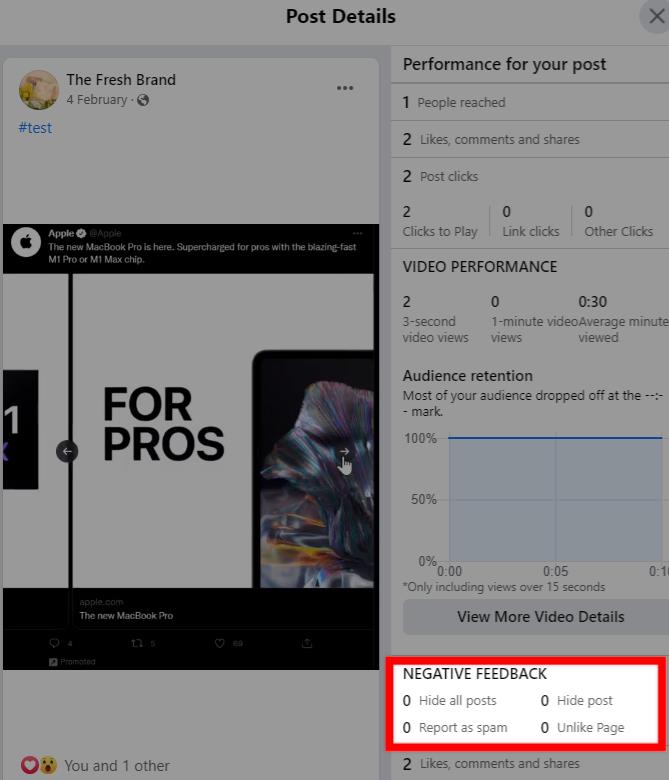
4. Negative feedback

Are people responding negatively to your video? Negative feedback involves hiding your post, reporting it as spam or unliking your Page. This is a crucial metric to track because it helps you identify problematic content that’s losing you fan’s attention.

In many cases, videos with tons of negative feedback may even put your brand reputation at risk. So it’s important to quickly review them and get to the root of the problem.

highlight of negative feedback on facebook video insights

5. Top location and top audience

Viewer demographics information like top location and top audience can help you learn more about your target audience. These metrics give you an idea of the types of people you should target. And they inform how you should tailor your messaging and marketing approach.

6. Swipe-up actions

This metric is specific to Facebook Stories. Swipe-up actions show you how many times people took action from your Stories by swiping up on a link or action button. For example, people may swipe up to “Shop Now.” It’s a useful metric for understanding how impactful your Stories are and how effectively they drive conversions.

Facebook story with swipe up to shop option

7. Saves

Another Story-specific metric to track are Saves which are measured by the total number of people who saved your Story video to their Facebook collection. It’s a good indicator of how much value your Stories are adding to your audience.

8. Peak live viewers

This metric is specific to Facebook Live and shows you the most viewers you had while your video was live. You can expand on this metric to see a graph of how this viewer count changes throughout the live broadcast. So it gives you a clear idea of when viewers start to drop off.

This data can help you find out if viewers are getting restless during a broadcast that’s taking too long. Or it could be a sign that you need to make some changes to your broadcast timing so more people can tune in for the whole thing. It could also be an indicator of the content quality itself.

facebook live video insights

9. Average completion rate

Closely related to the previous metric, the average completion rate helps you understand how many people watched your live video until the end. A low average completion rate suggests that your live broadcasts may not be engaging or well-executed enough. Or you may have broadcasted at a time when people were too busy to watch the entire thing.

You’ll need to find out the specific reason for this low completion rate and experiment with tips to make your live broadcasts more engaging.

10. Page growth

As you create more engaging video content, you’ll gradually see a growth in your fan following. Make sure you’re using Facebook video benchmarks to understand how your content is impacting your page likes.

Facebook also gives you the option to measure page growth so you can see how many followers you gained after a live video session. This is a helpful metric for understanding the impact of your live broadcasts so you know what’s working and what gets people to “like” your page.

11. Ad engagements

If you’re running Facebook video ad campaigns, you should also keep a close eye on your ad engagement metrics. How are people responding to your video ads? This is an important question to ask if you want to maximize the impact of your ads and get more out of your investment.

How much time are they spending watching your video ads? And how many times have people messaged your business after viewing your ads? You can view these crucial video ad metrics using the Ads Manager.

To get a more detailed breakdown of your video ad engagements, you can also use the Sprout Social Facebook Paid Performance Report. This gives you an overview of how much engagement your ads received. Plus, you can also view the number of clicks and web conversions generated from your ads. So you can use this data to get a better understanding of your campaign performance and look for opportunities to optimize your Facebook video ads.

12. Ad cost (CPM, CPE, CPC, CPCon)

Additionally, you should also be measuring how much you’re spending on your Facebook video ads. The Facebook Paid Performance Report gives you a detailed breakdown of your ad spend. It shows you how much you’re spending on your ads in relation to different performance metrics.

For example, you can see the cost per impression, cost per engagement, cost per click and cost per web conversion. These are all necessary metrics to gain a fuller picture of your advertising spend and eventually, your overall campaign performance.

Start tracking and growing with Facebook videos

As brands strive to stand out from the competition, video marketing is only going to grow in popularity. Marketers are seeing great value from using videos on Facebook. According to Sprout Social’s Index Edition XVII: Accelerate, 54% of marketers agree that video is the most valuable content type for achieving their social media goals.

If you’re going to get more out of your Facebook video marketing efforts, you can’t afford to miss out on all the crucial performance insights. So make sure you’re regularly tracking your performance using the key Facebook video metrics we shared above.

And if you want to learn more about the impact of videos, Facebook and everything in between, download the latest Sprout Social Index report.


The post 12 Facebook video metrics brands need to benchmark right now appeared first on Sprout Social.


from Sprout Social https://ift.tt/h5S2tRB
via IFTTT
Email Design Tips: A Guide for Non-Designers

Email marketing design tips

How important is the design of your email? Is a compelling message enough, or do you need to have gorgeous visuals as well?

If you’re like a lot of time-strapped business owners, you may not have had the opportunity to do much with your email design.

However, adding some design elements could improve your email performance significantly. Why? Because studies show that 90 percent of the information transmitted to our brains is visual.

So how can you use some of this knowledge to your advantage? Here are email design best practices to make your emails look better right away, even if you’re not a designer.

Email design layout visual hierarchy

The right visual style can make the difference between a subscriber who takes an action and one who deletes your email. Attention spans are getting shorter, so understanding how people read your email will help you craft more effective messages.

Knowing where their eyes are more likely to go will help you create a layout that makes your email more readable and helps navigate the reader towards your call to action. So let’s dive into a few email design tips that will help you do that.

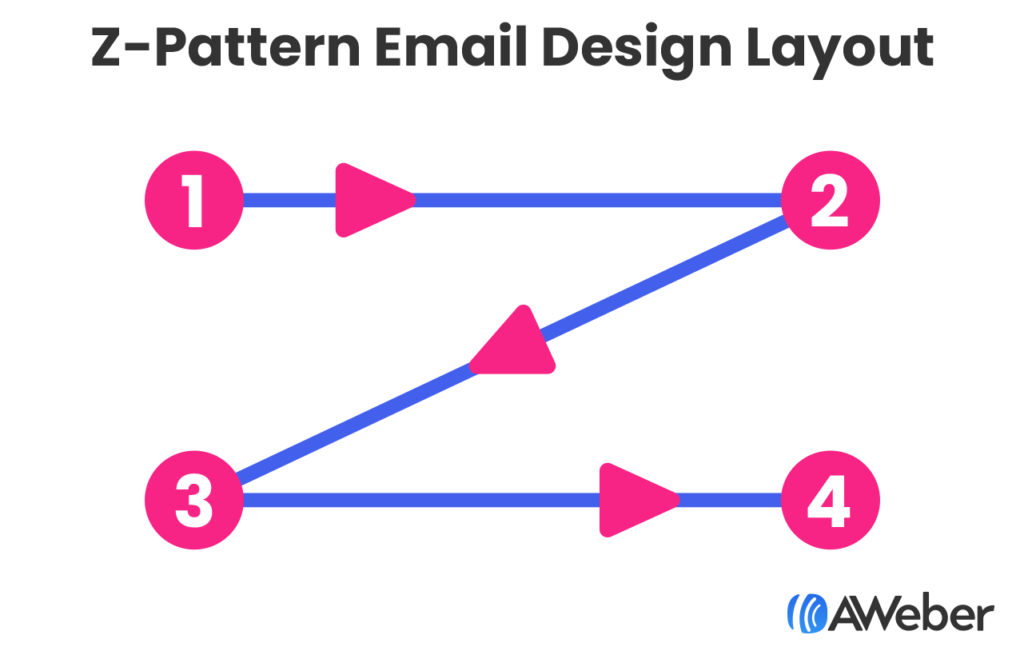
1 - Z-Pattern

The Z-Pattern traces the path of your eyes when reading, which is left to right, top to bottom.

People will read the first line across, then down and to the left, and back across the right again. When reading in this pattern, it forms a Z-shape.

Z-Pattern email design layout

This email design layout is best used when you have a lot of information. This structure will help your subscriber consume all the information in an easy and logical way.

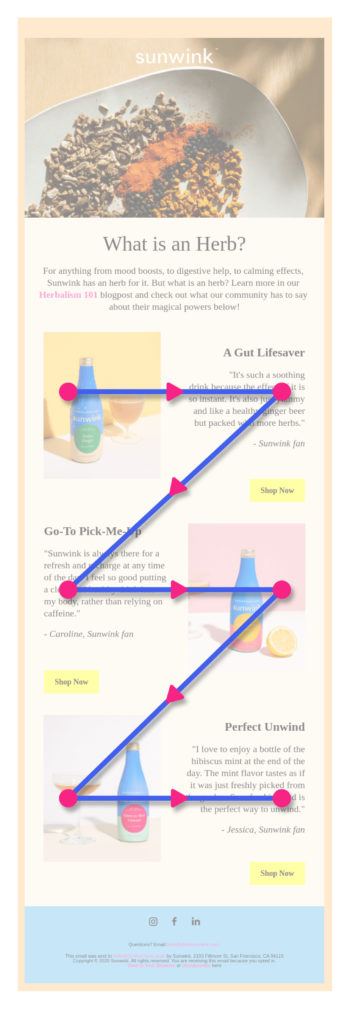
You will often see this type of email follow a pattern where you start with headline and text on the top left with an image to the right, then the lower left corner will have another image, across from that will be text. This works because:

  1. Readers' eyes are naturally drawn to images. So by having the images diagonal from each other, you're helping your subscribers follow an easy to read path.
  2. It creates a cleaner layout by not having all your text on one side of the email.
An example of a z-pattern email design layout

2 - Inverted Pyramid

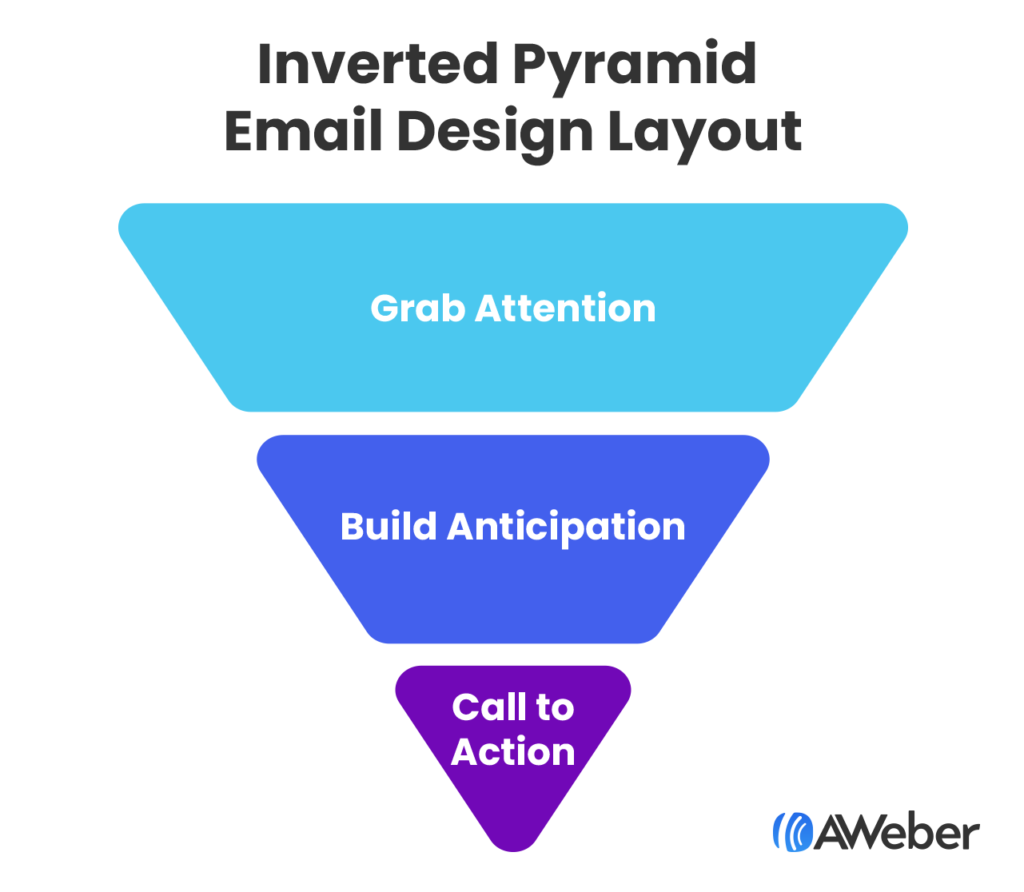
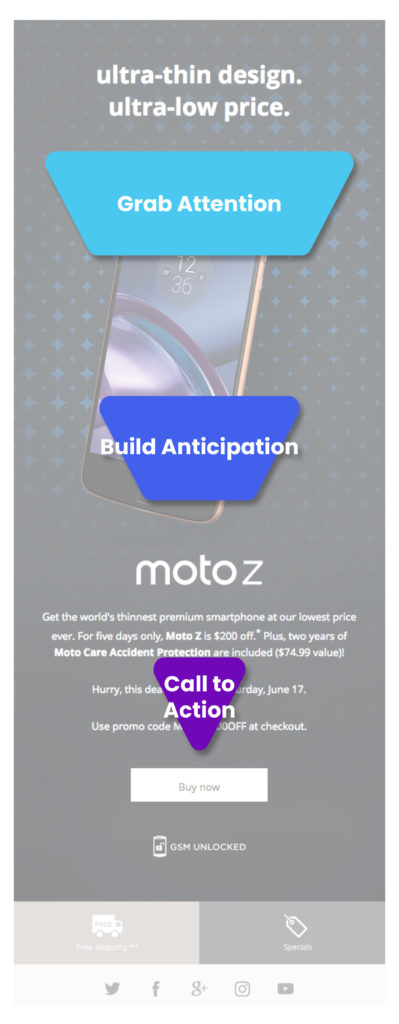
The inverted pyramid is a format used for news stories, but it also works well for emails. It is structured to grab attention and focus on the most important parts of your message. It’s good for when you have one thing to tell your readers, and a specific call to action you want them to take. 

Inverted pyramid email design layout

This layout can be used for driving subscribers to your website to read an article, to get sign ups for an event, or to purchase a single product or service.

Inverted pyramid email layout design example

3 - F-Pattern

The F-Pattern was first identified by the Nielson Norman Group after studying how people’s eyes read a website.

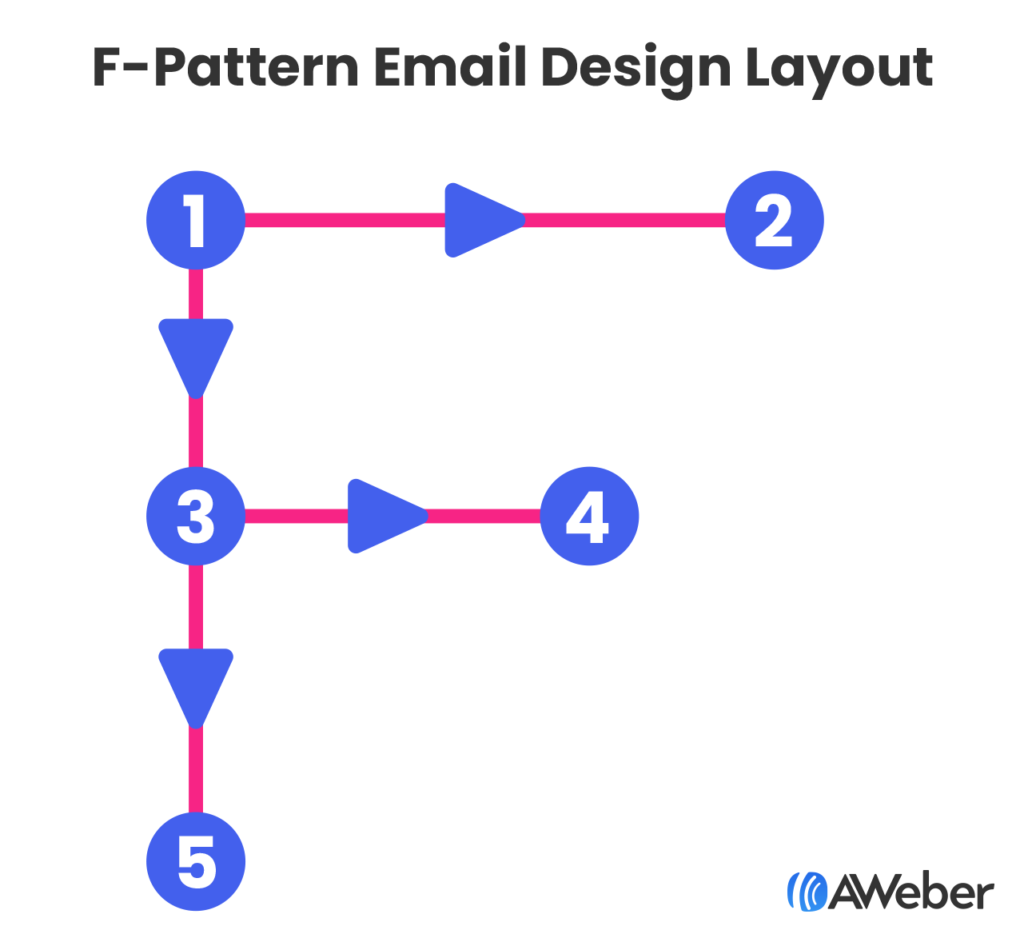
Similar to the Z-Pattern, a reader would consume content left to right, then back to the left. But instead of reading across the second line, they would read less. And so on.

F-pattern email design layout

How does this information impact your email design? 

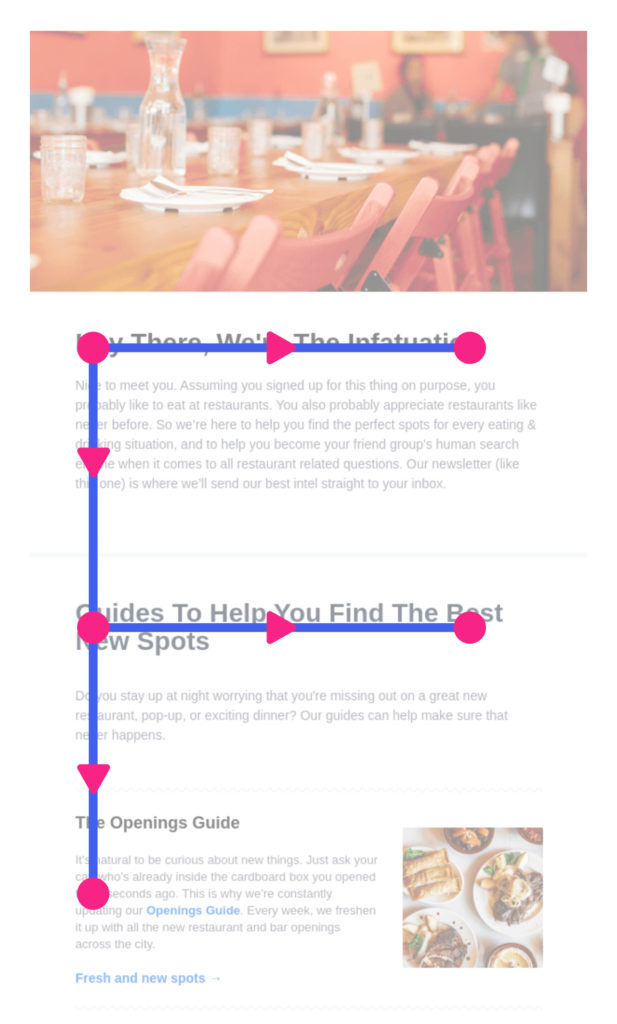
First, you should put your most important, attention-grabbing information at the top of your email. Then assume your subscriber is going to skim the rest of your email. So use less text further down as you create your email. And balance your email with images to the right.

This email design layout is best used if you have a lot of information you want to communicate. In this case you should structure your email with the most important information at the top, then use bullets and shorter content further down the email, and close with a call to action.

F-pattern email design layout example

Email design elements

Great content is an essential part of a successful email, and the design is part of that content. 

1 - Choose the right colors

Select colors that reflect your logo and/or brand… but be sure that there’s enough contrast and clarity for your message to display clearly for easy reading.

Text that doesn’t have enough contrast against its background is hard to read.

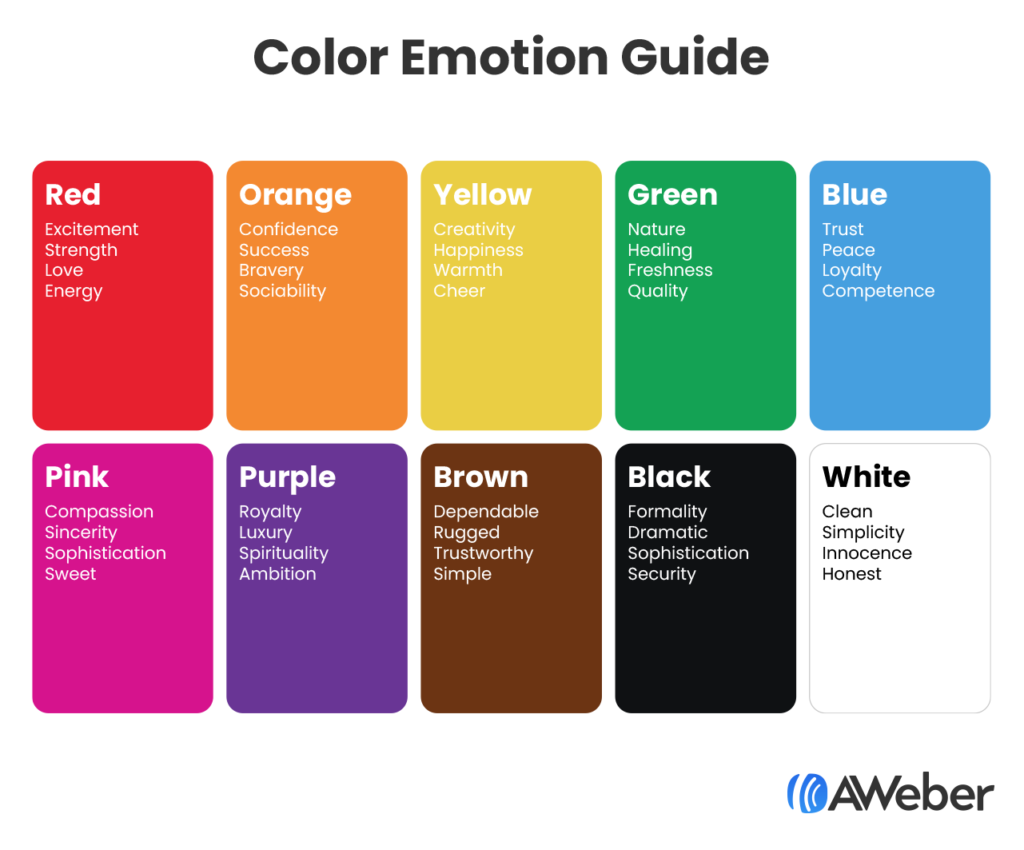
You can also use some of the color psychology we discussed above to select complementary colors. Check out this chart about the emotional impacts of different colors.

Color email guide card

Free color palette tools like Coolors will help you create a professional-grade palette in minutes, so your emails will be more aligned with your brand.

2 - Leave some breathing room

Densely packed emails may be hard to read – especially on mobile devices, where 49.7 percent of all opens occur.

This is because most people scan emails, rather than reading them word by word. Having some white space between elements makes an email look easier to scan. It basically just makes the email look less visually overwhelming. 

Leaving extra white space has an additional benefit: it challenges you to keep your message brief and to only include the relevant details.

Here’s a great example from TrueCar.

TrueCar email with elements spaced out

3 - Use text as a design element 

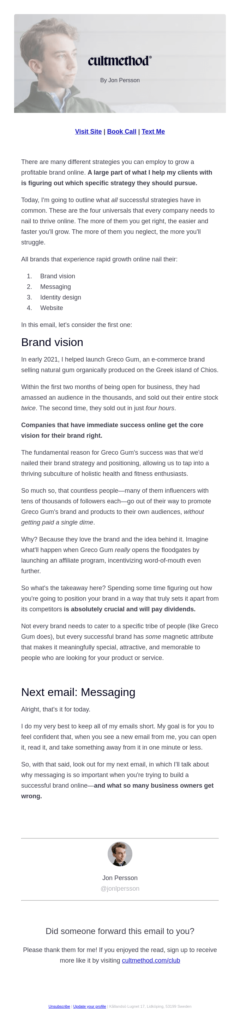
Formatting your emails for scanners also helps. The most common formatting elements are subheads, short paragraphs, bullet points, and bolded phrases. Using visual cues like these will make the most important points of your email easy to find.

Look at this example from Jon Persson of CultMethod, he bolds important elements within the body of his email, he also breaks up the copy by using bullets and perfectly placed headlines.  Plus each paragraph is short and easy to read.

Email example from CultMethod using text as a design element

4 - Balance text with images

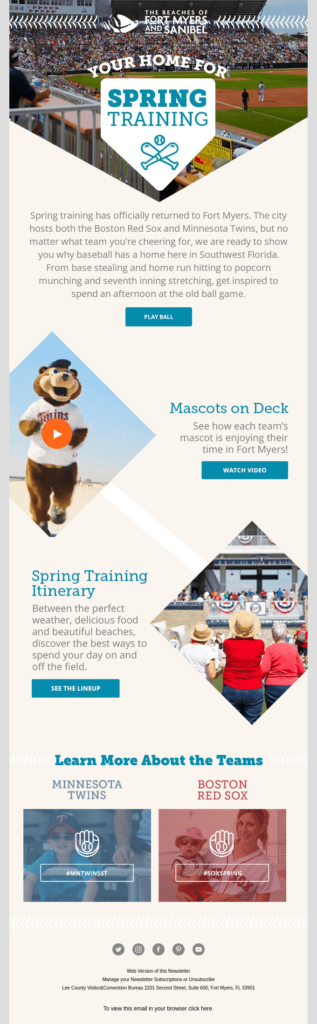
Break up chunks of text with visual images. Readers prefer short blurbs of information, which can be easily achieved by including images and lines when necessary.

Images help tell the story of what you want to communicate to your subscribers, but don’t overdo it. Follow the 60/40 rule which states images should take up no more than 40% of your email.

Spring Training at Fort Myers email balance text with images

5 - Plan for missing images

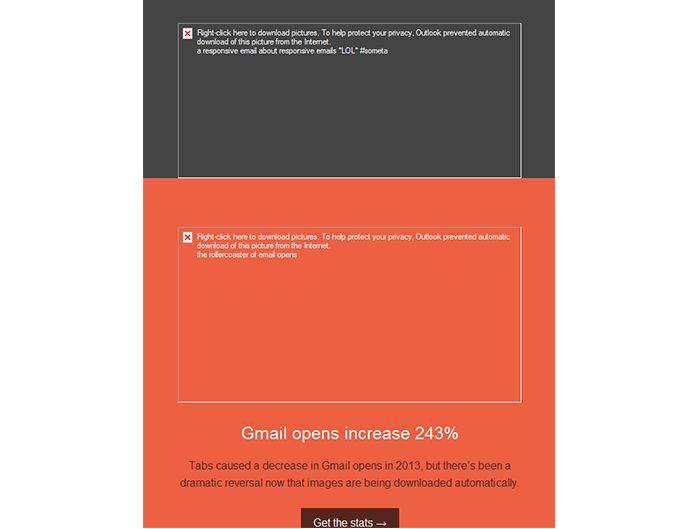
Nearly all email programs give subscribers the option to hide images. Some even disable images automatically, forcing the user to click a link or press a button to “turn on” images. 

For example, here is how an email with a large hero image appears in Outlook:

missing image example in an email

Since image blocking happens in many popular email programs, you should make sure your email is still readable—and your call-to-action is still clickable—when images are turned off.

Rather than using image-based buttons that will hide your CTA when images are turned off, try using a “bulletproof” button instead. This technique combines a background color with a regular text link, providing the illusion of a button that can be seen when images are on or off.

Most email marketing services (including AWeber) allow you to easily create bulletproof buttons within the email layout. 

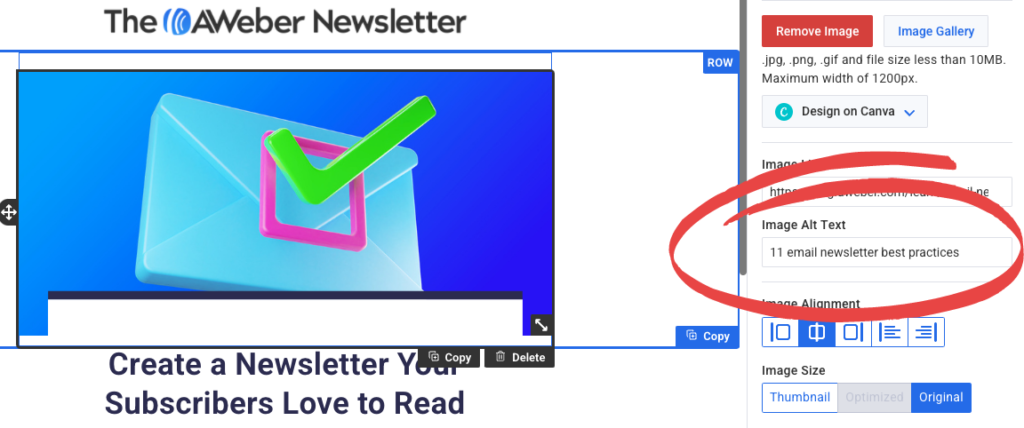
If the images you’re using are an important part of your emails, make sure you add the image alt text. This is text that describes what the image is about. If you’ve ever laid out webpages or worked with WordPress, you may have added alt text to images before. This is the same thing - just for email.

With image alt texts added, if your subscriber blocks images, they will still be able to read what you wanted to show them.

AWeber platform showing where to add the Image Alt Text

Email design tools for beautiful emails

You don’t need to start from scratch to create beautiful emails. Here are three email design tools that make getting started super easy.

1 - Canva

Canva is a widely-used free graphic design tool that allows you to create and edit any kind of image. AWeber has a fully integrated Canva drag-and-drop button, where you can create your images in Canva and drag them directly into your AWeber email.

Using Canva design element within AWeber

2 - Email templates

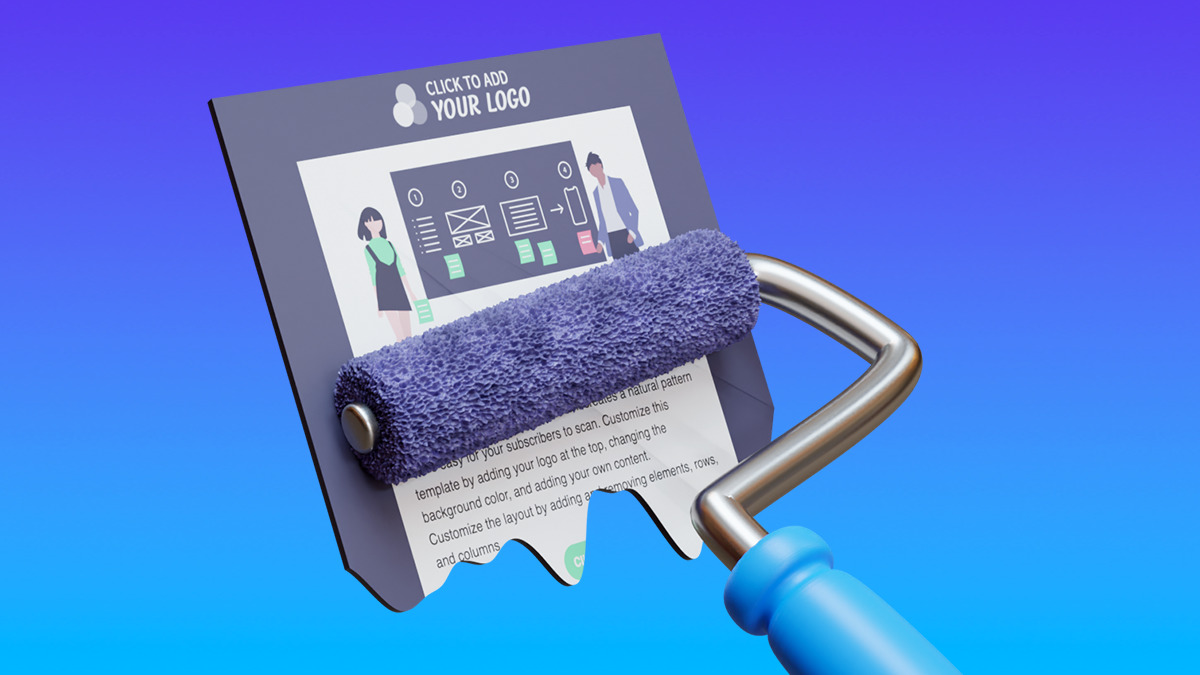
Sometimes simply getting started is the hardest part of sending an email. This is where an email template can come in handy. When you find the right template, most of the work is done for you. Just customize it to fit your brand by adding your logo and updating the colors, then you’re ready to go.

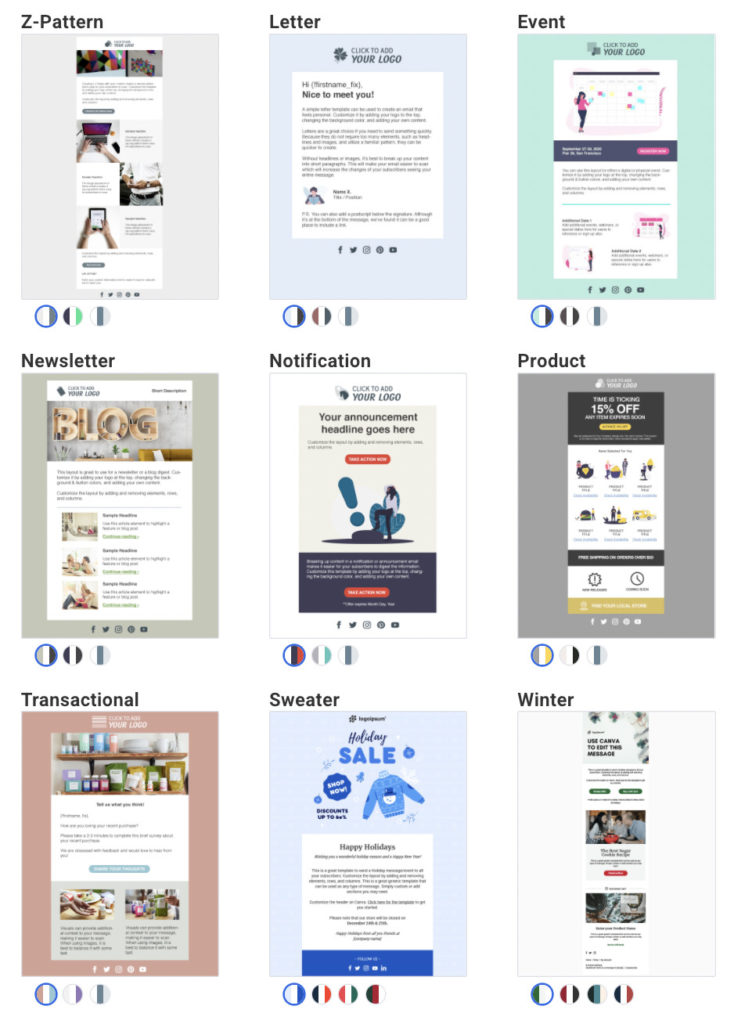
AWeber now has over 600 email marketing and newsletter templates ready for you to customize for your messages. These can save you hours of time every week and let you skip all the work of designing your own emails. 

Here are just a few of the templates available. Each template also has at least three color palettes to choose from.

AWeber email template samples

3 - Try an email builder

Online tools like Stripo, BeeFree, and Dyspatch also have templates and drag and drop email editors. They are similar to what you’ll find in your email marketing provider’s account, but some email designers prefer these tools. 

You can design an email in any of these tools and then import it into AWeber, or copy the code from the email builder and paste that into AWeber. There are instructions for how to do that with Stripo here

Start using these email design best practices

If you're not a pro designer, the task of designing an email may seem a bit intimidating. But if you follow these email design tips or use a pre-made email template provided by your email marketing platform, sending beautiful emails can be easy.

Of course, if you want a custom-designed email or newsletter, we can help with that, too. AWeber offers custom email template and landing page designs. Full custom designs are $229, or a modification of an existing template is $29. Click here to learn more about our custom design services

The post Email Design Tips: A Guide for Non-Designers appeared first on AWeber.


from AWeber https://ift.tt/pJ3QTHi
via IFTTT

Monday, 4 April 2022

10 steps to performing a successful Instagram audit

Nothing ever stays the same on Instagram, so why should your strategy? You might notice that your growth rate is plateauing. Or, your posts are receiving less engagement than before. Before trying out a new strategy, take a step back and perform an Instagram audit.

An Instagram audit takes a holistic view of your brand’s account. Instead of wondering if it’s the captions or visual branding that need work, complete an audit. Going through your IG account part by part may surface areas to work on.

Prepare for the Instagram audit

Before diving straight into the Instagram audit, there are a few things you need. Grab a copy of your Instagram marketing strategy and note your goals. Your goals and KPIs guide your strategy and determine if you’ll need changes after the audit.

What if you don’t know what your goals are? Think about your overall business goals and how you might use Instagram to accomplish them. Without having any goals in place, you won’t know what to do with your audit results.

An Instagram audit might sound daunting but in reality, it’s a straightforward process. Set aside some time to focus and follow these ten steps.

1. Audit your IG branding

When people land on your Instagram account page, what’s their first impression? Begin by taking an overall look at your profile page. Try to imagine yourself as a first-time visitor. Where do you look first and which links do you click on? Does it give you a good idea of what your brand does?

Remember to check your profile on both the web and mobile.

2. Update your IG profile and bio

The profile consists of everything Highlights and above on your account. And the bio is one of the first parts that people read when they land on your profile page.

sprout ig bio

First, ensure your username and name are consistent with your branding. Both of these fields are used in Instagram’s search results. So if your username is a shortened version of your company name, make sure that your name field has all the necessary information.

Next, review your category (if you entered one) and website. Because there’s only one hyperlinked field available in Instagram, make the most of it by using a feature like SproutLink in Bio.
linkinbio
Now, the bio portion. Does it clearly convey your brand? Do you have branded hashtags inserted? Unless you have a highly recognized brand, aim for being informative over minimalistic. Why? Because what you write in your bio counts as social media SEO.

Rounding out this step are the call-to-action buttons and Highlights. Check that the buttons are up-to-date and the Highlights are still relevant. Refresh your Highlights and Covers as needed.

Tips: Struggling to fix your bio? Learn how to create an impactful Instagram business bio. To improve your searchability and assure customers you’re the real deal, get verified on Instagram.

3. Audit your overall Instagram visuals

Look at your Highlight covers, profile photo and posts. Are they cohesive in feel and tone? You don’t need to have a perfect grid but the general visual of your profile page should all be on-brand.

unbirthday

Even with different post types, Unbirthday manages to keep its branding consistent throughout the account.

Tip: Get inspired by following brand accounts that are doing it right.

Content

Time to dive into your content. Here, we look at your content quality, the mix and your captions. Auditing your content helps review your content marketing strategy’s performance. Another benefit is that it keeps your content from going stale or worse, irrelevant.

4. Check content quality and relevance

As a highly visual platform, content quality and relevance are very important on Instagram. Without eye-catching posts, your captions won’t be read. And without relevant posts, you’ll be unfollowed in no time.

Do you use high-quality images and videos? Are they optimized for Instagram? To keep track of your images and have easy access to them, use Sprout’s Asset Library. With it, you can edit and use them across multiple social platforms without leaving Sprout.
asset library
According to the Sprout Social Index, Edition XVII: Accelerate, 46% of consumers say that audience engagement makes a brand best in class. In order to keep your followers engaged with your content, it needs to be relevant to their interests. Examine your top-performing posts and audience demographics. Are you serving the content that they’re most interested in?

5. Examine your Instagram content mix

Your Instagram content mix involves both the topics and formats you choose. In your feed posts, do you only push sales for your company or do you also educate? And within those feed posts, is there a nice mix of carousels and IG Video?

Instagram has so many different media formats to take advantage of. You don’t want to fall behind while other brands prioritize a video marketing strategy. Between Reels, Shoppable posts, Lives, Stories and other formats, you have plenty to choose from.

6. Audit your Instagram captions

Grab attention with that high-quality media and stick the landing with an equally high-quality caption. Explore the top-performing posts again for ideas on what resonates with your audience. Then, make sure it matches up with your brand voice. If it doesn’t, you might need to either change how you write your captions or revise your brand voice.

Grove Collaborative uses a mix of questions and educational content in their posts. Their captions might have a lot of words but they’re broken up with line breaks and emojis.

Tip: If you’re stuck on writing engaging captions, check out caption ideas that generate more interaction from your followers.

Admin and analytics

The last section of the audit focuses on the nitty-gritty of Instagram. Here we dive deeper into analytics and how they affect your account. This part answers questions like:

  • Am I posting at the right times?
  • Which hashtags are actually working?
  • Why should I do an engagement audit?
  • How do I audit my Instagram followers?

7. Look at your posting frequency and schedule

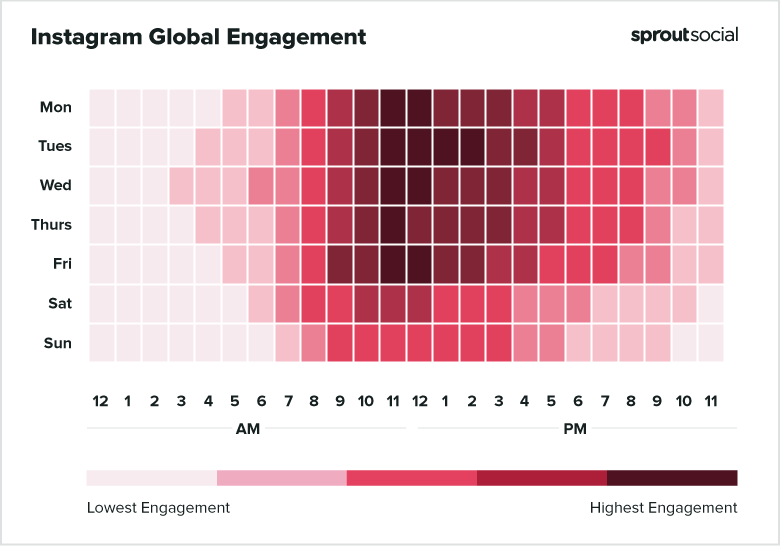
Knowing when your followers are online and engaged is necessary for your posting schedule. According to a Sprout analysis, the best times to post on Instagram are Tuesday 11 a.m.–2 p.m. and Monday through Friday 11 a.m.
ig engagement
To make it easier on you, Sprout’s own ViralPost algorithm tells you when the best time to post is for you. Based on your own accounts’ engagement analytics, ViralPost suggests Optimal Send Times. As you gain more followers, these times might change, which is why an audit is needed.
viralpost
Tip: Scheduling your Instagram posts frees up your time and encourages collaboration. Review how to easily schedule your posts to encourage audience engagement.

8. Analyze your hashtags

When used properly, Instagram hashtags have the potential to grow your brand.
ig business profile
Using Sprout’s Instagram Business Profiles Report, you can see how each of your hashtags performed. Note if there are similarities between high-performing hashtags. These trends might uncover which content topics you should explore further.

bulletjournal

Bullet Journal might be a brand but it’s also become a method of journaling that’s wildly popular. Users document with the hashtag whether or not they’re using the brand.

Tip: There are different types of hashtags out there. See which types of Instagram hashtags are best for your brand.

9. Audit your Instagram engagement

Have you noticed that your engagement is dropping off? Without great engagement in your posts, you lose the opportunity to build your community and increase brand awareness.

During the engagement audit, ask questions like:

  • Are you following appropriate brand accounts and engaging with their posts?
  • Are you replying to both comments and DMs?
  • Do you leave comments or start conversations on other accounts’ posts?
  • If you have accounts tagging you, do you track and collect user-generated content?
  • Do you keep tabs on your most-engaged followers?

Edible Arrangements uses a mix of UGC and influencer collaborations in its Stories. With these saved into Highlights, anyone can view them and be inspired by what others have done with their own Edible Arrangements.

Tip: Check out how your competitors are increasing their own Instagram engagement.

10. Check your Instagram followers

While Instagram does discourage bots and fake followers, some still slip between the cracks. An audit of your Instagram followers looks at what their interests are and if any of them are fake. You also look for influencers to work with and engage with.

Grab demographics data from your native Instagram Business Profiles Report. Combined with the Post Performance report, you’ll learn if your content is resonating with their interests.

IG Profile Demographcis

No one wants to be followed by a bunch of bots. Using a tool like the one from Modash, enter your username and it’ll surface fake followers. A side benefit is that you’ll also receive information on potential influencers.

Speaking of influencers, now is the time to set up an influencer marketing strategy. The follower audit will surface accounts that you might want to work with. Diversify your strategy by involving creators and micro-influencers. Both of these have proven to increase your brand awareness.

Tip: Everyone wants more Instagram followers but few want to put the work in to gain them. Explore tips on how to increase your Instagram follower count.

Perform your own Instagram audit

There you have it. In just ten steps, you’ve completed your own Instagram audit. An audit is needed every so often to make sure that your strategy is succeeding. Audits surface issues like an out-of-date profile and fake followers.

To get started on your own Instagram audit, check out this handy template.

The post 10 steps to performing a successful Instagram audit appeared first on Sprout Social.


from Sprout Social https://ift.tt/5IiDQZN
via IFTTT