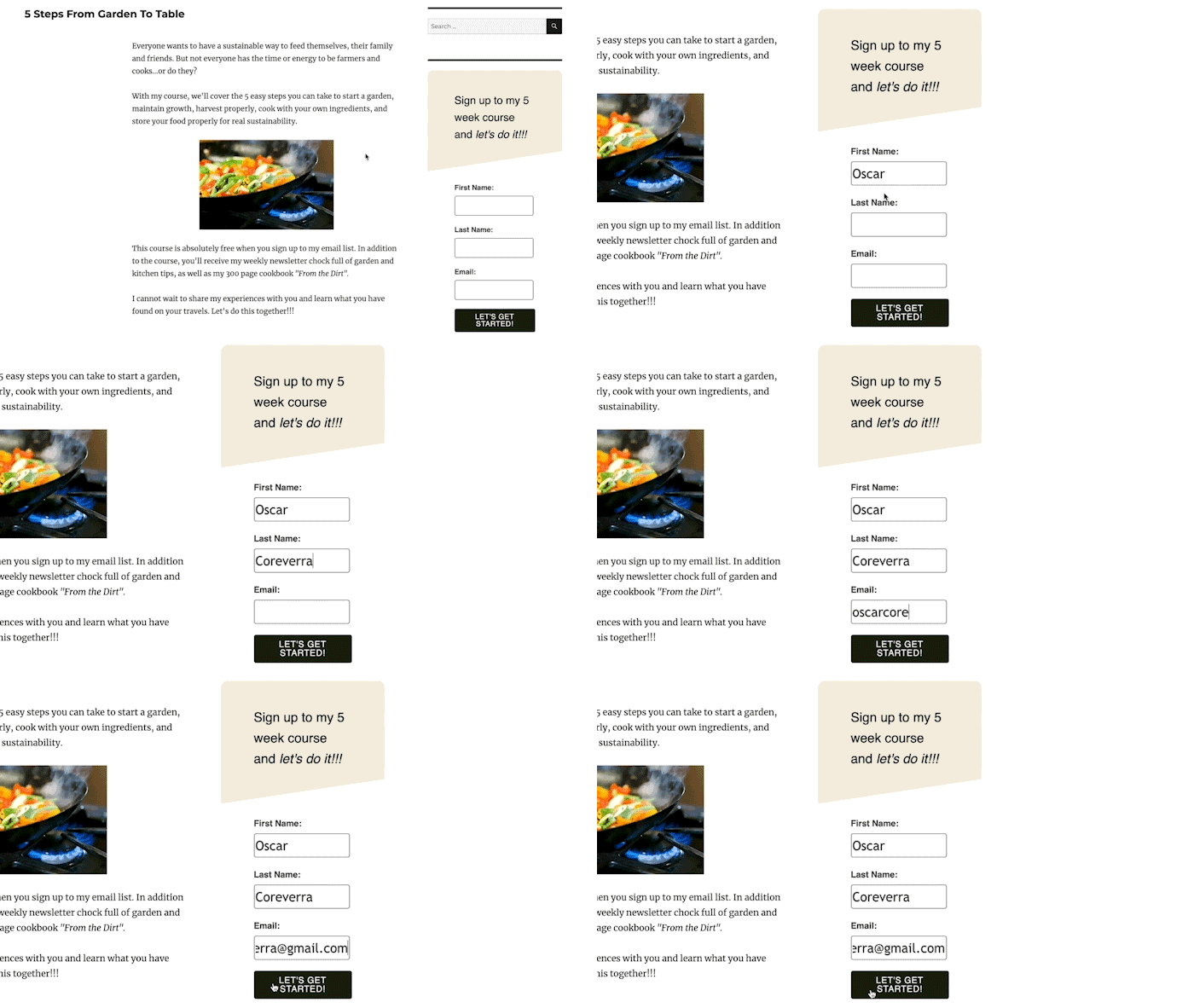
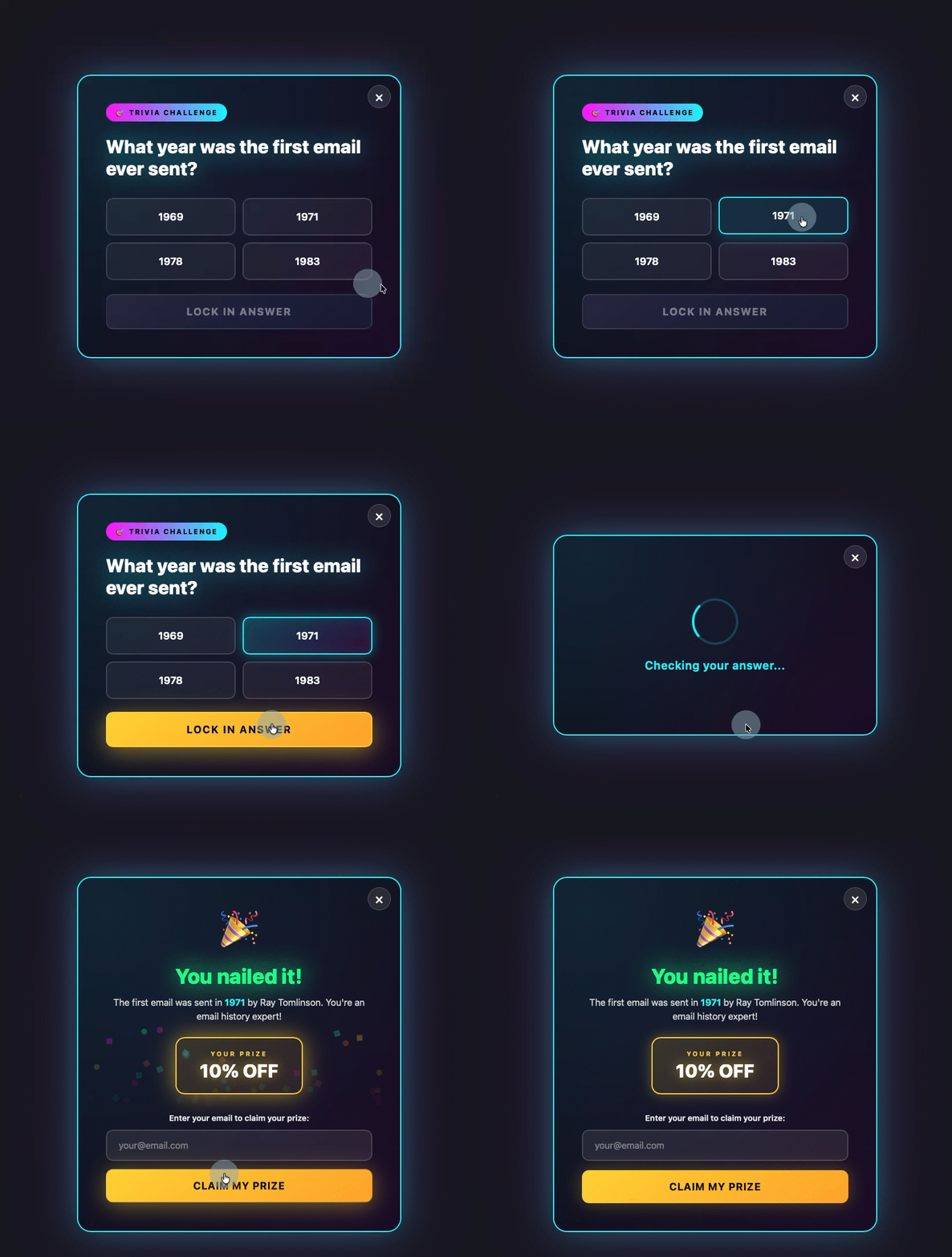
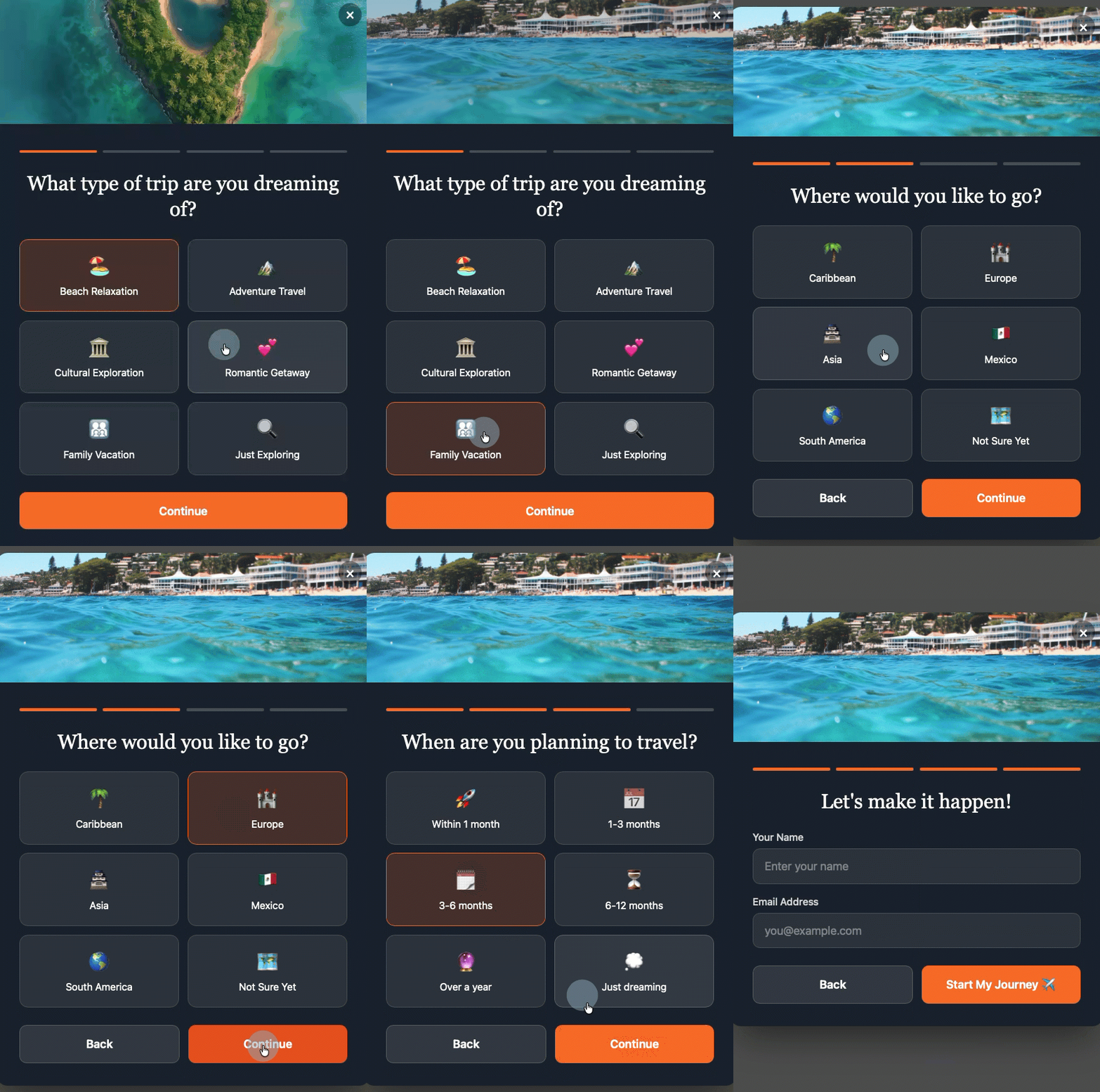
A multi-step form breaks one long form into a series of shorter screens. Instead of asking for a name, email, company, and interests all at once, you ask one question per screen. The visitor answers, taps next, and moves forward. Each step feels small. The whole process feels fast.
If your signup form is a single block of fields sitting on a page, you're likely leaving subscribers behind.
Why do multi-step forms convert better than single-step forms?
Three psychological principles explain why splitting a form into steps increases completions.
Progressive disclosure means showing people only what they need right now. A single-step form with five fields creates an instant calculation: "Is this worth my time?"
A multi-step form that starts with one question removes that calculation entirely. The visitor sees a question, answers it, and moves on.
The completion effect kicks in after someone answers that first question. Once you've invested effort (even minimal effort), you're more likely to finish. Incomplete tasks create tension. Your visitor wants to see what comes next. They want to finish what they started.
Reduced perceived effort is the simplest factor. Five fields on one screen feels like work. Five fields spread across five screens feels like a conversation. The total effort is identical. The perceived effort drops significantly.
What makes a good multi-step form design?
Good multi-step form design follows a few rules. Break any of them and you'll add friction instead of removing it.
Start with the easiest question first
Your opening question should require almost zero thought. "What brings you here today?" with three clickable options is easier than "Enter your full name." Easy first steps build momentum.
Keep each step to one question
The moment a single step starts to feel like a form, you've lost the benefit of splitting it up. One question per screen. That's the rule.
Show progress visually
A simple step counter ("Step 2 of 4") or a progress bar tells visitors how much remains. Uncertainty about length creates anxiety. Clarity creates confidence.
Put name and email last, not first
This is counterintuitive, but it works. When visitors answer interest-based questions before entering personal information, they've already committed to the interaction. The email field becomes a natural conclusion rather than a barrier to entry.
Make every answer useful. Each response in your multi-step form should map to a tag, custom field, or segment in your email platform. If you're asking a question just to fill a step, cut it. Every question should either qualify the subscriber or personalize what comes next.
With the AWeber AI Signup Form Builder, you can tell the AI to tag subscribers based on their answers. Describe the tags you want applied, and the builder handles the rest, including creating the tags and custom fields in your account automatically.
How do you build a multi-step form?
The AWeber AI Signup Form Builder creates multi-step forms from a single conversational prompt. You describe what you want in plain language, and the builder generates a fully functional multi-step form with animations, transitions, and automatic field mapping.
On an episode of The Shift AI Show, Chris Vasquez, AWeber's Chief Product Officer, built a multi-step personality quiz live using the AI form builder.
The builder generated a complete quiz with each question on its own screen. Visitors answered by clicking options, not typing. After entering their name and email, the form displayed their personality type on the same page.
The form also automatically created the custom fields and tags in AWeber. When Chris checked his subscriber list, the new contact appeared with the tag "personality visionary" already applied. That tag can trigger a specific welcome automation, drive segmented email sends, or power dynamic content blocks.
As Chris put it during the demo: "It's so frictionless for them to give you that info up front. And frankly, it's kind of fun to interact with, so it almost entices engagement. You don't have to go, 'I'll learn more about them later.' You can get a lot of that information up front without driving people away."
That's the core value of a multi-step form. You collect more data at the point of signup, and the subscriber enjoys the process.
Multi-step form examples
Do you need a multi-step form template?
No. Most template libraries offer pre-built layouts with fixed fields, preset styling, and a structure someone else decided on. You download one, then spend time rearranging fields, swapping colors, changing copy, and trying to make it match your brand. The template was supposed to save time. Instead, it becomes a starting point you need to undo before you can move forward.
Templates also restrict your creativity. If the template has three steps, you get three steps. If it has a certain visual style, you're working within those constraints. You're fitting your form around someone else's decisions instead of building one around your own needs.
A better approach: describe what you want and let AI build it for you.
The AWeber AI Signup Form Builder creates custom, branded multi-step forms from a plain-language description. Tell it you want a five-question quiz that segments subscribers by interest, or a three-step qualification form for your consulting business. The builder generates it with your branding, your questions, and your tagging structure. You can also upload an image of a form you like and use it as visual inspiration. The AI will create a custom form based on that reference, not a copy of it.
No templates to modify. No code to write. You get a form built around what you actually need, every time.
How do multi-step forms improve your email marketing?
Multi-step forms don't just collect more subscribers. They collect better data about each subscriber. Every answer is a data point you can act on.
Segmentation becomes automatic
Tags applied during the form process sort subscribers into groups without manual intervention. You can build segments based on answers given during signup and never touch them again. A subscriber who tells you they're interested in "vacation getaways" goes into one segment. "Investment property" goes into another. The form does the sorting.
Welcome sequences become specific
Instead of one generic welcome automation for every new subscriber, you can trigger different sequences based on quiz results, interest selections, or qualification answers. A subscriber who said "I need help right now" gets a different first email than one who said "just exploring."
Dynamic content becomes practical
AWeber lets you show different content blocks within a single email based on subscriber tags. A multi-step form that applies the right tags at signup makes dynamic content work from the very first send. No manual tagging. No waiting to learn about your audience. The form does that work at the moment someone subscribes.
Frequently asked questions about multi-step forms
How many steps should a multi-step form have?
Most effective multi-step forms use three to five steps.
Fewer than three doesn't provide enough of a progressive disclosure benefit. More than five risks drop-off, even with the completion effect working in your favor.
The right number depends on what data you need. Every step should collect information you'll actually use for segmentation, personalization, or qualification. If a step doesn't serve a purpose, remove it.
Can I build a multi-step form without knowing how to code?
Yes. The AWeber AI Signup Form Builder creates multi-step forms from plain-language prompts.
You describe what you want (a quiz, a qualification flow, an interest selector) and the builder generates the complete form with transitions, animations, and automatic field mapping.
Custom fields and tags are created automatically based on the form's questions and answer options. No HTML, CSS, or JavaScript required.
How do multi-step forms work with email automation?
Each answer in a multi-step form can apply a tag or populate a custom field in your email platform. Those tags trigger automations.
For example, a subscriber who selects "I need help right now" on one step of a qualification quiz can automatically enter an urgent follow-up sequence. Someone who selects "just exploring" enters a nurture sequence instead.
The form does the segmentation work at the moment of signup, so your automations are relevant from the first email.
How do I create a multi-step form in WordPress?
Install a one-time code snippet from AWeber into your WordPress site's header (through your theme settings or a plugin like WPCode).
Once installed, you build and manage all your forms inside AWeber. Every form you create or update publishes automatically to your site.
You control where each form displays, how often it appears, and which devices show it, all from AWeber's dashboard. No code changes on your WordPress site after that initial setup.
The AWeber WordPress plugin will also support the AI Signup Form Builder directly, making installation even simpler.
What are the best multi-step form tools?
The best multi-step form tool for small businesses is the AWeber AI Signup Form Builder.
Unlike traditional form builders that require you to drag, drop, and configure each field manually, AWeber's builder creates complete multi-step forms from a conversational prompt. You describe what you want in plain language, and the AI generates a functional, branded form with step transitions, custom field mapping, and automatic subscriber tagging.
It's purpose-built for email marketing, so everything connects directly to your subscriber list, segments, and automations without third-party integrations or additional tools.
Social media isn’t a digital billboard for your brand: It’s a portal to direct connection with your ideal customers and a pathway to powerful insights. From customer care to competitive research to crisis management, the impact of social media extends to every aspect of your business. And social intelligence, the application of social insights to business strategy, has become mission-critical.
The same report found that four in 10 marketers used social intelligence to improve customer retention, identify a new target audience or market segment, and adjust their campaign strategy in real-time. Looking forward, 71% of marketing directors say social intelligence will become more influential than traditional research in shaping business strategy.
By tapping into the ample benefits and business insights social media offers, you can transform the way your entire company operates, and future-proof your brand.
Customer service on social media is a non-negotiable part of an omnichannel support strategy. Consumers tag and direct message brands to resolve their issues across platforms, and demand swift thoughtful responses in return. According to The Sprout Social Index™, nearly three-quarters of consumers expect a response on social within 24 hours—a consistent year-over-year finding for three years in a row.
Response rates have serious impacts on customer satisfaction, loyalty and retention. The Index also found that 76% of consumers value how quickly a brand can respond to their needs, while 70% expect a company to provide personalized responses.
Implementing a seamless support strategy enables you to increase the lifetime value of your existing customers and drive revenue growth. Well-orchestrated customer service efforts also deliver valuable insights about your customers’ experience that help your business evolve. Almost half (45%) of marketers said that by using social intelligence cross-functionally, they were able to improve customer retention through proactive engagement, according to The Social Intelligence Report.
But it can be hard for a customer support team to stay on top of multiple social platforms and data sources. By using an AI-powered solution like Social Customer Care by Sprout Social, it’s easier to coordinate across teams so you can tackle the most critical conversations first, and every customer feels heard, supported and valued. Sprout’s AI capabilities enable teams to move faster, such as enhancing responses and highlighting priority messages so your team can focus on the highest-impact interactions.
You can also benchmark and track your support team’s performance to demonstrate their impact on revenue, identify opportunities for growth and capture customer feedback. The Case Management Report provides a holistic view of your team’s social care efforts, including key metrics like Case volume, handle and reply time, and performance benchmarks.
2. Bolsters brand amplification
Almost one-quarter of marketers say underutilizing social insights resulted in losing market share to competitors, according to The Social Intelligence Report. Social media is where consumers go to discover new brands, which makes it a powerful channel for growing awareness.
Brand awareness is the first step toward generating new leads, edging out the competition and driving sales. Tactics like influencer marketing are especially effective, as influencers continue to wield considerable sway. According to The State of Influencer Marketing Report, 92% of marketers say, on average, the reach of sponsored influencer content outperforms organic content on their brand accounts. With the right influencers (and their loyal followers) on your side, you can amplify your brand significantly.
The Sprout Social Influencer Marketing platform finds creators who truly fit your brand, building audience trust. AI helps surface the most topically-relevant influencer matches, so campaigns feel genuine and resonate with your customers’ interests.
Social media data also serves as a barometer of your current brand awareness, and helps you make business decisions that positively influence your reputation. For example, Sprout’s AI-driven Social Listening solution surfaces insights that reveal how you stack up to your competition via metrics like share of voice, positive sentiment, total engagements and overall conversation volume. These insights are a source of truth that can influence your company-wide competitive strategy, and enable you to make the right calls for your business by precisely decoding sentiment and competitive momentum.
For more tips to distinguish yourself from your competitors on social media, check out our list of 12 proven strategies to increase brand awareness.
3. Maintains cultural relevance
Today’s trend cycle moves fast—fueled by Gen Z’s internet behavior—and social media is where trends are born. Social is the #1 place consumers use to keep up with cultural moments, and 93% agree it’s important for brands to keep up with online culture, according to The Index. From viral moments to emerging creators and niche communities, what happens on social media shapes so much of what we do, say and care about outside of social.
Today’s consumers can spot inauthenticity from a mile away. Whether it’s a perfectly timed meme or a meaningful response to a trending topic, staying in tune with social media culture ensures you’re not just talking at your audience, but thoughtfully interacting with them.
Trends aside, brands that retire or divest from their social media presence are also at risk of irrelevance and being abandoned by their audiences. Social media is the key to building a long-term brand strategy that will help you stay top of mind for years (and decades) to come.
In the face of fierce competition for consumer attention, it’s imperative to tune into conversations happening around your brand and industry. Social listening and predictive media intelligence enable you to tap into and analyze what people are saying about your company, even if you aren’t tagged or mentioned.
With our AI-powered Social Listening and NewsWhip by Sprout Social solutions, it’s possible to see what’s rising and why it matters, enabling teams across the org to act confidently to strengthen customer trust and engagement with your brand. NewsWhip, specifically, uses predictive monitoring to determine how big a breaking news story could become and who’s dominating the conversation across media publications and social. Using these two solutions together enables brands to stay on the pulse and get ahead.
4. Makes your products and services more discoverable
Most people’s primary instinct when looking for information is still to turn to traditional search engines—but Gen Z is the reason why this is shifting. Social is now the #1 place they search, more so than Google and traditional search engines, per the Q2 2025 Sprout Pulse Survey. And when they do use traditional search engines, social content is appearing in search results more often. YouTube has even become the top citation source for AI search.
Whether they’re looking for product reviews, restaurant recommendations or how-to tutorials, audiences increasingly want answers from real people (and often, in video form). Social networks deliver on both.
This growing inclination to treat social as the new search bar provides new opportunities for brands. For instance, consumers are most likely to say they want brands to publish educational content about products and services in 2026, according to the Q1 2026 Sprout Pulse Survey.
As social network algorithms continue to prioritize user interests over demographics like location, brands that optimize their content for discoverability have the best chance of reaching new audiences (and future buyers).
5. Drives revenue
Social media is ever-present in the sales funnel. From generating awareness through organic campaigns to supporting social commerce through influencer marketing, social plays a key role in acquiring and holding onto customers.
For example, 76% of all users say social media (ads, influencer posts, brand content, etc.) has influenced some percentage of their purchases over the past six months, according to the Q2 2025 Sprout Pulse Survey.
On the other hand, 56% of marketing leaders say social drives revenue, and a comparable amount use revenue metrics to quantify social ROI, per The 2025 Impact of Social Media Report. There’s an instinctual understanding that social drives more than brand awareness—and that awareness alone doesn’t generate ROI—but many teams don’t have the infrastructure to prove it.
Some metrics (like MQLs) simplify attribution and make it easy to define ROI. Others (like engagement) can correlate with revenue gains, but their direct influence is harder to prove.
To meet this challenge, about one-third of marketers say their organization plans to prioritize integrations to increase investment in social intelligence, per The Social Intelligence Report. Sprout is the AI-powered Social Intelligence platform that completes the business intelligence ecosystem.
While other tools measure the result of business decisions, Sprout captures the reasoning of the market, using AI to understand the “how” and “why” behind every data point. It does not replace your CRM or BI tools like Salesforce; it stands alongside them as the source of external market reality. By unifying these systems, the enterprise eliminates the critical gap between internal data and external truth.
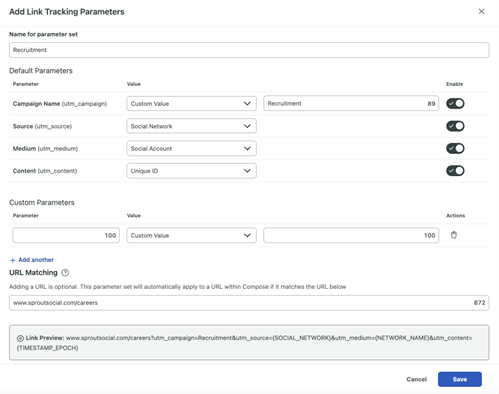
Over the last few years, Sprout’s social team has reimagined our approach to measuring the revenue impact of our work. In partnership with marketing leadership and our analytics team, we moved to a multi-touch attribution model that allows us to track the impact of social, influencer marketing and advocacy on leads throughout the sales funnel. Thanks to diligent UTM tagging in Sprout and our Salesforce integration, we uncovered a 5,800% increase in additional pipeline impact.
6. Fosters a thriving brand community
Responding on social and engaging with individual users is even more important to building an authentic brand community than simply posting just to post. A brand community is a place for people with an emotional investment in your brand to connect with each other and your company. There are many people who already love your brand. In fact, your brand community probably already exists on social media—you just need to find it.
Establishing relationships with your existing and potential customers makes them feel valued, which increases brand loyalty and evangelism. By actively addressing your audience’s questions, reacting to their comments and capitalizing on surprise-and-delight moments, you nurture a group of superfans who spread positive word-of-mouth and even share user-generated content on your behalf. (That library of content showcasing your product or service in action is great for discoverability too.)
Brand communities on and off social media are especially powerful business tools because they allow companies to hear from and engage with their biggest advocates in real time. Within your community on social, you can easily test new product mockups, source requested features, share content and collect feedback that can improve every aspect of your business.
7. Helps get ahead of a brand crisis
Nearly 40% of social marketers say their greatest fear is having to navigate a brand crisis, according to the Index. As many businesses know all too well, even crises that start offline (product recalls, leadership issues, supply chain problems) can quickly migrate and amplify on social.
In these scenarios, savvy communications and marketing teams can use social to their advantage. With the right tools, brands can surface real-time insights from social and media outlets that signal a crisis is emerging before it spins out of control. For example, NewsWhip helps you stay ahead of the narrative and be ready to act when conversations shift, with predictive alerts tailored to the issues, keywords and competitors you care about.
But social also makes it easier for brands to address crises head-on with audiences, demonstrating authenticity in a way formal press releases cannot. Like when energy drink brand Celsius was involved in a labeling mishap with hard seltzer brand High Noon: rather than ignoring the debacle, Celsius leaned in, captioning a photo of their product “it’s happy hour” and joking about their products not containing alcohol on X. They also teamed up with influencer Madison Humphrey, a creator known for her skits about divorced parents, for a hyper-focused video making light of the snafu.
According to Sprout’s Influencer Marketing data, the brand posts received over 1.5 million views, and Humphrey’s post received over 50,000 engagements and delivered almost $100,000 in earned media value. Thanks to quick thinking and the right social-first flair, what could’ve been a brand disaster ended up boosting sentiment and awareness.
8. Encourages brand advocacy
Satisfied employees want to spread the word about their company by posting on social. With social budgets tightening, employee-generated content is your superpower for expanding your reach without straining your bandwidth or ad budget. It’s a win-win.
According to Sprout’s Employee Advocacy Report, posting company content helps employees accomplish their day-to-day tasks and long-term goals. Employees report that sharing on social can help outside audiences understand their brand’s values, provide new leads and ways to engage with them, expand their potential reach and engagement, and communicate important messages internally.
The Advocacy Report also revealed 72% of engaged social media users would post about their company if content was written for them. Sprout’s Employee Advocacy platform enables you to draft message ideas for your employees to share, which makes it easy for them to amplify your content and help you achieve your goals. When employees share authentic, on-brand stories from the platform, customers feel more informed and connected to your brand.
9. Maximizes recruitment
Prospective candidates rely on social media to find open positions and research companies. According to LinkedIn, over 10,000 members apply for jobs on the network every minute.
The staggering figure explains why building a strong employer brand with the help of social media is essential to attracting top talent. To stand out in a sea of employers, your content needs to showcase your unique culture and values, and encourage brand advocacy. For example, creating a meet the team social post series or day-in-the-life vignettes are both effective ways to humanize your brand and grow your candidate base.
In addition to having your pick of the talent pool, featuring and celebrating your current employees will boost their satisfaction and reduce turnover, while generating audience engagement. According to a Q1 2026 Pulse Survey, almost 20% of consumers want to see frontline employees in brands’ social content more than any other content type.
10. Informs customer and competitor research
Most brands today run their business on incomplete data. They rely on surveys, focus groups and dashboards that reflect only a sliver of what customers actually think—while overlooking the conversations happening at scale on social.
Social is the richest, most honest source of customer insight today. It offers a real-time, unfiltered source of valuable consumer data to AI-powered intelligence platforms that require a steady diet of current data to remain useful.
Yet it’s still siloed, underused, and cut off from the systems where strategy is shaped and decisions are made. Marketing teams are most likely to use social data to inform their decisions today, according to The Social Intelligence Report. Product teams, which are responsible for shaping what a company builds, engage with social intelligence far less frequently. R&D teams, arguably the function that could benefit most from real-time, unprompted consumer feedback, use it even less.
When shared effectively, insights from social data can enrich an entire organization’s understanding of their customers and competition. Car manufacturer American Honda knows this first-hand: Social insights flow directly to R&D and marketing to shape sentiment around innovations like electric vehicles, showing how a well-defined social intelligence program can feed back into other departments and influence tangible business actions and products.
Surfacing these insights shouldn’t be like finding needles in a haystack. For example, as the Competitive Analysis Performance tab from Sprout’s Listening solution illustrates, AI analysis makes quick work of determining your competitive share of voice. You can take it further by asking Trellis, Sprout’s AI agent, questions to gain further insight into the data and make business decisions faster.
11. Refines product development
People are talking about your products on social media right now, whether they’re tagging you or not. They’re sharing what they love about them, and the exact ways they want you to improve them. And 55% of all social users say most companies do a good job of listening to what audiences say on social, but they don’t always act on that feedback, per a Q4 2025 Sprout Pulse Survey.
Building the right social listening queries can surface the feedback and prioritize product development needs. When you can turn feedback into meaningful insights and share them with your product and development team, you make your audience feel seen and build brand advocates for life. For example, with the help of Sprout, Canva tags all messages from users sharing product feedback or recommending wishlist features. This makes it easier to close the loop later when new releases come out—which happens frequently, since their recent product announcements have been based on user feedback.
Building long-term partnerships with influencers can also enrich R&D. According to The State of Influencer Marketing Report, 62% of all consumers who make daily or weekly purchases based on influencer recommendations are likely to share product feedback directly with influencers. The influencers you partner with have an even more direct view into your customers’ sentiment and feedback—insights that can help your brand pivot in real-time and grow long-term.
How social media impacts different business types
While social media positively impacts all business types, there are a few distinct benefits for companies of different sizes and industries.
SMB
For small and medium businesses, social media is an accessible way to access a wide audience and should be an essential part of your marketing playbook. Even with a small social team (or maybe even a team of one), you can design, execute and manage a presence that reaches and engages your target audience.
Read more: How Orkney Library uses social media to grow a global fanbase.
Enterprise
For enterprise brands, social is business critical. Through social intelligence, you have access to valuable, global customer data that can be turned into a business advantage. Plus, social data makes it easier to measure and attribute the success of campaigns at scale, which can have a large impact on an organization’s big picture. In fact, 82% of enterprise marketers say their social strategy impacts their business’ bottom line, and 85% say social enables them to create new products and services.
Read more: How ScottsMiracle-Gro empowers agents and cultivates brand loyalty with Sprout’s Salesforce Service Cloud integration.
B2C
B2C brands depend on social to increase their discoverability and create customers for life. By leveraging influencer marketing and developing communities of loyal fans, B2C companies tap into the power of social proof. Authentic engagement builds audience trust, driving long-term growth and brand affinity.
Read more: How Casey’s improved their overall guest satisfaction score with Sprout’s customer care capabilities.
B2B
When B2B brands harness social media, they significantly boost their market presence—making it easier to drive steady revenue growth. Like B2C, B2B companies rely on brand advocacy (from their employees, customers and community) to increase share of voice and visibility.
Read more: How Salesforce saved 12,000 hours and increased community engagement efficiency tenfold with Sprout.
Nonprofit
For nonprofit organizations, social is a prime channel for securing donations, increasing awareness of their mission, influencing public discourse and providing a community for those advocating for their cause. Unlike traditional media, social offers a direct line to the public, making it easier to encourage time-sensitive action and shape the narrative.
Social media offers a variety of advantages for the healthcare industry—from combating misinformation and delivering faster customer service to supporting employer brand efforts. Savvy organizations are even collaborating with brand-safe influencers to deliver health education on the networks patients already spend time on.
Read more: How Penn State Health amplifies the voice of the patient on social.
How will social media impact your business this year?
The future is bright for companies that recognize the power of social intelligence. Make the most of the business intel gleaned from social by bringing social data to the forefront of your business conversations and acting on them.
An AI form builder is a tool that creates signup forms from plain-language descriptions instead of manual design. You describe the form you want in a sentence, and the builder generates it. No coding. No dragging elements around a canvas. No hiring a designer. The result is a working, publishable form built in seconds from a text prompt, a screenshot, or a guided template.
This is a different approach than traditional form builders. Instead of choosing a template and editing fields one at a time, you tell the AI what you need, and it handles the layout, styling, animation, and field mapping.
The AI Signup Form Builder from AWeber is one example of this approach. It creates animated popups, floating 3D buttons, scratch-card reveals, spin-the-wheel signups, and multi-step forms from a single prompt. But the concept extends beyond any one tool.
Here is what AI form builders do, how they work, and what separates a useful one from a gimmick.
How does an AI form builder work?
AI form builders use large language models to interpret what you describe and generate a working form from that description. The process works in three stages.
1. You provide an input. That input can be a written description ("Create a popup with a countdown timer and email field"), a screenshot of a form you saw on another site, or selections from a guided prompt that walks you through options like form type, fields, and behavior.
2. The AI interprets your input and generates the form. It handles layout, colors, animations, field types, and display logic. A good AI form builder does not just produce static HTML. It builds interactive elements like scroll triggers, entrance animations, and conditional display rules.
3. You refine through conversation. Instead of clicking through menus, you describe changes in plain language. "Make the button larger." "Change the background to dark blue." "Add a progress bar." The AI updates the form and you preview the result.
This loop of describe, generate, and refine replaces the traditional build process where you would drag elements onto a canvas, configure each one individually, and troubleshoot layout issues across devices.
What makes AI form builders different from traditional form builders?
Traditional form builders are manual. You pick a template, drag fields into position, adjust spacing, choose colors, set display rules, and preview across devices. Every design decision requires a separate action. Multi-step forms, animations, and gamified elements either require custom code or are not available at all.
AI form builders collapse that process. You describe the outcome, and the tool builds it.
That difference hits hardest for small businesses. According to AWeber's research, 43% of small businesses have 500 or fewer email subscribers. Many of those businesses know they need a signup form. The thing that stops them is not cost. It is the blank canvas. They open a form builder, see a wall of options, and either pick the first template that looks acceptable or close the tab entirely.
An AI form builder removes that starting friction. You type what you want. You get a working form back. If it is not right, you describe the change instead of hunting for the right setting.
What should you look for in an AI form builder?
Not every AI form builder works the same way. Some generate basic static forms. Others produce interactive, animated forms with advanced display logic. Here is what separates a capable AI form builder from one that just automates a template picker.
Multiple input methods. The best AI form builders give you more than one way to start. Free prompting lets you describe your form in your own words. Guided prompts walk you through structured choices when you are not sure where to begin. Screenshot upload lets you recreate a form you saw somewhere else with your own branding. A template gallery gives you a starting point to customize through conversation.
Conversational refinement. Generating the initial form is step one. The real value is in the revision loop. You should be able to describe changes in natural language and see the form update. Upload images mid-conversation for visual inspiration. Come back later and pick up where you left off with full context.
Interactive and animated elements. Static forms blend into the page. A strong AI form builder creates forms that earn attention: animated popups with custom scroll triggers, floating buttons with hover effects, scratch-card reveals, countdown timers, spin-the-wheel mechanics, and multi-step layouts with progress bars. These are the kinds of forms that used to require a developer.
Custom field mapping. When your form collects information beyond name and email, like favorite product, company name, or location, the builder should map that data to the correct field in your email platform automatically. If the field does not exist, it should create one.
Display and targeting controls. A form is only effective if the right people see it at the right time. Look for page-level targeting, device targeting (mobile, desktop, or both), frequency controls (every visit, once per visitor, once per session), and scheduling (start and end dates so seasonal promotions turn on and off automatically).
Preview before publish. You need to see exactly how the form will look and behave before it goes live. That means testing animations, field validation, entrance triggers, and thank-you page behavior in a real preview environment.
Free prompting. Open the builder and describe what you want. "Create a scratch-card signup form where visitors scratch off to reveal a hidden discount. Always reveal 15% off." The builder generates the form with the scratch mechanic, the prize logic, and the email capture built in. Quick tips help you write a stronger prompt if you are not sure how to start.
Guided prompts. A structured prompt walks you through it: what you want people to sign up for, what type of form you want (popup, slide-in, floating button, horizontal bar), what fields to collect, and what behavior to add (urgency timer, animation, gamification). Fill in the blanks and the builder creates the form.
Screenshot upload. See a form on another site that you like? Upload a screenshot. Tell the builder what to keep and what to change. It adapts the design as your starting point with your own branding applied.
Template gallery. Browse ready-to-use forms organized by type: popups, slide-ins, horizontal bars. Pick one and customize through conversation.
Making edits
Once your form exists, a chat interface handles every revision. Describe any change and the builder makes it. You can also click directly on any text or button element to move, copy, or edit it. Upload images mid-conversation for visual inspiration. Close the tab and come back later. The builder picks up with full context on your current form.
Publishing
When you are ready to publish, display settings let you control where the form appears. Choose specific pages or show it site-wide. Set frequency to every visit, once per visitor, once per session, or on a schedule. Target by device. Set a start or end date for seasonal promotions. The on/off switch enables or disables any form instantly, no site code changes needed.
Custom field mapping
Custom fields map automatically. When your form collects information like favorite color or company name, the builder matches it to the right custom field in your AWeber account. No matching field? It creates one at publish.
Previewing and testing
Preview mode shows appearance, animations, field validation, and thank-you page behavior before anything goes live. Reload the preview to replay animations from the start.
What kinds of forms can AWeber's AI Signup Form Builder create?
The range depends on the tool, but a capable AI form builder handles far more than basic email capture. Here are examples of what AWeber's AI Signup Form Builder generates from a single prompt.
Animated popups. Popups that slide, bounce, or fade into view instead of just appearing. Set the scroll trigger, entrance animation, and timing in one prompt. Try: "Make a popup that slides up from the bottom of the screen with a bounce effect when a visitor scrolls past 50% of the page."
Floating 3D buttons. Buttons and elements that lift off the form with a 3D shadow effect and hover animation. The depth pulls attention to the subscribe action without competing with your page content.
Scratch-card reveals. Visitors use their mouse or finger to scratch off a hidden area and reveal a discount or offer. The mechanic, prize logic, and email capture are all built in. Try: "Create a scratch-card signup form where visitors scratch off to reveal a hidden discount. Always reveal 15% off."
Spin-the-wheel signups. Visitors enter their email for a chance to win a discount. The builder generates the wheel, the prize logic, and the email capture in one prompt.
Multi-step forms with progress bars. Break longer forms into steps so visitors see progress as they go. The builder handles step logic, progress indicators, and field validation.
Countdown timer forms. Add urgency with a live countdown. The timer, form fields, and display logic are generated together.
Each of these form types would traditionally require a developer or designer, custom CSS, and JavaScript. An AI form builder creates them from a description.
How to get started with AWeber's AI Signup Form Builder
The AI Signup Form Builder is available now in open beta. Log in to your AWeber account, open the form builder, and describe your first form.
If you do not have an AWeber account, the free plan supports up to 500 subscribers and includes full access to AI Signup Form Builder.
Frequently asked questions about AI form builders
Can an AI form builder create multi-step forms?
Yes. A capable AI form builder like AWeber's AI Signup Form Builder creates multi-step forms with progress bars from a single description. You describe what information to collect at each step, and the builder generates the step logic, progress indicators, and field validation. This is a significant advantage over traditional multi-step form builders, which typically require you to configure each step, transition, and validation rule separately.
Is the AI Signup Form Builder from AWeber free?
The AI Signup Form Builder is included with all AWeber plans, including the free plan that supports up to 500 subscribers. The builder is currently in open beta, meaning all AWeber users can access it and create AI-generated signup forms at no additional cost.
Do I need coding skills to use an AI form builder?
No. The entire point of an AI form builder is that you describe what you want in plain language instead of writing code. The AI Signup Form Builder from AWeber offers four ways to start that require zero technical knowledge: free prompting (describe in your own words), guided prompts (fill-in-the-blank structured options), screenshot upload (recreate a form you saw elsewhere), and a template gallery (pick a starting point and customize through conversation).
Animated popups with custom triggers. Floating 3D buttons with hover effects. Scratch-card reveals. Gamified experiences. Multi-step forms with progress bars. These kind of forms used to require a developer or designer. Now with AWeber’s AI Signup Form Builder, you can have it by describing what you want in a single sentence.
Easy to get started
Every option is designed to give you a working form in just seconds.
Free prompting
Describe your form in your own words. Quick tips help you write a stronger prompt.
Guided prompts
Suggested prompt guides you through building a form that converts.
Design from a screenshot
Upload a screenshot of any form you like. Tell the builder what to keep, and it adapts the design as your starting point.
Template gallery
Start with ready-to-use forms.
Refine through chat, click to edit
A chat interface handles revisions once the form exists. Describe the change and the assistant does it.
You can also click directly on any text or button to move, copy, or delete it.
Upload images mid-conversation for visual inspiration.
Come back later and the builder picks up with full context on your current form.
Control who sees your forms
1. Page options show your form on all pages or select specific ones. 2. Frequency set visibility to every visitor, once per visitor, once per session, or on a select schedule. 3. Schedule a start or end date so your form turns on and off automatically. 4. Device show your form to all visitors, mobile only, or desktop only.
Preview mode shows appearance, animations, field validation, and thank-you page behavior before you go live. Reload the preview to replay animations from the start.
Maps automatically to custom fields
When your form collects info like favorite color or company name, the builder maps it to the right custom field in your account. No matching field? It creates one at publish.
Publish when you're ready. The on/off switch enables or disables any form instantly. Set up your site once and every form you publish appears automatically.
Customer care is one of the most important aspects of social media management. Social and care teams are the frontline employees receiving customer feedback in real time, and solving or escalating issues before it evolves into something more serious. According to The 2025 Sprout Social Index™, 73% of social users agree that if a brand doesn’t respond to them on social, they’ll buy from a competitor.
That attitude has been the case for several years, but in an age of instant response through AI and direct access on social, customer expectations are even greater. And teams need to evolve their strategies to keep up, being proactive rather than reactive.
Gathering and acting on social data can enable customer care teams to identify potential issues before they escalate or bubble up into full-blown crises. Instead of waiting for a customer to reach their breaking point, companies can detect subtle shifts in sentiment and emerging patterns in conversations in real time.
And when you integrate AI it acts as the ultimate force multiplier. AI enables you to crunch large volumes of unstructured data, aggregating customer feedback into actionable insights with a speed and accuracy that was previously impossible. When care teams can tap the world’s largest focus groups, they can skate to where the puck is going rather than just reacting to individual inquiries. It’s a transformation into intelligent customer care, and at the heart of this approach is social intelligence.
What is intelligent customer care?
Intelligent customer care utilizes social intelligence and AI to prioritize responses, summarize conversation and proactively addresses customer concerns. This enables your team to provide personalized care that hits the right note with every customer. By understanding the context behind the query, you can transform a standard service interaction into something meaningful for the customer that builds genuine loyalty and fuels long-term growth.
Using social intelligence—the practice of gathering and acting on social data—in your customer care strategy allows for a two-pronged approach:
Micro-level prevention that solves problems for specific users before they feel the need to escalate.
Macro-level optimization that identifies and flags systemic flaws to implement broad changes that eliminate the root cause of complaints.
According to the Social Intelligence Report, customer care is the most cited success story for utilizing social data outside of marketing. In fact, 45% of professionals reported that social data had a positive impact on customer care through the discovery of emerging trends and untapped customer needs. This leads to better problem resolution, and surprise and delight moments that improve sentiment and coverage.
Social intelligence moves beyond direct mentions and private messages to understand the broader ecosystem with unfiltered feedback about your brand, industry and competitors that would otherwise go unseen. This helps your team stop playing defense and start leading with proactive action and engagement. And by monitoring the total volume and sentiment of conversations, you can catch subtle shifts before they turn into a full inbox of complaints that take up the support team’s time.
In this new era, the best response is the one you never had to send. And success is measured by the complaints you prevented, not just how fast you answered them.
So, how do you actually put intelligent customer care into practice?
Implementing social intelligence as an early warning system
Social data is the most real-time source of information that any organization has, and you can use that speed to your advantage. By leveraging it as an early warning system, you can detect subtle patterns in customer complaints or feedback and act to course correct before it becomes a larger issue.
These signals often point toward larger systemic issues such as a localized service outage, a bug in a recent software update or a confusing new policy that indicates broader sentiment shifts. Once identified, this intelligence can be fed back into the larger business ecosystem to course-correct before a minor friction point transforms into a widespread crisis.
To act on these audience insights, organizations must establish clear internal pathways, creating direct lines of communication so that early warnings from social channels are immediately shared with relevant departments, whether that’s customer success, product or PR.
With the right customer service tools, you can ensure that teams with the power to fix the root cause are alerted the moment the data signals a problem, allowing them to mitigate the issues quickly.
Trends don’t always knock, sometimes they break down the door. So you want to hear them coming before that happens. Social Customer Care by Sprout Social does this with Message Spike Alerts in our Smart Inbox, which turn your social messages into a warning system, so your team can get ahead of the problem early. And Listening Spike Alerts in Sprout Listening give your team early warnings when conversations change, so you’re never the last to know when the landscape shifts.
The moment your social conversations and messages break from the historical baseline, you’ll get an alert. No manual digging required. You can set your system to trigger when it detects:
Volume: A sudden, unexplained peak in the noise level.
Engagement: An unusual spike in shares or comments on a single thread.
Sentiment: A sharp, real-time shift in the mood of the conversation.
By automating this layer of care, you move your team past the grind of manual monitoring and towards solving problems before anyone else knows they exist.
Use sentiment analysis to prioritize responses
Not every message carries the same weight. Sentiment analysis allows your team to look beyond the literal text and decode the emotion and motivation behind it. A frustrated customer requires a different level of warmth and urgency than one who is simply asking a logistical question. By flagging high-frustration signals, you can move these interactions to the front of the queue and extinguish the spark before it catches fire.
Being aware of the sentiment also enables you to tailor the tone in your response to what’s most appropriate.
And while it’s vital for risk mitigation, it’s equally powerful for growth. By filtering for high-praise, high-influence voices, you can spot the unique opportunities to build brand equity. Engaging meaningfully with happy customers turns them into advocates, builds social proof and strengthens your brand.
Proactive engagement that’s in-tune with customer sentiment transforms your social presence into a vibrant, living community that amplifies your brand’s message, carrying it further than you ever could alone.
Break internal silos to scale the omnichannel experience
To get the most value out of intelligent customer service, the insights gathered by social and care teams cannot exist in a vacuum. To scale empathy, you need to see the whole person, not just the profile. This ensures that every department, from marketing to product development, is aligned with the customer’s actual experience, and can react accordingly.
The first step in breaking silos is technical integration. The Sprout Social Salesforce integration enables you to merge your CRM data with social media, so you can leverage social intelligence to enrich customer profiles. When a rep can see past purchases, previous support tickets and loyalty status alongside a current social interaction, the game changes. It means they can provide a seamless level of personalized service that meets the customer where they are right now.
Efficiency also improves when the voice of the customer flows through existing business tools. You can empower your teams to:
Generate CRM data or support cases directly from a social message.
Ensure that critical feedback doesn’t get lost in a DM but instead moves directly from the social front lines to the support desk.
By providing broader access to these insights, intelligent customer care enriched by social data serves as a compass for the entire company. Don’t wait for other departments to ask for data, make sure they see it.
Strategy Tip: Schedule recurring cross-functional reports to be delivered automatically to product and sales leaders.
By ensuring that real-time customer care feedback informs the product roadmap and sales strategy, your business stays agile and customer-centric. If the product team sees a recurring frustration in the data, they can fix it at the source and prevent the issue from arising again.
Deploy AI to respond early and confidently
AI is the elephant in the room for tech. But the goal of integrating AI customer service into your social and customer care strategy is to protect the human element, not remove it.
You should view AI as a high-speed assistant rather than a replacement for your customer care agents. It excels at handling repetitive data processing and categorization, which frees up your human experts to focus on complex problem solving and high-empathy interactions.
As a company scales, maintaining consistency becomes a major challenge. AI also acts as a quality control layer, ensuring that your unified brand voice remains intact across thousands of interactions. Whether a customer is speaking to a veteran agent or a new hire, intelligent tools can suggest language and tone that align with your brand’s identity, ensuring a high-quality, predictable experience every time.
Entering the intelligent customer care era
Integrating social intelligence with customer care is a total reimagining of what a digital presence can do. We are leaving the era of just reacting to messages. We’ve entered the era of intelligent customer care, which means meeting your customers’ needs before a specific issue even causes them to raise a ticket or concern publicly.
For too long, social customer service was treated like a cost center, an overhead expense to be minimized. Intelligent customer care flips that on its head. When you prove that proactive care reduces churn or boosts the brand, social customer care becomes a growth engine that clearly belongs at the leadership table.
Scaling doesn’t have to mean an endless increase in headcount. The intelligent customer service era thrives on a hybrid approach of strategic automation and human judgment, where each plays a crucial role.
By leveraging both, you set new standards. Bringing social intelligence to customer care means your team can stop managing volume and start mastering the customer experience.
To start making your customer care strategy more intelligent, learn how the Sprout Social Salesforce integration can strengthen your whole team with social intelligence.