Monday, 4 August 2025

Will social media bans reshape the future of marketing?

Conditions online can be harrowing. All of us are susceptible to doom-scrolling—absorbing the intensity of global political, humanitarian and climate crises with the wave of our thumb. Not to mention comparing our lives to influencers’ glossy content or our acquaintances’ highlight reels, letting unhealthy comparisons rear their ugly head.

With such dark sides to social, lawmakers worldwide have started to wonder: Do they have a responsibility to enact social media bans that protect children?

For social media marketers, who are already struggling to do their jobs, this means even more stress and brand safety risks. This new legislation may make it more difficult to reach certain audiences, publish content efficiently and stay compliant with ever-changing rule books. Zooming out, as the world’s economies become more connected, it’s going to prove challenging for global brands to comply with so many disparate policies and maintain relevance.

According to a Sprout Pulse Survey, already 50% of social teams say they’ve implemented stricter workflows and pivoted how they’re reaching their target audience in response to social media bans.

To make it easier to navigate, we’ve laid out important facts about proposed social media bans, and asked global marketers for their takes on how social teams should adjust their workflows and content strategies as regulations around social media become more common.

Please note the information provided in this article does not, and is not intended to, constitute formal legal advice. Please review our full disclaimer before reading any further.

Proposed social media bans to know

While the state of social media bans is always changing, here are the pieces of legislation currently on the table at the time of publishing—including which networks are included, proposed enactment dates and how the rules would be enforced.

Proposed social media bans in the US

  • The US TikTok ban is an ongoing saga. While the network was originally set to be prohibited from US app stores and internet hosting services on January 18, 2025, the enforcement of the ban was extended. Then extended again on June 17, 2025 for another 90 days. TikTok’s future still remains unknown, and if the ban is enforced, it’s still unclear how it would affect the 170 million US users.
  • The Florida social media ban for users under 14. Late last year, Florida state legislature passed a law that would prohibit anyone under the age of 14 to hold a social media account. The same law also required minors ages 14-16 to get parental approval to open an account. Any account of a person living in Florida under the age of 14 would be legally required to be deleted, by the user or the network. It’s not entirely clear which networks fall under the jurisdiction of the ban. More pressingly, a federal judge ruled against the ban and an ongoing lawsuit prevented the law from being enforced—for now. The law was originally slated to go into effect on July 1, 2025.
  • The Texas social media ban for users under 18. In May 2025, a proposed bill gained traction in the Texas State Legislature that would prohibit the use of all social media sites by minors—including X, TikTok, Facebook, Instagram, Snapchat and more. Any site that allows users to create content is considered a social media network, per the proposal. The bill would’ve also allowed parents to request their childrens’ existing accounts be deleted as well. The bill failed to pass into law, but Texas lawmakers remain keen to pass age restrictions in the near future.

Proposed social media ban in Australia

In late 2024, the Australian government passed one of the strictest social media laws in the world, banning all children younger than 16 from using social or creating accounts. The Australian social media ban would apply to TikTok, Facebook, Snapchat, Reddit, X, Instagram, and put the onus of keeping those under 16 from using social on the networks themselves. Failure to do so would result in fines up to $50 million AUD. Networks will be expected to verify users’ ages through ID, behavioral signals and biometrics (which has spurred debates about privacy).

While YouTube was originally excluded from the law, the ESafety Commissioner recently confirmed it will include the video sharing network, too.

The ban is set to go into effect in December 2025, which gives the social networks one year to implement systems to enforce the age restriction, and brands targeting younger consumers one year to adjust their Australian go-to-market strategy.

Proposed social media bans in the EU

At the EU level, the 27 member states are free to set their own age limits for social media use. But recently a group of 10 member states—led by Greece—formally requested that the European Commission make age verification mandatory to access social media. While this situation remains fluid, three nations are strongly in favor of minimum age limits to access social networks:

French social media ban for users under 15

In June 2025, French President Emmanuel Macron announced that he would push for an EU-wide ban on social media for users under 15. He said that if the EU doesn’t pass a total ban, he would start enforcing the ban in France. He didn’t specify when.

The ban is believed to be enacted using age verification technology, but it’s unclear exactly which networks would be affected or how the ban would be enforced.

Spanish social media limitations for users under 16

In May 2025, the Spanish government approved the draft of a new law that raises the minimum age for opening a social media account or subscribing to any type of network from 14 to 16 years old. Minors under 16 will only be able to do so with explicit authorization from their legal guardians.

The law will rely on age verification technology, putting the onus on the networks themselves. The law is still under review by Parliament, but many believe it is likely to be enacted once review is complete. The exact date remains unclear, as well as which networks would be impacted.

Greek social media ban for users under 15

Greece is moving to ban social media for all users under 15. The ban is said to be enforced via mandatory age checks and parental controls. It’s unclear which networks are technically included in the ban, or when it will be enforced.

How brands can prepare for social media bans (and changing consumer behavior)

Even if you aren’t operating within the jurisdiction of a social media ban, one survey suggests that young people are limiting their screen time on their own. Which begs the question: With new legislation and consumer behavior shifts on the horizon, how should brands prepare?

Channel experimentation

Now is the time to start experimenting on other networks and emerging channels.

According to Sam Morgan-Smith, Head of Social at the UK-based PR agency The Romans, “Platforms like TikTok, Snapchat and Instagram are still culturally powerful, but their viability for reaching younger users is becoming legally precarious particularly from an organic perspective. Brands need to audit their media mix through a lens of future-proofing—prioritizing platforms that can guarantee verified reach and are adapting to age-gating protocols. Think: YouTube Kids, Discord communities with mod oversight and emerging youth-safe ecosystems within the gaming space (Roblox, Fortnite). In short: where you spend has to match where your audience legally can be—and that line is moving fast.”

Tiffany Sayers, co-founder at Australian agency Loft Social, agrees. “Younger consumers are already showing signs of platform fatigue, or at the very least, platform fluidity. Gen Z isn’t loyal to one app; they’re loyal to the experience. So rather than anchoring investment purely by platform, brands should evaluate content fit, consumption patterns and community behaviour. Ask: where is attention moving, not what’s trending today. That means doubling down on community building over broadcast, and treating platforms like TikTok less as ‘social networks’ and more as ‘discovery engines.’ Platform agility is the new brand safety, I reckon.”

Age-aligned content

While the days of trying to reach everyone on social are long behind us, teams can’t only rely on the algorithms to deliver their content to the right people. Legislation headwinds will require brands to be more audience-specific when crafting their content.

Morgan-Smith describes this shift: “The days of blanket posting (or ‘throwing confetti’ as I refer to it) and trusting the algorithm are over. Brands will need to get far more strategic. Content needs to be age-aware and legally defensible.”

Sayers adds, “If underage users are legislatively restricted or platforms are penalized for blurred lines, we’ll need more rigour in how brands brief talent, capture first-party data and define success.”

Morgan-Smith and Sayers outlined what that could look like:

  • Organic content: Instead of speaking directly to teens, brands will shift their tone to reach parents, educators or older siblings. Brands should also stay vigilant to emerging requirements, like network-enforced content tags for specific age groups.
  • Paid social: Marketers should expect to see increased costs to secure audience reach and tighter targeting, while dealing with a smaller youth inventory. Brands will need to double down on transparency and age-tracking tech to remain compliant. Especially if operating across multiple jurisdictions.
  • Influencer marketing: All influencers and creators with young audiences will need to comply with robust age-verification protocols, guardian approvals and platform tracking. This could mean more family creators and less attention paid to follower count alone. It will also influence how briefs are written, with more emphasis on co-creating briefs that ensure brand safety and resonance.

Refined brand safety protocols

While many social teams already have some version of brand safety guidelines, their approach needs to get more sophisticated to not only meet network requirements but to comply with legal regulations and show up ethically.

Sayers explains, “We need to move beyond relying solely on platform policies and start embedding internal frameworks. Outside of the obvious—like disclosure and creator education—this includes tighter briefs with age-appropriate messaging, stronger vetting processes, content archiving and moderation protocols, and legal-reviewed guidelines for giveaways, comments and CTAs (more than just captions). Brands need to build processes for long-term digital governance, even if it hurts their vanity metrics. It requires long-term vision, not short-sightedness.”

Morgan-Smith agrees, adding, “Compliance can’t be a bolt-on—it needs to be built into the workflow. That includes governance playbooks (what’s permissible by age, region and platform), data protocols for consent data, age segmentation and targeting rules, and tools that adhere to emerging publishing rules (tagging, audit trails, etc.). Above all, training is fundamental. Not just for social, but all digital-facing departments need regular updates on global legislation, like Children’s Online Privacy Protection Act (COPPA) in the US, the UK Online Safety Act and Australia’s age-verification laws to avoid accidental noncompliance.”

Real-world immersion

Though younger consumers are known for operating in a digital ecosystem, you shouldn’t overlook the opportunity IRL activations offer to complement your online efforts. Especially as operating on organic social becomes more complex.

Sayers advises: “We’re seeing a strong shift back to IRL-led storytelling: micro-events, brand installations, peer-to-peer word of mouth and influencer content that lives beyond a grid. UGC and ambassador-led content seeded via paid media also continues to perform even if organic reach declines.”

Morgan-Smith adds, “As direct social access becomes a little more restricted, the strategic (and smart) pivot is toward hybrid ecosystems that bridge digital influence and real-world immersion. Online, brands should explore gaming integrations, instant messaging and youth-safe content platforms. While in real life, we’re seeing a creative resurgence—including university activations, experience-led marketing and retail theater. This isn’t about abandoning digital—it’s about recalibrating to environments where attention, access and trust intersect.”

Navigating social media bans requires agility: Social media marketers’ superpower

As social becomes a more legitimate form of media, legislation is inevitable and can work for everyone’s best interest—brands and consumers alike.

“This is an evolution, not an erosion. Social media is maturing. Compliance challenges signal legitimacy, not demise. It’s moving from the Wild West to a regulated media environment—like TV did decades ago. Rather than abandoning social, this is the moment to reimagine it. Invest in multi-channel ecosystems, build first-party relationships with younger consumers (with consent) and champion network accountability so you can influence how these spaces grow,” says Morgan-Smith.

Sayers adds, “Social still delivers ROI at every stage of the funnel. It just requires smarter systems and more intentional content now. Show leaders that ethical, compliant social is not only possible but powerful. It’s about shifting the conversation with your leaders from ‘how many likes’ to ‘how many hearts and minds.’”

This is just one piece of the larger brand safety picture. Download our comprehensive checklist, which helps you address risks from AI-generated threats to influencer partnerships.

Full disclaimer

The information provided in this article does not, and is not intended to, constitute formal legal advice; all information, content, and materials are for general informational purposes and are subject to change. Information on this website may not constitute the most up-to-date legal or other information. Incorporation of any guidelines provided in this article does not guarantee compliance or that your legal risk is reduced. You should contact your legal team or attorney to obtain advice with respect to any particular matter including how to comply with FTC guidelines and should refrain from acting on the basis of information in this article without first seeking independent legal advice. [Use of, and access to, this article or any of the links or resources contained within the site does not create an attorney-client relationship between you and Sprout Social or any contributors to www.sproutsocial.com.] Links to any third-party sites are for general informational purposes only. Such third-party websites are beyond our control, and we are not responsible for any content or links found within. Sprout Social does not endorse or otherwise opine on the compliance or legality of any content or examples on this article. All liability with respect to actions taken or not taken based on the contents of this article are hereby expressly disclaimed.

The post Will social media bans reshape the future of marketing? appeared first on Sprout Social.


from Sprout Social https://ift.tt/ctaPpY6
via IFTTT

Friday, 1 August 2025

How to Design an Email Newsletter: Design Elements That Make Readers Take Action

how to design an email newsletter

Email newsletter design directly impacts engagement rates. With most subscribers now opening emails on mobile devices, newsletters must be designed with smaller screens, touch navigation, and varying email client capabilities in mind to ensure readability and usability.

The most effective newsletter designs use specific visual elements that psychologically guide readers toward taking action—whether that's clicking a link, making a purchase, or engaging with content. The average person receives 121 emails daily, making standout design essential for breaking through inbox clutter.

Why Newsletter Design Matters

Newsletter design affects deliverability and engagement. When learning how to design a newsletter, understanding that emails with poor text-to-image ratios or "image-only" content often land in spam folders is crucial. Additionally, 33% of Gmail users have images blocked by default, making thoughtful design choices critical for message delivery.

What makes a newsletter successful from a design perspective:

  • Action-driving visual hierarchy that guides readers toward CTAs
  • Strategic color psychology that creates urgency and desire
  • Mobile-responsive layouts with large, tappable action buttons
  • Consistent branding that builds trust and reduces friction to action

The most effective newsletter designs balance visual appeal with functionality, ensuring accessibility across all devices and email clients.

Core Newsletter Design Principles

Optimize Text-to-Image Ratio

The ideal text-to-image ratio for newsletters is 60% text and 40% images. This balance prevents spam filtering while maintaining visual appeal.

Why this ratio matters:

  • Image-heavy emails trigger spam filters in Gmail, Yahoo, and Hotmail
  • Many subscribers have images disabled by default
  • Text loads faster than images across all connection speeds
  • Screen readers require text content for accessibility

Design for Mobile-First Experience

With mobile devices accounting for the majority of email opens, responsive design is non-negotiable.

Mobile design best practices:

  • Keep paragraphs to 2-3 sentences maximum
  • Use large, tappable buttons for calls-to-action (CTAs)
  • Implement single-column layouts for easy scrolling
  • Ensure minimum 14px font size for readability
  • Test across iOS and Android email clients

Implement Visual Hierarchy

Visual hierarchy guides readers through your content systematically. Use these elements to create clear information flow:

  • Large headlines (H1/H2) for primary messages
  • Subheadings (H3) to break content into sections
  • Bold text for key points and emphasis
  • Bullet points for scannable lists
  • White space to prevent visual overwhelm

Design Elements That Drive Action

Color Psychology for Conversions

Strategic color choices trigger specific psychological responses that influence reader behavior.

Action-driving color strategies:

  • Red buttons: Create urgency and immediate action (best for limited-time offers)
  • Green CTAs: Signal "go" and positive action (ideal for sign-ups and purchases)
  • Orange elements: Combine urgency with friendliness (effective for engagement)
  • Blue accents: Build trust while maintaining professionalism (good for B2B newsletters)
  • High contrast combinations: Ensure buttons stand out from background content

Button Design Psychology

Button design elements significantly impact click-through rates.

High-converting button characteristics:

  • Size: Minimum 44px height for mobile tapping
  • Shape: Rounded corners feel more approachable than sharp edges
  • Text: Action verbs that create urgency ("Get," "Claim," "Start," "Discover")
  • Placement: Above the fold and at natural content conclusion points
  • Surrounding space: Adequate white space to draw attention

Visual Flow Patterns

Strategic visual flow guides readers naturally toward desired actions.

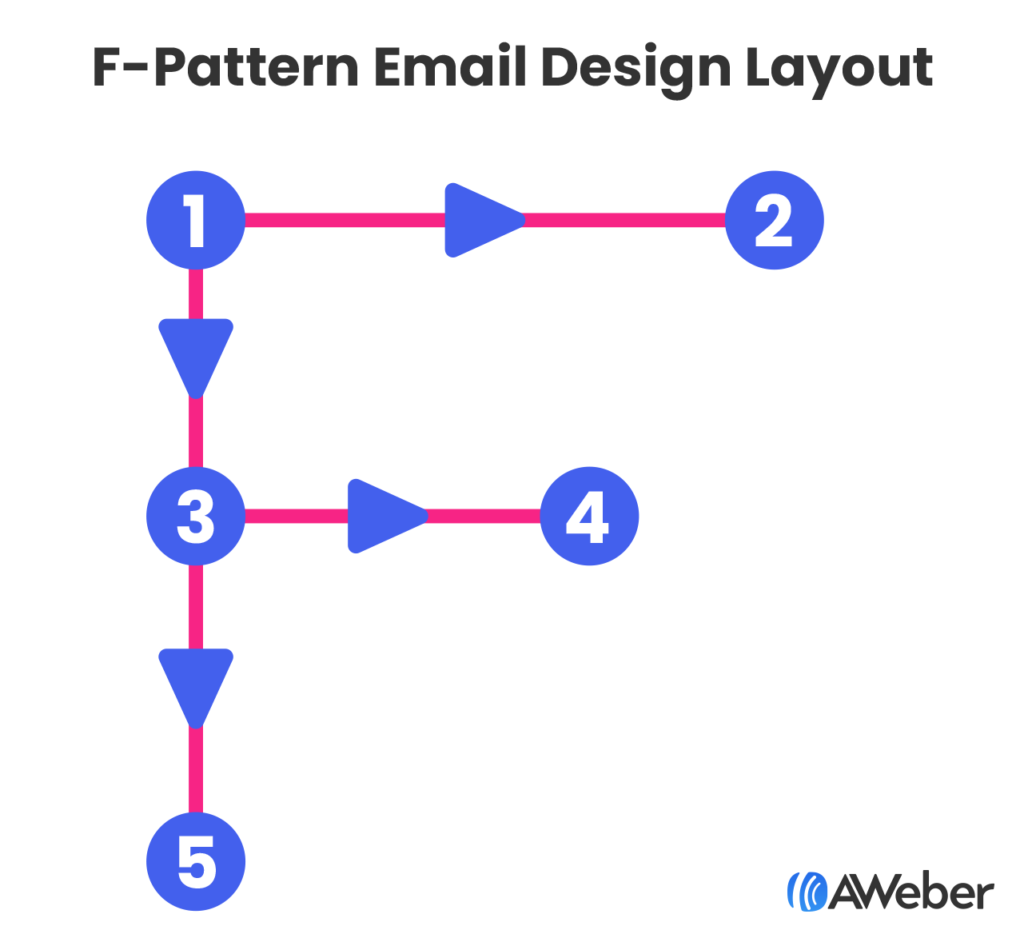
The F-Pattern: Readers scan left to right at the top, then down the left side—place key CTAs at these intersection points.

F-pattern email design layout

The Gutenberg Diagram: Eyes move from top-left to bottom-right—position your primary CTA in the bottom-right "action area."

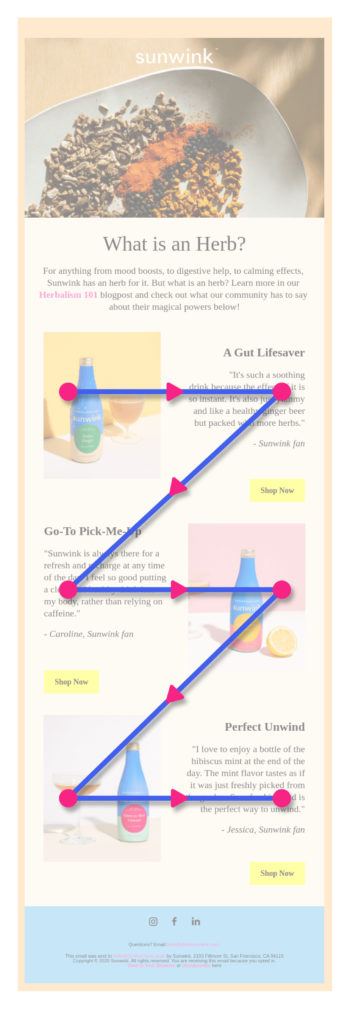
The Z-Pattern Layout: This layout mimics natural reading flow, alternating text and images in a zigzag pattern. This design technique helps readers move through content systematically while maintaining engagement.

Z-pattern benefits:

  • Guides eyes naturally through content
  • Creates multiple opportunity points for CTAs
  • Balances text and visual elements effectively
  • Works well for product showcases and announcements
An example of a z-pattern email design layout

Single-Column vs. Multi-Column Layouts

Single-column layouts perform better on mobile devices and ensure content displays correctly across all email clients.

When to use single-column:

  • Mobile-first email strategies
  • Simple announcements or updates
  • Blog post summaries
  • Event invitations

When multi-column works:

  • Desktop-heavy subscriber base
  • Product catalogs with multiple items
  • Newsletter sections requiring comparison

Trust-Building Design Elements

Social Proof Integration

Visual trust signals reduce friction and increase action rates.

Trust-building design elements:

  • Customer logos: Display recognizable brand partnerships
  • Testimonial callouts: Use distinctive formatting to highlight praise
  • Review stars: Include visual ratings for products or services
  • Subscriber counts: "Join 50,000+ readers" creates social validation
  • Security badges: SSL certificates and privacy assurances near CTAs

Scarcity and Urgency Visuals

Time-sensitive design elements motivate immediate action.

Urgency-creating techniques:

  • Countdown timers: Visual countdowns for limited offers
  • Stock indicators: "Only 3 left" with supporting visual elements
  • Color-coded urgency: Red highlighting for time-sensitive information
  • Progress bars: Show limited availability or completion status
  • Exclusive labeling: "VIP Access" or "Members Only" visual treatments

Essential Design Elements

Header Design and Branding

Your newsletter header establishes brand recognition and sets expectations.

Effective header elements include:

  • Company logo (optimized for mobile viewing)
  • Newsletter name or tagline
  • Clear brand colors consistent with your website
  • Navigation links (optional, but useful for web versions)

Strategic Image Selection

Images should evoke emotion and support your message, not just fill space. Consider these image strategies:

Bold, contextual imagery: Like The North Face's email showcasing waterproof gear in rain, images should demonstrate product benefits in real-world contexts.

Product photography: Show items clearly with sufficient lighting and multiple angles when relevant.

Lifestyle photography: Help subscribers envision using your products or services in their own lives.

Typography and Readability

Readable typography is fundamental to newsletter success. Follow these typography guidelines:

  • Use web-safe fonts (Arial, Helvetica, Georgia) for maximum compatibility
  • Maintain consistent font sizes throughout
  • Ensure high contrast between text and background colors
  • Limit font families to 2-3 maximum per email
  • Test readability across different email clients

Technical Design Considerations

Alt Text Implementation

Alt text is critical for accessibility and image-blocked scenarios. With 33% of Gmail users blocking images, descriptive alt text ensures your message reaches all subscribers.

Alt text best practices:

  • Write descriptive, concise alternative text for all images
  • Include key information that images convey
  • Avoid "image of" or "picture of" prefixes
  • Keep descriptions under 125 characters
  • Consider how alt text flows with surrounding content

Take a look at this email from Hotels.com where images were blocked, but the use of alt text was implemented.

Image in an email that didn't render, showing the alt text

And here’s what it should actually look like:

Example of an email where the image rendered

Color and Contrast

High contrast ratios improve readability for all users, including those with visual impairments.

Color guidelines:

  • Maintain 4.5:1 contrast ratio minimum for normal text
  • Use 3:1 contrast ratio for large text and UI elements
  • Test colors in both light and dark mode email clients
  • Avoid using color alone to convey important information

White Space and Spacing

Strategic white space improves comprehension and reduces cognitive load. Effective spacing includes:

  • Margins around text blocks
  • Padding within content sections
  • Line spacing for improved readability
  • Separation between different content types

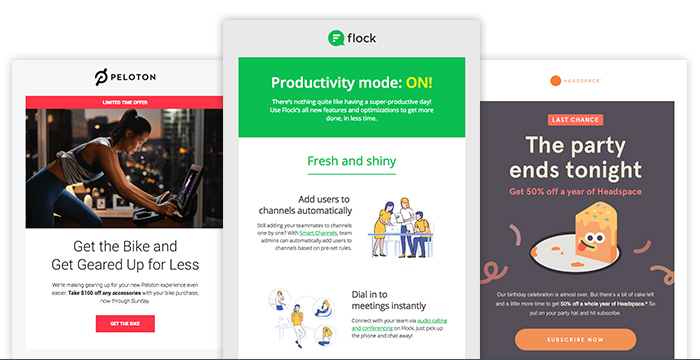
Take these newsletter examples from Peloton, Flock, and Headspace. All three newsletter examples use contrasting images and include enough whitespace to make for easy reading.

three different newsletter samples from Peloton, Flock and Headspace

Template Selection and Customization

Choosing the Right Template

Template selection should align with your campaign goals. Different objectives require different design approaches:

Promotional templates: Feature large product images, prominent CTAs, and minimal text
Educational templates: Emphasize readability with clear hierarchies and content sections
Announcement templates: Use bold headers and concise messaging 
Newsletter digests: Include multiple content blocks with consistent formatting

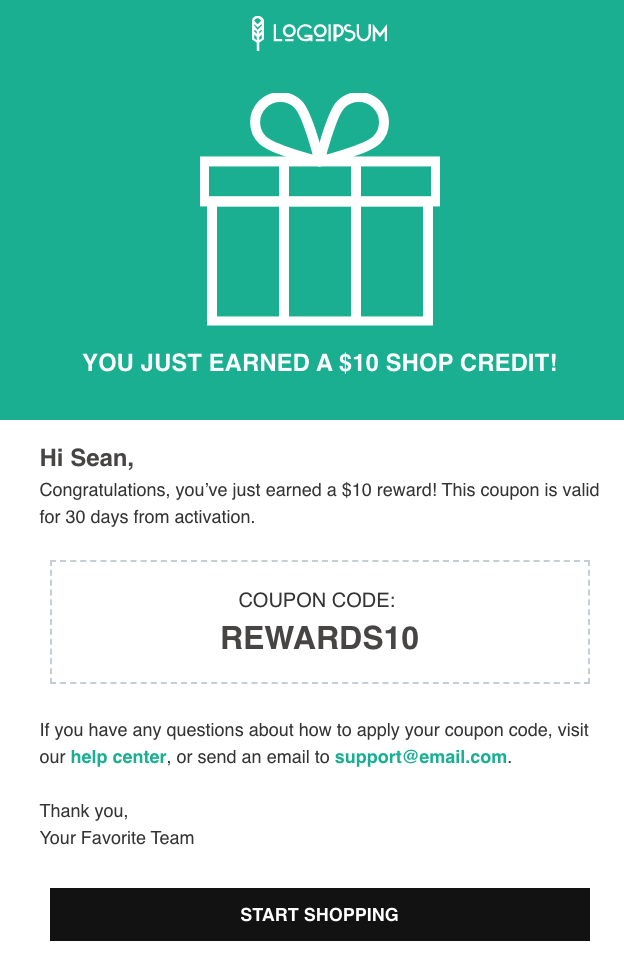
For example, if you’re an AWeber user who wants to send a new discount code to new subscribers to show your appreciation and to get them to try a product, you might want to select a template that clearly indicates your message. Here’s our “announcement” layout that you can customize for your business and brand.

AWeber email template with coupon code

Brand Consistency

Consistent branding builds recognition and trust. Maintain these brand elements across all newsletters:

  • Logo placement and sizing
  • Brand color palette
  • Typography choices
  • Voice and tone in visual elements
  • Image style and filters

Advanced Design Techniques

Interactive Elements

While video doesn't play directly in most email clients, you can create engaging interactive experiences:

Video thumbnails: Use compelling still images with play buttons linking to hosted videos GIF animations: Add subtle motion to draw attention to key elements Hover effects: Include CSS hover states for desktop users Progressive enhancement: Design base experience for all clients, add enhancements for capable ones

Personalization in Design

Visual personalization increases engagement beyond just using subscriber names. Consider these design personalization strategies:

  • Dynamic content blocks based on subscriber preferences
  • Location-based imagery and offers
  • Purchase history-influenced product recommendations
  • Behavioral trigger-based design elements

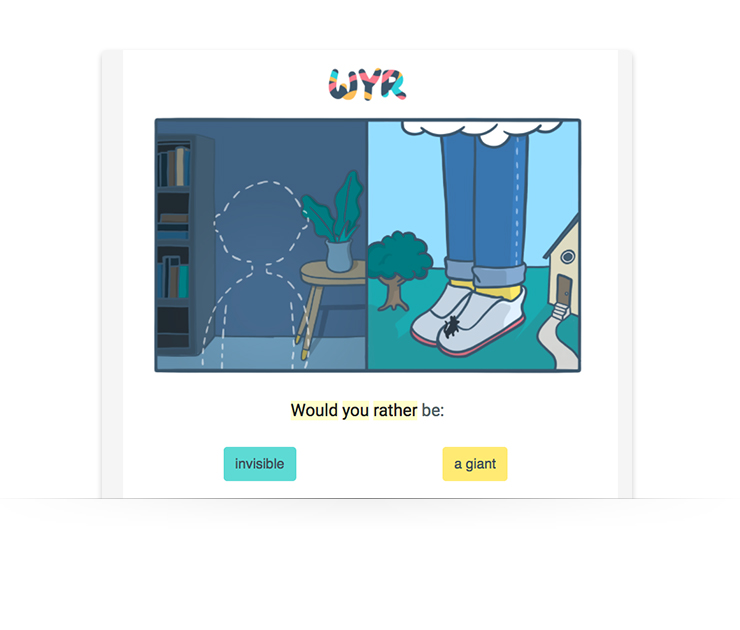
WouldYouRather (WYR) does this well by making every email engaging and interactive:

email newsletter example from company WouldYouRather

Psychological Design Triggers

The Power of Directional Cues

Visual elements that point toward CTAs increase click-through rates.

Effective directional techniques:

  • Arrow graphics: Subtle arrows pointing to buttons or links
  • Eye gaze direction: Photos of people looking toward CTAs
  • Geometric shapes: Triangles and lines that create visual flow
  • Image composition: Product photos that naturally lead the eye to action buttons

Cognitive Load Reduction

Simplified designs make decision-making easier for readers.

Load reduction strategies:

  • Single primary CTA: Eliminate choice paralysis with one clear action
  • Progressive disclosure: Reveal information gradually to prevent overwhelm
  • Familiar patterns: Use conventional layouts that require no learning
  • Consistent iconography: Standardized symbols reduce cognitive processing

Testing and Optimization

A/B Testing Visual Elements

Systematic testing reveals what resonates with your specific audience. Test these design elements:

  • Subject line and preview text
  • Header images and layouts
  • CTA button colors and placement
  • Overall color schemes
  • Image vs. text-heavy approaches

Cross-Client Testing

Email renders differently across clients and devices. Test your designs in:

  • Gmail (desktop and mobile)
  • Outlook (various versions)
  • Apple Mail (iOS and macOS)
  • Yahoo Mail
  • Outlook.com
  • Mobile-specific clients

Common Design Mistakes to Avoid

Over-Reliance on Images

Image-only newsletters risk deliverability issues and accessibility problems. Avoid these common mistakes:

  • Using images for all text content
  • Missing alt text for important images
  • Ignoring load times for image-heavy emails
  • Assuming all subscribers can view images

Poor Mobile Optimization

Mobile-unfriendly designs significantly impact engagement. Common mobile mistakes include:

  • Text too small to read without zooming
  • Buttons too small for finger tapping
  • Horizontal scrolling requirements
  • Unreadable fonts on small screens

Inconsistent Branding

Brand inconsistency confuses subscribers and reduces trust. Maintain consistency in:

  • Logo usage and placement
  • Color palette adherence
  • Typography choices
  • Overall visual style

Design Tools and Resources

Email Design Platforms

Modern email platforms offer drag-and-drop designers that simplify newsletter creation:

  • AWeber: Features mobile-responsive templates and intuitive design tools
  • Mailchimp: Offers extensive template library and customization options
  • Constant Contact: Provides industry-specific templates and design guidance

Design Inspiration Sources

Study successful newsletter designs from companies in your industry and beyond:

  • Really Good Emails: Curated collection of email design examples
  • Email Love: Inspirational newsletter designs across industries
  • Litmus Community: Technical resources and design best practices

Measuring Design Success

Key Design Metrics

Track these metrics to evaluate design effectiveness:

  • Open rates: Indicate subject line and sender effectiveness
  • Click-through rates: Measure design's ability to drive action
  • Conversion rates: Show ultimate business impact
  • Time spent reading: Gauge content engagement
  • Unsubscribe rates: Identify design or content issues

Design Attribution

Isolate design impact by testing individual elements while keeping other variables constant:

  • Single-element A/B tests
  • Multivariate testing for complex changes
  • Longitudinal studies tracking design evolution
  • Heat mapping for web-based newsletter versions

Accessibility in Newsletter Design

Universal Design Principles

Accessible design benefits all subscribers, not just those with disabilities:

Visual accessibility:

  • High contrast color combinations
  • Scalable fonts and layouts
  • Descriptive alt text for images
  • Logical reading order

Cognitive accessibility:

  • Clear, simple language
  • Consistent navigation patterns
  • Adequate white space
  • Predictable layout structures

Screen Reader Compatibility

Optimize for assistive technologies with these techniques:

  • Semantic HTML structure
  • Descriptive link text
  • Table headers for data presentation
  • Skip navigation options

Future-Proofing Your Newsletter Design

Emerging Design Trends

Stay current with evolving design standards:

  • Dark mode compatibility: Ensure designs work in both light and dark themes
  • Interactive elements: Incorporate subtle animations and micro-interactions
  • Minimalist aesthetics: Focus on essential elements and clean layouts
  • Personalization at scale: Use dynamic content for individual relevance

Technology Considerations

Prepare for changing email client capabilities:

  • CSS support improvements across clients
  • Enhanced mobile functionality
  • Privacy-focused design considerations
  • Cross-platform consistency requirements

Email Newsletters Design Recap

Great newsletter design strikes the right balance between visual appeal and usability. By applying proven principles—like optimized layouts, clear visual hierarchy, and consistent branding—you ensure your message not only looks professional but drives real results.

Key takeaways:

  • Prioritize clarity: Use a single-column layout, large buttons, and 14px+ fonts to ensure readability.
  • Balance visuals and text: Stick to a 60:40 text-to-image ratio to improve deliverability and accessibility.
  • Guide the eye: Use headlines, subheads, bullet points, and white space to create a natural reading flow.
  • Stay on brand: Keep logos, colors, fonts, and image styles consistent to build trust and recognition.
  • Make content accessible: Add descriptive alt text to all images so your message still lands if images are blocked.
  • Test before sending: Check formatting across major email clients on desktop and mobile.
  • Always be optimizing: A/B test layout, imagery, colors, and CTAs to see what performs best.

The post How to Design an Email Newsletter: Design Elements That Make Readers Take Action appeared first on AWeber.


from AWeber https://ift.tt/rMjX3UB
via IFTTT
The 6 Essential Sections of a Newsletter Every Email Marketer Needs

essential sections of a newsletter

I don’t have a creative bone in my body. So when I first started creating newsletters, I would always second guess myself, which usually left me just giving up and going with a plain white background, black text newsletter.

I can’t tell you how many times I’ve tried to start writing only to quickly get discouraged that my newsletter doesn’t look all that great. It looks plain. It looks average. I am not afraid to admit - It would look boring and I wouldn’t read it myself.

So I made it my mission to find out what makes a great looking newsletter that people could not wait to read. After countless hours of research I’ve listed the sections that appear most often in the most popular newsletters.

The 6 Essential Sections of a Newsletter

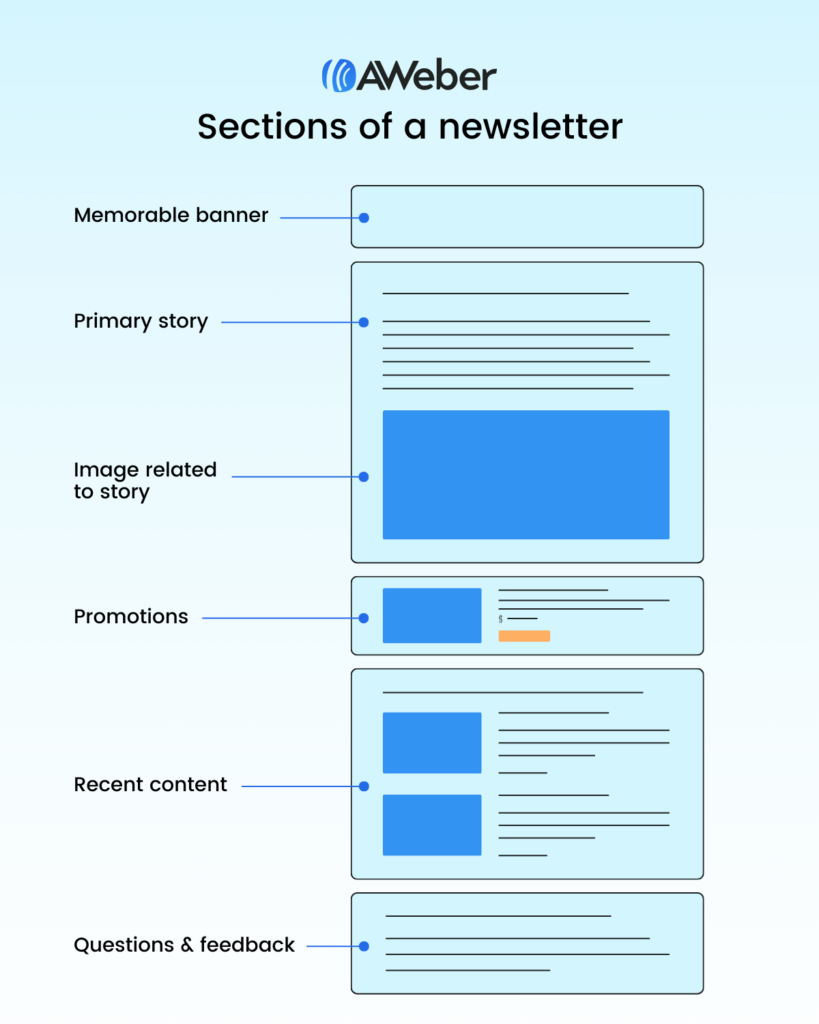
Every high-performing newsletter contains six core sections that work together to maximize reader engagement and conversion rates. As shown in the newsletter anatomy diagram above, these essential sections include:

  1. Memorable banner - Establishes brand identity and purpose
  2. Primary story - Delivers your main content and value
  3. Image related to story - Provides visual context and emotional connection
  4. Promotions - Strategic offers that monetize reader trust
  5. Recent content - Re-engages readers with past material
  6. Questions & feedback - Builds community interaction and two-way communication
Sections of a newsletter

1: The Memorable Branded Banner

Why Newsletter Headers Matter

I've subscribed to so many newsletters that I often lose track of things. What I've started noticing is that some authors forget to remind me who they are, what they offer, and why I signed up in the first place.

Newsletter banners should re-establish your brand identity in every email because subscribers receive dozens of emails daily and may forget your specific value proposition.

Let's not assume people remember us from our catchy email address. You need to begin every email by re-establishing your brand, identifying who you are and why it matters.

Essential Elements of Newsletter Banners

A memorable branded banner can be quite simple. Effective newsletter headers include three critical components:

  • Logo or brand name for visual recognition
  • Brand colors for consistent visual identity
  • Value proposition statement explaining why the newsletter exists and matters to subscribers

Check out this banner created for the RuhRoh newsletter:

memorable newsletter banner for RuhRoh Newsletter. Banner headline has the RohRoh logo and the tagline "Helping you avoid puppy problems"

As you can see the brand header section is strong with a dark background. The logo and newsletter name are on the left. And the thing that catches the eye is a reminder that this newsletter is here to help people avoid common problems of owning a new puppy.

How to Create Newsletter Banners in Canva

Here's a simple way you can design a branded newsletter header using Canva:

  1. Select "Create a design"
  2. Go to custom size and enter 1200 x 200 px (optimal newsletter banner dimensions), then select create new design
  3. Choose one of their pre-designed banner templates to get started
  4. Customize colors to match your brand palette
  5. Replace text with your newsletter name and value proposition
  6. Upload and insert your logo

The recommended newsletter banner size is 1200 x 200 pixels for optimal display across email clients.

2: The Primary Story Content

Delivering Your Main Value Proposition

Once your subscriber has opened the email and recognized your brand and purpose, it's important to jump right into the topic of the day. Your subject line likely prompted the reader to open the message, so they're looking for an immediate connection to the information you've promised. Let's not make them hunt around to find what they're looking for.

The primary story section should deliver on your subject line promise within the first 100 words to maintain reader engagement.

Key Components of Effective Newsletter Primary Stories

The primary story will be simply introduced by a title that helps the reader recognize it's the story they're looking for. Newsletter primary story sections perform best when they include:

  • Clear, descriptive headline that matches reader expectations
  • Scannable formatting with subheadings and bullet points
  • Actionable takeaways readers can immediately implement
  • Logical flow that guides readers to your main point

3: Images Related to Your Story

The Power of Visual Storytelling in Newsletters

Newsletter images should directly support and enhance your primary story content rather than serve as decorative elements. The most effective newsletter images create an emotional connection that helps readers visualize themselves benefiting from your content.

Best Practices for Newsletter Story Images

Newsletter images that drive engagement include:

  • Hero images that illustrate the main topic emotionally
  • Step-by-step screenshots for tutorial content
  • Aspirational lifestyle photos that help readers imagine success
  • Data visualizations that make complex information digestible
  • Product demonstrations for promotional content

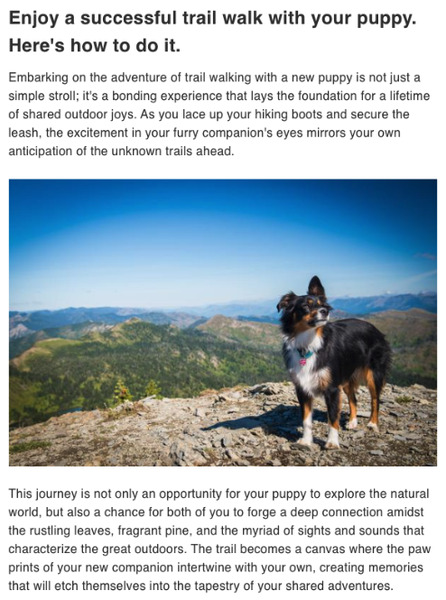
Check out the example below for the RuhRoh Newsletter, it explains how to have a successful trail walk with your dog. The image is aspirational in nature, helping the reader to imagine him or herself out on the trails with their pup.

Primary story section of RuhRoh Newsletter showing a headline, copy and image of a dog

4: Strategic Promotional Content

Why Newsletter Promotions Drive Revenue

Let's face it, your audience, large or small, trusts you. They read your newsletter for the information you provide and they see you as a valuable advisor on a topic they care about. Don't miss the opportunity to share and promote offers, courses, and products to them.

Newsletter subscribers are 40% more likely to make purchases compared to other marketing channels because they've already opted into your content.

Buying decisions are made so much easier when an expert recommends the exact thing that works for them.

Types of Newsletter Promotional Content

In your newsletter design, make sure you promote other services you might offer. Effective newsletter promotions include:

  • Digital courses and educational content
  • One-on-one coaching or consultation services
  • E-books and downloadable resources
  • Affiliate product recommendations
  • Partner collaborations and cross-promotions
  • Upcoming webinars or live events

Try to include at least one thing to promote in each newsletter. Newsletter monetization strategies work best when promotional content comprises 20-30% of total newsletter real estate.

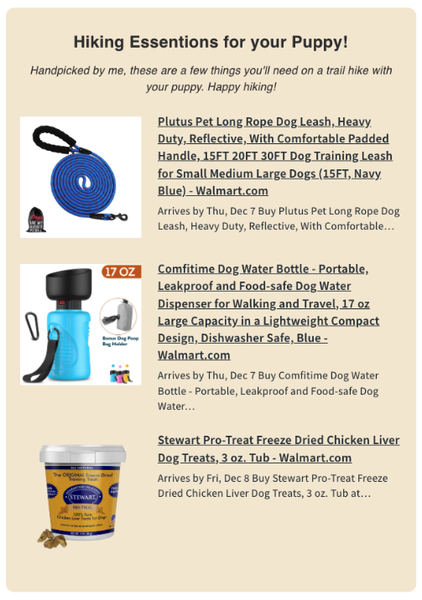
Here's an example from the RohRoh Newsletter, since the content we shared above is writing about trail hiking with my dog. It's a nice tie-in to promote a few essential products.

Promotional section of a newsletter showing 3 products that the newsletter is recommending

5: Recent Content and Archives

The Importance of Content Recirculation

As a newsletter author, it's a trap to assume every reader opened each email you've sent let alone read everything. In reality, it helps to re-send links to content you shared in previous newsletters. Make sure you always have a spot to re-invite the user to click through and access that content.

Only 20-25% of newsletter subscribers open every email, making content recirculation essential for maximizing reach.

Implementing Recent Content Sections

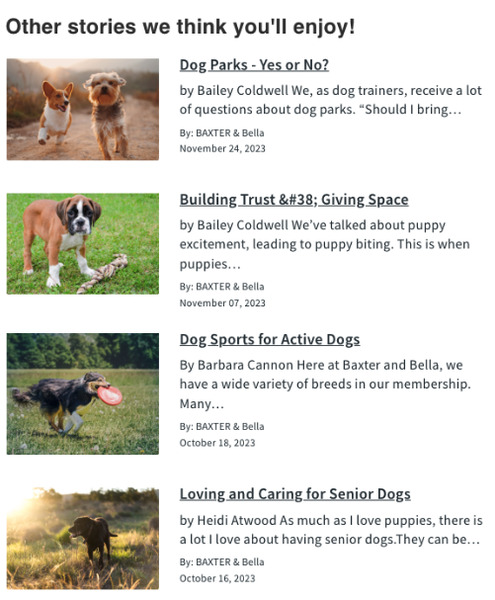
The RuhRoh Newsletter does just that by sharing their four most recent blog posts.

Most recent blog post stories shown in the newsletter

Newsletter content recirculation increases overall content consumption by 35-50% compared to single-send strategies.

You can manually add your most recent blog post in each newsletter or if you use an email provider, like AWeber, you can use an RSS feed element to have the image, title, description, and more automatically pulled into your newsletter.

Automating Content Feeds in Email Platforms

Here's how easy it is if you have an AWeber account:

  1. Drag the Feed element into your email
  2. Enter the RSS feed URL into the "Feed URL" box
  3. Set your preferences such as the layout style, text color, and the number of items you want to appear

RSS feed integration saves newsletter creators 2-3 hours per issue by automatically pulling recent content.

6: Questions & Feedback for Community Building

Why Newsletter Questions & Feedback Sections Matter

An often overlooked part of a great newsletter design is asking for feedback.

Email newsletters often feel like a one-way street. You write. The audience reads. So consider having a relationship with your audience, instead. Two-way newsletter communication increases subscriber retention rates by up to 60%.

As shown in the newsletter sections diagram, the questions & feedback section appears at the bottom of your newsletter, making it the final opportunity to convert passive readers into active community members.

Effective Reader Engagement Strategies

Invite them to reply to your email, ask questions, and yes, have them recommend topics you should cover next. Newsletter engagement tactics that drive responses include:

  • Direct questions about the main topic
  • Topic suggestion requests for future issues
  • Community group invitations (Facebook, Discord, etc.)
  • Survey links for subscriber feedback
  • Social media conversation starters
  • User-generated content requests

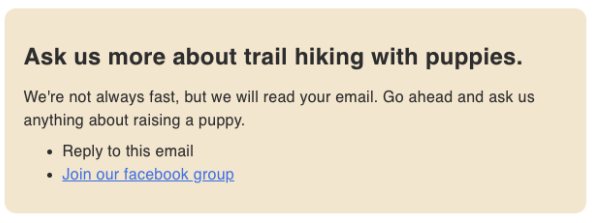
Here's an example of how to ask your readers to engage with your newsletter. You can prompt for replies by asking if anyone has more questions about your primary topic. You can also link to our Facebook group where people can join the community and get more involved.

Questions section of a newsletter design

Newsletter Design Best Practices and Final Touches

Consistent Branding Across Newsletter Sections

Once you have your newsletter designed, it's time to make some last minute tweaks to get it just right.

Newsletter design consistency increases brand recognition by 80% and improves click-through rates by 23%.

You want to make sure your newsletter design is using your brand colors for any call to actions, background colors, or text links. Also ensure you're using consistent font styles for your headlines and paragraphs.

Technical Newsletter Design Requirements

Key newsletter design specifications include:

  • Maximum width: 600-650 pixels for optimal mobile display
  • Font size: Minimum 14px for body text, 18px+ for headlines
  • Color contrast: 4.5:1 ratio minimum for accessibility compliance
  • Image optimization: Under 1MB total file size per newsletter
  • Mobile responsiveness: 60%+ of newsletters are opened on mobile devices

In most newsletter builders you're going to need to update these in each section. But if you're using AWeber to send your newsletters, this can be done using Theme Settings.

GIF showing how universal theme settings feature works in AWeber

Frequently Asked Questions About Newsletter Sections

How many sections should a newsletter have?

Most successful newsletters contain 4-6 sections, with the 6 sections shown in the newsletter diagram being the optimal structure for balancing content variety and reader attention spans.

What's the ideal length for newsletter sections?

Newsletter sections should be 50-150 words each, with the primary story section extending up to 300-500 words for in-depth topics.

Should every newsletter include all six sections?

While flexibility is important, newsletters that consistently include the core sections—memorable banner, primary story, story image, promotions, recent content, and questions & feedback—see 40% higher retention rates than inconsistent formats.

How do you measure newsletter section performance?

Track section-specific metrics including click-through rates, time spent reading, and conversion rates to optimize individual newsletter components.

Start Creating High-Converting Newsletter Sections Today

Designing a newsletter that looks like a work of art can be accomplished in no time with the right newsletter solution – like AWeber. Plus, once you've designed your new newsletter you can save it as a Template and use it over and over again.

The six essential newsletter sections—memorable banner, primary story, story-related image, promotional content, recent content, and questions & feedback—form the foundation of successful email marketing campaigns that drive both engagement and revenue.

Remember: Newsletter success comes from consistent execution of proven section structures, not complex designs or lengthy content.

The post The 6 Essential Sections of a Newsletter Every Email Marketer Needs appeared first on AWeber.


from AWeber https://ift.tt/pScKPZq
via IFTTT
How to get more views on TikTok (even with no followers)

Figuring out how to get more views on TikTok after posting is an important growth strategy for content creators.

Why? Because the more times people see your content, the better your chances of growing your reach and engagement, leading to potential earning opportunities.

Building a TikTok marketing strategy means experimenting with new ways to increase your visibility based on your brand and audience. If you’ve been struggling to reach more people, take note of our hacks below for how to get more eyes on your TikTok account and videos—for faster growth and brand discovery.

What is considered a view on TikTok?

A video view on TikTok measures the number of times your video starts to play. Even if the viewer scrolls away immediately after a video starts rolling, it’s still counted as a view.

However, these situations aren’t always black and white. Here are a few specific cases when a view may or may not count:

  • Autoplays: Autoplays are counted as views. TikTok users don’t need to engage with a video for it to be counted.
  • Loops: Looped videos are not counted as individual views if they occur during the same impression. For example, if a video loops five times while you’re typing a comment, it still only counts as one view.

For creators monetizing their videos through the TikTok Creator Fund, views must be “qualified” to count. This means they must:

  • Be unique video views from the For You feed
  • Be watched for five seconds or longer
  • Not be paid, artificial or promoted in some way

Why views matter on TikTok

Views are a crucial TikTok metric. They highlight how many times people have seen your videos, which signals interest in your content. The more views you get, the more your videos get shown and suggested by the TikTok algorithm to reach a wider audience.

More TikTok views also translates to more chances to receive other types of engagement. This includes comments, follows and shares, which are pivotal to how you grow on TikTok. These metrics matter when it comes to highlighting the size of your TikTok account for possible monetization or partnership opportunities.

How to get more views on TikTok: 12 strategies for growth (even with no followers)

Whether you’ve been posting videos for a while or just started a new account, you don’t need a large following to get more views on your TikTok content. Here are some practical tips to try today to grow your current audience.

Optimize your video for discovery

If you want to reach new people, you need to make it easier for them to find you. Use these five hacks to make your TikTok account more discoverable.

1. Add hashtags to your content

Hashtags exist on nearly every social media platform as a way to categorize, tag and search for content, and TikTok is no different. TikTok hashtags are used similarly, but they can also be used for trends and challenges.

Using hashtags in TikTok captions can help even more users discover your content and boost your view count. However, you need to be strategic about your hashtag use. Make sure you’re using hashtags that are both popular and relevant to your content.

Here are a few key ways to find the best hashtags for more TikTok views:

  • Pay attention to the hashtags your competitors are using
  • Use a third-party tool like TikTok Hashtags to find popular tags
  • Take advantage of TikTok’s autocomplete features to find hashtags
  • Browse through the For You page (FYP) to discover trending hashtags
  • Search TikTok’s Creative Center to find product-related tags in your industry

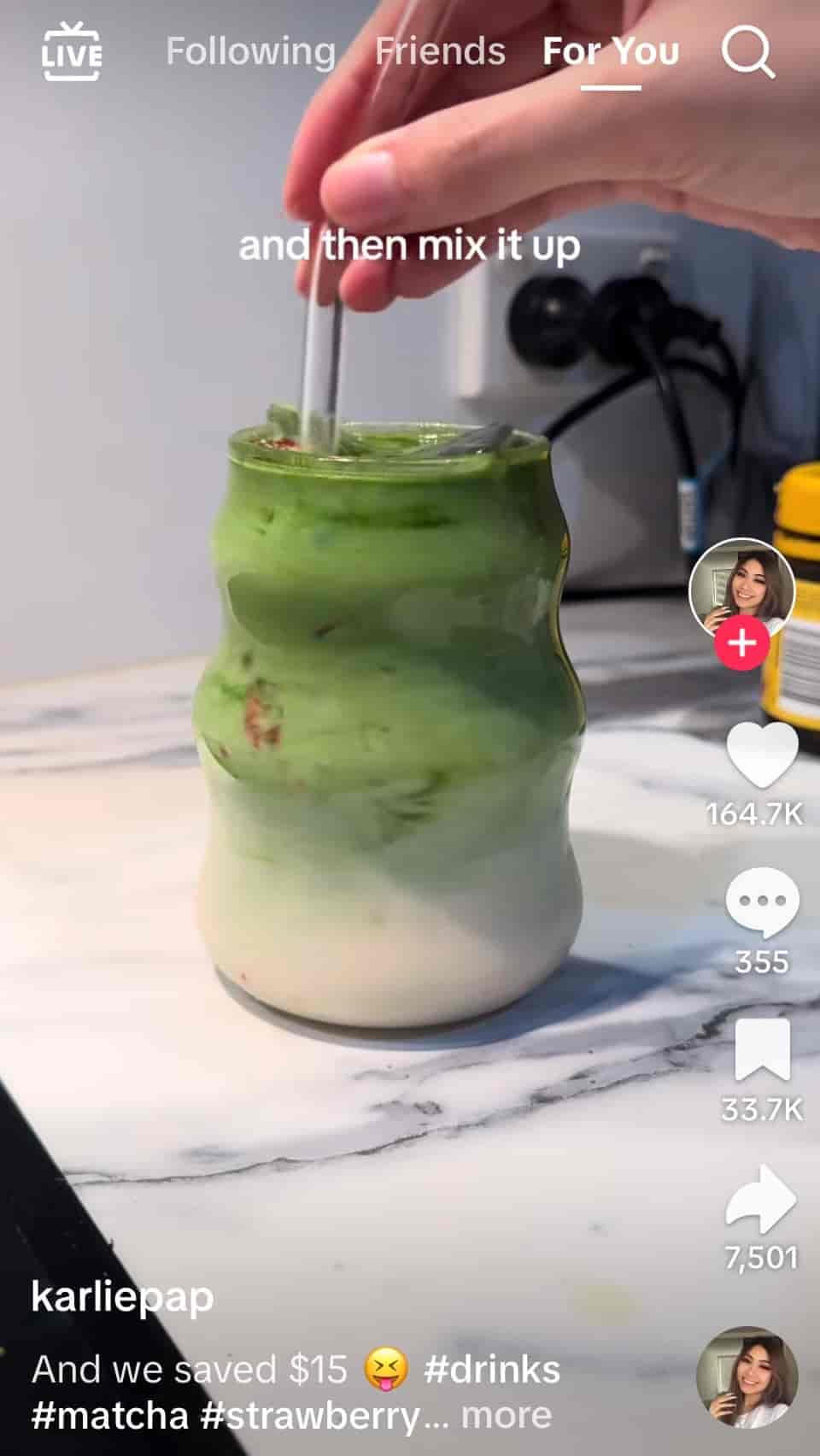
Here’s an example of how to incorporate hashtags into your caption to help boost your videos:

A screenshot of a TikTok video shows a hand mixing a matcha latte

Source: TikTok

Adding three to five hashtags seems to be the sweet spot for gaining a positive amount of reach. Experiment with different tags and try to keep them consistent with similar topics. This will help the TikTok algorithm understand what you’re posting about and get your content in front of the right audience.

2. Include popular music and trending audio

When in doubt, use popular music and sound clips within your video content. If someone likes the music clip, they can click on the spinning album in the bottom right corner to view more videos that use it, potentially leading them to discover your content.

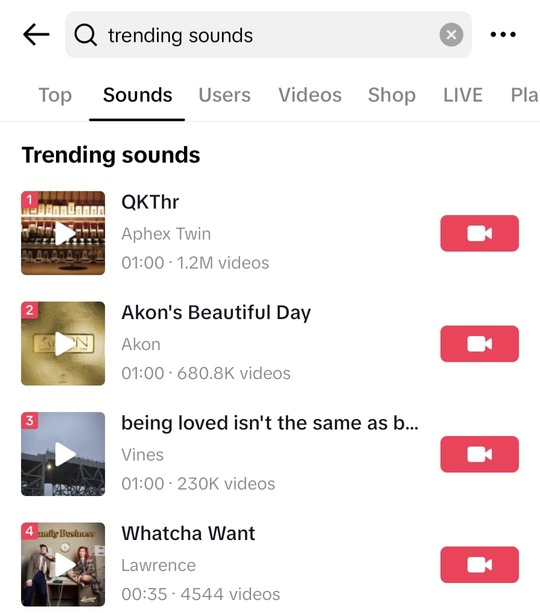
TikTok now makes it easy to search for trending audio for your videos, including royalty-free songs and audio that’s cleared for commercial use. This means you’re free to use it on your business account.

A screenshot shows TikTok search results for trending sound

Remember that you don’t have to do a TikTok dance or anything controversial to create popular videos. A bit of creativity can help you incorporate trending sound bytes into your videos to get more TikTok views.

Leveraging trending music and audio is an easy way for brands to boost their reach and potentially get picked up on the TikTok For You page. The key is using music that makes sense for your content.

3. Follow viral TikTok trends

Speaking of trends, TikTok is all about following viral trends, and they’re a great way to get more reach. Thankfully, there are many different types of trends to choose from. This includes dances, challenges, memes and more.

There are also truly organic events like the “Demure” trend that took over TikTok last year. Brands, influencers and everyday content creators alike got in on it and saw massive reach as a result. This example highlights again how you can use trending TikTok audio to get more views.

One of the best ways to gain an understanding of viral trends on TikTok is to spend time consuming content on the platform. Take a look at competitors and other brand accounts, but scroll for a bit each week as well to make sure you stay up to date on new TikTok content ideas. Also, pay close attention to the For You page and what’s trending among your target audience.

Content and trends move extremely quickly on TikTok. If you want to integrate these sorts of trendy ideas into your content calendar to get more views, you need to act on them quickly. Think days, not weeks or months.

4. Understand TikTok SEO

TikTok search engine optimization (SEO) involves optimizing your content and account to improve their visibility on the network. SEO uses tactics to make it easier for TikTok users to stumble across you while searching for relevant content.

A few items to try include:

  • Keywords: Use relevant keywords in your video descriptions, captions, hashtags and account info to help people find your content when searching. Keep this in mind when choosing a username as well.
  • Trending hashtags: Use hashtags related to your niche to reach more users.
  • Engagement: Encourage engagement by asking TikTok followers to like and comment on your videos. Their engagement—and your interactions with them—can boost visibility, since interaction plays a key role in TikTok’s algorithm.
  • Location targeting: If you’re targeting local audiences, optimize your content for local searches by including location-specific hashtags or keywords.

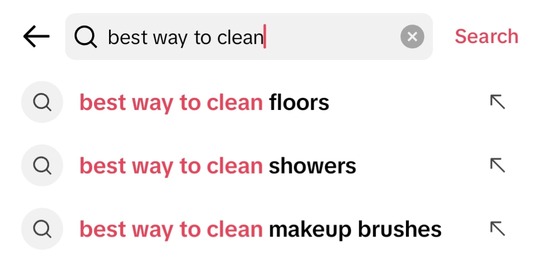
If you’re not sure how to find relevant keywords, try TikTok’s built-in tools like keyphrase autocomplete. This feature gives you a ton of ideas related to your industry and customer pain points to create content that not only gets views but also ranks in search results.

A screenshot shows TikTok’s keyphrase autocomplete feature giving keyphrase suggestions

Source: TikTok

5. Find the best times to post on TikTok

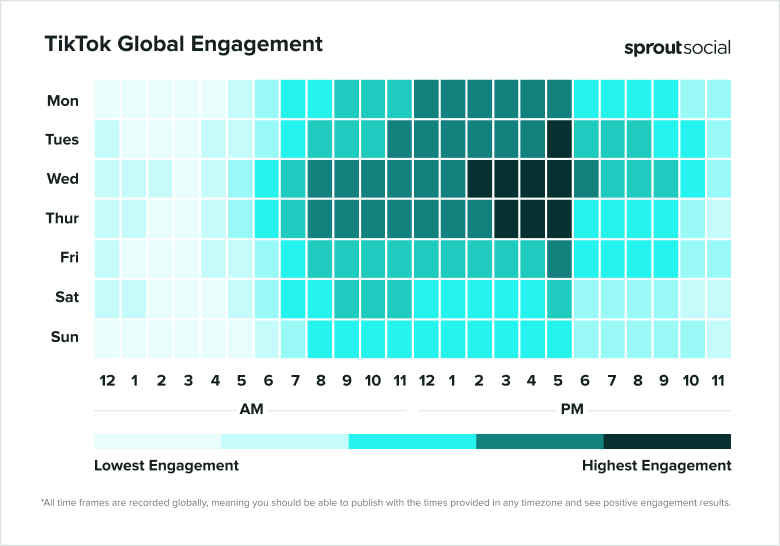
Timing your posts right increases the chances your audience will see them. According to our data, the best times to post on TikTok include:

  • Tuesdays at 5 p.m.
  • Wednesdays from 2 to 5 p.m.
  • Thursdays from 3 to 5 p.m.
A heat map shows when most TikTok users are online around the world

However, these times vary by industry, brand and location. There are also other factors that impact TikTok views and whether the algorithm picks up your content.

As a result, it’s best to experiment with different publishing frequencies and schedules rather than sticking to one-size-fits-all advice.

To find your own best times to post, pay attention to your TikTok analytics tools and when your audience is most likely to be online. Then, schedule your TikTok posts accordingly.

Maximize video performance and engagement

Once your content is discoverable, it’s time to focus on creating high-quality videos. Here are a few ways to make sure your videos shine.

6. Create a good hook

People often decide whether to watch a video within the first few seconds, which means your hook needs to be compelling enough to convince them to stick around.

A good hook can be a thought-provoking question, a bold statement, a nail-biter story or anything else you think will grab your audience’s attention.

A few types of hooks to try include:

  • An immediate promise: Clearly state what the video will reveal or solve in one short statement.
  • A fear of missing out: Tease what users will miss if they skip the video.
  • Cultural relevance: Relate to a situation the viewer might be going through right now.

7. Create videos from TikTok comments

If someone leaves a question in the comments, respond with a text comment or with a new TikTok video. Choosing the video response creates a visible link between the new video and the original.

This tactic drives additional views to the original post. Curious viewers often click back on the original video to see the full context.

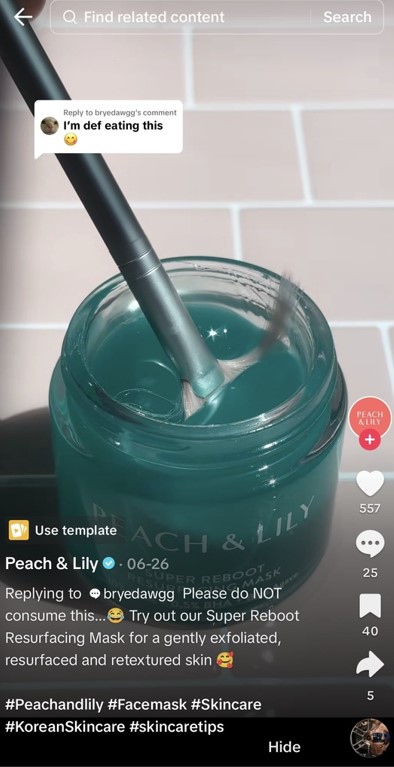
In this brand example, their social team used this tactic to spotlight a product. They turned a viewer comment into an opportunity to showcase the product’s aesthetics—earning strong views while keeping their content entertaining and on-brand.

A screenshot of a TikTok video shows a blue skincare product from Peach & Lily

Source: TikTok

Try coupling this strategy with other tactics to get more views on TikTok. For example, you could make a full-blown series where you reply to customers or answer questions regularly.

The bonus of using comments as content is that it naturally drives discussion, leading to more engagement, interactions and, ultimately, views.

8. Participate in TikTok challenges

There are many types of TikTok challenges, but the main two are branded challenges and community challenges. Branded challenges are challenges that relate back to your product or service to engage your audience. Community challenges are started by creators and TikTok users.

Try starting a unique branded challenge for your audience to participate in to see how much reach you can generate. Keep an eye out for community challenges that make sense for your brand or product to join to help expand your reach.

9. Create a lot of content

A typical rule of thumb is to post one to four times per day. If you want to keep up the momentum and grow your account, it’s a good idea to share as much content as often as you can. However, you also want to remain consistent, so make sure the content schedule you choose is sustainable.

Consider batch-creating content so that you have a lot to share for a week or two before you need to create more. Post daily at a minimum to increase the number of views on your TikTok account.

Creating a social media content calendar can help you plan diverse TikTok content in advance.

While some videos should be planned carefully, not all of them need to be.

By incorporating creators and customers into your strategy and posting off-the-cuff content, you can post more videos without as much editing. Many of the best brands on TikTok have a variety of content on their feeds.

Use data to refine your strategy

The more content you post, the more data you collect. Here are some ways this data will guide your future content and overall digital marketing strategy.

10. Track which videos drive the most engagement

Your TikTok analytics are a treasure trove of insights to help you understand what videos get the most engagement allowing you to do more of what works.

They may help you identify a type of content that gets you the most views, the topics your audience engages with most and patterns in which videos are watched all the way through.

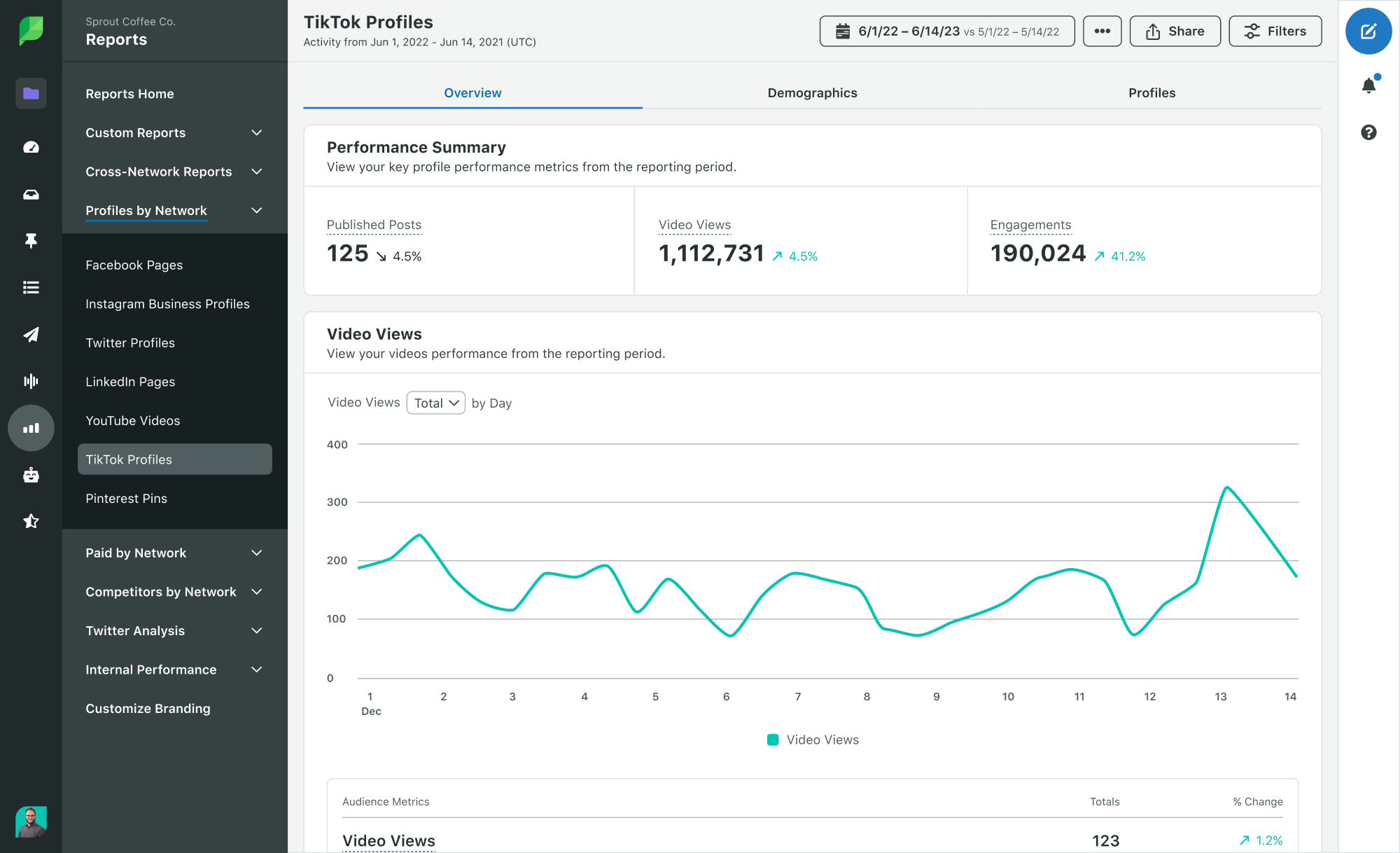
Take your content planning a step further by also using Sprout Social’s TikTok analytics. In addition to basic metrics, Sprout uses your TikTok data to inform the best posting times for engagement based on your unique audience.

A screenshot shows a performance summary for a TikTok video in Sprout Social

11. Use audience retention data to improve watch time

Getting someone to count as a view on your video is great, but you also want them to actually watch your video. For this to happen, you need to improve your audience retention rate.

Sprout Social also offers retention insights to help you understand how viewers are engaging with your content to identify areas for improvement. For example, see where in your videos viewers drop off to determine whether your videos are too long or if people lose interest at specific points.

These insights inform your future content to help keep viewers engaged for longer.

12. Spot trends using listening and analytics tools

It’s challenging to stay on top of TikTok trends, especially if you’re a busy business owner with other responsibilities. Thankfully, there are tools that monitor for these in the background when you can’t be online.

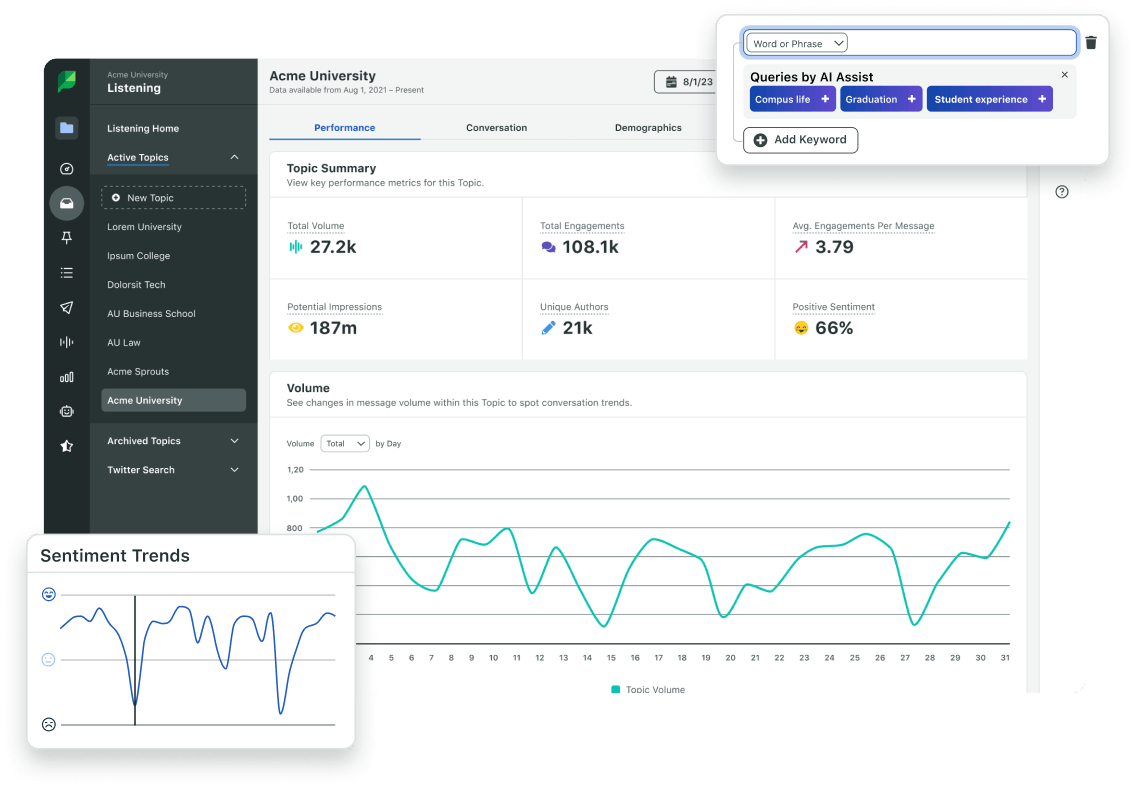
For example, Sprout’s Social Media Listening tool automatically sort through billions of data points to identify trends in seconds. It tracks consumer behavior related to specific topics so you always have one ear to the ground for trends within your industry.

A screenshot shows sentiment trends over time for a specific topic using Sprout’s Listening tool

These tools are a huge time-saver and help make sure you never miss an opportunity to get more views. Want to see it for yourself? Start a free trial with Sprout Social.

How to get more likes on TikTok

Ah, the age-old question: “How do you get likes on TikTok?” TikTok likes and views go hand in hand. The more you get of one, the more you get of the other.

Getting likes is less about increasing your visibility and more about engaging with your online community. Below are some tips to help you earn more engagement.

Create content that resonates and engages

To get more TikTok likes, you need to create quality content your target audience will enjoy seeing. Here are five ways to up your content game.

1. Create a multi-part series

If you’ve created a video that has performed well, use that to your advantage. Make it a multi-part series by coming up with more content of a similar nature.

For example, the Morning Brew team created a single video translating everyday terms into marketing buzzwords. Their audience loved it, so they started creating more videos with the same theme and format.

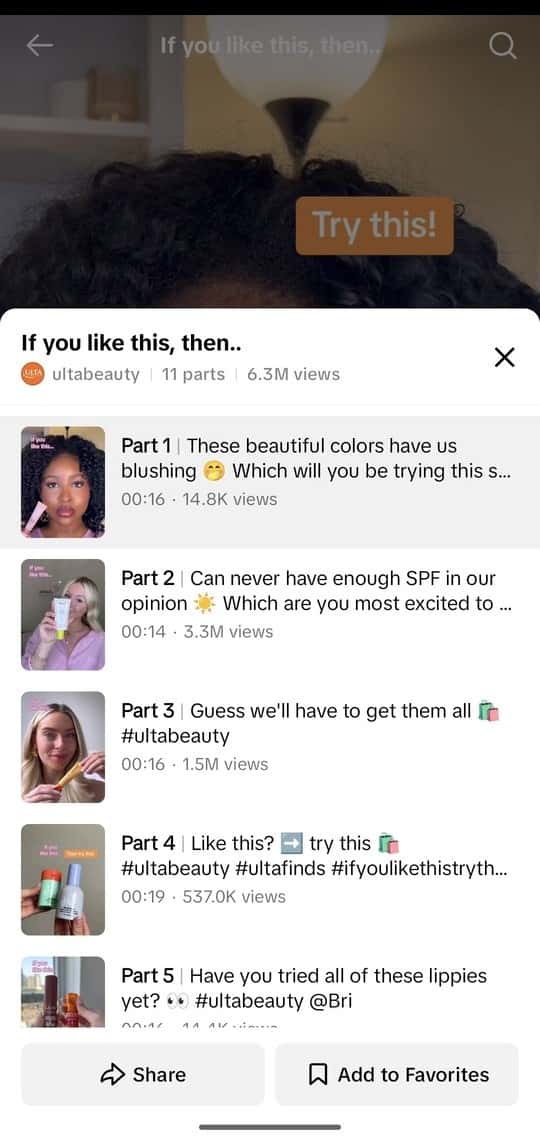
TikTok allows users to create playlists that are perfect for putting together a video series. Add all of the videos in a series to a list and make it easy for users to view similar videos within a single feed.

A screenshot shows an example of a list of similar videos on TikTok

Source: TikTok

A few ideas for different playlists and content themes include:

  • Customer showcases and testimonials
  • Product demos, tutorials and how-tos
  • Reaction videos
  • Reply videos
  • Q&A videos featuring your audience
  • “Tip of the week” videos

All of the above provide opportunities to both educate and engage with your viewers. Given how much TikTok leans into the concept of “edutainment,” this strategy can be an effective way to get more TikTok likes.

If you find that a series gets traction, it makes sense to continue your momentum and make similar content.

2. Know your target audience

If you’re wondering why your engagement is low on TikTok, it’s time to think about why your content isn’t hitting.

Pop quiz: who’s your target audience? Knowing your customers and who you’re trying to reach on TikTok helps you to create content they want to see.

When you create content that your target audience actually enjoys, they’re going to be more likely to like it, share it with their friends and follow your account.

Start by creating customer personas. Put together profiles of exactly who you’re trying to reach. This gives you an understanding of which types of content each persona would want to consume.

For example, are your customers looking at reviews? Are they looking up answers to questions or specific pain points? This is where doing research related to TikTok keywords can be a huge help, especially as the platform leans more into its search features.

Next, analyze your competitors. What are they posting? Better yet, which of their posts gets the most likes and comments? How can you incorporate similar strategies with your audiences?

Use this knowledge to cater your videos to your specific audience, and adjust your content strategy based on their reception.

3. Cross-promote your videos

If you’re struggling on TikTok but have great engagement on another social network, a bit of cross-promotion goes a long way.

Share your TikTok videos on other platforms to spread the word and get your followers to cross over. Easily share your TikTok videos on your Instagram Stories, or repurpose TikTok videos as Instagram Reels or YouTube Shorts. Consider also sharing links to your TikTok videos on X (formerly known as Twitter) to cast a wider net.

Beyond that, don’t be shy about promoting your TikTok presence across additional marketing channels, such as your marketing emails or even product pages. It simply provides another touchpoint for you to engage with your customers.

4. Duet and stitch popular videos

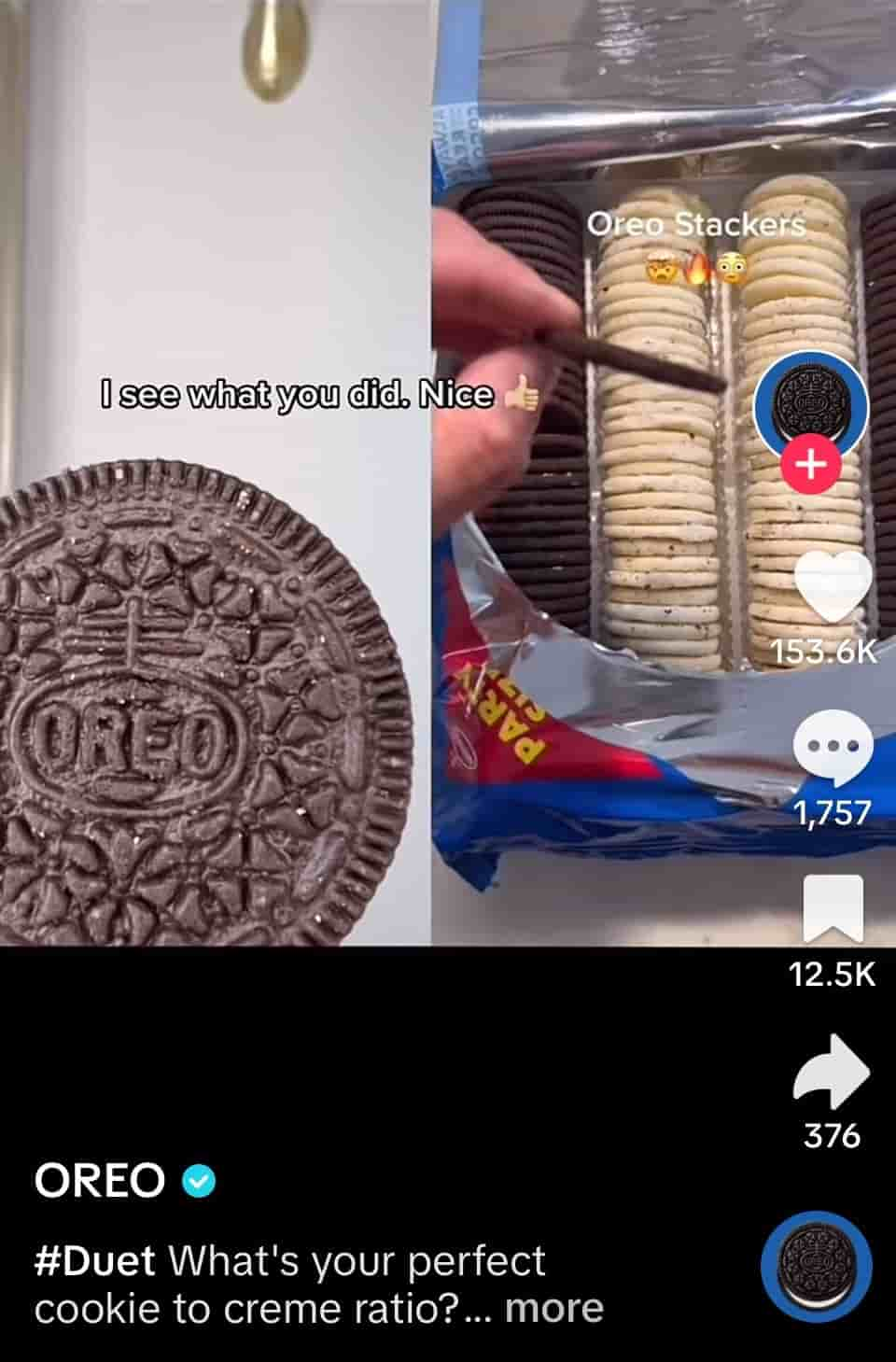
Another way to create engaging content is by dueting or stitching an existing TikTok video. A stitch plays part of an existing video before you take over with your own recorded video. It’s a great way to add additional context or commentary to someone else’s content.

A duet places your video alongside an existing video. This is perfect for reacting to another video, like OREO did by reacting to a creator’s video featuring their cookies.

A screenshot shows a TikTok video of Oreo’s duet with a customer

Source: TikTok

Incorporating duet and stitch videos into your strategy can be a great way to generate more likes—especially if you use videos from well-known creators. Like other tactics, it’s important to make sure you’re replying to relevant videos and not just trying to piggyback on trends for the sake of it.

5. Experiment with new video formats and styles

Experimenting is crucial on TikTok, especially as the algorithm and what ranks in the For You page changes rapidly. You can’t post the exact same types of content repeatedly and expect more likes.

There are plenty of details big and small to play around with for any given video, including:

  • Video lengths (sub-15 second vs. 30+ seconds vs. 1+ minute videos)
  • Voiceovers vs. no voiceovers
  • Music vs. trending audio
  • Content featuring customers vs. brand-generated videos

Another big detail to experiment with is less-polished content. Many brands make the mistake of going overboard with editing and making their content feel too produced. Notice that most of the viral TikTok content is raw and off-the-cuff, like this example.

That’s no coincidence. This detail is even more important for branded accounts that generally get less reach.

Also try creating TikTok ads from your best-performing videos to boost your exposure and engagement.

You may be surprised by what works and what doesn’t. You’ll never know until you create it.

Strengthen community engagement

Once your content is in check, focus on connecting with your viewers using these strategies.

6. Work with influencers and UGC creators

Partnering with well-known content creators as part of your influencer marketing strategy can be a great way to expand your community on TikTok.

If users see a familiar face, such as a TikTok influencer, athlete or celebrity, they’re likely to stick around and watch, like and follow your content. Similarly, if you have influencers create content featuring your brand on their own channels, their viewers may tap over to your profile and start watching some of your videos.

If you already incorporate influencer or user-generated content (UGC) into your TikTok strategy, you’re on the right track.

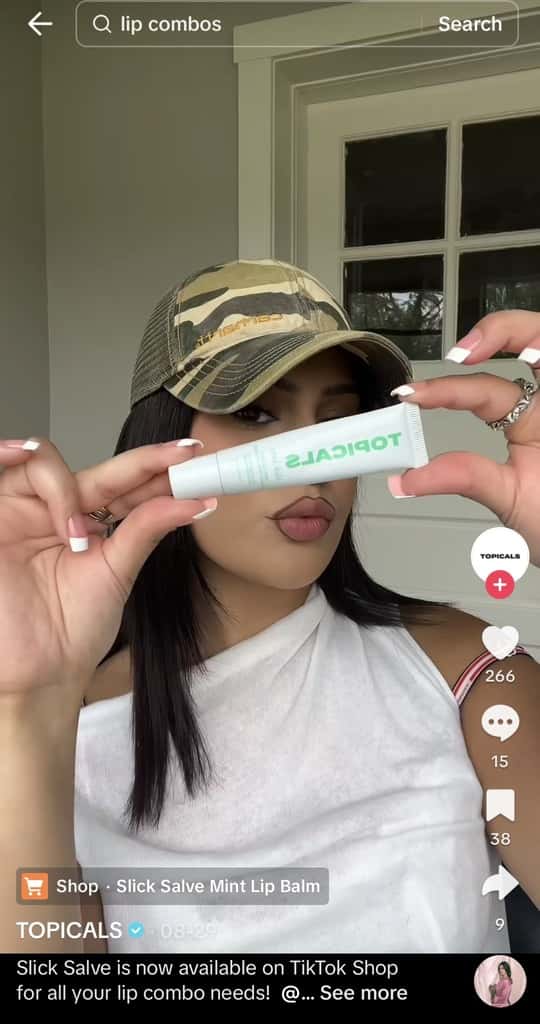
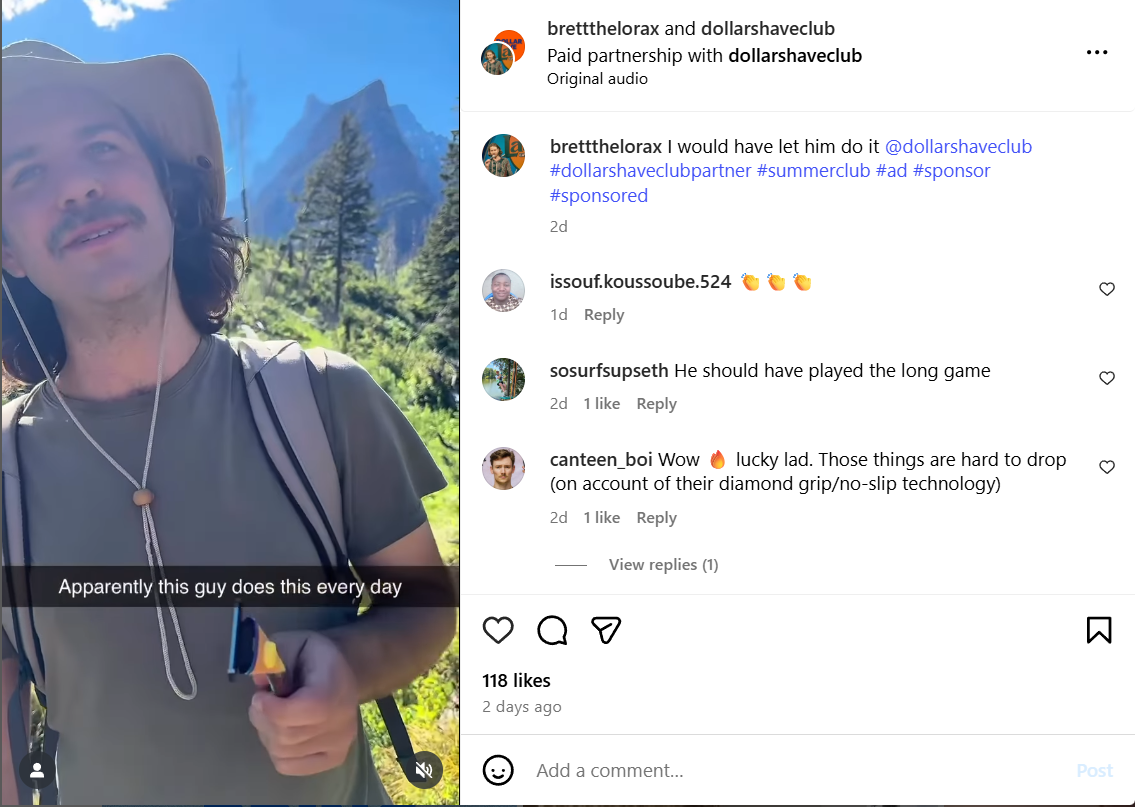
Pro-tip: Drive engagement and views further by tagging creators in your content like in the post below. This goes hand-in-hand with permitting creators to promote their videos but also increases the chances for creators to cross-promote your content to their own audiences. It’s a win-win!

A screenshot shows a TikTok video of influencer Alexa Mescudi promoting lip balm

Source: TikTok

Content that shows real people gets more engagement on TikTok. This is why many brands incorporate in-house employees or UGC creators to produce content for their business accounts.

7. Stay engaged with comments and live streams

TikTok has leaned heavily into its live-streaming features, which offer an opportunity to connect with consumers in real time.

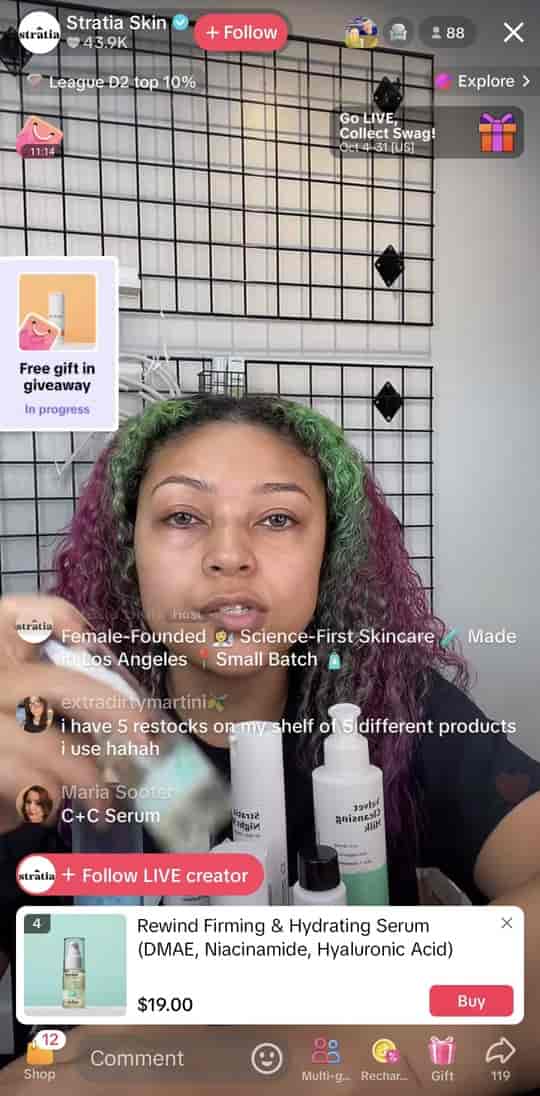
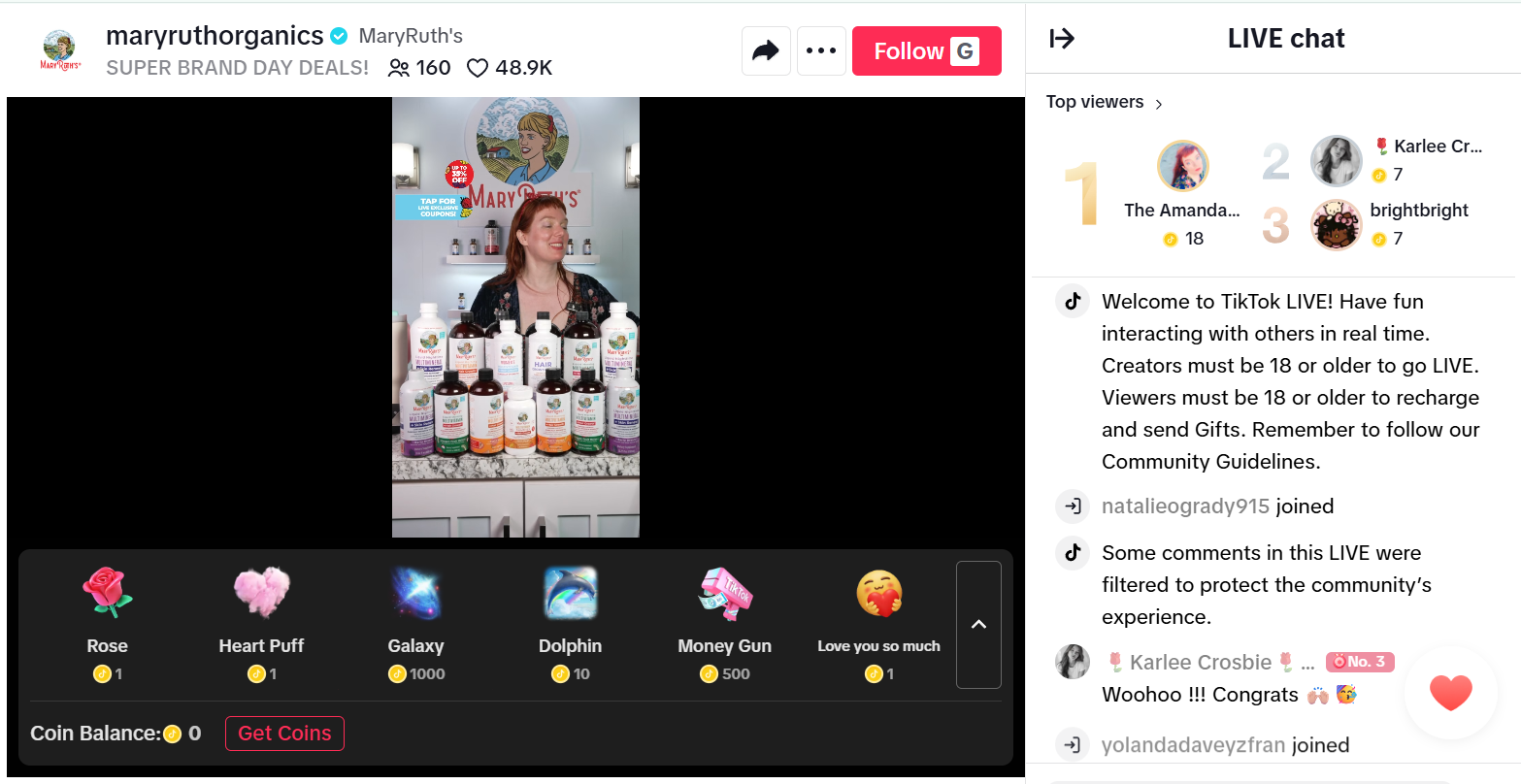
Check out how Stratia Skin does a TikTok LIVE to promote products and engage customers in sync.

A screenshot shows a past live stream hosted by Stratia Skin

Source: TikTok

Filming a TikTok Live is no small feat and requires a lot of legwork and prep to do effectively. That said, it’s a prime way to make connections with your audience and get more engagement on your videos. Showing customers that you care builds loyalty and long-term viewership.

8. Collaborate with other accounts to reach new audiences

Collaborating with other creators can be a great way to reach a wider audience, providing a greater opportunity for engagement. This could include people in your industry, other brands or anyone else who might be a good fit.

For example, if you’re attending an event or doing a cross-promotion, it makes sense to get the most out of that partnership.

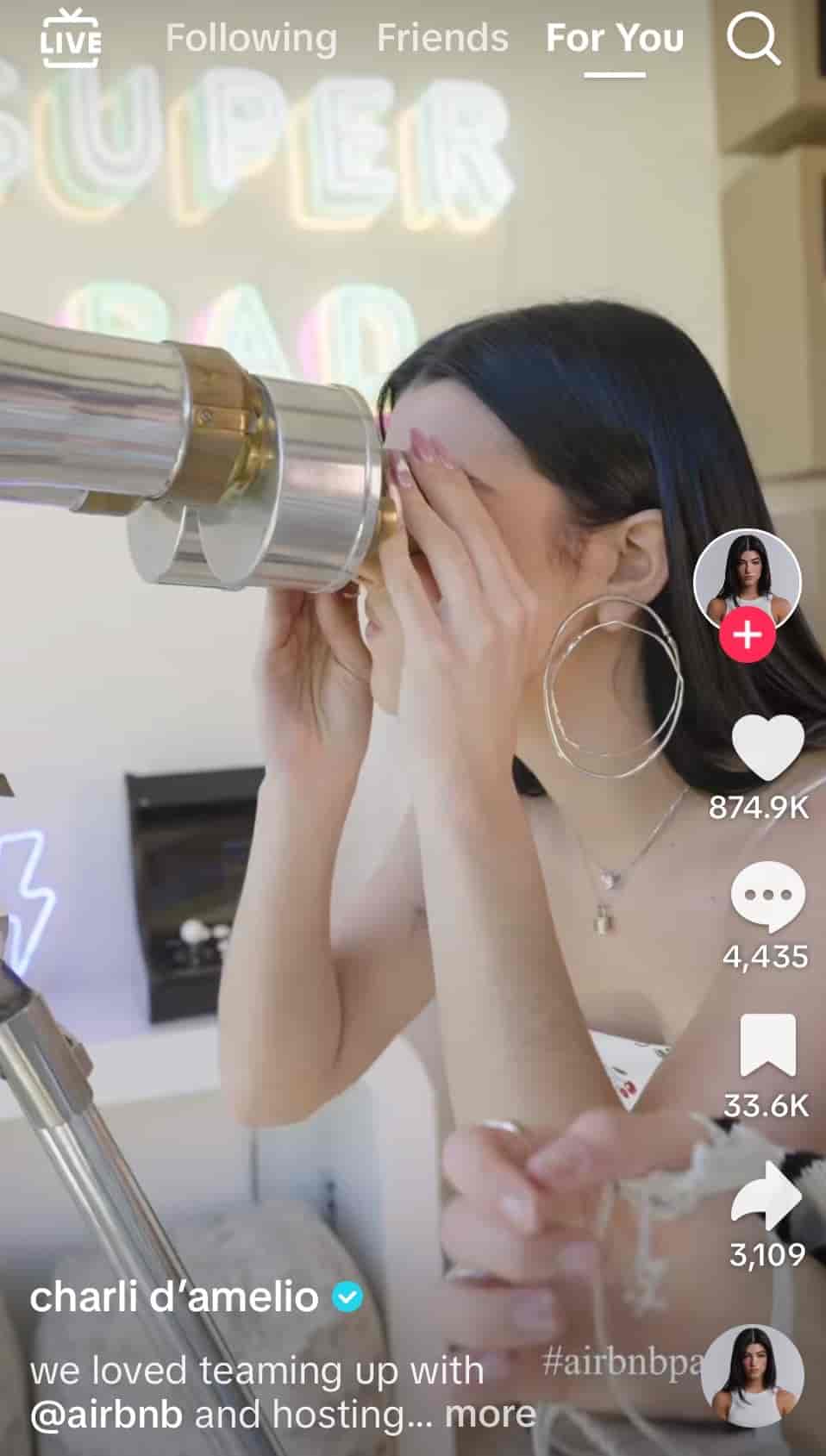
Check out this celebrity crossover with Airbnb’s TikTok account for inspiration.

A screenshot shows a TikTok video collaboration between Charli D’Amelio and Airbnb

Source: TikTok

Successful collaborations require planning. Think about your partnerships, events, product launches and other opportunities. Then, figure out how to align them with your TikTok content strategy.

Watch your TikTok growth skyrocket

Getting more views and likes on TikTok takes patience, effort and strategy, but the growth you experience as a result is often worth the work. By making your videos more discoverable, creating content that resonates and maximizing your community engagement, you experience these rewards sooner than later.

Spout’s social media management platform helps you create better content based on audience data and increase views by posting at the right times. It also connects you with the best brands and influencers for collaborations to expand your reach and identify relevant trends within seconds.

Speed your time to growth. Try out Sprout Social with a 30-day free trial.

The post How to get more views on TikTok (even with no followers) appeared first on Sprout Social.


from Sprout Social https://ift.tt/sk6qtoM
via IFTTT
Direct to consumer marketing: Elevating your strategy with social media

Direct-to-consumer (DTC) marketing has evolved from a disruptor model into a standard go-to-market strategy. By selling directly to customers, brands gain more control over their margins, customer data and long-term relationships.

But the appeal of DTC goes beyond cutting out the middleman—it’s about meeting rising consumer expectations. Today’s shoppers want more than transactions. They look for personalized, meaningful interactions that make them feel understood and valued.

That’s where social media plays a pivotal role. Direct to consumer marketing success depends on strong customer relationships, and social is where those happen in real time. In this article, we explore the marketing strategies fueling DTC growth—and how social media helps brands stand out, stay connected and scale impact.

What is DTC marketing

DTC marketing encompasses strategies that draw a straight line between brands and consumers. Instead of depending on shelf space or in-store promotion, DTC brands take control of the entire customer journey, from awareness to conversion to loyalty.

This model allows brands to build closer relationships with their audiences and tailor every interaction, from ads and content to post-purchase support. Traditional Consumer Packaged Goods (CPG) brands might rely on retailers to drive foot traffic. DTC brands meet customers where they are and create personalized, brand-owned experiences.

Social media plays a central role in that experience, giving brands new “owned” channels to expand their presence, make sales and foster community. Instead of seeking out a website, consumers can interact with DTC brands without leaving the platforms they’re already using.

The pivotal role of social media in direct-to-consumer marketing

Social media is no longer just a marketing channel for DTC brands. It’s become a foundational ecosystem for product discovery, consumer engagement, conversion and retention.

In a Q4 2024 Sprout Social Pulse Survey, 89% of respondents said a brand’s social media content impacts their purchasing decisions. Additionally, The Sprout Social Index™ found that most consumers begin interacting with brands on social media one to six months before making a purchase. The same report also spotlighted that personalized customer service is customers’ top priority on social.

Once a purchase is made, consumers turn back to social media to address any issues or concerns. If your service approach doesn’t live up to the quick and personalized standards consumers expect, you may lose them as a customer. In the Q2 2025 Sprout Social Pulse Survey, 49% of consumers said if a brand was unresponsive to them on social media, they might try reaching out on another platform, but 19% said they never would. Your DTC social media strategy can have major impacts for all areas of your business.

Social media and product discovery

Social media is a discovery engine. Ads, influencer content, posts from individual users and brand content can all appear in the results of a social media search to help users find what they need. Social media content from networks like YouTube, Reddit and Instagram also impacts traditional SEO, so even consumers using Google to search can be influenced by social posts about your brand.

Specialized algorithms learn what individual users like and can serve up content featuring products that seem tailor made for them. This exposure via social media is directly connected to sales: 76% of consumers in a Q2 2025 Sprout Social Pulse Survey said social media content has influenced some percentage of their purchase decisions in the last six months.

Influencer marketing’s role in DTC

Influencers carefully curate their content, sharing product recommendations that align with their aesthetic and lifestyle.

The best influencers partner with brands they genuinely use, building authentic relationships with their audience—who, in turn, look to them for trusted recommendations. Some 64% of respondents in our Q2 2025 Pulse Survey say that a brand partnering with an influencer they like makes them more willing to buy from that brand.

Influencer marketing can help DTC brands get a foot in the door with a pre-built, excited audience.

Social customer care as a loyalty lever

Social customer care is the linchpin between a one time purchase and long-term brand loyalty. For DTC brands, meeting people where they already spend their time—on social media—makes support more accessible and more personal.

Consumers expect to see brands where they are too, and they want companies to be available. Nearly three-quarters of those surveyed in The Sprout Social Index expect a response to their customer service needs within 24 hours or less.

If you rise to meet these expectations in your customer care approach while offering a personalized, empathetic experience, you can create lifelong customers who will come back to your offerings again and again.

The emergence of live shopping

As online shopping continues to evolve, younger generations seem to be reviving the QVC model their grandparents and parents enjoyed via live shopping.

In an old-school yet brand-new approach to social commerce, consumers are hopping on live streams on TikTok, Twitch, YouTube and other platforms to watch product demos, learn about items, hear reviews and ask questions in real time. Viewers can ask about their specific needs and how a product could work for them, from sizing questions to supplement guidance, with answers delivered by fun and engaging hosts.

Key social media strategies for DTC marketing success

To realize the benefits of DTC marketing, you’ll need a thoughtful strategy that engages your audience and incorporates trends. Here are some key points to consider and include in your approach.

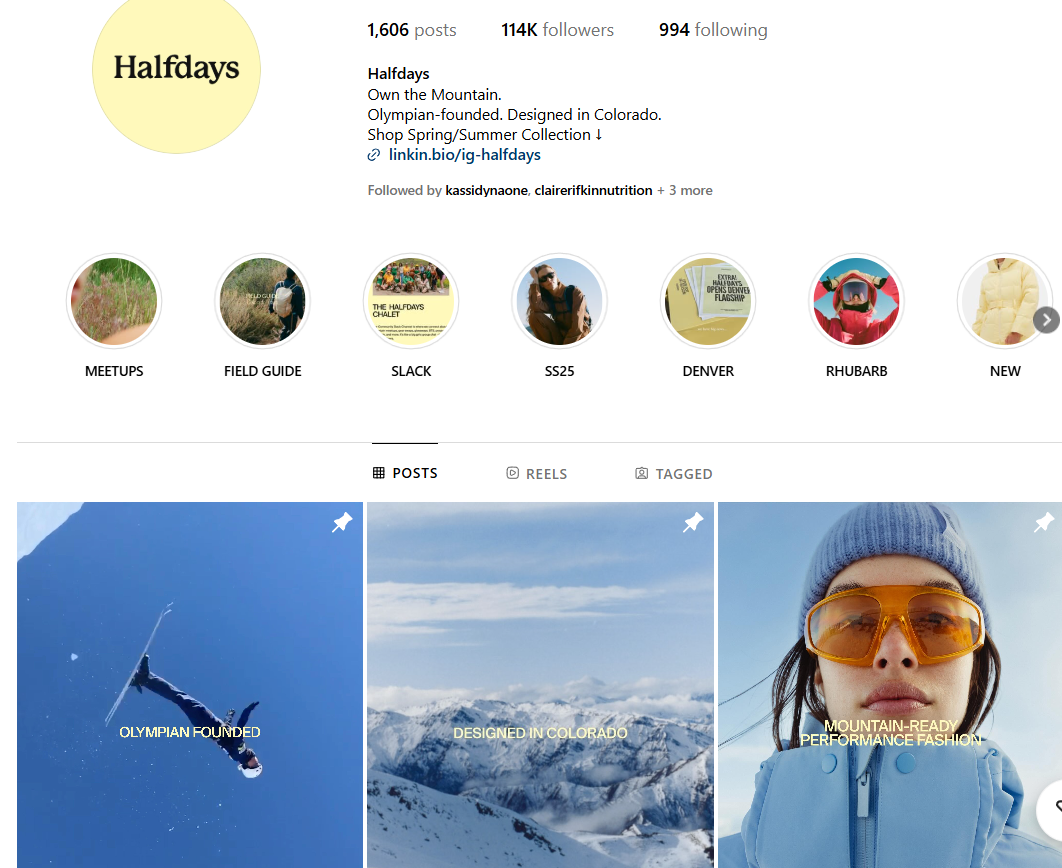
Choose influencer partnerships based on topical alignment

Given the role influencers play in shaping trends across platforms and the pull they have in audience opinion, finding the right influencers is crucial to DTC success. Influencers you partner with should be a match for your company’s values and speak to your target audience’s interests. They should be someone your potential customers can relate to and connect with. Algorithms drive what content is suggested to social media users, curated for their interests and past social activity. Keep this in mind as you select influencer partners for campaigns. Does their content match what your audience is searching for and interacting with?

Finding partners that align topically to your brand is easier with influencer marketing platforms. Sprout Social Influencer Marketing helps DTC marketing teams discover and engage with influencers that fit your brand best with features like the Brand Fit Score. The Brand Safety Reports help you pre-qualify potential influencers and feel confident that the partnership won’t compromise your brand values.

Personalize social customer care

The two most critical elements of customer care are speed and personalization. Responses to inquiries should happen within one day if at all possible, and messages should be customized for the individual reaching out. Customers feel cared for when it’s clear a response was crafted for them and the person sending it wants to help.

Social Customer Care by Sprout Social supports your efforts in nailing quality customer care. In addition to helping your team answer messages quickly and efficiently, Sprout gives you insight into metrics like average handle time so you can measure your team’s performance and ROI.

Use live shopping integrations to streamline social commerce

Live shopping events are a fun and engaging way to boost business and build consumer relationships at the same time. Depending on your capabilities, it can be as simple as setting up a tripod, building out your TikTok shop and going live.

However, integrating with platforms like Facebook Shops and Shopify can elevate your consumers’ social media commerce experience. This can open more opportunities for purchasing and streamline sales. Sprout Social has social commerce integrations that optimize your selling process across platforms and help customers buy from you in just a few clicks.

Build community and promote user-generated content

Creating a social media community can take your DTC strategy to another level. Encourage your customers to share their experiences with your products and services. User-generated content (UGC) is often more authentic than general marketing collateral, plus it builds personal brand connection with the individuals who share it.

Reshare posts and videos, use UGC in ads (with permission) and interact with posts your brand is tagged in. Nurturing community in this way can turn brand loyalists into true brand advocates.

Jump on viral trends

A well-timed meme can solidify your brand as one that “gets it.”

According to the Sprout Social Index, 93% of consumers say it’s important for brands to keep up with online culture. That means knowing what’s trending, from the funny to the bizarre, and creating relevant content where it makes sense. Some 40% of social media users think it’s cool when brands jump on trends (though Gen Z is more likely to think so than older generations). To meme correctly, make sure you understand the culture around a trend and how it’s being used before posting.

Use social listening and AI insights to understand your audience

DTC marketing strategies are most successful when they’re backed by data. Luckily, social media is a wealth of insight about your audience. You can gain a deeper understanding of their wants, needs and concerns surrounding your brand or specific topics to inform your DTC marketing approach.

AI-powered tools like Sprout Social Listening can be an ally in this process to assist in sorting through reams of data to uncover what really matters. Social Listening keeps your ear to the ground, compiling details on discussions about your brand and relevant trends. Features like sentiment analysis will show you patterns in how customers are feeling about your content and products. Armed with this knowledge, you can tailor content, offers and recommendations for your social media audiences.

Invest in paid social for audience growth and retargeting

For the best reach, DTC marketing strategies can implement a hybrid approach to social media that taps the benefits of both organic and paid social.

Paid ads can complement your overall strategy exposing your brand to new audiences. Social media advertising can also play a role in influencer campaigns while maintaining the approachable feel of organic content.

Paid posts are also useful for retargeting consumers who’ve interacted with your content before, but maybe haven’t made a purchase yet. If they’ve looked at a product on your website but not purchased, seeing that item again in their social feed via an ad might be the nudge they need.

Examples of brands using social media to elevate direct to consumer marketing

Who doesn’t love inspiration to develop your own strategy? Here are a few brands with stand out DTC marketing content.

MaryRuth’s Organics

MaryRuth’s Organics offers a line of natural, vegan supplements for a variety of health purposes. Though their branding has an old school charm, they lean fully into the social media communities of today.

With well over a million followers on TikTok, MaryRuth’s hosts daily live shopping events where followers can learn about the supplements from live hosts. These hosts engage with viewers in real time, answering questions about finding the right supplements for them. There’s often a small celebration when someone places an order, along with special promotions and sales available only during the live stream.

A live shopping stream on MaryRuth’s Organics’ TikTok page.

Dollar Shave Club

By bringing humor and simplicity to their subscription service, Dollar Shave Club has made a mundane personal hygiene task into an engaging social media topic.

A subscription service can have a natural community feel, bringing together social media users who all see the same logo once a month in their mailbox. Dollar Shave Club streamlines shopping for Instagram users by including a “Shop Our Feed” link in the page’s bio.

Their Instagram presence also leans on UGC-style content via influencer partnerships with comedians and WWE stars. In this example, comedian Brett Dodenhoff ties in his Dollar Shave Club razor in a humorous skit.

Instagram Creator Brett Dodenhoff (@BrettTheLorax) in a paid Instagram Reel collaboration with Dollar Shave Club.

Halfdays

Founded by an Olympian, Halfdays is an activewear brand for women who love  mountain-related activities like skiing and hiking. Their audience is professional and athletic, the type of person who might take a “half day” to hit the slopes early.

The brand’s social media presence is based around community, mixing UGC and approachable brand photography. They also take a unique approach to cultivating community and discussion through their free Slack channel. The platform is a great fit for women who likely already use the app in a corporate setting, and the group boasts over 4,000 members.

Halfdays’ Instagram feed, which features three pinned posts and multiple Story Highlights.

Social is the heartbeat of direct to consumer marketing

Social media platforms are the home base for brands that know what it means to be customer-obsessed. From responsive customer care teams to engaging live shopping experiences, DTC brands are continuing to redefine what exceptional marketing looks like.

DTC brands are now learning to navigate the attention economy in an increasingly crowded and noisy social media landscape. Read more about why and how brands can cut through the clutter with Sprout Social CMO Scott Morris’ perspective on the attention economy.

The post Direct to consumer marketing: Elevating your strategy with social media appeared first on Sprout Social.


from Sprout Social https://ift.tt/zmFbyGs
via IFTTT