Holiday shoppers no longer line up outside big-box stores for the best deals. Instead, they’re turning to social media to find, research and buy gifts. And when their shopping experience falls short, social is where they go to ask questions and share their frustrations.
Sprout Social’s Q3 2026 Pulse Survey shows that this holiday season, 86% of consumers plan to use social media for customer service as much (59%) or more (27%) than they did in 2025. As the peak shopping season approaches, social customer service volumes are likely to rise along with holiday demand.
To keep things running smoothly, customer care teams must make the most of all available resources. Luckily, Sprout Social is equipped with tools designed to alleviate the holiday rush while strengthening customer relationships—a gift that keeps on giving well after the holiday season.
‘Tis the season to bolster your customer care strategy. Keep reading to shape your strategy and to find out which Sprout features will set your team and customers up for success during this crucial holiday period.
Why social needs to be at the center of holiday customer service
Answering customer questions on social sits firmly in the center of the social media and customer care Venn diagram.
Social media is a direct line to your customers. And during the busy holiday season, their outreach will inevitably increase, further cementing social’s role in the entire customer journey.
Let’s look at three key ways social media must be central to your holiday customer service.
Social is the home of product discovery
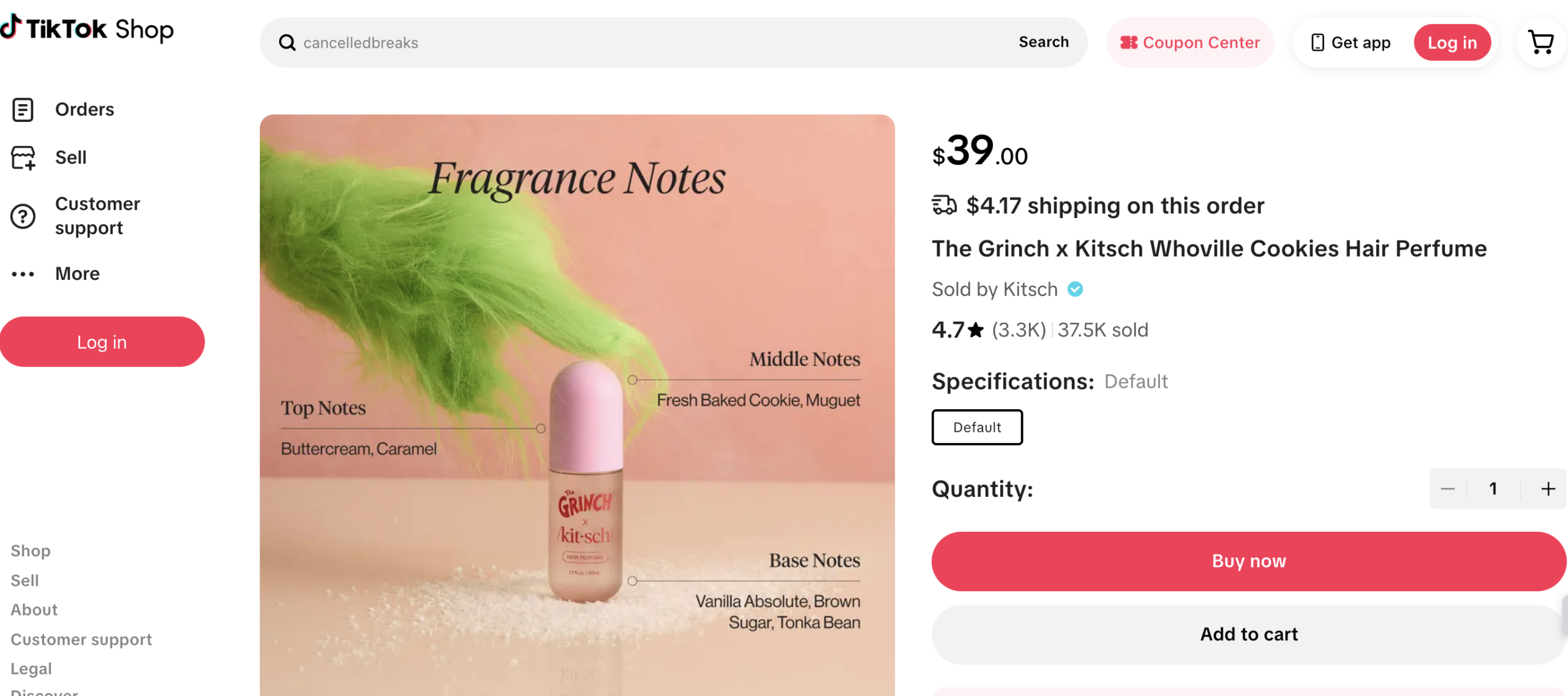
“TikTok made me buy it” is more than a catchy phrase. It’s a reflection of the influence social media has on buying behavior—on TikTok and beyond.
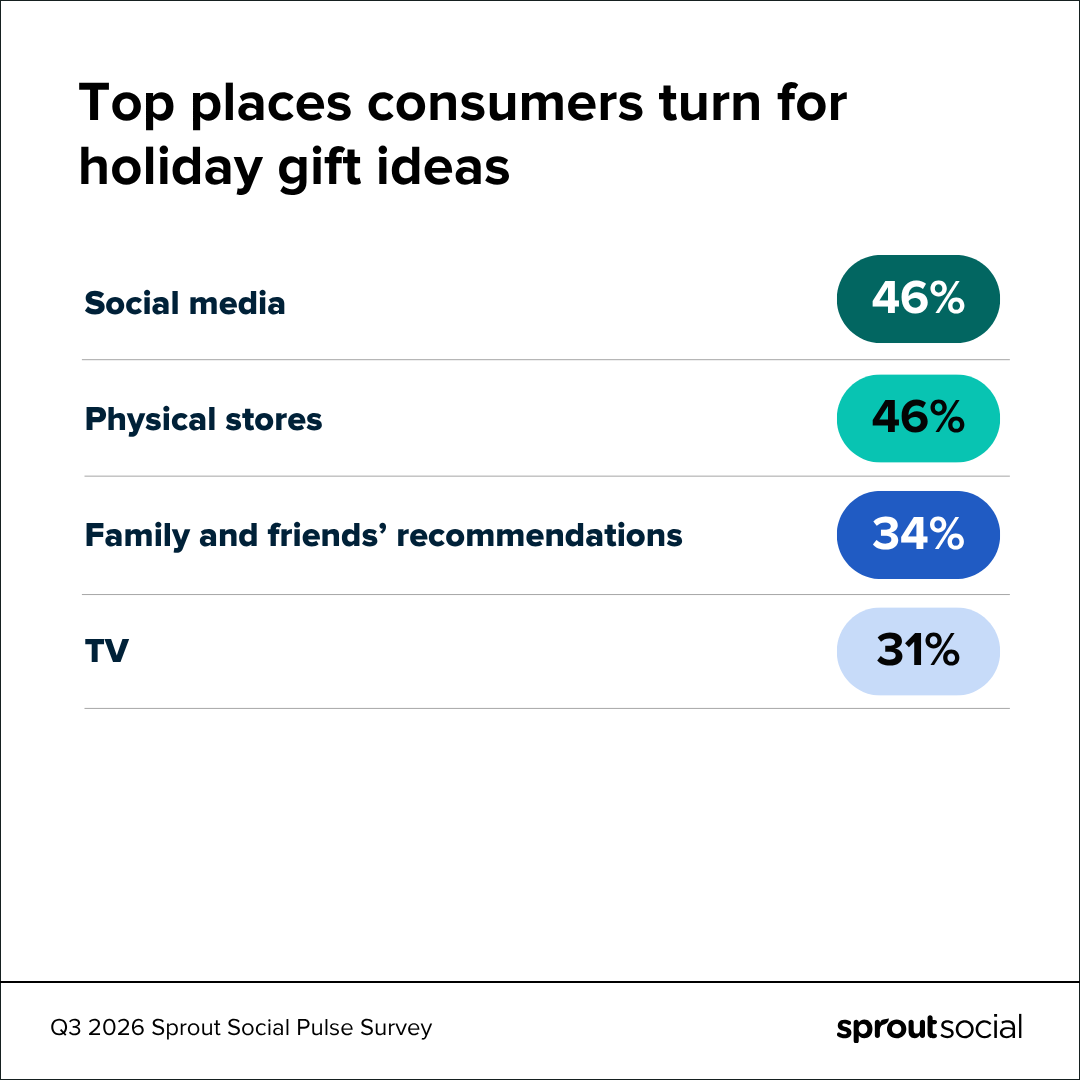
Social media is a virtual mall designed for product discovery, social proof and purchasing all in one place—and its popularity is only growing. In the Q3 2026 Sprout Social Pulse Survey, social media tied with retail stores as the #1 resource for gift ideas and product discovery, with 46% of respondents saying they plan to use social media to find gifts.
Compared to last year, 28% of all consumers plan to use social more to find holiday gift ideas, and 50% plan to use it just as much.
These figures are even higher among Millennials and Gen Z. Specifically, 85% of Millennials plan to use social as much or more for gift research in 2026. And the vast majority of Gen Z (88%) fall into the same boat.
To stay relevant during the holiday season, customer service must prioritize social media, meeting shoppers at the heart of their gift search. Outfitting your team with the training and social media customer care tools they need boosts customer satisfaction by resolving issues where they’re most active.
Customer outreach on social will surge during the holiday season
Many brands, especially those in hospitality and retail, can expect to see an increase in customer queries and requests throughout the festive season. And knowing where and how those messages will come in is critical to your seasonal success.
Per the Q3 2026 pulse survey, users who contact brands on social media still overwhelmingly prefer direct messaging, with 55% of participants naming it as their channel of choice when reaching out to a brand on social media. Other popular communication methods include posting comments, tagging a company publicly or replying to a story.
This spike in outreach could be linked to the fact that consumers are increasingly using social platforms’ built-in shopping capabilities. Some of the most popular include TikTok Shop, Instagram Checkout and Facebook Marketplace. When asked if they plan to make a purchase directly within a social media app this festive season, more than half (57%) of participants said yes. Of that, 38% said they have already done so and 19% said they would try it for the first time.
Having visibility and access to social is crucial for delivering strong customer service. If customer care teams are only reviewing and responding to email, phone and web form requests, they’re not getting the full picture of holiday-time customer service needs.
Consumers reach out on social during every step of their shopping journey
From inquiring about restocks to posting reviews, customers engage with social media at every stage of their shopping journey.
And when it comes to contacting brands, consumers have network preferences. The top channels and the proportion of consumers likely to use them are as follows:
- TikTok – 50%
- Facebook – 46%
- Instagram – 44%
- Bluesky – 36%
- Signal – 35%
- X – 28%
- Snapchat – 26%
With this data in mind, your team needs access to, and if necessary, training on engaging through these channels.
Remember: A stellar holiday customer service strategy doesn’t just resolve issues—it can turn casual shoppers into loyal customers and enthusiastic advocates. At the same time, a strategy that doesn’t account for social has the power to do the opposite.
10 tips to improve your customer service during the holidays
With the right toolkit and strategic processes, you can take the holiday season from stressful to streamlined.
If you want to revisit and revise your procedures before the rush hits, here are 10 tips for enhancing your holiday customer service strategy. Plus, we’ll explore some ways Sprout can help along the way.
1. Plan ahead
The holidays feel like they start earlier every year. If you’re not planning for the holiday shopping surge—by organizing your team, prepping for a Black Friday social media campaign and solidifying influencer partnerships—you’re risking the chaos of last-minute adjustments.
This year, avoid the scramble of catching up in a busy season. Plan to ensure smooth sailing before the ‘season’s greetings’ decor goes up.
Consider the other milestones your agents should align with—think: key dates for holiday marketing, like Black Friday and Cyber Monday sales or the last shipping days for guaranteed holiday delivery, that may lead to a spike in messages.
Teams should also be conscious of the challenges consumers face this time of year. For instance, the 2025 Deloitte Holiday Retail Survey found that 58% of people consider holiday shopping to be stressful. Financial strain is a key contributor for consumers this year, too, with the Q3 2026 pulse survey finding that 56% of consumers plan to reduce spending.
Although a well-oiled customer care process may not solve these problems, it can relieve stress on already overwhelmed shoppers.
2. Create holiday-specific FAQs
Add holiday-specific FAQs to your site, chatbots (more on that below) or even post captions so customers can find answers themselves. No matter how many FAQs you provide, you’ll always get repeat questions.
Brands like Educational Testing Service (ETS) are proof of how valuable proactive FAQ creation can be, no matter the season. Using Sprout, ETS—a nonprofit backing testing brands like GRE (graduate school entrance exam) and TOEFL (test of English as a foreign language)—monitored recurring customer questions and saw a 126% spike in queries before testing—their version of a holiday surge. The organization noticed recurring themes around topics like registration, score reporting, testing locations and at-home testing.
The brand then translated this data into clear, accessible resources to reduce friction for prospective testers and lighten the load on support agents. With these FAQs in place, the ETS team had more capacity to enhance their overall customer service, even reducing corporate response time from 2 hours to 1 hour 20 minutes.
Another tool for decreasing response times is pre-drafted replies. And creating one source of truth for these quick responses ensures consistency. For example, using the Sprout Asset Library, you can quickly search for and select pre-written answer templates as you respond to a question on social.

And if you want to limit or expand permissions, you can easily adjust who can access the Asset Library within Sprout.
3. Staff up
The majority of social media users expect brands to respond to them when they reach out on social media. And according to The 2025 Sprout Social Index™, quality is of utmost importance; 70% of consumers expect to receive personalized responses.
Consumers also have growing expectations around how brands respond to public queries (e.g. @-mentions or comments). The Q3 2026 pulse survey found that a third (33%) of consumers expect both an initial public response followed by a private conversation. On the other hand, 28% are satisfied with just a public response and 22% prefer a private reply only.
To meet those expectations—especially amid a busy festive season—you need extra hands on deck. Consider hiring temp or additional staff. For example, Al’s Sporting Goods hires seasonal customer service staff to handle holiday demand and ensure they maintain service quality.
Speed is key. The quicker your new staff can hit the ground running, the smoother your holiday season will be. Ensure you provide training and tools that make onboarding a breeze.
For example, Sprout has earned industry recognition as a platform with high ease of use, setup and admin—crucial elements when you need to get new staff into a tool fast. And with features like Cases and Case Management, you can assign and triage messages so your team can respond to every incoming message, without duplicating efforts or losing meaningful customer context in the process. With robust customer service case management strategies and tools, you can further streamline collaboration even as your team scales.

4. Tackle the highest-priority customer questions
Ensuring the highest-priority messages are sorted and answered quickly is crucial. Think: complex issues, urgent product inquiries, complaints or even valuable positive feedback needing acknowledgment.
Sprout’s Sentiment for Messages capability lets you identify and sort messages based on whether they’re positive, negative or neutral and create separate inboxes based on these sentiments. And with Message Intent, a machine-learning model determines if messages received in the Smart Inbox or Reviews fall into one of the following categories: Customer Love, Customer Support, High Brand Risk or Unclassified.
Once you identify the sentiment, you can respond appropriately and strategically. For example, positive messages are silver-platter opportunities for proactive engagement. Shark Beauty regularly replies to favorable comments on its Instagram accounts, enabling the brand to build deeper audience connections.

Teams managing a high volume of inbound messages should also consider a sophisticated triaging tool, like Sprout Social’s Case Management solution. Its smart automation capabilities remove the manual effort and monotony from assigning and creating cases, ensuring that your care teams can get to work quickly, provide the right level of care and avoid disruptions.

Inbound message tagging is another way to get the most out of Sprout’s Smart Inbox and Case Management solution. An organized tagging strategy helps you create tailored inbox views, ensuring quicker responses and improving your ability to analyze customer interactions once the holiday rush is over.
For Josh Martin, Director of Social Media and Brand Management at Papa Johns, the tool has streamlined the brand’s entire customer care process: “As a result of the Smart Inbox feature, response time has been cut in half since switching over to Sprout, as the team is able to move through the inbox much faster than before. The team is managing 600+ cases a week and saving 2 days worth of work each week—over 830 hours a year.”
Make sure all your customer care agents—seasonal or otherwise—are up to speed on your strategy with thorough documentation. If you’re not tagging messages in Sprout already, here are potential use cases to consider:
- Tag by urgency: If your agents are divided by support tiers, tagging messages by urgency can help ensure customers are connected to the right representative quickly.
- Tag by customer concern: Understanding trends in customer questions and complaints (e.g., in relation to specific themes or products) can better prepare you for next year’s holiday season. Use the Cross-Network Tag Performance report (which analyzes recurring themes across customer inquiries) to report on questions by internal Tag.
- Tag by response need: Some messages aren’t actionable. For example, if someone promotes their own services in your replies, you’re better off ignoring it. Tagging non-actionable messages lets your team focus on important customer interactions and helps you more accurately measure your agents’ time to first-response (TTFR) rates.
Use these tagging strategies individually or in combination to streamline customer service response and reporting efforts. By proactively tagging inbound messages and Cases, your team can provide excellent customer service no matter how many messages you receive this holiday season.
5. Protect customer data
The holiday season is prime time for cyberscams, phishing attempts and other digital threats. According to the Internet Crime Complaint Center’s (IC3) 2025 report, non-payment and non-delivery scams—where you ship goods or services but never receive payment, and where you pay for goods or services but never receive them, respectively—cost people more than $503 million that year.
The more audiences research and shop for gifts online (and on social), the more brands bear a responsibility to help protect customers’ private information.
As a best practice, you should never ask for sensitive data like credit card numbers in public forums like the comment section. If a customer does ask a specific order question in a comment or @-mention, respond swiftly to shift the conversation to a private message.
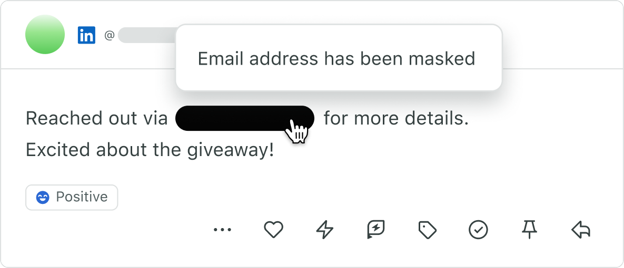
For brands in regulated industries, Guardian by Sprout Social offers data masking, which automatically hides sensitive data (such as credit card and Social Security numbers) sent via direct message. Guardian users can also tap into Secure Forms, a PCI-compliant way to collect this data without leaving the social conversation. Capabilities like these can be a holiday season boon for financial services brands, who often face an uptick in credit card fraud inquiries and other emergencies during the ‘ber months.
6. Use automation and AI
An impressive 81% of marketers say AI has already had a positive impact on their work, according to the Index. And it’s undoubtedly front-of-mind for teams wanting to ensure customer service efficiency this holiday season. When you can’t get an extra headcount to lessen the burden on your team, there are ways you can use AI as an assistant during busy seasons.
Here are three stand-out areas where automation and AI customer service tools can make a difference:
Faster responses
As mentioned, social users expect personalized responses from brands on social media. But quality alone isn’t enough; companies need to deliver on speed, too.
Our Q3 2026 pulse survey results reveal that 32% of social users anticipate a response on the same day. Others expect even prompter replies; 24% wish to hear back within 1-2 hours and 14% expect a reply within minutes.
In fact, consumers’ need for speed is so significant they’re willing to let AI do the work, despite an overarching skepticism toward AI-generated content. Specifically, 44% of Pulse Survey respondents said they feel somewhat comfortable with companies using AI (e.g. chatbots) to deliver quicker customer service. Additionally, 26% said they feel very comfortable with the idea.
Sprout’s Enhance by AI Assist, for example, uses generative AI to improve your responses to social comments and DMs–tailoring replies by length or the tone you want to convey, like friendly or professional, to ensure responses align with your brand voice.

Lean on chatbots
If you’re not already using chatbots to lighten your team’s load, this is your sign to start. And if you are, this is your sign to update them with holiday FAQs like order deadlines and promotional offers to keep responses accurate and reduce wait times as customer inquiries increase.
To address basic holiday customer service questions faster, we recommend using Sprout’s Bot Builder. Sprout’s Bot Builder lets you easily customize rule-based chatbots to handle a variety of holiday inquiries, from order tracking to shipping deadlines.
These rule-based chatbots also manage common questions that come through Meta’s Messenger or X (formerly known as Twitter) Direct Messages.

To start, determine what conversations you want your chatbot to handle. If you need help, Sprout comes equipped with a customer care-specific Bot Template, which you can tailor to handle holiday-specific questions, like return policies or gift card information.
Expedite administrative tasks
Especially during the hectic holiday months, your care team’s #1 priority should be addressing customer needs—not drowning in administrative cleanup work. Sprout offers a variety of tools to keep agents’ inboxes focused, including:
- Case Auto Close: This lets Care Managers set a threshold of inactivity for cases. When that threshold is reached, the case is automatically closed. This ensures cases that no longer need attention are closed efficiently, while still maintaining accurate metrics in reporting.
- Complete private messages handled by third-party platforms: To reduce inbox clutter and duplicative work, this setting ensures messages processed by third-party systems (e.g., bots, click-to-Messenger ads) are automatically marked complete.
7. Give agents the context they need to succeed
To set your team up for success through the holidays, you must provide them with the right information and tools. This also means giving agents the customer context they need, such as recent interactions and order history, to provide personalized service.
If your team has to juggle multiple tools just to handle a single customer message, you’re slowing down response times and frustrating both your team and your customers. Plus, your team may miss important customer history.
Sprout supports social CRM integrations with tools like Salesforce, eliminating the need to bounce between systems. You can access details from each platform in a single interface, so you can get a better understanding of the customer you’re supporting, the issue at hand and what’s been done so far to help.
For example, Sprout’s Salesforce integration helps you use social data for a world-class, omnichannel care experience. It enables your care teams to meet customers where they are vs. sending them to other channels, like a phone line or email.
For Sprout users like Sean Rebero, Senior Manager of Customer Care at Discount Tire, the Salesforce integration has made a world of difference:
“We wouldn’t be able to do the things that we’re doing today without having the ability to have [Sprout] integrated into our platform and Salesforce. It’s been a game changer for us.”
And now with Sprout’s social data in Salesforce’s internal AI assistant, Agentforce, care agents have message history accessible in a matter of seconds to speed up case resolution time, personalize responses and enhance customers’ overall experience.
An integrated social support strategy can make a major difference when dealing with a high volume of social messages. Connecting Sprout throughout your tech stack paves the way for more exceptional support experiences for your team and customers.
8. Establish collaboration norms
Creating a frustration-free, collaborative environment can look different for everyone, depending on your company’s needs. Before you design a process, you first need to evaluate existing and potential points of friction to address them proactively.
If you’re new to prioritizing social as a customer care channel, here are some questions to consider:
Who will review responses from seasonal agents and new hires?
Monitoring responses from new agents is time-consuming but necessary at the start of a busy season when quality control is especially important. Establishing a structured message approval process ensures customer interactions meet brand standards, even with new or seasonal agents.
To build an approval process, first identify which agents can be responsible for approving messages. Pair them with newer agents to ensure all replies stay compliant and on brand. As new agents feel more comfortable in their role, they can handle issues without an approver.
Sprout’s Reply Approvals workflow streamlines the process, allowing agents to submit, review and approve responses without interrupting their workflow to boost team efficiency during peak seasons.
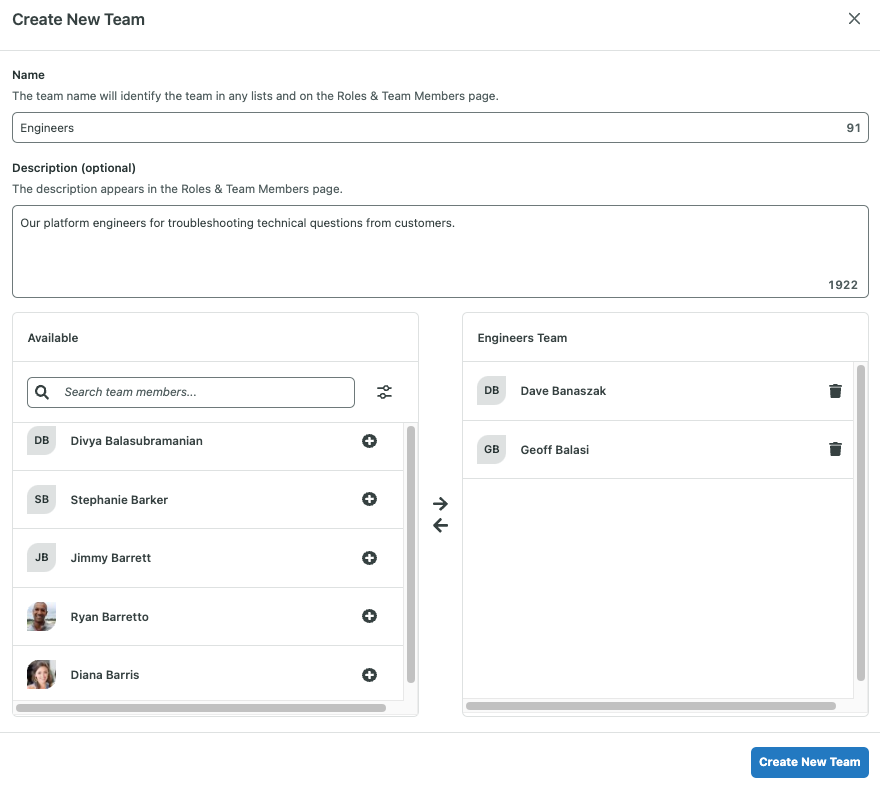
You can also create user teams in Sprout to ensure conversations and message comments are fielded to the right people for replies or clarification.
Who should agents go to with questions?
Whether all tough questions go through a single individual or you have point people for specific issues, document responsibilities for various topics and ensure agents know exactly where to direct their questions.
Bonus: Great customer service strategies aren’t built in a vacuum. Use this free social media customer service training deck to align marketing and service teams around a defined set of shared goals.
To further reduce confusion, use Sprout’s Conversations feature. This centralizes team conversations within the Smart Inbox, so questions can be answered without extra emails or direct messages back and forth.
9. Get ahead of holiday customer service crises
Responding to specific inbound customer questions and feedback during the holiday season is critical, but it’s just as important for teams to monitor the bigger picture. Today’s shoppers reflexively turn to social when something goes wrong, from product or packaging flaws to weather-related delivery delays, whether or not they tag your business.
With the right tools, marketing and customer care teams can keep an eye on the larger conversations happening around your brand and spot crises before they spiral. NewsWhip by Sprout Social uses predictive monitoring to spot potential threats early, detecting what’s being said about your brand across news media and social channels, and projecting how big the story could become. Paired with Sprout Social Listening, teams can track audience sentiment over time to see how social conversations shift before, during and after a crisis.

10. Capture feedback and performance metrics in real-time to constantly improve
To refine your holiday customer service strategy, you must be able to capture real-time feedback and performance metrics to make continuous improvements. Externally, customer feedback surveys are critical to seeing the big picture of how people feel about their service.
Add surveys directly on social platforms like Instagram to capture feedback where customers are most engaged. Using Sprout, it’s easy to configure and implement surveys that measure Customer Satisfaction Score and Net Promoter Score on Instagram, Facebook and X—three major platforms for customer engagement—to gain insight into customer loyalty and satisfaction levels.

Internally, analyzing customer service metrics—like reply time and messages answered—fills in the details behind why customers may feel a certain way about your service by pinpointing bottlenecks.
Real-time reporting also helps teams understand what’s driving service quality during the holiday rush. For brands like pet tech company Whisker, Sprout’s Automated Routing and Case Management tools helped feed support teams actionable posts to respond to, and the Case Management Report unlocked visibility into metrics like handle time that they could work to improve.
“We had historically struggled to prove the true value of our team’s work. Using the specific metrics in the Case Management Report, average handle time, total replies, reply time from assignment, tag tracking, we finally had the concrete data to show stakeholders exactly how necessary and impactful our daily work really is.” — Christopher Kuzara, CX Supervisor, Whisker
These powerful reporting and automation tools empower agents to streamline high-volume queues—freeing up their time to provide fast, consistent support even during peak seasonal demand.
‘Tis the season to be efficient: Master your holiday social media customer service strategy with Sprout Social
A strong holiday customer service strategy has a long-lasting impact on customer satisfaction and loyalty that continues long after decorations have been put away for the season.
The folks on the front line of your brand play a pivotal role in resolving customer concerns and building loyalty that endures. Equipping your team with the right tools ensures they can focus on delivering top-tier service—the kind that drives repeat engagement, clicks and purchases.
Luckily, Sprout can keep your customer care team in good spirits well into the new year. Get started with a free 30-day trial and spread holiday cheer, empowering your team to delight customers all season long with exceptional customer service during the holidays.
The post How to get ahead of the holiday social media customer service rush with Sprout appeared first on Sprout Social.
from Sprout Social https://ift.tt/Mfw6S28
via IFTTT

















![An image of the covered over sign at the Bay Area stadium from Levi's Instagram page, which it promoted as the [redacted] stadium](https://media.sproutsocial.com/uploads/2026/09/Levis-example.jpg)