Monday, 6 October 2025

What you need to know to create a social media budget

Marketing budgets are experiencing a major shift towards social media. According to The 2025 Impact of Social Media Marketing report, 87% of marketing leaders are planning to increase their paid social spend, and over 80% will also be increasing spend on influencer marketing and organic social.

And much of these budget increases are reallocated funds. Eighty-one percent of marketers are reallocating budgets away from traditional SEO and into organic social, paid social and influencer marketing.

Social media is playing a more significant role than ever before across marketing departments. Over half of brands already have a SOSEO (social search engine optimisation) strategy in place, and 43% are experimenting with social search. As the way people use and interact with social media continues to evolve, marketers need to rework their budgets to cater to these new behaviors.

We break down exactly how an effective social media budget should work today. You’ll find details on how to create one, what it should include and guidance on how to get it approved by shareholders and business leaders.

What is a social media budget?

A social media budget is a list of all the funds you allocate to your social media marketing activities within a specific span of time.

Social media budgets vary based on your company’s size, industry, goals and other factors. These can include:

  • Content creation (total amount and separate amounts for each network)
  • Paid ads (total amount and separate amounts for each network)
  • Social media tools expenses
  • Agencies or contractors
  • Influencer marketing campaigns
  • Internal social marketing team salaries

Some of these items will be more or less important depending on your strategy and available funds.
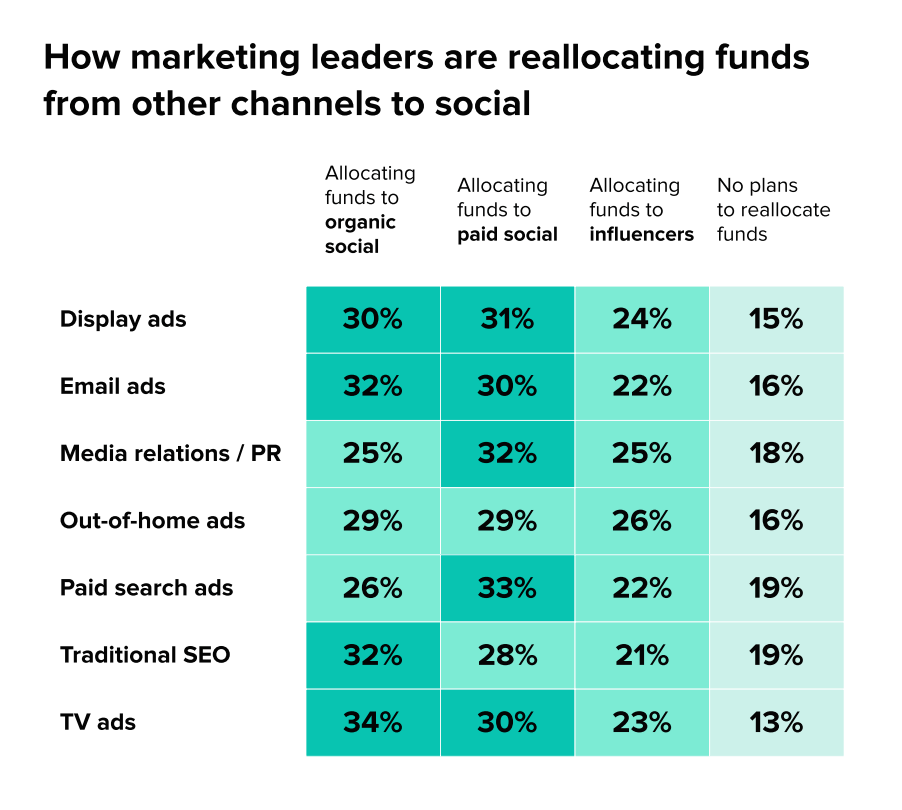
how current marketing How leaders are diverting funds to social media marketing according to the Impact of Social media marketing report 2025

How to create a social media budget

Here’s a step-by-step breakdown of how to create your social media budget. Make sure to rely on insights from your existing social data and your strategy when building a budget for your team.

Use goals as your foundation

An effective social budget should be goal-driven; you won’t know how to allocate your budget until you know your overarching social media goals. For example, if you’re hoping for more conversions, you might invest more heavily into paid lead-generating campaigns and less into awareness efforts.

To help you set goals, ask yourself questions like:

  • Did you meet previous goals?
  • Which strategies were successful, and which weren’t?
  • Did you have budget left over or were you stretched thin?
  • Do you want to increase resources to drive new strategies or expand previous ones?

In addition to considering your social goals, think about what goals your audience may have for following your brand on social media. Your goals need to align with your audiences’—otherwise, the disconnect may lead to poor engagement.

Your social goals should also be informed by your broader organisational goals and key performance indicators (KPIs).

Understand your team’s needs and historical data

Gather your previous social budgets, strategies and performance data from the last two to three years to develop a baseline for your upcoming budget.

Social marketers often use their previous year’s budget as a starting point and adjust it based on the company’s upcoming goals for social, as well as current financial performance. This is a good way to begin, but it’s not the only data to use when developing next year’s budget. Also consider:

  • Past performance: Highlight what worked and what hasn’t in previous years to determine the social strategies you’re planning. From this information, you can determine campaign and resourcing costs. Analyse your paid performance alongside organic to see how they compare, and to see where your budget was best used. Also, research any changes in social costs across platforms, as these may have increased since your last budget. Compare this data to figure out the most efficient, cost-effective strategies in this new budget.
  • Social network distribution: According to Sprout’s Impact of Social Media Marketing report, Facebook (70%), YouTube (68%) and TikTok (64%) drive the most business impact across all types of brands today. Review performance metrics like reach, engagement, conversions and ROI (Return on Investment) from each social network you use. See which networks have seen growth and which haven’t to inform your network distribution and resources in the coming year.
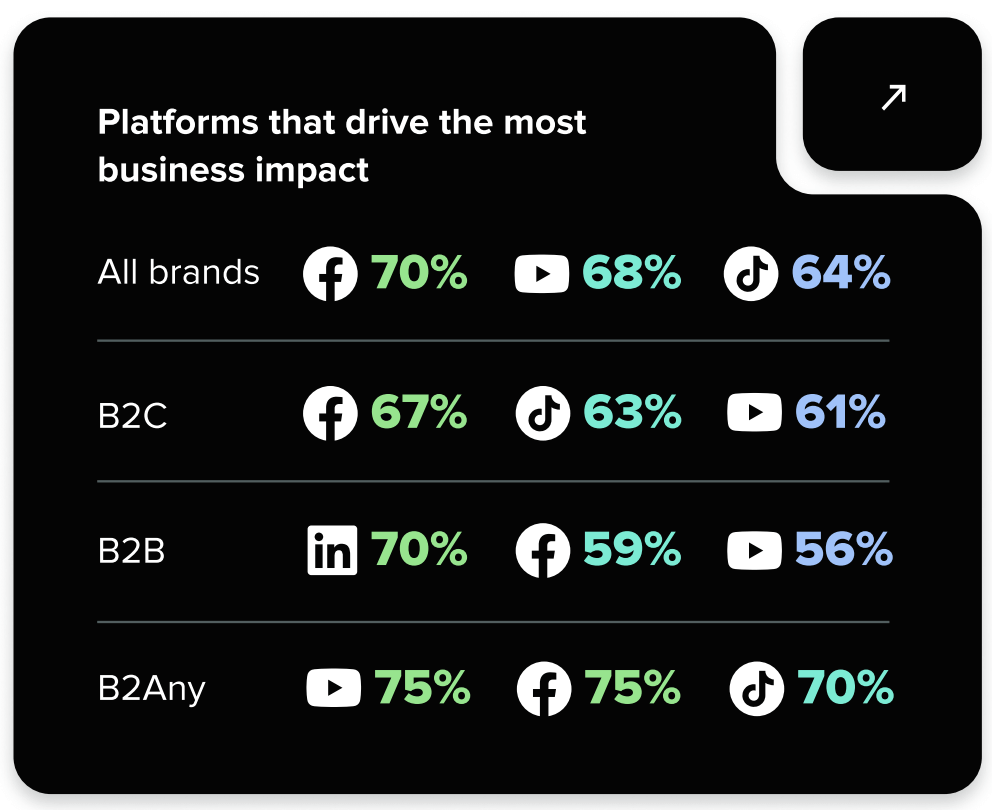
According to Sprout’s Impact of Social Media Marketing report, Facebook (70%), YouTube (68%) and TikTok (64%) drive the most business impact across all types of brands today.
  • Internal skills and expertise: Do you have enough people and resources in 2026 to execute your campaigns in-house, or will you need to hire new employees and/or contract external resources? The answers to this question can greatly affect your budget.
  • Existing tools and technology: Social media marketing tools streamline digital marketing efforts and save you money in the long run. Make a list of all the tools you’re using, and how much they cost. Then, list the benefits they provide, and calculate a monetary value for each benefit. This list will identify which tools are essential for your team, and which could be upgraded or switched out.
  • Factor in experimentation: Successful social content marketing often involves experimentation. This could include starting a new account on an emerging network like Bluesky, or trying out different types of content. Always assign a monetary value to how much experimentation you plan into your next budget. Look at how much time is needed to experiment properly and track your results. This will help you decide which experiments can become a core part of your strategy in your next budget.
  • Contingency plan: Social marketing can be unpredictable; networks might get banned in certain regions, or paid ad prices might increase without warning. A contingency plan helps you react to the market and unexpected emergencies. If you’re lucky, you won’t need to dig into your contingency plan budget at all, but if you do need to, you and your shareholders will be glad you assigned it.

 Take into account current economic conditions

Marketers are always asked to do more with less—and you may be asked to do the same with your upcoming social media marketing budget. When determining how much to spend on social in the coming year, factor in the following macroeconomic conditions as they may affect your organisation’s purse strings:

  • Economic outlook: Factors such as inflation, interest rates, geopolitical news and consumer confidence play a large role in both marketing strategies and budgets. Stay informed about the overall economic outlook for 2026 and how it may affect your industry.
  • Industry trends: Research industry-specific trends in social and identify potential opportunities for your brand. How does your target audience feel about brands on social media? What formats interest them the most? If your target audience values video formats, your creative production costs might be higher than if they preferred static images. Gather more insights into your industry, as well as the sentiments of your current audience, by using social listening tools. Social listening can uncover trends you might not have considered and provide greater insight into your audience’s expectations.
  • Competitive landscape: Analyse your competitors’ social media presence. What networks are they prioritising? What types of campaigns do they run? Check their brand profiles, and consider using a dedicated tool like Sprout Competitive Analysis to benchmark your performance against your competition. For example, you might see your Instagram channel is performing better than your competitor’s, but you’re not doing as well on TikTok; this could mean increasing your TikTok budget and keep your Instagram budget the same.

What should a budget for social media marketing include?

Now that you know what to consider when developing your social media budget, let’s dive into how to budget for social media marketing. Here are some factors to consider as you do so.

Employees and training

To excel on social—and keep your marketers from burning out—businesses should invest in recruiting, hiring and retaining social marketers. Per the 2025 Impact of Social Media Marketing Report, three-quarters of all marketing leaders have anticipated increasing social team headcount in the next year. And more than 50% anticipate needing to hire for specialised roles.

If you’re looking to hire new staff, factor their salaries and other costs of employment into your budget, such as recruitment costs. Include time spent reviewing resumes and onboarding staff. The more you factor in at this stage, the less hiring will impact your overall budget plan.

Keep in mind that adding new members to your team isn’t the only option. Sometimes, a reorganisation of existing team members may do the job. The majority of social teams are structured by network, while others are structured by audience engagement, content distribution and internal functional support. Consider what structure may work best for your team.

No matter how big your team is, training will always be part of your budget. If you don’t learn or adjust to new features, you risk falling behind your competitors. If your training costs are adding up, consider how you could offset them by relying more on contractors, agencies or freelancers instead of internal hires.

Content creation and production

Social media has accelerated business competition, but developing creative, informative content helps brands stand out in a crowded landscape. Consistently publishing and investing in content—emphasising quality over quantity, according to The 2025 Content Benchmarks Report—is imperative for achieving social goals.

Whether you produce content in-house or you outsource, it takes money, time and lots of planning. On average, video production costs organisations between $880 and $1200 per video but can vary by location. But given that video is a top content format for social, you should definitely include it in your strategy. And don’t forget post-production—editing, audio and graphic design work also takes time and money. Don’t let your content fall flat because you forgot to budget for post-production effort.

Brands publish an average of 9.5 posts per day across social channels, but the number can vary depending on industry. If your content strategy requires a higher volume of daily posts, your budget in this area might be much larger than that of a brand that posts a few times a week.

One way to alleviate costs is to build a user-generated content strategy to supplement some of your content calendar while also building brand loyalty. It’s something social media users crave, along with authentic, non-promotional content, according to The 2025 Sprout Social IndexTM. Keep in mind that while user-generated content can reduce some of your content creation costs, you’ll still need to allocate resources to managing it.

Another idea is to repurpose your existing content across multiple channels and media types. Can you edit a video into a GIF? Or turn article quotes into graphics? This is a great strategy to stretch your budget while reinforcing your brand’s value proposition with consistent key messages.

Software, subscriptions and AI tools

Social media software can transform the productivity of your social media department, helping you drive revenue and make a business impact.

Plenty of social teams use resources that come with recurring monthly or annual costs. They include subscriptions to social media management and analytics tools or customer support and email platforms.

Relying on native social networks to manage all the moving parts of your social strategy can hinder your progress. Social media tools enhance efficiency, empower creativity and generate data that benefits your whole business. Some of our favourites, which range in price, include:

Whatever keeps your social marketing running smoothly should be included in this area of your budget. If you are considering changes or new software in the coming year, consider including some padding here.

If you’re not sure when to upgrade your enterprise level social media management software, check out this article where we walk through considerations to think about before committing to a tool.

Within your software budget, make sure to consider AI tools. If used appropriately, AI-powered tools expedite nearly every social media management task, from data analysis to content creation to customer engagement and more.

Consider which tasks your social team spends time on each week that could be made more efficient by artificial intelligence tools. For example, triaging customer support requests is a cumbersome manual task that can take up a lot of time from a social media manager’s day. AI and automation, such as found in Sprout Customer Care, can triage customer requests and give your agents data about previous interactions to speed up responses, helping your team focus their time on other priorities.

Advertising and paid campaigns

Advertising is another big-budget area for social, and for good reason. For companies executing multichannel campaigns, you’ll need to decide how much to allocate for each channel. If Facebook is your biggest channel, for example, it makes sense to devote more money there. The average Facebook ad cost per click hovers around the $0.6 mark, but fluctuates based on industry.

If you want to grow your Instagram audience, invest more of your social media campaign budget in Instagram ads. Thankfully, you can manage Instagram and Facebook ads from one location, and even serve the same ad across both networks.

If you’re just starting out with social media advertising, we suggest learning the basics first and experimenting with different platforms, targeting options and content approaches.

Influencer and creator partnerships

Partnering with influencers and creators can have a massive impact on the success of your social marketing. Data from the 2025 Q1 Sprout Social Pulse Survey found that 83% of marketers say sponsored influencer content performs better in terms of conversion compared to organic content posted on their brand accounts.

It’s no wonder among brand collaborations, the booming creator economy and influencer marketing campaigns, brand partnerships are everywhere on social media. They effectively increase your brand presence and get new customers to your virtual door, but they do cost money to implement, especially depending on the reach of your partner.

When it comes to working with content creators, marketers cite budget as their biggest challenge. For example, almost half of all influencers charge between $250 to $1,000 per post, which can be too costly for some brands. Do your research and decide which channels and content types to prioritise early to make a better case for your creator-focused budget. When budgeting for content, consider outlining your own influencer rate card as a guidepost.
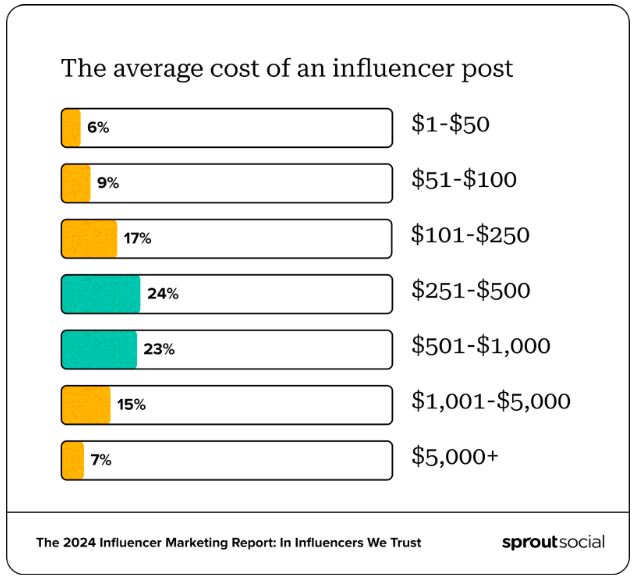
graphic showing the average cost of an influencer per post with the amount of followers they have.

Look at Influencer marketing as an investment. The Q3 2025 Sprout Social Pulse Survey found 32% of consumers bought a product or service through an influencer’s sponsored post in the past 12 months.

Whether a celebrity or an influencer, it’s important to research to choose the right partner for your brand to reap the greatest ROI. The cost of your partnerships can depend on content type, as well as the platform you’re requesting content for. While you’re cementing your contract with brand partners, make sure to incorporate a mutually agreed-upon social reporting plan so both parties can track how well the partnership performs.

If you’re unsure how much of your budget to dedicate to influencers, use this handy influencer marketing budget template. Use this template to strategically allocate resources to high-value partnerships and control costs by setting clear spending limits.

Social customer care

Budgeting for customer care should be a priority for any brand, as positive customer support can build stronger relationships between you and your customers. According to the Q2 2025 Sprout Social Pulse Survey, when brands are unresponsive to social customer service questions, 68% will never or only sometimes reach out to the brand again on traditional channels. To retain customers and provide a memorable brand experience, it’s vital to embed a customer care budget into your wider social media budget.

One of the biggest challenges brands face when providing customer care over social media is that they are inundated with customer requests and inquiries, making it difficult for them to resolve issues promptly.

The top three challenges facing social customer care teams today: Too many messages, too much manual work, and too little context.

Social customer care solutions that streamline processes and increase efficiency are a great investment for brands that want to create memorable customer relationships. Look at investing in tools like Sprout Social that can help you streamline social inbox management, or hiring new team members who are directly responsible for customer care requests. With this investment, you can better cater to your customers and build lasting relationships with them that benefit you in the future.

Agencies and contractors

Investing some of your budget into agencies or contractors frees up time for your internal team, and enables you to work with experienced partners. Outsourced teams can bring a new creative direction to your content strategies, which helps with experimentation. It also helps you branch out into different content types or onto new platforms.

The age of AI has only increased the relevance of contractors. Sprout’s Impact of Social Media Report found that 71% of leaders have upped their investments in agencies and contractors since adopting AI.

To determine your outsourcing budget, first assess the capabilities of your internal team. Look at where they’re excelling, and where they need more support. Then, search for agencies and contractors who specialise in filling those gaps, whether it’s content scheduling, video creation or managing influencer partnerships. Compare their prices against the time and costs you’d need to pay if you did it yourself. This should determine how much you can afford to spend on contractors in a given quarter.

Finally, make sure you value the work of contractors. By building long-term relationships with them, you won’t need to engage in a recruitment or sourcing process again in the future; you can instead go to them directly. Working regularly with the same partners also allows them to get to know your brand, which can result in superior content with improved results.

Tips for getting your social media budget approved

You’ve just finalised your new social media budget, now what? The next step is to get it signed off by your internal leaders.

According to Sprout’s Impact of Social Media Report, social practitioners frequently identified internal collaborators as vital to their success. Here’s some guidance on how to not just get your budget signed off, but encourage shareholders and business leaders to actively support your social strategies to boost your ROI even further.

Connect performance to ROI (return on investment)

Measuring social media performance through social media ROI is perhaps the best way to prove what you’re doing is working.

To calculate social ROI, input key metrics like your impressions, reach and engagement against the total cost of content creation, paid ads, tools and others. You can calculate an overall social ROI, as well as ROIs across different platforms. It’s worth doing both so you can hone in on what’s working, and explain why your strategy focuses on certain channels.

Connect every proposal in your budget to an ROI calculation, and then explain why you need a budget increase (or decrease) based on this calculation.

This clearly shows C-suite leaders what you plan to achieve with your budget. It also means you have trackable metrics you can use to see whether your budgetary plans are actually working and refine over time.

Align your social media goals to business impact

Alongside ROI, it’s also worth linking your social media goals to wider business objectives. This might include:

  • Recruitment and employee retention increases
  • Increased lead gen
  • Increased press coverage
  • Stronger brand reputation
  • Increased product or service sales
  • Expansion into different regional markets

Your business objectives will vary significantly depending on your company. Social media doesn’t operate in a vacuum; everything you do on social should positively impact your business online and off. Link your budget proposal to key business outcomes to show senior leaders how your budget directly impacts the future of the company.

Demonstrate the value of social intelligence

Social media intelligence refers to how the data you’ve gained from social media can be turned into detailed, actionable information about your customers and their expectations. It’s a uniquely powerful process, and one that you need to communicate to your stakeholders.

Tools like social listening enable you to collect social intelligence information which simply wouldn’t be possible if you weren’t investing in social media reach. Show leaders how you can use this information to refine sales conversations, audience segmenting, product feature updates and more.

By connecting social intelligence to other departments, you can prove how improvements made to your social strategy can benefit the entire company. This can help justify budget increases, or any planned experimentation across your channels.

Highlight competitive gaps and benchmarks

Social insights can reveal competitive gaps that you can use to your advantage. Identify exactly what your competitors are doing online and benchmark your performance against theirs.

This reveals industry-wide insights into what’s working and what isn’t, and the makeup of your competitors’ social presence. Use this data to find ways to outperform them.

Make sure to visualise your benchmark data, so leaders can clearly see performance figures. Explain that by continuing to invest in your social media, you can obtain even more detailed information on your competition over time. This can further improve your social output, as well as guide companywide objectives and support differentiation strategies.

Create a new social media marketing budget to set your team up for success

Social media budgets should be evaluated regularly. At a minimum, you should aim to review your social media budget annually. This means you can adapt to new trends, platforms and content types, and gives you plenty of data to learn from across your prior performance.

Get started with Sprout’s free annual social media budget template. Use this template to track costs related to content production, paid ads, resourcing, and software, so you can re-evaluate and prepare for a more cost-effective future for your social team.


The post What you need to know to create a social media budget appeared first on Sprout Social.


from Sprout Social https://ift.tt/3xASUKL
via IFTTT

Saturday, 4 October 2025

Marketing automation: The complete guide for your brand in 2025

Marketing now moves faster than ever. Teams often juggle more channels, customer data and tighter deadlines—all while trying to stay consistent and personalize customer experiences.

Manual marketing processes simply can’t keep up with the pace. They create bottlenecks, increase errors and make it harder to adapt in real time.

But marketing automation solves these roadblocks. Automation keep workflows flowing, remove repetitive tasks and give teams the space to focus on strategy and results.

Here’s how.

What is marketing automation?

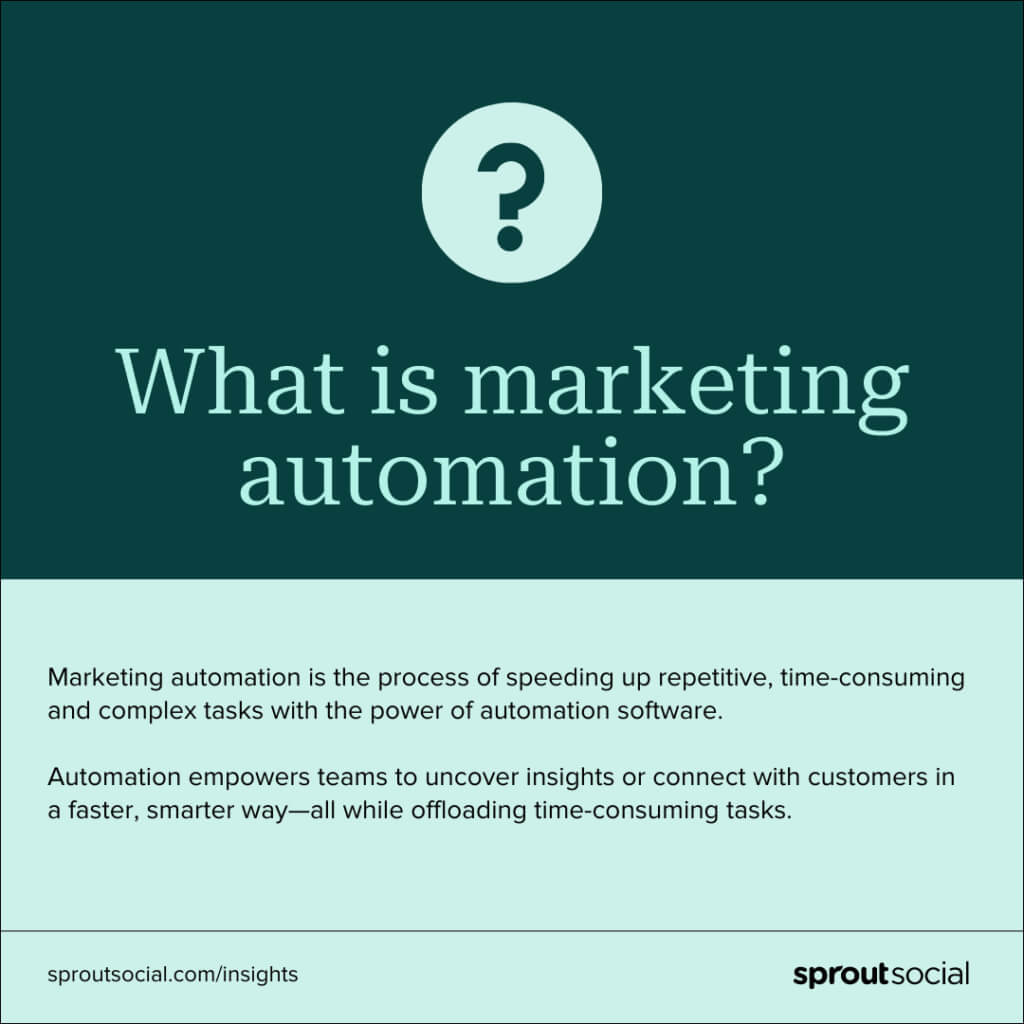
Marketing automation is the process of speeding up repetitive, time-consuming and complex tasks with the power of automation software.

Automation tools are popular in marketing departments. They empower teams to uncover insights or connect with customers in a faster, smarter way—all while offloading time-consuming tasks. Think: sending customer emails, SMS communications, scheduling social media posts, running digital ads and more.

Graphic defining marketing automation as speeding up repetitive, time-consuming and complex tasks with automation software

As Sprout’s Senior Manager of Marketing Operations Cam Conrad puts it, “Marketing automation allows you to execute your marketing campaigns at scale. It gives you the ability to build repeatable processes and templates for things like emails, landing pages and webforms.”

What’s the difference between email marketing and marketing automation?

Email marketing falls under the umbrella of marketing automation. But marketing automation is a lot broader and aims to streamline every corner of a marketing team.

It includes automation strategies across marketing, including email, social media, digital advertising, segmentation, analytics and data measurement.

Why use marketing automation?

78% of companies ‌already use marketing automation tools. Why?

Because manual marketing processes simply can’t keep up with real-time channels, rising customer expectations or growing data demands.

But marketing automation can. It gives brands the speed, scale and precision to thrive in today’s digital landscape and helps teams work smarter and deliver better results across the board.

Beyond this, marketing automation tools also help brands with the following tasks:

  • Streamlining repetitive tasks so your team can focus on high-impact work
  • Scaling marketing campaigns across email, SMS and social media without burning out staff
  • Generating and qualifying leads more efficiently with automated lead scoring, lead nurturing and follow-ups
  • Measuring marketing ROI using built-in dashboards and real-time analytics
  • Streamlining workflows by automating handoffs, connecting tools and creating shared visibility across teams
  • Analyzing customer data faster to uncover insights and adapt campaigns in the moment
  • Enhancing the customer experience through faster responses, improved consistency and personalized messages
  • Boosting campaign effectiveness with automated testing and optimization tools
  • Maintaining brand consistency across landing pages, emails and social media posts

These marketing automation capabilities empower teams to move faster, reduce errors and work at scale. By automating the most time-consuming marketing tasks, you can deliver better results across more channels without adding headcount or sacrificing quality.

How does marketing automation work?

Marketing automation tools turn complex workflows into repeatable, data-driven marketing processes. The result? Faster execution, stronger targeting and more effective marketing across the funnel.

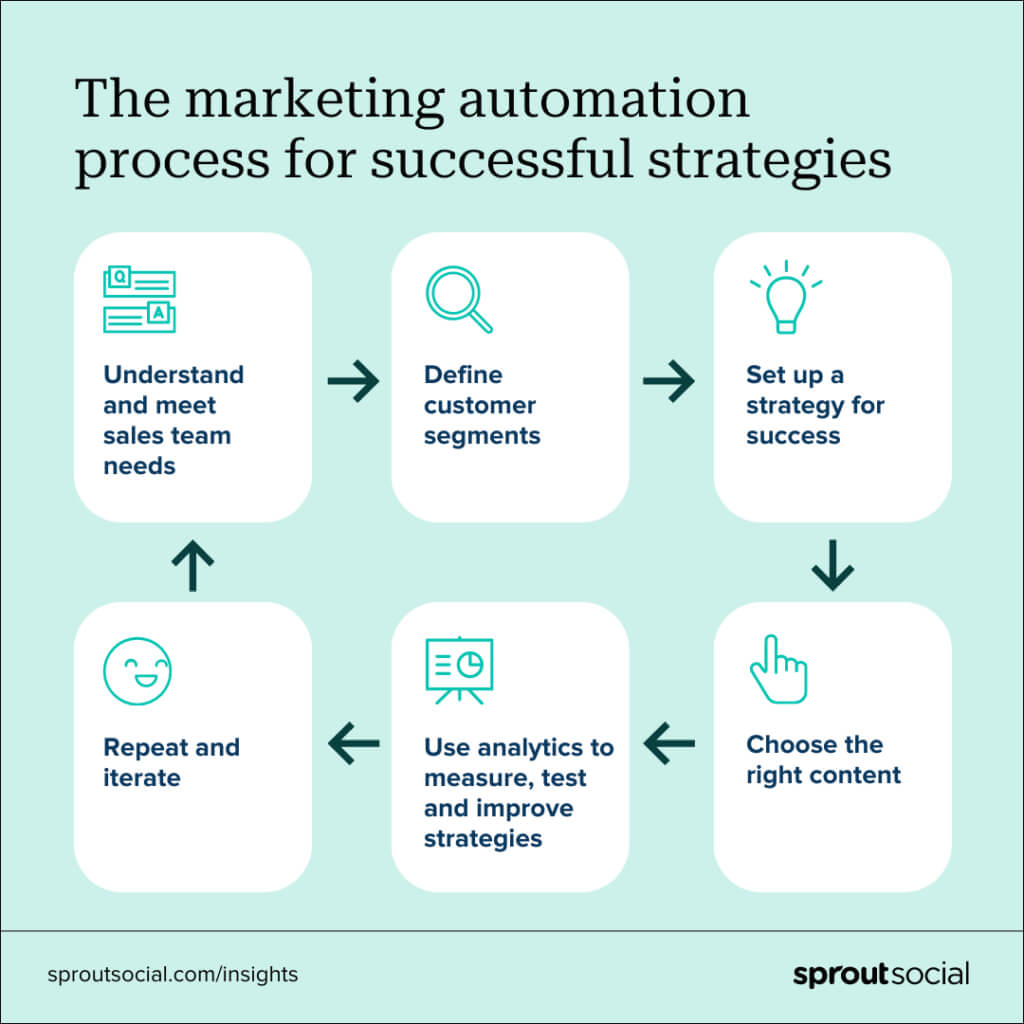
A green flowchart of six steps defining the marketing automation process for successful strategies.

Here’s how the process works, step by step:

  • Understand and meet sales teams’ needs: Start by identifying the goals or friction points across your sales process. Then, align your sales teams so everyone’s working toward the same goals. For instance, if sales needs warmer leads, you might use your social media management tool to route product questions directly to the sales team.
  • Define customer segments: Use behavioral and demographic customer data to build clear audience segments. When you know exactly who you’re talking to, it’s easier to create relevant content that resonates. Segments might include first-time buyers, high-intent visitors or ecommerce users with abandoned carts.
  • Set up a strategy for success: Map out your marketing automation strategy and tie it to your goals. To do this, think about which actions trigger outreach, what content to serve and when to follow up. For example, if your goal is to turn new visitors into buyers, your social media chatbot could automatically share a discount code when someone asks about pricing.
  • Choose the right content: Tailor your email campaigns, ads and landing pages to each segment based on behavior and intent. For example, someone who abandons their cart might see a retargeting ad on social, and once they click through, a tool like Uberflip can serve them a custom content journey designed to guide them back to a purchase.
  • Use analytics to measure, test and improve strategies: Build automation workflows that track performance in real time. For example, you can schedule reports to automatically generate and send as PDFs to stakeholders on a set cadence. That way, your marketing team gets regular updates without anyone needing to pull the data manually.
  • Repeat and iterate: Use insights to refine your marketing processes, update segments and improve timing. For instance, if your social data shows higher click-through rates on Reels posted in the evening, you can adjust your automated social media scheduling to match those patterns.

By following this process, you can build precise, goal-driven marketing automation workflows that cut waste, respond to real-time data and accelerate results across every stage of the customer lifecycle.

A screenshot of Sprout's Inbox Activity Report with a summary of performance metrics for received messages and action rates.

What are examples of marketing automation?

Marketing automation spans your entire marketing strategy—from email to social media, analytics, advertising and more. By automating workflows across your strategy, you’ll reduce repetitive tasks, improve accuracy and free your team to focus on strategic work.

Many marketers use these popular types of marketing automation:

Email automation

Email is still the most popular digital marketing channel for businesses. But without automation, email marketing is slow, which makes it almost impossible to personalize email campaigns at scale.

Automated email tools solve this issue by segmenting audiences, triggering messages at the right time and keeping campaigns consistent across the customer journey.

Here are a few options for automating your email campaigns:

  • Welcome emails for new subscribers
  • Abandoned cart reminders
  • Re-engagement or win-back campaigns
  • Transactional messages like order confirmations
  • Nurture sequences based on clicks or behavior
  • Recurring email campaigns like newsletters

Social media automation

According to the 2025 Sprout Social Index™, 73% of social users say they’ll buy from a competitor if a brand doesn’t respond on social media. That means engagement is as critical as content to your social media marketing strategy.

Social media automation software helps you stay responsive and interactive on social media while helping you post consistently. Not only can it help you speed up publishing workflows, but it also shows you how to automate social media engagement so you can reply faster, join conversations more easily and stay connected.

Here are a few ways to automate your social media workflows:

  • Auto-schedule social media posts across platforms
  • Route DMs and comments to the right teams
  • Deploy automated chatbots for common support questions
  • Centralize social media analytics dashboards
  • Set up smart alerts for brand mentions, keywords or trends

Audience analysis automation

Customer segmentation means grouping people based on shared behaviors, preferences or lifecycle stage. It’s essential for personalized messaging because it makes sure each audience receives content that’s relevant and timely. Automation makes this possible at scale by dynamically sorting contacts automatically and triggering the right messages at the right moments.

Here are some ways automation software helps you streamline audience analysis:

  • Identifies high-intent leads
  • Sorts audiences by email engagement
  • Targets ads based on recent interactions
  • Filters audiences by location, device or demographics

Workflow automation

Workflow automation connects your marketing tasks across teams and tools, speeding up execution and reducing human error.

Here are some common workflow automation examples:

  • Auto-notifications for project updates or deadlines
  • Approval workflows for social content
  • Lead scoring workflows that hand off qualified leads to sales
  • Auto-routing capabilities to send inbound messages to the right teams

Analytics automation

More data means more insight, but only if you can process it fast enough. Automation speeds up processing by making sense of raw numbers quickly and turning data into visual, actionable reports.

Analytics automation examples include:

  • Real-time dashboards that update automatically
  • Scheduled reports on email campaigns, ROI or conversion rates
  • Click-through, bounce and open rate summaries in your CRM

Advertising automation

Whether you’re advertising through social, search or display, automated ad tools help you serve the right message, at the right time, and spend smarter.

These are some of the most important advertising automation examples:

  • Retargeting campaigns based on past behavior
  • Personalized ads based on segment behaviors and demographics
  • Auto-budget allocation to top-performing creatives
  • A/B testing for headlines, images or CTAs
  • Geo-targeted search or display ads
  • Timed SMS offers during a flash sale

How is AI used in automation?

Wondering how AI enhances marketing automation workflows?

Automation helps marketers make better decisions by doing monotonous tasks for them faster. But AI relies on algorithms and massive amounts of data to help marketers solve problems, make more informed decisions and predict potential outcomes.

When combined, AI-powered marketing automation solutions can offload some of your tasks, while also making data-informed suggestions or decisions for you. This combination further streamlines your work and helps you make smarter decisions.

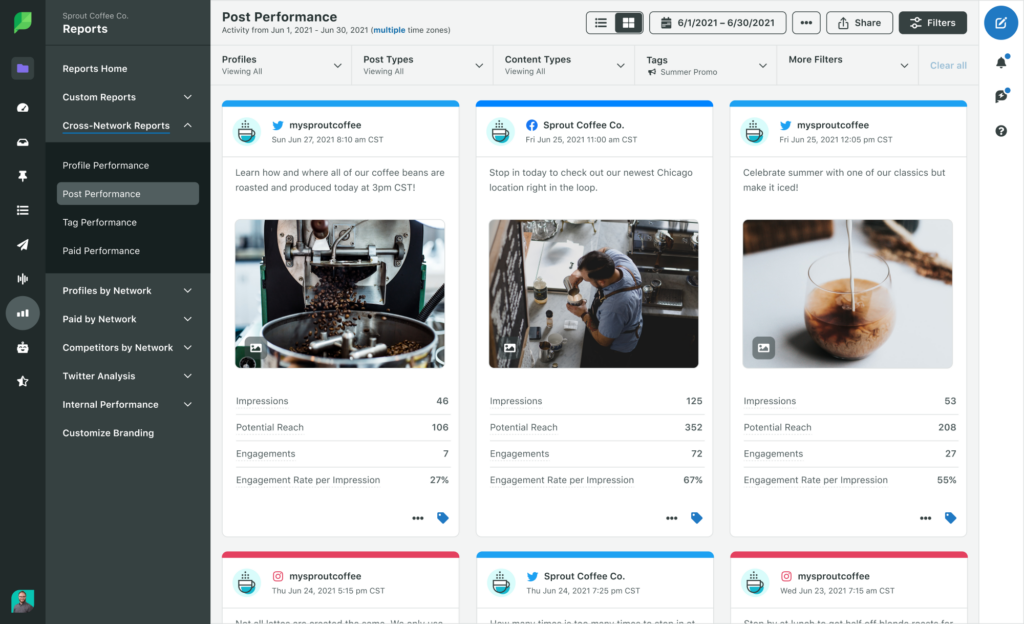
Take social media publishing, for example. Automation enables you to schedule posts to automatically publish. But AI marketing tools can help you further optimize that scheduled content. Sprout’s Optimal Send Times uses data science to analyze your posting times, then suggests seven ideal times to post for optimal engagement.

Screenshot of Sprout's Analytics for Cross-Channel Post Performance Report, showing performance of Instagram, Facebook and Twitter posts.

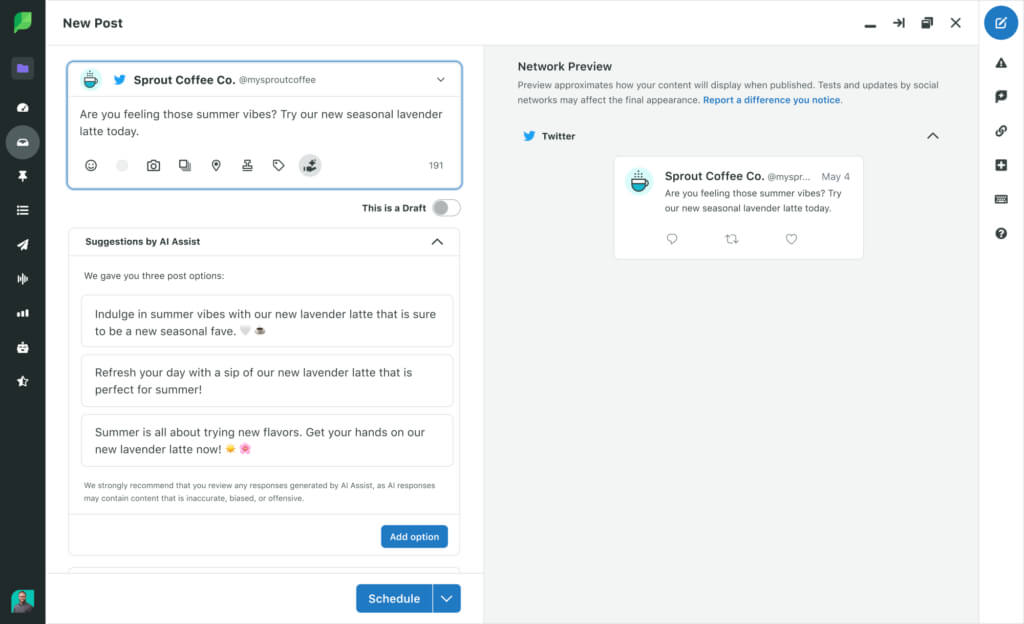
An AI-powered tool can also accelerate your content creation process. Sprout’s Suggestions by AI Assist will help social media managers break through writer’s block and inspire new ideas with social copy recommendations.

A screenshot of Sprout's AI Assist feature where three copy suggestions have been generated by AI.

If you’re wondering how else AI can automate social media marketing, check out our AI marketing toolkit.

But remember, AI-powered marketing solutions also go beyond social media. AI can optimize your entire marketing strategy.

For example, tools that use predictive analytics can suggest the next best action across email, ads or sales workflows. That might mean timing an automated email to trigger when a user is most likely to engage or flagging which lead is ready for a sales follow-up and suggesting what to say.

AI also powers personalization at scale by tailoring messaging, product recommendations and content based on individual behavior.

And AI-powered chatbots can extend your reach and reduce your support tickets by handling real-time customer questions across your website, SMS and other digital channels without adding extra staff.

Best marketing automation solutions

We’ve talked about what automation can do for you, your team and your business. But to start using automation, you need the right tools. Marketing automation tools are types of software that conduct automation processes for you. Examples include Sprout Social, Hubspot, Adobe Marketo Engage, Salesforce Marketing Cloud Account Engagement and Zapier.

When it comes to choosing the tools that are right for you, Cam suggests having a clear idea of what you’re hoping to accomplish with it. “There is a wide set of features available across different tools. Knowing your primary objectives will help you select the best fit. And bring stakeholders from other teams into the evaluation process—especially the team that owns CRM. Having their input from the jump saves a lot of headaches when you get to the implementation stage.”

This quick-comparison chart summarizes some of the stand-out automation tools:

Tool Key features Automation types
Sprout Social Publishing, Listening, Smart Inbox and Analytics Social media, customer engagement and analytics
HubSpot CRM, email, lead scoring and task automation Email, CRM, sales and SMS automation
Marketo Engage ABM, personalization and predictive segments Email, ABM and AI-powered lead management
Salesforce Marketing Cloud Dynamic content, AI lead scoring and CRM sync B2B automation, lead nurturing and analytics
Zapier Over 5,000 app integrations and workflow logic Workflow automation and lead management
ActiveCampaign Email flows, segmentation and ecommerce automation Email, CRM, ecommerce and SMS
Omnisend Ecommerce focus and drag-and-drop workflows Email, SMS and product recommendations
Encharge Behavior-based flows and SaaS focus Email, product journeys and lead scoring

Here’s a deeper dive into these eight tools:

1. Sprout Social

Sprout Social is an all-in-one social media management platform that helps teams manage content, track brand engagement and improve performance while reducing manual busywork. This platform also automates publishing, pulls in engagement across platforms and turns raw data into insights using powerful analytics tools.

A screenshot of Sprout Social’s Publishing Calendar that shows scheduled posts that’ll automatically release across multiple platforms

(Source: Sprout Social)

Key features:

  • Smart Inbox: Centralize brand messages from all networks
  • Publishing calendar: Schedule, preview and optimize posts
  • Analytics and reporting: Automate social reports and share insights with stakeholders
  • Social Listening: Monitor trends, sentiment and competitors
  • CRM integrations: Connect with Salesforce, Tableau and more

Why it stands out:

  • Supports full-funnel social media marketing
  • Facilitates seamless communications between marketing teams, support and sales
  • Automates customer support with chatbot workflows and Smart Inbox assignments
  • Delivers real-time social media analytics and visual reports to simplify campaign management
  • Automates the path from social trend to action by turning sentiment analysis and insights into organized, trackable tasks that teams can act on quickly

Interested? Try Sprout free for 30 days to see how automation and AI can streamline your process and break down silos. For a tailored experience of one of Sprout’s premium features, book a personalized social listening demo.

2. HubSpot

HubSpot is a full-scale marketing automation platform that combines CRM, content, sales and support tools. It’s useful for teams that manage complex marketing processes and customer relationships.

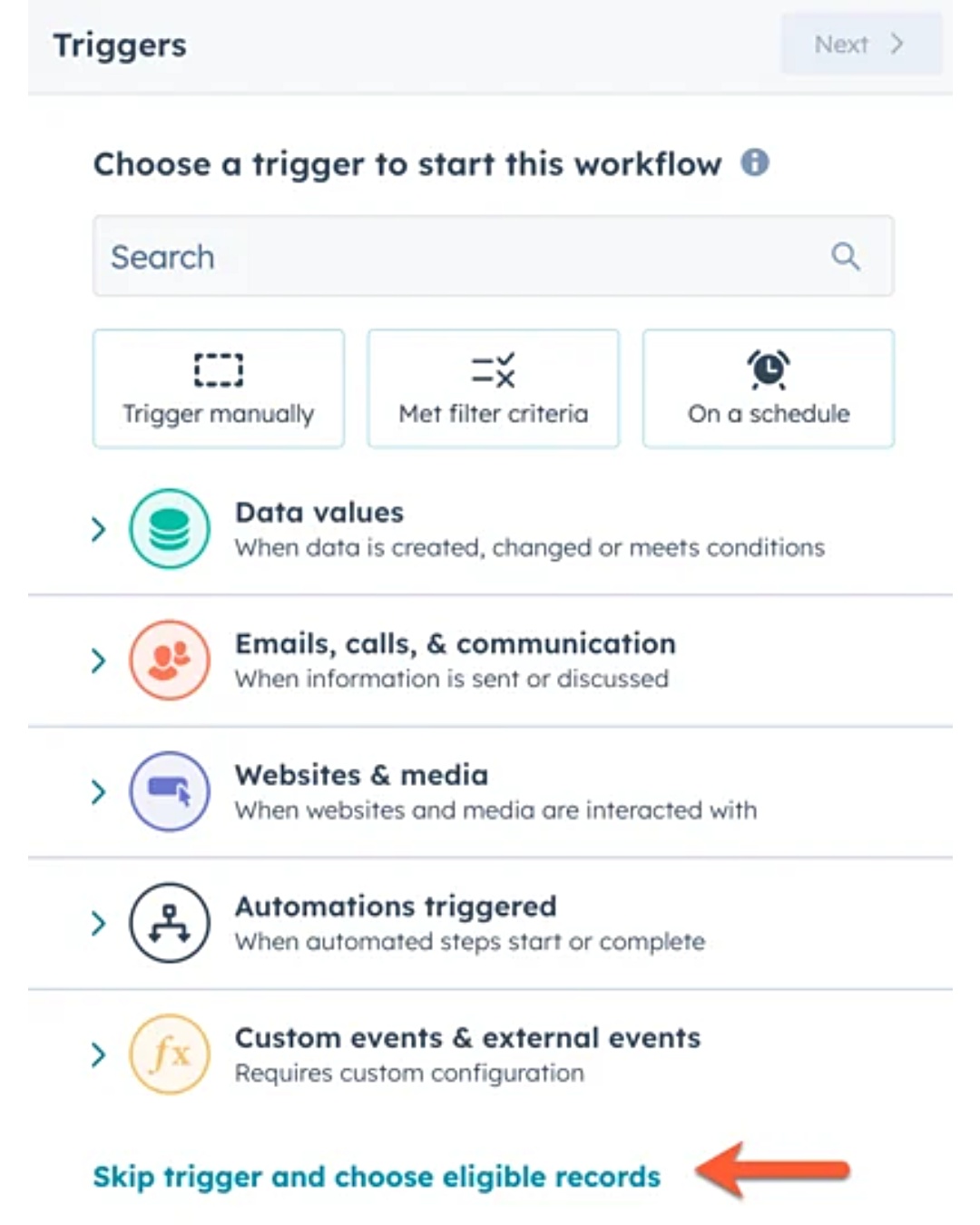
HubSpot’s workflow setup screen shows trigger options: Data, Communication, Automation and Advanced

(Source: HubSpot)

Key features:

  • Visual workflow builder: Design automated emails, tasks and lead scoring paths
  • Integrated CRM: Align sales and marketing in one connected system
  • Email campaigns: Launch one-off, triggered or dynamic email content
  • Behavioral automation: Nurture leads based on actions and engagement

Why it stands out:

  • Connects sales teams and marketers in one platform
  • Offers built-in customer support and training via HubSpot Academy

3. Adobe Marketo Engage

Marketo Engage is Adobe’s enterprise-grade marketing automation solution. It’s ideal for complex lead journeys, account-based marketing and cross-channel personalization.

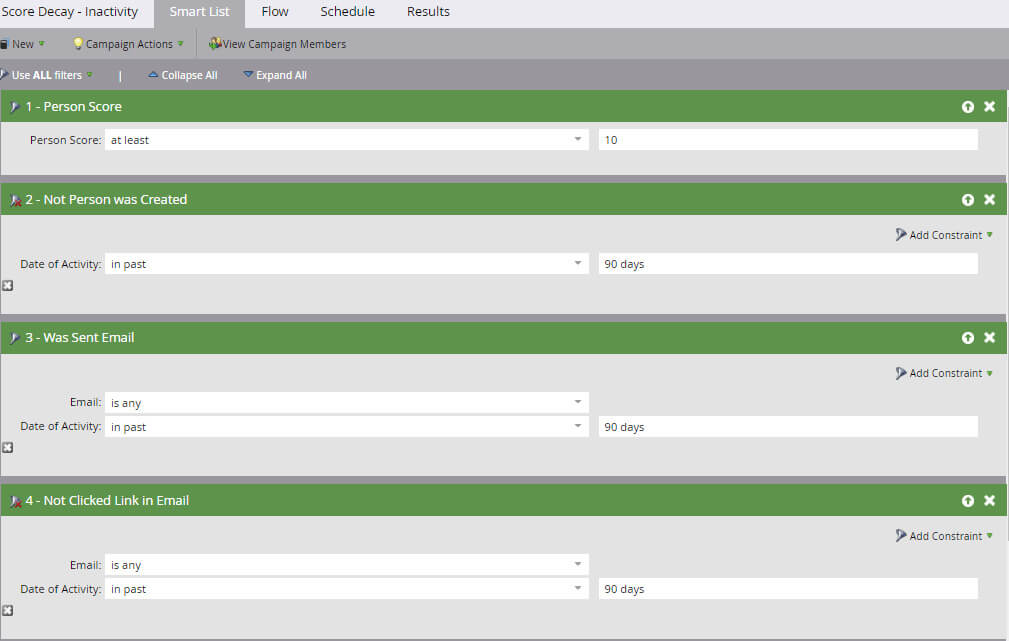
Adobe Marketo Engage’s lead scoring rule setup shows filters for person score, email activity and link clicks within the past 90 days.

Key features:

  • Multi-touch lead scoring: Track and score leads based on actions across channels
  • Predictive AI: Segment audiences using AI-powered behavioral insights
  • Email automation: Build journeys with landing pages, forms and triggered emails
  • ABM tools: Personalize campaigns dynamically for high-value accounts

Why it stands out:

  • Helps large teams manage multi-step customer journeys
  • Combines automation with AI-powered recommendations

4. Salesforce Marketing Cloud Account Engagement

Salesforce Marketing Cloud, formerly Pardot, is great for scaling B2B campaigns and aligning marketing automation with CRM data. It features a full spread of marketing tools, from dynamic marketing materials like email and website pages to AI-powered lead scoring.

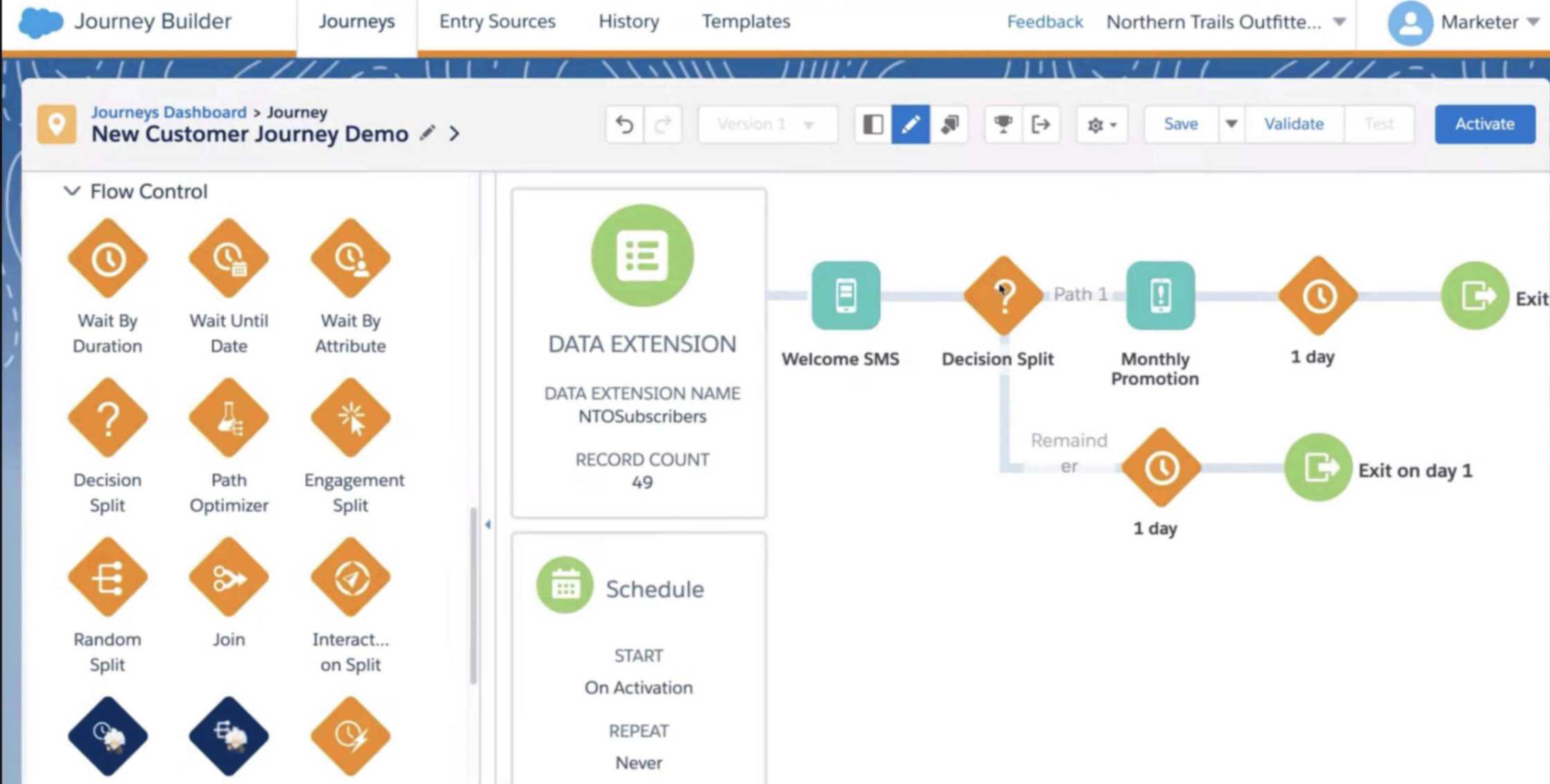
Salesforce Marketing Cloud’s Journey Builder interface showing a customer journey flow with drag-and-drop flow elements.

Key features:

  • AI-driven lead scoring: Qualify and grade leads automatically based on engagement
  • Email personalization: Tailor content and track campaign performance
  • Dynamic content blocks: Deliver personalized experiences at scale
  • Prospect activity tracking: Monitor behaviors across emails, site visits and more

Why it stands out:

  • Suits teams that are already using Salesforce CRM
  • Provides deep reporting and attribution visibility

5. Zapier

Zapier specializes in workflow automation, connecting over 5,000 apps to automate repetitive actions across your stack. It doesn’t require coding knowledge but offers robust data analytics tools to help you make decisions faster.

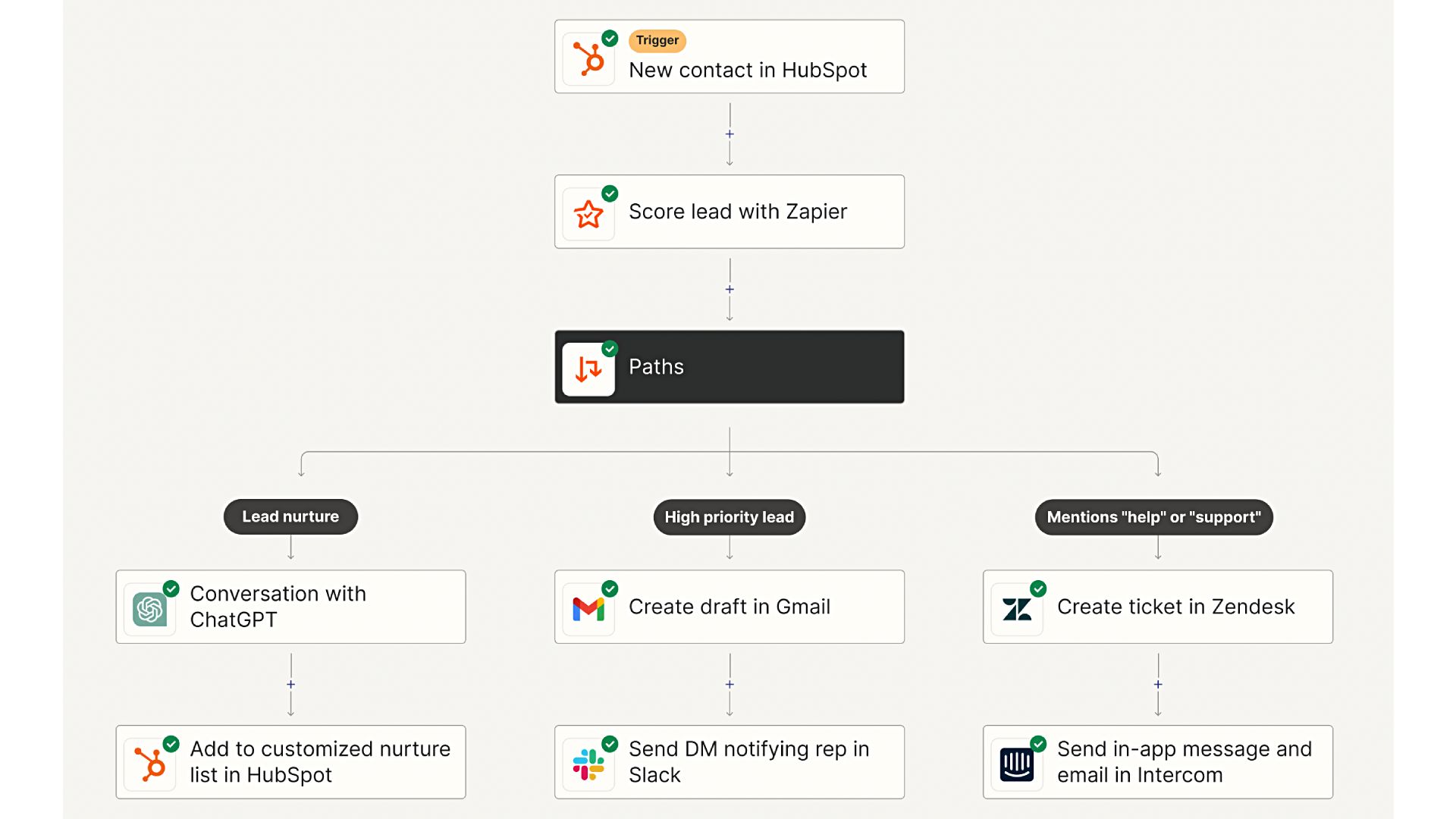
Zapier’s workflow builder showing a multi-path automation with branches for Sales, Accounting, Support and Communications

Key features:

  • Visual workflow builder: Automate actions with “if this, then that” logic
  • Lead routing automation: Manage lists, assign leads and send instant notifications
  • Integrations: Connect with forms, spreadsheets, CRMs and calendars
  • Task automation: Trigger follow-ups and handoffs without manual effort

Why it stands out:

  • Stitches together a wide range of tools
  • Automates marketing tasks without engineering support

6. ActiveCampaign

ActiveCampaign blends email marketing, CRM and automation workflows into a flexible platform for small to mid-market teams. It also lets you manage powerful automations that span sales, marketing and customer experience in a single dashboard.

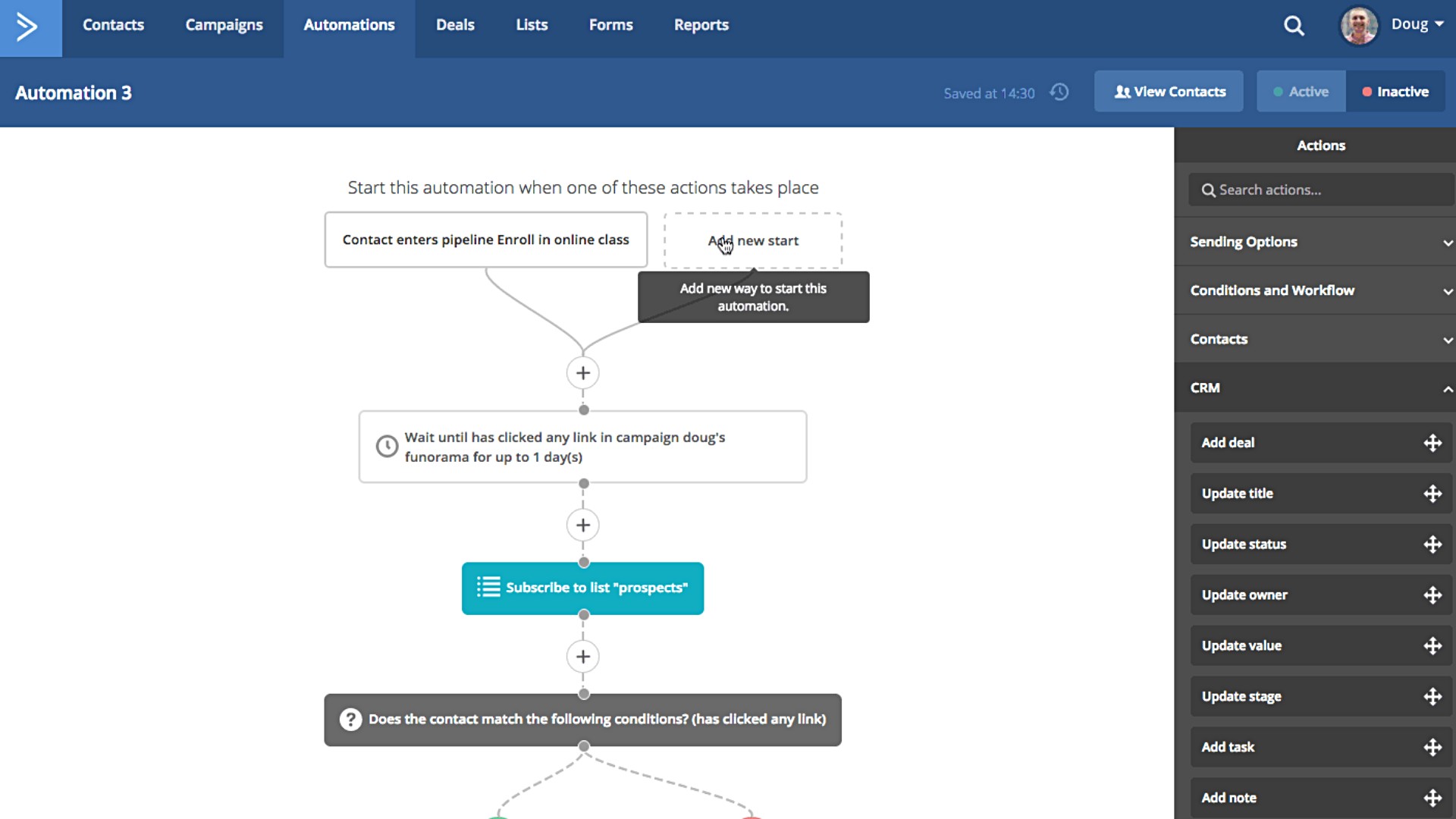
ActiveCampaign’s automation builder shows an email engagement flow with conditional logic, list subscription and CRM task actions.

Key features:

  • Email automation builder: Create sequences visually with drag-and-drop tools
  • Built-in CRM: Track deals and monitor your sales pipeline in real time
  • Lead scoring: Prioritize contacts based on behavior and engagement
  • Ecommerce automation: Recover carts and retarget based on product views

Why it stands out:

  • Focuses on personalized customer engagement
  • Offers industry-specific tools for ecommerce and service-based businesses

7. Omnisend

Omnisend is an automation tool for ecommerce teams that are looking to combine email, SMS and product-based automation in one platform. It also offers customizable templates and pre-built workflows to speed up campaign launches across multiple channels.

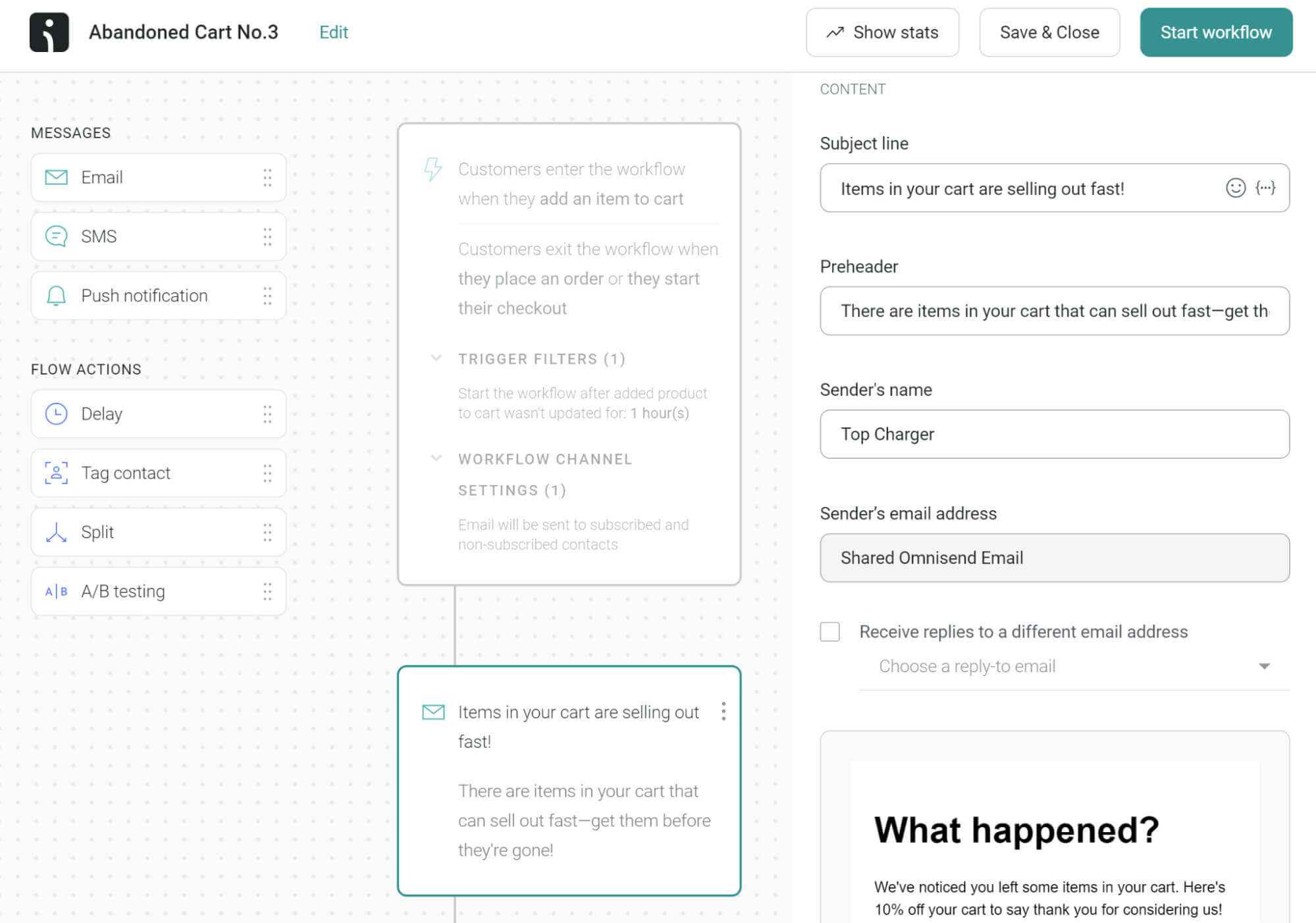
Omnisend’s abandoned cart automation builder shows email, SMS and push notification options with a triggered workflow

Key features:

  • Ecommerce workflows: Automate campaigns for carts, orders and more
  • Drag-and-drop builder: Create campaigns quickly with visual tools
  • Cart flows and confirmations: Send timely reminders and post-purchase emails
  • Product recommendations: Personalize with dynamic coupons and offers

Why it stands out:

  • Provides a clean UI for fast setup and testing
  • Focuses heavily on conversions and customer lifecycle

8. Encharge

Encharge is a marketing automation tool for SaaS companies that want to send behavior-based messages and improve lead nurturing. It features a smart event-based system that tracks user actions inside your product and lets you respond in real time.

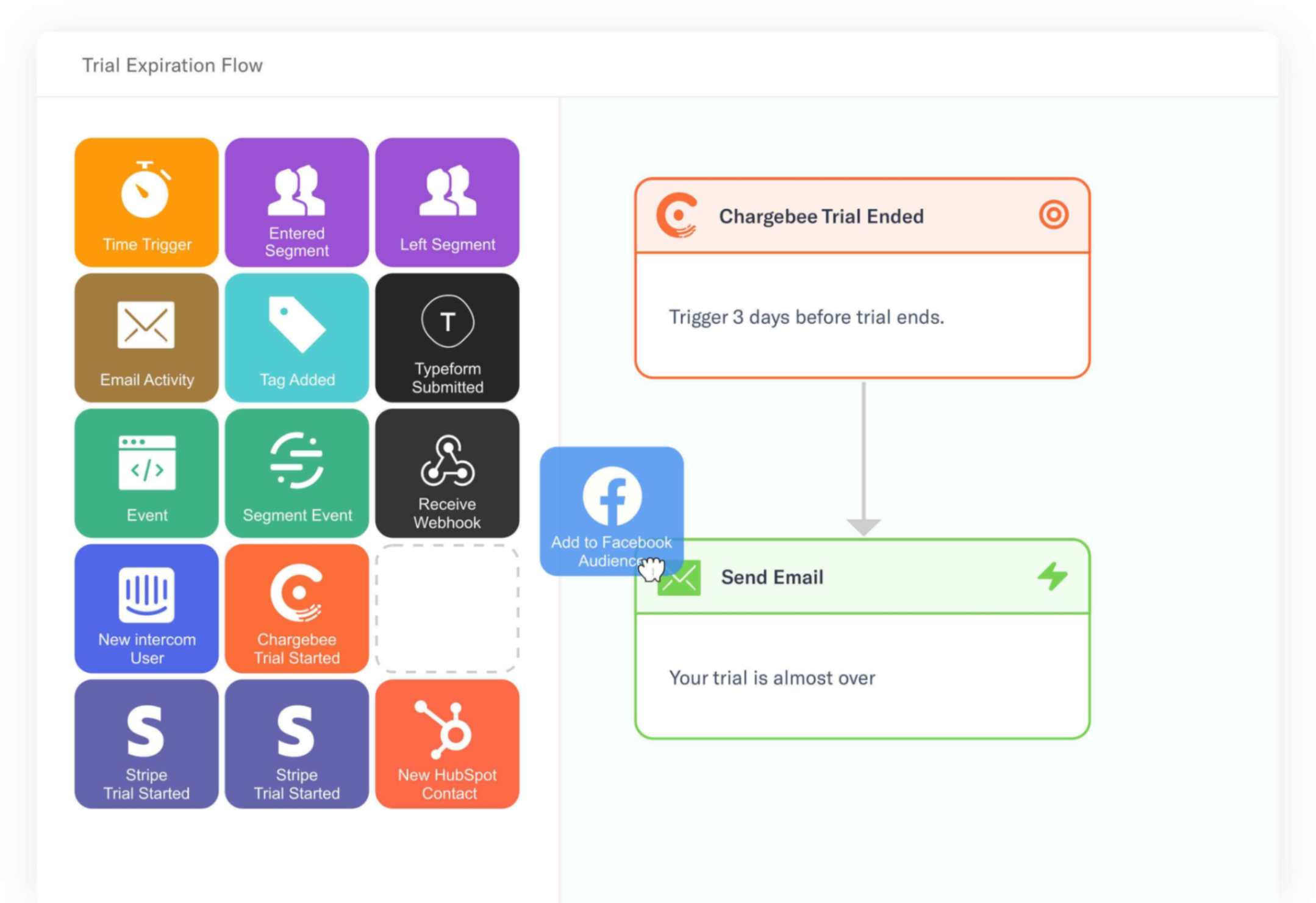
Encharge’s trial expiration flow shows automation of a follow-up email and Facebook Audience action.

Key features:

  • Visual journey builder: Design email sequences with an intuitive interface
  • In-app activity tracking: Segment users based on real-time behavior
  • Lead tagging and scoring: Automate contact organization and qualification
  • Custom triggers: Set actions based on user behavior and custom rules

Why it stands out:

  • Focuses on helping teams convert active users to customers
  • Makes complex flows easy to manage visually

How to choose the right marketing automation tool

The right automation platform depends on your goals, team structure and tech stack. For example, some tools focus on ecommerce, while others focus on SaaS or B2B. The best fit will align with how you already work, not just with what you sell.

Start by clarifying your must-haves, like the following:

  • Business model fit: Look for platforms that align with your industry, such as ecommerce, SaaS, services or multi-channel sales.
  • Ease of use: Choose a tool that your team can learn quickly. For instance, visual builders and intuitive UIs can speed up onboarding.
  • Workflow complexity: Map out how advanced your workflows need to be. If you rely on branching logic, scoring or cross-channel triggers, choose tools with flexible flow builders that can handle those use cases.
  • CRM integration: Ensure the platform integrates well with your CRM platform, payment system or lead database.
  • Automation support: Consider the workflows you intend to automate. Are you just automating email, or will you also need capabilities that support SMS, push notifications, chat and social ads?
  • Social integration: Make sure the tool can automate publishing, engagement and routing for social channels so you can manage campaigns and conversations in one place.
  • Social reporting depth: Understand how much insight you actually need. If you rely on detailed metrics to make decisions, look for tools with granular reporting on campaigns, segments and conversions. Or if you only need high-level summaries, a simpler dashboard may be enough.

If you’re unsure which capabilities you need, look for automation tools that offer free trials or low-tier plans. Once you know what works, you can invest in more advanced capabilities.

Best practices for implementing marketing automation

A marketing automation platform can transform how your team works, but only if you implement it correctly. Use these best practices to ensure a smooth launch and long-term success:

  • Align goals across teams: Set shared success metrics across marketing, sales and support before you implement any workflows. Since automation touches every stage of the customer journey, you need to align goals to prevent duplication and friction across departments.
  • Start with one workflow: Focus on a single use case first, like a welcome email sequence or lead scoring model. Once you prove that it works, you have a model to scale your automation from there.
  • Clean up your data: Standardize the data in contact fields, tags and segments across systems before launching. If you don’t, inconsistent data can lead to poor targeting and broken workflows.
  • Integrate your tech stack: Connect your CRM, ecommerce platform and analytics tools before activating automations. Otherwise, you’ll have to manually export data, which could cancel out your automation gains.
  • Test everything before launch: Run test users through each flow, preview your messages and confirm all triggers work. These tests help you avoid mistakes like sending duplicate emails or triggering the wrong message.

Get your marketing automation process started today

Marketing automation solves some of the biggest challenges in modern marketing: disconnected tools, repetitive work and slow response times. It also helps your team move faster, collaborate better and deliver more consistent customer experiences across every channel.

Even if you’ve already automated parts of your workflow, there’s always room to grow. Look for bottlenecks like manual handoffs, inconsistent follow-ups and siloed data, and replace them with automated systems that work behind the scenes.

Want to know where to start? Check out this guide to social media automation tools to explore your options, or start a free trial with Sprout to see it in action.

The post Marketing automation: The complete guide for your brand in 2025 appeared first on Sprout Social.


from Sprout Social https://ift.tt/mjlJhUW
via IFTTT

Friday, 3 October 2025

Understanding social media demographics in the UK: age, gender & behaviour

UK adults spend an average of 1 hour and 48 minutes a day on social media.

That’s nearly 13 hours a week, offering a solid window for brands to connect with their target audience. Success requires a clear understanding of each network’s users.

This includes the basics, like the age, gender and behavioural demographics on social networks in the UK. You’ll also want to gather deeper insights on what UK audiences expect from brands like yours.

UK social media demographics: key stats you need to know

In the UK, social media platforms attract large audiences across age groups and daily social media usage is high.

Before we delve into the particulars of each social network, it’s worth viewing the broader picture of UK social media trends.

54.8 million people in the UK use at least one social media platform. That’s 79% of the total population.

On average, time spent on social media is declining. UK users spent 11% less time on social media than the previous year. Note that this is an average. Some social media users are using the platforms far less frequently, while others are using them far more.

Using data collated from social media usage reports on Statista and Data Reportal, here’s a breakdown of age cohorts across LinkedIn, TikTok, Instagram and Facebook:

  • 18–24: 22.9%
  • 25–34: 32.6%
  • 35–44: 16.3%
  • 45–54: 15.2%
  • 55–64: 7.9%
  • 65+: 5.3%

In short, social media use in the UK still skews young. Half of all users are under 35, though older demographics are well represented.

Why understanding UK social demographics matters

Any effective digital marketing strategy starts with knowing your audience. With nearly 80% of the UK population on at least one social media platform, there’s a wealth of data to uncover valuable insights.

According to Sprout Social’s UK Index, British people place a high value on authenticity, cultural relevance and timeliness in brand communications. This means your content needs to reflect these values and what they mean to different demographics.

What feels culturally relevant and timely to a 19-year-old university student differs greatly from what resonates with a 43-year-old parent of two. Yet both demographics are highly active on social media and expect content that speaks to them. This is why understanding demographics is essential.

Getting it right allows you to:

  • Craft content that resonates with specific communities
  • Adjust your strategy based on what your community wants
  • Choose influencers whom your target demographic connects with

Both the challenge and the opportunity lie in uncovering how and where your target demographic uses social media.

Platform-by-platform breakdown for UK

Ready to dive into each major social media platform? Let’s break it down.

1. Facebook demographics in the UK

The UK has a total of 39.5 million Facebook users. That’s around 60% of the total population. It’s well past the explosive growth stage seen on TikTok, but the good news is that usage is still going strong. That’s particularly true in social commerce, where new features are added every day.

That said, it’s less popular among Gen Z and younger millennials.

The average amount of time UK users spend on the app is 39 minutes per day. The 18- to 24-year-old cohort spends as little as 15 minutes per day, preferring the greener pastures of TikTok and Instagram.

Here’s a breakdown of Facebook user demographics:

  • 18–24: 18.4%
  • 25–34: 24.7%
  • 35–44: 19.5%
  • 45–54: 14.5%
  • 55–64: 12%
  • 65+: 10.9%

It skews older than other platforms, but that could be a good thing. Older millennials and Gen X, who make up around half of Facebook users, have the highest median disposable income per household in the UK. So, if you have high-ticket products or luxury items, Facebook might be your best bet.

For more detailed insights, Sprout Social’s Facebook Analytics tool has you covered.

2. Instagram demographics in the UK

The UK has a total of 33.4 million users. That’s 48.2% of the total population and 56.3% of the eligible population (over the age of 13). Even better, Instagram use in the UK far exceeds the global average.

Brits spend an average of 53 minutes per day, or around six hours a week, on the platform. That’s nearly double the global average of 29 minutes per day, making it clear that the UK has a strong appetite for Instagram content.

Most UK Instagram users are Gen Z and Millennials, but Gen Xers and Boomers are still active on the platform.

Here’s a breakdown by age:

  • 18–24: 31.8%
  • 25–34: 30.4%
  • 35–44: 16.1%
  • 45–54: 9.5%
  • 55–64: 6.3%
  • 65+: 5.9%

The gender distribution in the UK skews slightly female at 55%, while globally, there is a roughly 50-50 split.

Due to the visual nature of the platform, brands whose chief appeal lies in aesthetics typically do best.

Think fashion, beauty and skincare, health and wellness, as well as retail brands. Need a hand scheduling your IG content? Check out Sprout Social’s Instagram Scheduling tool.

3. TikTok demographics in the UK

There’s a strong case to be made that the UK is the TikTok capital of the world. With 24.8 million active social media users in the UK, up from 16 million in 2024, TikTok is in the rapid growth stage.

UK users spend an average of 49 hours and 29 minutes per month on TikTok, well above the global average of 34 hours.

Older demographics are also increasingly adopting the platform and, in turn, increasing the buying power of the average TikTok user in the UK.

Here is a breakdown:

  • 25–34: 31.8%
  • 18–24: 24.4%
  • 35–49: 19.5%
  • 45–54: 12.9%
  • 55+: 11.4%

Interestingly for brands, most users are scrolling, not posting. Despite a global user base of 2 billion, users post only 34 million videos per day. This means less competition and a better chance for brands to cut through.

Like Instagram, TikTok is a highly visual platform, but there are some slight differences in the overall vibe. These differences alter which content rises to the top of the algorithm. Fashion and beauty shine, but technology and consumer packaged goods (CPG) brands also do exceptionally well.

Take a look at some stats:

  • CPG campaigns on TikTok delivered 2X greater ROAS than average.
  • Fashion brands on TikTok achieve a median ROAS of 2.5x.
  • Nikon led an innovative co-creation-centred TikTok campaign that achieved a 17% bump in brand awareness.

4. LinkedIn demographics in the UK

LinkedIn has one billion users globally, with 44.6 million in the UK. That’s a huge chunk of the country’s total population.

LinkedIn is exceptional in that, age and gender notwithstanding, its user base is largely homogeneous. It is a platform designed for white-collar professionals, and people use LinkedIn for career-related purposes only.

Here’s an age demographic breakdown of UK users:

  • 18–24: 23.7%
  • 25–34: 45.2%
  • 35–54: 25.8%
  • 55+: 5.4%

We can see that the bell curve skews slightly young, but the meat of it lies in older Gen Z and millennials. Men slightly outnumber women, making up 55% of the total UK user base.

5. YouTube demographics in the UK

Understanding YouTube user demographics in the UK is easy.

If your audience is between 13 and 85 years of age and has internet access, it’s almost certain they use YouTube. For this reason, you can expect that the number of monthly active users on YouTube follows the population distribution in the UK, which is approximately:

  • 0–18: 20.8%
  • 18–24: 8.3%
  • 25–34: 13.5%
  • 35–49: 19.3%
  • 50+: 38.0%

YouTube has a total of 54.8 million active users in the UK, against a total population of 68.3 million. As you’d expect in a case of mass adoption, the gender split is razor-thin: 50.1% male vs. 49.9% female. However, men use the platform 12% more than women, despite UK women spending more time online overall.

Given its ubiquity, virtually all demographics are represented. In that sense, you can think of YouTube as the opposite of the hyper-specialised LinkedIn. YouTube delivers content for every niche imaginable.

6. X (formerly known as Twitter) demographics in the UK

As of 2025, X has 22.9 million users in the United Kingdom, making it one of the least-used social media platforms in the country. This marks a 10.7% decrease in its UK user base over the last 12 months, equating to a loss of 2.73 million users. While 10% have left, 33% of UK users have considered leaving, citing changes to the platform in recent years.

That said, its heavily male-skewed user base (65.8% and 34.2% female) offers specificity for male-focused brands. Cryptocurrency, sports betting and supplement brands typically excel on X, as do male-focused fashion brands like OddBalls.

A promotional X post featuring three men on a rugby field wearing underwear.

Source: X

Age-related data specific to the UK is not currently available, but here is X’s global age breakdown:

  • 18–24: 34.2%
  • 25–34: 36.6%
  • 35–49: 19.7%
  • 50+: 7.0%

For detailed insights, check out Sprout Social’s Twitter Analytics tool.

How to use demographic insights to improve your UK strategy

With the data above under your belt, it’s time to use it to craft your social media marketing strategy.

1. Prioritise platforms based on your audience

Once you understand where your audience is most likely to spend their time, it’s time to lean into that platform. This doesn’t mean abandon all others. People of all ages and demographics use all platforms, but these demographics do suggest you should prioritise your investment in ads or content accordingly.

As a quick reminder:

  • For Instagram, think Millennials,
  • For TikTok, think Gen Z.
  • For LinkedIn, think professionals of all ages.
  • For X, think men.

2. Tailor voice, format and post timing

People of different ages consume social media differently. They have different preferences for content types, and they use language itself differently.

The overlap between user demographics, audience expectations and business goals can be complex and granular.

Let’s say you want to target Gen Z professionals. Remember the big debate about emojis in the workplace? Gen X and older say “nay“, but Gen Z says “slay”.

The generally accepted wisdom is that brand messaging on LinkedIn should be more dry and professional, but Gen Z brings a more casual feel to the workplace. LinkedIn content aimed at Gen Z professionals should keep this in mind.

3. Use Sprout Social’s advanced tools

Navigating the nuances of different social media platforms has never been easier.

With Sprout Social, you can:

  • Schedule and publish content for different time zones and platforms.
  • Surface audience insights for deep understanding.
  • Test various content types to find what works.
  • Optimise your post timing.

In short, Sprout makes understanding and speaking to your target audience easy.

Where Sprout fits into smarter audience targeting

Getting a general sense of the UK social media landscape is an important first step, but it won’t capture the specifics of your target audience.

Sprout Social will help you drill down to gain a deep understanding and then craft content for your audience.

Use Listening Tools to track real conversations across the UK and learn what matters to your audience. You can then use Social CRM capabilities for audience tagging, filtering and segmentation. With this data at your fingertips, Sprout’s AI can then assist you with tailoring content that resonates quickly and effectively.

Ready to master the UK social media landscape? Sign up for a free trial with Sprout Social today.

The post Understanding social media demographics in the UK: age, gender & behaviour appeared first on Sprout Social.


from Sprout Social https://ift.tt/PDrgU6h
via IFTTT

Thursday, 2 October 2025

8 strategies for using AI for customer service in 2025

Your brand’s long-term success hinges on your ability to personalize customer interactions and turn them into memorable experiences. By doing so, you build customer trust and loyalty, making your customer service a competitive advantage. This, in turn, boosts your brand recall and earns you lifelong customers.

However, customer care teams face immense pressure from both customers and the organization. They’re expected to respond instantly to complaints and queries, know all the answers, and navigate complex workflows, fragmented data and siloed teams.

Fortunately, AI can help them make swift, smart decisions for the personalized service customers crave. The transformation is happening now—AI and machine learning have become essential technologies for scaling customer care operations across social media platforms.

Read on to learn how AI in customer service can help you build meaningful customer relationships and foster lifelong brand loyalty.

What is AI customer service?

AI customer service uses machine learning, natural language processing, and predictive analytics to transform customer support operations. These technologies automate routine tasks, analyze customer sentiment in real-time, enable 24/7 chatbot support, and deliver personalized responses at scale. AI customer service integrates across social media platforms, email, and messaging channels to provide consistent experiences while reducing response times from hours to seconds.

Card defining AI customer service. It says AI customer service uses technologies like machine learning (ML) and text analysis to enhance customer care and improve the brand experience.

The benefits of AI in customer service

AI customer service helps brands improve and scale customer support functions without overwhelming agents. Here’s a closer look at the benefits.

  • Scalability: AI tasks can handle large volumes of data and tasks simultaneously, making it easier for agents to prioritize inquiries during peak times, and as your business grows.
  • Quick, 24/7 support: AI tools help provide round-the-clock customer support without the need for human intervention.
  • Personalization: AI customer service enables teams to personalize responses and recommendations to meet the tone and sentiment of the customer.
  • Consistency: AI tools help teams maintain brand voice and provide consistent responses, so all customers receive the same level of support.
  • Automate repetitive tasks: AI automation inherits manual processes and consolidates tasks so customer care agents can focus on more value-added activities.
  • Chatbots: Customer service chatbots enable you to instantly respond and resolve common requests while routing complex queries to specialized teams.
  • Multilingual support: AI tools like chatbots automatically translate and respond in different languages, breaking down language barriers. This makes it easier to support a wider customer base and helps brands explore new markets.
  • Cost efficiency: Brands significantly reduce operational costs because of AI capabilities that help scale your social media customer service without additional staffing and training costs.
  • Customer insights: AI tools give you centralized customer insights. Over 40% of business leaders we surveyed consider sentiment analysis a key AI application for understanding customer feedback. These insights allow brands to address feedback comprehensively and benefit other teams like product, procurement and marketing.

AI customer service tools and technologies

AI customer service isn’t one technology—it’s a sophisticated ecosystem working together to revolutionize support operations.

  • Machine Learning (ML): Powers personalization by analyzing customer interaction patterns, predicting needs, and optimizing response strategies.
  • Natural Language Processing (NLP): Enables AI to understand context, emotion, and intent in customer messages across multiple languages.
  • Generative AI: Creates human-like responses, summarizes conversations, and suggests reply improvements while maintaining brand voice consistency.
  • Predictive Analytics: Forecasts customer behavior, identifies at-risk accounts, and anticipates support volume spikes.

8 ways to use AI for customer service

Here are eight tangible ways to use AI for customer service to empower your teams and provide exceptional brand experiences.

Listicle that shows eight tangible ways to use AI for customer service to empower your teams and provide exceptional brand experiences.

1. Grow customer care at scale

Most brands react to customer service demands. Smart brands anticipate them.

Sprout Social’s AI-powered Case Management processes billions of social conversations across networks and review sites to predict service spikes before they happen. The system automatically removes redundant data and updates agent dashboards in real-time for instant decision-making.

Our solution updates customer cases in real-time and notifies agents of surges in @mentions, so they can be prioritized. It also assigns cases based on agent availability, increasing efficiency and speed while eliminating redundancies that duplicate work.

2. Create tailored, personalized responses

Customers don’t want to be nameless—they want to have a personal connection to your brand. And empathetic, personalized customer service is essential to that end. It increases customer engagement, builds loyalty and fosters long-lasting relationships.

Manual personalization breaks down at scale, especially across multiple social channels.

Sprout Social’s Enhance by AI Assist solves this challenge by automatically adjusting response length, tone, and style to match each customer’s situation and sentiment.

Teams can also automatically categorize sentiment in incoming messages to easily filter the inbox by Message Sentiment and quickly craft the best response to high-priority messages.

3. Set up customer service chatbots

Customer service chatbots help you connect with customers on- and off-business hours to give them timely support when human agents are unavailable. These bots can manage large volumes of messages and create a human-like experience.

Some are complex, such as online travel agency Priceline’s AI chatbot, Penny, which acts as a 24/7 concierge for bookings and offering local guidance.

Some are simpler, rules-based chatbots, which can be quickly built and added to social networks for real-time assistance. You can create one in minutes using Sprout’s Bot Builder on your X and Facebook accounts.

Sprout's Bot Builder helps you create a chatbot on your X and Facebook accounts within minutes.

In the Bot Builder, select your chatbot profile and follow the wizard for instructions. You can choose a template with predetermined rules and script options, or add custom rules and responses, along with pictures and GIFs.

Once your chatbot is set up, all customer conversations will stream directly into the AI-powered Smart Inbox, which enables you to create filters. This helps customer care teams stay on top of incoming messages and prioritize responses without getting overwhelmed.

4. Analyze customer sentiment

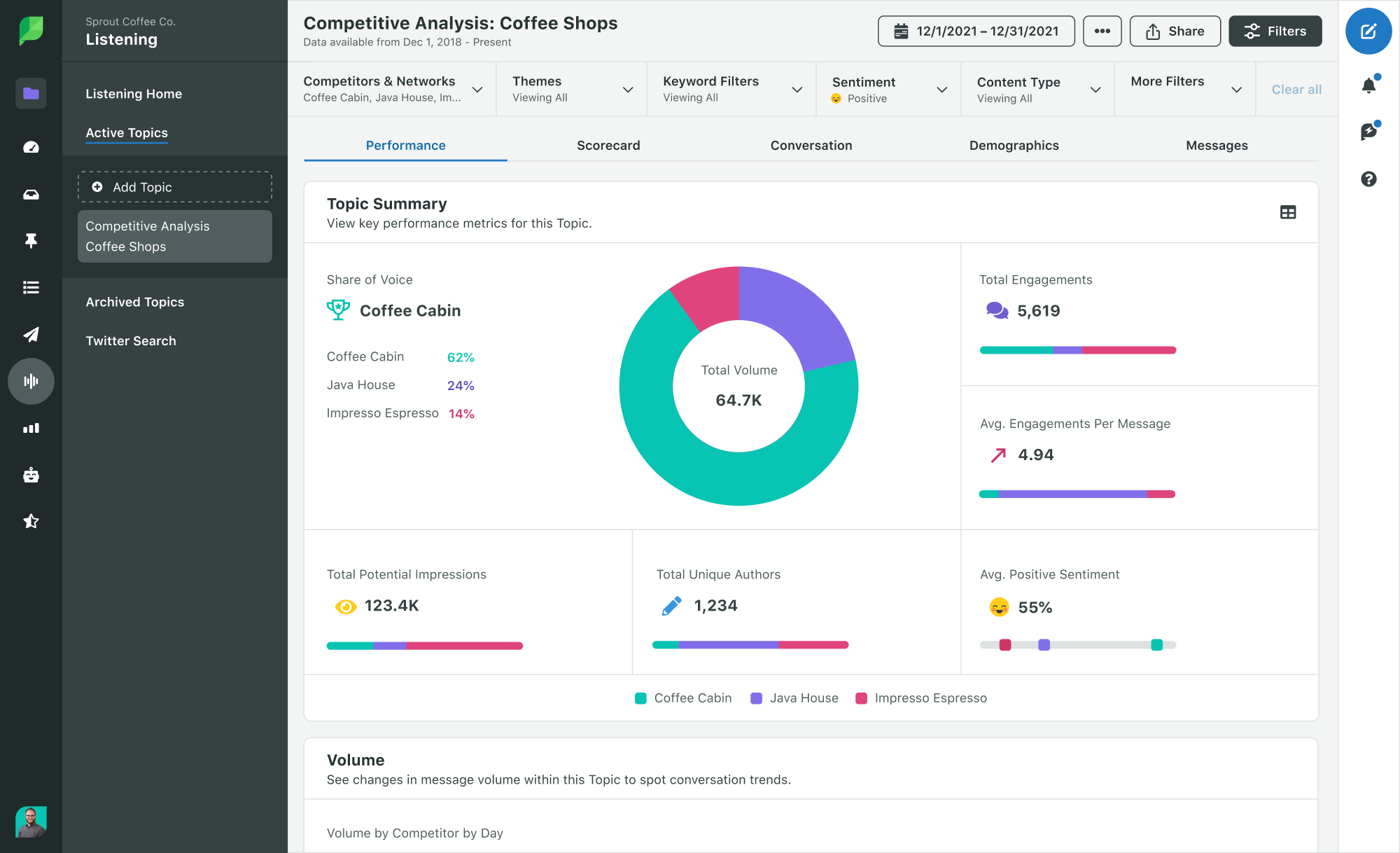
Use sentiment analysis to draw insights from customer conversations across social channels, review sites and CRM tools like Salesforce. These insights show important themes, including information about competitors. They also help customer service, marketing and sales teams better meet customer needs. For instance, you can tailor ads based on demographics or adjust messaging based on competitor insights from social listening.

Sprout's Competitive insights show important themes, including information about competitors. They also help customer service, marketing and sales teams better meet customer needs.

Sprout enables you to monitor sentiment in your social mentions across social networks and review platforms such as X, Instagram, Facebook and Google My Business. Focus your searches by keywords or specific queries, like complaints or compliments. Plus, track real-time positive, negative and neutral mentions, and analyze sentiment trends over time to enhance customer care.

5. Streamline workflows and increase team efficiency

Use AI in customer service to customize customer journeys and improve satisfaction by pairing your social data with your CRM.

Sprout enables you to do this through our Salesforce integration. Get a full 360-degree view of your customers and turn your social data into business-critical insights through a centralized dashboard.

Link a customer's social profile to Salesforce and get a full 360-degree view of your customers. Turn your social data into business-critical insights through a centralized dashboard.

Resolve customer issues by using AI-enabled case routing, and get additional context from their social messages and conversation history. The integration unifies all networks and profiles into a single stream, which enables quicker responses. Plus, this helps your team give better, more personal support, reducing customer frustration and meeting customers where they are, rather than starting conversations all over again.

6. Collect market trends and insights

AI-driven topic clustering and aspect-based sentiment analysis give you granular insights into business or product areas that need improvement by surfacing common themes in customer complaints and queries. This includes insights on customer demographics and emerging trends—key to guiding your customer care strategy.

For example, use this data to add more information to your resource center about what your audience cares about or update frequently asked questions (FAQs) from customers. This improves transparency for potential customers in the decision-making phase who are browsing products. It also helps brands cater to existing customers and provide support when they need it without requiring agent intervention

Sprout’s AI and machine learning can help you get important information from social and online customers. This gives you a complete view of how customers feel about your products and services.

7. Anticipate customer needs through predictive analytics

AI technologies like predictive analytics look at old and current customer interaction data to help you predict future customer needs, trends and behaviors. This helps provide proactive and personalized support, and allocate team resources more efficiently, especially during peak periods. Predictive analysis also helps the larger organization by predicting potential issues brands can address proactively.

You’re also able to identify customers who are at a high risk of leaving the brand. This helps you build targeted programs for customer outreach with personalized support and promotions.

8. Set up self-service virtual assistants and smart routing

AI-enabled self-help portals and virtual assistants (VAs) analyze and understand customer queries using natural language processing (NLP) to automatically provide relevant information and steps for troubleshooting.

Smart routing directs complex queries to specialized agents, eliminating customer transfers and increasing satisfaction while empowering agents to focus on high-value problem-solving.

These tips give you an overarching view of how to use AI in your customer care operations. If you’re beginning with social customer care, here are five ways to quick-start using AI.

Measuring AI customer service ROI

Measuring AI customer service impact requires tracking metrics that directly connect to business outcomes. Focus on KPIs that demonstrate clear value to executives and stakeholders.

  • First Response Time (FRT): Show how AI-powered automation drastically reduces the time customers wait for an initial reply. This directly impacts customer satisfaction.
  • Resolution Time: Measure the total time it takes to resolve an issue from start to finish. AI accelerates this by handling simple queries instantly and routing complex ones to the right agent.
  • Cost Per Resolution: Calculate the savings you generate. By automating routine inquiries, you lower the operational cost for each customer interaction and free up agents for high-value work.
  • Customer Satisfaction (CSAT): Link AI implementation to higher CSAT scores. Faster, more consistent and 24/7 support makes customers happier, which increases loyalty and retention.
  • Agent Productivity: Demonstrate how AI empowers your team to handle more complex issues. When AI manages the repetitive tasks, your agents become strategic problem-solvers.

Things to consider when implementing AI-powered customer service

Implementing AI customer service can, no doubt, greatly increase the efficiency of your existing teams to boost customer satisfaction. But there are certain considerations you must keep in mind to get the best results, such as:

Data security and privacy

Put an AI policy in place before you implement any AI system within your organization. Make sure you follow rules about customer data privacy. These include the EU General Data Protection Regulation (GDPR) and California Consumer Privacy Act (CCPA).

Integration with existing systems

Make sure your AI customer care tools are compatible with your CRM, ERP and other applications. Also check to see if you can enable real-time data synchronization across the tools for more accurate responses.

Investment and value

Opt for an AI solution that can scale with your growth. Consider cloud-based applications that are easy to implement and have strong customer support to minimize downtime.

Budgeting and resourcing

Apart from the AI solution, consider costs related to staffing and resourcing, such as employee training and downtime. Train customer service teams to understand the AI tool’s capabilities and limitations as well. This will give them confidence to consider it an ally and not a replacement.

Monitoring and improvements

Set up continuous monitoring to track the performance of your AI customer service tools and their output accuracy. Implement a feedback loop so you can plan regular updates to the models based on that feedback and new data collected.

Use Case: Improving global social customer care with Sprout insights

At Sprout, we’re always innovating—our processes and our tools—to build on our strengths.

While analyzing our customer care team performance, we discovered longer than average time-to-action during after-hours. This was especially affecting international customers.

Talking to our customer care team showed that they were quick with technical help and product information by phone or email, but social media requests during busy times were harder to handle. They were also not Tagging social messages in the same way. This made it difficult to organize, track and view those messages in social reporting later.

To fix this, our social and customer support teams used the information from the Inbox Activity Report to create a 3-pronged plan. This included staffing, finding the best times for agents to use Sprout’s Smart Inbox to handle requests and training them on Tagging. This helped the team to:

  • Prioritize messages: The Smart Inbox sorted incoming messages by Tagging, filtering and hiding completed messages to prioritize them.
  • Tap into key conversations: Identify keywords, hashtags and locations to surface unique engagement opportunities.
  • Understand our customers better: Keep up with built-in customer relationship and conversation history management that automatically removes old data so we always have the latest information at hand.
  • Improve team collaboration: Have clear and seamless team workflows with intuitive AI customer service tools that help manage and respond to incoming messages quickly.

This centralized strategy with the help of AI and automation, lead to better customer service around the clock. Tag rates increased by 37% and the average time-to-action during targeted care periods decreased by up to 55%. Additionally, an audit of the Tagging data enabled our social team to pull more comprehensive insights to demonstrate social ROI to our leadership team.

Read the full case study.

How to start using AI in customer service

As customer care leaders, your ultimate aim is to deepen customer trust and create a brand experience that keeps customers coming back. AI customer service helps you design personalized experiences to reach this goal.

Tools that help your teams, like AI chatbots, personalize messages and enact smart workflows, will enable your teams to support customers wherever and however they interact with your brand. Plus, with CRM integrations, you get a 360-degree view of the customer to strike a balance between scalable automation and personalized service.

Transform your customer service operations with AI-powered social customer care. Start a free trial or request a demo to experience how Sprout Social’s AI capabilities can revolutionize your customer support strategy.

The post 8 strategies for using AI for customer service in 2025 appeared first on Sprout Social.


from Sprout Social https://ift.tt/vN60ZCg
via IFTTT