Monday, 22 February 2021

14 Powerful Tactics to Improve Your Email Click-Through Rates

14 Powerful Tactics to Improve Your Email Click-Through Rates

People spend a lot of time worrying about their email open rates, but there’s another email metric that’s just as important — click-through rates.

Click-through rates reveal how many subscribers clicked a link in an email, as well as how many times they clicked it. 

What is a good email click-through rate?

This is a tricky question to answer. Email marketing benchmarks vary widely among industries, business size, audiences, and more. 

To better understand small business email marketing benchmarks, we conducted research asking survey respondents to self-report their click-through rates. Here’s what we found. 

What are average email click-through rates?

While it’s nice to get an idea of how your metrics stack up against others’, I would encourage you to change the way you view email marketing benchmarks. 

Rather than comparing your click-through rates to other businesses’ rates, keep an eye on how your rates improve over time. You’ll learn a lot more about your particular audience by focusing on your own data. 

After all, it’s true that ‘comparison is the thief of joy.’

But, you should know that low click-through rates can tank a product launch, hurt your website traffic, and make your email strategy ineffective.

Want to make sure this doesn’t happen? Try these 14 ways to optimize your emails and get more clicks. 

How to improve email click through rates

1. Stick to one call to action per email

When you’re creating an email, it may be tempting to include multiple calls to action (CTA) in the hopes that your subscribers will respond to at least one of the offers in an email. After all, the more options you provide, the more likely they’ll engage with one of them, right?

Well, not exactly. In fact, this can hurt your click rates rather than help them.

Too many links can distract and overwhelm your subscribers, decreasing click-through rates in your emails. To get optimal click through rates, include one call to action in your emails to focus your subscribers on taking a single action.

In fact, Whirlpool was able to increase their click through rates by 42 percent after limiting their CTA to just one.

In the email below from EOFire, there is one clear call to action and no question of what the subscriber is supposed to do – join the class.

stick to one call to action for higher click-through rates

2. Segment your emails

Different people have different interests. So do your email subscribers.

If you send the wrong people on your list an offer they’re not interested in, your click through rates will most likely plummet.

For higher click-through rates, segment your subscribers and send tailored emails based on their interests. You’ll see better click through rates when you send the right offer to the right person.

3. Create a sense of urgency

The fear of missing out (FOMO) is real, and eliciting this feeling in your subscribers can influence them to click on your calls to action right away.

If you have an offer that ends soon or a limited number of spots at a webinar, for example, you can create a sense of urgency by adding words like “now” or “today” to your emails.

We can tell you first hand that creating a sense of urgency works, because it worked on me.

Indoor plant seller Bloomscape retired some of their more popular plants. I couldn’t miss out on an opportunity to scoop up some favorites. 

get more clicks by using urgency

4. Personalize your emails

Have you ever received an email that didn’t apply to you at all? This kind of email may leave you feeling like a nobody on a huge list of email subscribers. And this feeling of alienation doesn’t encourage you to click.

Instead, when your subscribers receive an email for you, they should feel like you are addressing them alone. Truly personalized emails will feel like something written just for you. That kind of connection leads to higher click through rates.

Here are a few simple ways you can personalize your emails:

  • Include your subscriber’s name in your email. While this technique isn’t fresh, it can be effective. Instead of adding subscribers’ names at the beginning of an email, try adding them in the middle or at the end.
  • On your email sign up form, ask for information about your subscribers’ interests. Then, send segmented emails based on their responses.
  • Collect your subscribers’ birth dates on your sign up form and send them a celebratory email on their birthday.
  • Send a re-engagement email to people who haven’t opened an email from you in a while. Ask for feedback and see if they are still interested in receiving your messages.
  • Send emails tailored to what you know about your subscribers. What did they buy from you recently? Do you have something similar they may like? Send an email with a suggestion.

5. Create mobile-optimized emails

Eighty five percent of users access email from their phones.

And that means if your emails are difficult to read on a phone, there’s probably a huge percentage of your subscribers who aren’t getting the best experience and are most likely not clicking on your emails.

To make sure your emails are easy to read from any device, use email templates that are mobile responsive instead of mobile-friendly.

Mobile responsive emails are easier to read on both desktops and mobile devices, because text, images and buttons automatically adjust to fit the screen size. Additionally, multi-column email layouts adjust to single columns on mobile devices, and content is easy to access with both a mouse and a touchscreen.

Mobile friendly emails, on the other hand, scale down to fit the size of the screen, but don’t adjust layouts or fonts.

See how this mobile-friendly email below is difficult to read because the double-column layout makes the images, fonts and headlines too small?screen-shot-2016-11-10-at-11-39-45-am

Compare that to this mobile-responsive email below, where fonts and images are resized for the small screen and double columns turned to single columns:

mobile responsive images

If you’re not an email designer and have no idea how to make an email responsive, fear not! Many email service providers (like AWeber) provide mobile-responsive email templates for their customers.

6. Include colorful, clickable HTML buttons

One of the simplest ways to improve click-through rates is to ensure your subscribers know where to click. While plain text calls to action work for some people, a big button with a contrasting color immediately draws attention and can significantly improve click-through rates.

If you’re adding a button to your email, there are a few reasons why you’ll want to use an HTML button rather than an image button:

  1. An HTML button can be responsive, which means it’ll resize for people on different devices.
  2. Images in emails may not display for certain subscribers. And if your call to action doesn’t display as a result, click-through rates will tank.
  3. Email load times will be faster with fewer images in your emails.

You can code your own HTML button, or rely on your email service provider’s drag-and-drop editor (which will usually allow you to add customizable HTML buttons).

7. Don’t over complicate your email design

Complex isn’t always better, and this is often the case with email design. Avoid overwhelming your subscribers with an overabundance of images, icons or different fonts. Not only does this make for a disharmonious email, it’ll also take attention away from the content of your email and your call to action.

This beautiful, yet simple email from You Need a Budget incorporates a clean font, one image that works with the content of the email and a clear call-to-action button:

Clear CTA for click through rates
Photo courtesy of Really Good Emails

8. Use action-oriented CTA copy

Your email call to action copy should encourage people to take a specific action. Instead of using a generic call to action like “click here,” use verbs that describe the action you want subscribers to take, such as:

  • Shop
  • Learn
  • Get
  • Grab
  • Submit
  • Send
  • Start
  • Try
  • Reserve
  • Take
  • View
  • See
  • Watch
  • Read

By doing so, you’ll frame the subscriber experience in a way that influences them to want to take action.

9. Pique their curiosity

“The first and simplest emotion which we discover in the human mind is curiosity.” – Edmund Burke

Everyone has been curious about something at one point in their lives. And when a person is curious about something, they are inclined to resolve their curiosity.

Fortunately, you can also leverage curiosity in your email copy to encourage people to click-through on your emails.

Birchbox, for example, does this in the email below by offering a free mystery prize with a purchase. To find out what they would get, they need to click on the call-to-action button.

Free prize to increase clicks

Hopefully the prize is a good one, but at least it gets the click!

10. Include social proof

Believe it or not, people like to do what other people do. When they notice multiple people or a famous person doing something, they’re more likely to want to do it themselves. 

This is called social proof, which is a phenomenon where people are persuaded to take an action by seeing that other people have taken that action before them—and have seen success as a result of that action.

You can use social proof in your email content to encourage people to click through your calls to action. Bite does just that in the email below. By showing off how customers use their product and sharing their success stories, they tap into the power of social proof.

Social proof to increase click through rates
Photo courtesy of Really Good Emails

11. Write engaging headlines

If you use a headline in your email content, it will be the first thing your subscriber sees when they open your message.

A good headline quickly grabs your subscriber’s attention, engages them and gets them to read the rest of your email. And when subscribers read your email content, they become more likely to take action – which makes headlines pretty darn important.

For the email below, MailCharts used the subject line “Are your subscribers annoyed??” and then followed it up with the headline “You don’t know, do you?”

How to increase click-through rates

By linking the headline to the subject line, it guides the subscriber to continue reading through the rest of the content. You’ll also notice MailCharts does a good job of raising curiosity, which gives readers even more of a reason to continue reading and click the call-to-action button.

12. Use video

People love videos. They’re engaging, easy to follow, and often fun to watch. Plus, if people are in your videos, you can build relationships that written words often can’t.

While video doesn’t play in all inboxes, the inclusion of a thumbnail image of your video and a play button can boost click through rates tremendously. In fact, Wistia increased their email click through rates by 300 percent by incorporating videos in their emails.

Bonus tip: You can also try using GIFs in your emails to add motion to your emails and boost click-through rates.

13. Cater to what your audience likes

If one of your emails had an insanely high click through rate, it’s apparent that your subscribers liked what you did in that email. So, do it again.

Your audience should be your main barometer for what is working in your email strategy and influence the content and design elements you include.

Do you see high click through rates when you send short emails or long emails? Does your audience click more when there’s an image or video? Does a certain kind of content lead to higher clicks?

Take a look at your past emails and see which ones got the highest click through rates.

Then, repeat, repeat, repeat.

Have two (or three) ideas for one email? Split test them. See which version of the email wins and do it again. 

14. Feature the right images

Images in your emails can be a powerful way to grab the attention of your subscribers and convince them to click. However, you need to use the right images.

Email images should add meaning, support the content of your email or help make a relevant point. Additionally, you should use alt text in case your images don’t display.

Check out the header image in the email below, which serves multiple purposes:

image in an email
Photo courtesy of Really Good Emails

There are a few things that work well here.

  1. It summarizes the content of the email briefly and immediately, giving the reader everything they need to know in the space of a few seconds.
  2. The image supports the content of the email and provides additional meaning.
  3. Finally, it includes a call-to-action button, which encourages people to click on the email.

For the subscriber who skims or doesn’t read the email content, this image does it all. It catches their attention, tells them about the offer and gives them a place to click.

Related: How to Create Amazing Photos for Your Emails on Zero Budget

Bonus: 3 Ways to Increase Click Through Rates That Have Nothing to Do with Email Content

Believe it or not, you can set the stage for high email click-through rates without touching your email content. Here’s how.

1. Set expectations before people subscribe to your email list. 

To set a good foundation for your emails (and help your engagement rates start off on the right foot), you’ll want to make sure subscribers know what they’re signing up for before they give you their email address.

Whether it’s a monthly newsletter, weekly do-it-yourself tips or seasonal exclusive offers, being upfront about the kind of emails readers will receive helps attract the right people to your list. Plus, it sets expectations as to what you'll be sending them – as a result, there shouldn't be any unwanted surprises.

As you set expectations in your sign up form, however, do note that it’s just as important that the content in your email lives up to the promise you made. Why? Because your emails are more likely to be marked as spam if you say you’ll send one thing and deliver another.

2. Experiment with the frequency and timing of your emails.

Depending on your target audience and the content they prefer, the frequency and timing of your messages could vary greatly.

For most businesses, a weekly email newsletter is a great place to start. Eventually, you can increase the frequency of your emails to promote your product, share content or break your newsletter into smaller chunks. Or, ask your subscribers what cadence they prefer.

Try experimenting with time frames to figure out when your audience is most likely to read your email. For example, if business people are your target audience, you may get the best results if you email them during work hours. However, some people only have time to check their emails during lunch or when they first wake up. 

You can use analytics to determine when people are most likely to open your emails and plan your campaign accordingly.

3. Spend extra time crafting a subject line.

Strong subject lines impact click through rates just as much as open rates. Your email could contain the best content ever, but no one will read it if your subject line is weak.

Most people skim through their inbox, so make sure your subject line is short and punchy. 

Adding a special offer, asking a question, or emphasizing a sense of urgency, for example, can all be effective ways to create a compelling subject line.

Of course click through rates are important, but open rates and other forms of email engagement can contribute to your email marketing success. Make sure you track your email engagement metrics to learn what works for your unique audience.

Go get yourself a sick amount of clicks.

Try these tactics with your subscribers and see what increases click-through rates. Tell us what worked in the comments below!

(You’ll need an email marketing platform to apply what you learn in this post. Try AWeber’s easy-to-use email platform for free.)

Additional reporting by Liz Willits and Monica Montesa

The post 14 Powerful Tactics to Improve Your Email Click-Through Rates appeared first on AWeber.


from AWeber https://ift.tt/2fkfRZo
via IFTTT

Saturday, 20 February 2021

Facebook pulled the trigger on Australian news — and shot itself in the foot


Facebook today made good on its threat to block Australians from accessing or posting news content. The ban includes blocking links to Australian and overseas news publishers. Facebook said the ban was a direct response to the federal government’s news media code legislation, which is expected to become law soon and would require digital platforms such as Facebook and Google to pay news media companies whose content they host. Why has Facebook done this? The move is either a last-ditch attempt to gain concessions in the legislation or a simple cut-and-run by Facebook. The social media giant claims news publishers…

This story continues at The Next Web

from Social Media – The Next Web https://ift.tt/3dAcID0
via IFTTT

Thursday, 18 February 2021

4 experts on the social customer care metrics that fuel their top goals

Social media is more than a platform for brand marketing and advertising. It is also a critical customer service channel that enables customers to communicate with brands in real-time and vice versa.

According to the Sprout Social Index™, 74% of consumers will reach out to the brands they follow on social for customer service, making social customer care a priority for any business.

When a brand delivers high-quality social service, 44% of consumers say they stand out from the competition. But what constitutes “good” customer service? And how do you measure customer service quality?

We talked to four experts in social customer care and strategy about their customer service goals, best practices and how they measure success. We’ll walk through their top four goals, social customer care metrics and where to find them.

Their top four goals are as follows:

  • Provide timely responses
  • Resolve all problems, questions and inquiries
  • Offer 24/7 support
  • Increase customer satisfaction

So let’s dive in!

1. Provide timely responses

Key metrics:

  • Average reply time
  • Reply wait time
  • Time to first response
  • Resolution rate

How quickly a brand responds on social media contributes to their reputation for providing good customer service. While 79% of consumers expect a response in the first 24 hours of reaching out to a brand on social, 40% actually expect a response within the first hour

“The primary goal for any social customer support should be around speed of solving problems,” said Ellie Buckle, Head of Digital & Strategy at Purpose Media. “Customer support online follows the same basic rules as if it were in person, but many customers expect an even quicker response time.”

Brooke Sellas, the CEO of B Squared Media, also knows time is of the essence when delivering social support. “The biggest areas we look at with regards to customer care KPIs are response times—how quickly are we responding to mentions as they come in. And also time to resolution—the tracked time between a mention coming in on social, through any internal processes, and ending with closing the loop on social since it started on social,” said Sellas.

Buckle’s team at Purpose Media also focuses on time to resolution, also known as resolution rate. “When you’re measuring the speed of solving complaints or queries, it’s important to have a baseline time in mind. Then, proactively communicate with your customers if you aren’t going to hit that goal,” said Buckle. In other words, don’t leave your customers hanging, talk it out.

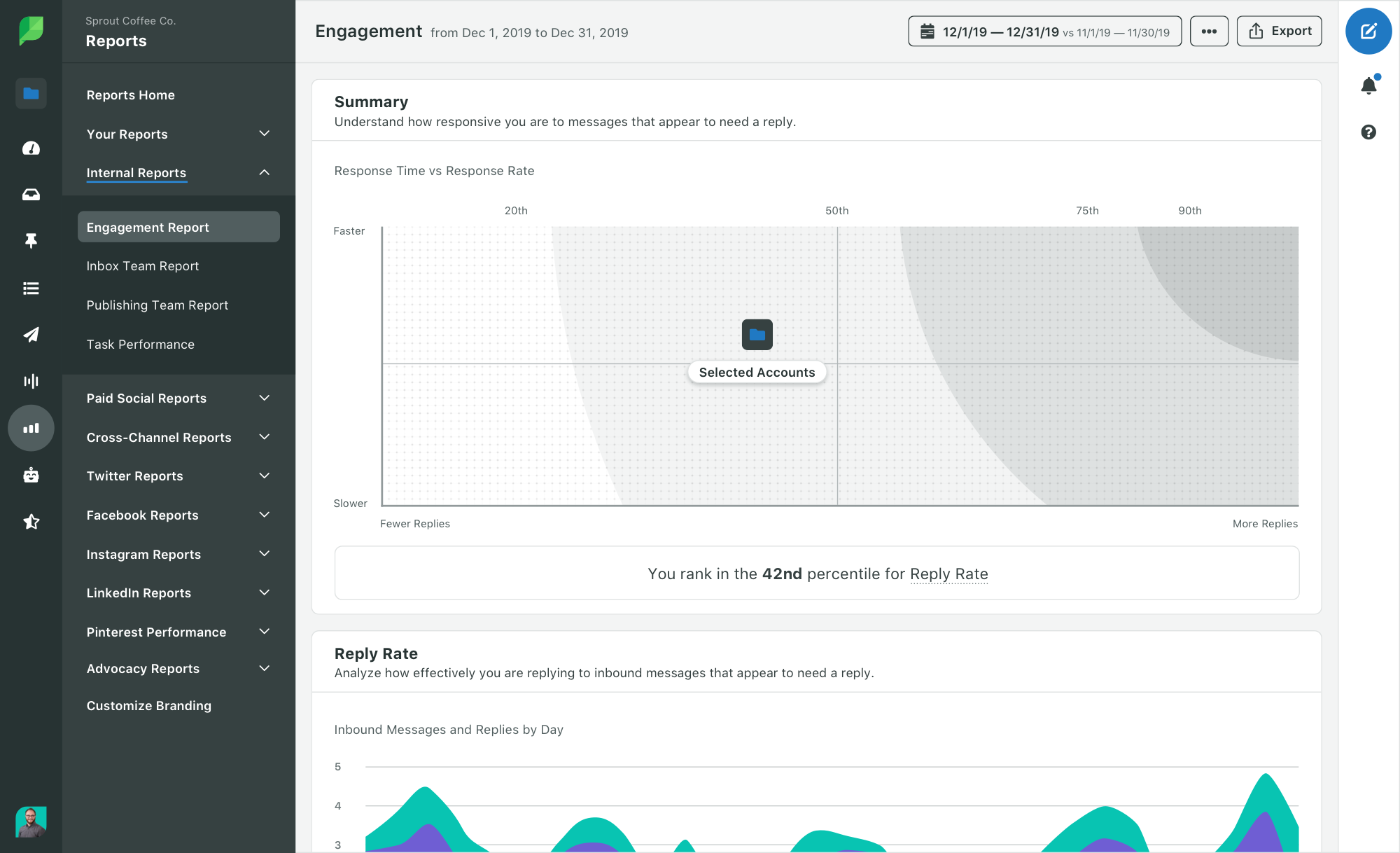
Sprout Social customer care features like the Engagement and Inbox Team Reports help users easily establish benchmarks, measure customer service performance and determine if they’re meeting their goals for timely responses.

The Inbox Team report is particularly beneficial if you have several people dedicated to providing social support through the Smart Inbox. The report breaks down reply metrics by team member, so each person can remain informed of and accountable for their performance.

2. Resolve all problems, questions and inquiries

Key metrics:

  • Reply or response rate
  • Total replies or response volume

High-quality customer service isn’t just about response times. You must also be resolving all of your customers’ problems, questions and inquiries that require comprehensive support solutions.

Effective inbox management also comes down to knowing which inbound messages to respond to and which can be marked as ‘done.’ For instance, compliments on your content don’t necessarily need a response. But if a customer sends a message about a product issue looking for a solution, letting them know you’re on top of it is critical.

“One of our top goals for customer support is ensuring that both positive and negative mentions are all addressed. And when we’re measuring the ROI of our customer support efforts, we look at several areas including response volume and response rate,” said Sellas.

Response rate is the rate that brands respond to messages or comments that they receive on a daily basis. Not every single comment or message will need a response, so if your response rate isn’t 100%, don’t sweat it.

Check out social response rate benchmarks by industry to get a sense of how your brand stacks up. Once you establish your own benchmark, response rate can be a good indicator of if you’re receiving and responding to more or fewer support issues than usual.

Instead of manually calculating response rate, Sprout’s Engagement report can do it for you. The report also shows how your Reply Rate and Reply Time metrics stack up against similar social profiles.

3. Offer 24/7 support

Key metrics:

  • Total unique users
  • Top received topics and subtopics
  • Most used quick replies

Providing timely customer service is a must, even during non-business hours. In those instances, chatbots can have your back.

“The most successful companies also embrace technology like automated chatbots. They make it so brands need less manpower and can communicate during off-hours that you aim to get back to all queries within 24 hours, which helps your customers really understand what level of service to expect from you,” said Buckle.

Using Sprout Social’s Bot Builder, Southern California Edison (SCE) is able to enhance its service capabilities and deliver customer care.

“Customers can share details of their issue in one step because the bot asks for this information up-front. This happens even before a human agent has to step in, which reduces the back and forth, said Carollyn Montales, SEC’s Online Community Management Senior Specialist. “That makes the process more efficient because it cuts down on the total time it takes to resolve that customer inquiry.”

Bots don’t just cut down on time, they also collect qualitative data and feedback. In Sprout’s Bot Reports, users can get a full analysis of how customers are engaging with chatbots and why.

Metrics like top received topics and subtopics and most used quick replies can help you determine what your audience most frequently needs help with. For instance, if your audience is using Bots to navigate technical support, you can pass that information along to your product teams and proactively create content that assists customers.

4. Improve customer satisfaction and sentiment

Key metrics:

  • Positive and negative sentiment
  • Voice of the Customer data

Social media users aren’t afraid to share their customer service experiences online, and with social media listening, you can capture sentiment, collect feedback and respond, even when your brand isn’t tagged.

Our own social team at Sprout uses listening for customer care as well. “Our primary goals for social customer care are to respond to all questions about Sprout, whether we’re tagged into a conversation or not,” said Olivia Jepson, the Social Media Specialist at Sprout. “We always monitor conversations around our content and product so we can listen to feedback, help solve a problem, connect our audience with our customer support team or even share a new perspective.”

When using listening for customer support, your primary focus should be on sentiment. Sentiment analysis, included in Sprout’s social listening tool, measures consumer perception of your products and services and maps out the change in sentiment over time. Sentiment analysis is a great complement to the data you collect from feedback forms and follow-up surveys about the customer experience.

If you notice sentiment start to dip, you can investigate what’s causing the change in perception and resolve the issue immediately. For instance, let’s say you have a Listening Topic set up to capture mentions of your brand and online orders. If sentiment starts to take a nosedive, you can click to view the messages that are moving the needle and find the specific issues your customers are having like shipping delays or order exchanges.

Make stellar social customer care a brand standard  

Whether you’re a social media team of one handling social support, part of a dedicated support team, or somewhere in between, ground yourself in your goals for customer service. Then, as you measure performance and social customer care metrics, you can adjust and better cater to your customers.

Want to get to know your customers on a deeper level and develop targeted customer care content? Listen to the voice of the customer. Download this guide to learn how to make better business decisions using VoC data.

This post 4 experts on the social customer care metrics that fuel their top goals originally appeared on Sprout Social.


from Sprout Social https://ift.tt/3qx9aFe
via IFTTT

Wednesday, 17 February 2021

Master Email Personalization with these 5 Best Practices

master email personalization with these 5 best practices

Don't you love getting emails that make you feel like the sender gets you?

Targeting subscribers and sending them personalized, hyper-relevant emails is a great way to better connect with the people on your email list.

It allows you to deliver the right message to people who want and need it most. And the more you can do that, the more likely you are to expand your reach and nurture your audience until they become customers. Not to mention loyal advocates of your brand.

But how can you optimize your emails so you’re making the most out of the opportunity to engage subscribers?

Let’s take a closer look at best practices for personalizing your emails to the right people on your email list.

But first, what's the benefit of email personalization?

By personalizing your emails so they solve your subscribers’ unique problems, you provide immediate value. And the sooner you can do that, the sooner your subscribers will understand what you bring to the table.

Plus, not only do personalized messages lead to more opens, clicks, sales, and engagements, not personalizing messages can have negative impacts, too.

The numbers speak volumes:

More than a name: A better way to personalize your emails

Personalization in email marketing is so much more than including a first name in a subject line or salutation. In fact, name-specific personalization can rub a subscriber the wrong way—if the rest of the email doesn’t feel tailored to them.

A truly personal email addresses the subscriber’s needs, desires, fears, preferences and other aspects of their personality.

Truly personal emails look at things like:

  • Which emails someone has opened and clicked through from in the past
  • Where on your site they visit
  • How they originally found you and what inspired him/her to sign up to your list
  • Products or services they’ve purchased in the past

Or, send personalized emails based on location, demographics, and other criteria that you collect from your subscribers. 

But how do you collect the data that you need to send personalized emails? Read on for the five best practices that will teach you how.  

5 Email personalization best practices

1. Identify your goals.

If you haven’t written down what you hope to achieve by personalizing your emails, now’s the time to do so.

Whenever you think about ways to optimize your emails, it’s important to understand why you’re optimizing them. You don’t want to throw in a subscriber’s first name simply because someone else did it and you thought it was fun. Make sure it helps you achieve your goal, whether that’s to boost your engagement rates like email opens.

As you think about how you want to improve your communication with subscribers, some questions you might ask yourself include:

  • Do you want to embrace a more conversational tone?
  • Do you want to include specific details of subscriber information?
  • Or, do you want to send more relevant content based on your subscribers’ needs and interests?

For each scenario, consider how you might be able to achieve the goal you’re looking for through personalization. 

If you want to embrace a more conversational tone, for example, addressing a subscriber by her first name can be a subtle way to achieve that. Adding a first name personalization field might also help your email stand out in the inbox and catch your subscriber’s attention.

Or, if you want to send the right message to the right group of people who would find it most relevant, you may want to segment subscribers to deliver targeted content.

By having an idea of what problem you want to solve, you’ll be able to identify the best way to segment subscribers and deliver more personalized emails.

2. Collect the data you need to personalize.

Once you have an idea of how you want to send targeted emails, make sure you’re collecting the right information so you can make it happen.

If you want to send targeted emails that include a subscriber’s first name, confirm you’re collecting first names in the sign up form. Or adjust your form to include a first name field, like this sign up form for Fable & Folly’s podcast updates.

collect first names for personalization

Sending personalized emails based on interest? You might want to ask for specific information on your sign up form in a drop down menu, or by having them check off relevant information. 

sign up form personalization

Or, send a survey out to your subscribers so you can see what people are interested in, and follow up with relevant email content. You can even add a tag when a subscriber clicks a link in your email to more easily categorize them into groups (or segments). 

welcome email personalization

If you want to send a one-off email based on how subscribers engaged with a previous message, create a segment based on actions like opens and clicks.

action based segmentation

Try to avoid asking for too much information up front. Including too many fields can be overwhelming for your potential subscribers. Don’t create a barrier that could prevent them from joining your list.

If you do include more than just name and email address, emphasize the value of your emails. Eexplain what kind of targeted content they can expect.

3. Use email personalization naturally.

Once you’re collecting the right data, there’s one rule to keep in mind: With great personalization power comes great responsibility.

Personalized content should feel natural and not forced. Do it if it makes sense for the goals you have for your broadcast emails or automated campaigns

Look back at the goals you originally set. No matter how you segment your list, personalization should make it easier for you to write with the audience in mind. And, of course, help you establish a personal connection with your email community.

4. Get creative.

There are so many ways to send hyper-relevant emails. Which means there are endless opportunities for you to get creative.

For example, personalization fields aren’t limited to subject lines. You can pepper them into your email content to better hold the attention of your readers. Here’s an example from Melyssa Griffin, who incorporated my first name into her email:

first name personalization

(Side note: In AWeber, you can easily use dynamic content to fix improper capitalizations—like the one above. Learn how to fix lowercase first names without expecting any work from your subscriber). 

For contextual content, consider how you might be able to target automated campaigns to your different subscribers. You can send them campaigns based on what incentive they signed up for, their geographical location or experience level.

One way to find out what your subscribers really need is by referencing any common questions they’ve asked. Are there individuals who want information based on their industry or personal situation? Are there others like that person? If you’re low on ideas, this can be a good place to start.

5. Test your emails.

Testing your emails is a must-do for most people who send email. This is especially important if you’re doing things like adding personalization fields or triggering multiple types of automated campaigns.

After you create a personalized email, send a test to yourself to make sure everything is pulled in correctly. Confirm subscribers' first names appear in an email if you want them to. If you’re using AWeber to send your emails, add personalization field content so you can view it in your test email.

Carefully set up the email process to go to your intended targeted group. And if triggering different automated campaigns, test the sign up process to make sure the emails launch with the right actions.

Tweak and test as needed until everything looks good to go!

Start personalizing your emails today

Try one of these new tactics to try in your next email send! Be as creative as you like when sending personalized emails.

Want more ideas to help you write better emails? Sign up for our What to Write in Your Emails Course (and get 45+ free email copy templates)!

what to write

Additional reporting by Monica Montesa.

The post Master Email Personalization with these 5 Best Practices appeared first on AWeber.


from AWeber https://ift.tt/2ldlfxH
via IFTTT

20 Facebook stats to guide your 2021 Facebook strategy

As the oldest and widest-reaching social network around, Facebook boasts a staggering number nearly of 2.8 billion monthly active users.

When creating an effective Facebook marketing strategy, brands must first understand who is on the platform and how they’re using it.

Facebook demographics

Who makes up the billions of Facebook users? They hail from countries around the world and are represented in all of the age ranges.

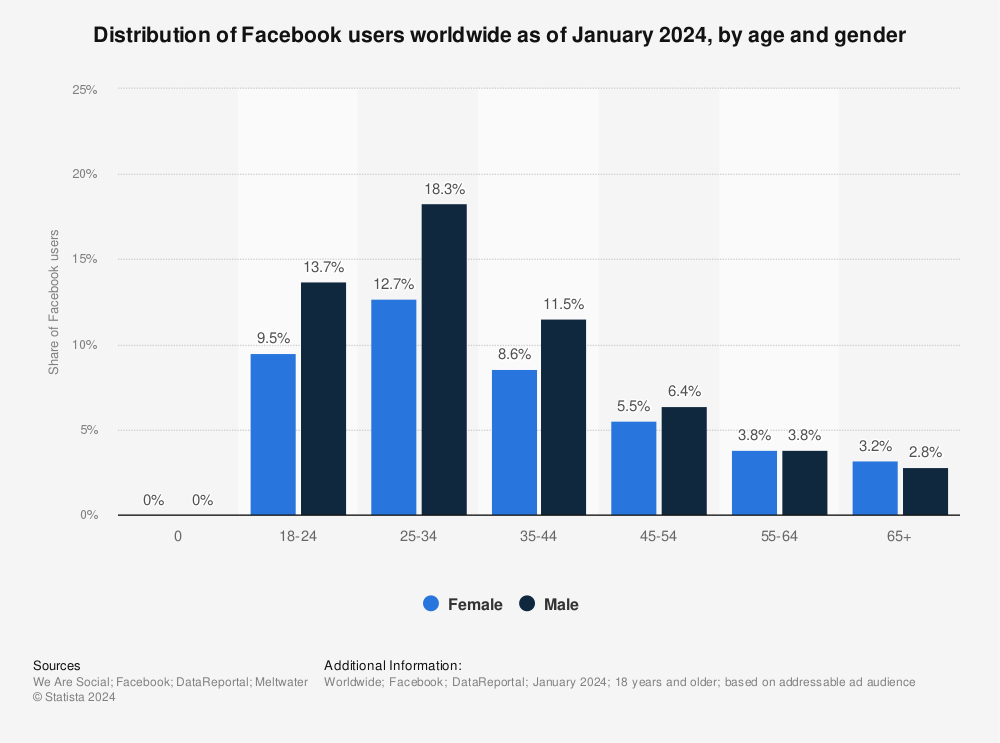
1. Users ages 25–34 years are the largest demographic

Bar graph statistic: Distribution of Facebook users worldwide as of October 2020, by age and gender | Statista

In the distribution of global Facebook users, 19.3% were male users between 25 and 34 years old and 13.1% were female users in the same age range. While Facebook users can be found at all ages, 72.8% are within the 18–44 years old range.

2. India has the most amount of Facebook users in the world

Bar graph statistic: Leading countries based on Facebook audience size as of October 2020 (in millions) | Statista

Among countries with Facebook users, India by and far has the largest number of users at 310 million. It is not so closely followed by the U.S. with 190 million and Indonesia with 140 million. But as you can see, global usage distribution is not limited to the U.S., which is good news for international businesses or brands who are considering an international expansion.

3. 32% of 12–34 year-olds use Facebook the most

Of all U.S. social media users surveyed, 32% of those aged 12–34 identified Facebook as the social media platform that they used the most often. This is a drastic drop from only five years ago when the top usage was at 58%.
Bar graph showing which social media platforms are used most often by ages 12-34

4. 86% of internet users with $100k+ income use Facebook

The distribution of internet users using Facebook is relatively similar among all U.S. household income levels. The lowest percentage is 81% of $60–$70k earners and the highest is 88% of $30–$60k earners. For advertisers, this is good news because it means that your tailored ads can target different income levels without worrying about a low target count.

Facebook usage statistics

While it’s good to know what the basic demographics are for Facebook users, it’s also important to note how these people use the platform. How frequently do they check Facebook and what do they use to access it? Knowing both can help tailor your content type.

5. 2.79 billion people globally use Facebook

As the most-used social platform in the world, Facebook boasts a global number of 2.79 billion users. Within the U.S., this number is expected to grow from 228.6 million currently to 237.8 million by 2025. The projected number comprises 69.1% of the U.S. population. The growth in usage penetration is small, only increasing 1.9 percentage points over four years.

6. Facebook users almost exclusively use mobile to access Facebook

Among its many users, 98.3% of them accessed Facebook via any kind of mobile device and 79.9% of users only used mobile. This is particularly important for businesses who have Facebook Pages. When crafting Facebook ads and posts on the desktop site, you still need to ensure that they look good on mobile, too.

7. 73% of U.S. Facebook users log in daily

A significant amount of people who use Facebook log in on a daily basis. On a weekly basis, the number increases to 93% of users. Login frequencies can affect how often you run your ads and create brand posts.

8. 36% of Americans get their news from Facebook

When surveyed about their news sources, 53% of Americans say they get it “often” or “sometimes” via social media sites, with Facebook at the top of the list.
Graphic showing which social media platforms are used as a regular news source for Americans by percentage, Facebook being the highest at 36%
Despite 59% of those who rarely seek news on social media believe the news on social media is largely inaccurate, social media still functions as a news source for a significant amount of people. Because of widespread misinformation, Facebook recently implemented new fact-checking policies to ensure that the news being shared is accurate.

9. 57% of U.S. social media users use Facebook to share content

In a February 2019 Statista report on what U.S. social media users do on the networks, it was found that 65% of them use Facebook to view photos.
2019 Statista chart showing the percentages of use cases for each social media platform; 65% of Facebook users use the platform to view photos.
Facebook is still a personal networking site, though. Of all the networks, it ranked the highest in use of sharing content with everyone (57%). This is closely followed by 46% of users watching videos and 43% sharing content one to one.

10. The highest engagement time on Facebook is Wednesday at 11 a.m.

Through user data, Sprout has identified the best times to post on each social network. But because 2020 was a year that had some significant usage changes that are expected to stay for 2021, the best times for engagement have been updated.
Screenshot showing the updates to Facebook's best times to post for engagement
While every weekday at 11 a.m. CST are high engagement times, Monday, Wednesday and Friday at 10–11 a.m. were shown to also rank high. If there is a drastic shift in working from home to back in the office, then it’s likely that the engagement times will change again.

11.The average engagement rate per Facebook post is 0.27%

In a 2020 study, it was found that the average engagement rate per Facebook post across all industries was 0.27%.

Bar chart showing the average engagement rate per post across all industries by followers
In the same study, when comparing industries, politics beat out every category at a 0.90% engagement rate per post. This is perhaps unsurprising given the amount of social media chatter that politics took up due to 2020 being an election year in the U.S.

12. Two-thirds of Facebook users visit a local business Page weekly

Across all the countries that Facebook users are in, two-thirds of them report visiting the Page of a local business at least once a week. Make sure that your business’s Facebook Page is updated with your latest information.

Facebook ad stats

Facebook ads are the bread and butter of the company’s profits. There are both general averages and industry averages for Facebook ad spending. And these days, it takes more than a pretty picture and witty copy to craft an impactful Facebook ad strategy. Use these stats to bolster your knowledge about Facebook ads.

13. Facebook’s total ad revenue is $20.7 billion

In a 2020 Q4 earnings call, Facebook revealed that its total advertising revenue was $20.7 billion. The company recorded a 25% year over year growth in this revenue stream. Some speculated that the global pandemic shifted many retailers to focus on the online space, thereby increasing their Facebook ad spending.

14. The average Facebook CPM is $5.31 & CPC is $0.43

Across all channels that are available in Facebook’s Ads Manager, the average cost per thousand (CPM) is $5.31. This number steadily rose through 2020. For the average cost per click (CPC), though, the number remained relatively stable at $0.43.
Graph showing the evolution of Facebook CPM & CPC from 2019 to 2020 in USD

15. Facebook has the most ads & highest CTR

Facebook Ads Manager offers four different ad placements: Facebook, Instagram, Messenger and Audience Network. Of these four, Facebook dominated at 45.2% of ads placement preference with good reason. The click-through rate (CTR) on Facebook is 3.90%, much higher than the next placement of Audience Network at 0.99%.
Bar chart showing the average Facebook ad click-through rate by placement

16. Status ad creative type has the highest CTR

Among all the creative types available in Facebook ads, status ads have the highest CTR of 6.65%. This is a little surprising, given that video ($157.15) and share ($146.16) have the two highest average spends. Status ads are averaging only $58.27 in ad spend.
Bar chart showing click-through rate by Facebook ad creative type
If you are looking for a higher CTR in your ads and you’ve been investing in video ads, perhaps test out status ads instead. They’re a lower investment and are easy to execute.

Facebook features stats

Facebook has many different features from Groups to videos. There are many to keep track of and only a few of these features are highly relevant for brands. If you’re looking to try a different tactic in your Facebook marketing strategy, here are some stats to get you going.

17. More than 1.4 billion people are using Facebook Groups every month

With guidelines that recommended against in-person gatherings, people looked for more ways to stay connected than over. In its annual Communities Summit, Facebook revealed that a stunning 1.4 billion people are using Facebook Groups on a monthly basis. Because of this rise in Group use, the social platform revealed several new features to make Group posting and admin monitoring easier than ever.

18. 26% of Facebook Group users’ primary group is around a hobby or activity

It’s no surprise that Groups usage increased during the pandemic. In a new survey, Facebook found that 26% of users’ primary Group is built around a hobby. That same survey noted that 86% of Facebook Group users  whose groups are primarily online will continue engaging in their group at either the same level (48%) or more frequently (39%).
Pie chart showing the importance of Facebook Groups to users by hobby or local area.
Given this increase of Group use, understanding not just why people but use Groups but also how is paramount to implementing a Facebook Group marketing strategy.

19. 15% of all Facebook content is video

Between Live and native videos, video content totaled to 15% of all content on the network. In 2020, most of this video content (71%) is actually published by Pages with over 100k fans.

20. Vertical videos generate the highest engagement rate

Between landscape, square and vertical formats, vertical wins out on the highest average engagement rate of 0.35%.
Bar chart showing the most engaging video format on Facebook; vertical videos are the most engaging on the platform.
This being said, landscape videos are still the most popular format on the network, making up 52% of videos. Square videos make up 33% and vertical videos 15%. Social media video marketing can support multiple different goals and all the stages of the buyer’s journey.

Conclusion

Now more than ever, it’s important for businesses to hone in on their online presence. As the most-used social media platform in the world, it seems to reason that Facebook should be near the top of your list.

Facebook Groups and ads are now more significant for brands than before. If you’re stuck on how to increase your brand’s engagement, explore these ideas to boost your Facebook engagement.

This post 20 Facebook stats to guide your 2021 Facebook strategy originally appeared on Sprout Social.


from Sprout Social https://ift.tt/2slM07G
via IFTTT

How to create social media chatbots that enhance and improve customer service

Monday, 15 February 2021

How to Write Call to Action Copy: 20 CTA Phrases to Get More Subscribers

how to write call to action phrases

When you created your sign up form, you probably spent the majority of your time writing the copy and fine-tuning the design.

But how much time did you spend thinking about your call to action (CTA) copy?

If you defaulted to using words like “submit” or “sign up” in your call to action copy, chances are it didn’t take much time at all. But that means you might be missing out on a big opportunity to convince even more people to sign up to your email list.

To help make the most of your sign up form and increase conversions, we compiled our 8 best practices for writing stand-out CTA copy. 

Plus, see 20 unique call to action phrases that you can copy for your own button right now.

Best Practices for Writing Call to Action Copy

1. Be Compelling

“Submit” or “sign up” are so 2012. To really stand out and engage your site visitors, try using more compelling copy.

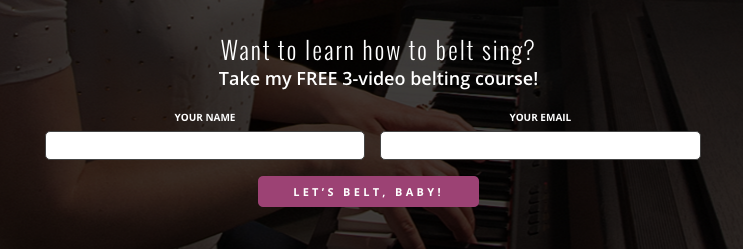
Check out this distinct and inviting CTA button that vocal coach, Felicia Ricci, used when she sold courses:

unique call to action for a course

2. Keep Call to Action Copy Brief

If it takes long for prospective subscribers to read the copy on your CTA, it won’t bore your readers to tears… but it might bore them to the point where they’re no longer interested in signing up to your email list. Yes, your copy should be compelling, but it shouldn’t be as descriptive as a Charles Dickens novel.

So what’s the CTA copy comfort zone? Typically it’s two to five words. If you have a creative one-word CTA, testing different lengths will be key to understanding what works best for your audience.

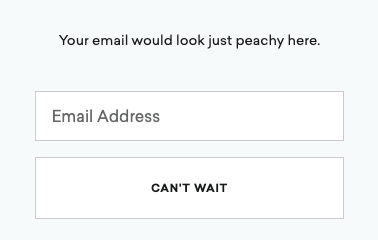
Here’s another example from Daily Harvest, which not only includes an engaging CTA, but one that hints at the company’s bread and butter:

easy sign up form CTA

3. Use Action-Oriented Words in the Call to Action Phrase

Most CTA copy uses some sort of actionable word or phrase. Even “submit” gives readers a next step to take. But as you think of ways to get more creative with your forms, make sure it focuses on the action you want your readers to take.

Avoid phrasing your copy in a way that presents the incentive, such as “Here’s your whitepaper.” Instead, go for verbs like:

  • Download
  • Get
  • Submit
  • Send
  • Start
  • Try
  • Reserve
  • Take
  • Upgrade
  • Explore
  • Save
  • Go 

4. Clearly Explain What They’ll Receive

While your sign up form copy should already explain what people will receive in exchange for their personal information, consider repeating it in your call to action. Whether new subscribers are getting a free ebook, access to an email course, or a weekly newsletter, test out highlighting the benefit in your form button.

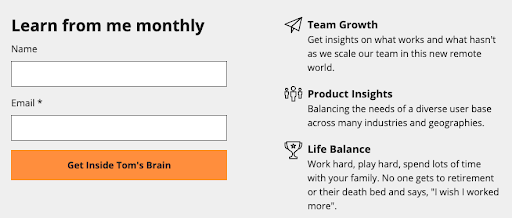
Check out how our Founder Tom Kulzer wrote the call to action on his personal site. Not only is the CTA unique and fun, it clearly articulates what a subscriber can expect to receive.

personal site CTA

5. Try First-Person vs. Second-Person Call to Action Phrases

It’s natural for marketers to write to their audience in the second person, where the reader is addressed as “you” or “your.” This point of view is often used because it speaks to the individual as opposed to a mass audience. As a result, it feels more personal to the recipient. It also forces you to present the value of the action you want readers to take.

For example, this whole blog post is written in the second person perspective in order to encourage you to test new CTA copy and increase subscriber growth. And we often write our calls to action that way too.

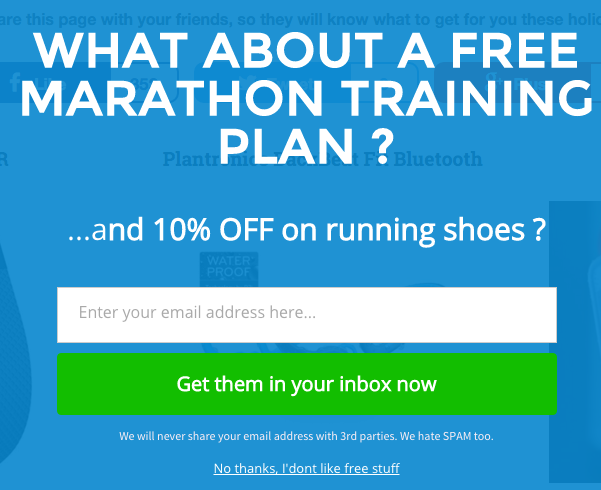
In the form below from Running Shoes Guru, you’ll notice CTA button is written in the second-person perspective:

second person call to action copy

But it may also be worth testing out first-person language on your sign up form, too. It may help your visitors feel a sense of ownership of your offer.  

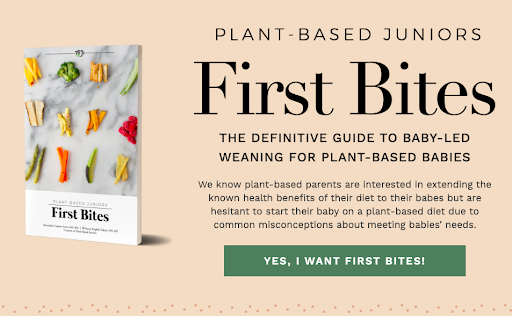
Plant-Based Juniors, a blog about feeding children a plant-based diet, tried out first-person language on their guide’s landing page:

first person cta copy phrase

6. Create a Sense of Urgency in your CTA copy

We often encourage our readers to create a sense of urgency in their subject lines; and the same can also be said for the copy in your call-to-action button.

Adding words like “now” or “today” at the end of your copy are used to encourage people to take action. 

CTA copy with urgency

7. Reference the Value of Your Incentive

If you’re offering an incentive in your form at an exclusive value, you might want to test mentioning it in your call-to-action copy as well.

Offering a free ebook or email course is a way to encourage people to subscribe to your email list. In the example below, you’ll notice that both the value and sense of urgency are presented in the CTA:

value driven CTA

8. Evoke an emotion

Great marketing is all about tapping into emotion. You want your audience to feel a certain way, and your copy is the place to do it. 

Fable & Folly Productions is all about community, and they want their website visitors to feel like they’re welcome. Check out their unique call to action copy in their sign up form below. 

emotional call to action phrase

20 CTA Phrases to Try Right Now

Want to swap your current CTA with something a little more whimsical and out of the ordinary? Swap it with the call to action phrases below. 

  1. Gimme
  2. Snag this offer now
  3. Don’t miss out
  4. Let’s go
  5. I want free _____
  6. Let’s do it
  7. Hop to it
  8. I’m ready to roll
  9. Send me the goods
  10. Get the discount now
  11. I’ll take it!
  12. Enroll
  13. I can’t wait any longer
  14. Join the tribe
  15. Yes, please!
  16. I’m in
  17. I’m here for it
  18. Try it risk-free
  19. Save my spot
  20. Get the tips

Which CTA Copy Change Will You Make?

With so many ideas to choose from, we encourage you to test different approaches.

We even have you covered if you’re looking for more tips on how to create killer CTAs for your sign up form

Inspired to start tweaking your CTA? Give it a try and tell us about the results you saw!

Additional reporting by Monica Montesa.

The post How to Write Call to Action Copy: 20 CTA Phrases to Get More Subscribers appeared first on AWeber.


from AWeber https://ift.tt/1NTEZAV
via IFTTT