Monday, 26 July 2021

How long should social posts be? Free social media character counter

Crafting a witty Tweet, optimizing your Instagram posts with hashtags or brainstorming copy for Facebook ads may all seem like completely different tasks. But they all have one thing in common – they each have a platform-specific character limit.

More importantly, you need to know the ideal character count for social media posts. This could improve your chances of getting people to read or engage with your posts.

To make your job a little easier, we’ve put together a detailed guide on social media character limits and ideal post lengths. We’ve also included a free social media character counter to test the length of your social posts before you hit “Post.”

Facebook

Facebook ads character count

Facebook generally has the same character limit across all ad types, with the exception of carousel ads and in-stream video ads.

  • Headline – 40 characters
  • Body text – 125 characters
  • Link descriptions – 30 characters (20 for carousel ads and in-stream video ads)

Pair these Facebook ad character counts with our Facebook ad size guide to create the perfect ad.

Facebook posts character count

Facebook is the perfect place to share long-form content, with the platform allowing up to 63,206 characters in regular posts. This gives you ample space to tell a detailed story or explain something in-depth.

Ideal Facebook post length

But just because you can post a lengthy status update on Facebook doesn’t mean you should. In fact, short posts tend to perform better even on Facebook.

According to a BuzzSumo analysis, the ideal Facebook post length is around 50 characters (or fewer), which tends to get the most engagement.

Buzzsumo study shows the optimal number of characters for Facebook post is less than 50.

That said, what engages your audience will also vary depending on your industry. So we recommend testing out what works for you specifically and trying out different Facebook post lengths to find the ideal character count for you.

Facebook maximum character limits

Besides posts and ads, Facebook also has character limits for usernames, Page descriptions and comments:

  • Username character limit – at least 5 characters and up to 50 characters
  • Page description – 255 Characters
  • Facebook comments – 8,000 Characters

Instagram

Instagram ads character limit

The character limit for Instagram ads is similar to that of Facebook.

  • Headline – 40 characters
  • Body text – 125 characters
  • Link descriptions – 30 characters

For more specifics around Instagram ads, check out our Instagram ad size guide.

Instagram captions character count

The Instagram caption limit is 2,200 characters. So there’s sufficient space to add context to your posts through your captions. It’s also important to note that Instagram captions are truncated at 125 characters.

Ideal Instagram caption length

While 2,200 characters is abundant caption real estate, huge blocks of text may look messy and distract people from the main focus of the post, i.e., your photo or video. The ideal length is 1-50 characters, as Quintly found that these tend to drive more interactions in an analysis of 5.9 million posts.

Quintly study chart shows the correlation between post length and higher average interaction

However, you may also want to test longer captions to see how your audience responds and how engagement varies by post type. For instance, longer captions could work well with informative and educational posts. But fun and casual posts may need just a few words in the caption or even a few emojis.

Check out some of the best caption ideas we put together to make the most of this space.

Instagram Hashtags

Maximum Instagram hashtag limit

Instagram allows you to add up to 30 hashtags per post. But stuffing your caption space with all the hashtags you can use isn’t always a good idea. In fact, using irrelevant hashtags could put your account at risk of getting shadowbanned.

Ideal Instagram hashtag limit

The same Quintly study found that fewer hashtags (between 1 and 10) tend to drive more interactions overall. For larger profiles with 10+ million followers, using zero hashtags worked even better. However, this doesn’t apply to smaller profiles (fewer than 1k followers) since their reach is more limited. For these profiles, using 10+ hashtags drove the most interactions.

Quintly study chart shows the correlation between hashtag amount, follower count and average interaction.

Our Instagram hashtag guide has more tips and ideas on how to make the most of hashtags in your posts.

Maximum Instagram character limits

Instagram also sets a limit on how long your bio and username can be:

  • Instagram bio character limit – 150 characters
  • Instagram username character limit – 30 characters

Twitter

Tweet character count

Within the last few years, Twitter increased Tweet character counts from 140 to 280 characters.

Ideal Tweet length

Unlike with other social platforms, longer posts tend to perform better on Twitter, according to reports from Sotrender and the Chicago Tribune. The sweet spot is between 240 and 259 characters, which tend to get the most likes, replies, Retweets, impressions and link clicks on average.

Bar chart from a Chicago Tribune report showing the average retweets by character count

Twitter maximum character limits

Twitter also puts a cap on how long your DMs, profile name, bio and handle can be:

  • DMs – 10,000 characters
  • Twitter handle – 15 characters
  • Profile name – 50 characters
  • Bio – 160 characters

Pinterest maximum character limits

Pinterest sets limits on the number of boards and Pins you can create to keep the platform running smoothly. Besides that, there are character limits to maintain in the text areas as well:

  • Maximum number of Pinterest boards – 2,000
  • Maximum number of Pins – 200,000
  • Profile name – 30 characters
  • Bio – 160 characters
  • Username – 30 characters
  • Board name – 50 characters
  • Board description – 500 characters
  • Pin title – 100 characters
  • Pin description – 500 characters

While Pinterest has a pretty lenient allowance on descriptions, only the first 50 characters will show up when people initially click on your board or Pin.

If you’re just starting out on Pinterest or looking for ways to up your game, check out our guide on using Pinterest for businesses to make the most of this platform.

LinkedIn maximum character limits

LinkedIn offers plenty of areas for users to enter text, with each having its own character limit. Here’s a quick look at some of them:

  • First name – 20 characters
  • Last name – 40 characters
  • Status update (personal profile) – 1,300 characters
  • About us/Summary – 2,000 characters
  • Company Page name – 100 characters
  • Company update – 700 characters
  • Company leaders headline – 150 characters
  • Company leaders description – 150 characters
  • Employee testimonials – 400 characters
  • Title of custom module – 150 characters
  • Body of custom module – 500 characters
  • URL label for custom module – 70 characters
  • Recommendation – 3,000 characters
  • LinkedIn Publishing post headline – 100 characters
  • LinkedIn Publishing content length – 110,000 characters

With LinkedIn offering a vast range of advertising options as well, the text character limit also varies depending on which ad type you’re running. Check out our comprehensive guide on LinkedIn ads to find out the specs for each ad type.

YouTube

While YouTube may solely be about video, it also has a few text fields. The platform puts a cap on how many characters you can use in these fields:

  • Video title – 100 characters
  • YouTube description – 5,000 characters
  • Playlist titles – 150 characters
  • YouTube tags – 500 characters total

Free social media character counter

Want to know if your social posts are making the cut in terms of character count? Paste your content into our social media character counter below and see if your posts fit the character limit.

The Sprout Social Compose box also comes with a built-in character counter, which will automatically keep track of your post length as you create them.

Make every word count

When you have such limited space to work with, you need to say more with less. That’s why it’s so crucial to know the character limit across all social media platforms so you can adapt your voice and approach accordingly. Make the most of this guide to craft the perfect social media post for your brand.

Want to make sure you create a compelling marketing message that’s within the social media character limits? Check out our guide on making sure your marketing message always hits the mark.

The post How long should social posts be? Free social media character counter appeared first on Sprout Social.


from Sprout Social https://ift.tt/2UKoeVA
via IFTTT

Friday, 23 July 2021

5 Steps to Promote and Sell Online Courses

5 Ways to Promote and Sell Online Courses

As a business owner, you've probably accumulated a lot of valuable industry knowledge over the years. What you might not realize is that people are often willing to pay good money for that type of knowledge. Have you ever thought about creating and selling an online course to share your expertise with the world? 

If not, then you could be missing out not only on some profits — but on the opportunity to become an industry leader as well.

Benefits of selling an online course

There are many benefits to creating and selling an online course, regardless of the industry in which your business operates. For starters, these courses can often serve as marketing tools on their own; they spread awareness of your brand and help you reach a larger audience of potential customers and clients. 

Meanwhile, online courses are easier (and cheaper) to create than you may realize. There are plenty of platforms that make setting up your online course a breeze — and many of them offer free trials so that you can get a feel for the platform and its features before you commit.

You can even sell an email course or challenge if you want to deliver course participants lessons via email.

An online course is also something you can work on in your free time and from just about anywhere.

Last but not least, an online course can help you generate some passive income; many course creators can bring in anywhere from $1,000-$5,000 a month on course sales alone. Once your course is created and available for purchase, you can continue to earn profits on each purchase indefinitely.

Should your business create and sell online courses?

If you have industry knowledge that you'd like to share with the world, then you can (and should) create your own online course. However, there are some other criteria that can make you and your business great candidates for digital course creation.

  • You want to build your reputation within your industry
  • You want to generate a passive income
  • You're driven to help and inspire your audience through education
  • You want to use the course as a marketing tool to attract and engage your audience

Of course, you'll also need to be willing to set aside the time and put in the effort to create a course that stands out others in your field. This isn't easy for everybody, so it's something to consider before you dive in.

How to sell online courses: A step-by-step guide

So, you've decided that you want to create and sell your own online course, but you're not sure how to create an online course to sell. Fortunately, there are some simple steps you can follow to get started.

1. Decide on your subject matter

The first step is figuring out what your course is going to cover.

This is completely up to you, of course. However, as you contemplate options for your course's subject matter, it's important to consider what your audience will find most interesting.

In fact, you may even want to conduct some audience research (such as a poll or survey) to gauge interest for a couple of different course topics. From there, you can move forward knowing that the topic you've chosen is one that will be legitimately useful to your audience.

2. Create your online course

Once you know what you want to cover, it's a good idea to create a general course outline. This outline should cover "big picture" topics that your course will cover, as well as ideas or concepts that may stem from each topic. 

From there, you can begin crafting your actual course content. Ultimately, it will be up to you how you want to present your course — though most online courses these days rely heavily on video. But incorporating some other forms of media into your course can make it more dynamic and useful to different types of learners.

In addition to creating your actual course content, you'll want to come up with lessons and assignments for your students to complete as well. PDF is often the best format for this — but again, you can play around with your options and decide what works best for you.

3. Decide how to deliver your course

How do you want your audience to consume your course? Via email, a course platform, a PDF? Something else entirely?

It all depends on the experience you want your course participants to have. Using a medium like email to deliver your course can make it easy for consumers to consume and know exactly what they need to complete that day. Or, you can use email to send course reminders or check in occasionally.

You can also use a platform like Thinkific to host your course and provide a platform for your students to review the material.

Once you decide the medium to deliver your course, it's time to begin marketing.

4. Promote your online course

Once your course is completed, it's time to publish it and make it available for purchase.

No matter how informative your course may be, it's not going to sell itself. Chances are, you'll have to do a fair amount of marketing if you want your course to be successful and profitable. Fortunately, there are many simple yet effective ways to promote an online course and encourage more people to purchase it.

Landing Pages

The simplest way to publish your course that keeps you in control of all profits is to simply sell online courses from your own landing page.

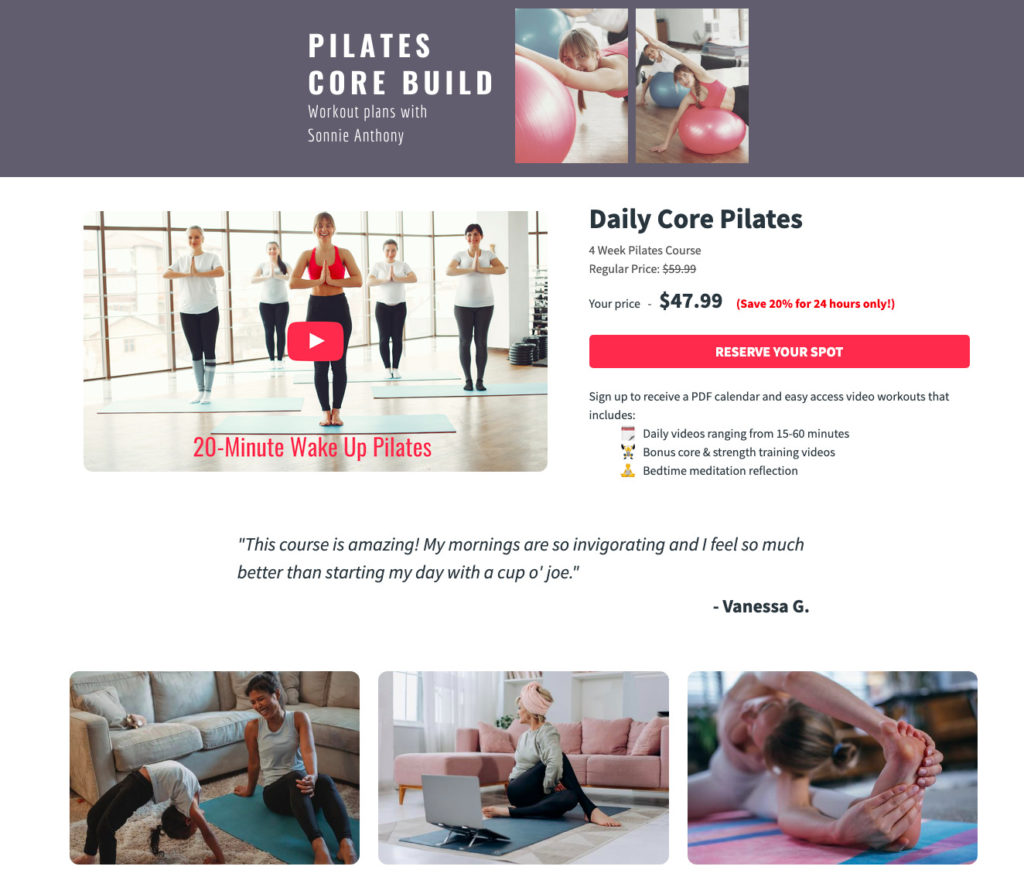
Using a landing page template like the one below, you can create your own landing page to easily promote your course, collect payment and automate the delivery of the material.

a landing page example showing how to Sell an Online Course

A dedicated landing page for your online course should include a precise call-to-action to purchase the course and get it delivered via email today. Landing pages are not only effective, but are great for SEO and could help more potential customers stumble across your course online.

Email Marketing

Email is another great tool for promoting your online course. If you already have an established email list, use this to your advantage. You can send out emails before your course is even available to create hype and generate interest.

You might even consider offering an "early-bird" discount to those who purchase ahead of time. Once your course is live, email is a great way to continue marketing your course to your subscribers with special discounts.

Social Media Marketing

Don't overlook the effectiveness of social media when promoting an online course, either.

Use your existing social media accounts on popular platforms like Facebook and Twitter to generate excitement about your course before it launches. This is a great way to target a large audience of your existing followers with the potential to reach even more people through shares and other exposure.

When marketing your course on social media, don't overlook professional platforms like LinkedIn, either. When most people think about social media, they think about platforms such as Instagram, Facebook, Twitter, and Instagram. However, a professional network like LinkedIn is suitable for promoting an online course to people who are specifically within your industry.

Other Marketing Strategies to Sell Courses Online

Social media, email, and landing pages will probably be your best bet when it comes to promoting your course online. However, some other possible promotion tools to consider include:

  • paid advertising (on Google or other search engines)
  • blog posts on your business blog (for informational and SEO purposes)
  • YouTube promotional videos
  • third-party websites and influencers
  • affiliate programs
  • webinars and podcasts
  • pop-up ads on your own website

5. Collect and consider feedback

After your course has been on the market for a few weeks, or even a few months, it's a good idea to start sending out surveys to those who have purchased and taken your course. This is a great way to collect some valuable feedback so that you can get a better idea as to what people have found helpful about your course and what could possibly use some improvement.

Once you've received some feedback, take some time to assess it and make revisions to your course as you see fit. This will require you to set aside some additional time and resources; however, making these revisions can pay off if you're able to improve your course, boost its ratings/reviews, and encourage more people to purchase it.

Of course, as more changes and innovations occur within your industry, it's also a good idea to update your course material to ensure that everything is up-to-date. These small efforts will not go unnoticed and will ensure that the information you're providing to your paying customers is as accurate and useful as possible.

Selling digital courses: the bottom line

Creating an online course can be a great way to start generating a passive income while also boosting awareness of your brand and establishing yourself as a thought leader within your industry.

And while it will take some time, persistence, and motivation to create a digital course, doing so can help you share your knowledge with others. Meanwhile, by following some basic marketing and promotion strategies as outlined here, you can help your course content reach as many people as possible.

The post 5 Steps to Promote and Sell Online Courses appeared first on AWeber.


from AWeber https://ift.tt/3rI8Fd7
via IFTTT

Thursday, 22 July 2021

How to set up a successful Twitter advertising campaign

Another Layer of Security: Google Announces BIMI for Gmail Support

Google support for BIMI

Security: every business needs it. Not every business prioritizes it.

But just this month, Google announced a plan to make it even easier for brands to send secure email — helping their recipients feel confident they’re getting mail from you (and not someone pretending to be you).

Google’s announcement is about its support for BIMI in Gmail. And Google’s not alone — Yahoo! Mail also supports the email and brand security protocol. 

Plus, AWeber already has built in support for email authentication and BIMI — so you can start taking advantage of the benefits BIMI offers right now.

But first, what is BIMI and what does it mean for you?

BIMI stands for Brand Indicators for Message Identification. BIMI lets email recipients view certified brand logos for messages sent by fully authenticated senders

With BIMI, brands are able to associate their logos with messages, and have full control over which logo is displayed as their email avatar. This helps guard the consumer against fraud.

As an added bonus, it also helps to establish more brand recognition and visibility.

In order to participate in BIMI, the first step is to become a fully authenticated email sender.

How do I authenticate my emails for BIMI?

With AWeber, it’s easy for you to participate in BIMI, as our platform already supports sending fully authenticated email. 

AWeber users who send mail with a custom domain name are already encouraged to set up SPF and DKIM to authenticate their email messages. Senders who also publish a DMARC policy are ready for BIMI by referencing a verified, trademarked logo.

Not familiar with SPF, DKIM and DMARC? Here’s what you need to know:

  • DKIM stands for DomainKeys Identified Mail. It is technology that allows email authentication and helps stop spam and phishing email attacks. 
  • DMARC stands for Domain-based Message Authentication, Reporting & Conformance. It is the current policy for email authentically and helps Internet Service Providers protect themselves from spammers pretending to send emails from their network.
  • SPF stands for Sender Policy Framework. It is a technique used to authenticate commercial emails and prevents spammers from sending emails with a forged name.

Ultimately, these three ways to authenticate emails help prevent spam, phishing and forging. Taking steps to ensure your emails are authenticated will help you get up and running with BIMI in no time. 

We put together a complete checklist to help guide you in setting up BIMI. Follow these steps and you’re well on your way to peace of mind in the inbox. 

BIMI Checklist

If you’re an AWeber customer, you can take the following steps to get set up.

  • Configure your domain for sender authentication at AWeber with SPF and DKIM records
  • Publish a DMARC policy
  • Publish a BIMI record with a link to your verified brand mark/logo
  • Validate your logo with a verified mark certificate (see Digicert and Entrust)

We’re here to help

AWeber is passionate about helping our users send authenticated and permission-based emails. Please contact our customer solutions team for support as you get started with BIMI.

The post Another Layer of Security: Google Announces BIMI for Gmail Support appeared first on AWeber.


from AWeber https://ift.tt/3eMGgNH
via IFTTT

How different generations use social media: A complete guide

Social media usage is on the up and up. Our Sprout Social Index™ 2021: UK & Ireland Edition report found 76% of consumers have used social media more in the past year, and 63% have bought from it. Brands caught on to this upward trend and are engaging social media users to drive awareness, clicks and sales.

Success on social media starts with defining your target audience. Consequently, understanding how different generations use social media is critical to shaping a social strategy that gets results.

In this post, we’ll dive into the nuts and bolts of social media use by generation. We’ll also share some insider tips on how to impress each generation to ensure your social media campaigns are consistent hits.

Before we get started, let’s get familiar with the groups surveyed for the Sprout Social Index™ 2021: UK & Ireland Edition, which we’ll reference throughout. We surveyed 500 British and Irish consumers comprised of:

  • Generation Z (survey respondents ages 18-23)
  • Millennials (survey respondents ages 24-39)
  • Generation X (survey respondents ages 40-55)
  • Baby Boomers (survey respondents ages 56-74)

The score on Generation Z and social media

Born as social media gained worldwide popularity, most of Generation Z (also known as “Gen Z” or “Zoomers”) have never known a life without unlimited access to people or information. As the most tech-reliant group, Gen Z and social media are almost synonymous. This is the generation you’re most likely to find on social media, with 87% spending more time on social channels in the last year.

But despite increasing Gen Z social media usage, these digital natives are the least likely to follow brands on social. Gen Z prefers to build connections with their existing community and people like influencers, whose buying advice they trust over brands. So much so, 79% of Gen Zers say they would purchase after seeing an influencer recommendation.

Gen Z hasn’t adopted the same social media habits or preferences as their predecessors either. When on social media they:

  • Opt for video-centered and gamified platforms like Instagram, YouTube, Snapchat and TikTok.
  • Expect culturally relevant and inclusive content that entertains, educates and inspires while keeping up with pop culture.
  • Observe trends and often share, participate in and consume viral content.

What Gen Z consumers expect from brands on social media

From active brand conversations to personalised shopping experiences, Gen Z shoppers know what they want. They expect brands to remain receptive to their needs and help them make informed purchase decisions.

Gen Z also wants to connect beyond the point of sale, engaging, collaborating with and giving feedback to brands. They also want to feel like empowered individuals when shopping. Consequently, they gravitate towards brands who use their data responsibly to create convenient and immersive customer experiences.

What Gen Z social media usage means for your brand

To get Gen Z’s attention on social media, lead with entertainment and tweak your content to fit different Gen Z sub-segments. Then, give Gen Zers a voice to earn their trust.

Be transparent and authentic. Sprinkle in your offerings where it feels most natural in your campaigns to maintain the light-hearted feel Gen Zers love. Also, investigate Gen Z’s social media preferences to find untapped opportunities for your brand to stand out. For example, TikTok is Gen Z’s stomping ground, yet just 32% of businesses use it.

Here are few more ways you can capture Gen Z’s attention:

  • Invest in video content and challenges fronted by popular Gen Z influencers.
  • Partner with influencers to create content that promotes lifestyles Gen Z wants to attain.
  • Deploy a social listening tool to uncover emerging trends and identify conversation topics related to your brand that can inspire polls or other interactive content.

The full scoop on Millennials and social media

Busy building careers, starting families and entering eldercare years, Millennials outshine the harsh labels attached to them. This misunderstood generation doesn’t miss a beat online. They use social media to:

  • Stay connected with their personal and professional connections.
  • Relax and watch entertaining content.
  • Find and buy products.

Millennials are more receptive to social media marketing than their counterparts. They don’t mind following brands online and are less likely to unfollow. This generation even engages in social commerce when convenient.

Here are some important stats to note on Millennial social media usage:

  • Millennials are the third most active group on social media.
  • Nearly three-quarters (72%) report their social media usage has risen in the past year.
  • Millennials are likely to connect with businesses on Facebook (70%), Instagram (64%) and Twitter (33%).
  • Millennials are the most likely generation to buy after seeing an ad, watching a product video or reading a social media review.

What Millennials expect from brands on social media

From product discovery to job hunting, Millennials use social media to get things done. They seek easy, intuitive experiences from brands, which explains why Millennials cite convenience as the most important and compelling reason for social commerce.

This generation wants to make a difference. They expect brands to use their social platforms to take a stand on important societal issues. For example, clothing retailers have launched recycling initiatives in response to consumers’ desire to reduce their carbon footprint.

We are excited to introduce our new #PrimarkCares women’s leisurewear collection with Recover™ 💙 The collection is…

Posted by Primark on Thursday, May 27, 2021

Millennials also seek engaging experiences with brands online; they want to build relationships, give opinions and co-design future products or services. Knowing this, it’s not surprising Millennials are the only age group that favours social media over email for customer service enquiries and feedback. The vast majority (87%) agree or strongly agree that social media is the fastest way to connect with a business.

What Millennial social media usage means for your brand

To attract Millennials, streamline your customer journey and make each touchpoint painless. Use voice of the customer (VoC) data to uncover wants, needs and frustrations, and develop social media content that addresses them. Here’s how to reach Millennials and impress them:

  • Develop a social-first customer service strategy using multiple social channels.
  • Set up multiple social channels and stores.
  • Amplify content that informs their buying decisions, whether that’s educational videos showcasing your product or service, or other customers’ reviews.

It’s also important your brand identifies the social problem(s) it wants to help resolve and publicly supports it. For example, you could:

  • Adjust your offerings to reflect your values.
  • Host discussions with experts.
  • Work with influencers that match your brand values.

For inspiration, look to brands like Fenty Beauty and MDMflow. They’ve paved the way for inclusive beauty with expansive makeup lines and diverse model and influencer collaborations.

Winning over Millennials may be challenging, but doing so can yield the best results—99% say they would refer a business to their network if they feel connected to them on social media.

The facts on Gen X and social media

Gen X didn’t spend their childhood glued to social media. But as the second most prominent generation on social media, they’ve made up for any lost time. Gen X social media has increased, with 76% reporting they used social media more this past year.

As avid researchers, savers and independence-seekers, Gen X enjoys being online, racking up nearly two hours on social media daily. They use it to search for company information, aid their buying decisions and connect with family and friends. Facebook is Gen X’s first choice platform, followed by WhatsApp and Instagram.

What Gen X expects from brands on social media

With some of the highest volumes of disposable income in the UK, Gen X knows their value as consumers and expects brands to acknowledge it. They pay close attention to brands’ customer experiences and go where they are appreciated.

Consider that:

  • Gen Xers value responsive customer service. More than one-third (34%) report feeling connected to a business on social when that business understands them as a consumer.
  • Almost all Gen Xers (95%) expect a reply to complaints or feedback they share on social media.
  • Nearly half of Gen Xers consider brands to be market leaders on social when they have a reputation for putting customers first.

Gen X doesn’t like being bombarded with ads. They prefer to research alone and build connections with brands via social media and email organically.

What Gen X social media usage means for your brand

To stand out to a Gen X audience, communicate that you see and want to know them. Here are a few ways to make it happen:

  • Be visible: Post often on social media to build your brand’s authority and reputation.
  • Help Gen X research your offerings: Provide useful product information on your social channels and show how users can get the most out of their purchases.
  • Appeal to their saving nature: Offer enticing, personalised discounts and promotions.
  • Build trust: Share your brand’s values and promote first-hand customer reviews on social media to make Gen Xers feel confident shopping with you.
  • Provide multiple feedback channels: Gen X is least likely to resolve a customer service issue via phone. Having unified, consistent email and social media customer care options is key.

It’ll take some time to yield results, but Gen X is worth the wait. They’re the most loyal generation and spend more (96%) with a business when they feel connected to them on social media.

The lowdown on Baby Boomers and social media

Coming from an era of Polaroid cameras, typewriters, and receiver phones, Baby Boomers were well into their adult years when social media took hold. Consequently, they prefer to stick to basics like finding information, researching brands, and interacting with others on social media. But that’s not to say Baby Boomers aren’t online. They’ve taken technological changes in stride:

  • Baby Boomers use Facebook the most: 92% of those surveyed have an account.
  • Out of the Baby Boomers we surveyed, 63% report using WhatsApp and 57% use YouTube.
  • Two-thirds of Baby Boomers report increased social media use in the past year.

Also, Baby Boomers are budget conscious and use social media to look out for discounts and promotions. They like to feel in control of their purchase decisions by conducting thorough research.

What Baby Boomers expect from brands on social media

Baby Boomers want to be heard by brands. For example, 53% expect businesses to inform them when they’ve passed their feedback from social media to the appropriate teams.

Transparency and good customer service are also vital to this age group, with 64% saying timely customer service would make them choose one business over another.

This generation expects brands to keep them informed and provide opportunities for them to express their thoughts on a brand. For example:

  • Baby Boomers’ primary motivations for liking or following companies on social are to learn about new products/services (69%) and stay up to date on company news (51%), explaining their disdain for irrelevant content.
  • Most Baby Boomers (87%) are likely to buy from a brand when someone they trust recommends a product/service.
  • More than two in 10 Baby Boomers reach out to businesses on social when they have feedback, second only to email.

What Baby Boomer social media usage means for your brand

Baby Boomers are the generation you’ll work hardest to keep. Not only are they least likely to shop with you after a bad experience, but they also cited the most reasons for unfollowing a business. The top answers included:

  • Poor customer service
  • Bad quality products
  • Excessive ads

To win over Baby Boomers, provide a phenomenal customer experience and make their education your priority. Here are some more ways you can get into their good books:

  • Blend new school and traditional marketing channels: For example, post Facebook video content and follow up with newspaper campaigns to meet Baby Boomers where they are.
  • Spell out the benefits of shopping with you: Offer clear and honest descriptions of your products’ tangible benefits to aid their decision-making.
  • Maintain a strong reviews strategy on social: To get Baby Boomers’ attention, display user generated content and positive reviews to build your brand’s social proof.
  • Keep the promos coming: Give Baby Boomers an incentive to stick around by offering interesting and relevant deals they can share.

Many brands don’t put older adults and social media together, sidelining a critical part of their audience in the process. As more Baby Boomers get comfortable with social media, brands that invest in building these consumers’ trust will reap long-term dividends..

The keys to mastering generational marketing on social media

Generational marketing holds the key to turning curious visitors into raving fans. To triumph, you must understand how different generations use social media and tailor strategies to appeal to each age group.

There’s never been a better time to kickstart generational marketing.
Brands that are attentive to the specific wants and needs of different consumers can win around each demographic, uncover profitable audiences and unlock new levels of growth. Get your research hat on and take your first steps towards building optimised social media campaigns you can count on. Your future brand will thank you for it.

Ready to take your social media strategy to new heights? Learn more about how British and Irish consumers’ use of social media is evolving and how marketers can keep pace by downloading the Sprout Social Index™ 2021: UK & Ireland Edition report.

The post How different generations use social media: A complete guide appeared first on Sprout Social.


from Sprout Social https://ift.tt/2W4d3Hn
via IFTTT

Wednesday, 21 July 2021

See public relations differently: How the NAACP uses social media to publicize a movement

Perception is everything, and in today’s 24/7/365 global news cycle, it can change in an instant. For public relations teams navigating this often turbulent environment, the insights gleaned from social media can be a guiding light—illuminating how your audience feels and how you can best position your brand in response to timely issues and breaking events.

The human behind your social handle is the most public and agile person in your organization, making the partnership between them and PR vital.

Vanessa Mbonu, the NAACP’s Vice President of Digital Marketing & Communications, shares how social works in lockstep with the PR team–aligning on everything from the seemingly mundane to the highly polarizing and using insights from social as a barometer for broader brand awareness efforts.

The last few years have been transformative for the NAACP. What sparked that transformation?

VM: The NAACP is the first and largest civil rights organization in the US, so we work to achieve equity for the Black community and other communities of color.. In the Spring of 2020, those communities faced what we call “twin pandemics:” COVID-19 and Jim Crow era-racism.

Of course, COVID-19 wreaked havoc on all our communities, but in the U.S., African Americans and Asians were bearing the brunt of the crisis as there were greater health and economic risks.

At the same time, unfortunately, the killings of Ahmaud Arbery, Breonna Taylor and George Floyd sparked a new wave of Black Lives Matter protests, which reopened a very important national conversation about the history of unjust policing in our communities.

As if this was not enough, there was misinformation spreading about both the coronavirus and the U.S. presidential election, specifically targeted toward the Black community.

America was undergoing a reckoning where people really started paying attention to the Black community, our plights, our needs and our issues.

This increased the need for trusted voices more than ever. It was so important that the Black community had an organization and leaders to turn to for trusted, credible information. We saw ourselves as the providers of such information.

How would you describe the NAACP’s approach to social and PR before the events of 2020?

VM: Pre-pandemic, we took a traditional approach to PR: Write a templated press release with our standard logo and boilerplate, pitch it to journalists, follow-up, light a candle, say a prayer, follow-up some more, repeat.

Traditional PR Strategy timeline: Draft a press release, release it to a news wire, pitch to journalists, follow-up and up and up, repeat

This approach leads to a lot of rejection, so you really have to keep at it, but fortunately, we were getting traction.

We approached social media similarly. We planned and scheduled content, went through approvals, posted, engaged with our audience, and then repeated that several times a day.

Cycle arrow diagram showing traditional social media is to: plan & schedule content, edit & seek approval, post content, engage

During and post-pandemic, business as usual was just not working anymore. So we married the two to become social media relations.

What exactly is social media relations?

VM: We’re an advocacy-based organization, so we always want our message to reach as many people as possible. I spend a lot of time on the internet, trying to figure out how the NAACP can get from point A to point B quickly.

With social media relations, we can make our statements faster, bolder, louder.

I personally noticed what would turn into our social media relations approach on MLK Day in 2019, when former Vice President Mike Pence compared President Trump to Martin Luther King Jr. Regardless of your political opinions, those are very different people, so we Tweeted a quick reaction, calling it an insult to Dr. King’s legacy. The engagements speak for themselves.

Our social media relations tone and voice are very different than what we use in a traditional press release. It’s assertive, it gets straight to the point, and that’s what people want to see on social. Everyone’s eyes glance over the “hitherto’s” and “therefore’s.” There’s not enough time or characters for that.

You can also tell that there is someone behind the screen and that there are real emotions being felt by the person typing the message.

With this approach, we get immediate reactions from our audience. Even if you’re not responding directly to them, engaging with your audience and looking at what they are saying is invaluable to understanding the tone and temperature of the community that you’re working in.

How did the NAACP’s PR and social media teams work together to execute a social media relations strategy?

VM: Instead of relying on securing soundbites from a digital broadcast or headlines in print, we began making “Tweetments”–a public statement in a social media post–to publicize the BLM movement.

On the day that the Derek Chauvin verdict was announced, our President and CEO Derrick Johnson put our official statement in a Tweetment.

Like me and my team, reporters spend a lot of their time online, so in a sense, we’re meeting them where they are. Instead of a reporter reaching out to ask what the official statement from the NAACP is, or relying on them checking their crowded inbox, it’s on Twitter, right where they needed it.

With this approach, our statement was picked up and published on countless major media outlets. We were everywhere and still are.

Reporters have come to expect that we’ll make Tweetments, so we have a lot of them following us and making requests for interviews on social. We repurpose those interviews to create more content and awareness on social, tagging the outlets and the reporters, growing and diversifying our networks exponentially.

Table of the NAACP's exponential social follower growth from May 2019 to May 2021.

How do you foster supportive relationships between social media and public relations teams?

VM: My number one tip: Break down the silos to break through the noise.

As Vice President of Digital Marketing & Communications, my main priorities are social media, email marketing and digital advertising campaigns, but I can’t put blinders on.

I need to know what my press team is doing because that helps me understand what’s happening in a day and how people are reacting, which then helps me produce content.

The same is true for them. They take inspiration from the tone we use on social in email copy, Youtube videos, pitches to outside sources and more.

We also work closely with leadership and outside consultants, so we have weekly external brainstorms to ideate, talk and react to what’s happening in social media, the news and the world around us. From there, we decide what role the NAACP should play.

We are a team of communicators, so we need to do what we do best—communicate.

What is one piece of advice you’d give other social media marketers or PR pros?

VM: Diversify the voices in your social feeds and press lists.

We would not be as successful as we are if we did not do this. We primarily focus on serving the Black community and communities of color, but that doesn’t mean we’re only following people from that audience.

There are movers and shakers across every industry talking about whatever it is that you want to publicize. We follow everyone who has something to say about our mission and our movement.

Don’t wait for your audience to come to you, seek them out on social.

It’s critical for businesses to meet their audience where they are. Don’t wait for them to find you, especially if you run a smaller business. When you consistently engage and seek your audiences out, you will get to a point where people come to you first.

As social media use among consumers continues to steadily increase, most businesses are adopting social as their primary external communications channel.

Downward the full State of Social Media Report for more insights on how executives plan to embrace business strategies fueled by social in the future.

The post See public relations differently: How the NAACP uses social media to publicize a movement appeared first on Sprout Social.


from Sprout Social https://ift.tt/3eIsA6d
via IFTTT

25 Back to School Subject Lines to Help Get Your Email Opened

A graduation hat sitting on two books

Back to school is a big sales opportunity. Whether you sell something to students or not, this is a time when many people are making purchase decisions.

According to Mastercard SpendingPulse™, which measures retail sales across all forms of payment, U.S. back to school sales are expected to grow 5.5% from 2020 and 6.7% from 2019. That means you can expect a boost in sales, even relative to the last couple of years.

Email is the #1 source of back to school purchase decisions. So if you are selling something students need, or just want to use the excuse to offer parents a deal, it’s time to fire up those emails with the perfect subject line.

4 guidelines for attention-grabbing back to school email subject lines

Whether you use our recommended back to school subject lines or want to create your own, there are a few tried and tested guidelines for writing them:

  1. Include “back to school” in the subject line. People associate back to school phrasing with deals. Adding this to your subject line will immediately pique interest.
  2. Keep it short. Shorter subject lines tend to stand out in an inbox. Try for less than 40 characters total.
  3. Get to the point. Buyers want to know exactly what’s in your email before they open it. Running a sale? Promoting a new product? Include it in the subject line.
  4. Use emojis. An effective emoji grabs attention and can double down on the point of your email. We include a list of 10 engaging emojis you can use below.

Ready to get started on your email? Here are 25 general-use subject lines that you can take or make small modifications to. 

25 back to school subject lines

  1. Ready to go back to school?
  2. Get ready for the back to school season
  3. Back to school sale starts today!
  4. Save big on back to school deals
  5. One day only. Back to school sale
  6. Specials for back to school
  7. New _____ for back to school
  8. Get ______ this football season
  9. Get X% off for back to school
  10. Original back to school styles
  11. Back. To. School.
  12. Get your back to school essentials
  13. Free shipping on back to school orders
  14. Top 10 _____ for back to school
  15. Prep for school: New year, new you
  16. Back to school deals for you
  17. Back to campus styles
  18. It’s time for back to school
  19. Fall favorites for back to school
  20. Pre-fall back to school sale
  21. Get ____ for your kiddos this school year
  22. Treat yourself during back to school
  23. A fresh start this school year
  24. Just in for back to school
  25. A fresh start. Back to school supplies

Want to boost your subject line with an effective emoji? Here are ten popular ones to include.

Top 10 emojis to add to your back to school emails

Test out some of these emojis on your audience and see what grabs their attention.

  1. ⌛ — Hourglass. Use this emoji to show that the deal or promotion is only available for a limited time.
  2. ⚡️ — Lightning. You can also use this emoji to emphasize a short-term discount or promotion.
  3. 💰 — Money bag. Use this emoji to indicate that your buyers will be saving money when they purchase from this email.
  4. 🍂 — Falling leaves. Use this emoji to set an autumn season tone.
  5. ✨ — Sparkles. This emoji indicates success and positivity. Try it on either side of your subject line.
  6. 📚📓 — Books. Use these emojis alongside any school messaging for emphasis.
  7. 🛍️ — Shopping bags. Use this emoji if you are selling products either in-person or online.
  8. 👞👕 — Products. Use these emojis if you sell products that have a specific emoji associated with them (you can search online to find out).
  9. 🏈 ⚽ — Sports. Use these emojis to indicate a certain season or if you’re targeting sports fans.
  10. 👪 — Family. Use this emoji if you’re targeting families with your offerings. Remember, there are lots of different family emoji options, so make sure you pick one that resonates with your audience.

When using emojis in your subject line, remember that some people won’t necessarily see them. Always use them to enhance the message, but not replace it. 

For example, use emojis like this:

👍 “Back to school book sale 📚” 

Don’t use emojis like this:

👎 “Back to school 📚 sale”

A/B test your subject lines to find the best open rates

You can test your subject line using a split test. Copy your email and give the copy a new subject line or add an emoji. Then, using an A/B/C test, you can send the more successful subject line to the majority of your audience, resulting in better open, click through, and sales rates!

Learn more about A/B testing your emails.

Send your back to school email using AWeber

Ready to get your emails sent out ASAP? Get an AWeber account set up in minutes. It’s fast and easy to send your first email. Plus, with A/B testing and robust reporting, you can test the most successful email subject lines year round.
Sign up today.

The post 25 Back to School Subject Lines to Help Get Your Email Opened appeared first on AWeber.


from AWeber https://ift.tt/3wWuuGs
via IFTTT