Hashtags have evolved. In the early days of TikTok, they were a “growth hack” for virality. Today, they are a critical piece of TikTok SEO. They help the algorithm categorize your content so it reaches the right people, not just more people.
With over 1.6 billion monthly active users, standing out requires a strategy that blends trending topics with specific keywords.
This guide covers the top hashtags for 2026, the new “3-5 Rule,” and how to use hashtags to rank in search.
What are TikTok hashtags?
TikTok hashtags are clickable keywords used to categorize video content. They begin with the hash symbol (#) and help the platform’s algorithm understand the context of a video to serve it to relevant audiences on the For You Page (FYP) and in search results.
For example, adding #SmallBusiness tells TikTok to show your video to users interested in entrepreneurship. If you also add #packaging, it narrows that audience further to people interested in order fulfillment content.
Looking to enhance your content’s discoverability on TikTok? See how Sprout Social can help you master your hashtag strategy.
Do TikTok hashtags still work?
Yes, TikTok hashtags still work, but their purpose has changed. In the early days of the platform, hashtags were primarily “growth hacks” used to force content onto the For You Page (FYP). Creators would pile on generic tags like #fyp and #viral hoping to catch a lucky break with the algorithm.
According to Sprout Social’s Q2 2025 Pulse Survey, 41% of Gen Z consumers now treat social apps as their primary search engine, prioritizing them over traditional tools like Google.
This evolution has birthed the era of TikTok SEO. Hashtags are no longer just about casting a wide net; they are about indexing.
When you post a video, the TikTok algorithm scans your visuals, listens to your audio, reads your captions, and checks your hashtags to determine exactly what your video is about.
The bottom line: A strong TikTok SEO strategy requires you to treat hashtags as keywords. By aligning your tags with the specific queries your audience is searching for, such as #BestBudgetLaptop instead of just #Tech, you transition from chasing fleeting views to capturing high-intent traffic.
8 Benefits of using hashtags in your TikTok strategy
Incorporating hashtags into your TikTok marketing strategy isn’t just about following trends; it’s about building a sustainable content library. Here a re eight benefits your account gets from a smart hashtag strategy.
1. Increase visibility and discovery (SEO)
On a basic level, adding hashtags in your TikTok captions help the TikTok algorithm index your content. When you use a hashtag relevant to your video, you signal to TikTok exactly who should see it, whether or not they are already following your brand. A well-placed hashtag can land your video on the For You Page of a highly relevant audience that is searching for exactly what you offer.
For example, adding #DIYProject could help your video show up in the search results of people who are searching for the hashtag.

2. Boost engagement
Better visibility translates to higher engagement rates. When your content reaches the right people, they are more likely to like, comment and share because the topic actually interests them.
3. Build community
Branded TikTok hashtags are a great way to create a community around your business and for your audience. Encouraging your followers to use a specific tag (e.g., #SproutSocial) builds a dedicated space for user-generated content (UGC).
For example, #jellycat has generated billions of views by giving fans a place to show off their collections. The hashtag has generated 1 billion views, proving just how popular these videos are.

4. Identify competitors
Just as you use hashtags to get discovered, so do your competitors. You can click on industry tags (like #SaasMarketing) to conduct a competitive analysis, see what offers they are running and identify gaps in their content that you can fill.
5. Get TikTok content ideas
Feeling stuck? Click on a niche hashtag in your industry. You will instantly see the top-performing videos in that category. This is the fastest way to see what TikTok content formats (tutorials, skits, lists) are resonating with your audience right now.
6. Find relevant influencers
Hashtag searches are the best way to discover TikTok influencers you can partner with. If you are looking for a beauty influencer, don’t just search “influencer.” Search #CleanBeauty or #SkincareRoutine to find creators who are already making high-quality content in your specific niche.
7. Surfacing trending topics
Hashtags are the pulse of the platform. By monitoring rising tags in the TikTok Creative Center or Sprout Social, you can spot TikTok trends before they peak, giving you a chance to create content while the wave is still rising.
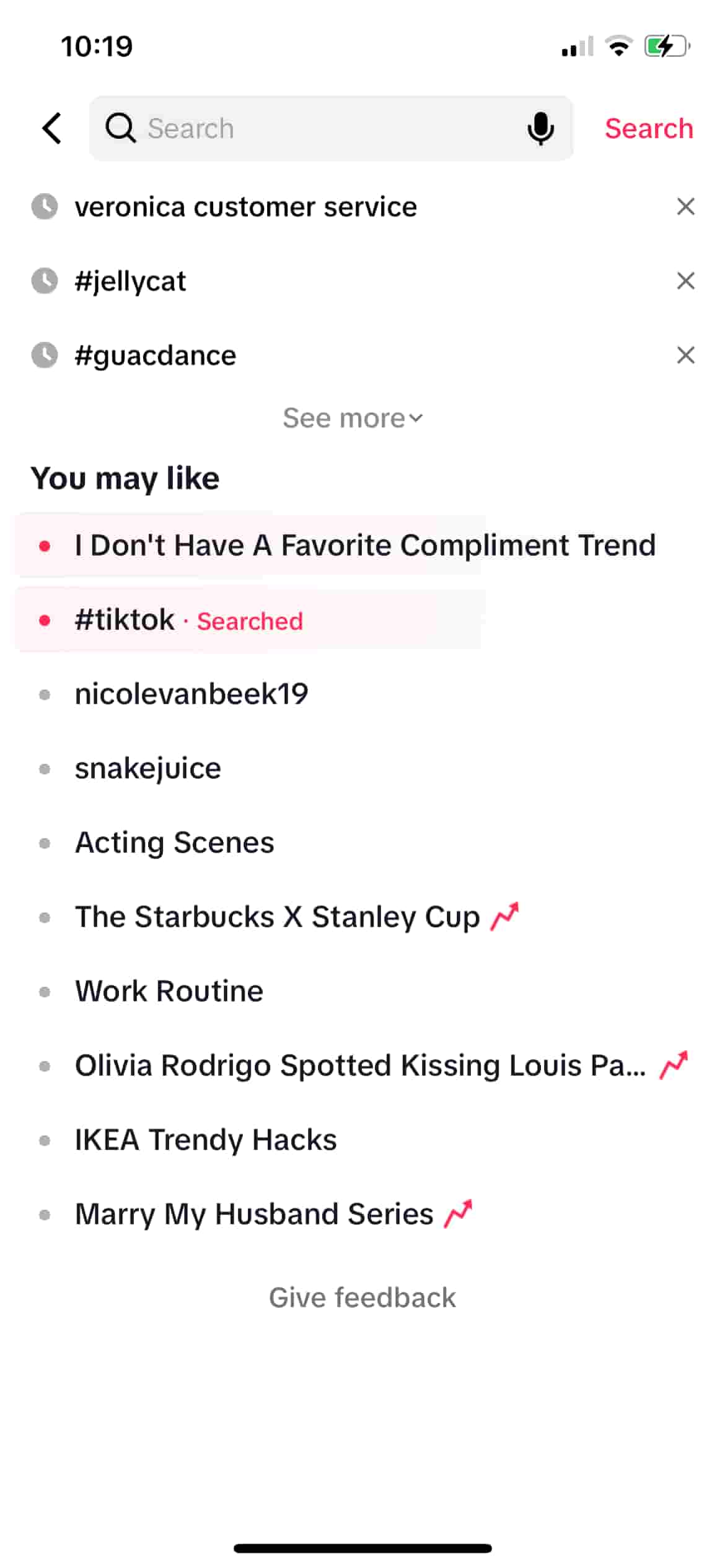
Discover trends natively in the TikTok app by tapping the search icon in the top right corner of your home feed. You’ll see popular trends as well as topics the app thinks you’ll like based on your activity. Browse TikTok like someone in your target audience might to see what types of content ideas pop up.
8. TikTok monitoring
Hashtags—especially branded ones—are essential for social listening. Using a tool like Sprout Social to monitor your branded hashtags helps you catch customer complaints, praise or questions that might not have tagged your official account directly.
Use a TikTok monitoring tool to gain insights about your target audiences, competitors and brand sentiment.
Top TikTok hashtags in 2026
Curious on how to find the trending hashtags on TikTok? We’ve got some of the most popular TikTok hashtags in several industries for inspiration.
50 Popular hashtags on TikTok
- #fyp
- #foryou
- #foryoupage
- #viral
- #tiktok
- #trending
- #duet
- #funny
- #comedy
- #love
- #explore
- #meme
- #video
- #new
- #dance
- #music
- #like
- #follow
- #tiktokviral
- #prank
- #fashion
- #fitness
- #beauty
- #food
- #gaming
- #cute
- #education
- #art
- #travel
- #pets
- #humor
- #challenge
- #health
- #lifestyle
- #tutorial
- #tips
- #motivation
- #smallbusiness
- #anime
- #lol
- #fun
- #happy
- #artist
- #girl
- #friends
- #repost
- #viralvideo
- #explorepage
- #life
- #xyzbca
Top 10 Trending TikTok hashtags
Keep in mind that this changes week to week, so you’ll need to check out what TikTok is saying their trending hashtags are right now.
- #UFC324
- #PaddyPimblett
- #Dallaska
- #JustinGaethje
- #DragonBallSuper
- #AlexHonnold
- #DeshaeFrost
- #SkyscraperLive
- #DBS
- #PaddyTheBaddy
Top 10 TikTok hashtags for B2B
- #business
- #entrepreneur
- #marketing
- #smallbusiness
- #b2b
- #businesstips
- #sales
- #leadership
- #motivation
- #productivity
Top 10 TikTok hashtags for fashion and beauty
- #fashion
- #beauty
- #ootd (Outfit of the Day)
- #makeup
- #skincare
- #grwm (Get Ready With Me)
- #style
- #fashionhacks
- #beautytips
- #model
Top 10 TikTok hashtags for fitness
- #fitness
- #gym
- #workout
- #fit
- #health
- #gymlife
- #motivation
- #bodybuilding
- #personaltrainer
- #fitfam
Top 10 TikTok hashtags for food and beverage businesses
- #food
- #foodie
- #yummy
- #delicious
- #foodtiktok
- #cooking
- #recipe
- #foodlover
- #chef
- #dinner
Top 10 TikTok hashtags for technology and software
- #tech
- #technology
- #innovation
- #engineering
- #coding
- #software
- #gadgets
- #programming
- #developer
- #techtok
Top 10 TikTok hashtags for travel
- #travel
- #wanderlust
- #adventure
- #vacation
- #explore
- #travelgram
- #nature
- #traveltiktok
- #holiday
- #tourist
TikTok hashtag best practices
Maximizing your reach on TikTok starts with a smart hashtag strategy. Here is how to build a hashtag framework that actually works.
1. Focus on hashtag quality over quantity
Gone are the days of stuffing 30 hashtags into a caption. Current data supports a “less is more” approach focused on precision indexing.
Data from CapCut (ByteDance’s official editor) explicitly states that using 3 to 5 hashtags gives the best results, as fewer tags prevent the algorithm from receiving mixed signals.
2. Use a search-first strategy
Why does “less is more” work? Because user behavior has shifted from passive scrolling to active searching.
According to Sprout Social’s Q2 2025 Pulse Survey, 41% of Gen Z now treat social apps as their primary search engine, surpassing traditional tools like Google.
Because users are searching for specific answers, using 30 random tags hurts your SEO. Using 3-5 accurate tags helps you rank for those specific high-intent searches.
3. The “3-3-3” strategy
If you want to use a few more hashtags, use this 3-3-3 balanced formula to target different layers of the algorithm. This means you’ll be using up to 9 hashtags:
- 3 Broad or high-volume hashtags: Think #marketing or #fyp to cast a wide net.
- 3 niche or community-focused hashtags: Such as #SocialMediaManager or #DigitalMarketing to find your specific peers.
- 3 Content-specific hashtags: Such as #HowToWriteCopy or #ContentIdeas to target users searching for exactly what you are teaching.
4. Mix popular and niche hashtags
Don’t only use #fyp. Everyone is competing for that feed. When you use niche hashtags like #B2BSales, you are competing in a smaller pool where you are more likely to be the “big fish” and rank at the top of search results.
How to find the best TikTok hashtags for your brand
Finding the right hashtags is both an art and a science.
You can manually search for hashtags on the app: identifying which hashtags are influencers in your niche or your competitors are using. While these methods can be effective, they’re often time-consuming and lack the data you need to make valuable decisions.
To build an effective TikTok hashtag strategy, you need a more efficient method.
How to find TikTok hashtags with Sprout Social
Sprout Social takes hashtag research from a manual chore into a streamlined advantage. Instead of guessing which hashtags will work, our AI-driven insights will help you find, analyze and add hashtags for every post.
Step 1. Log into Sprout Social.
Don’t have a Sprout Social account yet? Start your free 30-day trial with your business email and test managing your entire social strategy from a single platform.
Step 2. Link your TikTok Business Account to Sprout Social by navigating to Settings > Profiles and click Add Profile. Follow the prompts to authenticate your account and grant Sprout the necessary permissions.
Step 3. Compose your TikTok video post. Select the camera icon and click +Upload a video. Videos must be at least 3 seconds and no more than 10 minutes.
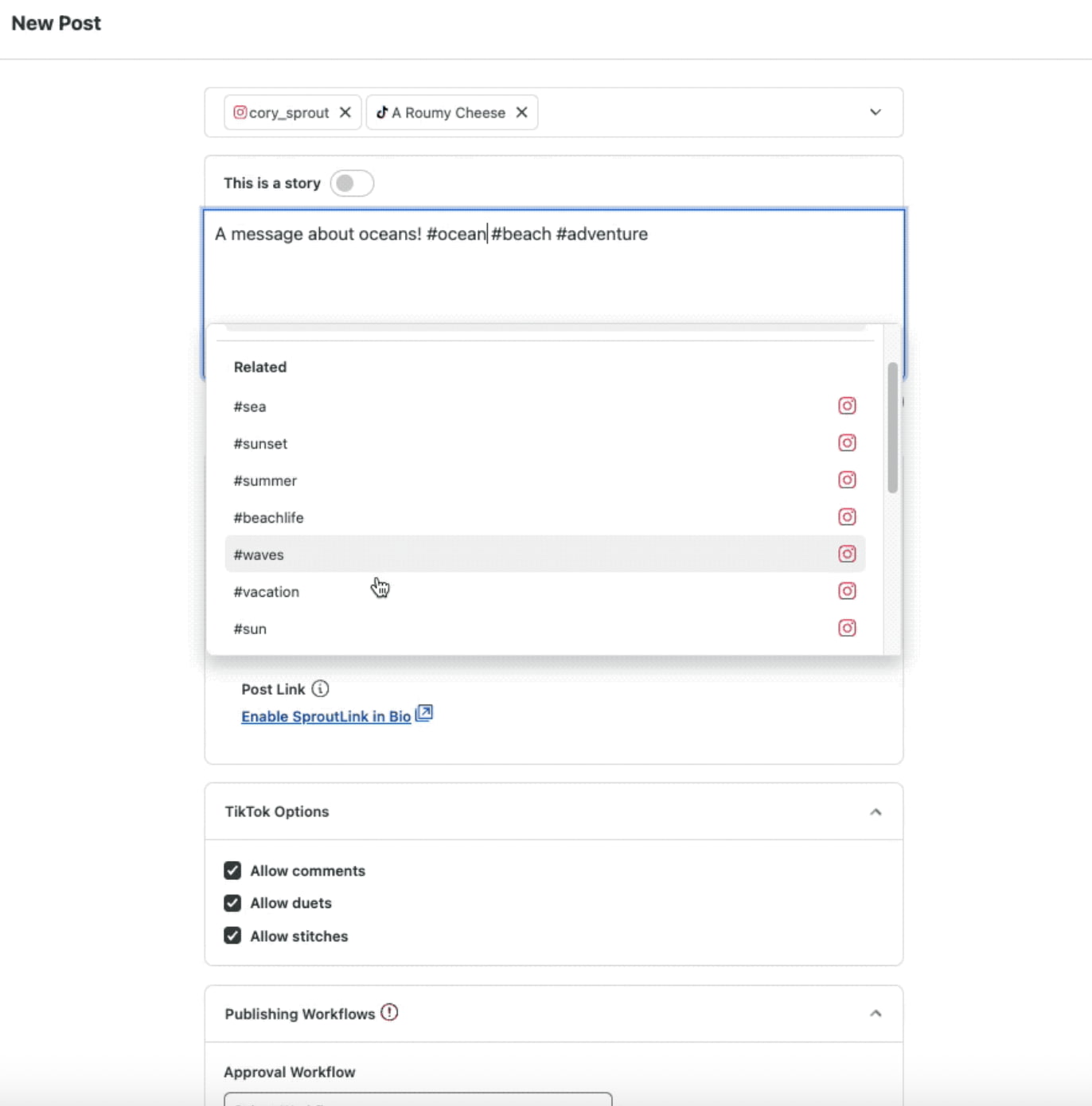
Step 4. Begin typing your caption and add a # to begin searching for relevant TikTok hashtags. Sprout provides suggested hashtags by volume.
Step 5. Schedule your TikTok videos to publish when your audience is most active using our Optimal Send Times feature. This AI-powered capability analyzes past content performance and suggests a time when your audience is most active and likely to engage with your content.
How to add and manage hashtags with Tag Collections
Once you’ve identified the perfect hashtags for your campaigns, you can create and save groups of related hashtags for specific campaigns, products or content pillars using Sprout’s Tag Collections.
Instead of manually typing hashtags for every post or storing them in a spreadsheet, you can save those in Sprout’s Tag Manager as an efficient way to incorporate them into future posts.
For example, you can create a “Q2 Product Launch” Tag collection and a “Behind The Scenes” collection, with relevant hashtags saved within that Tag Collection.
To create a Tag Collection in Sprout:
- Navigate to Account and settings > Settings.
- Click Tag Management under Global Features.
- Click Add Collection.
- Then, enter a name for the Tag Collection, such as “Summer Launch”.
- Click Create collection.
- Once you’ve created a Collection, you can add tags. Click the Tag Collection you just created and want to add tags to.
- Click Add Tag in the right-hand panel.
- Enter the tag name and click Create tag.
- Now, when you use Compose, you can apply tags to outbound messages on TikTok.
Using Sprout’s Tag Collections:
- Improves efficiency: When creating a post, simply apply the relevant collection to add all its associated hashtags in a single click.
- Ensures brand consistency: Your entire team can use a consistent hashtag strategy, reinforcing your branding and campaign goals across all posts.
How to measure hashtag performance with Sprout Social
Without data, your hashtag strategy is incomplete. To tie your hashtag use directly to performance, use Sprout’s Tag Performance Report.
When you use Tags to your scheduled TikTok videos in Compose, Sprout aggregates the performance data into the Tag Performance Report for every post with that tag, allowing you to see which hashtag strategies are driving the best results.
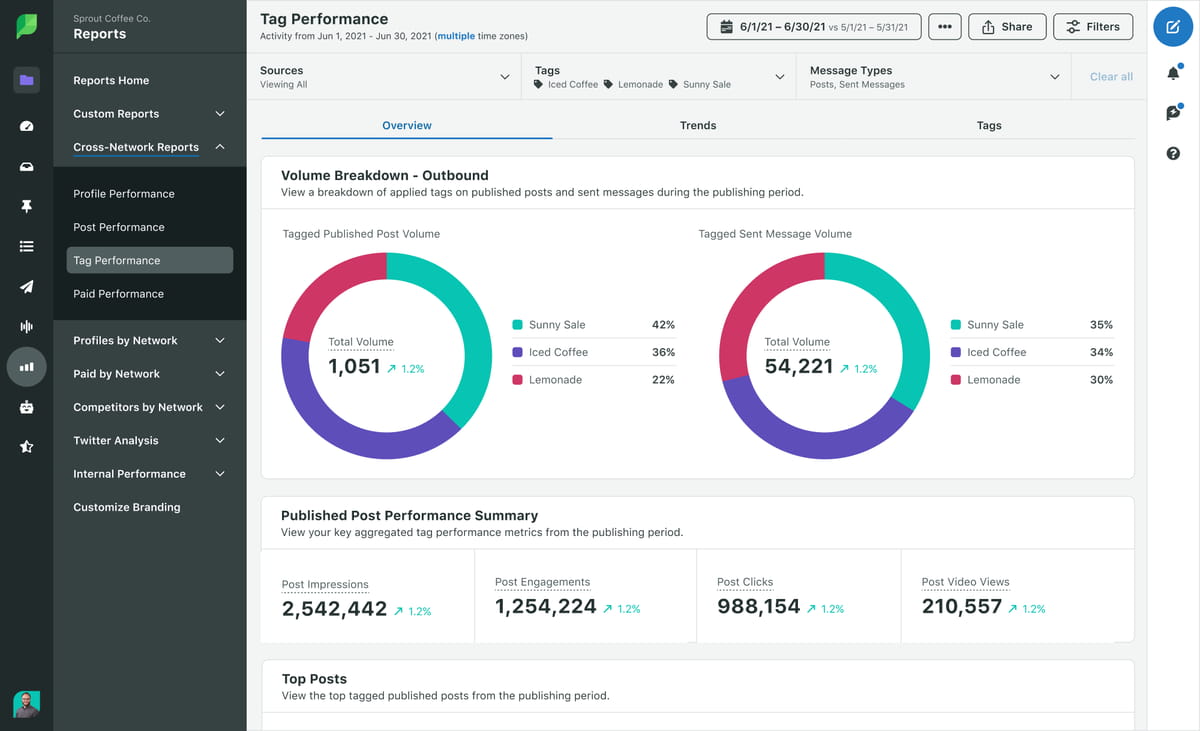
By analyzing TikTok metrics like impressions, engagement and video views at the campaign level, you move beyond individual post performance. This provides a clear overview of which campaigns and specific hashtags are resonating with your audience so you can alter and adjust your hashtag strategy.
TikTok hashtag generators and discovery tools
Looking for even more inspiration for TikTok hashtags? There are many tools available to help you find the perfect hashtags for every video you publish. These four are the perfect starting points.
Sprout Social
Sprout Social is an all-in-one social media management platform that can help you through dozens of tasks—from monitoring online conversations to discovering trends and so much more. Find relevant hashtags as you write content in the Compost box, which automatically suggests hashtags as you begin adding them to your post. Alternatively, use Suggestions by AI Assist to generate copy and hashtags as you compose posts. These AI automation features can help eliminate the guesswork from manually researching relevant hashtags.
Hashtag Expert
Hashtag Expert is an easy-to-use smartphone app that can help you find hashtags based on a starter keyword, a category relevant to your industry (of which there are 35 to choose from) or a group of hashtags you’ve used before. Download Hashtag Expert and start compiling hashtags for your video content.

You can easily get a group of relevant hashtags for your video and save them for later, or copy them right inside the app to then paste into your TikTok caption. Plus, you can get access to daily trending hashtags to help you discover even more content ideas.
TikTok Hashtags
TikTok Hashtags is a basic hashtag generator that can help you find related hashtags.

Start by typing in a hashtag like #style and generate a handful of relevant and popular hashtags that can help increase visibility on your content. This is a completely free tool that’s easy to use for each of your new videos.
For the record, TikTok has no association with this website.
Ahrefs TikTok Hashtag Generator
Ahrefs has a free AI TikTok Hashtag Generator tool as a part of its free digital marketing and SEO tools arsenal. But this hashtag generator works a bit differently than the others.
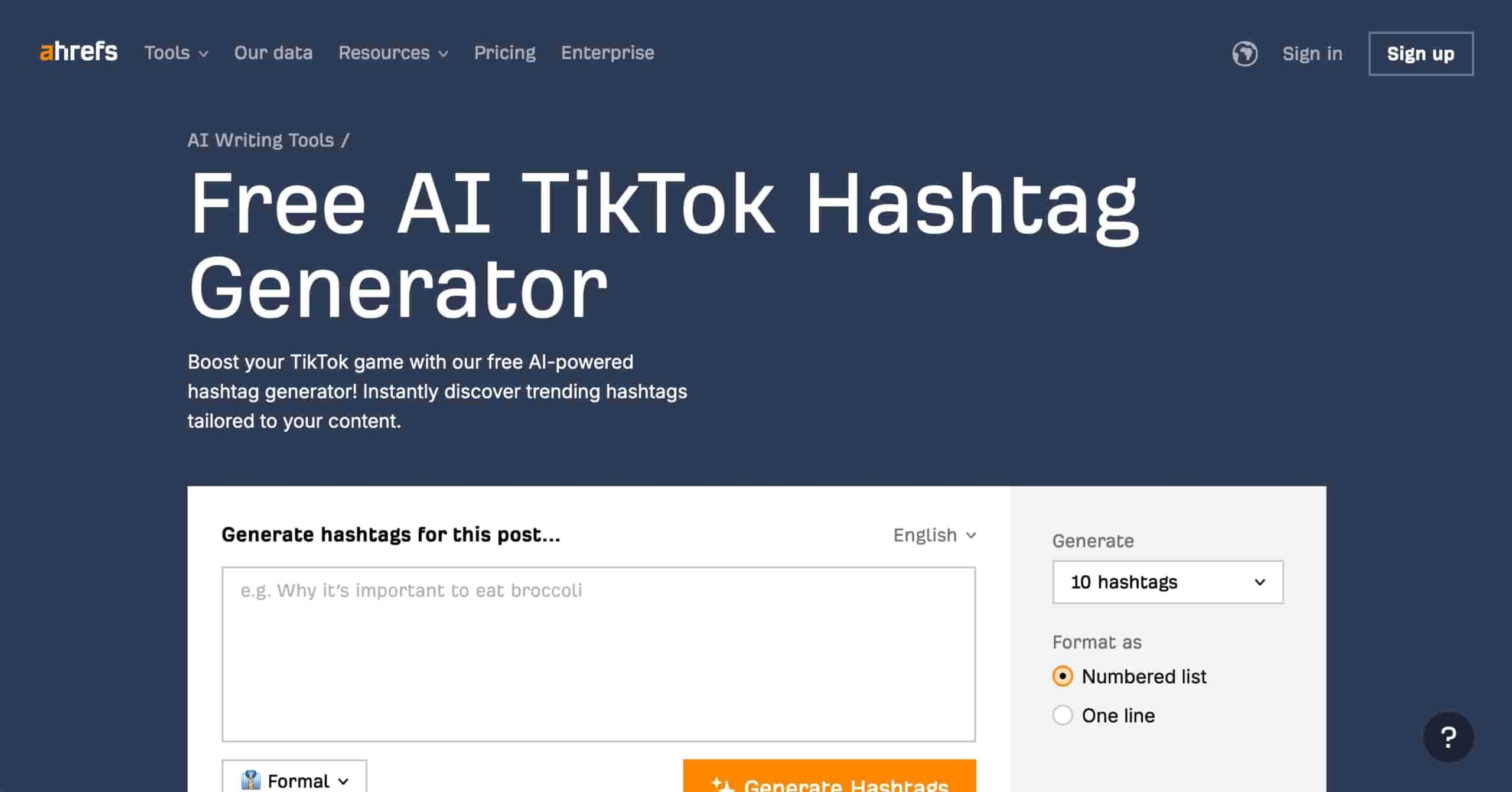
With Ahrefs’ AI hashtag generator, you can type your video caption or a brief synopsis of your video into the text box and wait while the tool generates a list of hashtags for you to include. Specify the number of hashtags you want, the formatting you prefer, as well as the writing tone you’re going for. Then copy and paste the hashtags right into TikTok.
Make TikTok hashtags work for you
With more businesses using TikTok in their marketing strategies, incorporating the use of hashtags can be a great way to stand out. But just using the right hashtags isn’t enough. You also need to keep an eye on your TikTok analytics to look for opportunities to keep improving.
The post TikTok hashtags: How to use the best hashtags for more views in 2025 appeared first on Sprout Social.
from Sprout Social https://ift.tt/6OSw0Pd
via IFTTT

No comments:
Post a Comment