Wednesday, 7 March 2018

How to Write the Perfect Welcome Email in Under One Minute

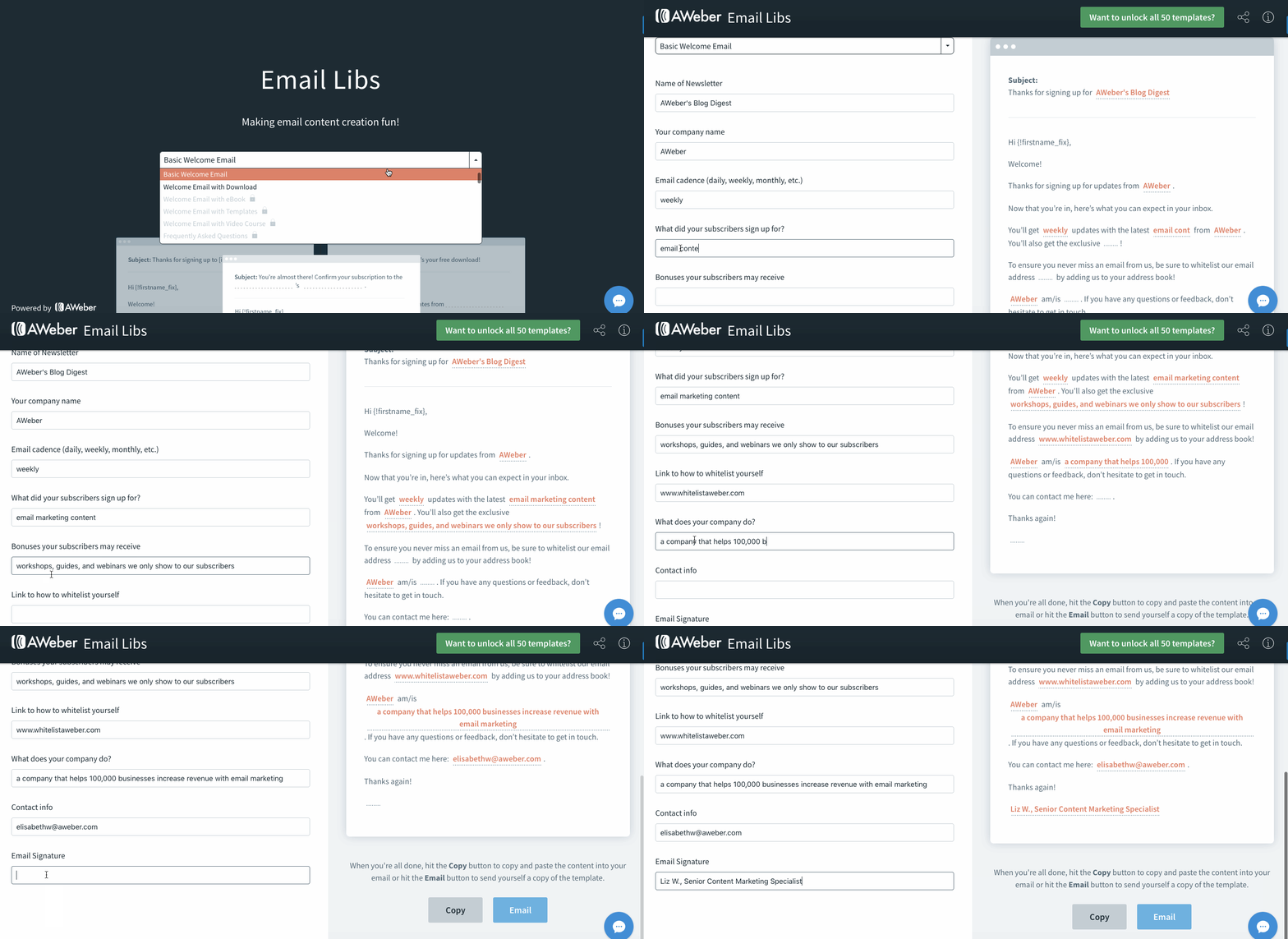
What to include in your welcome email
This welcome email template in Email Libs includes some key components every welcome email should have.- It welcomes your subscribers to your list.
- It sets expectations (reveals the type of content your subscribers can expect from you, as well how often they will receive it).
- It delivers your lead magnet a.k.a. your incentive (if you have one) for joining your list.
- It includes your contact information.
- It asks your subscribers to “whitelist” you so that your messages reach their inbox instead of their spam folders.
Add your own twist
Once you fill in the blanks in the template, copy and paste the words into a Word doc or a Google doc. Then add your own “spice” to the text to personalize it. Here are some easy ways to do that. 1. Be human. Your welcome email is automated, but it shouldn't sound like it came from a robot. Your subscribers want to hear from you. Set the tone, and let your personality shine through. If you like using emojis, add one. 😎 If you have opinions, confidently express them. If you’re always an optimist, end with your favorite motivational quote. If you pride yourself on being irreverent, then tell it how it is! Heck, if you’re the king of “dad jokes,” include one. (How do you make a Kleenex dance? Put a little boogie in it!) Remember, this is your first impression. Make a splash right from the get-go. If you do this right, your readers will eventually be able to recognize your voice in every stage even if your logo and brand colors go missing from your emails. And they'll be even more excited to open your next email. 2. Avoid R.O.T. (redundant, outdated, and/or trivial information). Your content has to be valuable. A subscriber joined your list because they think you can help them solve their problem. Sure, you may have a free lead magnet to entice them, but that content still needs to be high-quality, fresh, creative, and useful. If it’s just something your subscribers can find on Google or your emails are full of content that your competitors also provide, they’ll bounce out of your list and never make it to the next email in your series. 3. Tell stories. Humans love stories. We communicate through them. We learn from them. Our personal stories and memories give our lives meaning and order.Your welcome email can include your story. It’s your chance to tell your subscribers why you’re the best person to give them information.
But don’t write a novel. Try to keep your story to 10 sentences or less.
Here’s a great example of a super short, but compelling Story Email from Jill Angie of Not Your Average Runner. It’s her first email in her automated series for new subscribers, and it’s included as a section within her welcome note.
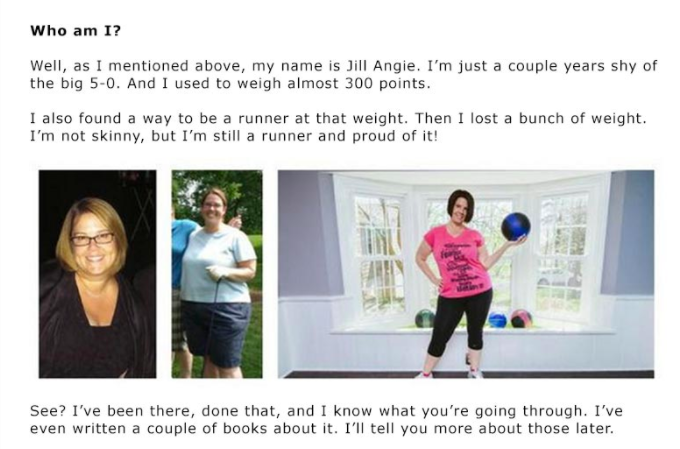 Jill’s story is 10 sentences. That’s it. But in her story she oozes likability and she hits her readers’ biggest pain point: weight loss. She knows that’s why her subscribers joined her mailing list, so she wastes no time addressing their challenge in her very first message. If you’re not a writer, no problem. Shoot a quick 30-second video of yourself and link out to it from your welcome email. Or include a photo of yourself.
What comes after your welcome email?
Once you have your welcome email set, it's time to start thinking about the rest of your automated sequence. The best email marketers are not spinning their wheels every day trying to come up with email ideas. They're not trading time for money. They've automated their emails so their subscribers go through their entire marketing funnel. They turn their subscribers into buyers, and then buyers into brand advocates — without ever manually sending an email! It all runs on autopilot, bringing in new customers and driving profit day after day after day. In 24/7 Email Marketing Master Class, we reveal the perfect automated 7-email sequence that successful entrepreneurs and businesses are using right now. By the time you finish the class, you'll be able to build your very own automated series that gets results around the clock. Sign up now — registration closes March 13th!The post How to Write the Perfect Welcome Email in Under One Minute appeared first on Email Marketing Tips.
from Email Marketing Tips http://ift.tt/2FnaN0M
via IFTTT
How We Increased Engagement for Our Online Course by 150% with Email Automation

The 3 frequency options
While we wanted to give our subscribers the power to choose their own email frequency, we didn't want to make this choice overwhelming. So we limited their options to three:- one lesson a day
- two lessons a day
- one lesson every other day
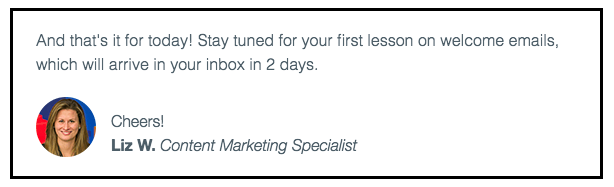 Here’s the same section of that email from the one email per day series:
 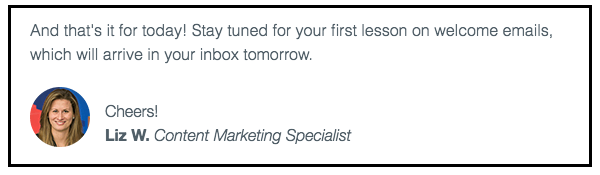 And here’s the same section of the email in the two emails per day series:
  See how similar these three email sections are? We only needed to change a few words to make them relevant for subscribers. Once our automated series were ready, we launched them and collected the results.
Here’s what happened
There was quite a spread. Our subscribers had very different preferences:- 46% chose daily emails
- 31% selected emails every other day
- 23% chose two emails per day
Step-by-step instructions for doing this yourself in AWeber
How we collected our subscribers’ preferences
First, you need to collect the frequency preferences of individual subscribers. You can begin doing this by adding a frequency question to your email sign up form. Here’s the question we added to our “What to Write in Your Emails” landing page sign up form: “How often would you like to receive lesson emails?”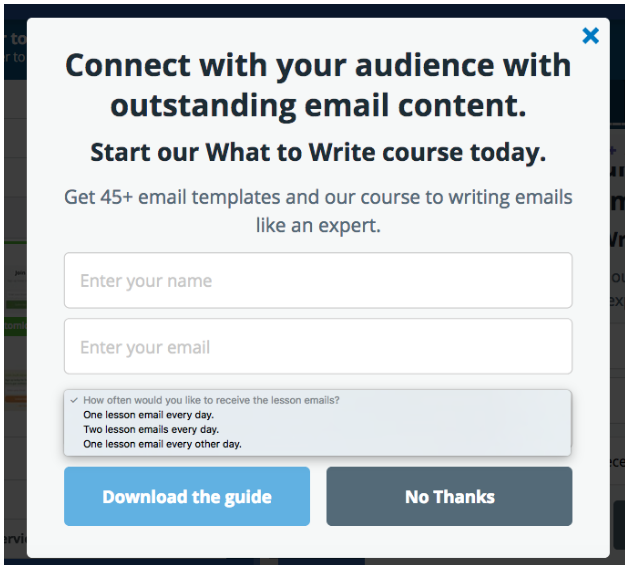 When a subscriber chose their ideal frequency on the form, AWeber automatically applied a tag to the subscriber which matched their frequency choice. (You can launch automated series based off a tag, so we used these tags to segment our subscribers into our three different automated series. I'll explain this in more detail shortly.) If you use AWeber sign up forms, you would set this up by:
- Creating a new field on your form
- Choosing “Radio” as your input type
- Entering your question, your subscribers answer options, and the appropriate tags.
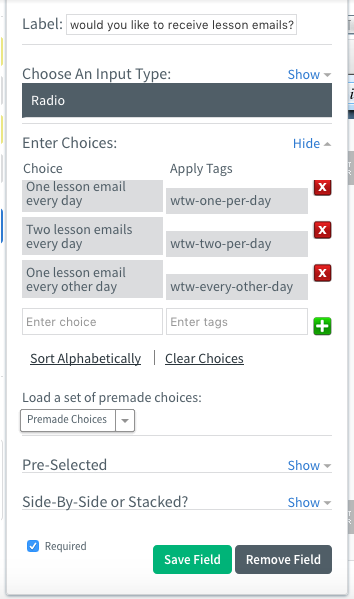 We named our tags “wtw-every-other-day,” “wtw-one-per-day,” and “wtw-two-per-day.” (WTW is our abbreviation for What to Write.) Setting up the form was that simple! With this added question, our subscribers could choose their favorite frequency option on the form, and AWeber automatically tagged them. Now, let’s talk about the automated series. Pro tip: You can name your tags whatever makes sense to you! But keep in mind, you may want to use tags to segment your audience in the future. That's why tags should be descriptive enough that you understand what they mean.
How we set up the automated series in AWeber
We created three automated series in AWeber's automation platform Campaigns – one for each frequency choice.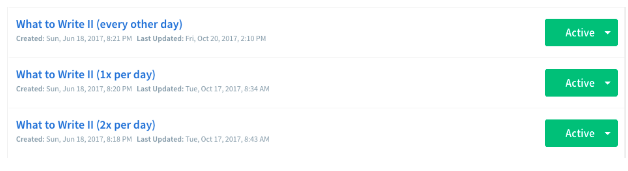 We set up the three automated series to trigger off the tags we used in our sign up form. If a subscriber had the “wtw-one-per-day” tag, AWeber automatically added them to the automated campaign which delivered one email each day.
  To ensure subscribers only received emails on the days they selected, we added time delays between each email. These time delays were different for each automated series. For instance, in the one email per day campaign, we added one-day delays between each email.
 Here’s how the finished one email per day campaign looks inside Campaigns:
 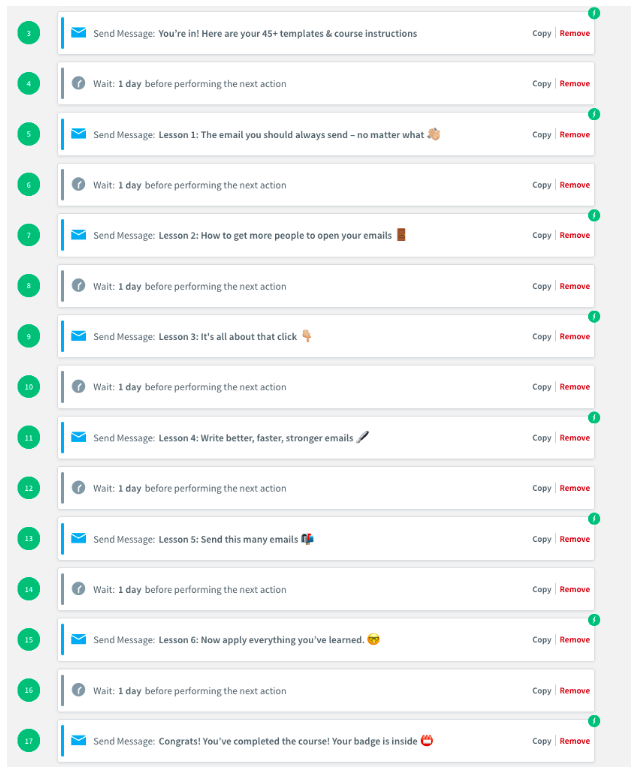 Pretty cool, right? These three series are examples of action-based automation (when a subscriber automatically receives emails based off the choices they make). With action-based automation, you can increase your email engagement by sending the right content to the right person at the right time.
Want to master action-based automation?
Save your spot in 24/7 Email Marketing Master Class, the most complete course for creating a powerful, profitable email automation campaign that gets results around-the-clock. Hurry! Enrollment closes on March 13. During the course, you'll:- Pinpoint your business’s USP (unique selling proposition) to set yourself apart from the masses
- Map out your own powerful marketing funnel that seamlessly moves your subscriber through his or her purchasing journey
- Obtain little-known writing tips and email marketing strategies to help you convert subscribers into “buying” mode
- Learn the SEVEN battle-tested email strategies that the most successful brands and entrepreneurs are using right now.
- Get an all-access look at extremely profitable email series and the techniques they use to turn subscribers into advocates
- Learn about the best integrations to make your email marketing efforts run smoothly and effectively
- Grasp the ins-and-outs of how to set up a single-flow automated email series or a more advanced action-based automation email series
- Build your own effective and profitable automated email campaign to skyrocket your business
The post How We Increased Engagement for Our Online Course by 150% with Email Automation appeared first on Email Marketing Tips.
from Email Marketing Tips http://ift.tt/2G28uRO
via IFTTT
Tuesday, 6 March 2018
#SproutChat Calendar: Upcoming Topics for March
Spring is finally upon us and what better way to celebrate the season change than brushing up on our professional skills and connecting with new folks? As social media adapts to the ever changing trends, it’s smart to stay up to date by learning from others in the industry.
This March, we’ll be covering a number of topics ranging from chatbots to customer service to storytelling. Anyone who works in social is able to benefit from the bevy of topics that we’ll be discussing this month.
Wednesday, March 7: Chatbots & Customer Service
As chatbots evolve to better support business’ needs, how can they integrate well into your social strategy? Sprout All Star Elite, Jeff Higgins, joins the chat to talk through the advantages of a thoughtful chatbot strategy. Participants can expect to also walk through how chatbots can elevate a brand’s customer service approach.
Add event to calendar
Apple Google Outlook Outlook.com Yahoo
Wednesday, March 14: Data-Driven Storytelling
What role does data play in your social media strategy? Can it go beyond monthly wrap-up reports and help your social strategy? The ability to uncover insights and tell a cohesive story can be a compelling tool in your content development. Michael Brito will join #SproutChat to talk about the importance of data in your social storytelling efforts.
Add event to calendar
Apple Google Outlook Outlook.com Yahoo
Wednesday, March 21: Social Media for Diverse Audiences
Marketers are keenly aware that audience is key in developing their social strategies. But what if your social channels communicate to a multitude of audiences? How does this impact your strategy? Sprout All Star Elite, Tim Cigelske, will share how he does just this and highlights how higher education institutions can communicate to various audiences on social media.
Add event to calendar
Apple Google Outlook Outlook.com Yahoo
Wednesday, March 28: Creating & Maintaining a Social CRM
For businesses big and small, a CRM is an essential tool for a sales team to keep track of the conversations they’re having with prospective and current customers. Social media isn’t any different. This week at #SproutChat we’ll chat about how social media managers can keep track of customers across social channels.
Add event to calendar
Apple Google Outlook Outlook.com Yahoo
This post #SproutChat Calendar: Upcoming Topics for March originally appeared on Sprout Social.


from Sprout Social http://ift.tt/2Ia9NyQ
via IFTTT