Thursday, 10 January 2019

Our obsession with taking photos is changing how we remember the past


Last year I visited the Hermitage in St Petersburg, Russia – one of the best art museums in the world. I was expecting to serenely experience its masterpieces, but my view was blocked by a wall of smart phones taking pictures of the paintings. And where I could find a bit of empty space, there were people taking selfies to create lasting memories of their visit. For many people, taking hundreds, if not thousands, of pictures is now a crucial part of going on holiday – documenting every last detail and posting it on social media. But how does that…

This story continues at The Next Web

from Social Media – The Next Web http://bit.ly/2VHjuf1
via IFTTT

Wednesday, 9 January 2019

2019 Email Marketing Statistics: We Analyzed 1,000 Emails from Today’s Top Experts

Nearly every business with an email marketing strategy wonders how to write the perfect email. They question the length of their emails. (Short or long?) They wonder how they can get more people to open their emails. (Should I capitalize my subject lines or not?) And they debate even the little things. (Emojis or no emojis?) And there isn’t a simple answer to these questions — until now. With the help of AWeber’s data scientist, we analyzed 1,000 emails from 100 of today’s top marketers. Our goal? Gather email marketing statistics that will answer these questions. The 100 experts we analyzed are the best of the best. Their email strategies engage thousands and drive millions in revenue. Many of them see unheard of results (like 80% open rates and 30% click-through rates). In this post, we answer 4 important questions: And more!

Want to skip to a specific section? Click on one of the questions above.

Email marketing statistics: Words in an email

The average email length

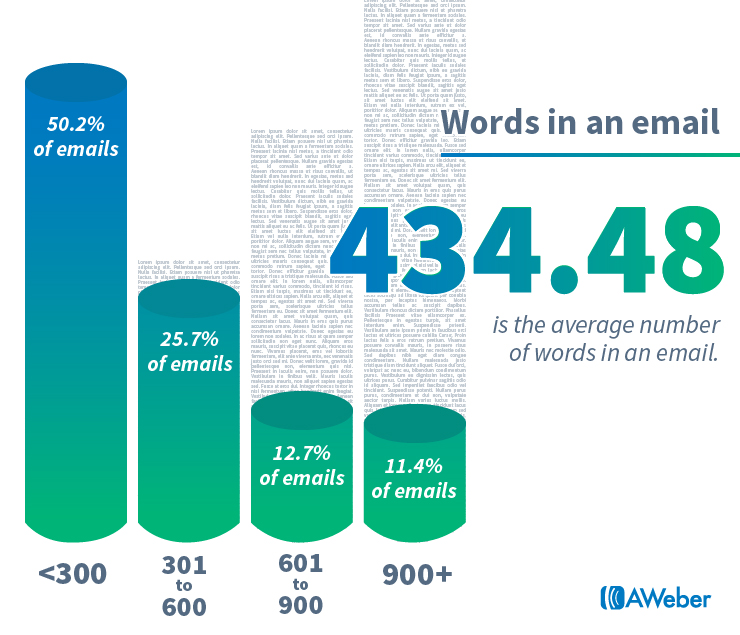
Of the 1,000 emails we analyzed, we found that emails have 434.48 words on average. 434 words takes approximately 3.3 minutes to read. Email marketing statistics: Words in an email  

Why some pros go with shorter emails

However, more than 50% of the emails we analyzed contained 300 words or less (a 2.3 minute read time). With people receiving more emails than ever before, it makes sense that experts are sending shorter emails. Email marketers need to stand out to captivate their readers. Short emails might be a good strategy for doing so. Henneke Duistermaat is the founder of Enchanting Marketing and one of the 100 top marketers whose emails we analyzed. She often sends emails with less than 300 words. “Have you ever heard someone complaining they're not getting enough email?” Duistermaat said. “Everyone’s inbox is overflowing. We’re all time-starved. So, we love succinct messages that help us make a quick decision: whether to reply or not, whether to click through or not.”

Why some pros send long-form emails

Yet, 24.1% of the emails we analyzed contained 601 words or more. And 11.4% of them had more than 901 words, a read time of approximately 6.9 minutes. These experts stand out by sending long emails packed with valuable content, like Ann Handley. Handley is the Chief Content Officer at Marketing Profs, a marketing education company, and one of the top 100 marketers we included in our research. She sends her newsletter TotalAnnarchy via AWeber every other Sunday. On average, her newsletters contain 1,838.5 words, which takes roughly 14 minutes to read. Handley said, “It's not that long-form emails are effective. Rather, what's effective is emails that have value for the people on your list. I don't set out every other Sunday with a goal of writing the longest email I possibly can. But I do have a goal of writing an authentic, valuable, fun letter to each and every subscriber on my list. I put my heart and soul into it, and that's why people respond.” Matt Kepnes, author and founder of travel blog Nomadic Matt, is also on our list of top marketers. He sends long-form emails as well. On average, they contain 802 words. Instead of linking off to posts on his blog, he includes entire articles within his emails. These messages see high open and click-through rates. “People will read longer emails if the topic is important enough," Kepnes says.

How to choose your email length

So how do you decide whether to send short or long emails? It depends on your unique business goals, according to Andy Crestodina, a top email marketer and the founder of website consulting company Orbit Media. “If your goal is simply awareness, long or short is less important. If subscribers see it, like it, and smile, you met the goal! If your goal is traffic, then give the recipient the minimum amount of information needed to decide to click. The CTR (click-through rate) is everything and more text just means more noise in their inbox.”

Email marketing statistics: Characters in a subject line

The average character count of a subject line

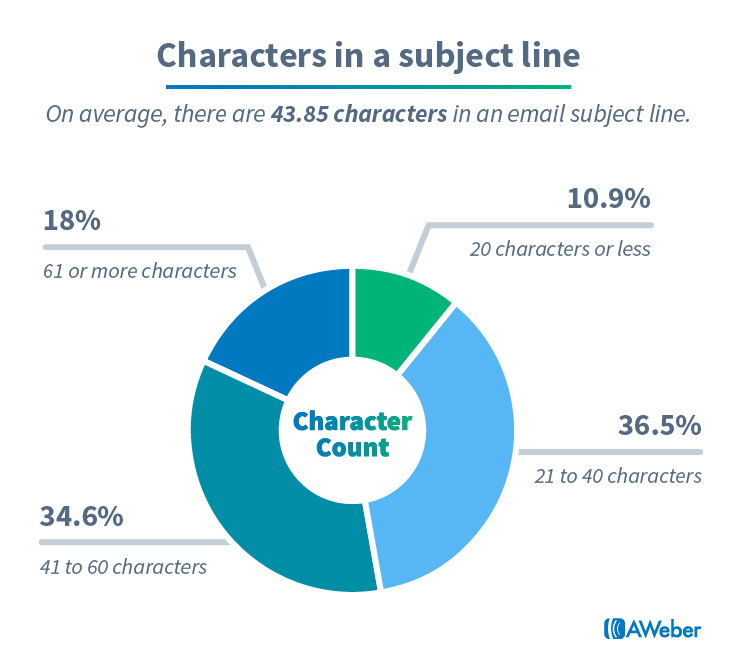
Email subject lines play a huge role in whether your messages get opened. In fact, 47% of email recipients open email based on the subject line alone, according to research done by Business2Community. After researching 1,000 subject lines, we found that email subject lines have 43.85 characters on average. Email marketing statistics: Characters in a subject line   82% of experts send subject lines with 60 characters or less. Which makes sense considering most desktop email clients, such as Gmail and Yahoo!, only display approximately 60 characters before a subject line gets cut off.

Why you should consider using short subject lines

46% of emails are opened on mobile devices, according to research conducted by email testing service Litmus. So it’s important to consider how mobile devices affect the ideal subject line character length. Most email clients stop displaying an email subject line on mobile devices once it reaches between 33 and 43 characters. The exact number varies from one email client to another. Since they don't get cut off in the inbox, shorter subject lines may outperform longer ones. And because only 10.9% of subject lines contain 20 characters or less, it may also be an opportunity to stand out. Brian Dean, founder of SEO company Backlinko and one of the 100 top marketers whose emails we analyzed, sends subject lines with an average of 15.1 characters. “After lots of testing I've found that short subject lines get much higher open rates,” Dean said. He believes these results are due to two factors:
  1. Short subject lines reach the inbox more frequently.
  2. Short subject lines are more mysterious.

“I used to try to outline the entire message in my subject lines. And it gave people no reason to actually open my email,” Dean says.

Email marketing statistics: Emojis in subject lines

The percentage of emails with emojis

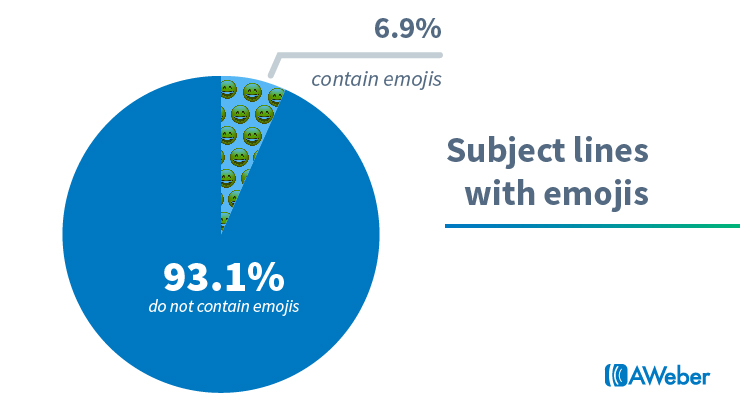
Only 6.9% of the 1,000 email subject lines we analyzed incorporated emojis. That leaves a whopping 93.1% of subject lines without them. Email marketing statistics: Emojis in subject lines  

Why only 6.9% of emails contain emojis

Experts might see emojis as a risk, since they can display differently, and sometimes incorrectly, in email clients. In fact, subscribers opening emails on old computer operating systems may not see emojis at all. “Windows 7, which holds a major market share of 48.4%, offers very limited support for emojis, displaying in black and white or not at all,” email testing company Litmus says in its research on emoji support in email. [caption id="attachment_88494" align="aligncenter" width="800"] [Image source: Litmus][/caption]

Why you should consider using emojis in your subject lines

While only 6.9% of subject lines included emojis, that doesn’t mean you shouldn’t. In fact, this may mean you should test them with your own audience. It could be a huge opportunity to be unique. And emojis might actually increase open rates — as long as you use the right emoji, according to Mark Asquith, marketing expert and founder of Rebel Base Media. (Asquith is one of the 100 top marketers whose emails we included in our research.) He frequently uses the icons in his own subject lines. “A well-placed smiley, timer, or contextual emoji used alongside a well-thought-out subject line will really make your message stand out within someone's already very busy inbox,” he said.

Try a/b split testing two email subject lines — one with an emoji and one without. The results from your split test can help determine if emojis boost open rates with your own audience.

Related: How to Split Test Your Emails

Email marketing statistics: Subject line capitalization

The 3 capitalization formulas for email subject lines

To find out how top marketers use capitalization in their email subject lines, we examined the subject lines from our 100 experts to see if they relied on a particular capitalization formula. We found 3 common formulas: sentence-case capitalization (the first letter of the first word is capitalized), title-case capitalization (the first letter of every word is capitalized, except for articles like “the” and “an”), and all lowercase capitalization (every letter is lowercase). As an example, here is the same subject line with these 3 different formulas applied to it:
  1. Sentence-case: This is an email subject line
  2. Title-case: This Is an Email Subject Line
  3. All lowercase: this is an email subject line

How experts capitalize their subject lines

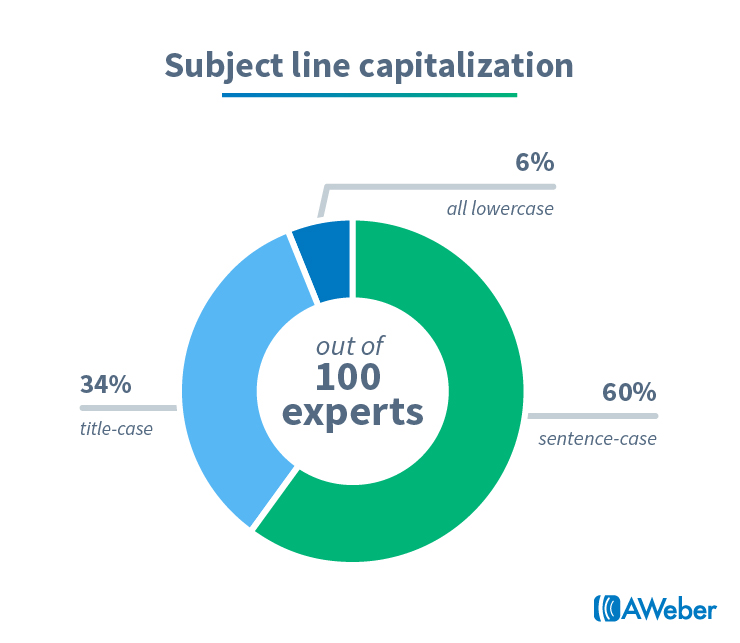
60% of email subject lines use sentence-case capitalization, 34% use title-case capitalization, and only 6% use all lowercase email subject lines. Email marketing statistics: Subject line capitalization  

Are lowercase subject lines an underused secret?

The majority of the experts we analyzed use sentence-case capitalization. But a few experts consistently send emails with entirely lowercase subject lines, like email marketing expert Val Geisler. Geisler is a freelance consultant and writer who specializes in email marketing, and we analyzed her emails for our research. Geisler points out that people are more likely to open an email if it’s from a personal connection or friend. “If you're writing an email to a friend, are you going to title-case the subject line? Probably not. You likely won't even use sentence-case capitalization," she said.“I write my emails like I'm writing to a friend so my subject lines follow the same principles. Does it work? I'll let my ~80% open rates and ~30% click rates speak for themselves.”

How should you use these email marketing statistics?

Use these findings as a guide the next time you’re writing an email. Want to stand out? Try a strategy that most people aren’t using — like emojis in subject lines or lowercase subject lines. Want to follow a proven strategy used time and again by the experts? Use the findings in this report to follow time-tested email copy strategies used by the majority of experts. To receive more research like this, as well as free email marketing advice and strategy, subscribe to our weekly email newsletter FWD: Thinking.

About the data from this research

We analyzed 1,000 marketing emails from 100 successful businesses and entrepreneurs. While we didn't randomly select these businesses, we chose experts across multiple industries and from numerous countries. See the complete list of the 100 businesses we included in our research (and follow them!) here.

The post 2019 Email Marketing Statistics: We Analyzed 1,000 Emails from Today’s Top Experts appeared first on Email Marketing Tips.


from Email Marketing Tips http://bit.ly/2AFDMMO
via IFTTT

Tuesday, 8 January 2019

Twitter will begin testing ‘ice breakers’ to spark healthy conversation


Last year, Twitter touted a handful of features meant to spur conversation on the platform. Or, “increase the health of public conversation,” as CEO Jack Dorsey told Congress last year. At CES today, company representatives confirmed to Engadget that the features would roll out to certain users in the coming weeks as part of a public test. The first of these was a Facebook-like presence indicator that displays when users are online. Presumably, it’s easier to start a conversation with people who are actively using the social network at the moment you want to talk to them… who knew? Depending…

This story continues at The Next Web

Or just read more coverage about: Twitter

from Social Media – The Next Web http://bit.ly/2FlWgFd
via IFTTT

In Instagram’s darkest corner, all it takes is a hashtag to uncover images of child sexual abuse


For pedophiles, a single hashtag opened the door to one of Instagram’s seediest corners, one where images of sexually exploited children were openly traded as if they were collectibles. For anyone willing to engage, finding images of child sexual abuse was about as simple searching for a laptop on Craigslist. The transactions started in the open with one of several hashtags — #dropboxlinks was one of the most popular, although variants for those seeking boys, gay, or a specific age group were prevalent. All it took was following (or searching for) the correct hashtags. Users then moved the conversation to…

This story continues at The Next Web

Or just read more coverage about: Instagram

from Social Media – The Next Web http://bit.ly/2CYDNgu
via IFTTT

Wednesday, 2 January 2019

Create your social media campaign plan for 2019 (with editable worksheets)

The Ultimate Guide to Email A/B Testing

email ab testing

In a world where people are bombarded with countless emails on a regular basis, it’s more important than ever to craft emails with purpose. According to Statista, 269 billion emails were sent in 2017, and that figure is expected to rise to a staggering 333 billion by 2022. These days it’s not enough to assume you know what type of email your audience will want to open — let alone read through it entirely. You have to be certain. Creating great emails requires a lot of hard work, researching, and strategizing. The best emails are crafted not only with goals in mind, but also with the target audience at the forefront. From subject line strategies to sound design principles, there are many components that make up a successful email. But how can you be sure that one version of an email will be more successful than others? You’re not the first person to ask that question. What if there was a way to be sure that one version of an email would generate more engagement, lead to more landing page views, and/or provoke more sign ups? Well . . . there is. Email A/B testing or split testing is a brilliant way to determine what resonates with your audience and what sparks their interest. With email A/B testing, your team can gather data-backed proof of the effectiveness of your email marketing. (AWeber just released a new email A/B testing feature that allows you to test more than just your subject lines — like send times, copy, templates, buttons, and more! Try out AWeber for FREE for 30 days — and split test away!)

Getting Started with Email A/B Testing

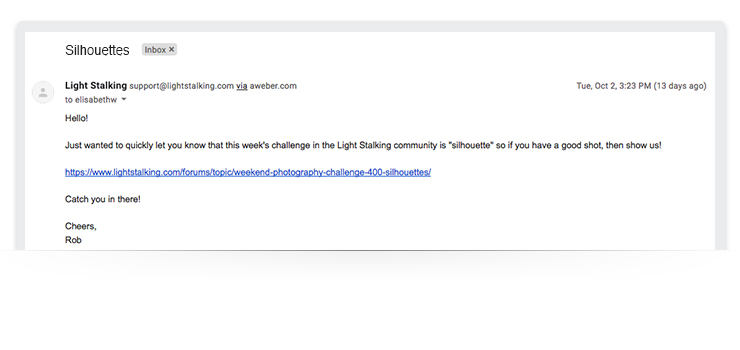
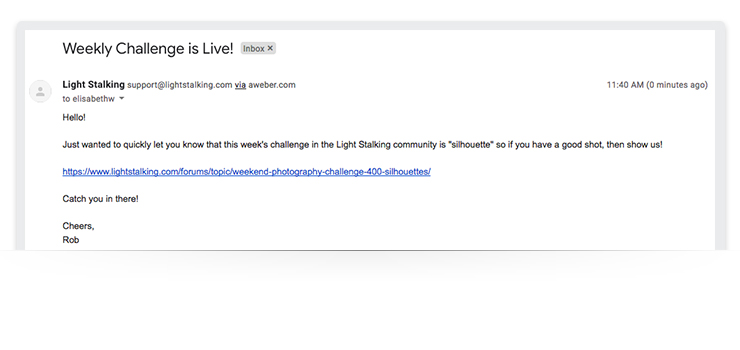
Conducting an email A/B test is simple. Create two or three identical versions of the same email, but change one variable like the subject line, the lead image, or the CTA button. You can test variables as distinct or as nuanced as you see fit. For example: You might test the color of a CTA button versus testing the subject line. Related: 6 Email A/B Tests You Can Set Up in 1 Minutes If you think that creating multiple versions of the same email with a tweak or two sounds tedious or time-consuming (and wonder how much insight can you gain from changing the text on a CTA button), consider this. AWeber customer and photo sharing community Light Stalking split their email subject lines to gauge the success of one versus the other. email ab testing email ab testing As a result, they were able to increase their web traffic from the winning subject line email by 83%. How’d they do it? The founder of the community, Rob Wood, wanted to run an email A/B test on the subject line of the Light Stalking weekly challenge email, which asked subscribers to send in a photo of a silhouette. The test was simple: Wood created two identical versions of the same email, changing only the subject lines. The first email used a straightforward subject line, “The Weekly Challenge is Live!” and the second email was just one word and hinted at the nature of the challenge, “Silhouettes.” The email with the shorter headline (“Silhouettes”) was the winner, which Wood sent to the remaining 90% of his list. From there, the email yielded an above-average click-through rate, which drove more people to the Light Stalking website and increased overall engagement levels. Impressive, right? And simple. This is a perfect example of how email A/B testing helps you make data-backed decisions. With that, let’s talk a bit more about the basics of email A/B testing and how it can help you optimize your next email campaign. Related: Should You Capitalize Your Subject Lines? This Marketing Expert Found Out
Setting Goals for Email A/B Testing

Anyone can split test an email, but like anything in digital marketing, having a clear goal and purpose for testing is essential. Sure, you can run a quick email A/B test and obtain useful results, but having a more precise testing strategy will yield more powerful data. Email A/B testing is a great tool to use at any time, but it can be especially useful if you want to gain insight on a new campaign or email format. Before you begin your test, it’s essential to establish what you are testing and why. A few questions that can help guide your team at this stage include:
  • Why are we testing this variable?
  • What are we hoping to learn from this?
  • What is the impact this variable has in relation to the performance of this email?
In theory, you could test any element of an email, but some variables will give you more insight into your subscribers' minds than others. The beauty of split testing is that no variable is too small to test.

Copy Elements

Copy elements such as subject lines, headlines, body copy, and calls to action immediately come to mind when thinking about what variables to test. After all, copy elements are some of the first things people see when your email pops into their inbox (as well as after they open it), so it’s important to optimize. For example, a personalized subject line that reads, “Ben, did you see this?” versus “Did you see this?” could be the difference between a subscriber opening and deleting the email. But just how important are a few words? We wanted to get to the bottom of this, so we added an extra word to a call-to-action button in one of our promotional emails. Doing so subsequently increased our trial subscriptions by 12.8%. Talk about the power of words.

Design Elements

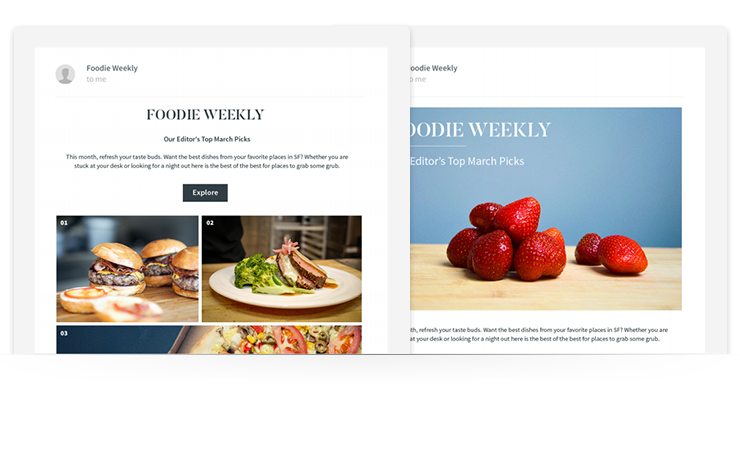
Design elements like colors, fonts, images, templates, and spacing are just as crucial to an email as the copy and links. Did you know that 53% of emails are opened on mobile devices? With this in mind, think about how your email visually appeals to subscribers and what they need to get the best reading experience. email design ab testing These two emails have the same copy and messaging, but are presented in very different ways. One puts a bit of written copy up top, while the other relies on a central hero image as a visual cue. This simple tweak in formatting could yield wildly different results. Email A/B test different templates, layouts, and formats to see which yields the best results for your email campaigns. Related: How to Create Amazing Photos for Your Emails on Zero Budget
Additional Elements

Aside from the visual and copy elements within an email, you can A/B test a few other variables as well. Testing when you send an email could be just as important as what your email says. When measuring the success of an email as it relates to the time it’s sent, consider:
  • Day of the week
  • Time of day
  • Relation to the time of year (e.g., holidays, industry events, seasons, etc.)
Testing the time you send an email can provide a valuable understanding of your subscribers' behavior as well . . . not just their interests. Not sure about what font to use for the body of the email? Test it. Going back and forth between a few colors for the CTA button? Test it. The bottom line: You can and should test different variables of your email campaign before launch so you can optimize for success. Just be sure you’re testing only one variable at a time to get the most accurate and useful results possible.

How big should your test sample size be?

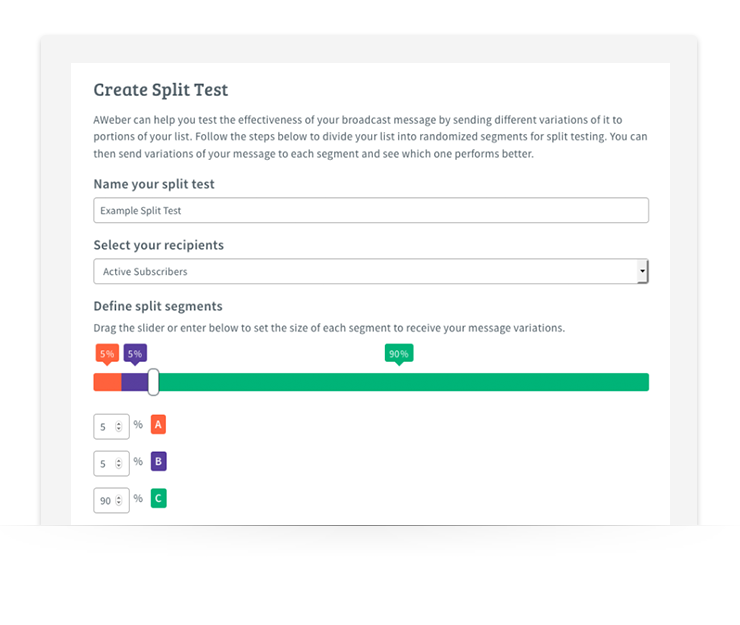
It’s important to note that when conducting your email A/B test, you’re testing on only a small percentage of your subscriber list. You want your test list to be large enough that you can gauge how the rest of the subscribers will likely react without using the entire list, but just small enough that you can send the winning version to a large portion of your audience. The goal is to get accurate, significant results, so bigger lists (minimum 75 to 100 subscribers) typically work the best. However, keep in mind that you should be using a sample that represents the whole list, not just a specific segment. Related: Your Start-to-Finish Plan to Get 1,000 Subscribers So what does a sample look like? There are many ways to approach this. You can figure out a generic sample size with a calculation that factors in your email list confidence level, size, and confidence interval. Or, if you’re an AWeber customer, you can manually select the percentage of your list that will receive each version of the split test. create email ab test Either way, make sure you select a viable percentage of your list to send your test emails to so you have enough data to analyze. Often this is in the 10% to 20% range.
Best Practices for Email A/B Testing

Email A/B testing seems pretty straightforward, right? It is, but like any experiment, if you don’t solidify the details and ensure your test is valid, your results may turn out to be useless. Keep these things in mind when creating your split test:
  • Use a large enough sample to get as close to statistically significant as possible
  • Make sure your sample group is randomized
  • Test early (like before a campaign launch, so you have time to interpret the results) and test often
  • Identify each variable you want to study and test one at a time
The important thing to remember when it comes to creating an email A/B test is that it doesn’t have to be a complicated process. Email A/B testing is designed to deliver powerful, straightforward insights without a bunch of confusing variables.

Email A/B Testing Set Up

You have the basics of email A/B testing down, so let’s next discuss how to set one up properly.

Determine your goals

First things first: Identify the intentions behind the campaign you want to test. Your goals will act as your compass when figuring out the details of your email A/B test. Every component of your campaign should trace back to your end goals.

Establish test benchmarks

Once you have defined your goals, take a look at your current email data and examine how your previous email campaigns have fared. From there, use your findings as benchmark numbers. These numbers will be significant when it comes time to analyze your email A/B test data so you can gauge early success. These numbers should also help you decide on the variables you want to test moving forward.

Build the test

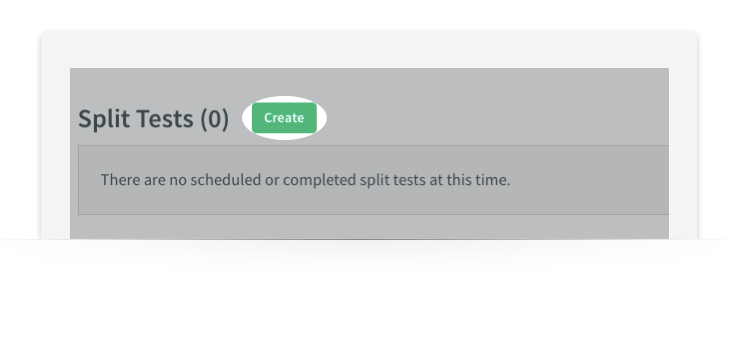
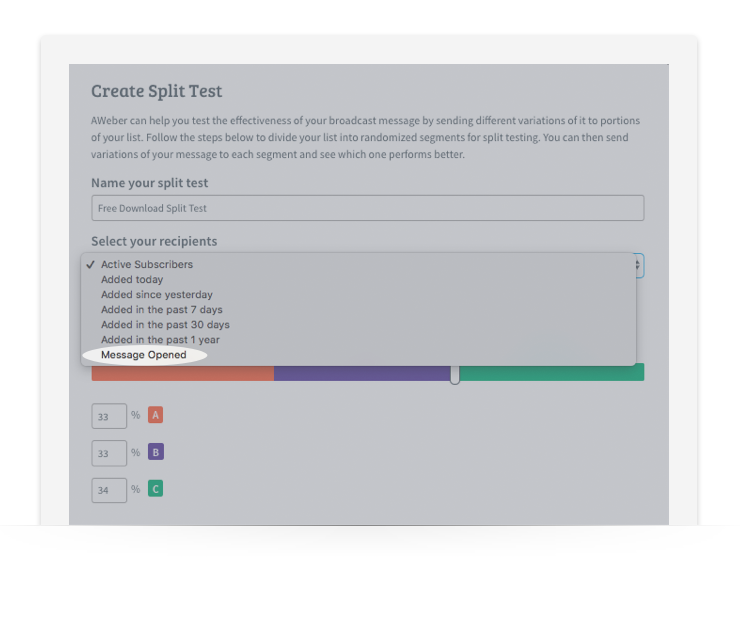
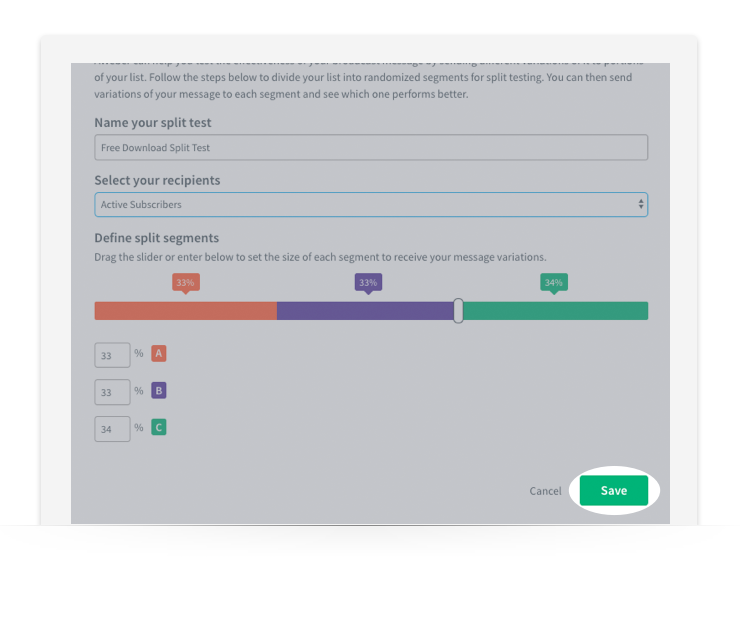
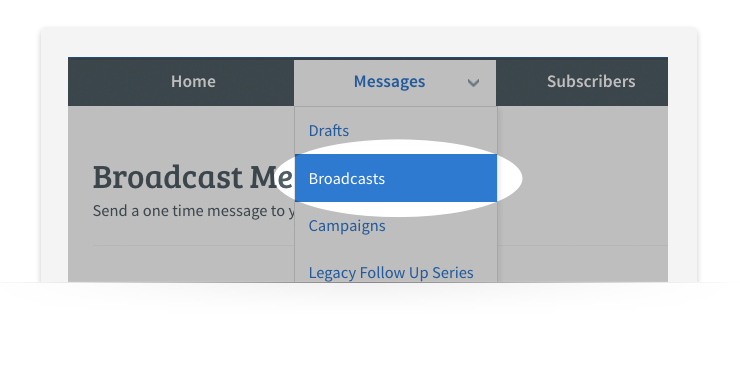
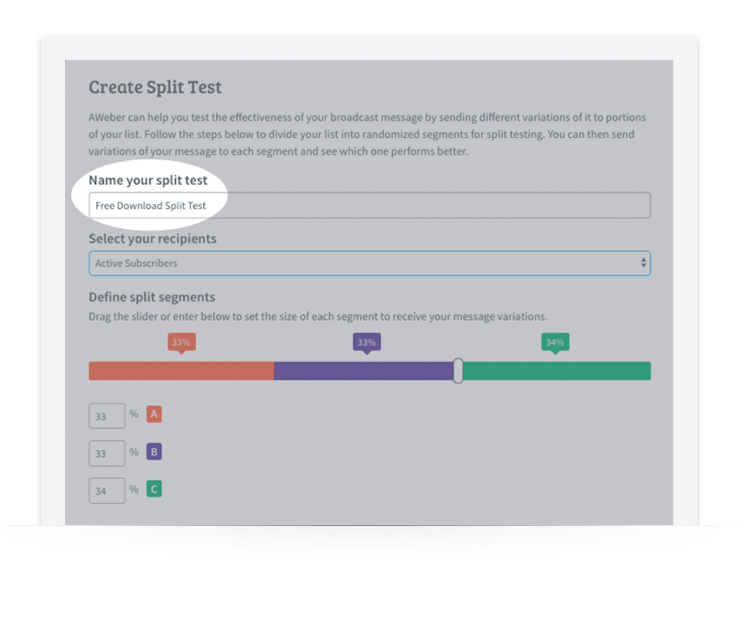
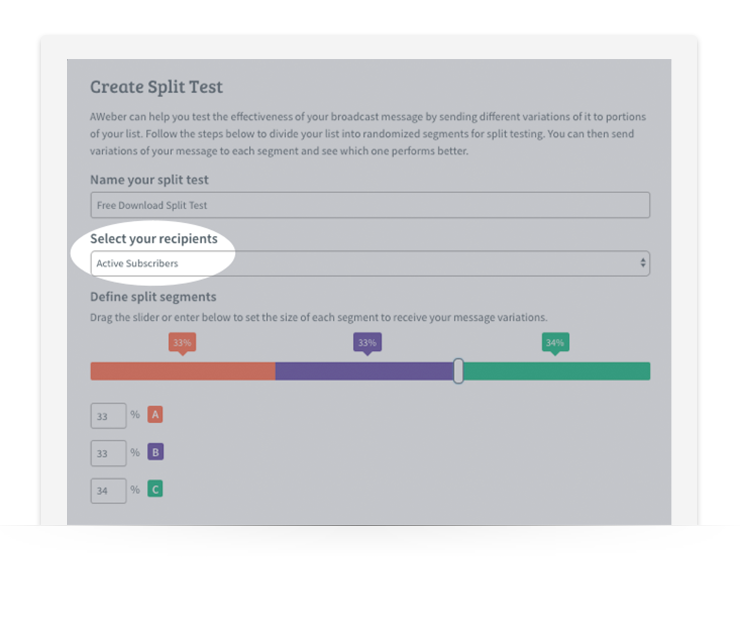
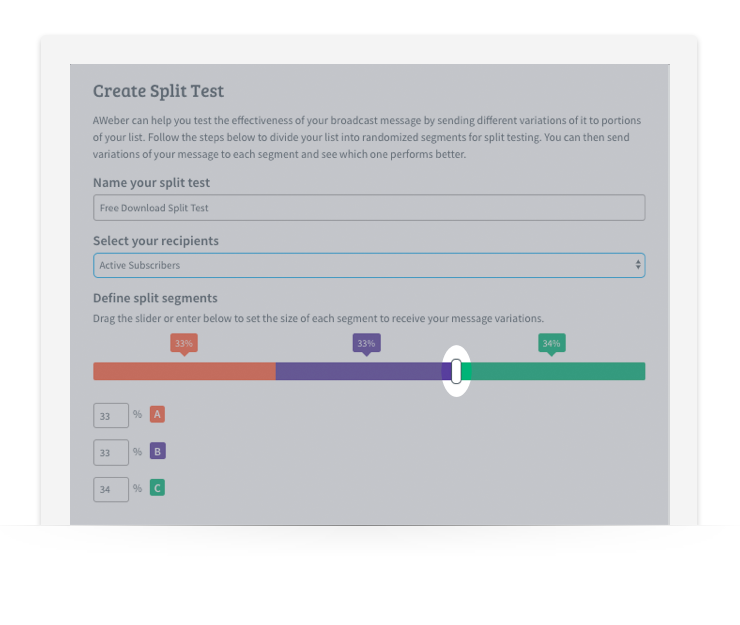
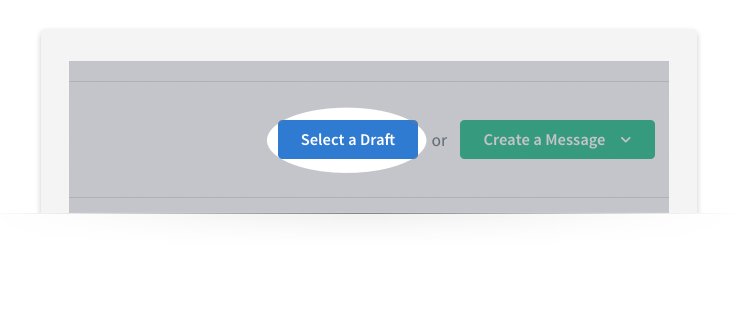
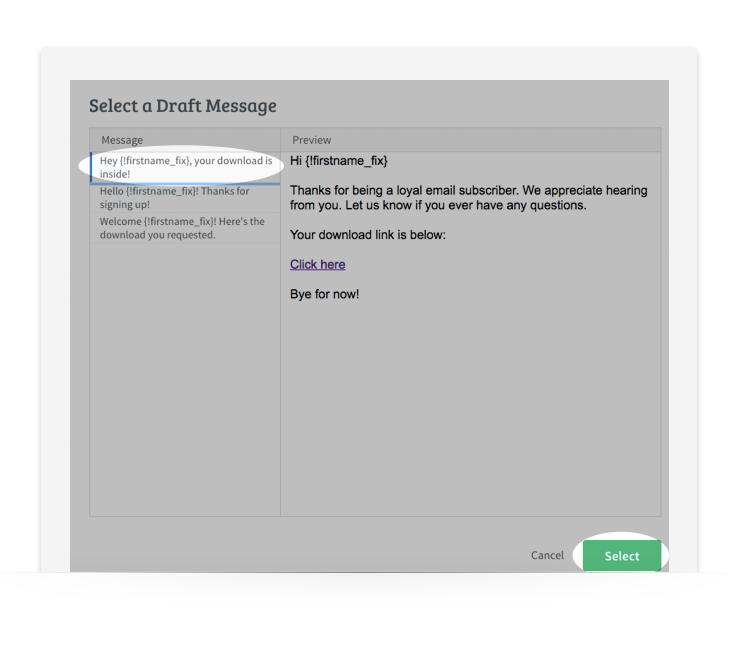
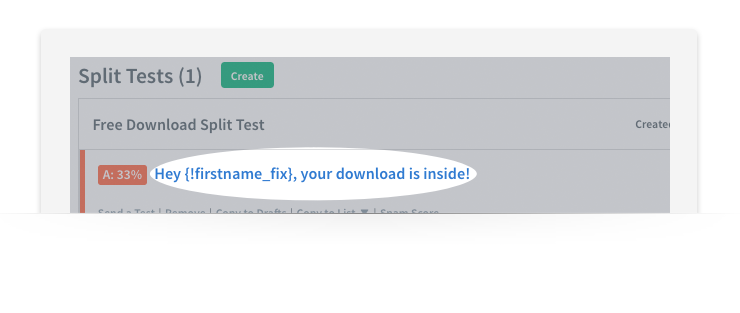
You have your goals and your benchmark data; now it’s time to build your test. Remember to test only one variable at a time. (Refer back to our best practices — above — if needed.) Bonus: Did you know AWeber customers can automatically split test their email campaigns (and can test up to three emails at a time)? It’s true. Here’s how it works: 1. Log into your AWeber account. 2. Hover over Messages, then click Broadcasts. email ab test 3. Click on Create. email ab test 4. Name your split test. Be as detailed as possible when naming them so you can make sure you select the right one when it comes time to run the test. email ab test 5. If you’d like, you can send your split test to a segment a.k.a. a group of subscribers. Click on the drop-down menu and select the segment. email ab test email ab test 6. Using the slider, define your split segments into their two or three groups. (You can change the percentages to make sure you’re testing with only a small percentage of your list. So if you were sending to two groups, you could have 10% of your list get one variation and another 10% get the second variation. Then, you can send the winning message to remaining 80% of your list.) Once you are satisfied with your settings, click Save. email ab test email ab test 7. Then, to select the message you want to test, click Select a Draft on the right hand side menu. email ab test 8. From there, select the message you want to use and click Select. email ab test 9.You will then see the selected message added into one of your split test segments. Click Schedule to schedule your split test message. email ab test email ab test 10. Schedule your message just as you would with any other Broadcast message within your AWeber account. Once your Broadcast settings are set, click Send Message Now. There you have it! Repeat these steps each time you want to send a split test message.
Email A/B Testing Inspiration and Examples

It can be tricky to identify what variable test can help you improve key metrics. Here are a few examples that can help you figure out which variables to test.

To improve your open rate…

This one is easy! To improve your open rate, you need to test different subject lines. We recommend trying a few different types of subject lines like questions, capitalization, long vs. short, subject lines with emotional value, emojis, etc. You can also test different preheaders — the preview snippet of text that is next to your subject line or below it (on mobile) in your inbox. In addition to testing subject lines, try sending the test emails at different times of day and see if that has an impact on the open rate. Your subscribers may be more inclined to open an email in the morning on their way to work or at night after dinner instead of during the middle of a workday. The better your subject line, the more likely your subscribers will open the email and read through. Having a solid subject line is like getting your foot in the door. Related: How Do I Avoid the Spam Filter?

To improve your click through rate…

Keep subscribers interested in the email by providing eye-catching, engaging content throughout. If it’s your click-through rate you want to improve, make sure you create clickable content. Consider how interactive content, information gaps (missing pieces of info that spark a reader’s curiosity), or contests could boost your in-email engagement. There are also many variables you can test to optimize for click-through rate — a strong CTA, intriguing anchor text, personalization, spacing, or bold imagery. Just remember to test one at a time to ensure you know precisely why subscribers are clicking more (or less).

To improve your reply rate…

Many marketers tend to overthink this one, but it’s actually pretty simple. If you want your subscribers to reply to your emails, ask them to! It’s that easy. Try testing a “From [your name] at [your business here]” approach, which can make an email feel like a personal note instead of an email blast. (For instance, “From Andy at AWeber” would be the sender name that appears.)  Think about it: If subscribers think they are replying to an actual person, they are more inclined to do so. You also might try testing long-form vs. short-form emails with a call-to-action that encourages subscribers to reply to the email with their thoughts, opinions, or questions. Leverage that P.S. line, too. That last line can be an opportunity to encourage conversations and replies from subscribers.

Tracking and Measuring Email A/B Testing Success

We’ve covered a lot of ground so far around email A/B testing. With so many elements to test, you might be thinking, “How can I verify that a campaign is successful or that a test yielded helpful data?” The answer: Think back to your goals. Your goals will tell you what metrics you should pay the most attention to and what you should work on improving. For example, if generating more leads from email campaigns is your goal, you’ll want to focus on metrics like open rate, click-through rate, and form fills. It’s also important to look at your metrics as a whole to see the big picture of how an email performed. Being able to track that data and refer back to it will also help you optimize future campaigns. Another question that might be top-of-mind for you: How long should you let an email A/B test run for before ending it and analyzing the results? According to Zapier, after about four to five days the effectiveness of an email dies out. They claim that if your email isn’t seeing any other significant activity after five days, it’s likely it won’t see any other activity. However, digital marketer Neil Patel recommends running your A/B test for at least two weeks with 100 subscribers to determine any statistical significance of your results — or that they aren’t due to chance. If you run your test for too short a period, you run the risk of not allowing enough subscribers to open the email. With that being said, why not test how long you run your test? If you see engagement with your emails die out after 48 hours, then you can cut the tests off around that point. Once your test has ended and as you begin analyzing your data, keep detailed notes of your findings. Ask yourself:
  • What metrics improved?
  • What elements of the email flat-out didn’t work?
  • Were there any patterns that correlated with past tests?
Maintaining records and tracking results will help guide future campaign optimizations. Put together a testing roadmap or a detailed record of what you’ve tested, the results, and what you plan on testing in the future. That way, you’ll have a detailed account of your tests and won’t leave any stone unturned in the process.

Get Started with Email A/B Testing Today

Email A/B testing is imperative to the success and optimization of any email campaign. It allows you to gain real insight that can help you make decisions about existing and future emails. Email marketing is always changing, and as subscribers’ attention spans seem to get shorter, it’s vital to know what will yield the most success. Get started today with AWeber. Our email A/B testing tool allows you to do more than just split test subject lines — you can test almost anything (calls-to-action, colors, templates, preheaders, images, copy, and more!). Give AWeber a FREE spin for 30 days.  Want to learn even more about email A/B testing? Download our free guide here.

The post The Ultimate Guide to Email A/B Testing appeared first on Email Marketing Tips.


from Email Marketing Tips http://bit.ly/2F5DToe
via IFTTT

The 7-Day Challenge to Jump-Start Your Email Marketing in 2019

Every year, 80% of new year's resolutions fail by the time February rolls around. Launching your email marketing strategy shouldn’t be one of them. That’s why we created a simple, 7-day challenge to help you dominate email marketing in 2019. By the end of it, you’ll have launched the most important parts of a successful email marketing strategy. And the best part? You only need 30 minutes or less each day to complete this challenge. (Don’t have an email marketing platform? You’ll need one. Set up a FREE email marketing account in AWeber.)

Day 1: Choose your email template and brand it. (30 minutes)

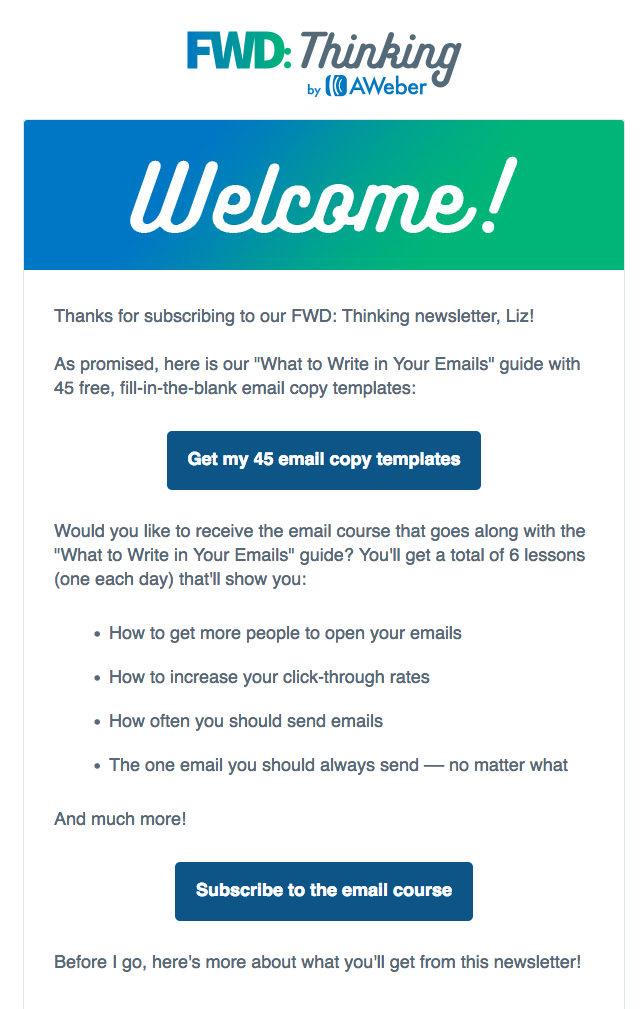
This step is often overlooked. Many people use different email templates every time they send an email. Or, they never fully customize a template to match their brand. But branding an email template and using it consistently are important. Your brand sets you apart from your competitors. It allows you to be unique and develop a personality for your business. It builds credibility and trust between you and your subscribers. Your subscribers can see your content and immediately tie it back to you. Step 1: Choose your email template. Find an email template that works with your brand and your message. A plain template is often better than one already filled with colors and background images, because it’s easier to make it your own. Then, add your logo to the top or bottom of the email. (Inside AWeber, there are 8 NEW email templates you can easily customize to fit your branding. Choose the template format you'd like. Then drag and drop to add your images and build the layout you want.) Step 2: Add your brand colors to your template. Don’t overdo it! Too many colors can be distracting. Try adding your brand colors in just a few places, like your call-to-action buttons, header image, or headlines. For example, in the welcome email of AWeber’s FWD: Thinking newsletter, we incorporate our brand colors by using a header image with AWeber’s green and blue gradient and a call-to-action button with our brand’s shade of blue. Homework: Watch this video on How to Design an Awesome Welcome Email. To do: Choose an email template and add your logo and brand colors to it.

Day 2: Customize your confirmation message. (15 minutes)

A confirmed opt-in message is an email you send people immediately after they fill out your sign up form. It asks them to verify they want to subscribe to your emails by clicking a link or button in the message. Confirmation messages are optional but strongly recommended. They serve as proof that your subscribers definitely want to be on your list. So internet service providers (like Gmail and Yahoo!) may deliver more of your messages to the inbox when you use confirmation messages. Plus, it prevents subscribers from signing up using fake email addresses. To make your subscribers more likely to confirm their subscription, you can follow these common best practices for confirmed opt-in emails:
  1. Keep your content short.
  2. Explain the value your subscribers will receive by subscribing to your list.
  3. Tell them what they need to do to confirm.
Homework: Read Writing Confirmation and Welcome Emails People Love. To do: Set up and customize the subject line and content of your confirmed opt-in email. (If you’re an AWeber customer, you can follow these directions to complete this step.)

Day 3: Create a sign up form. (30 minutes)

Sign up forms allow your subscribers to easily join your email list. You can promote your form by adding it to your website and sharing a hosted sign up form with your audience. Hosted sign up forms allow you to share your form anywhere, even if you don't have a website. Homework: Read 9 Inspiring Sign Up Form Ideas to Grow Your Email List. To do: Write your sign up form copy and build your form using ideas from the homework post you just read.

Day 4: Write your welcome email (30 minutes)

A welcome email is the first message subscribers receive after joining your list and confirming their subscription. And it gets a lot of attention — on average, open rates are 4 times higher and click-through rates are 5 times higher than other emails, according to marketing research company Experian. You can take advantage of this above average engagement by crafting an excellent welcome email. Your welcome email should:
  • Welcome subscribers to your email list.
  • Deliver the lead magnet you promised on your sign up form.
  • Explain what kind of content you’ll send subscribers, how often you'll send it, and what they'll learn.
  • Introduce yourself or your business.
  • Ask subscribers to add you to their address book. (This is called whitelisting and it can help more of your emails bypass the spam folder.)
Once you draft your welcome email, take some time to personalize it! Personalization makes your subscribers feel you’re writing a message specifically to them. Something as simple as including your subscriber’s first name in the subject line or body of your welcome email can boost opens and clicks.Homework: Read The One Email You Should Always Send and How Personalization Can Help You Connect with Subscribers. To do: Write and build a welcome message for your subscribers using AWeber’s Drag and Drop Email Builder.

Day 5: Automate your welcome email. (10 minutes)

You wrote your welcome email. Your next step? Automate it. That way, your subscribers will receive it immediately after they sign up for your list. Simply create an automated series for new subscribers in your email marketing platform. Here's how:
  1. Build a new automation series in your email marketing platform. Make sure it's set up to send to every new subscriber.
  2. Paste your welcome email content into the template you chose on day 1.
  3. Add your welcome email to the series.
  4. Activate your series.
Your email marketing system does the rest! Homework: Read Email Automation 101: How to Use Automation. To do: Create a welcome series using AWeber’s automation platform Campaigns and add in your welcome email. (Here are step-by-step instructions for setting up your own welcome series in AWeber.)

Day 6: Publish your form on your Social Media channels. (20 minutes)

Your list is set up and your confirmation and welcome messages are ready to go. Now it’s time to put your hard work to the test and start to grow your list! An easy first step is turning you social media followers into email subscribers. People who follow your brand on social media have already shown they want to hear from you. And there’s no better way for them to stay up to date on your latest content and sales than joining your email list. Post a link to your hosted sign up form on Facebook, Twitter, and LinkedIn and ask your social followers to subscribe for exclusive updates. Homework: Read 7 Expert Tricks to Grow Your Email List with Social Media. To do: Add your sign up form to your Facebook profile and tweet out the hosted URL to your form.

Day 7: Share your sign up form with your connections. (20 minutes)

Reach out to the people you already know, like colleagues, friends, or family members. Ask them if they want to sign up for your email list. Let them know what content you are offering and explain the benefits they would receive if they sign up. If they say no, maybe the content you’re offering just isn’t for them. But maybe they know someone it would be perfect for. You never know until you ask! Homework: Read How To Get Your First 50 Email Subscribers in Less Than 30 Days. Use the fill-in-the-blank copy template in this post to easily reach out to people. To do: Contact 5 people you know. Send them the hosted URL to your sign up form and ask if they’d like to join your email list or share it with someone they know.

Ready, set, go!

Congrats! If you completed this 7-day challenge, you’re well on your way to launching a successful email marketing strategy. Want more content like this? Subscribe to our FREE weekly email newsletter FWD: Thinking for email marketing tips from the pros.

Bonus challenge

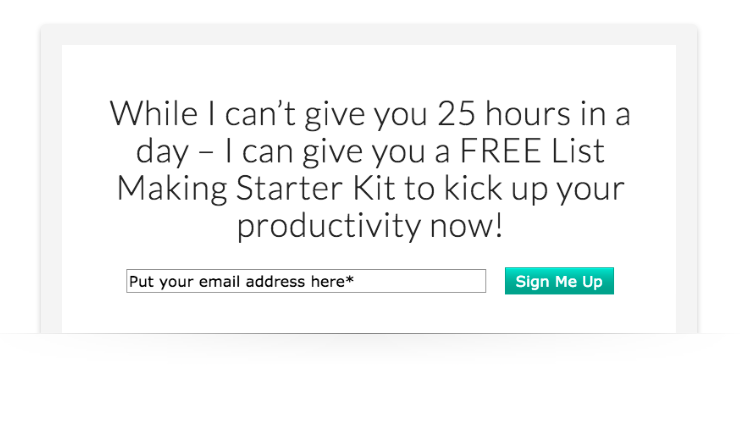
Ready for your next challenge? Then try this: Create a lead magnet, a freebie you give subscribers when they sign up for your list. Lead magnets can increase the conversion rate of your sign up form. For example, author and productivity expert Paula Rizzo offers a free List Making Starter Kit in return for signing up for her email newsletter, which she sends via AWeber. Homework: Read How to Create a Lead Magnet in Less Than a Day. To do: Build a lead magnet, add a link to it in your welcome email, and mention it on your sign up form.

The post The 7-Day Challenge to Jump-Start Your Email Marketing in 2019 appeared first on Email Marketing Tips.


from Email Marketing Tips http://bit.ly/2GZYxJ0
via IFTTT