Tuesday, 23 May 2023

AI won’t replace social teams: Here’s why

Every new advancement in tech sparks new possibilities—and new fears. This new era of artificial intelligence (AI) naturally has social teams thinking: Is an AI social media manager about to take my seat?

When it comes to AI social media tools, I’m optimistic…and this is coming from someone who regularly thanks her Google Home to keep it happy.

Rather than replace social media pros, the adoption of AI in marketing has the potential to make human creativity and strategic thinking more important. The more monotonous tasks AI can take on, the more you can focus on growing your strategy, and business, and do more of what you actually like. Imagine that.

Let’s get into why AI likely won’t be taking your role, and how using AI in social media can help you focus on the impactful part of your role—and less on the busywork.

Why the “AI social media manager” isn’t coming for your job

The role of social media manager has always been relatively future-proof—last year, it was the third most in-demand marketing position. And social media marketers have always had to evolve how they work. In the 2010s, that meant creating an Instagram strategy. In 2021, it meant gutting your social strategy to prioritize short-form video. Today, it means adding AI to your social media skills to keep all the plates spinning.

To help explain why AI is not about to take your job, I talked to Jeff MacDonald—Social Strategy Director at Mekanism and AI optimist. “I don’t think social media managers should be concerned about AI taking their jobs,” Jeff explains. “To me, all AI is going to do—if you know how to use the tools right—is help you accelerate your work and decrease how long typical tasks take.”

That’s not to say that social media managers won’t be impacted. “It’s going to augment everyone’s roles, our job will be different. But I think, I hope, people will like that difference, and like spending less time in front of screens and more in front of faces.”

So let’s make the case for why an AI social media manager is likely not coming for your seat at the table.

Putting AI in charge is risky

From spreading disinformation, to creating posts based on offensive AI output, putting unchecked AI in charge of social can create a brand crisis—any communications leader’s nightmare.

“From an ethical standpoint, I don’t think you’re ever going to put your social on autopilot,” Jeff explains.

You’re going to be steering the ship…I think that’s where the line will be. We’re going to see AI as an assistant.
Jeff MacDonald
Social Strategy Director

Instead, Jeff suggests treating AI as an idea launchpad. “You’re going to be steering the ship. You need to make sure what’s happening on your social channels is human-fed and human-curated. I think that’s where the line will be, we’re going to see AI as an assistant.”

People want to connect with people

Jeff says it best: “I don’t think anyone wants to hear a response from a computer.”

It’s hard enough for brands to create human connection. People crave authenticity on social, and they can spot boilerplate, AI-generated posts and responses a mile away.

A screenshot of a LinkedIn post where the author is explaining why people shouldn't use AI to generate their comment responses to social media posts.

Social media work is about more than just creating on-trend posts. It’s about connection, and building a community—a human element AI just can’t fully replicate.

“Everyone is still going to want human-to-human interaction—the thing that’s most important about community building— to be driven by an actual person,” Jeff says.

AI still needs a human touch—from prompt to product

AI is only as good as the ideas, and editing finesse, humans contribute—especially when you have brand guidelines to adhere to.

And while you can train AI to capture your brand voice or tone, there are other issues at play. “Many AI models are trained in the past,” Jeff explains. “ChatGPT can now browse the internet for more updated information. But for the most part, it’s old data. So if there’s anyone in any industry that needs the latest information, it’s not going to know the latest trends.”

But even when AI does analyze the latest data from your channels, comments or larger social space, it can’t always grasp human nuance. “It may not know that the 50K mentions your brand received are all from people who are being sarcastic and actually don’t like something your business is doing, or the direction a campaign is going in.”

Without a human touch, this has the potential to leave you with inaccurate insights, and lead to poor business decisions.

The case for embracing AI in social media workflows

Social teams are already catching onto the benefits of these tools. According to a Q2 2023 Sprout pulse survey of 255 social marketers, 71% have started to integrate AI and automation tools into their workflow. And 82% of that group report that those tools have already driven positive results.

AI is not only helpful for social media marketers—it may ultimately be needed to future-proof your skills, and preserve your team’s time as your role gets more complex. Let’s get into why.

A data graphic that reads 71% of marketers have begun to integrate AI and ML tools into their workflow.

Takes over the manual tasks so you can focus on the big challenges

The more social evolves, the less bandwidth already-crunched social teams will have. The need to manage your limited time and work efficiently will only become more necessary—that’s where AI in social media can help.

An overview of social media teams' biggest challenges including bandwidth, proving ROI, social execution, resourcing and social as a business function. The leading challenge is bandwidth/talent, which has increased significantly YOY.

To Jeff, that’s the core benefit of AI. “It’s about the opportunity to offload that mental burden that every social media manager has onto a computer,” he explains. “AI is the perfect work buddy who never gets tired, who always wants to come up with the next idea or take a pass at that next brief for a client project you’ve been pushing off.”

A Tweet that reads: day 3/30 of me letting ChatGPT run my life to get me to 1M followers in 30 days. Update: it's kind of working yet I'm still kinda bad at TikTok. Today, ChatGPT wrote me a 30s script to say so I said it. Follow along and share the journey.

When it comes to content creation, tapping AI for initial ideas can spark creativity when you’re in a rut. And that can help you battle social media burnout. Speeding up content production opens up more time to dedicate to strategic priorities. Think: experimenting with new content formats or digging deeper into performance metrics.

AI tools can also help you get more out of your content with optimization recommendations. For example, Sprout Social’s Optimal Send Times and hashtag recommendations maximize your reach—while sparing you hours of manual engagement and performance analysis.

Screenshot of Sprout Social's Compose box and scheduling a Facebook post with ViralPost optimal send times.

Proves your impact and helps you make better business decisions

As the role social plays in an organization becomes more sophisticated, you’ll need more sophisticated insights to inform better business decisions.

AI analytics and automation tools mine massive amounts of data faster than the speed of social vs. the hours or days this would take manually.

You can look at large data sets and speak to numbers and data with more intelligence than we’ve ever had the ability to do before.
Jeff MacDonald
Social Strategy Director

Let AI handle the time-consuming task or pulling data and creating reports so you have more time to analyze those insights and incorporate them in your strategy. As Jeff puts it, “You can look at large data sets and speak to numbers and data with more intelligence than we’ve ever had the ability to do before.”

According to our 2023 State of Social Media report, 51% of business leaders say they use social media data and insights to inform their company’s business strategy. And 48% strongly agree that social media data and insights will be a primary source of business intelligence for their company.

A circle chart data visualization with three data points. The title reads, extent that social media data and insights currently inform my company's business strategy. The data reads as follows: 51% consistently informs, 34% it often informs, and 14% it occasionally or does not inform.

AI gets you the insights you need in seconds. For you, that means less time aggregating data, and more time acting on it.

Enables you to be proactive vs. reactive

According to a Q2 2023 Sprout pulse survey, the top two challenges for managing a brand’s social presence are identifying and responding to emerging trends, and changing algorithms.

Using AI enables your team to get ahead of these challenges. As Jeff puts it, “AI-driven analysis truly adds a special use case where all of a sudden you have the skills to be a true trend spotter.”

A data visualization entitled top 3 challenges for managing a brand's social presence. Identifying and responding to emerging trends is 49%, changing algorithms is 48% and generating engaging content is 37%

Social listening is one tangible way AI and automation give you superpowers—and information—to help you be proactive. Listening tools sift through billions of data points to uncover trends, insights and business intelligence crucial for your organization.

Social media listening can uncover trends among your audience. The Scout Agency used it to discover an interesting trend among Georgia-based customers of their client, Martell: They were mixing the brand’s cognac with sweet tea. They used this insight to introduce a Martell and sweet tea cocktail at Atlanta Falcons games. The drink became the top-selling cognac cocktail at Mercedes-Benz Stadium.

Not all trends are positive. Social listening can help you identify an issue bubbling up before it becomes a brand crisis. Purdue University used Sprout’s Social Listening tools and alerts to detect spikes in certain topics and get ahead of potential issues.

A screenshot from Sprout's platform that demonstrates message spike detection. In the screenshot, you can see the Smart Inbox and a message alert that reads: We started detected a spike 5 minutes ago.

Reclaim time for human-to-human connection

There are often so many tasks to balance that you’re left with little time for the “social” part of social media.

AI tools can free up time for social teams to connect with each other, and other teams who could benefit from social media intelligence. As Jeff puts it, “By using an AI tool, social media teams can do more of what they’re excited about. When was the last time you had free time to talk to teammates about what they want to do on accounts, and what gets them excited?”

This extends to your social customer care efforts, too. Using chatbots or AI-generated responses for FAQs frees you up to get creative with audience engagement and focus on high-level issues.

And for social media marketers nervous about getting called out for AI-generated responses, remember: AI should never be alone behind the wheel. You’re in charge. Lean on AI to draft responses, but lean on your editing skills to humanize them.

Where will AI social media skills take your social workflow?

AI is here to stay. And the technology gets more sophisticated, so too will the social media teams who choose to adopt it.

Hopefully we’ve put your mind at ease and given you some ideas about how to make AI work for your workflow, skills and role.

To learn more about AI in marketing today, register for our The State of Social Media & AI webinar on June 1.

The post AI won’t replace social teams: Here’s why appeared first on Sprout Social.


from Sprout Social https://ift.tt/krs18wR
via IFTTT

Monday, 22 May 2023

What to do when faced with these 10 social media marketing challenges

Ready to tackle the biggest social media marketing challenges?

If you’ve been struggling to keep your social media strategy agile and up to date, you’re definitely not alone.

Competition for attention on social media is tougher than ever. New social networks are changing how we create content. Plus, people’s expectations are getting higher every day. It’s no wonder building a memorable brand presence online can feel overwhelming.

Fear not. In this guide, we’re breaking down 10 of the most common social media marketing problems brands face today. For each challenge, we’ll also give you actionable next steps that help you clear the hurdle with ease.

  1. Keeping up with changing social trends
  2. Finding social talent
  3. Proving the ROI of social
  4. Falling engagement rates and fewer post interactions
  5. Standing out against established social competitors
  6. Lost time from juggling multiple social platforms
  7. Little-to-no communication between departments
  8. Running out of creative content ideas
  9. Responding to call-outs and crises
  10. Lack of growth, direction or strategy

The average lifespan of a trend is shrinking fast, leaving room for more trends than ever before.

This abundance is great for consumers, who get to enjoy hyper-targeted micro-trends that appeal to their interests 24/7. For marketers, harnessing trends is only getting more complicated.

According to a Q2 2023 Sprout pulse survey, 49% of marketers say identifying and responding to emerging trends on social media is the biggest challenge in managing their brand’s social presence.

A text-based graphic that says "49% of marketers say identifying and responding to emerging trends on social media is the biggest challenge in managing their brand’s social presence."

It’s a needle-in-a-haystack effect for social media marketers. To create content that resonates with your target audience, you have to sift through an endless stream of content to figure out what’s relevant.

When done manually, this looks like a lot of scrolling. Thankfully, social media management tools and process adjustments can keep you on trend without blowing up your screen time.

Solutions:

  • Make trendspotting a collaborative effort. Don’t attempt to keep up with rising trends all by yourself. Instead, crowdsource ideas by asking teammates about what they’re seeing on their feeds.
  • Use a social listening tool to tap into trends in a way that resonates. Nailing your voice-of-customer is crucial to creating effective trend content. Audience insights from a social listening tool help refine your message so that it’s current and relevant.
  • If there’s not enough time to create net-new content, opt for strategic engagement plays. Commenting on viral videos or content from relevant creators can generate as many impressions as a feed post.

2. Finding social talent

One of the biggest challenges social media teams face isn’t taking place in inboxes or timelines. It’s on the job boards.

Hiring social media professionals has become quite a challenge in today’s ever-evolving landscape. The demands placed on social marketers have skyrocketed. It’s no longer enough to be a strong strategist or copywriter. Brands now seek individuals who excel in creating engaging content across various formats, all while possessing a firm understanding of internet culture.

According to The Sprout Social Index™ 2022, more than half (52%) of marketers cite finding experienced talent as their team’s primary obstacle. This scarcity of experienced and proficient professionals in social media management presents brands with difficulties in securing the right team members.

An overview of social media teams' biggest challenges including bandwidth, proving ROI, social execution, resourcing and social as a business function. The leading challenge is bandwidth/talent, which has increased significantly YOY.

If you’re on one of the many teams trying to up their headcount this year, be extra thoughtful about your growth strategy. Craft an enticing job description that aligns with your future vision for the channel to attract qualified talent.

Solutions

  • Write a thoughtful, clear and intentional social media manager job description that shows candidates you understand and value their work.
  • Create an exceptional interview experience using resources in this hiring manager toolkit. It’s complete with interview questions, scorecard templates, assessment examples and an onboarding checklist, all designed to create a wow-worthy process from start to finish.
  • Brush up on social recruiting strategies. Use employee advocacy and referrals to tap into brand new spheres of talent that might miss your job listing otherwise.

3. Proving the ROI of social

Social media has come into its own as an integral part of every business strategy. Its impact is felt everywhere, from the songs we sing to the topics we talk about.

Still, some higher-ups may fail to recognize the immediate value of investing in social media as a priority channel. Although social plays a clear role in lead generation, customer nurturing and more, it’s difficult to make sense of the metrics needed to translate that impact.

Making a business case for social media is a common challenge associated with social media marketing but it shouldn’t have to be.

Although justifying social media to your boss might involve factors beyond your control—budget, personnel—tying your organization’s presence to business practices, the bottom line and performance is a priority. Doing so not only helps cement the importance of your role but also helps earn future buy-in from colleagues and leadership.

Solutions:

  • Document how your social presence impacts business goals—think brand awareness, lead generation, customer nurturing and sales—by understanding important social media KPIs.
  • Highlight relevant metrics that have moved the needle in the past year to help you reach those goals, like traffic, mentions, reach and engagement.
  • Conduct competitive analysis and market research to drive home the importance of having a strong social presence for your respective industry.

4. Falling engagement rates and fewer post interactions

“Is organic social traffic dead?”

This simple, five-word question has sparked countless webinars, LinkedIn posts and think pieces. It makes sense. Ever-changing algorithms can make chasing organic traffic feel like a never-ending game of whack-a-mole, where hitting one target means missing the next.

In our most recent quarterly pulse survey, marketers ranked keeping up with rapidly changing algorithms and features as their second most common social media marketing challenge.

Earning reach and interactions can be an uphill battle if you’re not running paid promotions alongside organic content. That said, it’s not an impossible fight.

Solutions

  • Assess your top-performing posts to understand what drives the most interactions. Try to find common threads between these posts, such as timing, content themes, post types, formatting or voice.
  • Focus on content that taps into your existing followers, customers and community. This might include question-based content, user-generated content campaigns and responding to shout-outs and comments.
  • Consider collaborating with influencers and brands as a way to extend your reach and encourage more brand mentions.

5. Standing out against established social competitors

Feel like you don’t have much of a share of voice?

Most industries are crowded with competition. Look no further than the beauty space as evidence, brimming with brands and influencers eager to show off products in action.

Whether you’re facing off against legacy brands or established players in your industry, staking your claim as an up-and-comer is a tall order.

Focus first on establishing your identity and community versus obsessing over others’. It’s easy to get stuck comparing follower counts and engagements, but that’s not doing you or your followers any favors.

Remember: A smaller, thriving community is more valuable than vanity metrics.

Solutions:

  • Build your primary promotional strategy around engaging with customers—for example, curating user-generated content and responding to questions, comments and tags.
  • Develop a distinct brand voice—don’t discount the power of personality as a way to stand out.
  • Activate employees to boost your brand’s content and reach beyond your account.

6. Lost time from juggling multiple social platforms

Building a presence across multiple social networks can often make it feel like time is slipping through your fingers.

With messages, notifications and content deadlines constantly demanding your attention, managing multiple profiles and interfaces is one of the most challenging aspects of social media marketing.

Maintaining a presence across various platforms means cross-posting and engaging with comments on different channels. Without a well-thought-out strategy, it’s easy to feel overwhelmed and burned out.

We all have limited time in a day, so it’s crucial to allocate it wisely without compromising customer relationships or disrupting your schedule.

This is where tools like Sprout’s Smart Inbox come in handy. This centralized approach to inbox management consolidates messages across channels in one convenient place, saving you time and energy.

A UI mock-up of Sprout Social's Smart Inbox.

Solutions:

  • Define your “priority” network and focus most of your efforts there. Ask yourself: Where do you have the most meaningful interaction? Where are you seeing the most growth? Which platform is tied most to your business goals?
  • Adopt a social media tool like Sprout to consolidate your social presence and assets. Doing so will result in less time jumping between networks and will help streamline your workflow.
  • Consider outsourcing or sharing responsibilities across your marketing team as needed.

7. Little-to-no communication between departments

Social media marketing isn’t just about posting content and interacting with your audience. It involves collaboration with other departments such as customer service, product development and demand generation.

The graph below shows the teams that social marketers interact with the most.

A data visualization that reads "Teams that contribute to their organization's social strategy." The chart demonstrates that customer service, corporate communications, product, HR and R&D teams contribute to their company's social strategy.Sharing your data and insights shouldn’t be a burden and doesn’t have to be a time-consuming process. Collaboration goes hand in hand with creating better campaigns and lessening second-guessing, empowering yourself and your colleagues.

For example, consider how your sales or product teams see the ongoing impact of your content marketing and social presence. With their insights, you can spend more time on activities that help your customers and win over prospects.

Solutions:

  • Set up regular meetings and check-ins to review metrics and explore collaboration opportunities across teams.
  • Be consistent and proactive with sharing social data. Use this social listening report template to democratize previously siloed insights across a business.
  • Use your CRM data to better understand how your company’s social presence impacts your marketing and sales funnel.

8. Running out of creative content ideas

Coming up with fresh content ideas is among the most frustrating social media challenges. A poorly timed creative rut can throw off your entire day, if not week.

Growing your social media presence is a never-ending job. Whether a campaign falls flat or earns a ton of attention from followers, you’re still expected to follow up and keep the good content flowing.

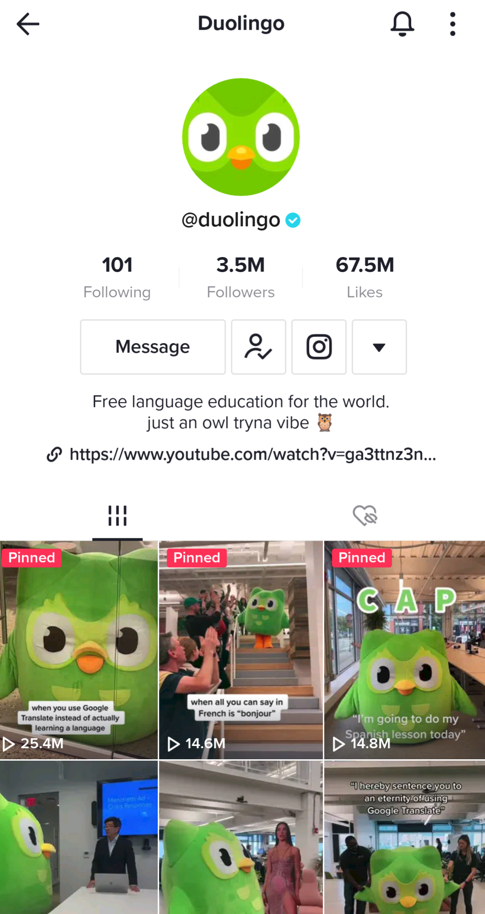
Social media success stories like Duolingo on TikTok represent a great example of how creative content can take your brand to new heights.

Duolingo's Tiktok profile page showing a following of 3.5 million and examples of their videos

Again, you can’t obsess over what your competitors or legacy brands are doing. Creativity often comes in waves and the same rings true for social marketers. We recommend being proactive about coming up with ideas through strategic, ongoing brainstorming.

Solutions:

  • Use social listening tools to uncover conversations and content your target audience is buzzing about.
  • Create a social trendspotting strategy to get a head start on movements and crazes before they blow up.
  • Collaborate with creators or brand advocates who’ve succeeded in driving engagement recently. What can you learn from them?

9. Responding to call-outs and crises

Social media has become a go-to channel for customer service and support.

Likewise, it’s a popular place to keep your customers in the loop in case of a crisis or hiccup with your product or service.

Screenshot of Tweets from a brand, @tryramp, sharing that their service is experiencing issues and then providing an update when the issue is resolved.

However, simply pushing out announcements isn’t enough to keep your customers happy.

Social customer care is an all-or-nothing game. If you only respond to a select few engagements, you risk getting called out for ignoring others. Ignore a high-priority message and you run the risk of setting off a brand crisis.

Speeding up your social media response time is an easy way to build transparency with your audience, but that alone is not enough. You should also ensure you’re responding to the full spectrum of messages that land in your inbox—that includes the good, the bad and the ugly.

Solutions:

  • Develop a specific social media crisis plan to handle events involving serious backlash without getting overwhelmed.
  • Stay up-to-date on common customer concerns, questions and trending topics. Use what you find to craft canned responses that still feel personal.
  • Make a point to personalize your customer responses (even when using messaging templates). Custom greetings and sign offs can make a digital interaction much more human.

10. Lack of growth, direction or strategy

Running social with a limited budget can feel like swimming against the current. It takes twice as much effort to meet performance objectives, let alone exceed them.

Choppy economic conditions have created roadblocks on many of the standard paths to growth. That doesn’t mean that your social performance is beyond your control. To pave a new way forward, marketers must prioritize and embrace new organic strategies that combat stagnation.

Solutions

  • Prioritize ruthlessly. Dive into performance reports to identify the ideal content mix that delivers the best possible results. Use what you learn to pushback on competing priorities that don’t contribute to top-line growth.
  • Encourage alignment between marketing and finance by connecting the dots between your strategy and the overall business plan. The more familiar you are with how you can contribute to top-line goals, the easier it will be to successfully make the case for budget.
  • Support customer retention by reallocating efforts toward social media community management. Focus on delighting your biggest fans. These brand advocates will help you build social proof, which in turn will help you attract new customers in an authentic and relatable way. By fostering brand loyalty, your business can also enjoy the advantages of recurring revenue.

Which social media challenges do you need the most help with?

Building an impactful social presence doesn’t happen by accident.

If you’re hitting roadblocks or don’t know what to do next, don’t panic. It happens! After all, challenges are just stepping stones to achieving your goals.

What truly matters is having a proactive plan in place to continually propel your social media presence forward. Addressing the social media challenges above isn’t something you can afford to shy away from.

If you’re ready to overcome these 10 common obstacles, download our suite of free social media templates to get started.

The post What to do when faced with these 10 social media marketing challenges appeared first on Sprout Social.


from Sprout Social https://ift.tt/YR2iT1s
via IFTTT
How to Schedule LinkedIn Posts in 2023

LinkedIn’s rising popularity has made it a leading social network for brands to gain authority and target potential customers. With 82% of B2B marketers achieving their greatest success on LinkedIn, it’s clear that LinkedIn is a preferred channel for B2B marketing.

With so many brands competing for users’ attention, managing and growing a LinkedIn account takes enormous time, dedication, and effort. So, it’s no surprise that many marketers find building a LinkedIn presence overwhelming.

If your content marketing strategy includes posting on LinkedIn, you may be wondering how to handle this task effectively. That’s where social media scheduling tools come in, allowing you to deliver content that meets your brand’s needs, while being timely and relevant to customer interests.

In this guide, we’ve compiled some helpful tips and best practices for scheduling your posts on LinkedIn.

Table of contents

Why should you schedule your posts on LinkedIn?

Scheduling your LinkedIn posts allows you to optimize the execution of your LinkedIn strategy, which provides an efficient means to distribute your content on the platform effortlessly.

1. Saves time and reduces unnecessary workload

Establishing a LinkedIn presence requires much time, effort, and dedication, which is time-consuming. By scheduling posts, you spend less time on manual publishing on LinkedIn, freeing you up to focus on higher-level tasks such as content creation, analysis, and engagement.

2. Helps you stay consistent

Scheduling your posts allows you to plan content in advance and set them to post at the right times. This way, you maintain a consistent LinkedIn presence without staying on the platform or worrying about posting daily.

3. Grow your profile engagement faster

Scheduling your LinkedIn posts will help you reach your audience at the best times when they’re most active on LinkedIn. When scheduling your post, you can choose the best time when your audience will be available and target your posts to show up at that time, thereby increasing engagement.

4. Keeps you organized

Keeping track of your LinkedIn account can be stressful, especially if you manage multiple accounts simultaneously. Scheduling your posts takes the burden off of that. All you need to do is create your posts and schedule a publishing time.

5. Helps you scale your LinkedIn efforts

Growing your audience on LinkedIn comes with much dedication and time. Scheduling makes it easier. When you schedule your posts, it gives you the advantage of posting consistently and growing your account.

How to schedule posts on LinkedIn

There are two ways to schedule posts on LinkedIn. First, you can schedule your posts with the LinkedIn Native scheduler, but that comes with some restrictions we’ll soon discuss. The second option is scheduling with a third-party platform like Sprout Social. Let’s discuss each one in detail.

How to schedule posts with LinkedIn Native Scheduler

  1. Log in to your LinkedIn account and click the ‘Start a post’ box at the top of the homepage.
Linkedin start a post feature
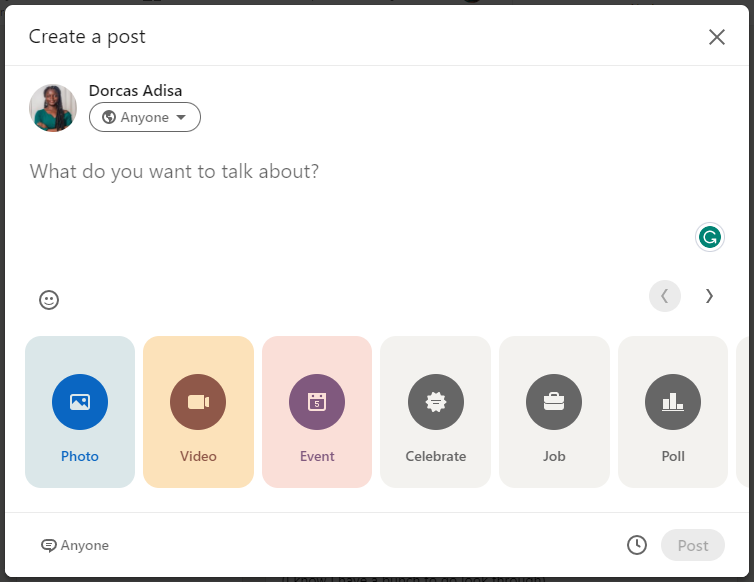
  1. Enter the body text of your post and attach any images, videos, or documents. If you’re attaching an image, you can edit it, tag other users, and add alt text. If you’re posting a video instead, upload a customized thumbnail and an SRT file for subtitles.
linkedin native create a post feature and scheduler
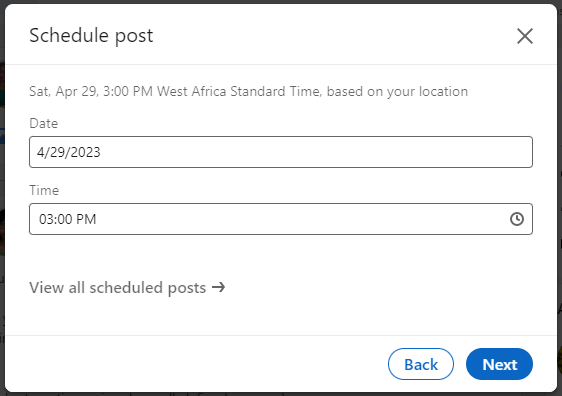
  1. Click the clock icon in the lower right corner to open the schedule dialog.
  2. In the scheduling dialog, select a date and time from the dropdown to schedule your post. If your audience is in a different time zone, consider scheduling in their time zone.
schedule post linkedin feature within the platform
  1. Select ‘Next’ to save your schedule settings and return to your post preview.
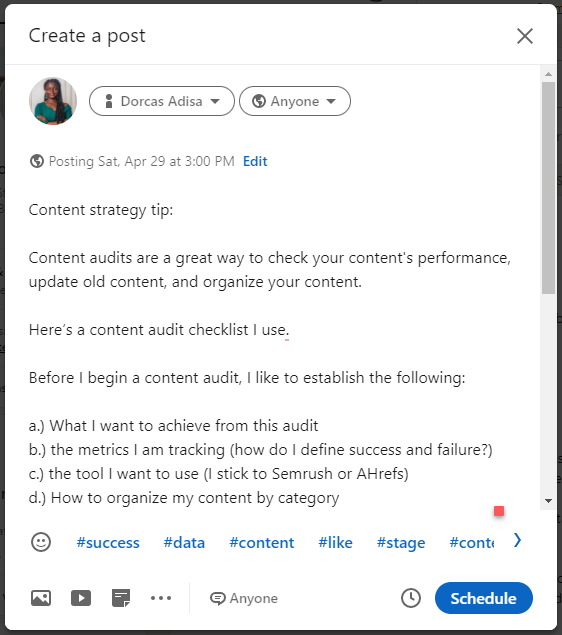
  2. When you’re all done, review your post for spelling errors, formatting issues, and ensure it matches your brand’s guidelines and tone. Also, review your image and hashtags to ensure they’re accurate for your post.
linkedin post example
  1. Click the schedule button, and you’re done.
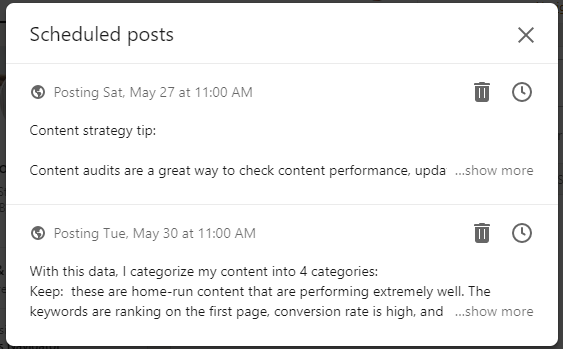
  2. If you wish to view scheduled posts on LinkedIn, click ‘View all scheduled posts’ on the schedule dialog to see all scheduled posts.

In the scheduled posts window, you can preview all scheduled posts and their publish dates. To delete a post, simply click on the delete icon, and if you want to reschedule, click on the clock icon to select a new date and time.

view all scheduled posts

That’s it. You’ve scheduled your first post on LinkedIn.

Limitations with the native LinkedIn scheduler

While it seems straightforward to schedule content with LinkedIn’s native scheduler, there are several limitations that social media managers should be aware of. These limitations may hinder your ability to schedule posts effectively.

  • Limited scheduling options: LinkedIn’s native scheduler provides fewer options for scheduling posts. For instance, it only allows scheduling for up to three months in advance. In addition, LinkedIn doesn’t allow bulk scheduling, which means that each post must be scheduled individually, which is time-consuming.
  • Limited analytic features: LinkedIn’s analytics only provide a basic insight into your LinkedIn content performance and audience behavior. It doesn’t give you much freedom to track your audience demographic data or metrics like click-through rates, follower growth, or engagement rates.
  • Inability to tag people and pages: Using LinkedIn’s native scheduler prevents you from tagging people or pages in your post. This could limit the reach and engagement of your post.
  • No support for managing multiple LI accounts at once: With the native LinkedIn scheduler, you can only schedule posts for one account at a time. This is a drawback, especially for social media managers who manage multiple accounts.
  • Limited posting options: You can’t schedule articles, newsletters, multiple image posts, events, or polls with the LinkedIn scheduler. This has to be done manually.
  • Limitations on approval collaboration: The LinkedIn scheduler discourages the collaboration of teams in real-time. Posts can only be made and seen by one person, so every review, approval, or collaboration must be done outside the tool.
  • Posts cannot be edited after uploading: Once a post has been scheduled for upload, it can’t be edited. In the event that any corrections need to be made, you would need to delete the entire post and repost it.

How to schedule posts on LinkedIn using Sprout Social

An alternative to scheduling posts with LinkedIn’s native scheduler is to use a social media scheduling tool like Sprout Social. Here’s how to do it:

Create your LinkedIn post

The first step is to create your post. Before writing, be clear on the goal of the post and how it will benefit your audience. A good LinkedIn post starts with an attention-grabbing hook, which could be a question, a story, a compelling statement, or statistics.

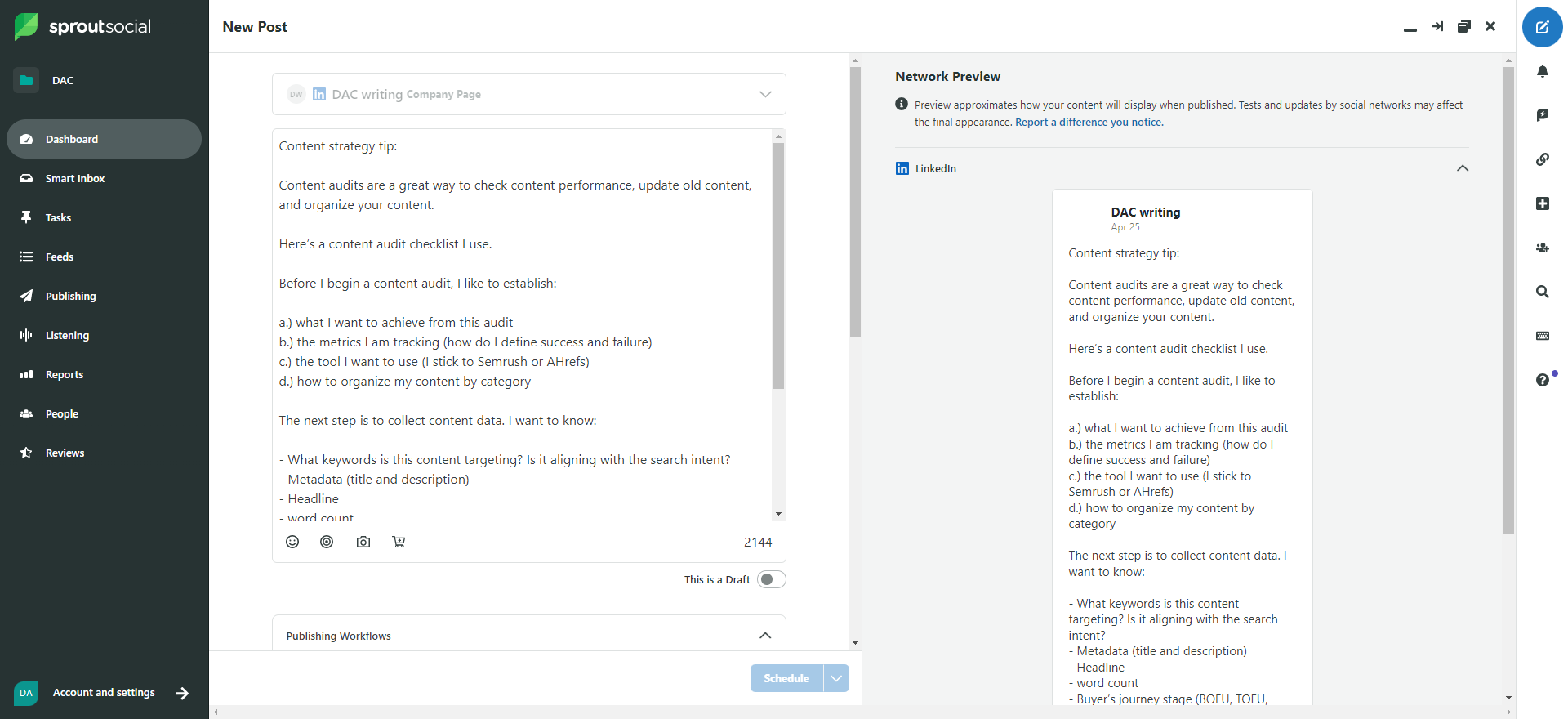
On the Sprout dashboard, click the Compose icon to open up a new post. Input your post in the text box provided and format it for a better reading experience. You can also add emojis or product links. Use relevant hashtags if possible.

On the right side, you can preview changes to your posts to see the outcome on LinkedIn in real-time.

sprout social new post preview

Add media to your post

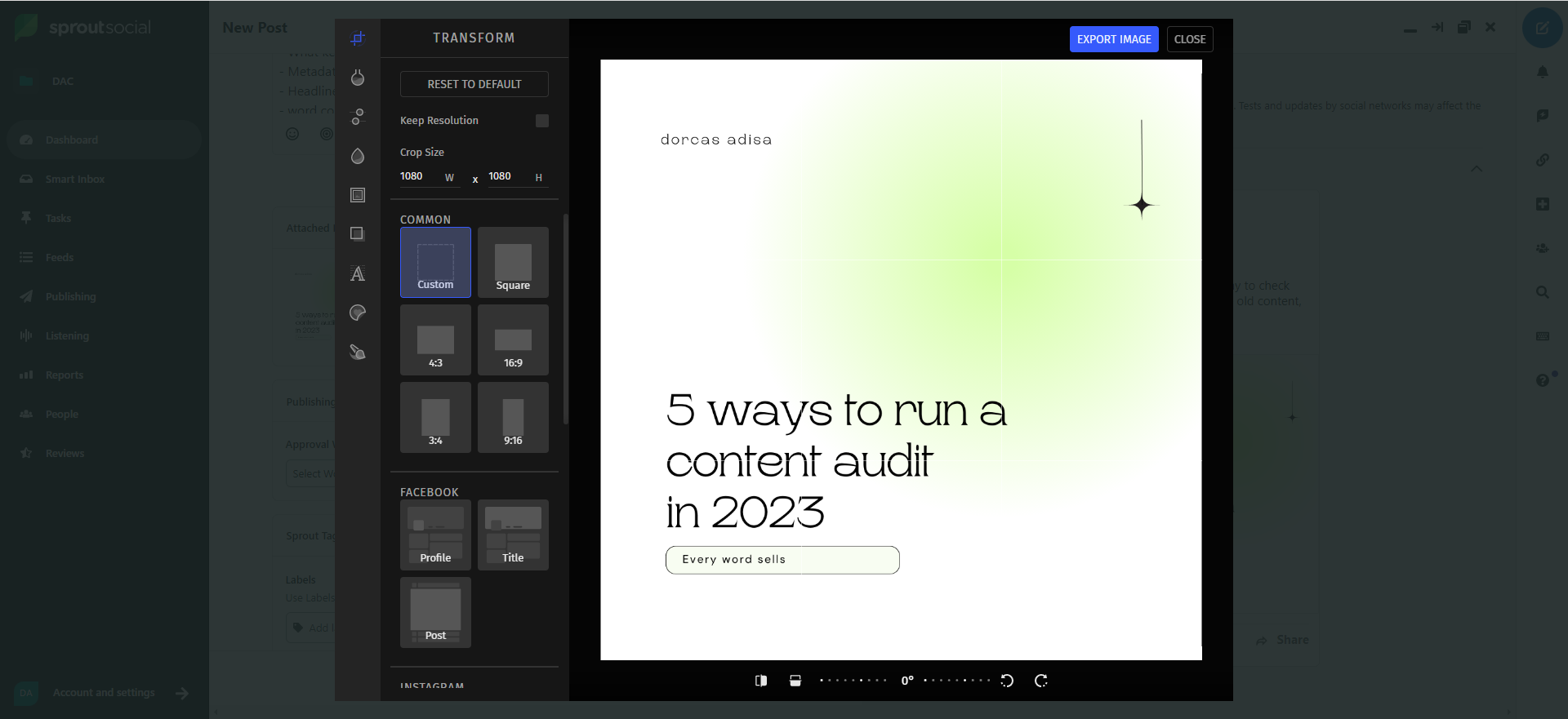
Upload approved media content to your post to make it stand out. This could be an image, video, or document to enhance your post and make it stand out. After uploading, you can edit your images on Sprout with the integrated image editor tool or resize them using our social media resizer.

sprout social post image editor

Here, you can crop the image size and add filters, frames, new texts, overlays, or stickers. Once you’re done, export the image to save your changes.

You can also add descriptive text to your image to provide additional context, information, or details to the viewer. Include relevant keywords related to your image or post to improve the searchability of your post and increase its visibility to a broader audience.

Preview and optimize your post

After editing your post, click the profile picker to select the LinkedIn profile for your post. Sprout Social allows you to manage multiple LinkedIn accounts at once and lets you post on a company or personal page.

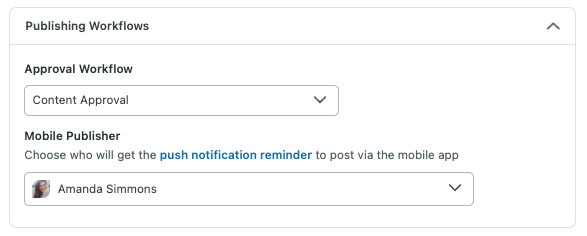
Set up approval permissions for collaboration and approval of each post. This is useful for social media teams and marketers who need their clients’ or managers’ feedback on posts before they go live.

publishing permission workflow

Finalize your post

After your content is optimized, you can finalize it for publishing. This includes submitting content for approval, saving it as a draft, or publishing your post immediately. Contents needing approval can be saved as drafts until all reviews are complete.

On Sprout’s calendar, you can view, share, and collaborate on your monthly scheduled content in a calendar view. You can add notes to each comment from another team member. And if you’re bulk scheduling your posts in Sprout, you can view all your scheduled posts at once and correct them accordingly.

Schedule your post for publishing

Once you’re all set, select when you want the post to go out. You can publish your post immediately, auto-schedule with Sprout Queue, or schedule it for later.

Pick a specific date and time to schedule your posts. Better still, take advantage of Sprout’s tool, ViralPost, to pick optimal times when your audience is most active on LinkedIn.

You can also auto-schedule your posts with Sprout Queue to fill engagement gaps and publish posts automatically throughout the day. You don’t need to input a time or day when the post will go live; Sprout Queue takes care of that for you.

5 Tips for Scheduling Your LinkedIn Posts

Ready to start scheduling your LinkedIn posts? Consider these five tips to help you effectively schedule your LinkedIn posts.

1. Know your audience

Before posting on LinkedIn, define who your ideal audience is. You need to know: who are you talking to? What do they do? What do they like? A generic response like “CEOs” or “marketers” won’t do. You must dive deeper and answer specific questions like:

  • Location: get clear on your audience’s location so you can customize posting times to when they’re most active.
  • Professional details: Find out what they do and their position.
  • Buying power: Find out their role in the buying process. For example, content heads often suggest project management software for their team.
  • Industry: What industry are they currently in? Do they use familiar lingo?
  • Content type: Study the content types they engage with. Pay attention to the content that gets the most shares, likes, comments, and reposts. This will give you an idea of what topics and content types resonate with them.
  • Online behavior: Pay attention to the type of content they engage with. Find out what content gets the most shares, likes, comments, and reposts. This will give you an idea of what topics and content types resonate with them.

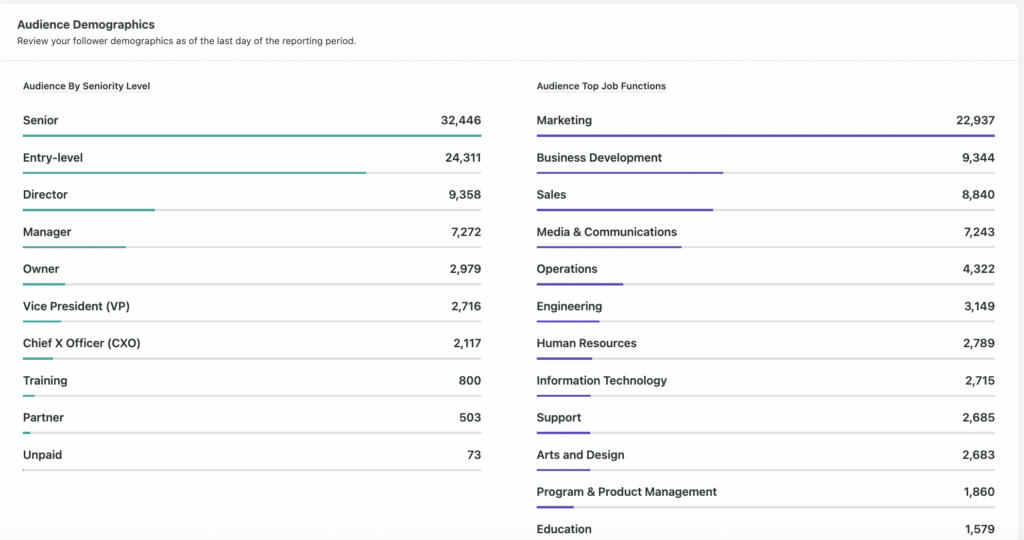
With the social listening tool on Sprout Social, you can collect in-depth data about your audience. Research your audience by location, seniority, and job function to know who you’re reaching.

social media audience demographics


2. Monitor and optimize your posting timing

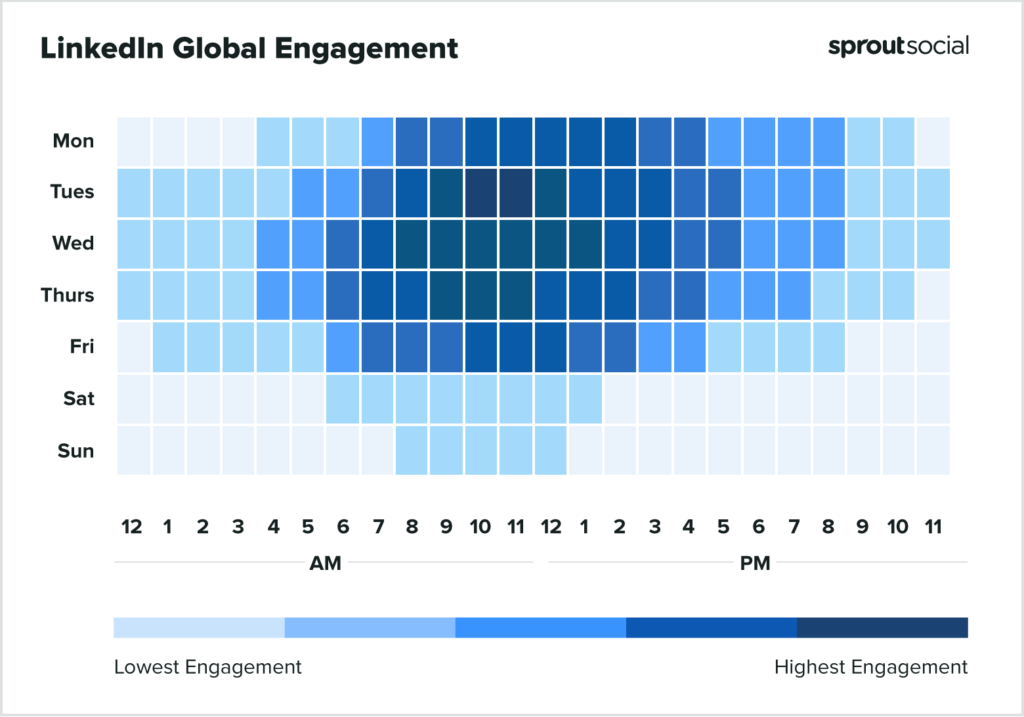
The best time to post on LinkedIn is during optimal hours, when your audience is most active and likely to engage with your post. Our research at Sprout Social found that the best times to post on LinkedIn could vary depending on the industry and demographics.

heatmap of scheduled post times and engagement during those times

However, on average, the best time we found to post on LinkedIn is 10 a.m. on Tuesday. But don’t let this restrict your posting schedule to this time. Keep a close eye on your LinkedIn analytics to determine which posts perform well and adjust your posting schedule accordingly.

3. Experiment with different content types

The best post types on LinkedIn can differ depending on your industry. We studied 3,000 LinkedIn posts and found that long-form “how-tos” perform 31.5% better than every other content type. This is unsurprising, as LinkedIn is a community of professionals who share ideas and learn from one another.

However, we also found that posts with a single image perform 2x better than text-based posts and have a 98% higher comment rate, whereas posts with videos get 5x more engagement on LinkedIn. This means uploading video content from webinars or tutorials would perform well on LinkedIn.

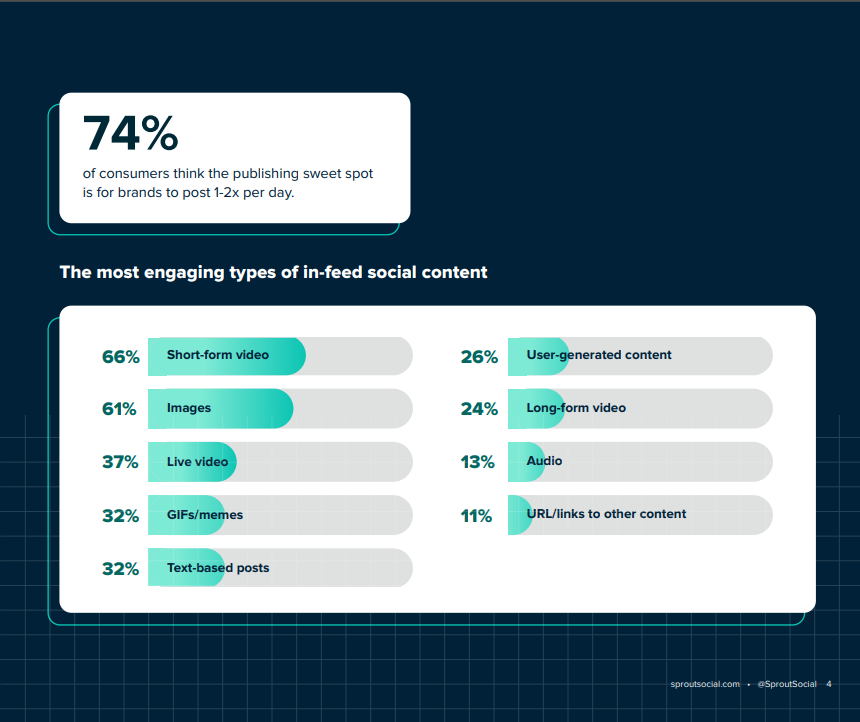
In the content benchmark for 2023, we also researched content types that perform well on social media, not just LinkedIn.

linkedin most engaging types of in-feed social content comparison table

Experiment with different post formats to find your audience’s sweet spot for engagement. Depending on the vibe, you could choose to alternate content types for each posting day. For example, posting a meme gives off a relaxed feeling, which fits into a weekend mood. Meanwhile, text-based posts, videos, or slides would fit well for other days.

But if you’re still clueless about what to post on your company’s page, check out this post on LinkedIn’s best practices for marketing professionals.

4. Take time to engage with your audience

Scheduling a post is one part of a successful LinkedIn strategy; the other is engaging with your audience. Engaging with your audience humanizes your brand and fosters a positive customer relationship. This helps you gain credibility, build authority, and increase brand loyalty.

Also, engaging with your audience increases your account’s visibility on the channel. Think of it this way: the more you show up in the comment section, the more people engage with you, which gets more eyeballs on your profile.

You can engage with your audience by:

  • Leaving meaningful comments on people’s posts
  • Reposting content that is meaningful and true to your brand
  • Replying to comments on your posts
  • Responding to questions, comments, and messages

5. Optimize your LinkedIn marketing strategy with data

At intervals, study your LinkedIn analytics to measure what’s working and what’s not, so that you can adjust your content accordingly. Sprout Social provides in-depth social media analytics and reporting features to help you measure your content performance, track your brand mentions, and monitor your competition.

Don’t just create multiple posts in advance without looking at past results. Leverage data to:

  • Analyze your best-performing posts and how you can re-create them for more success.
  • Break down your least-performing posts and list possible mistakes.
  • Optimize your LinkedIn strategy to suit the audience’s needs.

Optimize your LinkedIn Strategy with Scheduled Posts

Scheduling your LinkedIn posts enables you to plan your content in advance to ensure more consistent follower engagement. Without it, you’ll have to manually post your content on LinkedIn, which can be time-consuming and insufficient.

Regardless of how good you think your LinkedIn content strategy is, it’s always best to schedule posts in advance so you can implement a consistent and strategic content calendar.

Want to start scheduling your LinkedIn posts? Sprout Social’s LinkedIn scheduler makes it easy to schedule posts on LinkedIn. Sign up for a free 30-day trial today!

The post How to Schedule LinkedIn Posts in 2023 appeared first on Sprout Social.


from Sprout Social https://ift.tt/MfxTkZm
via IFTTT

How to capture the full impact of social media on healthcare

The road to wellness isn’t linear. Neither is the road to social media maturity. The COVID pandemic was an unanticipated crisis for the healthcare industry, but one that opened organizations’ eyes to the crucial business impact digital and social media marketing can have.

Social can tackle some of the biggest problems the healthcare industry is facing. Employer branding efforts can help ease some of the nurse attrition pains providers are feeling. When new threats emerge, healthcare organizations can take to social media to educate the public on how to protect themselves. When medical misinformation starts brewing, social media is a direct line to setting the record straight with patients.

Social media can impact every arm of your business. But an effective social strategy isn’t possible without strategic investments. Attempting to integrate social media without investing in the proper tools and infrastructure is setting yourself up for failure. When healthcare organizations choose the right partner, they get back precious time and resources to focus on the most important objective: connecting communities with quality care.

The rising importance of social media for healthcare

Healthcare companies have to educate, understand and regularly communicate with their communities to make an impact. Unlike other industries, those communities span generations, each with specific platform and message preferences.

Public health threats don’t care about content calendars, meaning that healthcare companies have to be prepared at all times. As misinformation proliferates and breeds mistrust, healthcare professionals need to be able to engage in dialogues and fact-check to keep their communities safe and informed.

Managing these priorities requires consistent strategy and execution, understanding of and communication with your audience and frequent reporting on your progress. None of that is possible with legacy social media management solutions. Social media for healthcare is complex. Companies have to invest in advanced social media management resources to minimize the chaos.

3 ways to maximize the ROI and impact of social media on healthcare

Healthcare companies that intentionally embed social media throughout their operations will reap the ROI—but not without the right infrastructure.

Sprout Social commissioned a Total Economic Impact™ study conducted by Forrester Consulting to quantify the potential impact of investing in Sprout for social media management. Here are findings from the Forrester study, along with three ways an intuitive platform like Sprout helps generate concrete business results.

1. Customize your content strategy

Audience segmentation can get complicated quickly. Every demographic needs healthcare and every demographic uses social media. Multi-generational synchronicity across your content strategy is key. The family matriarch who primarily uses Facebook requires a different touch than the cousin who spends his time on Twitter or the daughter who is only scrolling on TikTok. Tailoring the message to both the audience and the platform becomes overwhelming without the right tools. For organizations that manage multiple profiles, it gets exponentially harder.

Sprout Social gives organizations the flexibility to tailor their content for each account—plus the peace of mind that all teams are adhering to a cohesive strategy and tone.

According to the Forrester study, over three years, Sprout’s centralized platform enhanced social media teams’ productivity by 55% in year 3, driving a total of $973,000 in savings for a composite organization representative of interviewed customers.

Large health systems with profiles for different locations and divisions can ensure their team is rowing in the same direction. For example, our publishing suite and Asset Library make it easy to duplicate posts and quickly tweak the message based on platform and audience. Since your entire social team is in the same tool, everyone has visibility into your overarching messaging and can align their tasks accordingly.

A screenshot of Sprout Social's create new campaign feature, where users input information about a campaign—from the name to the duration to the brief.

Sprout’s campaign management features simplify the burden of planning, monitoring and optimizing social content initiatives across your team. Campaigns allow you to group posts into categories, whether you’re tracking by audience, subject, event or something unique to your organization. Campaign reporting gives quick visibility into performance in real time or retroactively.

2. Retain patients with efficient, effective service

Healthcare moves fast and companies don’t have the luxury of being uninformed. When every second counts, your team needs swift access to what matters.

One dissatisfied patient airing their grievances on social media can quickly turn into thousands. If the story strikes a chord, your inbox can become flooded with inquiries and complaints from people throughout your community. According to our 2023 Content Benchmarks Report, health, wellness and fitness brands receive an average of 120 inbound engagements per day—and those messages only increase on a news-heavy day. When something goes wrong, customer service teams can become overwhelmed and run the risk of sending out inconsistent replies or not responding at all.

Sprout’s Smart Inbox is prepared for these situations, with customizable controls to let you know when an issue or crisis is unfolding. Spike Alerts can give you time to catch your breath and come up with a response plan while Automated Rules can help you manage the load. If there’s a touchy subject that comes up frequently, you can use saved replies to make sure you hit the right notes every time. Our integration with Salesforce Service Cloud gives customer service teams relevant patient context to guide their interactions, without having to leave the platform.

A screenshot from Sprout's platform that demonstrates message spike detection. In the screenshot, you can see the Smart Inbox and a message alert that reads: We started detected a spike 5 minutes ago.

The piece of mind Sprout Social provides for customer service teams is immeasurable. The cost and time savings are not.

According to the Forrester study, customer service representatives saved over two hours a week with Smart Inbox, a $142,000 cost savings over three years for the composite organization.

3. Unite internal teams with a centralized tool

With a breadth of audiences to engage and campaigns to manage, healthcare social teams don’t have the time to spend maintaining disparate tools and manual processes.

Whether planning posts for a major initiative or a crisis response, you need a streamlined content approval workflow that doesn’t involve emailing documents or multiple Slack messages. Organizations also need accessible data to understand and continuously optimize the impact of their social strategy. Identifying what’s working, what to tweak and what to eliminate is vital—but it shouldn’t take hours poring over spreadsheets to find out.

Partnering with Sprout has helped us to keep pace with the pulse of our audience. Our strategy is most effective when we can clearly see what’s working or not working, where our audience is growing and how we stack up with our competitors. All this data is at our fingertips in Sprout—from the 30,000 ft. big picture view to the granular performance of a single post.
Rosanna Jensen
Marketing Content Manager, MultiCare Health System

By uniting your social operations into the same platform, Sprout Social shows you the whole picture, whether you’re publishing, messaging, auditing or analyzing. Avoiding Excel band-aids frees your team up to be creative and reduces the risk of burnout.

According to the Forrester study, moving away from disjointed legacy solutions and centralizing social media needs in Sprout Social drove $473,000 in savings over three years for the composite organization.

Realize the ROI of social media for healthcare

Organizations responsible for delivering always-on care need technology that can keep up. Healthcare teams have to invest in resources that unlock the full power of social across their organizations, be it to engage communities, retain patients or recruit future talent.

Learn more about how Sprout generates significant social media ROI by downloading The Total Economic Impact™ of Sprout Social study.

The post How to capture the full impact of social media on healthcare appeared first on Sprout Social.


from Sprout Social https://ift.tt/3ZM8sT5
via IFTTT

Friday, 19 May 2023

A beginner’s guide to social media marketing tools

The right social media marketing tools make a big difference.

And without the right social media marketing tools, your social strategy may fall flat before given the chance.

Good social media marketing can transform the success of your brand. But without an arsenal of specific, powerful tools that align with your organization’s goals, you can’t create or share valuable content, or attract new audiences or drive meaningful engagement.

The list of marketers’ responsibilities never stops growing. Luckily, we’re doing a detailed breakdown of what you should be looking for in each social marketing solution, so you don’t have to. Let’s dive in.

Looking for something specific? Use these links to jump to the section that fits your needs.

Table of contents:

Social media scheduling tools

There are several different types of social media scheduling tools available on the market for everything from composing posts to content curation to queuing and organizing.

But all of them have one common goal: Save time.

Every marketer knows that jumping back and forth between networks is a time-drain. Multiply that time across all of the social properties you manage, and your workday may be an uphill battle against content scheduling.

Reclaim your time, not to mention your sanity, by seeking out interactive tools.

Sprout Publishing Calendar

Social media scheduling tools make it easy to schedule and track every social message you’ve created across all of your individual social media profiles and networks.

Social scheduling tools also make it easy to work with a larger social team. By designating access to the proper managers, or by creating advanced permissions, you’ll ensure that no message is sent without a second look.

What can social media scheduling tools do?

  • Share the same content to multiple profiles and networks with a single click.
  • Use your unique social media data to automatically post content when your audience is most engaged.
  • Queue and publish the same post across multiple profiles in one step.
  • Plan and organize all of your social content with the help of a dynamic calendar.

Social media analytics tools

If your data is off, your social strategy is off.

Whether you’re tracking Facebook impressions, tallying up Twitter click-throughs, measuring follower growth on Instagram or evaluating your LinkedIn engagement—you can’t get the full picture of your efforts without the tools to analyze each piece of the puzzle.

Sprout Social Analytics Tools

Social media analytics tools are key to a cleaner big picture.

What can social media analytics tools do?

  • Track the performance of all your social networks and profiles in a single place.
  • Monitor the efficacy of social campaigns by tagging and reporting on them individually.
  • See which messages resonate most in your audience to guide your social publishing strategy.
  • Spy on the competition to see how their engagement and growth measures up to your own.
  • Track how quickly and efficiently you’re responding to messages that require a response.
  • See which of your team members are the most efficient and engaging and publishing content

Social media engagement tools

Engagement tools are the nucleus of your brand’s visibility, responsiveness and efficiency. With every instant, consistent interaction with your customers on social, you’re building loyalty.

Consider seeking out collaborative tools, like review management systems for customer comments, task management and tagging. The more organized your incoming customer messages are in the backend, the more seamless a user-experience you’re creating on the front-end.

Sprout Social Messages

What can social media engagement tools do?

  • Unify all of the messages from every network and profile in a single inbox.
  • Notify you when your profiles are seeing a sharp increase in mentions.
  • Assign messages to individuals on your team who are most apt to answer questions.
  • Show you the full social media history of someone reaching out to your handles.

Social media listening tools

Social media listening tools let you analyze and provide actionable responses to the insights you’ve collected through social monitoring, using more advanced features. Together, these tools help you meet higher standards for your customers and improve overall brand health

Sprout Social listening tools

What can social media listening tools do?

  • Show you the general sentiment social users have to a specific topic or brand.
  • Analyze entire campaigns quickly and enable you to create succinct reports.
  • Identify trends in your industry long before they become the newest hot topic.
  • Identify industry gaps, track share of voice and understand consumer attitudes toward competitors to uncover business opportunities.

Social media monitoring tools

Social media monitoring is often used interchangeably with social listening, which only does a disservice to the respective value of each method.

Social media monitoring tools help with the “what” vs. the “why” of listening. Think of it as the searching and collecting stage gathering of data from social conversations that will help you better understand your understand your audience and improve how you engage with them.

When looking for a tool, remember that monitoring is not an alternative to Enterprise-level listening tools. So first assess your needs: If you’re starting out and your immediate needs can be met with a tool that will help you track social media mentions, stick with reactive monitoring tools to avoid being overwhelmed by the full capabilities of a listening suite. If you’re looking to dive deep into customer sentiment and drive change in the way you understand your audience, a listening tool’s proactive nature will cover those needs and more.

It all depends on your business goals at hand, but any marketer will tell you that monitoring and listening tools in tandem is the way to go.

Sprout Social Product Image of Engagement Smart Inbox with Instagram Brand Keywords Selected

What can social media monitoring tools do?

  • Bring all your messages from your Twitter, Facebook and Instagram profiles into a single stream.
  • Enhance your social media monitoring with Brand Keywords that uncover valuable social engagement opportunities.
  • Configure the Smart Inbox with profile, message type, keyword and date filters to quickly find what you need.
  • Create custom tags and apply them to incoming messages to better organize and report on social monitoring efforts.

Social media automation tools

The trick to helpful automated marketing is not relying too heavily the automated tools to do what a human should, but rather to identify the repetitive tasks that can be automated without compromising the user experience. That will free you, the human, up to handle the more challenging or sensitive items.

It’s a common misconception that automation tools are meant to make the social marketing process a hands-off experience. But that’s not true. They’ll certainly save you time and effort, but they won’t replace the marketer’s brain behind the brawn.

To start out, consider integrating automation tools like social media chatbots into your social marketing strategy, to streamline customer service across Facebook and Twitter. With a bot, you can quickly create logic-based replies to your customers’ most frequently asked questions.

Sprout Social Product Image of Bots Builder Twitter Bot with Customer Care

What can social automation tools do?

  • Create rules to automatically flag or archive inbound social messages to clear your inbox.
  • Increase your response rate by showing you suggested replies based on your typical social behavior.
  • Evaluate how effective your social marketing is with automated feedback requests.

Facebook marketing tools

If Facebook is a part of your social media strategy, you’ll want to make sure your marketing tool belt is stocked. From everything you need for publishing content, engaging with your audience and analyzing your results, these tools will help you transform your Facebook strategy.

With all the algorithm changes, figuring out how to boost Facebook engagement is a priority for every social media marketer. Use these tools to plan, execute and analyze the perfect Facebook marketing strategy.

A Facebook dashboard is the central hub for your data and analytics. Read through this guide to learn why a dashboard is so important, which metrics to include and the tools you need to build your own.

Facebook competitors report Sprout Social

What can Facebook marketing tools do?

  • Simplify your Facebook posting by scheduling messages to automatically publish.
  • Delegate or remove access to users to manage your Facebook presence as a team.
  • Give access to a Facebook CRM, allowing you to cater messages to individuals.
  • Report on your Facebook performance across all of your profiles.
  • Dig into your Facebook competition to see how you stack up.

Twitter marketing tools

Plenty of Twitter tools have come and gone over the years. So how do you know what software is worth investing your time and money? These roundups will give you plenty of reliable and proven marketing tools for Twitter so every piece of your Twitter marketing strategy is valued.

Sprout Social Twitter trends report

Tired of buying Twitter tools you only use for a week? Bad software wastes time and money–even if the tool is free. We’ve compiled a list of 10 great tools for everything from scheduling Tweets, running Twitter Chats, automating processes and more.

Which Tweets get the most engagement? What’s the age range of your audience? Who’s liking and Retweeting you the most? Use the tools in this list to answer all these questions and never be left in the dark about your Twitter analytics again.

What can Twitter marketing tools do?

  • Manage multiple Twitter profiles from a single location.
  • Schedule months of Twitter content from a single social calendar.
  • Provide historic data on interactions with your social media followers.
  • Monitor all of Twitter for mentions of your brand or products.
  • Run detailed reports on your Twitter marketing to showcase internally.

Instagram marketing tools

Looking for the best apps to edit photos before sharing them with your audience? Or maybe you need data on how well your campaigns are performing. Having the right Instagram marketing tools handy makes it easier to engage with your audience, create better content and analyze your efforts.

Instagram business profile sprout social

It’s time to do a deep dive into what is and isn’t working for your brand on Instagram. Brands know they need Instagram, but how do they measure and make sure the platform works? Use these seven Instagram analytics tools to measure engagement, audience growth, hashtag stats and more.

Engaging your audience at a glance with eye-catching images is key to Instagram success. Master every element of producing great-looking visuals for Instagram with these apps for every situation.

What can Instagram marketing tools do?

  • Manage and publishing engaging content from a single place, including desktop.
  • Benchmark your Instagram performance with deep analytics.
  • Monitor the network for hashtags to leverage or messages that need a reply.
  • Measure your overall performance to prove the value of Instagram internally.

Targeted solutions, broader business

When done right, social media marketing can bring remarkable success to your brand. With the right tools, you can create, curate, publish, schedule, analyze and so much more. And all of that doesn’t only amount to more efficient work, it means bigger business—attracting new audiences, driving brand awareness and increasing engagement.

Ready to dominate the social landscape? Start filling your arsenal with the right tools. If you need help figuring out where to start, try a free trial of Sprout Social or get in touch with one of our social media professionals today!

The post A beginner’s guide to social media marketing tools appeared first on Sprout Social.


from Sprout Social https://ift.tt/leUE4vC
via IFTTT

Thursday, 18 May 2023

10 advanced social media copywriting best practices

Social practitioners wear many hats as they balance emerging networks and formats. Yet, strong social media copywriting skills remain the foundation of bringing a social strategy to life.

Whether you’re writing for a massive audience on an established platform or building a niche community on a vertical network, it’s important to refine your copywriting skills to reach your target audience. According to Rachael Goulet, Sprout Social’s Director of Social Media, “Whichever social networks you use, effective writers know how to tailor their writing for different audiences and platforms.”

In this article, we offer 10 actionable tips for copywriting on social media with advice from our social team peppered in to help you level-up your skills and engage your audience in meaningful ways.

  1. Create post templates
  2. Recycle your content
  3. Lead with a hook
  4. Write with accessibility in mind
  5. Use active voice
  6. Experiment with longer posts
  7. Test CTAs throughout your content
  8. Embrace the rise of AI in copywriting
  9. Analyze your metrics
  10. Invest in copywriting tools and training

Know your audience, brand voice and competitors

Before putting your hypothetical pen to paper, it’s important to have a foundation that guides your approach. Social media copywriting varies greatly by industry and brand. What works for a hamburger juggernaut will most likely fall flat for a government agency Consult the competitive analysis and research you’ve done on your audience to inform your copywriting strategy. Answer key questions like:

  • What kind of content does our audience want from our brand? How do they expect us to sound?
  • How do our posts address customer pain points?
  • What niches or subcultures does our brand resonate with?
  • What are competitors doing right? What are they missing?
  • What tone are competitors using? What does their voice sound like?
  • How is our audience reacting to competitors’ content?

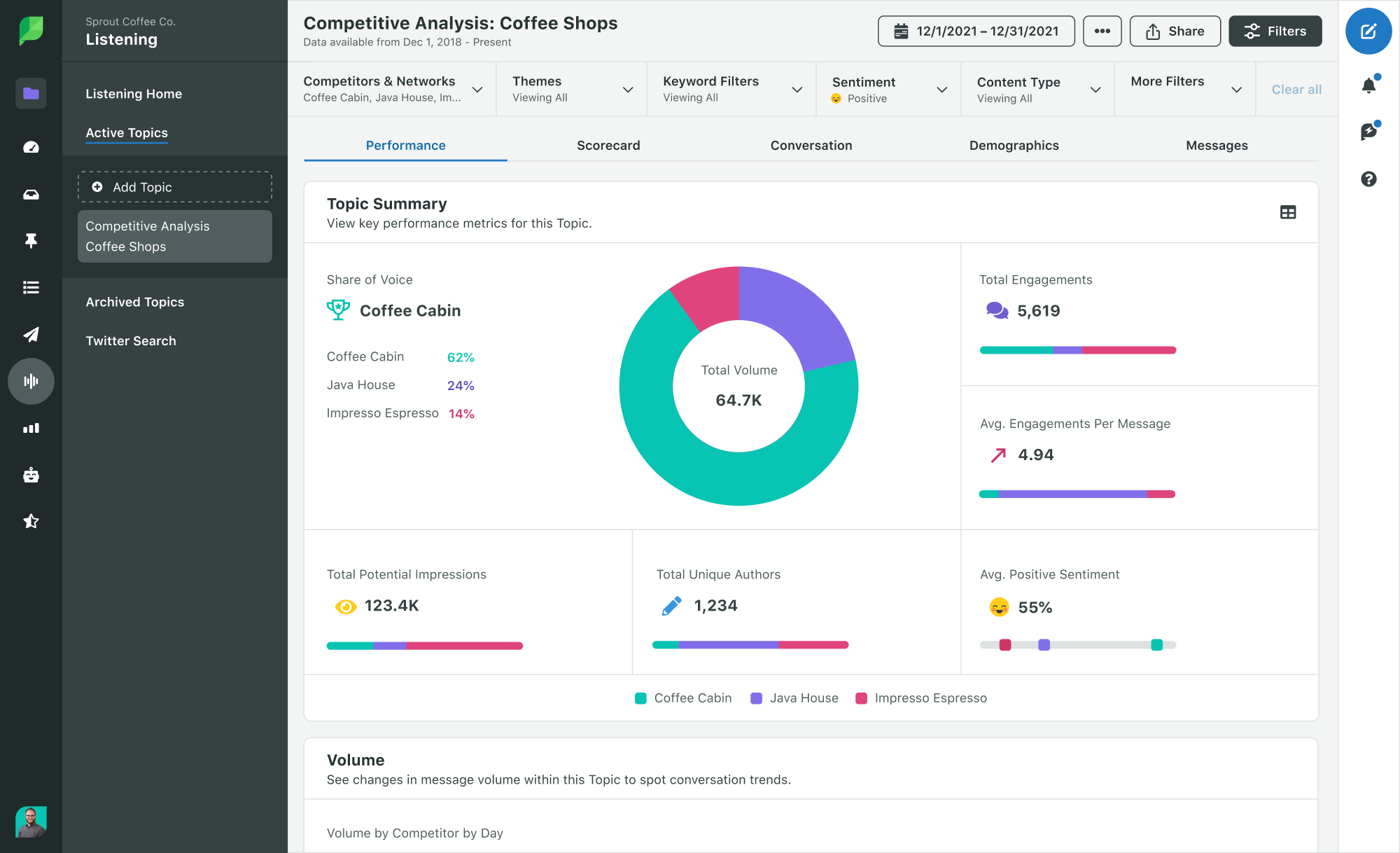
Sprout’s competitor reports and listening tools expedite this research by identifying what kind of content works best on social for your audience and industry. They enable you to track your competitors’ key metrics like audience growth, engagement and post volume for each network, then compare them against your profiles so you can benchmark your performance. They also empower you to dig into trending conversations, and gain consumer insights that will help you differentiate your brand.

An example of a competitive analysis listening report in Sprout

This research also informs your brand voice and helps you refine your unique style guide. Carve out an authentic, distinct voice that will help you improve brand recognition, build loyalty and differentiate you from the competition.

Your social media style guide should encompass all things copywriting—from grammar, mechanics and tone to how to approach writing for different platforms, audiences and formats. For example, the Sprout Social style guide, “Seeds,” provides specific direction for everything from embodying the Sprout voice to writing for different channels to describing the technical details of our product.

Be sure to consult teams across your org, like your creative and strategy teams, to ensure your voice accurately reflects your brand’s values and goals. Invest time into building a guide upfront to help you streamline and standardize copywriting in the future. Read our post that delves into creating elevated style guides to get started.

With this direction, you’ll know how best to embed your brand voice into your social media copywriting while meeting audience expectations. And you’ll be able to apply these tips for social media copywriting more successfully.

1. Create post templates

If you’re constantly scrambling for new post ideas, try turning your best performing posts into templates. By using a tried-and-true post formula, you will save time and replicate your success without recreating the wheel.

Paramount+ uses this method on Twitter, hooking their audience with an engaging question or statement, then pairing the copy with branded hashtags, compelling calls to action (CTAs) and video teasers of their upcoming shows.

On TikTok, Paramount+ uses a slightly different formula, while maintaining their templated approach. They post nostalgic video clips from famous old shows streaming on their platform, and pair them with copy relevant to today’s pop culture.

Take a cue from Paramount+ by creating your own post templates.

To quickly identify which of your posts generated the most awareness or engagements, use a tool like Sprout’s Post Performance Report. The report provides a unified view of all your social networks, so you can see which posts performed best with your audience across channels. Narrow in on the key components of your best performing posts, and use them to build your templates.

2. Recycle your content

Repurpose, repurpose, repurpose. As Olivia Jepson, Sprout’s Senior Social Media Strategist shares, “We rely on the work done by other teams—like the research and writing done by the content team—to fuel our publishing calendar.” When copywriting for social, identify successful content your brand has created for other channels and tailor the message for social platforms.

For example, take an article that resonates with your audience and break it down in several different social posts.

  • Pull a stand-out quote or hot take from the article and use it as a post.
  • Write a one-sentence summary of the article, and share a link to it in your comment section or bio.
  • Share data visualizations from the piece as a carousel paired with key takeaways.

We used our article, about what your social team will look like in 2028, to generate each of these posts.

@sproutsocial

A strong social strategy means deeply understanding how #SocialMedia drives trends and overall change. ⚡️ #SMMs #MarketingTips #SocialStrategy

♬ original sound – Sprout Social

3. Lead with a hook

Staying on-brand doesn’t have to be boring. In fact, your copy should entice your audience to keep reading. Don’t be afraid to say something spicy or outlandish—as long as it’s relevant to the things your audience cares about. Just beware crossing the line into clickbait territory, and stay authentic to your brand voice.

Greg Rokisky, Sprout’s Social Media Strategist, advises, “When it comes to writing social hooks, swing big! Ask questions, spill a hot take, utilize a trending angle and give your audience something to agree or disagree with you about.”

Crafting a hook with these tips in mind will help you generate more engagement on your posts. As Greg says, “When in doubt write through a lens of empathy and authenticity. Ask yourself: What would make me want to stick around and read a post? Or engage in a meaningful way?”

To test what kind of hooks make a splash with your audience, use our creative testing template.

4. Write with accessibility in mind

Social media copywriting with accessibility in mind ensures an inclusive experience. Make sure accessibility is part of your overall strategy, and apply it to your social content—from copy to images to videos.

Here are a few best practices to keep in mind to make your social copy accessible, especially for those using a screen reader:

  • Make hashtags easier to read by using “CamelCase,” i.e., capitalize the first letter of each word in a hashtag. It should be #TeamSprout rather than #teamsprout.
  • Avoid all caps. Using all caps might make screen readers interpret the word as an acronym, disrupting the content experience.
  • Spell out acronyms the first time you mention them to avoid confusion.
  • Write in pain language. Avoid jargon and overly complicated words to make your content more accessible for those new to your industry, non-native speakers or people with cognitive disabilities.
  • Avoid run-on sentences. Keep your copy short and concise.
  • Present the most important information first. This is helpful for accessibility, and for writing more engaging copy.
  • Include @ mentions and emojis at the end of your post. 
  • Use special characters in moderation. Screen readers know to not read all special characters aloud, like ampersands. But too many special characters in your text can result in a confusing experience.

5. Use active voice

Passive voice clouds the meaning of your copy. Use an active voice to craft concise and actionable social content.

For example, take this sentence: “Diligent customer service professionals can’t be replaced by robots.” Now, let’s transform it with an active voice: “No robot can replace a diligent customer service professional.” The verdict? Active voice is clearer and will grab your audience’s attention.

To edit your social copy quickly, use a free tool that detects passive voice like the Hemingway Editor.

6. Experiment with longer posts

Social media copy is often short, sweet and to the point. Network character restrictions and consumer behavior shaped social into a fast-paced channel. But there are some platform-specific cases when long form posts drive more engagement.

For example, on a channel like LinkedIn, your brand can use long form posts to build your thought leadership and credibility. LinkedIn audiences are hungry for knowledge and, in recent years, have started blending their professional announcements with personal posts. They’re willing to invest time into reading compelling content, especially if it leans into human connection.

Greg advises brands to experiment with incorporating more long-form content into their engagement strategy. But he cautions not to overdo it. “Know the story you’re trying to tell, and don’t overcomplicate it. Focus on the pain points your audience is up against, and point to a solution.”

7. Test CTAs throughout your content

When copywriting for social media, it’s best to mix up your CTAs. Avoid too many sales-driven CTAs in a row, and test which phrases generate the most engagement from your audience. Consult our list of example CTAs to get started.

Tailor your CTAs to the customer journey and your content funnel. For example, in some cases, your CTA could be a call to engage on social: “Let us know what you think in the comments section.” Other times, your CTA might drive people to your website: “Click the link in the bio to shop our latest collection.”

CTAs should also vary by platform. While sharing a link works well on LinkedIn,  Facebook and Twitter, it’s best practice on Instagram to drive your followers to click the link in your bio instead. Pay attention to platform nuances like this that can have a big impact on your post performance and conversion rate.

8. Embrace the rise of AI in copywriting

Artificial intelligence (AI) isn’t going to take your job. Instead, embracing up-and-coming AI can make you a more productive marketer and copywriter by speeding up your content development process and helping you overcome writer’s block. Try inputting the link to your brand style guide and other examples of your brand’s content for the best copy outputs.

Of course, AI is not a flawless solution. While it can automate workflows and kickstart brainstorming, a human touch is needed to make sure your copy is appropriate for audiences. In our social team’s own experiment, they realized AI tools often fail to prioritize accessibility and brand guidelines, and can sound too robotic.

Ultimately, AI is meant to be a complementary tool. Use it to empower your team to do their best work, but it can’t replace your copywriting expertise.

9. Analyze your metrics

The art of social media copywriting doesn’t end when you hit publish. If you take a “post and ghost” approach, you will miss critical audience insights that can help you level-up your copywriting skills for your unique audience. After your content goes live, monitor how your followers react. Reflect on your performance by asking questions like:

  • Which topics generate the most awareness?
  • Do certain post lengths garner more engagement than others?
  • How well do certain CTAs drive conversions compared to others?

Use the findings to evolve your copywriting style and iterate on your content strategy. By using tools in Sprout’s Analytics suite, you can quickly access these metrics in real time. For example, you can use the Tag Performance Report to compare different CTA styles across platforms, and make adjustments to your copy.

Example of the Tag Performance report in Sprout

10. Invest in copywriting tools and training

Finally, strive to always be growing and improving as a writer. Copywriting is a skill that can be honed and tested. With the multitude of tools and services out there, it’s easier than ever to continuously improve.

Here are some of our favorite social copywriting resources:

Elevate your approach to copywriting for social media

Save these tips for copywriting on social media to keep the latest best practices top-of-mind. With some research, experimentation and refinement, you can evolve your copywriting skills and create a standout social presence. If you need direction narrowing-in on your brand voice, take our interactive quiz to discover your unique persona.

The post 10 advanced social media copywriting best practices appeared first on Sprout Social.


from Sprout Social https://ift.tt/Owd4y7m
via IFTTT