Tuesday, 8 December 2020

Exploring video length best practices for social media

It’s impossible to open up a major social platform now and not see a video post. Videos range from short promotional videos on Instagram to quick trailers on Twitter to longer livestreams on Facebook. Videos encompass a wide range of topics and are consumed by many people around the world. Between 2013 and 2018, video consumption online has increased at an average of 32% per year.

In a recent report, video completion rates increased from April to July, maintaining a growth of 11% year over year. This aligns with shelter-in-place orders from around the world and the increased number of people who stayed at home this year.

Videos are more important than ever in marketing and this is not a trend that’s going away anytime soon. To make the most out of your video marketing strategy, you’ll need to figure out which video length is best for your goals and social platforms.

General social media video best practices

These aren’t hard or fast rules and we all know that rules are meant to be broken sometimes. In 2019, the average global viewer spent six hours and 48 minutes per week watching videos, a 59% increase since 2016. More and more videos are being published, which means you’re competing against a lot of content. These best practices are a good place to start from if you’re just wading into video marketing.

Videos should be accessible

Not everyone watches videos with sound on. Adding captions or turning the auto-captioning feature on is the easiest way to ensure that your video is accessible in this area. Preview your videos to ensure they look good with or without sound.

Keep videos short

For the most part, people on social media have short attention spans. You need to capture their attention within the first few seconds. Drive your point across quickly and succinctly, don’t drag it on if you don’t need to. This general practice tip does vary across networks and types of videos, as we’ll see later on.

Optimize for social media

The social platform you’re posting on matters. While you could post the same video across multiple platforms, it’s not advised. Each video needs to be optimized for the platform that they’re on.
Graphic of three different Instagram in feed video lengths
Video sizing matters on where you intend the video to go within a specific network. Get familiar with social media video specs so you don’t make the mistake of putting a landscape video into Instagram Stories.

Recommended video length per social media network

Because videos are available on so many platforms these days, brands should know where to focus their efforts. In a 2019 study, 51% of social media users watched videos on Instagram, 46% on Facebook and 50% on Snapchat.

Statista table of percentages of several stats, including watching videos, based on social platform

Here are the ideal video lengths based on the network.

Facebook video length best practices

Facebook has a few different types of videos available to you. For example, Facebook livestreams can be as long as 8 hours. And Facebook says that most people will watch other video types to the end if they are 15 seconds long. One study found that if you want higher engagement, 2 to 5 minutes was the range to aim for.

Instagram video length best practices

Both Facebook and Instagram have Story videos available. Instagram Stories and Reels max out at 15 seconds, feed videos are at 60 seconds and IGTV videos at 60 minutes. Instagram feed videos are recommended at 26 seconds. Story videos can be strung together but the first few seconds are vital to ensuring video watch completion.

Twitter video length best practices

Twitter’s video length max is 140 seconds but they recommend videos be 15 seconds or less. According to Twitter’s internal data, Tweets with video had 10x more engagement than without video.

LinkedIn video length best practices

The maximum length for LinkedIn videos is 10 minutes but the network recommends that the ideal length depends on your objective. For brand awareness and consideration, LinkedIn says that a video under 30 seconds has a 200% lift in completion rates.

Pinterest video length best practices

Pinterest videos are relatively new and they’re maxed out at 15 minutes. The network recommends that you keep the videos at 4 seconds to 15 minutes for Pins and 6 to 15 seconds for ads. As for Pinterest Stories, those are maxed at 60 seconds

Snapchat video length best practices

While the maximum video length on Snapchat is 3 minutes for ads, the network recommends that you keep it within 3 to 5 seconds with the call to action in the first 3 seconds.

YouTube video length best practices

A network based entirely on videos, it’s reasonable to expect that the length will vary depending on what the viewer wants. There is a maximum of 12 hours per video, the longest of any network. Longer videos at a minimum of 10 minutes have been more popular lately, possibly because that’s the point at which creators are able to insert ads.
Google survey bar chart showing percentages of participants who used services to watch video
According to Google’s internal study, YouTube surpassed all other networks with 78% of those surveyed having watched a video on the network in the last 24 hours.

Different types of videos

The type of video you publish is directly tied to the objective you want that video to have. These types also affect the ideal lengths of the videos. While we did mention earlier that shorter is usually better as a general rule of thumb, it’s not always the case for videos like webinars and explainer videos.
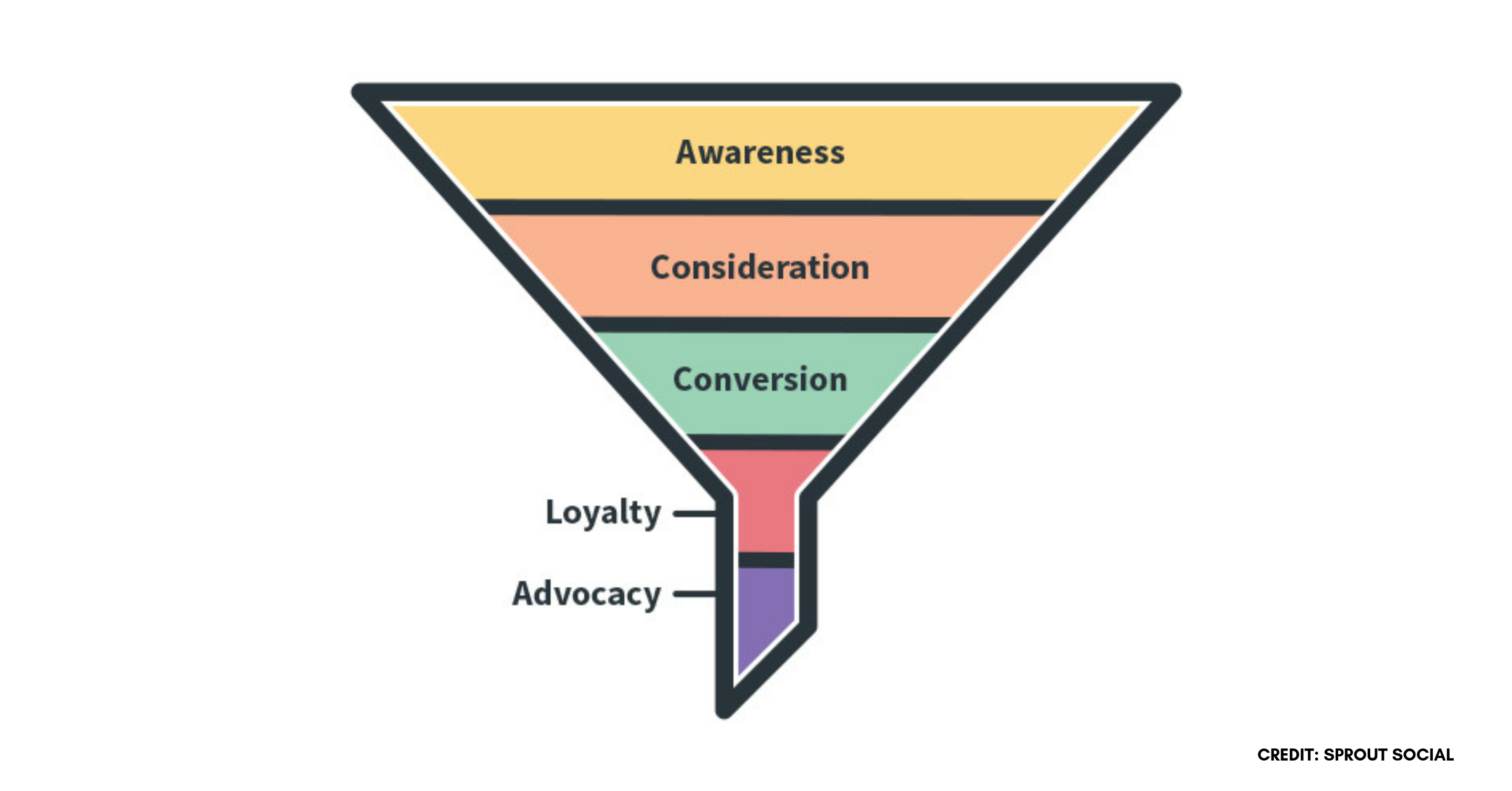
Graphic depicting the various stages of a social media marketing funnel
To identify where you want videos to go, consult your marketing funnel. Videos in the awareness stage are often short, such as product trailers. Videos in the loyalty and advocacy stage tend to be a little longer since they include types like how-tos or explainers. At this point, customers are familiar with your brand and have converted, so they’re more likely to engage and stay engaged with longer videos.

Live videos

Going Live is more and more popular for brands. Live Facebook videos that last over an hour have been found to increase engagement from 0.19% to 0.86% when compared to 5 to 10 minute video lengths. According to another study, users watch livestream videos at a rate of 10 to 20 times longer than other types of video content.

News videos

News videos are one of the most popular types of videos on Twitter. It’s recommended for news videos to be less than 15 seconds with you getting the point across even quicker.

Promo & teaser videos

Much like movie trailers, promo and teaser videos aim to get the viewer interested and hyped up about a product or service. These tend to rest on website homepages or on social media to hint at a new product. Because of the nature of this video, it’s recommended to keep it under 30 seconds.

Explainer videos

Explainer videos are usually animated and very short, as they function as a type of trailer for a business. The length should max out at 60 to 90 seconds and here, shorter is always better.

How-to videos

Forty-six percent of global viewers use video to learn something new. These types of videos tend to be longer in length not just because of the content but because people will search directly for them. Three to six minutes is a good starting point, though many videos do go beyond if the information is captivating.

Product videos

Product videos are some of the most popular videos out there. They include short product introductions, unboxing videos and feature highlights.
Marketing Charts' bar graph showing top online video qualities for consumers' decision-making
When asked about the ideal qualities in a video that were important to the decision-making process, 48% of consumers surveyed said that it reflects the specific products and services they own or are interested in.

Conclusion

As you can see, video lengths vary drastically between content types and networks. While it is generally best to keep videos short, long videos still have a place. To truly understand the video length ideal for your brand, you’ll need to experiment and analyze. It’s been said that humans now have an attention span shorter than a goldfish but if that was the case, long-form videos wouldn’t be successful. As long as videos are helping you achieve your social media goals, their length should not have a dramatic impact.

This post Exploring video length best practices for social media originally appeared on Sprout Social.


from Sprout Social https://ift.tt/2VSQFgP
via IFTTT

Monday, 7 December 2020

Drive More Referrals with the New Marketing Funnel

drive more referrals with john jantsch

In the first 5 minutes of this episode of The FWD: Thinking Show, John Jantsch — Founder of Duct Tape Marketing — said something that could shock a lot of marketers.

“As marketers, we’re not in charge of getting people to buy from us or creating demand,” said John.

But as he went on, his meaning became more clear.

“We need to organize our buyers’ behavior and create content that addresses that behavior.”

Jantsch created the concept of The Marketing Hourglass™ to explain how marketers can organize their buyers’ behavior in a way that improves their marketing strategy.

In this episode of The FWD: Thinking Show, Jantsch discusses how marketing has changed over the years, and how marketers can apply the new marketing funnel to gain audience trust, especially through email marketing. 

Episode summary

There’s no doubt marketing has changed over the last decade, but Jantsch explains the thing that’s changed most about marketing is how people buy. 

The stats speak for themselves:

  • 61% of mobile searches are more likely to contact a local business if they have a mobile friendly site.
  • 80% of potential customers won’t consider a business with low ratings.
  • 64% say watching a marketing video on Facebook has influenced them to make a purchase in the last month.
  • 92% of consumers will visit a brand’s website for the first time for reasons other than making a purchase.
  • 82% of small business owners claim their main source of new business is referrals.

Jantsch says that creating content that addresses customers’ and potential customers’ needs at each step of the customer journey ultimately drives more referrals and helps grow your business. 

Of course, a powerful part of creating and distributing valuable content is through email marketing. Listen to the rest of John’s conversation to hear his best email marketing tips and strategies for business growth. 

Podcast timestamps

3:40: Stats every marketer needs to know. 

7:45: As marketers we need to organize behavior.

9:00: Why referrals are just human nature. Create a journey so everyone who comes to learn about the company comes to be a referral source.

11:00: Content is one of the greatest ways to move people along the customer journey if you understand their goals and objectives around each stage.

12:00: What is the Marketing Hourglass™? 

16:18: What are some ways businesses can give value to people and use content marketing to build trust?

20:00: How do you transition from providing your audience value to selling?

21:45: How to find your customers’ pain points with interviews and reviews

26:30: How to make your buying experience seamless.

28:50: What role does email marketing play in creating an awesome experience and build trust?

32:00: How to make sure email automations feel personal. 

36:10: Why not everyone should be authentic.

38:15: The Self-Reliant Entrepreneur: a sneak peak.

Episode Resources

John Jantsch is a marketing consultant, speaker, and author of Duct Tape Marketing, Duct Tape Selling, The Commitment Engine, SEO for Growth, and The Referral Engine. He is also the founder of the Duct Tape Marketing Consultant Network. His latest book, The Self-Reliant Entrepreneur: 366 Daily Meditations to Feed Your Soul and Grow your Business, is a daily reminder to entrepreneurs that a better you makes a better business. 

Learn more about The Marketing Hourglass (and download the worksheet) here.

Follow John Jantsch on Twitter, and check out his company Duct Tape Marketing.

Check out interviews with marketing experts

We’ve had experts from all walks of marketing on The FWD: Thinking Show to share their expertise and guidance. Check out previous episodes and get expert advice by clicking the button below.

The post Drive More Referrals with the New Marketing Funnel appeared first on AWeber.


from AWeber https://ift.tt/2VPPMpm
via IFTTT

Social media analytics & reporting guide

Thursday, 3 December 2020

10 ways the Sprout Social mobile app lets you manage social from anywhere

There are few professions that require people to always be on the way social media marketing does. Between publishing content, providing customer care, reporting on social data and the many other responsibilities of social media marketers, there’s a lot to juggle every day. Not to mention, social media doesn’t slow down for your busy schedule, vacation plans, appointments or even a pandemic.

Fortunately, social media apps like Sprout Social help marketers like yourself keep up with the speed of social and enhance your efficiency. And no matter where you are, our Android and iOS apps bring the power of Sprout to the palm of your hand.

Unlike some popular social media apps, there’s nothing “light” about the Sprout Social mobile app. The depth of features and parity to the desktop version make it so that users can seamlessly switch to managing social from anywhere. Learn more about how this pocket-sized solution provides big-time benefits for social media marketers.

1. Publish content from anywhere

 Like any social media manager that pours their heart, soul, creativity and time into their content calendar, you probably want to remain hands-on to make sure each post goes out smoothly. With the Sprout Social mobile app, you can bring your calendar with you wherever you go. View all of the content you’ve scheduled, add notes to certain days, adjust send times, identify publishing gaps and more.

For Blue Corona, a full-service digital marketing agency, the Sprout Social mobile app is a must-have. “If you’ve ever found yourself needing to publish a company update while you’re away from your computer, Sprout’s mobile publishing feature makes it as easy as a few clicks on your phone,” said Blue Corona’s Digital Content Manager, Ryan Maloney. “You can post across different profiles and networks simultaneously, just as you would on their desktop app. The functionality lets me sit by the pool or spend time with my family, while also posting to Instagram for clients and checking their profiles.”

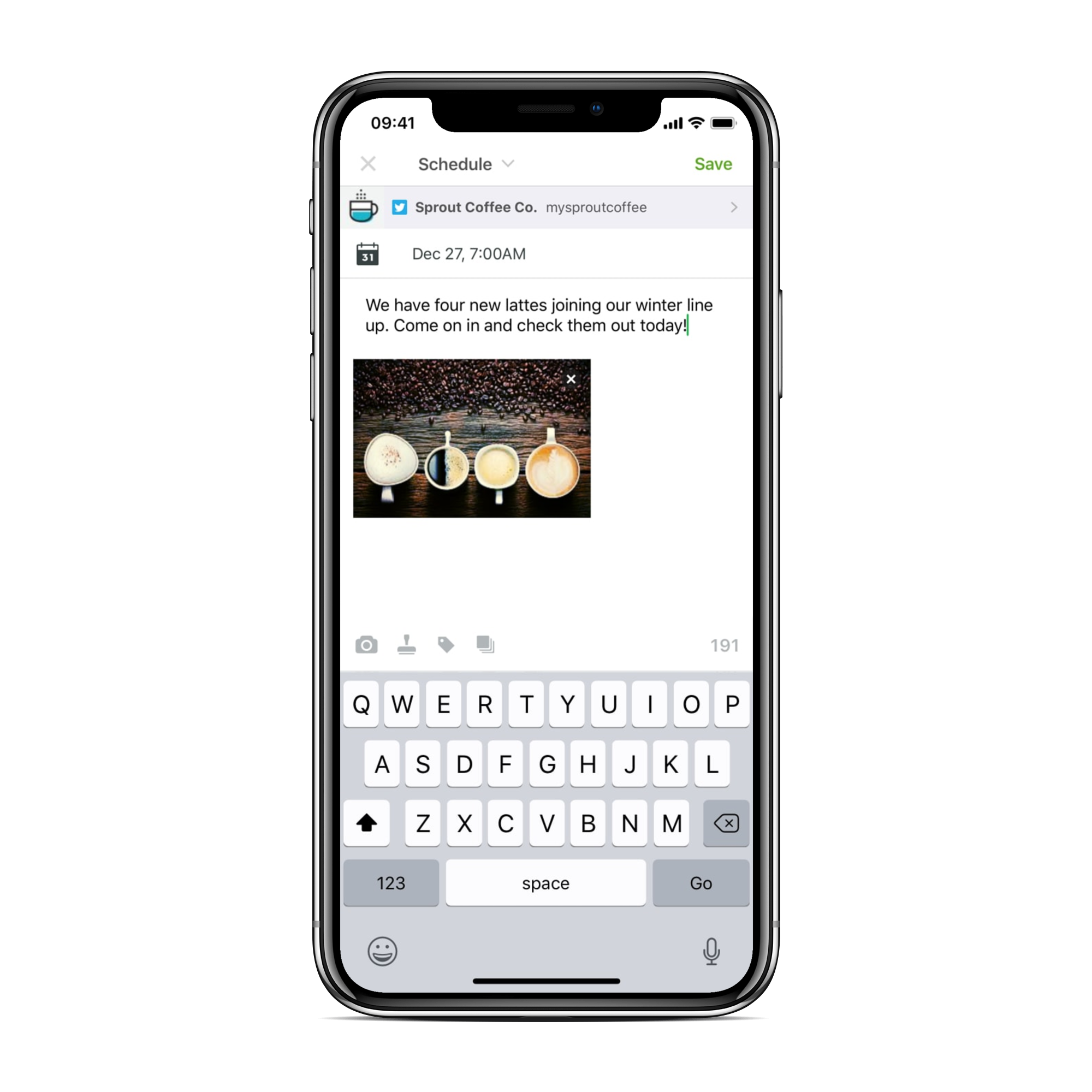
You never know when a content idea or clever copy will strike you. Rather than keeping notes in various locations or sending emails to keep track, use Sprout. In the mobile app, you can compose messages, save your ideas as drafts, schedule posts for later, or publish to your social networks right away. A social media app separate from native social platforms also ensures that you won’t cross wires with your personal profiles.

2. Protect your assets

Sprout’s Asset Library is a major, well, asset for our customers. When you’re publishing on-the-go, it’s a pain to have to hunt down on-brand, approved content assets in various email chains or other digital locations. What’s worse is when you have to wait until you’re back at your computer to craft your content. The Asset Library in Sprout’s mobile app allows you to remotely access the artwork, photos, videos, messages and Saved Replies that you’ve already stored there.

You can also add new assets to the library on the mobile app. So, if for example, you’re taking photos with your phone while covering an event, you can upload them to the Asset Library and you and your colleagues can access them no matter where you are.

3. Curate relevant content and fill your calendar

Adding third-party content to your content calendar can help make it more robust and balanced. Curating and sharing that content in the mobile app is simple. Why? Because the app finds content for you.

The same Content Suggestions tool in Sprout’s desktop app is available on mobile. In the main menu options, you’ll see “Find Content.” Then, once you add the categories and industries you’re interested in, Sprout creates an organized, sortable feed of links shared from a wide variety of sources. See an article that you want to add to your calendar? Just click “Send to Compose” to publish or schedule it.

Additionally, once you have Content Suggestions set up in the mobile app, you can choose to display a stream of trending content at the top of your calendar view, streamlining the process even further.

If you’ve found third-party content outside of Sprout in your mobile browser, social apps or other content platforms, no sweat! You can also use the share extension on your mobile device and send it to the Sprout app from there.

4. Bask in the glow of approvals

Mobile message approvals ensure that the necessary level of oversight and collaboration is possible, even if you and your colleagues are scattered. So, whether you’re a marketer who needs final approval from your manager before posting, you’re the one who does the approving or you just want visibility and transparency, you can do it on your mobile device.

Beyond publishing, you can also leverage approval workflows for community engagement and social response management. For the more complicated customer inquiries, you might need to get another set of eyes on your responses before posting. Or, if you want to make sure the person you’re managing remotely is responding with the proper empathy, care and brand voice, the mobile Smart Inbox, users can set up Reply Approvals.

5. Care for customers anywhere

A brand’s social media platforms are often the first places people will go for customer service. If your brand drops the ball though, it can be costly. According to the Sprout Social Index™, 49% of consumers will unfollow a brand due to poor customer service, so it’s worth the investment.

Speedy responses are a major factor for customers when deciding what is and isn’t quality customer service. These days, 40% of consumers expect brands to respond within the first hour of reaching out on social media. With Sprout’s mobile apps’ Smart Inbox, you can continue monitoring and meet the urgency of important moments for your customers.

The Humane Society of North Texas (HSNT) is busy day-in and day-out answering questions about their services, sharing their animals’ stories and finding forever homes for their furry friends. Sprout’s mobile app helps them stay engaged and connected when being at a desk or computer isn’t feasible.

“We mainly use Sprout’s mobile app to respond to comments on all our social media channels. We have thousands of followers asking questions that need to be answered in real-time, not hours, or even days later,” said HSNT’s Director of Communication, Cassie Davidson. “The app also saves the comment history on older threads, so if people follow up again, Sprout catches it and we’re able to respond.”

Saved Replies are another feature available in the mobile app that can improve the efficiency of your customer service. Store responses to frequently asked questions, comments or concerns in the Asset Library. Then, access them from the reply window in the mobile app to quickly respond to massive amounts of incoming messages with ease.

6. Get alerted when it matters most

It’s great to be plugged in, responsive and engaging with your social communities, but it’s easy to get overwhelmed and side tracked by excessive notifications. In the mobile app, easily pick and choose what alerts you receive.

If you hesitate to step away from monitoring your inbox but need to, receiving push notifications based on Inbox Rules and Spike Alerts might give you some peace of mind. Inbox Rules can be customized to your specific needs. So, whether you want to be alerted when a specific person messages your brand or notified when a recurring keyword or phrase comes up, you can easily create a rule for that. And with Spike Alerts, if Sprout detects a sudden influx of messages, you and your team members will be notified. If it happens to be customers just showing your content love, awesome! But if there’s a crisis brewing, you can get ahead of the curve, be proactive and monitor the situation.

7. Take a moment of pause during a crisis

You never know when a crisis might occur or where you’ll be when it does. In the event of a brand crisis, having tools that help you get your ducks in a row will save you and your team a lot of stress. In Sprout’s mobile app you can pause all content in your publishing queue with the touch of a button, if necessary. You can also disable comments from the app to quiet the noise a bit while you figure out your brand’s response.

8. Manage business reviews on-the-go

Whether your business recovering from a crisis or just chugging along, you can continue strengthening your brand’s online reputation from your mobile device. In Sprout’s social media app, you can monitor and manage reviews for all your business locations across Facebook, Google My Business and TripAdvisor.

And remember those notifications we talked about? Customize them so that you receive a mobile alert for high priority review types so you and your team can address critical new reviews in a timely fashion. Only want to be notified of 1- and 2-star reviews for specific profiles? You’re set! Looking just for the love, setup notifications just for 5-stars.

9. Measure success with mobile reporting

According to the Sprout Social Index™, 39% of marketers say they struggle to demonstrate the value of social across their organizations. Part of the problem is that marketers aren’t using their social data to its fullest potential.

With Sprout’s mobile reporting feature, you can quickly and easily generate the same high-quality, print-ready, Sprout reports you know and love directly from your mobile device. Once generated, you can immediately print, email or AirDrop reports to the right people.

“The mobile reports come with detailed information that assists you in analyzing your data and metrics while you’re away from your workstation,” said Maloney. “You can gain insights that influence your strategy and decisions confidently, regardless of where you are in the world. And I can always access and discuss my client’s data confidently thanks to the Sprout mobile app reporting tool.”

10. Put a pin in tasks and return to them later

Social media management apps like Sprout’s simplify team collaboration. If you’re off-the-clock and something comes up in Sprout that needs your attention when you return, your teammates in Sprout can assign specific Tasks to you in the app. Or, if you notice a message you want to return to later, you can put a pin in it by Tasking the message to yourself.

And for marketers at agencies, Tasks and other collaboration tools can help you keep up with client needs.

“We view our clients as partners, and any successful partnership requires collaboration. Sprout’s mobile app is the perfect solution for enabling Blue Corona to stay in sync with our clients in order to effectively publish, manage, and analyze content from our phones and devices,” said Blue Corona’s Digital Content Manager, Ryan Maloney. “With that flexibility and the capabilities of the app, we can execute our clients’ requests no matter where we are.”

Sprout’s mobile app lets you manage social from anywhere, but be mindful that you also need rest and recovery to avoid burnout. If you’re taking some well-earned time off, honor it, customize those notification delivery preferences and enjoy it!

If you’re interested in trying our mobile apps, start a free 30-day trial and download the app for iOS or Android today.

This post 10 ways the Sprout Social mobile app lets you manage social from anywhere originally appeared on Sprout Social.


from Sprout Social https://ift.tt/37xXF8j
via IFTTT

Wednesday, 2 December 2020

Email Marketing vs. Social Media: Which is Better?

Email marketing vs. social media: which is better?

Email marketing vs. social media.

"Email marketing is dead."

"That social channel is old news."

How many times have you heard phrases like this, pinning tried and true marketing channels against each other like gladiators gone to war?

I know my answer: too many to count. 

So called ‘experts’ have a bad habit of killing off marketing channels that have been around a while in favor of the ‘latest and greatest’ tactics and tools. 

But there’s a reason those older channels have been around so long. They work. 

This was the narrative that came on the scene when social media was just gaining popularity. Now that social media marketing is no longer new, we wanted to revisit the conversation of email marketing vs. social media, and explore how they’re different, how they’re similar, and how you can use them together to drive more awareness, engagement, and sales. 

Email marketing vs. social media: similarities and differences.

Email marketing and social media are both fantastic channels to engage your audience. While they both encourage two-way communication, the biggest difference is with email marketing - you own your list. You do not own your followers on social media. 

Even though your social following may be larger than your email list, there are more barriers to overcome with social media. For instance, social algorithms change all the time — which means it’s never guaranteed that your entire audience will see your message. 

And while it’s a scary thought, you also run the risk of a social platform shutting down and you losing all your followers. Think: Vine circa 2016. Those creators needed to rebuild their following elsewhere. Imagine if they grew their email list alongside their social audience…

Let’s break down a few more similarities and differences. 

How is email marketing different from social media?

One of the best things about social media is that it lets you reach new fans and audiences in a very public way. People can search for your topic or area of expertise and stumble upon your page at random or through a friend or family member referral.

But social media can get crowded. If you’re not investing in paid advertising, there’s a good chance your posts won’t get seen (let alone by the right people).

The good news? Engaging your audience is easy – all you have to do is add email to the mix!

The even better news? Your subscribers are likely to be more engaged because they opted in to hear from you.

You can set the timing and frequency of when you want to deliver content to your prospects. There’s no algorithm to work around. With email, it’s super easy to track who your content is reaching and how it performed. (And if you’re using a trusted email service provider, there’s no question about whether or not your content is actually getting delivered). 

Plus, according to emarketer.com, email marketing is the most effective channel for customer retention. 

 Email marketing is the most effective channel for customer retention

How are email marketing and social media alike?

Despite their differences, email and social media work better together.

Social media is a great way to reach new audiences and communities of people. Email is how to keep them engaged and nurture the relationship. It’s a win-win!

Plus, both social media and email marketing make great customer engagement channels. Stay competitive and use social media to provide quick responses to inquiring customers. 

Leverage both of their strengths to really amp up your marketing strategy as a whole.

3 social media strategies for email marketers

If you’ve been focusing on email marketing as your primary channel, here are some ideas to help you amplify your marketing on social media. 

  1. Invite them to your social media. Have a lot of email subscribers? Summon them to your Twitter feed. Big audience on Facebook? Request the pleasure of their company on your blog. Each person probably has one platform they’re most comfortable with. But they may initially encounter you on other channels. Give them the option to follow you where they prefer, or they may drop you altogether.
  2. Run a contest. Hold a contest related to your brand. You can do something as simple as asking for new product suggestions. Have your readers submit their answers either through email or social, wherever your audience is largest. Tell them you’ll announce the winners on the channel you’re trying to grow. Link to a place where they can sign up to meet you there!
  3. Incentivize engagement across channels. You may already have a large, active audience on Facebook or Twitter and be looking to grow your email subscriber list (or vise versa). Collect comments and requests from them on one medium and address them on the other. People who see your responses may click over to see what all the chatter is about.

Grow your email list with social media

So how do you get your followers to sign up for your email list? The answer is surprisingly easy!

You can share lead generating resources or content upgrades, like a webinar, PDF guide or ebook, as an incentive in exchange for their email address.

Another simple way to boost your list growth is to host a contest or giveaway with a valuable, relevant prize. Just remember to state that entrants will be added to your email list (or give them the option to opt-out).

If you’re wondering which social media platform is best for email list growth, there’s no one answer – it’s really dependent on where your audience is.

Twitter and LinkedIn as good places to start because they are the most “landing page” friendly. However, don’t overlook channels like Pinterest and Instagram. Both are really good places for finding new audiences through search.

If you’re willing to invest a little, Facebook ads are a great place to promote your list. You set the targeting and budget for your ads. You can also create lookalike audiences based on the profiles of your current email subscribers.

Related: The experts at Sendible answer your questions about social media marketing. 

Build a powerful marketing strategy

Now that you understand the benefits of both social media and email marketing, it’s time to create the perfect marketing strategy for you.

Need more help getting started with email marketing? Get the full experience by checking out How to Grow Your Business With Email Marketing. 

The post Email Marketing vs. Social Media: Which is Better? appeared first on AWeber.


from AWeber https://ift.tt/37wOsgz
via IFTTT

Growing Your Social Media Audience

Tuesday, 1 December 2020

How to do an Instagram audit that improves your performance

Have your Instagram engagement rates been dwindling? Perhaps your performance flatlines no matter what strategies you try. That’s when you need to take a good look at your profile and figure out what is or isn’t working for your brand. An Instagram audit helps you do just that.

Even if everything seems fine with your Instagram marketing efforts right now, an occasional Instagram audit still makes sense. It helps you get ahead of the curve and prevent issues before they arise. Are you seeing a sudden spike in fake followers? Is your posting frequency just not working anymore? You’ll get answers to all of these questions with a thorough Instagram audit.

This guide shows you how you can audit Instagram performance in various aspects. Let’s dive in.

Before the audit

Before you begin your Instagram audit, there are a few things you need to take care of. First, you have to be clear about why you’re using Instagram for your business in the first place? What is it you want to get out of your business Instagram account? In other words, what’s the goal of your Instagram account?

Your Instagram audit should help you determine how well you’ve been meeting those goals. And for this, you also need to narrow down on the key performance indicators (KPIs) that align with the goal. Perhaps you want to look at follower growth, interactions, traffic, etc. depending on what’s most important to you. And you could also have different goals and KPIs for different campaigns.

Figure out which KPIs matter to you for this specific Instagram audit so you know what to look for.

Audit your Instagram content

The key to Instagram success is sharing content that resonates with your target audience. So an Instagram account audit needs to start with a thorough assessment of your content. The goal is to figure out what kind of content works best for your Instagram strategy.

1. Check your content quality

Are you posting high-resolution images and videos? Or do you have too much blurry and low-resolution imagery? This could significantly drag your whole aesthetic down, not to mention your account credibility.

Following the recommended image sizes for Instagram could fix and prevent a lot of quality issues. Ideally, your images for feed posts should be 1080 x 1080 pixels and 1080 x 1920 pixels for Stories.

2. Assess your content relevance

For your content to resonate with your audience, it needs to be relevant to them. Does it align with their interests or address their pain points? Find out by going through comments to see what people are saying about your posts.

You can also check out your most successful posts and compare those posts to the rest of your feed. The native Instagram Insights tool will show you your Top Posts and Top Stories. Using this information, you can determine what type of content engages your audience the most.

3. Examine your posting frequency and schedule

Timing matters, especially when it comes to social media publishing. Are you posting too much or not enough? And most importantly, are you posting at a time when you’re most likely to reach your audience?

According to a Sprout Social analysis, Wednesday is the best day to post on Instagram. As for timing, 11 a.m. on Wednesdays and 10—11 a.m. on Fridays are the best times to post.

A heat map Sprout's analysis of the best times to post on Instagram, which could help with an Instagram audit of your publishing schedule..

Does your current posting schedule aligns with this? It would be wise to conduct an analysis of your own account to see when your followers are the most active and which posting frequency works best for you.

4. Check your overall content mix

Are you publishing a good mix of content types? Your Instagram feed should have a balanced mixture of promotional and non-promotional content as well as user-generated content. This helps create a well-rounded feed that accurately represents your brand.

Remember to switch between different content formats as well instead of solely focusing on photo posts. Videos, carousels, shoppable posts and IGTV previews should also be a part of your feed.

The Sprout Instagram feed consists of a good mix of employee highlights, useful tips, relatable posts and more.

The Sprout Instagram feed features a good mix of different content types, from images to carousels to video.

5. Go through your captions

Your captions give more context about your Instagram posts, so they should be consistent while aligning with your brand voice. During your Instagram account audit, make sure you go through the captions of your top-performing posts to figure out what’s working.

Do you keep them short or go a bit more in-depth? Are you asking questions? Do they have emojis? How many hashtags do you usually use? All of this will help you figure out what makes your posts engaging and how to replicate the results.

6. Analyze your hashtags

With hashtags playing a critical role in the Instagram algorithm, it’s crucial that your Instagram audit report also includes hashtag analysis. The idea is to figure out which hashtags you’re using and which ones are working for you. You can then use these insights to optimize your content strategy and future posts for better visibility and engagement.

Use Sprout’s Instagram Analytics tool to run a thorough analysis of your Instagram hashtags. This tool gives you a detailed breakdown of your most used hashtags and hashtags that drive the most engagement on your posts.

Sprout Social Reports dashboard highlighting Instagram hashtag performance

Audit your Instagram followers

An Instagram follower audit is another critical aspect of your Instagram audit. Auditing your followers helps you understand them better, so you can figure out how to share more relevant content.

1. Study your audience’s interests

To conduct an Instagram follower audit, first find out what your audience likes. What are their interests and preferences? Again, you can get demographics data from your Instagram Insights. This should give you some basic idea about what your audience might like.

To complement this, you can also conduct polls through your Instagram Stories or ask them questions in your captions. Don’t forget to check out the other accounts your followers are following. This can also help you make sense of their other interests.

2. Weed out fake/bot followers

A fake followers audit is another critical step. There are entire businesses that make money out of creating bot followers that people can buy to ramp up their following. These bot accounts often follow other accounts to seem a bit more authentic. And whether you like it or not, you could be a victim of fake follower invasions.

This means you’ll get disproportionate amounts of followers compared to actual engagements on your posts, further damaging your numbers. Tools like Fake Follower Check from Modash and the Instagram Audit Tool from Influencer Marketing Hub can help you spot these fake followers and weed them out.

Audit your Instagram profile and branding

Your Instagram account audit can’t be complete without an audit of your profile and branding. Make sure your Instagram profile aligns with your brand visual identity and that you maintain consistent branding throughout.

1. Check your overall feed aesthetic

Are you maintaining a consistent aesthetic throughout your Instagram feed? Some brands try to keep things consistent with brand colors or themes that align with the brand personality. So take a closer look at your feed and see if visitors can instantly get a feel of the visual identity you want to portray through the aesthetic.

2. Review and refresh your bio

Is your Instagram bio reflective of your brand identity? Does it have all the info you want your followers to know? Does it have updated links to your profile or landing pages? It’s good to occasionally review your Instagram Business Account bio to keep things fresh and relevant.

The Sprout Instagram bio explains what the brand is all about and what’s shared on Instagram.

Sprout Socials' Instagram bio clearly explains the brand's purpose

3. Check for branding consistency

Is your Instagram branding consistent with your branding across all social platforms? For starters, make sure you’re using the same profile image across all your social media profiles. And what about consistency in your profile name and handles? All of these factors play into your overall branding strategy, so make sure you occasionally review them for consistency.

Additionally, you should also use Instagram Highlights cover images that align with your brand’s visual identity. For Sprout, colors and graphics help maintain a consistent visual identity in the cover images for our Instagram Highlights.

The cover images for Sprout's Instagram Highlights feature colors and graphics consistent with the brand's visual identity

Gear up for growth with Instagram audits

Running an Instagram audit provides you with valuable insights of your marketing and content strategy. It’s the key to fueling Instagram growth and boosting your performance. And don’t forget to start out with a clear goal before you begin your audit so you know where to focus your efforts. If you need a little help with this, read our guide on how to set social media goals.

This post How to do an Instagram audit that improves your performance originally appeared on Sprout Social.


from Sprout Social https://ift.tt/2wLQSE3
via IFTTT