Thursday, 2 February 2023

How social media consistency drives business results

In 2022, Figo Pet Insurance went all-in on their organic TikTok strategy. They started posting four to five videos a week on the platform (an impressive goal for their scrappy team!) and their efforts led to audience growth, multiple viral videos and revenue-driving ads.

If you’re wondering how social media consistency can help you improve your social strategy, build your audience and contribute to revenue growth like Figo, you’re in the right place. In this piece, the team behind Figo’s social media presence shared their tips for maintaining a regular social cadence and translating results to larger company goals.

Why social media consistency matters for brands

Consistency on social media isn’t just nice to have: it’s a non-negotiable for long-term success. Here are the four leading reasons why social media consistency matters.

Practice makes perfect

Bridgett Colling, Director of Marketing and Communications at Figo, saw the opportunity to expand her brand’s TikTok presence. But she knew success on the app was only possible with volume and consistency.

“The most successful brands are the ones who create a lot of video content. They get the reps in and make content all the time. It’s a numbers game. So, that’s the approach we took to TikTok.”

Though posting up to five times per week was a stretch for her small team, Colling said it paid off by allowing them to hone their craft and really go for it.

The consistency allowed Cheyanne Rains, Figo’s Social Media Coordinator, to develop her own social media video template to make video creation more efficient. Many of the videos she creates—including their highest performing video—take 15 minutes to develop from start to finish.

@figopet

We know its hard to resist thise puppy dog eyes, but here are 10 foods you should always avoid feeding your dogs 🚫 #yesfigopets #pethealth #petsafety #petfood #dogsoftiktok #dogmom #petparents #fyp #foryou

♬ MI CHIQUITA – Alexander McCabe

Outperform your competition

Sprout’s data science team analyzed posting frequency across more than 30,000 Sprout customers and found that the industry average is 11 posts per day across all social channels. And on TikTok, providing your audience with fresh and diverse content daily is the best way to crack the algorithm and end up on the coveted #ForYouPage.

Bridgett saw this play out firsthand. “Even as a smaller, younger pet insurance brand, our consistency sets our performance apart from more established competitors.” She says Figo often matches or surpasses its competitors’ views, engagements and share of voice.

A screenshot of Sprout Social's Competitive Analysis dashboard that demonstrates how three competitors compare in share of voice, impressions, engagements and sentiment.

To track those metrics, Cheyanne uses Sprout’s Competitive Analysis Report (see image above) to compare Figo’s results side-by-side with competitors. The findings help Figo reinforce the value of social at their company and pulse-check brand health.

Make space to experiment

As Cheyanne puts it, experimentation was the theme of Figo’s 2022 video strategy. By posting every work day, she could identify which content types generated the highest impressions and engagements.

Cheyanne explains, “Trending sounds and memes related to pets and pets insurance drive the highest engagements. Listicles are also high-performing videos.” She returned to these formats again and again to produce a pipeline of successful content.

Even with solid success from these formats, Figo’s consistent posting cadence left space for new ideas, too–like their “Ask the Vet Tech” series, which amplifies their internal thought leadership and provides unique value to their community.

@figopet

Head to the link in our bio for more details about coverage for hip dysplasia in pets 🐶🐱 #hipdysplasia #petinsurance #figopet #askavettech #vettechtok #pethealth #doghealth #vetbill #fyp

♬ Pieces (Solo Piano Version) – Danilo Stankovic

A regular posting schedule empowers your team to never stop testing and learning. If you’d like to see another example, in Sprout’s TikTok testing strategy we analyze our highest- and lowest-performing videos to reveal how we should adjust our content moving forward.

Build an audience

Going viral on TikTok was an impressive milestone for Figo. But Bridgett pointed out virality wasn’t their number one priority. What’s more important than going viral is finding and building a genuine community on social media.

For Cheyanne, connecting with people required understanding the culture of TikTok. “People use TikTok to watch videos that average people make with their phones. Keep your videos as authentic as possible. Talk like a real person behind the screen and avoid a sales-y approach.”

The TikTok algorithm delivers a niche, personalized experience. To reach your audience, you must dig into the topics they care about and put out relevant content consistently. Cheyanne explains, “Stay on top of trends within your community. Not just trending sounds and memes, but the topics people are talking about. Pay attention to how you can relate them back to your brand.”

Sometimes relating to your audience can be a challenge. Cheyanne revealed a well-kept secret that will surprise Figo’s followers: she doesn’t have a pet. Gasp!

So how does Figo churn out so many adorable fur baby videos? By tapping into another important audience: their internal team. Cheyanne uses an internal messaging channel to source participants. The footage her coworkers provide helps her stay consistent and humanize Figo’s brand, like this meet the team post demonstrates.

Use social media consistency to grow your revenue

Once you’ve mastered social media consistency, use it to strategically increase your revenue.

These are the four steps the Figo team followed to launch their TikTok account and translate channel growth into revenue gains.

1. Get leadership buy-in

You can’t build a presence on any platform overnight. You need the long-term support of executives behind you—even before you start seeing results. Bridgett describes her CMO’s support as “vital” to her brand’s success.

Apply it: If you want to branch out to a new network or experiment with emerging technology, pitch your vision to leadership. Show them how opportunities on social media can drive long-term business value. Get them on board to allocate time and resources to your strategy.

2. Repurpose content efficiently

For a small team like Figo, repurposing successful content from their blog and other social networks was key to staying consistent on TikTok. This year, they’re expanding their focus to YouTube using the same method.

Apply it: When you’re trying to stay consistent on social, you don’t need to start from scratch. Maximize your existing assets and draw on the success of other platforms. You’ll save your company time and money, and increase your ROI (more on that soon). Plus, you already know the content resonates with your audience. Just be sure to meet community expectations on each platform.

3. Turn organic performance into paid amplification

As an experiment, Figo started running ads on TikTok in late 2021. The initial returns were minimal. Bridgett says, “TikTok didn’t start pushing people down the funnel until the organic presence took off.”

By 2022, Figo earned credibility and built a following, which made it possible to identify their best-performing videos and put money behind them.

Apply it: A consistent, organic posting strategy goes hand-in-hand with running successful ads. You need to post regularly to attract your audience and test what works (without blowing your budget). A hybrid paid and organic social media strategy drives long-term results.

4. Measure ROI and share your results

For Cheyanne, whose primary focus is increasing brand awareness, understanding the complex digital buyer’s journey is important. In her role, she uses Sprout’s reporting tools to demonstrate the fruit of her efforts. She combines her brand awareness metrics with paid ads results and revenue gains to tell the complete story of Figo’s success on TikTok.

A screenshot of Sprout's TikTok Performance Report that demonstrates the number of published posts, views and engagements from one TikTok account.

Apply it: With a tool like Sprout, you can access all your social media analytics and generate reports to share with your team in one place. For example, the TikTok Profile Report captures how many posts you published, how many views you received (including paid) and your total engagements.

Use these rich sources of social data to calculate your ROI and socialize your results internally.

Start your free Sprout trial

Streamline your publishing and reporting with Sprout Social

Even though consistency is key to growing your presence (and your revenue), we know you face barriers to posting regularly. Limited time and resources. Lengthy approval periods. Uncooperative algorithms.

Sprout’s publishing and reporting tools empower you to streamline your internal processes, keep up with best practices and simplify social media consistency. Just as our tools are Figo’s secret sauce to accomplishing their posting goals, you can use them to power your posting strategy.

Social Listening

Sprout’s Listening tools help you build a deeper understanding of your audience and competitors. Learn what’s trending in your industry and how you stack up against your top competitors when it comes to sentiment, share of voice and engagement.

A screenshot of Sprout's Listening Conversation Overview which demonstrates trending keywords and hashtags popular on social.

Publishing Calendar

The Publishing Calendar makes quick work of drafting, approving and scheduling social content so your team has more time to focus on fine-tuning your strategy. Like Cheyanne says, “I schedule posts in Sprout so I don’t have to worry about it the rest of the week.” Sprout gives you the tools to replace time-consuming tasks—like logging into the native apps—with automated ease.

A screenshot of Sprout's weekly publishing calendar view that makes it easy to see all upcoming posts at a glance.

Gain insights from social data

Sprout’s Analytics tools speed up data collection and distribution so brands can focus on the KPIs that matter, inform strategy and prove ROI.

Use data to enhance your strategy and craft effective paid and organic campaigns. With analytics alongside publishing and engagement tools in the Sprout platform, you can easily turn insights into action.

A screenshot of Sprout's Cross-Network Paid Performance Report which demonstrates total spend, impressions, engagements, CPM, CPE, clicks, CPC, conversions and CPCon.

Now that you are well-versed in the benefits of social media consistency, learn how real brands combine insights from Listening and Premium Analytics to drive powerful results with their social data.

Start your free Sprout trial

The post How social media consistency drives business results appeared first on Sprout Social.


from Sprout Social https://ift.tt/5eaQdpx
via IFTTT

Wednesday, 1 February 2023

Presidents Day marketing, email and social media ideas to boost your sales and engagement

Presidents Day marketing, email and social media ideas to boost your sales and engagement

Presidents Day is a golden opportunity for your business to boost sales and connect with your customers. Whether you're a nonprofit, personal coach, sell music online, or sell through Etsy, there are many ways to capitalize on this holiday and make the most of the increased consumer spending that comes with it. 

According to a study conducted by the National Retail Federation, shoppers spent an average of $139 on Presidents Day which is about 25% more than on an average day. This is likely due to the popularity of the holiday, which encourages shoppers to take advantage of the sales and discounts offered by retailers.

To help you thrive this holiday, we’ve compiled the best marketing, email, and social media ideas from several top businesses to see what makes them successful during Presidents Day. From offering a sale, to hosting a patriotic-themed event, to creating a special menu, these ideas will help you stand out and make the most of the holiday. 

So, if you're looking to boost your sales this Presidents Day, keep reading!

8 Presidents Day marketing ideas

There are many creative marketing strategies that you can use to make the most of this holiday. Here are some effective marketing ideas that will help you increase sales and grow your business.

1 - Offer a sale or promotion

Create a Presidents Day sale or promotion, offering discounts on products or services. This is a classic sales boosting tactic during Presidents Day. By offering discounts, you can attract more customers and increase sales.

2 - Have some fun on social media

Host a Presidents Day themed contest or giveaway on social media. This idea is a great way to increase engagement with your brand on social media and also drive sales.

3 - Make your email subscribers feel special

Offer an exclusive Presidents Day deal or coupon to email subscribers. This is a great way to reward your email subscribers and encourage them to make a purchase.

4 - Cross-promotions with other businesses

Partner with other businesses or brands to cross-promote Presidents Day deals and offers. Promoting to a partner’s audience exposes your brand to new potential customers and sales opportunities. 

5 - Host a patriotic-themed event or promotion

Consider hosting an event or promotion that has a patriotic theme. This could be a local parade, a concert, a food festival, or a community service project.

6 - Create a virtual game (also known as gamification) 

Create a virtual scavenger hunt of Presidential sites or historical locations related to the Presidents. We love scavenger hunts because they can take so many creative forms from video tours to virtual reality experiences that customers can access online.

Related: See how this company was able to create a virtual scavenger hunt around Times Square using AWeber landing pages

7 - Create a special Presidents Day item

Create a Presidents Day menu or special in honor of Presidents Day. This could be a dish or dessert that is inspired by a President or a dish that is named after a President.

Or create a limited edition product or package that is only available during the Presidents Day holiday. This could be a special flavor, a limited edition design, or a package deal.

8 - Run a flash sale

Running a flash sale is an effective way to drive sales by creating a sense of urgency and encouraging customers to make a purchase quickly.

25 Presidents Day social media post ideas

Posting on social media for Presidents Day can be an effective way for a business to connect with its audience and promote its brand. Here are a few reasons why it may be important for a business to post on social media for Presidents Day:

  • Increase engagement: By posting content related to Presidents Day, you can spark conversations and increase engagement with your followers.
  • Boost brand awareness: The right social media post can help increase your brand awareness by reaching a wider audience and exposing you to new potential customers.
  • Strengthen connection with existing followers: The more you connect with your audience, the greater connection you create.
  • Drive sales: By using Presidents Day as a theme for a promotion or sale, you can drive sales and increase revenue.

Here are Presidents Day post ideas that you can use on any social media channel. You can post these with an image or create a video for TikTok or YouTube.

Presidents Day social media post message ideas for a sale

  1. Honor our leaders and save big on our Presidents Day Sale! [insert sale details and link to your website]
  2. Celebrate Presidents Day with us! Take advantage of our special deals and discounts [insert sale details and link to your website]
  3. Patriotic savings await! Check out our Presidents Day Sale [insert sale details and link to your website]
  4. In honor of our nation's leaders, we're offering [insert sale details] during our Presidents Day Sale. Shop now [link to your website]
  5. Remembering our past, saving for the future. Presidents Day Sale [insert sale details and link to your website]
  6. Celebrate #PresidentsDay with a special sale or promotion at our store
  7. In honor of #PresidentsDay, we're offering discounts for military and veterans
  8. Leadership and savings go hand in hand. Check out our Presidents Day Sale [insert sale details and link to website]
  9. Honor the legacy of our past presidents by saving big on our Presidents Day Sale
  10. Celebrate the Legacy of Our Nation's Leaders with Our Presidents Day Deals - Get Great Savings Today!
  11. Celebrate Our National Leaders and Unlock Amazing Savings on This Presidents Day - Don't Miss Out!

Presidents Day social media post message ideas to honor the day

  1. Today We're Celebrating Our Great Nation and the People Who Make It Thrive - Honoring Our Employees and All Those Making a Difference This #PresidentsDay! 🇺🇸 🎉
  2. In honor of #PresidentsDay, our team reflects on the leadership lessons from past presidents that we apply to our business
  3. A day to recognize and appreciate the contributions of past American presidents to business and commerce
  4. On #PresidentsDay, we're grateful for the opportunities and freedoms afforded to us as a business in America
  5. Wishing you a happy and prosperous Presidents Day! #PresidentsDay
  6. Honoring the legacy of our nation's leaders on this Presidents Day #PresidentsDay
  7. Let's celebrate the vision and leadership of our past presidents on this #PresidentsDay
  8. Sending our best wishes for a happy Presidents Day! #PresidentsDay
  9. Remembering the contributions of our nation's leaders on this #PresidentsDay
  10. On this Presidents Day, let's reflect on the progress and success of our nation #PresidentsDay
  11. Happy Presidents Day! Let's take inspiration from the leadership of our past presidents #PresidentsDay
  12. Wishing you a day of reflection, appreciation, and inspiration on this Presidents Day #PresidentsDay
  13. May this Presidents Day bring you joy, hope, and a renewed appreciation for our nation's leaders #PresidentsDay
  14. Celebrating the diversity of our Presidential history on this #PresidentsDay and wishing you a happy one

Increase visibility by using a hashtag

The use of hashtags enable people on different social media channels to find your content. Here are the most popular hashtags to use for Presidents Day

  • #PresidentsDay
  • #HappyPresidentsDay
  • #PresidentsDayWeekend
  • #PresidentsDaySale

Presidents Day email ideas

Presidents Day is a busy shopping holiday, and many consumers are looking for deals and promotions. By sending a sales email, you can attract their attention and encourage them to visit your website or store.

Here are some tips on how to use email marketing to boost your sales on Presidents Day:

1 - Include discount codes and special offers

Make sure to include any discounts or special offers you're running this Presidents Day. This can include a percentage off discount, buy one get one free deals, or free shipping promotions.

If you're holding a Presidents Day event or sale in your store, make sure to include information about it in your email.

Here’s a great example from a furniture store.

Presidents day email example from furniture store Article

2 - Use a clear and compelling subject line 

Your subject line is the first thing that customers will see when they receive your email, so make sure it's clear and compelling. Use strong action words and include the main benefit of your sale or promotion.

Need some subject line ideas? Keep on reading for over 30 ideas you can use for your emails.

3 - Include a clear call-to-action 

Including a clear call-to-action (CTA) in your email, such as "Shop Now" or "Limited Time Offer" makes it easy for customers to take action and make a purchase.

Color can prompt an action too. Check out how Fender uses a bold red to draw attention to the CTA in their email.

Presidents day email example from Fender with strong CTA

4 - Use Presidents Day-themed graphics and images 

Have some fun with your Presidents Day email. Use images and graphics that are related to the holiday and showcase your patriotism. This can include images of past presidents, American flags, or other patriotic imagery.

Here are some Presidents Day images you can use for free in your AWeber account.

Close up of an American Flag
American flag
Abraham Lincoln statue at the Lincoln Memorial

5 - Send a reminder email 

Send a reminder email on the day of the sale or promotion. This can help remind customers about your sale and encourage them to make a purchase.

25+ Presidents Day email subject line ideas

Creating a compelling subject line for your Presidents Day email campaign can be the key to getting your message opened and read by your target audience. 

Here are some of our favorite Presidents Day subject line ideas that you can use for your email campaigns.

Presidents Day sales subject line ideas

  • Presidential Deals: Limited Time Offer
  • Leadership and Value: Our Presidents Day Offer
  • Honor the Legacy of our Nation's Leaders with our Special Offer
  • A Tribute to Progress: Our Presidents Day Offer
  • Innovative Deals for a Presidential Holiday
  • Patriotic Prices: Our Presidents Day Offer
  • Honoring the Vision of Our Leaders: Exclusive Offer
  • Commemorating Presidents Day with Exceptional Offers
  • Celebrate Presidents Day with [your business name]
  • Honor our Presidents with exclusive deals
  • Presidents Day Sale: 10% off 
  • Presidents Day Savings: Up to 50% off
  • Honor our Leaders: Exclusive Presidents Day Deals
  • Celebrate Presidents Day with [your business name]'s Sale
  • Presidential Discounts: 25% today only
  • Presidents Day Exclusive: For a limited time
  • Presidents Day Blowout Sale 
  • Presidential Deals: 10% off for [use customer’s first name]
  • Presidential Discounts for [use customer’s first name]
  • Presidents Day Specials: Save up to 25% on [product line]
  • Celebrate Presidents Day with our special offers
  • Honor the legacy of our leaders with our latest deals
  • Presidents Day sale: Up to 50% off
  • Leadership and Savings: Our Presidents Day special
  • Innovative deals for a Presidential holiday
  • Final Hours - Presidents Day Sale

Presidents Day newsletter subject line ideas

  • Patriotic savings: Our Presidents Day newsletter
  • Honoring the vision of our leaders with our latest products
  • Remembering the past, planning for the future: Presidents Day newsletter

Create your own Presidents Day campaigns 

Presidents Day is a great opportunity for businesses to connect with customers and boost sales. By utilizing these ideas you can create a successful campaign that resonates with customers and drives sales. 

Remember to keep your marketing, emails, and social media efforts patriotic. By following these tips, you can make the most of the holiday and increase your business's bottom line. 

Happy Presidents Day!

Do you have other ideas you’ve tried, let us know in the comments below.

The post Presidents Day marketing, email and social media ideas to boost your sales and engagement appeared first on AWeber.


from AWeber https://ift.tt/5teQqjZ
via IFTTT
How to manage multiple social media accounts

When you’re creating your social media strategy, there are some obvious questions you’ll need to answer. Which platforms make the most sense to invest in? What should your post cadence be? How will you structure your social media team? These are all important considerations for social media management, but there’s one more to think about. How many accounts do you need?

You might think that one account per platform is ideal, but depending on your business’ needs and your social media goals, it could be in your best interest to manage multiple social media accounts for different functions. We’ll help you figure out how to evaluate your account needs and create a strategy tailored to a multi-account approach.

4 signs your business needs multiple social media accounts

It can be difficult to tell when you’ve outgrown the need for one social media account per network. Here are four ways you can evaluate whether it’s time to invest in multiple social media accounts.

Customer support dominates your feed

Customers increasingly turn to social media for customer support. They don’t want to wait for someone to email them back or navigate a maze of phone prompts to get to an agent. They want to make a quick post and have someone get back to them quickly. According to the 2022 Sprout Social Index™, over half (57%) of consumers expect a response from brands within 12 hours.

When your business grows to the point that most of your posts are responding to support issues or complaints, it might be time to dedicate an account to those issues. Xbox Support’s Twitter account is an excellent example of a support account. Their posts are tailored toward informing users about issues they’re working to fix and they reply to user issues with solutions or directions to their DM support channel.

You manage multiple audiences

Take a look at your ideal customer profiles (ICP)–or maybe ICPs. How much do they have in common? If your audiences are starting to break out into distinct segments, it might be time to consider having multiple social profiles to cater to each.

For example, Texas A&M University has audiences of faculty, students and alumni. Beyond that, the university encompasses 16 academic colleges, 19 NCAA sports and hundreds of departments. What matters to a life sciences student probably won’t have a lot of overlap with what matters to a football-obsessed alumnus. With that level of difference, you have to break up your social accounts to make sure you stay relevant.

If you’re a large corporation, you might have audiences looking for information beyond marketing, sales and customer care. At Sprout, we have an investor relations Twitter to showcase relevant highlights for that audience. Enterprise companies with a high volume of job openings might have a careers account dedicated to job seekers. If important messages aren’t relevant to a large portion of your core audience, it might be time for multiple accounts.

For instance, New Jersey Transit runs 14 separate Twitter accounts for each transit line they operate. If a user was looking for information about bus service but NJ Transit’s feed was cluttered with information about hiring, train service interruptions and police activity, they’d become pretty frustrated. NJ Transit manages that complexity through multiple accounts.

You deal with regional differences

If your business has multiple locations, or serves a variety of regions, managing multiple social accounts might be in your best interest. A snowstorm in New York might close your locations there, but that doesn’t matter at all to your customers in sunny Florida. Having multiple social accounts can help you navigate regional complexities.

A great example of this strategy is Aldi’s Twitter accounts. As a multinational company, there are bound to be differences in products and audiences across borders. Aldi splits their social presence into Aldi US and Aldi UK, with vastly different content featured on each. On the UK account, they feature products solely available at those locations and alter their tone and spelling to match the regional standard. On the US account, they use American spelling and tone, while referencing uniquely American cultural events, like the NFL playoffs.

You have a lot of variety in your product suite

If you’re an enterprise-level business, chances are that you have a lot of products. While all of those products might be relevant to a business at large, they probably won’t resonate with each individual user.

As your product suite grows, it might be advantageous to create accounts for specific products or user audiences. For example, Salesforce manages accounts for different products so they can reach a wider audience with relevant content.

Salesforce manages multiple social media accounts

How to manage multiple social media accounts in 5 steps

Managing multiple social media accounts can seem daunting, but it doesn’t have to be. Follow these five steps to get started.

Step 1: Have a strategy in place

Having a solid social media strategy is imperative for any brand, but it’s especially important when you’re managing the complexity of multiple accounts. To get started, there are a few things you need to evaluate.

First, establish what accounts you need to create. Document your requirements. Are you going to segment accounts by purpose, like support vs. marketing? Or does it make more sense to segment by attributes like audience, location or product? Once you have those answers, decide how many accounts you need and how your team should manage them. You should also think about how your teams will interact.

We combat decentralization by creating relationships and being a resource for other departments or teams in the Texas A&M system that are working in social. Recently, for example, we got a message in Sprout about our recreational sports center. Even though the message wasn’t directed to the Texas A&M rec sports social channels, we were able to pass it along to the right people because we’ve built the relationship.
Krista Berend
Director of Social Media at Texas A&M

After you’ve decided what accounts to create, make tangible goals for each. You’ll need KPIs to make sure the additional complexity is delivering results for your business. Measure your performance against those KPIs constantly and don’t be afraid to adapt or tweak when you’re underperforming.

If you’re looking for a place to start, this 30-day social media plan template is a great jumping off point.

Step 2: Document your brand guidelines

When you have one social media manager and one account per platform, it’s pretty easy to stay within brand guidelines. But when you add the complexity of managing multiple accounts, you need more formal governance. Make sure you have a brand guide with directions for your voice, tone and visuals handy for each account.

When you’re dealing with different audiences, there might be slight shifts you want to make across accounts. Keeping a voice that resonates with your audience is the priority—which means making room for a little nuance. Document those differences in your guidelines as well so there’s never any confusion about how to apply your overall brand voice in specific contexts.

Step 3: Reuse content

Having multiple social media accounts means having to create more content. That’s just math. It’s even more important to have a strong content repurposing strategy.

Crossposting across platforms is a great way to get started. What works well as a Reel could work well as a TikTok. Retweeting relevant content across multiple accounts gets more eyes on the same post, but it also has the benefit of bringing more eyes to your other accounts. You can turn video content into GIFs to share on other platforms. The world of content reuse is endless if you get creative.

Another way to repurpose your content is developing a library of reusable assets. Sprout Social’s Asset Library allows you to organize and categorize frequently used creative assets, helping everyone on your team ensure they’re using approved media.

A screenshot of the Asset Library in Sprout Social. In the screenshot, multiple images can be seen.

Step 4: Invest in a social media management tool

It’s hard enough to manage one social media account natively. It’s nearly impossible to manage multiple social media accounts without a helping hand.

Social media management tools keep your DMs, content calendar, replies, mentions and metrics under one roof. Even if you have multiple accounts, they’ll all be housed in one place so you can see everything in one screen, in real time. It also creates a single source of truth for sophisticated social teams so you can stay on the same page and keep writing the same story. Sprout Social is an all-in-one social media management platform that helps teams tackle all the day-to-day aspects of social—from publishing and engagement to reporting and plan for tomorrow.

Start your free Sprout trial

Step 5: Automate your tasks

When you’re managing multiple accounts, scaling can be difficult. That’s where automation comes into play. Social media automation tools will take care of the little tasks so you can focus on strategy.

Managing multiple social media accounts means multiple sources of DMs. Sprout Social’s Smart Inbox aggregates all of your messages across accounts and platforms into one view. You can reply directly from the platform so you won’t ever miss a message. Applying tag-based Inbox Rules can also help automatically route the request to the right responder.

Coming soon, Sprout users on the Advanced plan will also have access to Custom Post Variables, which gives teams the ability to dynamically change specific parts of a social post depending on predefined custom variables. One post can quickly be tailored to each of your location or product-specific accounts, taking one more thing off of your social media to-do list.

Manage multiple social media accounts with minimal stress

Creating and managing multiple social media accounts doesn’t have to be stressful. With the right set of tools and a clear goal, having multiple accounts will improve your audience relationships and simplify your processes.

Interested in trying out a tool that’ll make managing multiple accounts a breeze? Try out Sprout Social for 30 days.

The post How to manage multiple social media accounts appeared first on Sprout Social.


from Sprout Social https://ift.tt/95s4Mvb
via IFTTT
8 guidelines to make social media posts more accessible

Social media has the power to bring people together—but when you don’t use social media accessibility best practices, it also has the power to exclude.

For the most part, scrolling through social is a no-brainer. We can log on while we watch TV, throughout the day, even during Zoom meetings (hey, we’ve all done it.)

But the ease of scrolling through social isn’t a universal experience. For people who use accessibility aids to people who need additional contrast in visuals and text, partaking in social media can be a frustrating experience.

Thankfully, you have the power to make your social channels more inclusive of more of your audience. And that puts your brand in the enviable position of improving social media engagement, while showing the whole of your audience that you see them.

What is social media accessibility?

Social media accessibility is the practice of designing and developing social media content and posts that provide a smooth, inclusive experience for everyone—including for you, the marketer.

Non-accessible content can cause all sorts of annoying, disruptive experiences—like videos with a lot of background noise that don’t use captions. Creating more accessible social content is truly a win-win for everyone involved—from you, to your audience.

We talked to social strategist, accessibility advocate and creator of Accessible Social Alexa Heinrich for this article. When it comes to social media accessibility, she said: “Creating accessible social media means ensuring that everyone can access your content. No matter their physical or cognitive abilities.”

Make accessibility part of your strategy, and apply it to your social content every day—not just when disability awareness dates are trending.

A definition graphic that reads what is social media accessibility? The practice of designing and developing social media content and posts that provide a smooth, inclusive experience for everyone.

Why accessibility matters on social

One in four Americans lives with a disability. And according to Pew Research, 62% of adults with a disability report owning a laptop, and 72% use a smartphone.

In other words: without inclusive social media, you risk alienating members of your audience, or missing them entirely.

“Logically, the more accessible you make your content, the more people that will be able to access and engage with it,” Alexa tells us. “Inclusive best practices can have a direct impact on your communication efforts and affect how many people you reach with your digital content.”

From screen readers to Sticky Keys and more, technology has made it easier for people with disabilities to be a part of the online conversation. But that same technology requires you, the marketer, to follow accessibility best practices to provide an inclusive experience.

“Marketers should care about the experience that their followers have when they engage with their brand on social media.”

In short, Alexa summed it up best, “Marketers should care about the experience that their followers have when they engage with their brand on social media.”

8 guidelines to make your social posts more accessible on every platform

Making your social posts more accessible on social media is relatively easy, once you know where to start.

Here are 8 social media accessibility best practices and tips you can start implementing today:

  1. Add alt text to images
  2. Make your text accessible
  3. Be mindful of emojis
  4. Add closed captions and subtitles to videos
  5. Make your visual content accessible
  6. Use inclusive language
  7. Prioritize inclusivity in your images
  8. Make accessibility and inclusion part of your routine

1. Add alt text to images

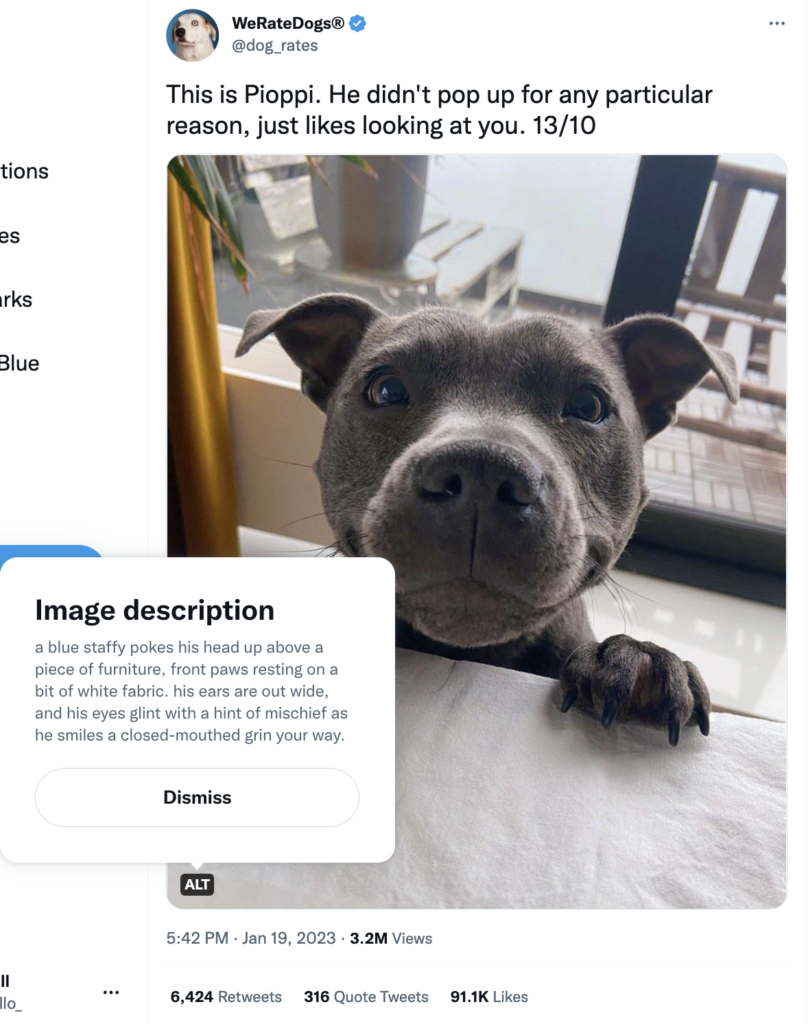
Alternative text, or “alt text,” is a short yet informative description of an image that screen readers use to describe that image on social media.

Here’s an example of what it looks like on Twitter:

A screenshot of the Twitter account We Rate Dogs featuring a photo of a cute grey puppy and the alt text of the image, which reads a blue staffy pokes his head up above a piece of furniture, front paws resting on a bit of white fabric. His ears are out wide, and his eyes glint with a hint of mischief as he smiles a closed-mouthed grin your way.

Alt text is easy to add, yet underused. Other times, it’s used incorrectly altogether. Unfortunately, it’s not uncommon to see some brands or accounts use alt text to hide unhelpful easter eggs, image credit and calls to action.

Best practices for creating and adding alt text

Alexa put it best: “When writing alt text, ask yourself, ‘What about my image is vital for someone to know?’ Think about what you’re trying to achieve with your social media content. Make sure that your alt text is descriptive enough to make your image accessible in a way that helps you meet those objectives and properly informs your followers.”

Here are some best practices to follow:

  • Keep it succinct, yet informative. 125 characters is a common guideline, but don’t be afraid to write longer to paint a clearer picture for graphics or images alike.
  • Skip writing “image of” or “picture of.” These are a given.
  • Include context, too. The alt text for the Tweet below is “Snoozing fox in the brush at Lake Clark National Park & Preserve, Alaska,” which clearly explains why the image was paired with text about waking up early.

  • Include keywords. Alt text plays into SEO—include keywords, as long as they’re relevant.
  • Add video descriptions, too. Videos may not have an alt text option, so remember to add descriptions to your captions or threads to describe your video content. The below video from US Fish and Wildlife Services provides an in-depth and extremely informative description of their video.

A video of a deep sea jellyfish in the Mariana trench from the US Fish and Wildlife Service where they've included a long and informative video description describing the video.

  • Don’t overthink it. Alt text is subjective. As Alexa put it, “As the content author, you have the power to decide what details are important in not only your image, but your entire post as well.”

As far as how you actually implement it, here are a few tips on how to add alt text on each platform:

Twitter:

  1. Upload an image to your Tweet
  2. Select add description under the image
  3. Enter your alt text description up to 1,000 characters
  4. Tap save
  5. An “ALT” badge will appear on your image to indicate that it contains alt text.
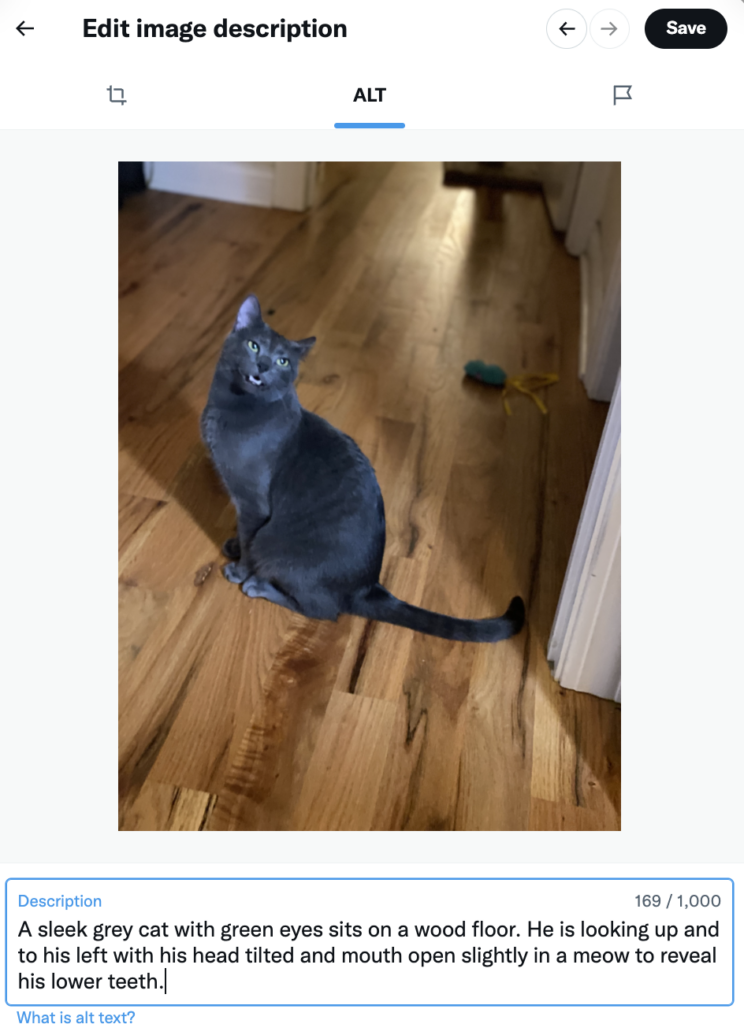
  6. If you have multiple images, tap add description for any of them and use the arrows in the editing window to toggle between images.
  7. According to Accessible Social, using GIFs from Twitter’s media library allows you to add alt text to GIFs, too.
The edit image description window of Twitter where a photo of a grey cat has been uploaded and the following alt text has been added: a sleek grey cat with green eyes sits on a wood floor. He is looking up and to his left with his head tilted and mouth open slightly in a meow to reveal his lower teeth.

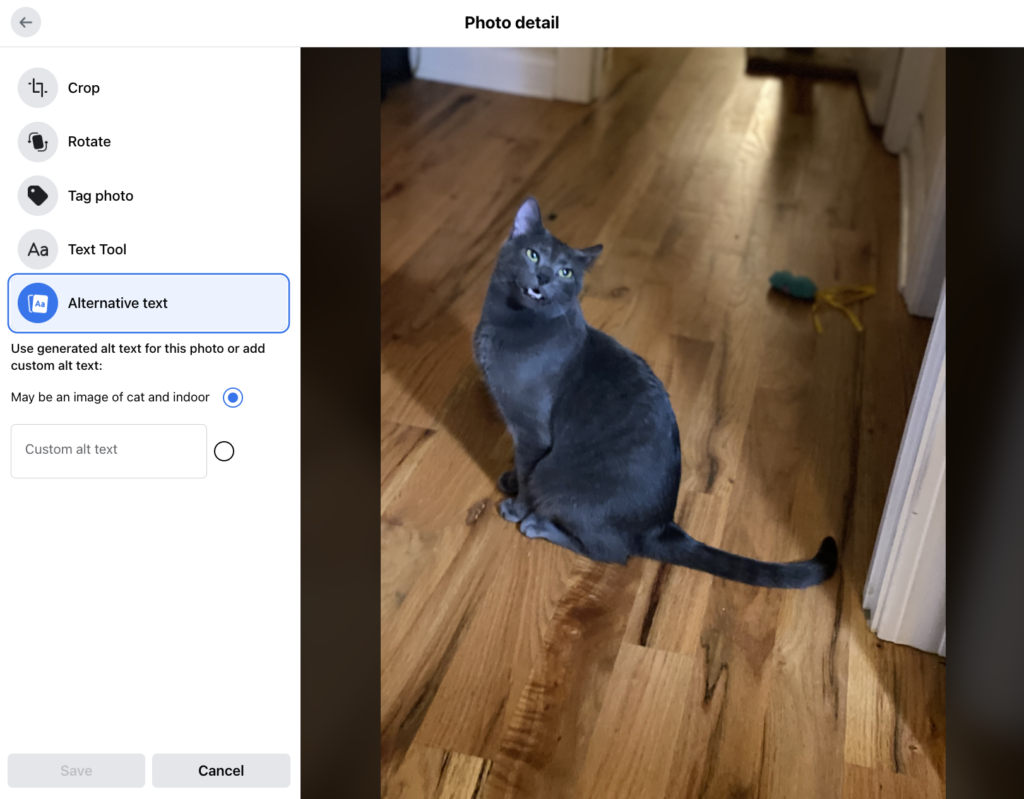
Facebook: Facebook will automatically add alt text to images, but these auto-descriptions are far from perfect.

To add alt text to a new post:

  1. Upload your image to a post
  2. Tap edit (or, on mobile, tap the three dots on your image
  3. Tap Alternative text
  4. Add your Custom alt text
Facebook's photo editing interface where there is an option to add alt text at the bottom of the toolbar.

Editing alt text that was automatically assigned to your photos is easiest on mobile. The auto alt text for this image was “may be an image of cat and indoor”—all the more reason to add your own. To edit your alt text:

  1. Go to your post
  2. Tap on your photo
  3. Tap the … in the top corner
  4. Select Edit Alt Text

Instagram:

When adding Instagram images on desktop, you’ll see an Accessibility dropdown option. But adding alt text to images as you share them on mobile is more complicated:

  1. Upload your image once you’re done editing
  2. Hit Next
  3. Tap Advanced settings
  4. Tap Write alt text

To add alt text to an existing post:

  1. Tap the … above your post
  2. Tap edit
  3. Tap Accessibility
  4. Write your alt text
  5. Hit Done

LinkedIn:

  1. As you add an image to a post, tap Add description in the top right of your image
  2. Note: Adding or editing alt text is only available on desktop

Between the back and forth and limitations, like not having the ability to use alt text in Facebook’s Business Suite, adding alt text platform by platform can be challenging. Using Sprout Social streamlines your accessibility and publishing efforts. You can add alt text to your images across Facebook, Twitter and LinkedIn, in one step.

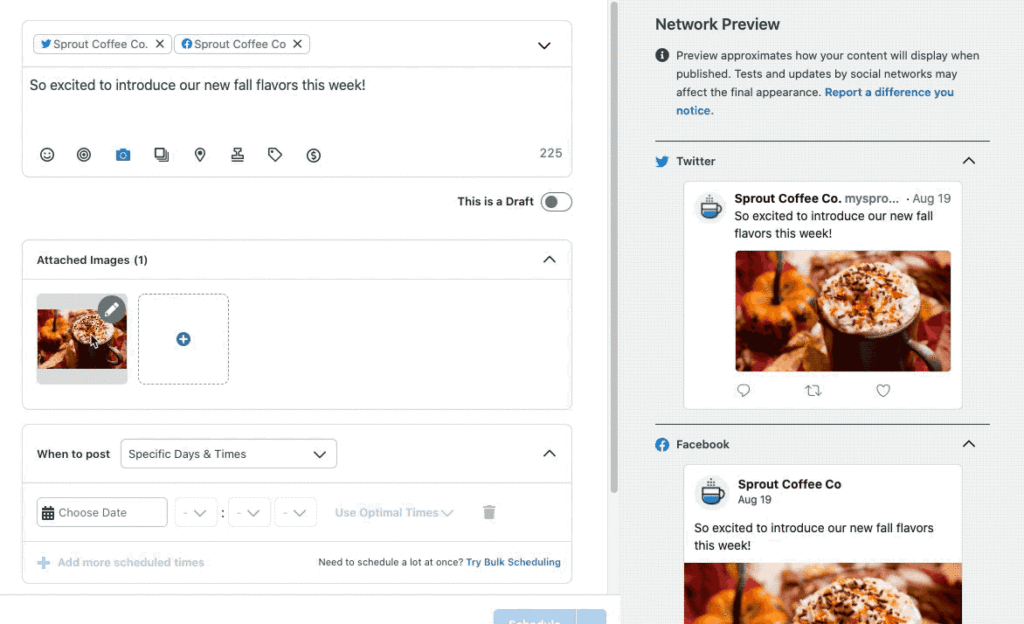
A GiF demonstrating how to add alt text in Sprout as you add a new post by tapping a pencil icon on any images you upload to a Facebook, Twitter or LinkedIn post, then tapping add descriptive text.

While API limitations mean you can’t add alt text to Instagram images in Sprout, you can add image descriptions to your captions as you schedule your posts—an accepted and widely-used alternative.

The Sprout platform helps cut down on steps so you can double down on accessibility. In fact, our accessibility features were a big factor in why Texas A&M University chose Sprout as their go-to social media management platform.

2. Make your text accessible

While playing around with typography on your website or social posts can be trendy, fancy fonts can be a nightmare for screen readers.

When it comes to social posts, a number of best practices will make all of your text more inclusive.

How to write accessible text

Let’s start with a few best practices to follow:

  • Format your hashtags the right way. From adding humor to celebrating hashtag holidays, hashtags are here to stay. Make hashtags easier to read for screen readers and users alike with “CamelCase,” where you capitalize the first letter of each word in a hashtag. So instead of #weloveteamsprout, write #WeLoveTeamSprout.
  • Avoid all caps. All caps make words harder to identify by their shape, and screen readers may read them as acronyms—not full words. For example: text vs TEXT.
  • Be mindful of font color. This is more relevant for landing pages or blog posts you link to. Ensure your font and hyperlink colors are accessible.
  • Avoid “creative” typography. Playing around with cute fonts has become popular in social bios and posts. But these don’t work well with assistive technologies.

  • Spell out acronyms first. This helps screen readers and people unfamiliar with acronyms.
  • Write in plain language. Avoid jargon and overly technical language to make your posts more accessible to those new to your industry, non-native speakers or people who experience cognitive impairments.
  • Avoid run-on sentences. Instead, opt for clear, short sentences.
  • Present the most important information first. Helpful for accessibility, and to get your point across clearer, sooner.
  • Include @ mentions at the end of your posts. This helps the flow of your post, especially for screen readers.
  • Use special characters correctly, and in moderation. Screen readers know to not read all special characters aloud, like ampersands. But too many special characters in your text can result in a confusing experience for people using screen readers.

3. Be mindful of emojis

Consider this: every emoji has a description assigned to it, like alt text to an image.

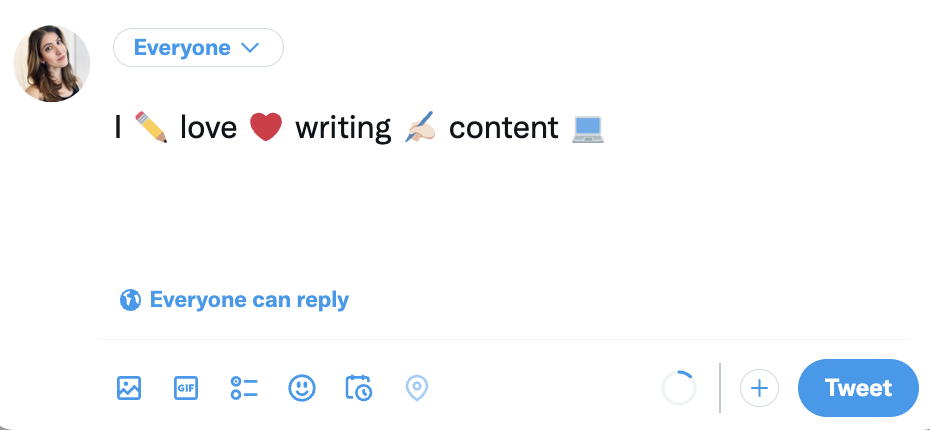
A screen reader would read the Tweet below as, “I pencil love red heart writing writing hand: light skin tone content laptop.” Not so cute.

A drafted tweet with a sentence that contains an emoji in between each word to demonstrate an example of a sentence that screen readers would not read well. The sentence reads I pencil emoji love heart emoji writing hand holding pencil emoji content computer emoji

How to use emojis while keeping your content accessible

You don’t need to stop using emojis, just be mindful of where and how much you use them. Here are some tips:

  • Be mindful of trends that rely on repetitive, overused emojis. The viral “red flag” trend, for example, is a nightmare for screen readers. If you must jump on a trend like this, limit your post to just a few emojis, like the below Tweet does. Find more tips in this article.

  • Use emojis in moderation. This limits confusion in your posts.
    Put them at the end of a social post. This also helps you lead with your key information. And keep in mind: custom emojis that represent different skin tones are fantastic and inclusive, but be aware that they have longer descriptions. If you use multiple in a row, you’ll add complexity for folks using a screen reader.
  • Avoid emojis in your profile name. This is disruptive to screen readers.

4. Add closed captions and subtitles to videos

Including closed captions should be an essential part of your video marketing strategy.

As Alexa put it, “Captions make videos accessible for a variety of users—from those with hearing loss or cognitive disabilities to those learning a new language to people who simply don’t want to wake their sleeping partners or babies.”

It also happens to be popular with Gen Z and millennial content consumers. Plus, captions even give you an SEO boost.

Captions are always a win when added to your videos. Here are a few common best practices:

  • Go beyond what’s being said. Subtitles write out what’s said, but closed captions add extra information for context like sounds in the background or music being played.
  • Ensure captions aren’t covered by platform content. Especially important in formats like Reels and TikTok.
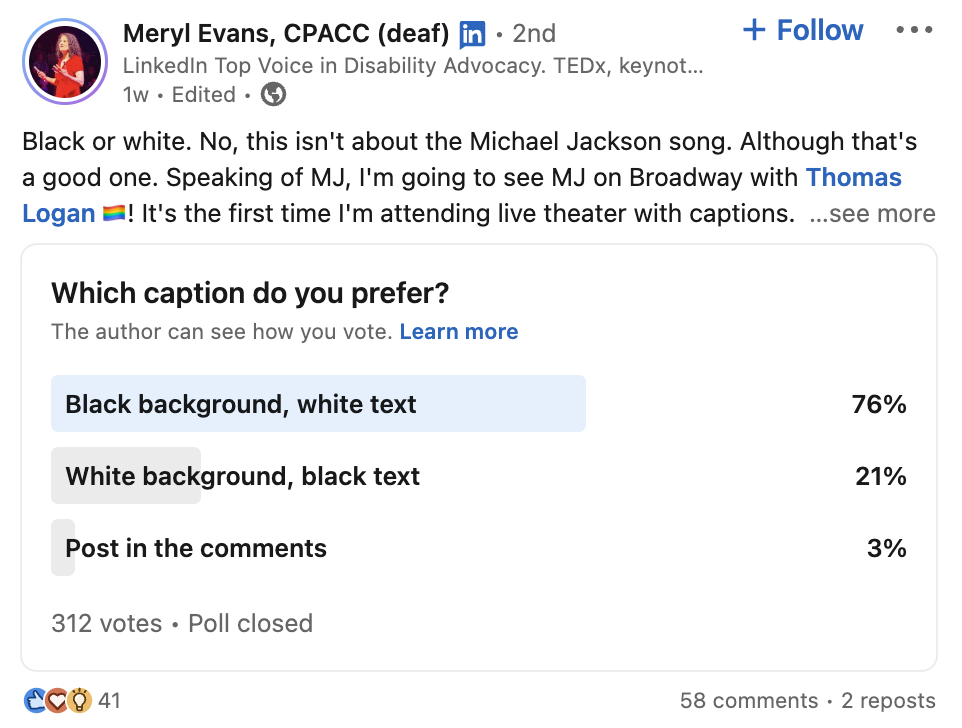
  • Create high contrast captions. Make sure your captions are visible against your background, like white text against a black highlight, or vice versa.
A LinkedIn poll that asks the audience whether they prefer captions with white text against a black background, black text against a white background or a post in the comments. 76% of people voted for black background, white text.

Here’s how to add and edit closed captions

Most social platforms have made this an easy step to include. But while auto captions are incredibly helpful, like any AI process, they’re not perfect—which can lead to confusing, or even offensive caption mistakes.

Luckily, platforms that offer automatic captions also offer ways to edit them.

YouTube: It’s important to caveat—on YouTube, closed captions are called subtitles. There are a number of tools you can use to generate YouTube subtitles faster. But adjusting auto captions is an easy and quick place to start.

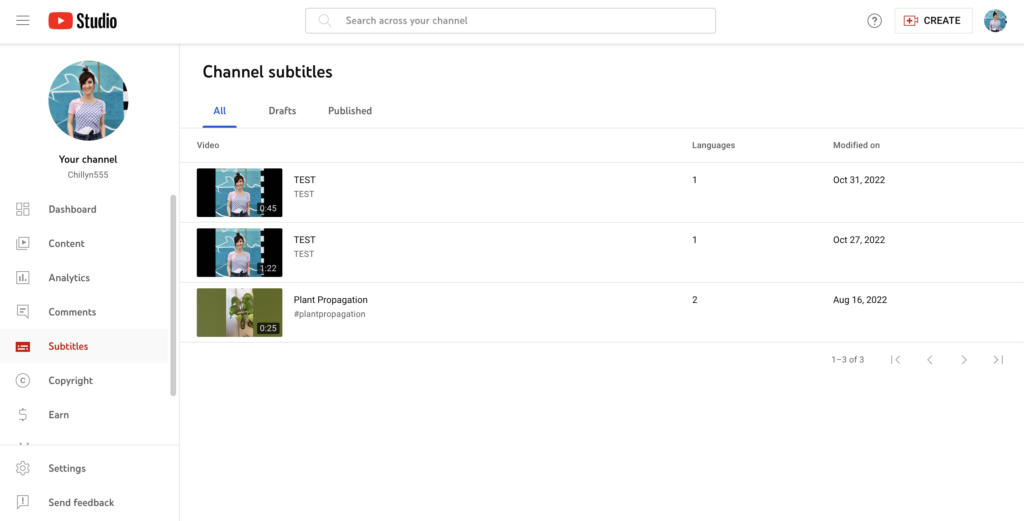
  • To add or edit auto captions on your videos, log into YouTube Studio
  • Click the Subtitles tab on the left navigation
  • Select the videos you want to add subtitles to, or edit subtitles of
  • Set your language
  • You’ll be taken to a page where you can edit the auto-subtitles of your video. Click Duplicate and Edit to correct any auto-caption errors
  • Publish
  • Heads up: When you upload a video and opt into auto captions, your captions may not populate right away. Keep checking back, then edit them when they are available.
The YouTube Studio interface where the Subtitles option on the left toolbar is highlighted.

Facebook:

On desktop:

  1. Add your video to a post
  2. Click Edit
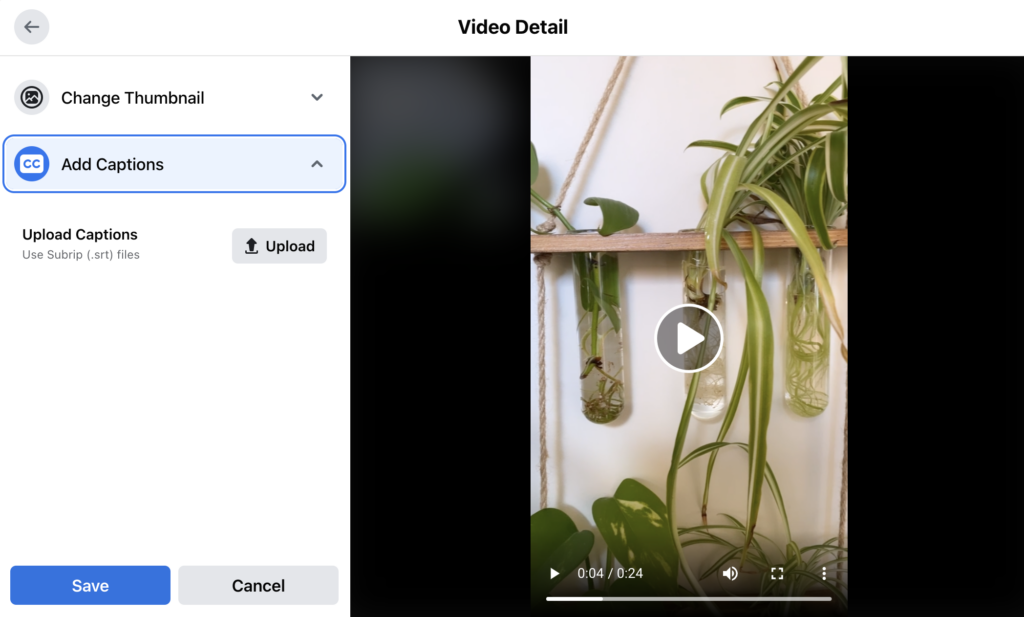
  3. Click Add Captions
  4. Click Upload Captions. Facebook uses Subrip (.SRT) files for captions
Facebook's post upload window where under the option to Add Captions the interface provides the option to upload captions.

On mobile

  1. Add your video to a post
  2. Tap Edit
  3. Tap CC at the top of the screen
  4. Facebook will transcribe the audio
  5. Select the look of your captions
  6. Edit them by tapping the Edit Captions button. Then, adjust words you need to change by tapping on them and typing in corrections.

Instagram:

  1. Upload your video (all videos on Instagram upload as Reels now)
  2. Tap Next
  3. Tap the Stickers icon at the top of the screen
  4. Tap the Captions sticker
  5. Instagram will transcribe your audio
  6. Tap your captions as they appear on the screen to edit individual words
The Instagram Reels interface showing that you can select a captions sticker for your Reel

TikTok:

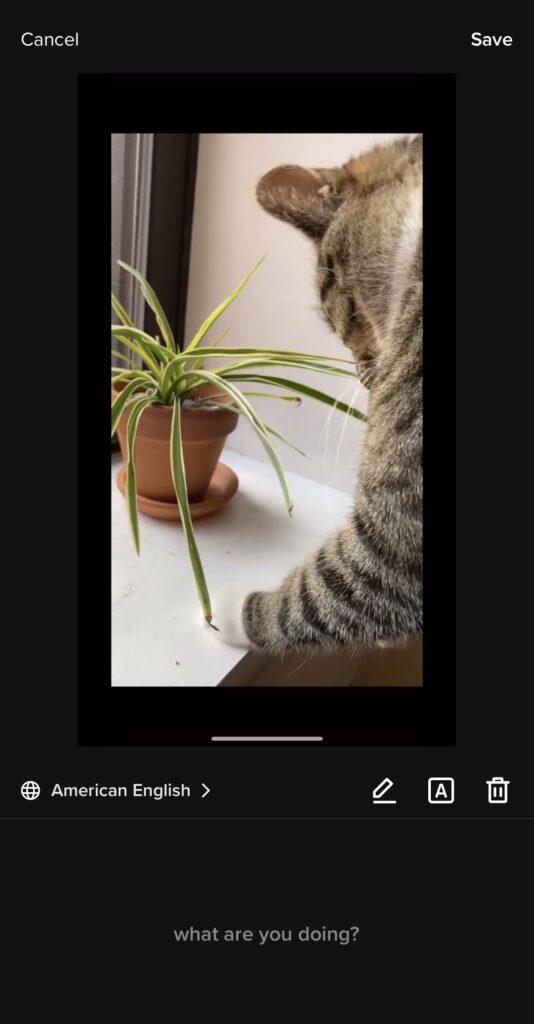
  1. Upload your video
  2. Tap Captions on the side navigation
  3. TikTok will transcribe your audio
  4. Review your captions, and tap the pencil icon to edit them
The captions editor on TikTok where you are able to edit and adjust captions for videos as you upload them.

LinkedIn:

  1. Exciting news: LinkedIn now offers both auto captions and a way to review them. Start by logging into LinkedIn on desktop
  2. Add a video to a post
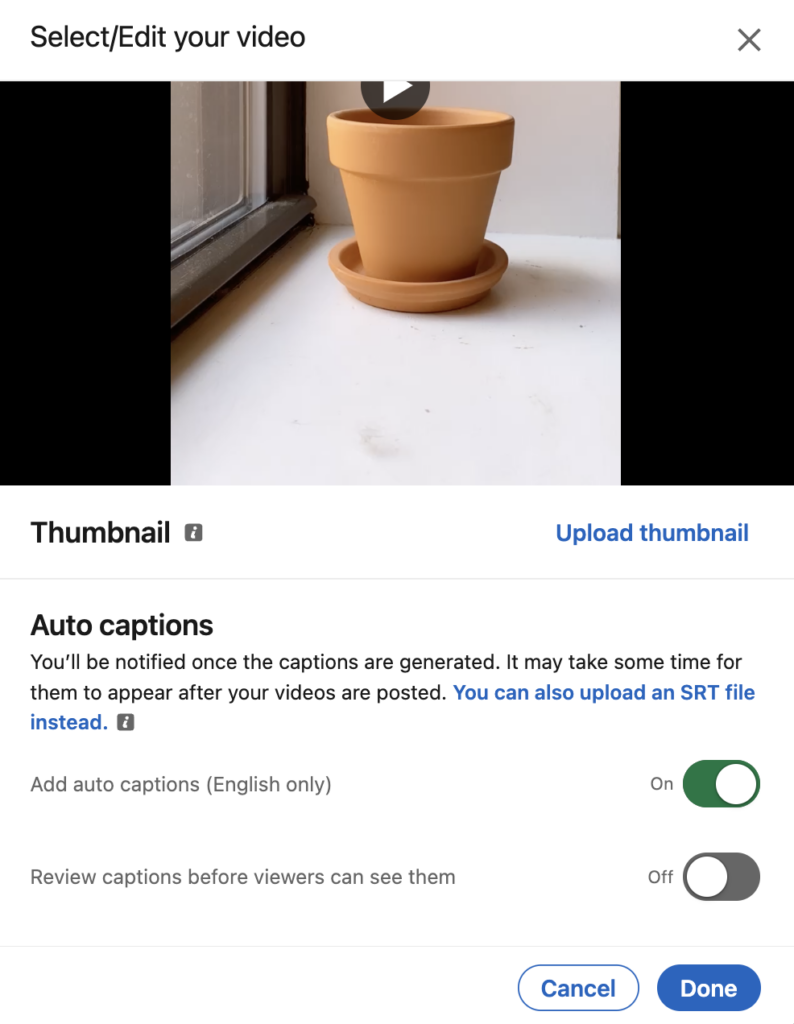
  3. Under Auto Captions, toggle on Add auto captions and review captions before viewers can see them to be extra safe
  4. You’ll see a banner below your post when your captions are review-ready
  5. Review your captions by clicking the … on your post
  6. Click CC Edit Captions
  7. You can also upload an .SRT file instead, which is prompted above your auto caption option
LinkedIn's auto caption function, where you can toggle on the option to review captions before content is published.

Twitter:

  1. To add captions to your Twitter video content, you need to upload an .SRT subtitle file
  2. Click on a video within your Media Studio Library
  3. Select Subtitles
  4. Choose your text language
  5. Click Upload and select the .SRT file
  6. To update the file further, click the pencil icon

5. Make your visual content accessible

Making your images and videos accessible goes beyond just using alt text and captions.

From providing warnings on content that would impact people with photosensitivity to making your content accessible to people with colorblindness, there are a number of ways you can provide a better experience with your visuals.

How to create accessible visual assets

There are a number of ways you can make your visuals more accessible to all:

  • Avoid packing a graphic with text. Consider limiting the information on your graphics and linking to a blog post or landing page for a full statement, full event info, a full blog post, etc.
  • Include a warning for people with photosensitivity. If you post a video with strobe effects or flashing lights, include a warning and create a pause before your content plays. TikTok includes a warning for content that may trigger unpleasant or dangerous effects for some people.
  • Be mindful of viral trends that are not accessible. Trends that rely on unique post formatting, like the handshake trend below, may be fun to jump on. But they’re not friendly to assistive technologies. Before jumping on trends, consider how they would be read by a screen reader, and consider limiting using these trends, or holding off altogether.

  • Don’t rely on different colors to convey meaning. This may exclude those who are colorblind, and may be impacted by cultural differences.
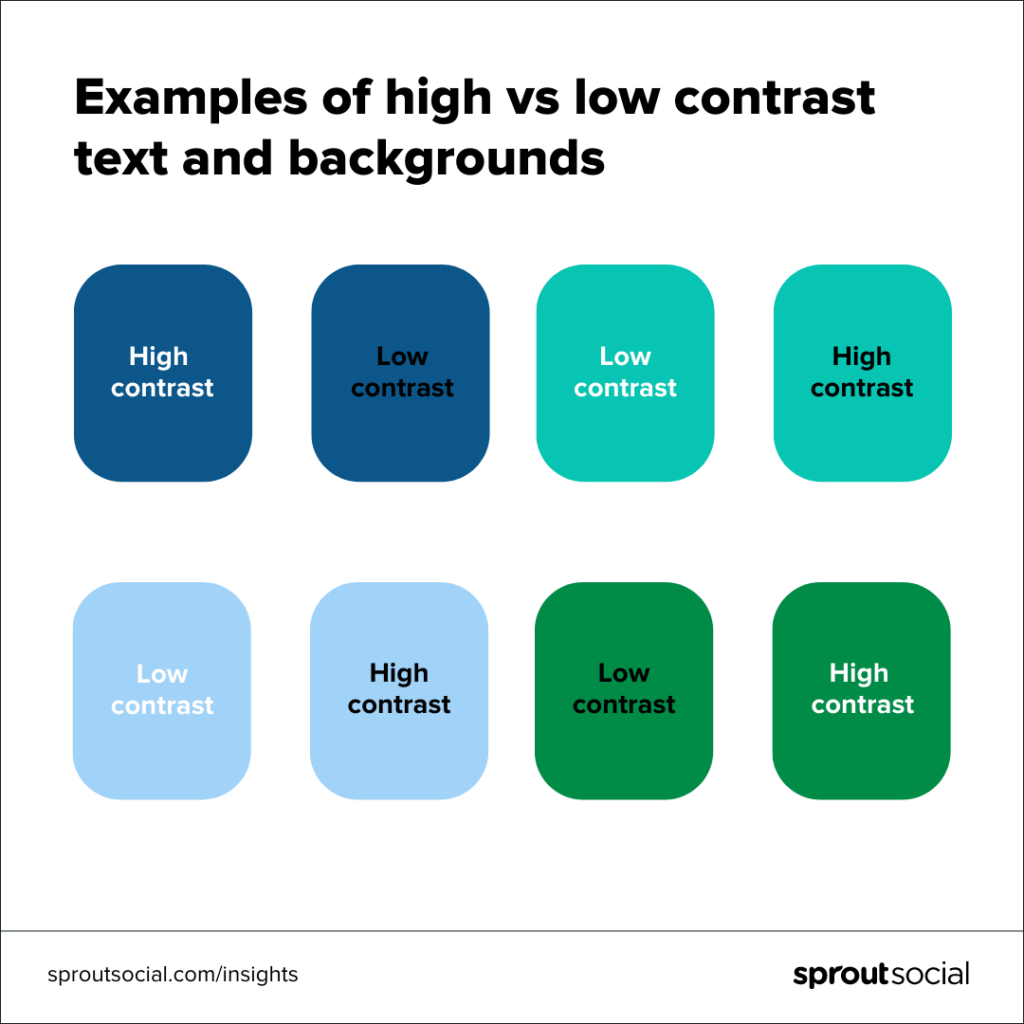
  • Create visuals with high contrast. High contrast makes graphics easier to interpret. Ensuring the colors in your graphics have a 4.5:1 contrast will help make the text on your graphics visible to everyone.
An series of squares of different colors ranging from dark blue to light blue to dark green to light green demonstrating how light text against dark backgrounds or dark text against light backgrounds provide a higher contrast and more accessible reading experience for graphics.

6. Use inclusive language

It can be all too easy to perpetuate bias, stigmas and marginalization in the words and phrases we may have gotten used to every day—even when we don’t realize we’re doing it. Not even beloved musical artists are immune.

Inclusive language is what it sounds like: using language that is inclusive and respectful, and free of bias, discrimination or exclusionary terms. Using it in your communications—from social posts to job descriptions—helps everyone feel like they’re addressed, included and welcome to participate.

Here’s how to use inclusive language

Inclusive language takes self-checking and education. But it’s important to start now and to make it a part of your everyday process.

Here are a few ways to start using more inclusive language:

  • Bust bias in your writing. For example, using the word “normal” as a comparison group can be ableist, or puts one group in “the norm.” Using gendered language is biased, too—a tool like the gender decoder can help.
  • Use people-first language. For example, saying “a person with a disability” vs “a disabled person.”
  • Keep an eye out for offensive language. Language is ever-evolving. Keep an eye out for now-outdated phrases, sayings or references, and cultural appropriation in your language.
  • Keep learning. Language is constantly evolving, and we are constantly learning. Be curious about others, and educate yourself on preferred terms. Our inclusive writing guide is a great place to start.
  • When in doubt, ask. Preferred terms even differ within groups and over time. Rather than assuming pronouns or preferred terms, when in doubt, respectfully ask.

7. Prioritize inclusivity in your images

Accessibility and inclusion matters when it comes to HOW you post.

But it also applies to WHAT you post.

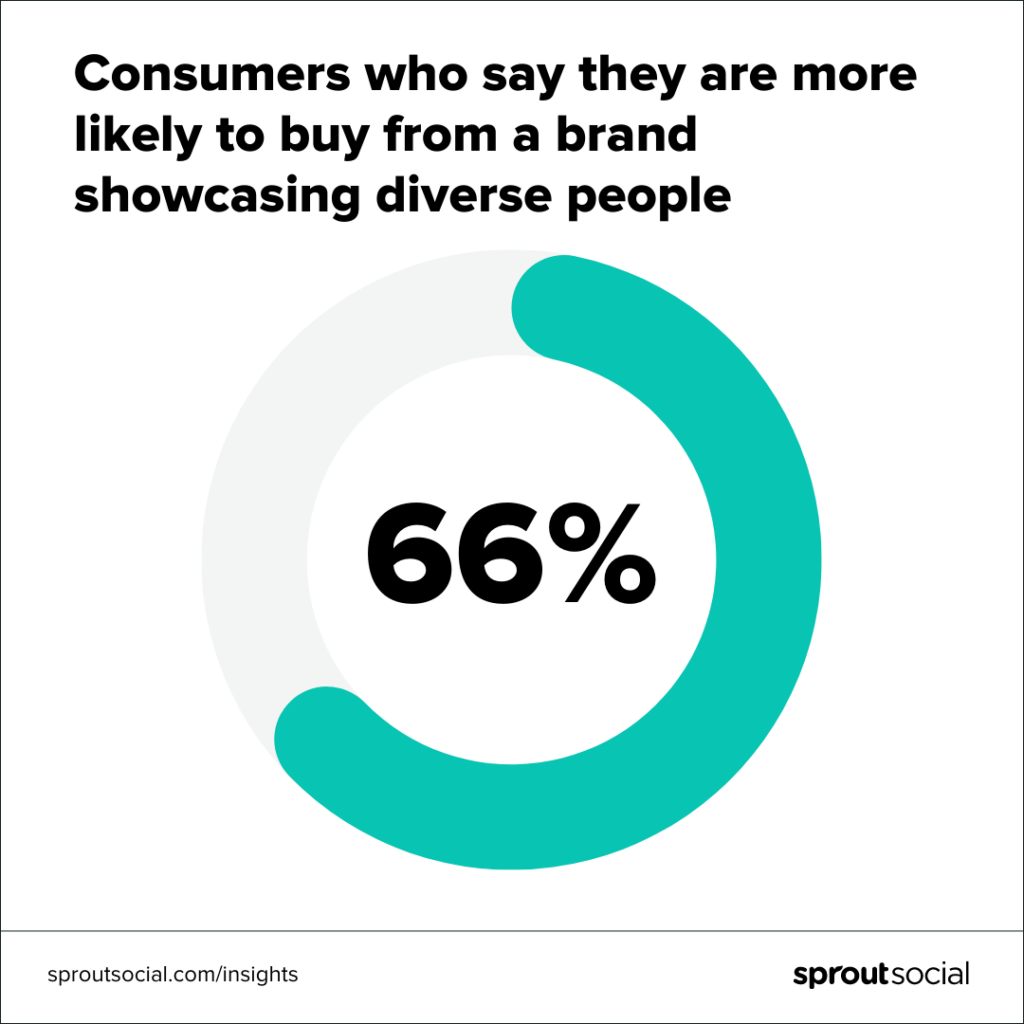
After all, according to a recent Sprout Social survey, 66% of respondents said they were more likely to buy from brands showcasing people of diverse races, gender identities, ages and more. A Facebook analysis found that people with disabilities and the LGBTQIA+ community, for example, are underrepresented in digital ads.

A data visualization that reads consumers who say they are more likely to buy from a brand showcasing diverse people. The center of the graphic reads 66%.

Prioritize diversity in social media and ensure that the whole of your audience feels included. Just remember to make these images accessible, of course.

How to prioritize more inclusive marketing assets

These are just a few tips to get you started. To dive deeper, check out our article on diversity in social media.

  • Be mindful of your models. Do your models reflect the many ages, backgrounds and perspectives of your audience?
  • Consider your collaborators. Inclusive social media content extends to creators, agencies and partners you work with and feature, as well. What voices are you amplifying, and are there voices you could amplify more?
  • Listen. Listen to your audience if they take issues with your materials, and make changes.
  • Prioritize diversity all year-round. Only featuring a diversity of gender identities and couples during Pride Month, or women during Women’s History Month is inauthentic and risks tokenism. Feature people of all ages, backgrounds, body types and more all year around to truly represent and speak to your audience.
  • Make your alt text descriptions inclusive. There are many resources out there about being inclusive with your alt text. Educate yourself on how to be inclusive with your descriptions, and know that this could come down to preference—for example, how someone identifies. When in doubt, ask—never assume. This resource has some great examples.

8. Make accessibility and inclusion part of your routine

If all of this seems overwhelming when you’re just starting out, know that you’re not alone. In a recent Sprout Social survey of 300 marketers, almost a third said that the time commitment to making posts accessible is their biggest challenge when it comes to accessibility.

But by now, you know how important it is to include more social media accessibility and expand your audience.

Integrating accessibility best practices into your content creation workflow makes accessibility part of the process—not an afterthought.

And, silver lining: in that same data above, almost a quarter of marketers report being able to prioritize accessible content smoothly.

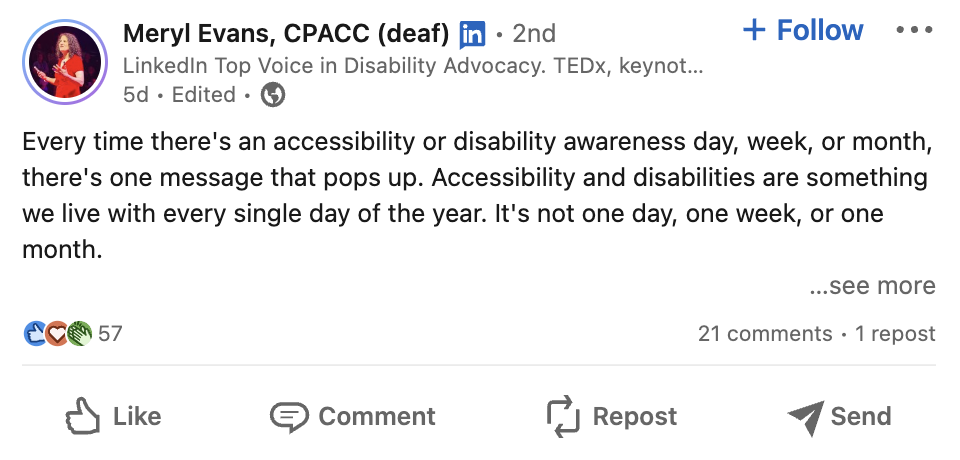
A LinkedIn post by Meryl Evans that reads every time there's an accessibility or disability awareness day, week, or month there's one message that pops up. Accessibility and disabilities are something we live with every single day of the year. It's not one day, one week or one month.

Provide training for yourself and your team. Then, bake accessibility practices into your social scheduling and content planning routine. Setting your team up with a platform that makes adding alt text as you publish easy (like Sprout Social’s publishing tools) can help you streamline this further.

Social media accessibility benefits everyone

Don’t let the fear of perfection hold you back from making your posts more accessible and inclusive. The first step is the most important. The sooner you start putting accessibility and inclusive practices into your social media strategy, the better.

If you want to see how Sprout can streamline social media management for your entire team—accessibility features included—try us for free for 30 days. Sign up for a free trial and start your accessibility practices today.

Start your free Sprout trial

The post 8 guidelines to make social media posts more accessible appeared first on Sprout Social.


from Sprout Social https://ift.tt/ZecYLu4
via IFTTT
8 best email subject line generators: a smarter way to increase your open rates

Writing a good subject line is a fine art that could mean the difference between your email being opened or ignored. In fact, some of the most impactful split tests we run at AWeber are subject line tests. Why? Because the more people that open your email, equals more people reading your content which eventually equals more clicks.

It can be tough to write a subject line that captures enough attention to get someone to open, especially when you first start building an audience. Heck, even seasoned email marketers struggle creating the perfect subject lines.

As a result, lots of subject line generators have been built to try and make this easier. But they’re not all built the same.

I tried some of the most popular subject line generators so you don’t have to! In this post, I’ll tell you how much they cost (some are free), how good the subject lines are, and which subject line generator might be right for you.

The best email subject line generators

Copy.AI

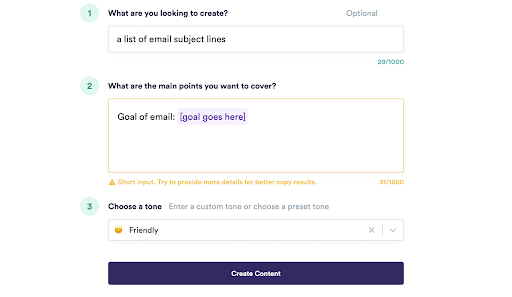
Copy.ai's subject line generator platform

Copy.ai is a tool that uses artificial intelligence (AI) to write marketing resources for you. They offer everything from email subject lines and ad copy to fully written blog posts. Their interface is clean, helpful, and easy to use.

It’s worth noting that since email marketing isn’t Copy.ai’s bread and butter, the results you get are not optimized or tested in any way for the inbox. 

Price:

Free plan includes 2,000 words per month.

$49/month for unlimited words and additional pro features.

What they ask for to generate your subject lines:

  • What is the goal of your email?
  • Tone, with options: friendly, luxury, relaxed, professional, bold, persuasive, witty, empathetic, adventurous, or write in your own.

Results:

Copy.ai’s results were okay, if fairly generic. Many of them felt like blog post titles rather than subject lines, with a number at the beginning (e.g. 7 Things You Didn't Know About Cooking). The subject lines weren’t optimized for any audience, either. But, you may find their results helpful as a starting point to create your own subject lines (especially since Copy.ai is free).

Favorite subject line generated: Air fryer recipes for lazy nights (and busy ones, too)

Score: 4/5 

Anyword

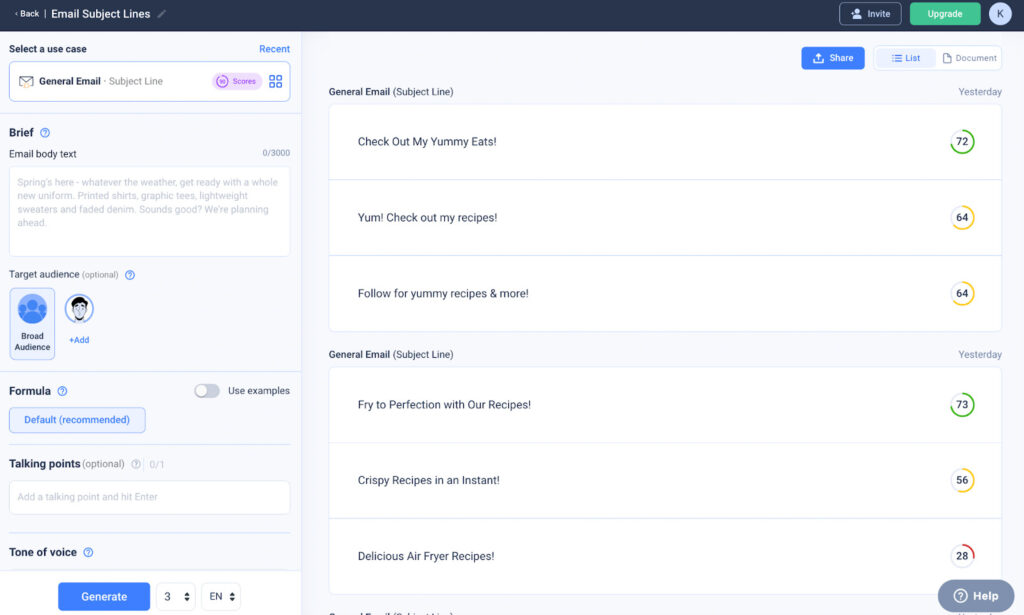
Anyword's subject line creator tool

Anyword is an AI-generated copy tool built specifically for “performance marketers.” You can use it to create ad copy, blogs, and emails as well as product descriptions and SMS messages. 

Anyword’s email subject line generator creates as many results as you need, and it gives each a score. Click on more details for the score and it tells you which age and gender this subject line is likely to appeal to most.

Price:

7-day free trial includes their starter plan and 2,500 word credits.

$24/month for 20,000 word credits per month.

What they ask for to generate your subject lines:

  • The full text of your email.
  • Your target audience.
  • Talking points.
  • Tone of voice: engaging, conversational, hard sell, playful, 5th grader, confident, or write in your own.

Results:

Anyword’s results were fairly repetitive and generic. When I gave it a prompt for “summer pork recipes,” all three results had the word “sizzling” in them. I liked that the subject lines were fairly short, which felt different than a blog title. They mostly included action words, but didn’t seem like they’d stand out in an inbox. 

Anyword also gave me a few subject lines with bad scores (as low as 28 out of 100). If they have scores, I think they should provide you with only the best subject lines.

Favorite subject line generated: Sizzlin' Summer Swine Recipes

Score: 4/5

Scalenut

Scalenut's AI-generated subject line creator platform

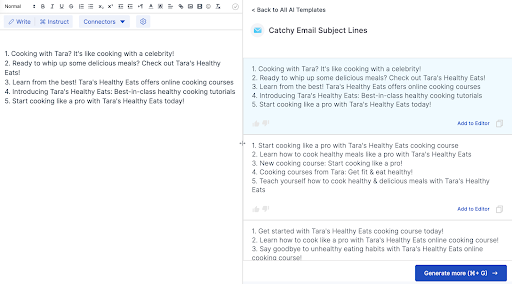
Scalenut was my favorite tool to use. It was easy to sign up and find the email subject line generator. Plus, Scalenut includes a document editor — a place where you can copy and paste any or all of the generated subject lines, the full email text, and anything else that helps you decide on the right subject line.

Scalenut uses AI to generate marketing copy and also includes an SEO tool that you can use to create guidelines for your blog posts.

Price:

7-day free trial.

$17/month for 100,000 words per month.

$47/month for unlimited words.

What they ask for to generate your subject lines:

  • Brand name
  • Brand description
  • What is the email about?

Results:

Scalenut had my favorite results. There was a lot of variety in the tone, length, and context of the subject lines they created. And I felt like they “got it” when it comes to actually writing a subject line — they didn’t just sound like a bunch of blog post titles.

Plus, Scalenut included some emojis in their subject line results.

Favorite subject line generated: Air fryer recipes? Yes please!

Score: 5/5

Encharge

Subject line creator tool from Encharge

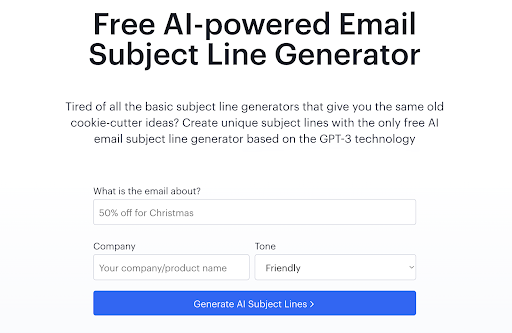
Encharge has a free email subject line generator using Chat GPT-3 technology. It’s quick and easy to use — you don’t need to create an account or sign in. The purpose of Encharge’s email subject line generator is to do just that — generate subject lines. It doesn’t offer any other AI copy options.

Price:

Free.

What they ask for to generate your subject lines:

  • What is the email about?
  • Company
  • Tone: appreciative, assertive, awestruck, candid, casual, cautionary, compassionate, convincing, earnest, enthusiastic, formal, friendly, funny, humble, humorous, informative, inspirational, joyful, passionate, thoughtful, urgent.

Results:

There was a lot of variety in the results I got from Encharge, and they were all definitely geared towards a subject line, not blog posts. And, it’s worth noting that Encharge was the only subject line generator to include a price in the subject line for my product sales email ($19.99 for a cookbook).

Favorite subject line generated: Cooking for One or Two? Increase your cooking skills with this new online course!

Runner up: Porktastic, Eh?

Score: 4/5

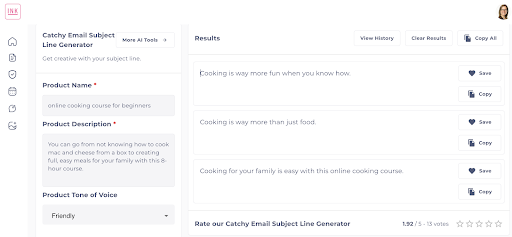
Inkforall

Inforall AI-powered email subject line generator platform

Inkforall is a fairly simple AI writing tool that creates many different kinds of content, including email subject lines. It will create three email subject lines for you from your prompt, and you can easily click to save one or all of them. Inkforall’s interface is easy to navigate and nice and simple to use.

In addition to copy, Inkforall can also generate images for you. Plus, their tool can generate copy in 20+ languages.

Price:

5-day free trial includes 10,000 words.

$39/month billed annually or $49/month billed monthly.

What they ask for to generate your subject lines:

  • Product name
  • Product description
  • Tone: adventurous, board note, bold, comedian, empathetic, friendly, funny, gloomy, investor note, Joe Rogan, luxury, Obama, persuasive, professional, relaxed, Shakespeare, Warren Buffet, witty.

Results:

With tone options for Obama, Shakespeare, and Warren Buffet, the results can vary a lot more — which provides a lot of different types of subject lines. There was not a lot of variation within any given tone, however. These results are a great jumping off point to make modifications or for someone who doesn’t want too many options to choose from.

Favorite subject line generated: Cooking is too intimidating. Let's fix that.

Score: 3/5

Copymatic

Copymatic's email marketing subject line creator platform

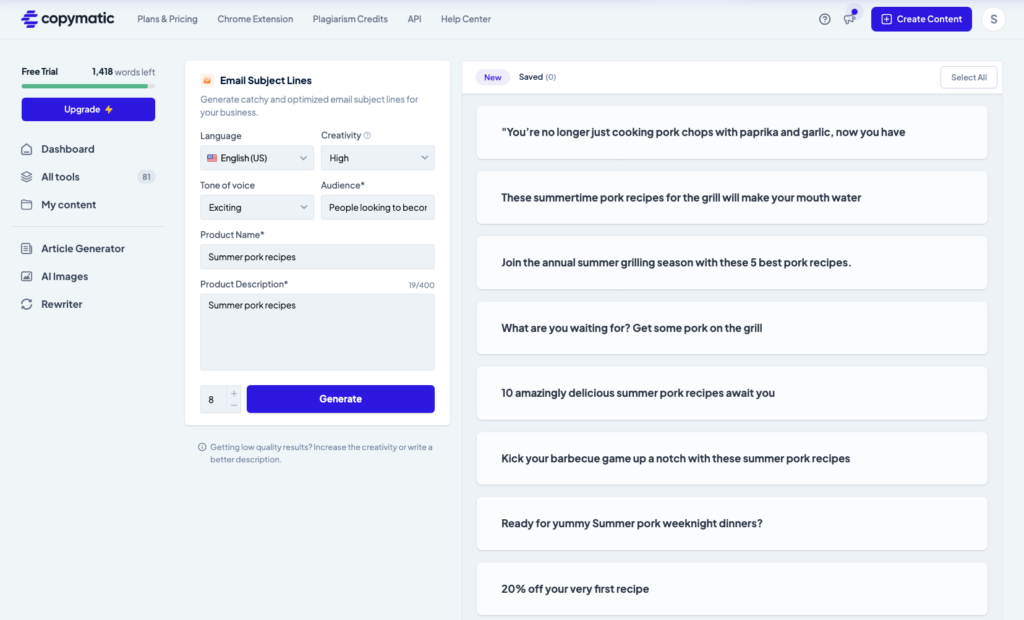
Copymatic is an AI-powered platform that produces content from blog posts to landing pages to subject lines. It can create up to 8 subject lines in one request. You can save or copy any of your content. The interface is really clean and easy to use.

Price:

Free trial which includes 1,500 credits (each credit is equal to one word)

Plans start at $6/month billed annually or $9/month billed monthly for up to 15,000 words/month.

What they ask for to generate your subject lines:

  • Level of creativity. The higher the creativity level, the less repetitive results you’ll receive
  • Product name
  • Product description
  • Your audience
  • Tone: professional, childish, luxurious, friendly, confident, exciting

Results: 

I had eight subject lines created and felt 7 out of 8 sounded clever and original. However a few of the subject lines were long, I fear a good portion of the copy would be cut off in the recipient's inbox. However, you could use those as inspiration and reduce the length to come up with a creative subject line.

Favorite subject line generated: These summertime pork recipes for the grill will make your mouth water

Score: 4/5 

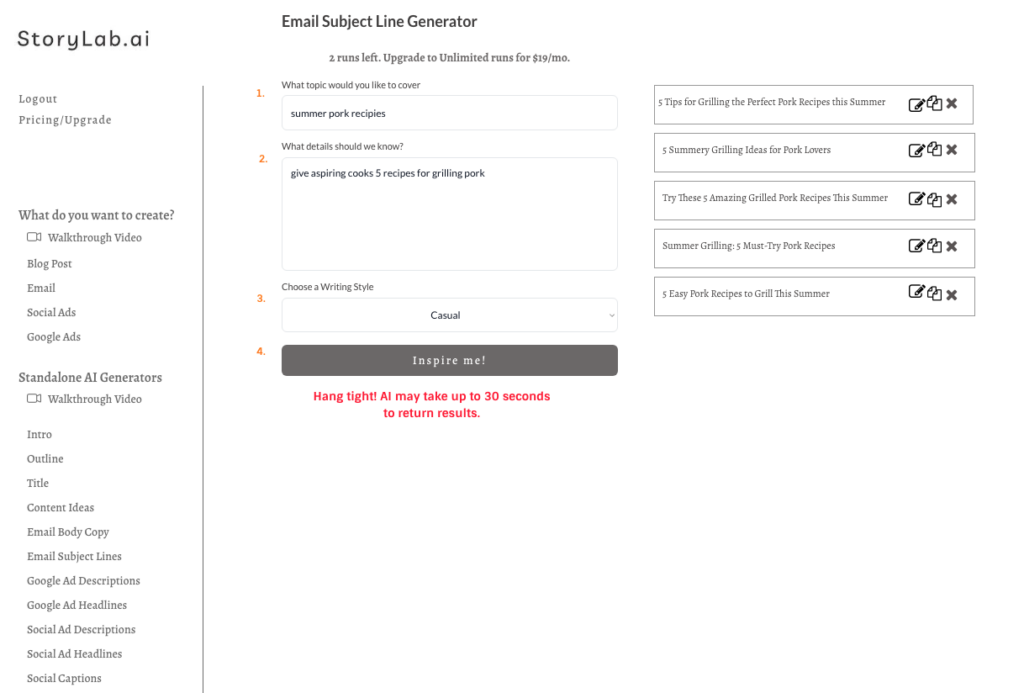
StoryLab.ai

StoryLab.ai email subject line generator platform

StoryLab.ai's bread and butter is generating shorter form AI content from titles, email copy, content ideas, social descriptions, and subject lines. 

Price:

Free - 3 AI generated runs/month

Starter - $5/month for 25 AI runs/month

Pro - $15/month for 100 AI runs/month

Unlimited - $19/month for unlimited AI runs

What they ask for to generate your subject lines:

  • Topic you’d like to cover
  • Details StoryLab.ai should know about your company, email details, customer pain point
  • Writing style: Professional, witty, list, storytelling, bold, adventurous, friendly, persuasive, empathetic, sassy, classy, casual, comedic

Results: StoryLab.ai provides five results. The subject lines generated were good, but not very original. And all the subject lines were very similar. I would have liked more variety to choose from. Overall not a bad option but I found better subject line generators.

Favorite subject line generated: Summer Grilling: 5 Must-Try Recipes

Score: 3/5

Subject line generators to skip

We tried a few subject line generators that just didn't produce results that were super helpful. We suggest skipping over the Google Chrome subject line generator plugin, ActiveCampaign’s subject line generator, and Keap’s subject line generator.

Best subject line graders

Once you’ve chosen your subject line generator and gotten a list of subject lines, you may want to run each of them through a grader to gauge how effective they are likely to be (and help you choose which to use).

Here is a list of five free subject line graders:

  1. CoSchedule Headline Analyzer
  2. Advanced Marketing Institute's Headline Analyzer
  3. The Email Subject Line Tester by Litmus
  4. Mizy
  5. SubjectLine.com

Did the subject line generators help you get better results from your emails?

Did you save time? Get better open rates? Tell us in the comments which subject line generator you decided on and how it helped you.

The post 8 best email subject line generators: a smarter way to increase your open rates appeared first on AWeber.


from AWeber https://ift.tt/jnX3pmQ
via IFTTT