Wednesday, 8 February 2023

How to make money with email marketing (10 expert tips)

how to make money with email marketing

When it comes to making money online, the most powerful tool in your arsenal isn’t social media or SEO or paid search ads . . .  

It’s email.

Email marketing has the highest conversion rates of any marketing channel. In fact, transactions from email are three times more profitable than those made on social media, according to management consulting firm McKinsey & Company.

Want to start earning money from your email list? Then follow these 10 proven ways to make money with email marketing.

  1. Sell a product or service
  2. Offer a paid newsletter
  3. Sell other people’s products
  4. Upsell premium or exclusive products
  5. Cross-sell related products
  6. Get repeat purchases
  7. Have a cart abandonment plan
  8. Include sponsored content or advertising in your emails
  9. Ask people to spread the word
  10. Automate your email campaigns

How to monetize email marketing

1. Sell a product or service

Already have a product or service to sell? Awesome! You can skip this section.

If not, this is your very first step. Find a physical or digital product or service to sell. 

Not sure what to promote to your audience? Here are some ideas to get you started:

  • eBooks
  • Training guides
  • Online courses
  • Private virtual coaching sessions
  • Classes or workshops
  • Memberships

Selling a product or service in an email example

Take a look at how this YouTuber promotes weight loss ebooks to her audience using email marketing.
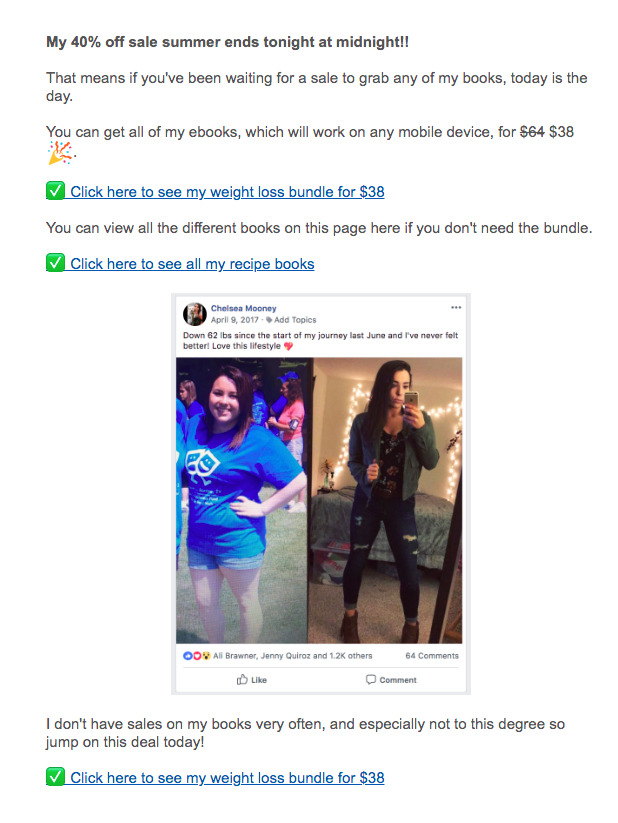
How to sell a promote an ebook with email marketing

2.  Offer a paid newsletter 

Offering a paid newsletter is a way for you to monetize your email marketing efforts by charging a subscription fee for access to exclusive content or additional features. 

For example, if you’re a blogger who writes about personal development and productivity, you could use a paid newsletter to offer exclusive email content and resources to your subscribers. It could be called "The Productivity Boost" and include:

  • Exclusive articles and tips on productivity and time management
  • Access to a private online community where subscribers can ask questions and interact with you
  • A monthly Q&A to discuss productivity challenges and strategies
  • Access to a library of productivity templates, worksheets, and checklists

To promote the paid newsletter, you would create a landing page with information about the newsletter and its features, along with testimonials from current subscribers. You could also mention the paid newsletter on your website, social media, and in your other emails.

Related: How to create a paid newsletter

Paid newsletter example

Here’s a great example of a paid newsletter from “Lenny’s newsletter”. Lenny sends one free addition of his newsletter each month so his subscribers can see the amazing value the paid newsletter provides that his free version does not.
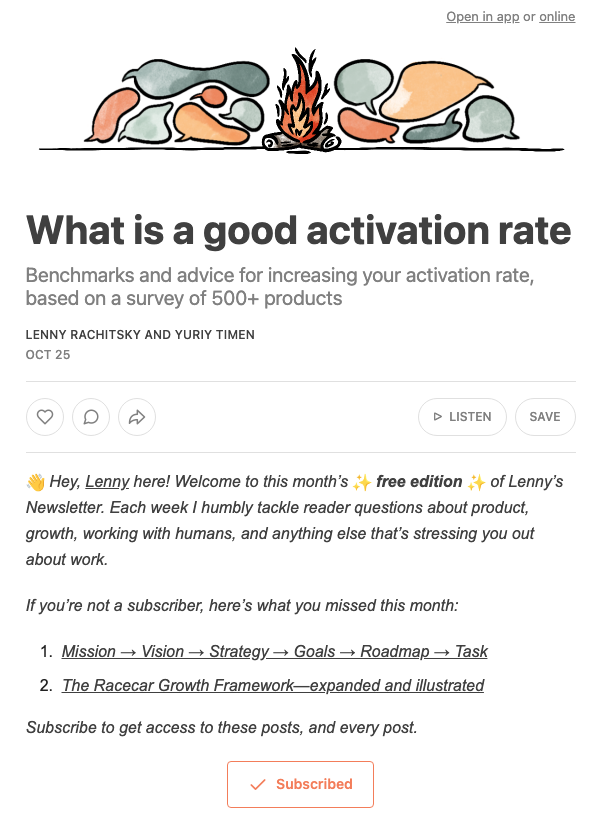
An example of a paid newsletter from Lenny's Newsletter"

3.  Sell other people’s products

You don’t always have to sell your products or services to monetize email marketing. Instead, you can be an affiliate for other businesses’ products or services. As an affiliate, you get commissions from a business that you generate for the company. 

Here’s an example of a great affiliate connection: An online business coach offers planning advice to her clients. To help them turn her advice into reality, she recommends affiliate tools — like website builders and email marketing providers — to serve her clients’ marketing and sales needs.

Before you begin affiliate marketing, make sure you have a strong relationship with your subscribers and that you only recommend products and services that make sense for them. Otherwise, they may unsubscribe.

Many companies have affiliate programs you can join — like AWeber! You can sign up for our affiliate program here. 

Plus, AWeber integrates with tools like ClickBank that makes finding affiliate products to promote to your audience easy.

Selling other people’s products in an email example

GetOrganizedNow.com, an AWeber customer, uses the ClickBank integration to find and sell products that are aligned with her audience’s interests. For example, GetOrganizedNow.com found their audience enjoyed home improvement projects so they decided to promote landscaping services to their customers.

Here’s an example of the email that they sent:
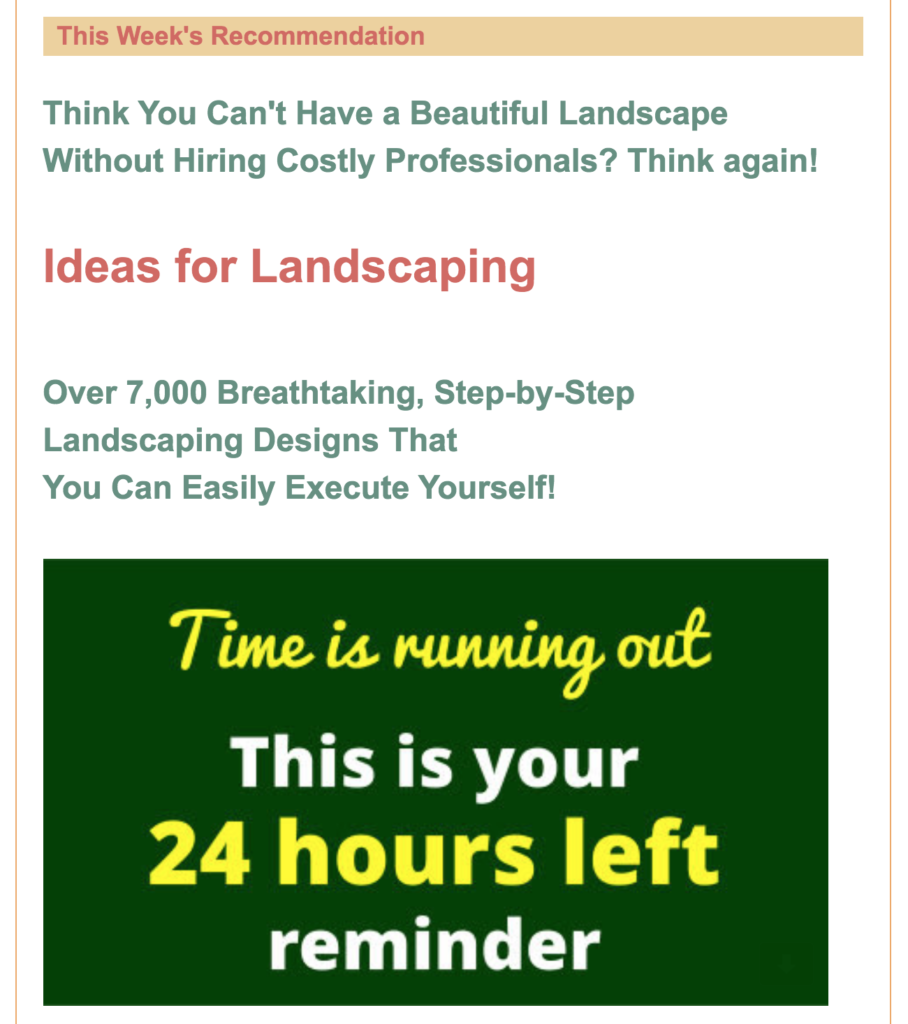
how to sell affiliate products with email marketing

4. Upsell premium or exclusive products

One of the best opportunities for making money with email marketing is by offering additional products or services at the point of transaction — a.k.a. upselling.

Let’s say you’re a life coach, and your main product is an online monthly membership that includes access to a community of users, webinars, and a library of resources.

Once someone purchases your membership, you could then offer them exclusive one-on-one coaching sessions. A participant can pick the topic they want you to focus on and ask questions they may not feel comfortable asking in a live webinar in a virtual room filled with other members. Many people will pay top dollar to get this individualized attention.

Or it can be much simpler than that. If you’re an online personal trainer, you could offer a free downloadable upper-body workout. When someone requests it, they receive an automated email with the download — plus an upsell to a comprehensive 12-week program that guarantees them results.

Upsell email example

Here’s an example from the company FabFitFun. The email tries to upsell quarterly subscribers on an upgraded membership for the chance to customize their subscription boxes early and get more products.
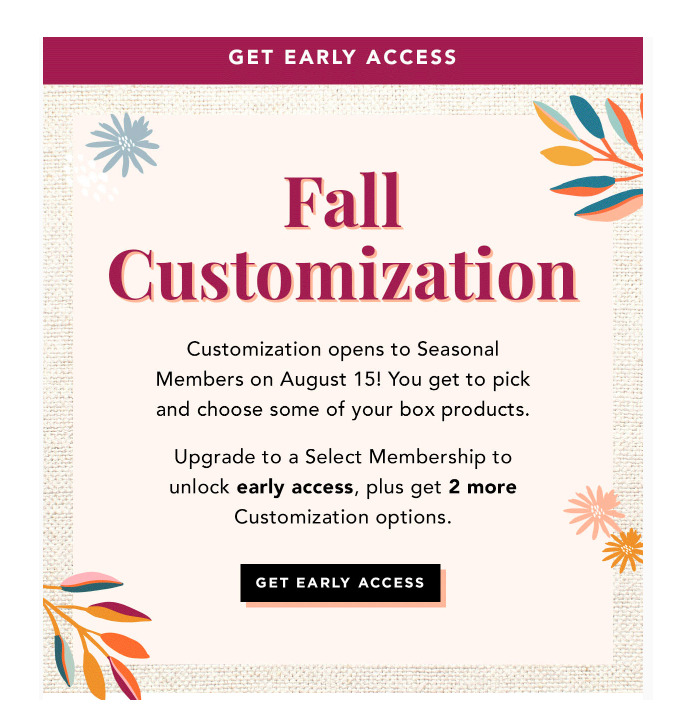
Example of an email that's encouraging an upgraded membership

Every purchase a customer makes gives you insight into their likes and interests. You can use this info to entice them with other products they may also enjoy.

In fact, you probably have an email in your inbox right now that reads, “Because you bought this, you might be interested in this.” That’s because online shoppers who get targeted, personalized messages are more likely to purchase from you again. 

Cross-sell email example

Here’s an example of a great cross-sell: A nutrition coach becomes certified through an online course. Once they complete the course, they’re automatically sent an email that cross-sells to other courses — this time about yoga certifications or strength and conditioning certifications.
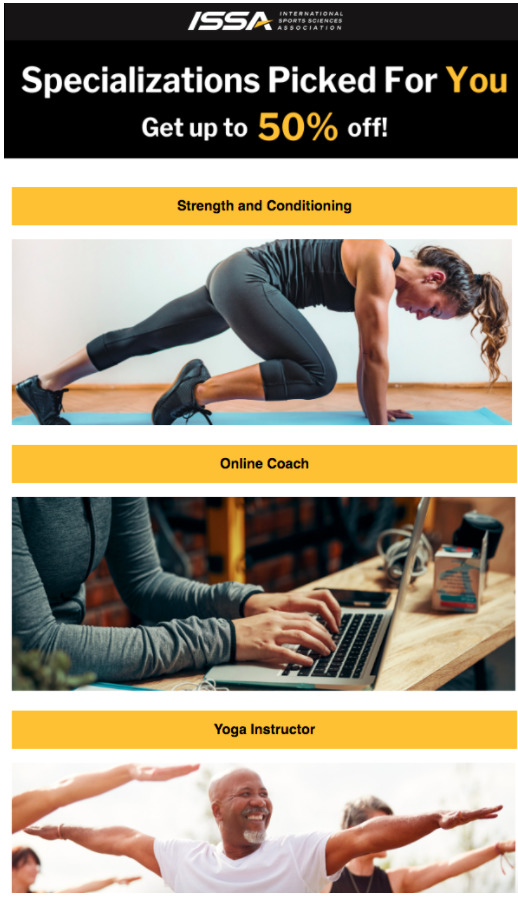
Example of how to cross-sell with email marketing

I recommend sending an automated email with additional recommendations approximately one to three weeks after a customer’s initial purchase. It’s super easy to set up targeted, automated email sequences like these in AWeber. Create your FREE account today.

6. Get repeat purchases

Along the same lines as cross-selling, you may have a product or service that calls for repeat purchases. Sometimes a friendly reminder email is an effective way to keep bringing in a steady stream of sales.

This method to make money with email marketing works extremely well for businesses that rely on recurring, seasonal, or perishable goods. For instance, a window cleaning service may email a client at the end of every season to remind them to schedule their next appointment.

Offering a discount or coupon can also go a long way. Offering a person a discount off their next cleaning may give them the boost they need to book another session. 

Or, simply remind your customers that they may want to book their next appointment, and give them the option to set up reminders if they’re not ready to purchase with you. 

Repeat purchase email example

Here’s a great example from Salon and Spa by Kimberly Gider, they send this reminder email shortly after their most recent visit.
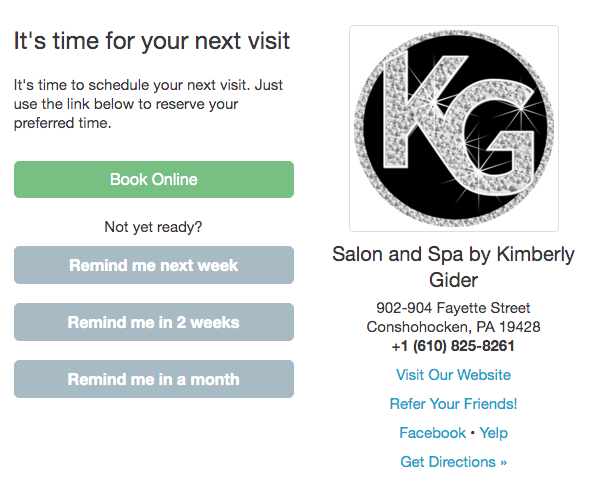
Reminder email to encourage repeat purchases

7. Have a cart abandonment plan

We’re all a bit forgetful, so it’s no surprise that buyers often get distracted or step away from a purchase because they weren’t ready to buy at that moment. But if you’re using an e-commerce platform like WooCommerce, you know what they left behind.

Automatically send highly relevant emails encouraging them to buy the product or service they were considering. Customers who received multiple abandoned shopping cart emails are 2.4 times more likely to complete the purchase than those who receive only one followup email, according to Experian.

Try sending the first message one day after, a second message 48 hours after, and possibly a third message within three or four days of abandonment.

Keep cart abandonment emails short. It doesn’t hurt if you inject some humor or personality to catch the reader’s eye. 

Abandoned cart email examples

Check out this example from the clothing company Chubbies.
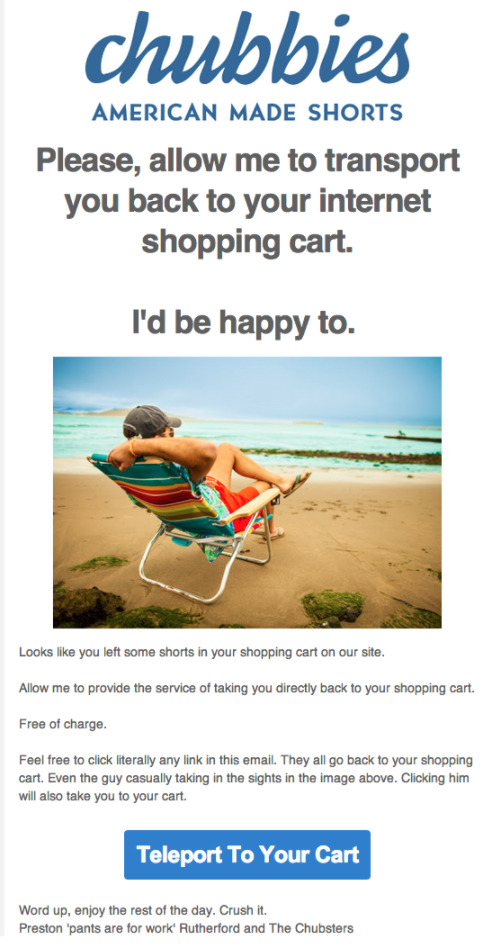
Email marketing example from Chubbies

And this example from the Dollar Shave Club that quickly reminds the person of all the benefits they’re missing out on by not joining.
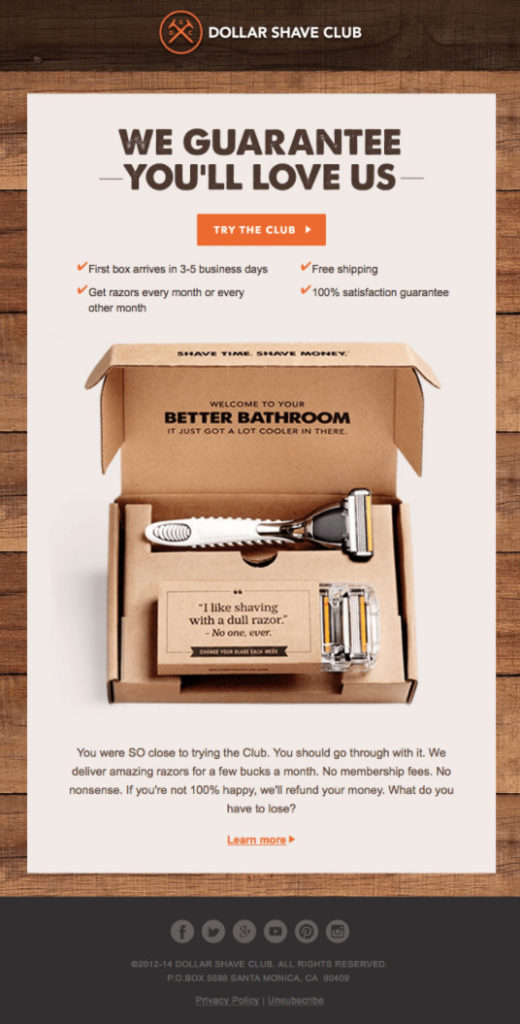
Email marketing example from Dollar Shave Club

You can even offer relevant information to help address questions or concerns they may have, or highlight your great customer service team. Many companies will throw in a discount to tempt you even further or create urgency with a limited-time offer.

8. Include sponsored content or advertising in your emails

Another way you can make money from your email list is by selling ad space in your emails. To do this, you’ll need a minimum of 1,000 engaged subscribers on your list — people opening your emails and interested in your content. 

When you’re first getting started the easy thing to do is go through a third party service such as Paved or Swapstack. These third parties are centralized marketplaces that connect companies looking to advertise with people or companies looking to accept advertisements in their emails.

How you allow those advertisements to be structured in your email is completely up to you. 

Selling ad space in an email example

MorningBrew, for example, allows advertisers to add their logo to the top of their daily newsletter.
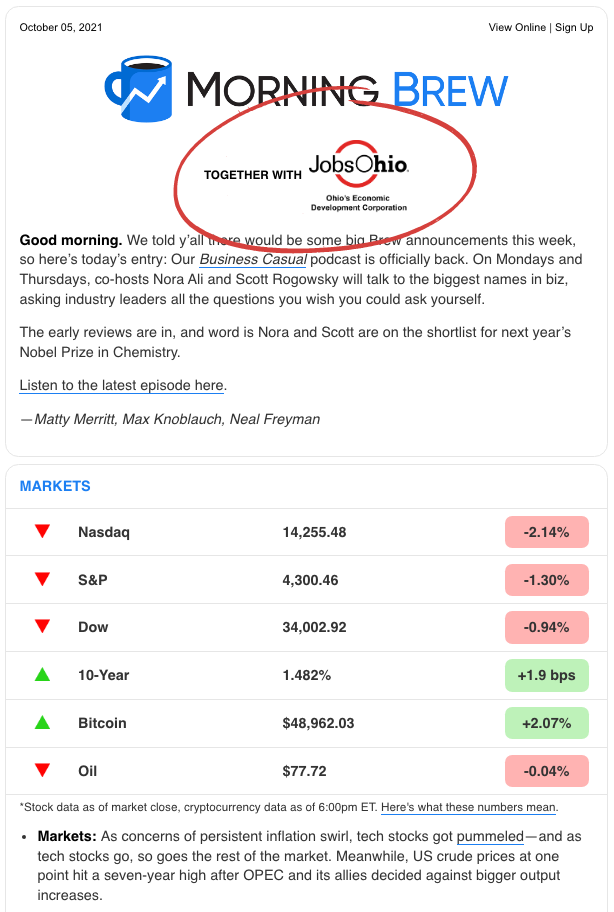
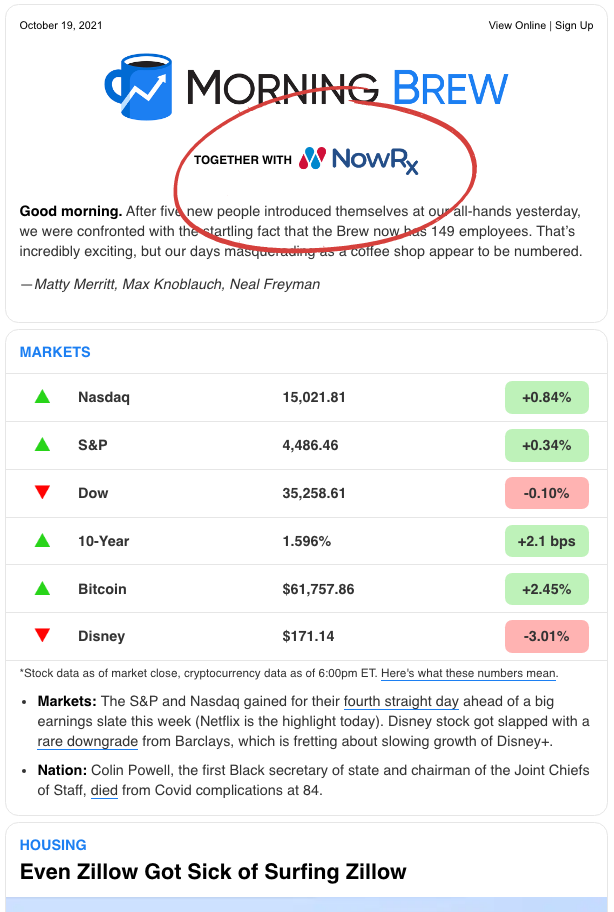
Email newsletter example from MorningBrew with an sponsorship at the top

9. Ask people to spread the word

The last tactic I’ll write about is also one of the oldest marketing strategies: word of mouth!

This tactic is one of the oldest marketing strategies: word of mouth!

According to a Nielsen report, 84 percent of consumers say they either completely or somewhat trust recommendations from family, colleagues, and friends about goods and services. That makes personal recommendations the highest ranked source for trustworthiness when it comes to making a purchase.  

So if you have an engaged, loyal customer base, send emails encouraging them to recommend your products and services to their friends and acquaintances. You can also go a bit further by asking them to give you positive online reviews and to “like” and share your social feeds.

Think about implementing referral links to incentivize your subscribers to spread awareness about your brand, too. Referral links allow your current customers to promote trackable links for your business. In exchange for sending new paying customers your way, you can give them incentives like discounts, coupons, vouchers, cash, prizes or redeemable points.

Referral email example

Check out how the Hot Chocolate 15k/5k race encourages runners to refer their friends to the race below.
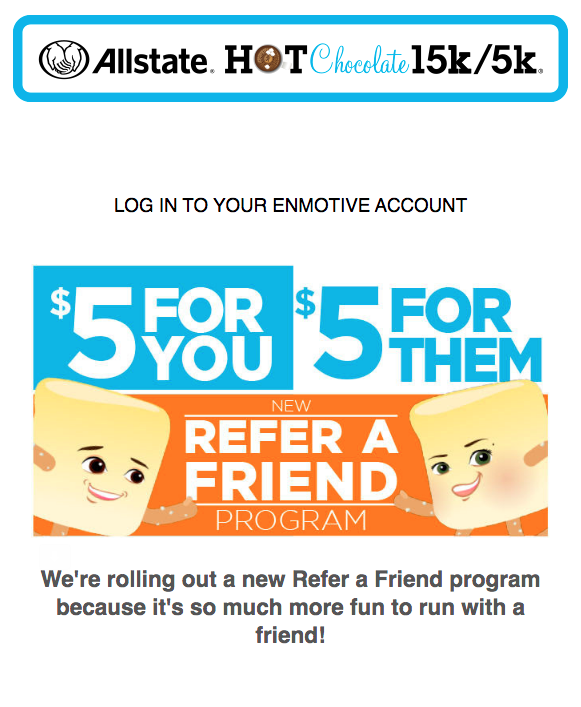
How to ask for referrals with email marketing

10. Automate your email campaigns

Automated email campaigns — also called autoresponders — are a series of emails that are automatically sent to your new subscribers after they subscribe, saving you time and effort so you can keep your focus on your passion.

The first email in your automated series is your welcome email, which should set the tone for the types of emails your subscribers can expect from you. It’s also a great time to make a sale since welcome emails often see higher engagement rates than other types of emails. 

Then, expand upon your welcome email with a welcome series to provide ongoing value to your readers. 

For example, if you’re a podcaster, your welcome series could share top blog posts, more about you and your business, a survey of your subscribers to learn more about them and their interests, and more.

With a partner like AWeber, you can set up automated email campaigns to make money with email marketing easily. 
AWeber's 24/7 email marketing master class course

How to close the sale with email

While all of these tactics are excellent ways to make money with email marketing, they’ll most likely fall flat without some killer email copy or content to win over your potential buyers. Check out our free What to Write course and you’ll learn how to craft the perfect email for every layer of your funnel, and get 45+ email content templates to copy and paste. 

Plus, save money on your email marketing by signing up for AWeber Free — our 100% free pricing option to make email marketing and landing page services available at no cost.

The post How to make money with email marketing (10 expert tips) appeared first on AWeber.


from AWeber https://ift.tt/1UKOqsn
via IFTTT

27 TikTok stats marketers need to know in 2023

Making waves: Unexpected industries innovating on social

There’s a place for everyone on social media. Whether you’re into knitting figures from your favorite TV shows or foraging for wild mushrooms, social media has a community for you.

But if you work in a technical or niche industry, it might seem like you don’t belong on social. That’s an understandable feeling. When lists of brands to watch and the majority of viral posts feature B2C brands, it’s easy to feel like your brand has nothing to say—but that couldn’t be further from the truth. No matter your industry, you can make waves on social media.

Industry events and webinars make space for people to discuss trends, talk about controversies and tout the latest innovations in their industries. The people who attend those are all on social—and they’re interested in seeing that information in their feeds. Social media is like a giant trade show exhibit hall and with a little creativity, your brand can have the best booth.

Let’s highlight unexpected industries that are making the most of their social media presence. Get ready to be inspired.

Keep on trucking

Is there anything more invigorating than the open road? No one knows that feeling better than trucking companies. But trucking is a legacy industry, meaning brands might be reluctant to join social media. Here are a few that are leading the way and making an impact.

Freightliner Trucks dives into nostalgia

There’s something about human nature that makes nostalgia so enticing. Everyone is a sucker for a good vintage ad. Why do you think Mad Men ran for seven seasons?

Freightliner Trucks understood the power of nostalgia and had the history to back it up. After 80 years in business, they jumped back in time for their latest ad campaign. Giving it a ‘70s feel makes it stand out in feeds full of futuristic predictions and shiny new technology.

The takeaway

Make it visual. Translate your brand differentiators into one-of-a-kind imagery for a lasting effect.

American Trucking Association takes care

Some industries are tight-knit. Once you get into certain niches, everyone knows everyone. That level of community matters and your brand should take an active role. Social media provides the perfect venue to show your audience that you’re part of the group.

The American Trucking Association showed its humanity when a member posted about losing a friend in the industry. They retweeted the original post, adding their own condolences and personal memories in the long run. This customer-centric approach makes their brand come across as approachable and connected to the community.

The takeaway

It’s okay—and even encouraged—to get personal. Whether it’s a celebration or a consolation, big moments in your industry and audiences’ lives should be shared.

Manufacturing the perfect social presence

Manufacturing is an industry we can’t live without, but it often fades into the background since the work isn’t always visible to everyday consumers. Manufacturing marketers: don’t pass up this opportunity. There’s endless B2B marketing potential for manufacturers on social.

International Paper Company harnesses a holiday

If you look hard enough, there’s a holiday for basically everything. From Popcorn Lovers Day to Star Wars day, people love celebrating these hashtag holidays on social media. There’s bound to be one related to your brand.

International Paper Company looked at the list of unofficial holidays and found a winner in National Pizza Week. At first glance, the paper and cardboard company has nothing to do with pizza. But they control a very important part of the delivery experience—the box. Realizing that most people have little-to-no idea what they can recycle, they turned this silly holiday week into a teachable moment about their product.

International Paper Company doesn’t stop at pizza. They’ve also created content for America Recycles Week, Life-Changing Injury and Fatality Elimination (LIFE) Month, and Forest Products Week, tapping into holiday tie-ins year-round.

The takeaway

People love an excuse to celebrate. You might as well give them one. By leaning into hashtag holidays, you’ll loop your brand into a larger conversation and bring joy to your followers.

Avery Dennison goes all-in on platform

According to the 2022 Sprout Social Index™, over half (51%) of consumers plan to regularly use YouTube but only 35% of marketers plan on meeting them there. That’s a missed opportunity for any brand.

Avery Dennison, a major manufacturer spanning products, isn’t missing out on YouTube traffic. Their page is fully loaded, whether that’s product deep-dives, how-to videos or employer brand clips. Avery Dennison takes full advantage of YouTube’s functionality, with playlists to group like videos and Shorts to capture your attention. The strategy is paying off, with over 26,000 subscribers following their channel.

The takeaway

Different brands require different social media platforms. Look at who you’re trying to reach and meet them where they are.

Cummins Inc. wraps up the year with milestones

In 2016, Spotify introduced its Wrapped feature and marketing hasn’t been the same since. It seems like every company has created its own year-in-review feature or campaign. You might think these messages are best suited for consumer companies or flashier B2B enterprises.

Cummins Inc., a global power technology leader, thought differently. With over a century of innovation under its belt, Cummins has celebrated countless milestones along its journey.

2022 was no exception with numerous entries added to the list, from delivering record-breaking revenues and appointing its first female CEO to setting a Guinness World Record. To celebrate, they posted their “Top Moments of 2022” as a carousel and video post. The effort paid off with over 3,000 views.

The takeaway

Don’t be afraid to borrow ideas from other industries. Your audience is likely participating in trends across social media, so why shouldn’t you?

Establishing a strong social presence in healthcare

Social media moves quickly and for a highly regulated industry like healthcare, creating a post takes more effort than just pressing send. But that complexity doesn’t mean healthcare businesses should count themselves out of the game entirely. While social media for healthcare might look different, it can still be extremely effective.

Mayo Clinic Nursing keeps it light

Going to the hospital is never a fun experience. It’s usually a high-stress environment and no one wants to be there.

The nurses at Mayo Clinic bring some levity to the serious nature of the hospital with their TikTok account. In one video, they point out “Things in the Pediatric Department That Just Make Sense,” hopping onto a popular trend. The nurses show interventions, tricks and tools they have to make the hospital a little less scary for young patients. This video isn’t only entertaining to watch, it also shows how much the Mayo Clinic nurses care about their patients having the best possible experience.

The takeaway

Do you have a crowd-pleasing customer care tactic? Social is the perfect place to show off how your employees go the extra mile.

Pfizer loves the learning process

Life sciences are complicated for the layperson. There’s a reason doctors and researchers have such a long educational journey. But just because it’s complicated doesn’t mean that people don’t need to understand it. Breaking down complex concepts is a key aspect of the healthcare industry.

Pfizer knows there’s a lot of confusion around mRNA technology—and they also know that a lab coat and a chalkboard won’t make it any simpler. The brand decided to create a comic strip starring an mRNA protein named Mirna to explain exactly how this new vaccine innovation works in terms anyone can understand. The result is a cute and informative post that racked up over 250 Quote Tweets.

The takeaway

Your customer might not understand everything about your product, but that doesn’t mean they don’t need or want to. Brainstorm fun ways to explain the more complicated aspects of your industry so everyone can see its importance.

Hologic makes things personal

Sometimes it’s good to take things personally. Personal stories bring out your audience’s empathy and emotions. They’re a powerful tool for getting your message across.

Hologic, a healthcare testing manufacturer focused primarily on women’s health, puts a face to their brand on LinkedIn. The company regularly features their employees through video and text posts to show how they live their values every day. These employees are passionate about the work they do and their employer. It’s an excellent brand opportunity—for both marketing and employer branding.

Hologic LinkedIn post
Hologic Linkedin Post

The takeaway

Your employees can be powerful advocates for your brand. Social media gives you the opportunity to put them front and center.

Classifying a social strategy for government agencies

People don’t exactly associate excitement with the government. Whether comedians are making jokes about the lack of entertainment value on C-SPAN or you’re stuck in line at a bureaucratic agency, the government doesn’t automatically invoke fun. But that doesn’t mean your marketing can’t be. If you still think government social media accounts have to be stuffy, the TSA’s award-winning Instagram account would like to have a word with you.

The CIA gets smart

The National Reconnaissance Office, the National Security Agency, the Cybersecurity and Infrastructure Agency and the National Geospatial-Intelligence Agency had a meeting of the minds with the CIA. They weren’t assessing current threat levels or planning out new strategies. They were creating a crossword puzzle to celebrate National Puzzle Day. With seven down and eight across, the puzzle’s questions focus on facts about national security agencies and laws. It’s a fun way to get citizens involved and informed about these agencies.

The takeaway

Sometimes partnerships can have unexpected results. Team up with like-minded marketers from partner brands and see what magic you can create.

NASA cultivates relatability

The nearest star is almost six trillion miles away. Even the moon is over 230,000 miles away. NASA is known for exploring the final frontier, but with those kinds of distances, it’s easy for citizens to wonder why we bother.

NASA addresses this question head-on in an annual publication and online blog called NASA Spinoff. The content hub focuses on innovations from the NASA Technology Transfer Program, a branch of the organization dedicated to innovations on Earth. NASA’s social media team frequently repurposes content from Spinoff for post ideas. In this example, they created a video teaser for the publication, showing tangible examples of the benefits the agency provides. NASA clearly knows how to create a value proposition.

The takeaway

Having a solid content repurposing strategy is just good social media management. What works for one platform might not directly translate to another, but you can always source ideas from past and ongoing campaigns.

The Iowa Department of Natural Resources tests your knowledge

Some agencies, like the Department of Motor Vehicles, touch almost everyone. Others have more niche audiences, like the Department of Natural Resources. These constraints often give agencies more flexibility in their posts since they know exactly who they’re talking to.

The Iowa Department of Natural Resources knows that people who visit its Facebook page have at least a passing interest in the outdoors, which they weave into content accordingly. In one post, they gave their audience a pop quiz: Out of four photos of birds, one of them was not a bald eagle. This question seems like it’d be pretty easy, considering the amount of patriotic bald eagle imagery across the US, but it proved to be surprisingly difficult. But they didn’t stop with just the post. They replied to each guess in the comments, telling them whether they were right or wrong. Can you guess which bird isn’t a bald eagle?

POP QUIZ: which one of these birds is NOT a bald eagle? 🦅🦅🦅

Posted by Iowa Department of Natural Resources on Monday, January 30, 2023

The takeaway

Your audience has something in common. It’s your job to figure out what it is and leverage that commonality to engage them.

Uncommon industries require uncommon tactics

No matter what industry you’re in, there’s a community of people you can appeal to. And you can find that community on social media. Even the driest industries or topics can become fascinating if you tell the right story to the right people in the right way. Now’s your chance to get creative.

Looking for somewhere to start? Take our interactive quiz to find out which social media persona works best for your brand.

The post Making waves: Unexpected industries innovating on social appeared first on Sprout Social.


from Sprout Social https://ift.tt/6gjXRsx
via IFTTT

Tuesday, 7 February 2023

LinkedIn ads: the ultimate guide from zero to hero

LinkedIn ads are a powerful tool for all kinds of businesses. The platform has over 810 million users, with 65 million of them in decision-making positions.

While organic content is still the heart of any LinkedIn marketing strategy, running ads can help amplify your content’s reach and impact.

In this guide, we’ll dive into LinkedIn advertising, discussing everything from the different ad formats available, to creating a target audience, to measuring the success of your campaigns.

Table of contents

How to get started advertising on LinkedIn

Using the LinkedIn ads campaign manager

Start by signing into the LinkedIn Campaign Manager. The LinkedIn ads manager is where you can manage your LinkedIn advertising campaigns.

Before you get started with Campaign Manager, you need to create a LinkedIn account if you don’t have one yet; it takes just a few seconds to create one.

linkedin campaign manager signup

Enter your account name and select your currency. If you’re running ads on behalf of a business, link your campaign with a LinkedIn page.

Setting a relevant ad objective

Next, choose the objective for your ad campaign. Do you want more people to become aware about your business? Perhaps you want to attract more website visitors. Or maybe you want to capture more leads.

LinkedIn advertising gives you several objectives to choose from for three different stages of the sales funnel–awareness, consideration and conversions. At this stage, you can set the most relevant objective for a particular LinkedIn ads campaign.

Linkedin objectives

If you’re an employer that’s advertising for an open position, you also have the option to set an objective to promote job opportunities.

Nailing your ad targeting

You can’t run a successful ad unless you’re targeting the right people. Make sure you have a clear idea of what kind of people you want your ad to reach. You have several targeting options for LinkedIn ads–whether you want to target people based on location, industry, company size, education, job function or skills.

linkedin targeting options

You can even select multiple attributes at a time to further narrow down your targeting. You also have the option to exclude audiences with certain attributes that aren’t relevant to you.

Before you save your ad campaign, make sure you enable audience expansion so LinkedIn can expand and engage a new audience with your ad campaign. This option automatically includes people with similar attributes as the ones you’ve selected.

Choosing the right LinkedIn ad types for your campaign

LinkedIn offers several ad types and formats to help you promote your business in the best way possible. Let’s take a look at these ad types below:

Sponsored content

LinkedIn sponsored content looks just like a regular post that you’d see on your feed except with a CTA button and a “promoted” label.

You can choose from five different formats of sponsored content — single image, carousel, video, event and document. It’s better to switch between the options every once in a while to compare their performances and see which one works best with your audience.

  • Single image ads: These ads consist of a single image and are typically used to promote a product or service, increase brand awareness or drive website traffic.
  • Video ads: These ads include video and are typically used to demonstrate how a product or service works, tell a brand story or increase engagement.
  • Carousel ads: These ads include a series of images or videos that users can swipe through. Carousels are typically used to showcase multiple products, services or ideas, or tell a story in slideshow format.
  • Event ads: These ads allow businesses to promote upcoming events like webinars, conferences and meetups. They include date, time and location details, and a call-to-action to register or attend the event.
Linkedin sponsored content
  • Document ads: These ads allow businesses to promote whitepapers, ebooks or case studies by displaying a preview of the document and linking to the full version. They’re typically used to generate leads and increase brand awareness.

Lead gen forms

LinkedIn’s lead gen forms let you easily capture leads without requiring users to leave the platform. You can add these forms to any sponsored content or message to collect names, emails and job titles.

The forms are pre-populated with users’ profile data, which encourages more people to sign up. You can also include custom questions in your forms to gather additional information about your prospects.

Once a user submits a form, their contact information is sent to your business and they’re also added as a new lead in LinkedIn’s CRM.

Sponsored messaging

LinkedIn also lets you send paid direct messages to targeted users. In fact, using this ad tactic alongside sponsored content can boost your clickthrough rates by over 70%.

There are two sponsored message ad formats you can choose from:

  • Message ads: This ad format lets you send personalized and targeted messages to users with a single call-to-action (CTA.) You can also add lead gen forms to your message ads to easily capture leads.
  • Conversation ads: This ad format lets you add multiple CTAs to your messages to help prospects engage with your business and access targeted offers and links.

Quick tip: To improve your sponsored messages, you can personalize them with your audiences’ names and job titles using LinkedIn macros.

Text and dynamic ads

LinkedIn also offers special ad options that are a bit different from regular sponsored content. These include text, spotlight and follower ads. Let’s take a look at each one below.

  • Text ads: Pay-per-click (PPC) text ads appear on the right-hand side of a desktop screen. They include a small image along with a short headline and blurb. They may be less prominent than sponsored content but can still be very effective depending on your campaign goal.
  • Spotlight ads: These are dynamic ads that are personalized for each individual profile. Spotlight ads link back to your website or landing page, and are a great way to share insightful, thought leadership content.
  • Follower ads: These dynamic ads are also personalized, but the goal is to get you more followers on your LinkedIn company page.

The true cost of LinkedIn ads

The average cost-per-click (CPC) on LinkedIn is between $5-6.

But the actual cost of LinkedIn ads depends on factors like the type of ad, targeting, budget and the campaign’s performance.

The pricing system for ads can also vary.

For example, sponsored content is generally priced on a CPC or cost-per-mille (CPM) basis, while sponsored messages are typically priced on a cost-per-send (CPS) basis.

Targeting options, such as demographic and job title targeting, can also affect the cost of LinkedIn ads. The more specific the targeting, the more expensive the ad will be.

Additionally, if your campaign is performing well and achieving the desired results, the cost-per-conversion may be lower, making the campaign more cost-effective.

Keeping this in mind, it’s important to set a budget and measure the ROI to ensure your ad costs don’t add up and jeopardize your financial goals.

Setting up your ad budget and schedule

A big part of running ads on LinkedIn is setting a budget for your campaigns. This helps you control the total cost of advertising on the platform.

LinkedIn offers three budget options to control your ad spend:

  • Daily budget: This option lets you specify the average amount you want to spend on your ad per day. You can choose between a continuous schedule or a set schedule for your daily budget.
  • Lifetime budget: This option lets you specify the total amount you want to spend on your campaign from start to finish. LinkedIn will then automatically adjust the daily budget to deliver optimal results. The daily spend can vary depending on factors like traffic, seasonality and bid type.
  • Combination: You can also set both daily and lifetime budgets for your campaign. This will help you control the total cost as well as your daily spending. However, you can only select a continuous schedule for this type of budget strategy.

Once you’ve specified the budget for your ad, you also need to set the campaign schedule. The schedule will determine the lifetime of your ad and also help pace your spending.

The scheduling options you have will vary depending on your budget type.

  • Continuous schedule: Run your campaign continuously from a start date. The campaign will end once your budget has been entirely consumed. You can use this option for all three budget types.
  • Set schedule: Run your campaign from a specified start date to end date. You can use a set schedule for both lifetime and daily budget options, but not if you’re using a combination of the two.

Understanding LinkedIn bid types

LinkedIn advertising is based on an online auction system where your ad competes with other ads for placement. To win, you must place competitive bids for your ads.

You can choose from three bidding types in the Campaign Manager:

  • Manual: This bidding strategy lets you set a specific bid amount for a key result. This option can charge by clicks, sends, impressions or views, depending on your ad format, objective and goal. Manual bidding gives you more control over the bid amount, but you need to track the performance of the campaign and adjust your bid as needed.
  • Cost-cap: This bidding strategy lets you set a maximum cost per key result. This allows the system to automatically adjust your bids to achieve optimal results while staying within your campaign’s budget.
  • Maximum delivery: This is a automated bidding strategy that uses machine learning to set and adjust bids while utilizing your entire budget. The goal is to maximize key results and use your total budget most efficiently.

Measuring the success of your LinkedIn ad campaigns

You don’t run LinkedIn ads no reason. You’d do so with the hope of getting some return on your investment. This makes it crucial to monitor and measure your ad success so you can see whether your investment is paying off.

Perhaps you might even notice that some types of LinkedIn ads are working better than others and you’ll want to shift your focus towards those. You might also find that some ads aren’t delivering any results at all, so you’d want to stop setting money toward something that doesn’t work.

The LinkedIn ads manager comes with a robust reporting feature that lets you track LinkedIn analytics and metrics to understand your ad performance. This includes metrics like clicks, impressions, cost per click, click-through rate, cost per impression, conversions, cost per conversion, leads and cost per lead.

You can even track your performance with different audience demographics in the ads manager. For instance, you can view how people performing a certain job function responded to your ads in terms of clicks, impressions and click-through rate.

Looking to dive deeper? Sprout Social’s LinkedIn management tool can help you dig into the good stuff, visualize key metrics and keep an eye on performance and trends data.

Screenshot of Sprout Social's LinkedIn Report showing impressions as a line chart and table, highlighting how many times your content was seen during the reporting period.

Best practices for LinkedIn advertising

Finally, let’s walk you through some LinkedIn best practices that will help you run successful ad campaigns on the platform.

Maintain the correct LinkedIn ad specs

Your LinkedIn ads need to instantly attract and draw in your target audience and you can’t do that without outstanding visuals. When creating visuals for your ads, make sure you follow the proper LinkedIn ad specs and sizes.

The specs vary for each LinkedIn ad type and ad format. Here are the basics:

Sponsored content

Single image ads

  • Should be in JPG or PNG format.
  • File size should be 5MB or smaller.
  • Keep headlines under 70 characters to avoid truncation.
  • Keep descriptions under 100 characters to avoid truncation.
  • Images display at 1200 x 627 pixels and should be at least 400x in width.

Carousel ads

  • Use 2-10 cards per ad.
  • Individual cards should not be larger than 10MB.
  • LinkedIn recommends using 1080 x 1080 pixels with an aspect ratio of 1:1 for individual images.
  • Keep introductory text under 150 characters and two lines to avoid truncation.
  • Character limits below ads are either 45 characters maximum, or 30 characters with a lead gen CTA button.

Video ads

  • Keep it under 15 seconds for better engagement (though LinkedIn allows up to 30 minutes of video ads).
  • File size should be between 75KB and 200MB
  • Your video should be in MP4 format running at less than 30 frames per second.
  • Audio size should be less than 64KHz.

Multiple aspect ratios and quality options are available with varying requirements. Check out the full LinkedIn ad specs for video ads to learn more.

Message ads

  • Banner creative should be 300×250 pixels.
  • It should be no larger than 40KB.
  • It should be in JPG, non-animated GIF or PNG (without flash) format.
  • Add up to three links using a maximum of 70 characters for anchor text.
  • Message text should be no more than 1,500 characters.
  • Subject should be no longer than 60 characters.

Text ads

  • Ad image should be 100×100 pixels
  • It should be in JPG or PNG format
  • File size cannot be larger than 2MB
  • Keep headlines under 25 characters
  • Keep descriptions under 75 characters

Note that there are five different sizes and ad specs for text ads. There’s also a whole bunch of LinkedIn ad size and specs for dynamic ads like follower and spotlight ads that are tailored to individual users depending on which format you choose.

For even better results in lead generation through your LinkedIn ads, some experts also recommend using colors that contrast with the platform’s blue and white colors in your visuals. This will give your ad an instant pop, allowing you to effectively draw in your target audience.

Support your ads with a strong organic brand

Running ads alone does not guarantee leads and conversions.

You also need a powerful organic strategy in place to pique your audiences’ interest, build trust and boost the impact of your paid campaigns.

Along with investing in ads, regularly share valuable and engaging content to establish your business as a thought leader. Create a well-designed company page and use consistent branding to look authentic and high-quality.

Don’t forget to engage with your audience — respond to comments and messages, and welcome both positive and negative feedback.

Finally, track analytics to understand the performance of your organic content. This will help guide your ad campaigns and set your future content up for success.

Keep testing and optimizing

Based on the insights collected from your performance tracking efforts, you’ll uncover some excellent opportunities and ideas to improve your ads.

Run A/B tests on different LinkedIn ad types, ad creatives, ad copy and CTAs. Find out what resonates with your audience and use that to further improve your ad performance.

Additionally, you might even want to use A/B testing to optimize your ad targeting. Make slight alterations to your targeting criteria to identify which audiences are most responsive to your ads. This will eventually help you perfect your LinkedIn ad targeting and get more out of your advertising efforts.

LinkedIn Ad examples to inspire you

Now that you know how to run ads on LinkedIn, let’s look at some interesting examples from real-life brands to get your creative juices flowing.

Asana

Asana linkedin ad example

Asana is a cult-favorite project management tool used by businesses worldwide. This means they have some great numbers to show off and attract potential customers. This is exactly what they’re doing with this LinkedIn ad example, where they use their success in helping increase employee satisfaction as eye-catching copy.

Shopify

Shopify linkedin sponsored content

Shopify does a brilliant job of addressing one of the biggest pain points of office-based employees — the long, monotonous commute. They do so by using powerful imagery and contextual copy, enough to grab the attention of anyone looking to transition to a more flexible work setting.

TikTok

TikTok linkedin video advertisement

In this LinkedIn ad example, TikTok promotes its virtual event using an engaging video made with high-contrast, bold colors and trendy imagery — perfectly aligned with their brand identity. We also love how the copy speaks directly to the specific audience for this post — B2C startups.

Notion

Notion linkedin lead gen form

Who says event ads are just for webinars? SaaS companies like Notion can also promote product demos on LinkedIn using multiple ad formats, including event ads. Make sure to throw in a lead gen form into the mix like Notion does to encourage more people to register.

Canva

Canva linkedin ad carousel ad example

This carousel ad by Canva is everything the online design tool stands for — colorful and versatile. Using this ad format allows Canva to highlight the many ways users can benefit from the software, visually showcase the tool’s interface and abilities, as well as look beautiful and eye-catching.

Grammarly

Grammarly linkedin ad example

Grammarly’s LinkedIn ad is proof that you don’t need flashy colors and visuals to create an impactful advertisement. In the example above, the popular AI writing tool demonstrates its editing feature using a screenshot of the app itself as copy.

Does it work? You bet! And the clever bit about this ad is the sentence being edited in the screenshot resonates with the target audience (hint: freelancers and contractors.)

Grow faster with LinkedIn ads

With the right approach, LinkedIn advertising offers plenty of opportunities to connect with the right audience and grow your business. But it can get overwhelming when you’re just starting out.

Make the most of the steps above to build a winning LinkedIn advertising strategy and generate valuable leads. Interested in learning more? Check out our LinkedIn marketing guide to 10x your growth on the platform.

Or, find out how you can use LinkedIn for business beyond marketing.

The post LinkedIn ads: the ultimate guide from zero to hero appeared first on Sprout Social.


from Sprout Social https://ift.tt/O0J7P8d
via IFTTT

Employee advocacy stats to secure C-level buy-in

Securing C-suite buy-in is essential to getting any new project off the ground. To communicate your vision in a clear and concise way, you need to lead with numbers.

When taking an employee advocacy program up the chain, employee advocacy stats should be the backbone of your pitch. Decision makers want to see proof of success and the measurable benefits your company will gain by launching a brand amplification program.

Keep reading for statistics on employee brand advocacy that will grab the attention of multiple leaders across your C-suite.

The employee advocacy statistics your boss needs to see

According to The Sprout Social Index™, more than two-thirds (68%) of marketers report their organization already has an advocacy program.

A circle graph with a title that reads: Does your organization have an employee advocacy program for social media? The graph indicates 68% yes and 32% no.

While many advocacy programs are informal side projects, sophisticated brands will find ways to formalize and evolve them through dedicated staff, tools, processes and employee training.

Of the 1,000+ marketers we asked, those that had an advocacy program stated their top three objectives were increasing brand awareness, attracting qualified job applicants and having more control over brand messaging. Other reasons included driving more qualified leads, establishing thought leadership and creating new networking opportunities.

A chart that reads: The most important business outcomes of an employee advocacy program. 1. Increase brand awareness. 2. Increase number of qualified job applicants. 3. Control over brand messaging. 4. Drive more qualified leads. 5. Establish thought leadership. 6. Networking opportunities.

And employees want to post about their companies. According to Sprout’s Employee Advocacy Report, 72% of engaged users would post about their company if content was written for them.

A stat call-out that reads: 72% of engaged users would post about their company if content was written for them.

Your C-suite pitch: Traditional social media tactics are becoming less reliable. Organizations leading the advocacy charge have an edge over their competitors. In the face of limited resources, changing algorithms and congested feeds, an advocacy program is a company’s greatest asset to amplify content, increase ROI and recruit top talent.

Using Sprout’s Employee Advocacy platform is the easiest way to launch a brand advocacy program. In the platform, you provide pre-approved messaging that your team can share from one centralized hub. And your internal team can curate the articles directly in Sprout. Employees are empowered to post authentically, while feeling confident they’re staying on-brand.

A screenshot of Sprout's Employee Advocacy platform that demonstrates how users can curate a new story for their internal team to share.

Stats that prove the impact of advocacy on brand amplification

Advocacy supercharges your brand awareness efforts and enables you to amplify your reach beyond what you could achieve with organic tactics alone.

Take IT software company Ivanti. After creating a brand ambassador program with the help of Sprout’s Advocacy platform, the organization reached 16 million people on social media in the first month.

A data visualization that reads a Sprout customer reached 16 million impressions the first month they launched their brand ambassador program.

We had similar results at Sprout. In 2022, content shared through our Advocacy platform earned more impressions than all our social networks combined. In fact, 95% of the 740,000 impressions earned from our recent Salesforce global partnership announcement were driven by posts our employees shared.

A data visualization that reads 95% of all impressions from a recent partnership announcement were driven by posts Team Sprout shared.

Your C-suite pitch: Across industries, organic social performance has taken a hit. Tapping into employee networks is the most impactful way to amplify your best performing content and spike impressions—without stretching your bandwidth or ad budget.

Sprout’s Advocacy platform automatically measures shares, engagements and reach, so you can see your amplification impacts in real-time.

A screenshot of Sprout's Employee Advocacy Content Report that demonstrates metrics like views, shares, engagements and clicks for each curated article.

Stats that prove the impact of advocacy on revenue

Enlisting your employees as brand advocates isn’t just key to increasing awareness, it has serious effects on your bottom line and sales targets.

First, advocacy enables you to scale and amplify your best performing content so you can generate qualified leads without straining your ad budget. For example, at Sprout, we reached almost $450,000 in earned media value in 2022, while Ivanti achieved more than $500,000.

Second, according to Sprout’s Employee Advocacy Report, posting company content helps employees accomplish their day-to-day tasks and long-term goals—including social selling. About 72% of engaged social media users and 62% of casual users say sharing company posts helps their social selling efforts.

A bar graph with a title that reads: Ways employees believe sharing company posts on social media help their role. 73% of engaged users cite brand awareness, 72% cite social selling, 54% cite market amplification and 51% cite internal communication.

Empowering your employees to share meaningful content positions them as thought leaders in your industry, helping them generate new business opportunities. As LinkedIn reports, salespeople who regularly share about their company on social media are 45% more likely to exceed their quota.

Your C-suite pitch: Advocacy unlocks revenue gains by complementing your demand generation efforts. From achieving earned media value to empowering your team members to do their best work, investing in an employee brand amplification strategy pays in dividends.

Sprout’s Employee Advocacy reporting tools give you the data needed to quantify your advocacy program, and to connect results to leads, event registrations and more.

A screenshot of Sprout's Employee Advocacy General Report. The metrics overview demonstrates the number of active stories, total shares, average shares per user and earned media value. The report also breaks down metrics like shares, reach and earned media value by network.

Stats that prove the impact of advocacy on hiring (and keeping) top talent

Potential new hires will research your company on social, keeping an eye out for what your current employees think about it. Afterall, your employees’ perspectives matter three times more to prospective candidates than your CEO’s. When employees celebrate your company culture, they elevate your employer brand and increase interest in your company.

In a recent Sprout survey of 1,000 consumers, 87% of Millennial respondents indicated that they feel more connected to brands when they see employees sharing information online, and 81% think it’s important for employees to post about their company (up from 72% in our previous survey).

A bar chart title that reads: What Millennials think about employees who share about their company on social media. 87% feel more connected to the brand and 81% think it's important.

Advocacy also invites your current employees to be stewards of your brand, fostering a sense of ownership, loyalty and belonging. When employees have a stake in your company, it improves their long-term morale, engagement and retention.

Your C-suite pitch: Creating employee advocates strengthens your recruitment and retention strategies. Advocacy expands your candidate pool and generates positive social sentiment and buzz that increases your application volume.

From Sprout’s platform, you can draft and send custom internal newsletters. Broadcast curated stories about open roles, company achievements and employer brand content so your employees can share the posts from their inbox with one click.

A screenshot of Sprout's Advocacy platform Send a Newsletter tool that demonstrates the email settings for sending internal newsletters (teams, subjects, heading and message).

Why Employee Advocacy by Sprout Social is worth the investment

Employee Advocacy by Sprout Social is the easiest way to extend your social reach, increase brand awareness, drive sales and attract talent—while satisfying your employees with an easy-to-use platform.

Like one Sprout customer in the healthcare industry who increased their engagements by 200% in six months after launching their advocacy program. Their employees also reported 98% satisfaction with the platform.

A data visualization that reads a Sprout customer increased their engagements by 200% when they launched their employee advocacy program

Calculate how your business can benefit from using the Employee Advocacy platform with our ROI calculator.

The post Employee advocacy stats to secure C-level buy-in appeared first on Sprout Social.


from Sprout Social https://ift.tt/ZRo5YGU
via IFTTT

Monday, 6 February 2023

How to run an Instagram giveaway or contest successfully

Running an Instagram giveaway or contest is a strategic way to engage your audience and grow your following. Plus, it’s a fun way to give back to your followers—and work to turn more of your followers into customers.

There are so many social media contest ideas out there that could be a perfect fit for your brand, and they can even be a stellar tactic for building a library of user-generated content and new followers.

Throughout this article, we’re going to dive deeper into what an Instagram giveaway is and why you’d want to host one—plus a step-by-step showcasing how to put on your own giveaway successfully.

Why should you host an Instagram giveaway?

An Instagram giveaway or contest tends to start with an Instagram post that asks your audience to complete some sort of task to enter into a giveaway to win a free product or prize. This type of campaign can generate a lot of excitement around your brand, bringing in new eyes and increasing reach and engagement… sometimes by a lot.

There are a number of benefits to employing this strategy—let’s cover the most important ones.

Get more followers

Many brands require that users entering their giveaway must first follow them on Instagram. Follow-gating your giveaway like this ensures that your Instagram following grows alongside your entries. While you’ll likely start receiving entries from those who already follow you, prepare to see some growth as your giveaway gains traction.

Generate higher engagement

Instagram giveaways can generate higher engagement on specific posts (your giveaway announcement, obviously)—but it can also improve your engagement overall. Algorithms work in funny ways, but once it realizes that you’re getting a lot more engagement than usual, it’ll start to place your content in front of even more eyes, boosting your total engagement.

Increase reach and impressions

Similarly, your Instagram giveaway can help you increase your overall reach and impressions. The more engagement on your giveaway posts, the more likely your content will be shown to followers. If users keep seeing your content and interacting with it, you’ll pop up at the top of their feeds more often, helping to increase your reach.

Create an opportunity to collaborate with others

Lastly, Instagram giveaways present a great collaboration opportunity. Many brands (as you’ll see us cover shortly) choose to co-host giveaways. Find a brand with a product that’s complementary to yours (i.e., if you sell silk pillowcases, collab with a brand that sells hair masks) and give away those products together in a beautiful little bundle.

Types of Instagram giveaways

There are five main types of Instagram giveaways that you’ll see brands utilize. We’ll walk you through how each of these works and why you might want to choose that route.

1. Like, comment and follow

One of the most popular methods of entry is to have people like your photo announcing your Instagram contest, leave a comment and follow your account in order to gain entry.

Or, you could make commenting the most important part of the entry, like we see in this fun holiday-themed giveaway from Edible Arrangements:

Screenshot of an Instagram post on Edible Arrangements' Instagram page of a holiday themed arrangement of fruit and cookies.

When you use this tactic, simply name your prize, lay down the ground rules and watch the entries fly in. You can ask people to comment on why they should win, nominate someone to win or simply tag a friend to spread the word.

That last option is a great contest idea all on its own — read on for more ways to make tagging friends in contests work effectively.

2. Tag a friend

Want to really get the word out about your Instagram contest? Ask people to tag a friend when they enter! Users can tag as many friends as they like in order to get even more entries.

Then, those users are likely to enter and tag some of their own friends, creating a ripple effect of awareness around your contest and brand. You can also host a tag-a-friend Instagram contest in order to ask your followers to nominate someone who deserves a prize.

Here’s an example of what this might look like from Edible Arrangements:

Screenshot of an Instagram post by Edible Arrangements showcasing four Twix cheesecakes and a caption encouraging followers to enter a contest.

Edible Arrangements asked users to enter the contest by tagging a friend in the comments. Many giveaways allow users to tag multiple friends as a way of entering more than once, increasing their chances.

3. User-generated content

If you’re looking to put together a campaign around gathering user-generated content (UGC) to share online, creating an Instagram giveaway around that concept can be a great way to do it.

Ask your audience to share a photo onto their feed using a specific branded hashtag or tagging your business so that you can easily find all of the entries in one place.

Not only does this reward your customers for helping you out, but it gives you an entire arsenal of user-generated photos to share on your feed for future content planning.

Because this type of giveaway entry requires a lot more effort on your audiences’ part, you’ll want to make the prize worth it.

4. Collaboration

As we mentioned earlier, another way to broaden your audience is by collaborating with a similar brand for your giveaway prizes. This way, the audiences of all involved brands can learn about new, similar brands, and have an even better prize at the end.

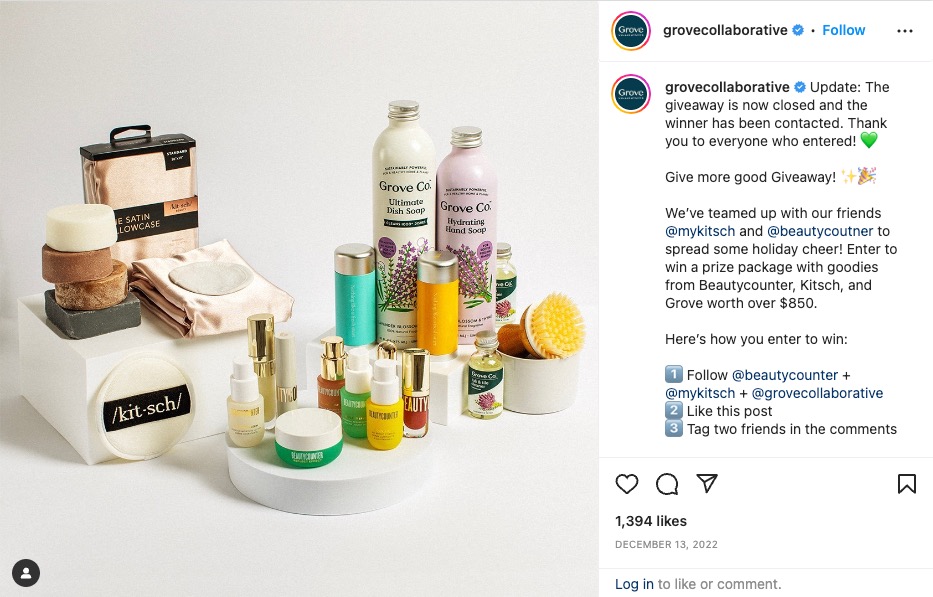
Here’s an example of this type of collaborative giveaway where three brands got together to offer a major prize bundle as their giveaway prize:

Screenshot of an Instagram giveaway post by Grove Collaborative that showcases products from Grove, Kitsch and Beauty Counter. This is an example of a collaborative Instagram giveaway.

Many influencers also host collaborative giveaways like this, meant to help their followers discover new brands and bloggers, and vice versa.

If you’re working to grow your Instagram presence, a collaborative contest or giveaway might be your best bet.

5. Instagram Stories

While Instagram contests are all about giving back to your audience, there are important benefits for your overall Instagram marketing strategy too: brands can garner a lot of attention and generate a bigger audience through them as well.

Having your audience share a post on their Instagram Stories as a form of entry can be another great way to get the word out there.

It’s super easy for users to share posts to their Instagram Stories, so asking for something like this as an entry isn’t asking too much of your audience, and can be a great way to spread the word.

How to run an Instagram giveaway in 6 steps

Running an Instagram giveaway is a fun way to increase engagement and followers, but you need to follow the right steps to maximize your success. Utilize this blueprint for your next contest or giveaway to make sure you’re covering your bases before you announce the prize(s).

1. Define your Instagram giveaway goals

Before anything else, you need to make sure you define the overall objective of your Instagram giveaway. Otherwise, how will you determine whether or not it was successful in the end?

A few questions you might ask yourself to determine your goals are:

  • Are you trying to engage your audience more in your content?
  • Are you aiming to generate a larger following?
  • Is your plan to build a library of UGC to share on social media?

This is going to determine what type of Instagram giveaway you run. Whatever your main goal or objective is, keep it in mind throughout your entire contest planning process so that everything you do makes sense for your end goal.

2. Identify your budget and prizes

The next step is to identify what your budget is and how large of a prize or prize bundle you’re able to give away for free. You might start with a single, small prize for your first giveaway to test the waters before eventually moving onto a larger prize down the road.

Keep in mind that your prize should be specific to your target audience and something unique for hem to win.

For example, a cash prize or an iPad or iPhone could apply to anyone, whereas a gift card or limited edition product from your shop would appeal only to the people who would buy from you anyways. This helps engage your target audience further and can also help your awareness goals. If the winner posts their own photos of the products they received from your contest, you’ll get additional awareness and reach out of your efforts.

3. Plan and run your Instagram giveaway or contest

First things first, are you running a giveaway or a contest?

For the most part, these are one in the same. However, some brands choose to create more in-depth contests, where entrants are asked to put their best foot forward and a winner is selected by their performance.

A giveaway, though, has a randomly-selected entrant win the prize.

The next thing to consider is how users will enter your Instagram contest. Think back to the examples we shared above. Which contest or giveaway type falls most in line with your main goal or objective?

Whatever you decide, make sure it’s easy for people to enter your contest. No one is going to enter a contest that requires them to do a lot of work–people want your entry process to be simple and easy.

Once you decide the best entry method for your contest, it’s time to start planning out the rest of the details.

First, determine how long your Instagram contest will last. How many days will your audience have to enter? Make sure that deadline is predetermined and that you clearly let your audience know when entering will end.

Second, are you going to use a hashtag for your campaign? Whether you have people post photos with that hashtag or ask them to use it in the comments, creating a campaign-specific hashtag that no one else is using is a good idea. This way, you’ll be able to tell the contest entries from regular posts about your brand.

Third, what is the theme for your contest? This is especially important for UGC-focused contests. You want to make sure your audience knows what types of photos you’re looking for them to share.

And finally, how will you notify the winner? Will you tag them in a comment? Share a new post? Message them? Tag them in an Instagram Story?

These are all things you need to plan before you launch the contest.

4. Design your campaign assets

Next, you need to put together campaign assets to announce and promote your Instagram contest. Not only will this draw attention to followers, it’ll help you cross-promote it on various platforms, in your email newsletter, on your website and more.

Create imagery for both your Instagram feed and to share on your Instagram Stories to increase the number of followers who see the contest early on, giving you plenty of time to collect entries. You’ll want these to stand out and increase the total number of entries. Consider getting high-quality photos of the prize and add “GIVEAWAY” or similar copy in big, bold lettering to the top of your graphic.

Next, you need to think about your captions. Start with an attention-grabbing hook so that you can reel viewers in. Then explain what the prize is, how to enter the giveaway and what the overall rules are. You must also follow Instagram’s terms and release them of any affiliation with the giveaway.

5. Measure your giveaway entry results

Keep a close eye on how many people are entering your giveaway, if you’re receiving any questions about it and how many relevant entries are coming in with the giveaway hashtag.

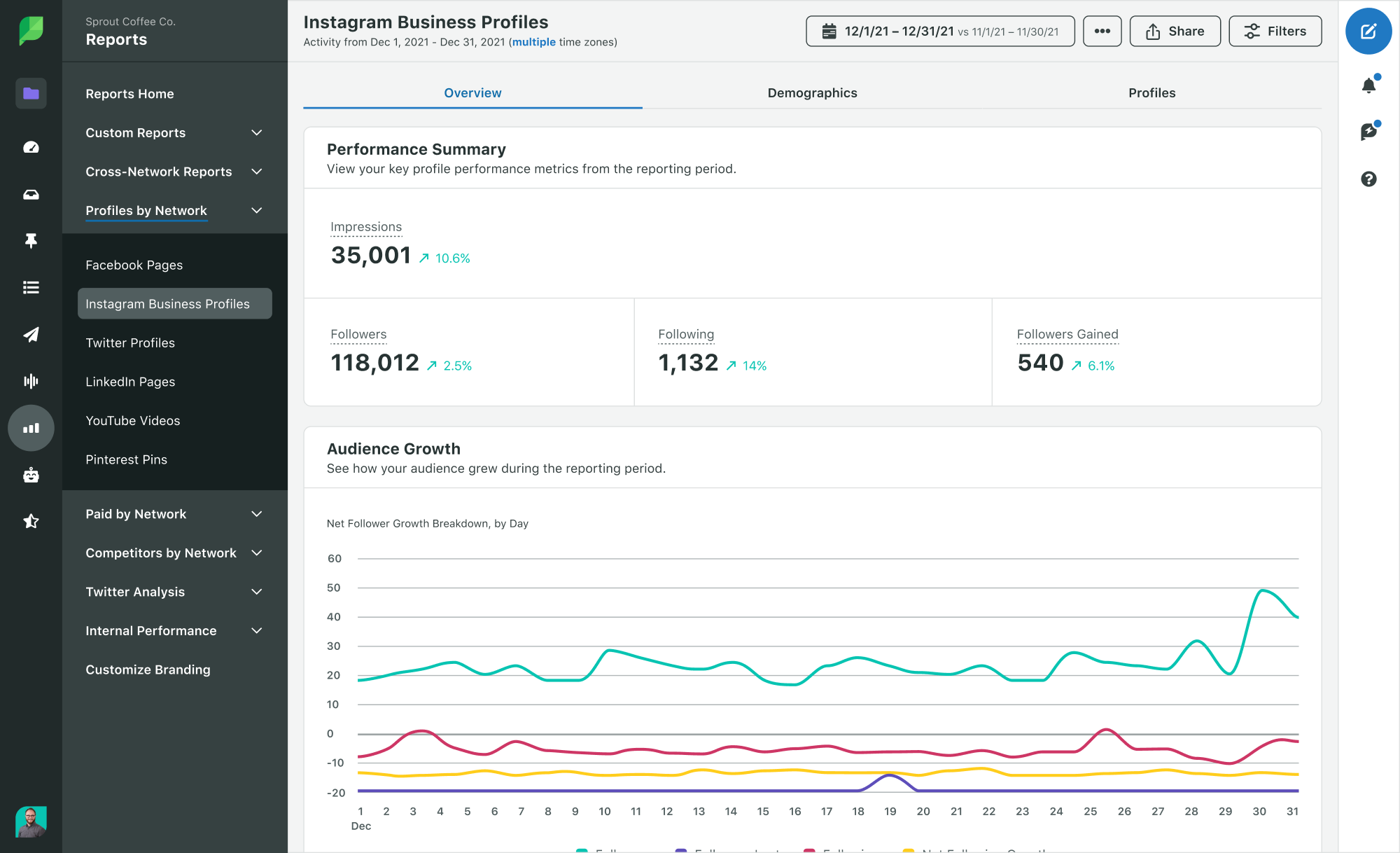
Use a social media management tool such as Sprout Social to generate reports on hashtag and keyword use, follower count, engagement rate and more.

Screenshot of the Sprout Social Instagram Business Profile Report showing a performance summary within a given time period.

Keep an eye on all related posts and comments so that you can pinpoint whether or not you met your initial goal with the giveaway. If increased awareness or reach is one of your goals, track the performance of your giveaway hashtags in the Instagram Business Profiles Report to measure the hashtags associated with your brand. You’ll be able to tell if your branded giveaway hashtag is creating the buzz you’re looking for:

Screenshot of the Sprout Social Instagram Business Profile Hashtag Performance Report showing the most use and top hashtags associated with your Instagram account.

Also pay attention during and right after the giveaway to see if you’ve generated an influx in sales as well.

6. Select your winner with an Instagram giveaway picker

Once your giveaway timeframe has ended, it’s time to choose a winner. The best way to do this is by using an Instagram giveaway picker tool. There are a number of available tools for you to take advantage of specifically for these purposes.

Many brands will even record themselves using a tool to select the winner and share the video on their Instagram Stories as a way to prove that the winner truly has been randomly chosen.

A few popular Instagram giveaway pickers include:

  1. Wask
  2. GiveawayPick
  3. Comment Picker
  4. Iconosquare

Turn Instagram giveaway entrants into customers

Start running your own Instagram giveaways to boost your followers, increase social media engagement and, best of all, ramp up conversions. By introducing new people to your product, you’re increasing the chances of introducing someone to your brand for the first time and becoming a customer.

For even more ideas on how to convert your social media audience into customers, check out the latest Sprout Social Index™.

The post How to run an Instagram giveaway or contest successfully appeared first on Sprout Social.


from Sprout Social https://ift.tt/jUTiWHb
via IFTTT

Understanding and exploring core social media features

With so many competing social media ecosystems, it can be overwhelming to keep track of all the features. How do you know which platform to prioritize to make the biggest impact on your business? Most experts will tell you there’s no right way to do it.

And we agree! But we’ll discuss the common social media features brands benefit from the most and a few untapped features to consider. We’ll also explain the criteria brands can follow to decide which social media app to invest in.

Core social media features and functions for your brand

Although every social platform is different, they share some functionalities that set them apart from other types of media. Here are some of the common features of social media that brands leverage to engage with their audience.

Content sharing and virality

Social media content has the potential to bring exponential reach and engagement—the virality factor. As more people like, share and comment on your posts, it’s exposed to newer audiences who might be interested in what your brand offers. Compared to other forms of media, putting out content is simpler, doesn’t involve formalities and is more cost efficient.

Audience engagement

Social media creates a space for direct interaction with potential customers, unlike most traditional media that’s a one-way street for engagement.

Establishing your presence on social and responding to comments makes you part of the conversation. By engaging with your audience, you can understand what content resonates, your brand perception, plus discover common issues and features your customers want.

Features for audience engagement:

  • Comments and reactions on posts
  • Direct messages
  • Live videos

Sales and growth

Social commerce is ever-increasing. About 68% of consumers responded they made at least one purchase directly from social media in 2021.

Some social media apps enable brands to display product catalogs and complete purchases within or outside the app.

Social shopping features:

A screenshot of Facebook Marketplace that demonstrates search results (prices, images) of the search term "satin dress."

Most social networks also have e-commerce, and you can use social media to drive traffic to your website. For example, the link in bio feature can direct your audience to more content on your website. Here’s an example of an interactive bio from Semrush’s Twitter account:

A screenshot of Semrush's Twitter bio that demonstrates their link in bio to their website.

Lead generation

Social has features dedicated to generating leads, like mobile-optimized ads that capture customers details while offering a lead magnet. You can also create personalized experiences by running retargeting ads to convert past visitors or abandoned carts.

Features for lead generation:

Here’s an example of a Sponsored Carousel Ad on LinkedIn by Refinitiv. They increased their click-through rate by 34% through this campaign which also generated quality leads.

A screenshot of Refinitiv's sponsored carousel ad on LinkedIn.

Top features social media apps have in common

Analytics and reporting

All the major apps offer analytics that inform how well your content performed as well as demographic information about your audience.

Instagram Analytics account insights that demonstrates how many accounts have been reached in the last 30 days. The chart breaks down followers compared to non-followers.

Use the analytics feature to tailor your social media marketing strategy and prove ROI. Also gauge the performance of your social media activities, from audience growth and engagement to purchases.

And don’t forget about social listening. Analyze conversations around your brand and industry to identify trends and understand sentiment.

Customer care and communication

More users are turning to social media when they want to communicate with brands or air their grievances. According to The 2022 Sprout Social Index™, 57% of consumers expect a response on social media within 12 hours.

This means brands need to be prepared to address customer concerns and potential brand crises through:

  • Customer service: Encourage customers to reach out to your brand on social for customer service queries.
  • Reputation management: If a customer posts about a negative experience, acknowledge the comment then address the issue. Try to offer a solution in a DM, so you get more control over what’s being said about your brand.
  • Crisis communication: In case of a crisis, make it a priority to post about it on social media and let your followers know how and when it will be resolved.

Stripe proactively responds to customers who post about the issues they face on social media.

Tweet thread showing Stripe's customer service responding to an issue a customer Tweeted

Features that enable customer communication:

  • Direct messages (DMs)
  • Saved replies on DMs
  • Comments on posts

You can also use tools like Sprout Social to manage customer expectations and deliver responsive, tailored experiences on social media at scale.

Collab features

Some social apps have recently launched collaboration features, so you can co-create content with other brands or creators. A collab post will show up on both users’ profiles, giving brands the potential to tap into each other’s loyal audiences.

Features for brand collaboration:

  • Instagram collab
  • Paid partnerships in Reels
  • Facebook Brand Collabs Manager
  • Facebook Partnership messaging folder
  • TikTok Duet

Navigating feature overlap in different platforms

Between the similarities and differences, it can be overwhelming to understand where to invest your time, energy and resources for your brand.

Instead of trying to crack each platform, prioritize the ones most relevant to your audience and brand. Here are some tips to help you evaluate what will work best for you.

Know your audience

Which social media platforms do your target audience spend time on? Once you know where your audience is, you can easily prioritize where you should invest in your brand’s presence.

Next, know how your audience uses that platform: What kind of accounts do they interact with, what are their preferred content formats, how much time do they spend? Gather data by conducting a survey, checking out competitor accounts, reading industry reports or by using a social listening tool.

Establish goals

Choose platforms based on your business goals, as this will help you decide which specific features will benefit your brand the most.

For example, if your goal is to increase sales, choose a platform with shopping features. If your goal is to grow your email list, make use of lead-gen features.

Choose based on your time and resources

How much time can you commit for social media marketing and management? What kind of content are you more comfortable creating? Answering these questions will help you decide which platform is best for you.

For example, visual-driven platforms like Instagram may require more time as compared to text-driven platforms like Twitter.

You’ll also need to consider how frequently to post on each platform to reach the desired engagement level.

Untapped social features brands should know about

Among the commonalities, there are also some unique gems. Here are some lesser known features that can benefit your brand.

Instagram Guides

Instagram Guides are a curation of published posts featured separately on your profile. Guides are like Story highlights because they can help your audience find specific content that interests them long after you initially posted.

A screenshot of Grove Collective's Instagram Guide Plastic-free Products at Grove.

There are three different kinds of Instagram Guides:

  • Post Guides: Curate posts around a specific theme, share helpful resources and curate listicles.
  • Product Guides: Bring eCommerce products into the spotlight.
  • Place Guides: Curate a guide using posts with specific geotags.

LinkedIn Showcase Pages

Showcase Pages are an underrated LinkedIn feature that help brands that cater to multiple segments or offer several types of products.

You can target audience segments with dedicated Showcase Pages based on different criteria like interests, preferences, professions and more.

YouTube cards

YouTube cards are link cards that pop up throughout a video to direct viewers to other related content. You can add cards to promote another video, a playlist, a channel or an external link.

A screen of a Sprout Social YouTube video. YouTube cards pop up in the right-hand corner of the screen with related content suggestions based on the video.

Many creators leave out cards and only use the description box. Use cards to direct your viewers’ attention, in the moment, to a particular piece of content.

Facebook Watch Party

Watch Party enables you to stream at a certain time of your choosing in a Facebook group. It’s different from Facebook LIVE because it’s pre-recorded and you can engage as people watch the video. However, you can use it to re-stream a Facebook LIVE, as well as create playlists with multiple videos or host a watch party for a video from a partner account.

Hosting a Watch Party is a great way to repurpose your video content that previously performed well.

How to keep up with changing social media features and trends

Social media features are dynamic and evolving. New features are constantly added and user behavior changes. So you need to keep up with the latest functionalities to create successful social media marketing strategies.

You can navigate through the noise by taking a critical look at what’s most essential for your business and which platforms will propel your business forward.

Want to know more about social media features? Here are some articles to help you out:

The post Understanding and exploring core social media features appeared first on Sprout Social.


from Sprout Social https://ift.tt/s08SvmE
via IFTTT