As the U.S. prepares to celebrate Independence Day, there’s another holiday trend Americans can expect to look forward to: July 4th promotional emails.
Whether you plan to host a huge sale, offer exclusive discounts or simply take a holiday spin on your typical content, getting your emails to stand out in the inbox can be a doozy – especially when there are hundreds of other businesses tying the holiday to their emails too.
So what can you do?
8 cool ideas for your 4th of July email campaigns
My goal is to help you stand out in crowded inboxes by giving you some different (and slightly out of the box) ideas for your independence day emails.
1 - Fireworks picture contest
Fuel the excitement of Independence Day by inviting your audience to participate in an exhilarating photo competition. Encourage customers to showcase their photography skills and artistic vision by capturing mesmerizing fireworks and sharing their best shots on social media, while tagging your business page.
As the skies ignite with vivid colors and explosive beauty, this contest offers a unique opportunity for your brand to engage with customers and generate buzz around your products or services.
You can have a prize for the photo that gets the most likes.
2 - Red, white, and blue product collection
Everybody loves a deal. So if you’ve got products that could be bundled together and fit a red, white, and blue theme, wrap them up as a discounted bundle.
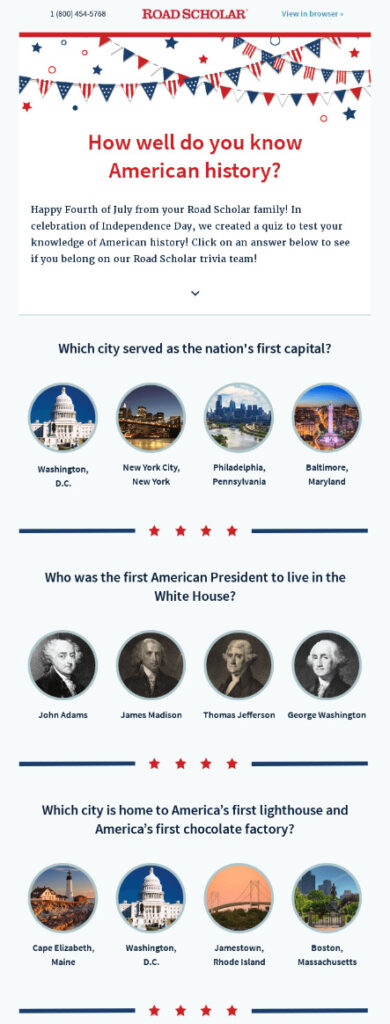
3 - 4th of July quiz
Create an interactive email by quizzing your audience on how well they know their American history.
Here’s a nice example from RoadScholar:
4 - Support a cause this Independence Day
Highlight your brand's commitment to a specific cause or charity aligned with patriotic values.
Offer a percentage of your sales during the 4th of July period to support that cause. Inform customers that by choosing your product or service, they are not only celebrating but also making a positive impact on their community or the nation.
5 - Show your patriotism
On Independence Day, how about a nice and simple “Happy 4th of July” message.
Here’s an example from TradeGecko:
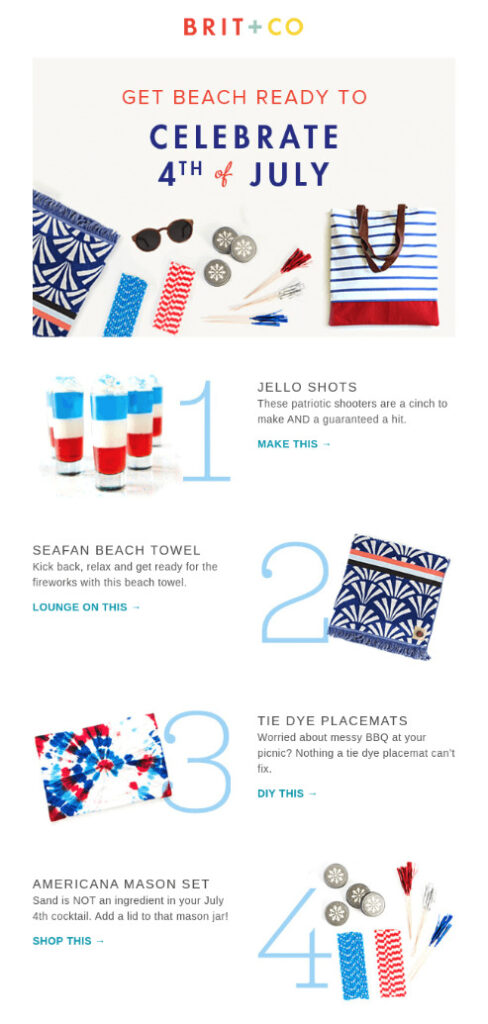
6 - 4th of July themed products
Just highlight red, white, and blue products.
Brit+Co does just that in their 4th of July email:
7 - Online scavenger hunt
Who doesn’t love a good game?
You can play to the inner child of your audience by having some fun with your 4th of July email campaign. Provide some clues in your email and send your audience to your website to find them.
Maybe you add historic pictures throughout your blog, whoever finds all the images can win.
8 - Send your email before or after July 4th
Keep in mind that your subscribers may not be paying close attention to their inboxes on July 4. Consider sending your holiday email before or even after the holiday when they’re more likely to open it. Plus, it’ll also give you an edge over the competition.
Considering a post-holiday message? You might want to try a subject line like, “We’re Still Celebrating July 4th: Buy One, Get One Cupcakes!”
Or, if you want to get a head start, try a subject line like, “Ready for this early July 4th deal?”
Give your emails a patriotic theme
Transform your 4th of July email messages into a celebration of red, white, and blue.
Infusing your emails with patriotic elements can help you create a memorable and engaging experience for your audience.
Here’s some ideas on how to leave a lasting impression on your subscribers as you celebrate the land of the free and the home of the brave!
Subject line tips
Here are three tips to keep in mind when writing eye-catching subject lines for your July 4th emails.
Use time-sensitive words, like “July 4th” or “Fourth of July”.
Create a sense of FOMO — or fear of missing out — with your subject line. This is one of the most effective psychological drivers of email opens.
Referencing specific dates in your subject lines creates a sense of urgency with your subscribers, and ultimately encourages more subscribers to open your emails.
Mention how long your promotion is running. Having a week-long sale? Be sure to mention it. This not only tells subscribers how long they can access the deal, it’ll entice them to act faster and take advantage of it as well.
4th of July email subject lines examples
This Week Only: Hot July 4th Sales!
The 4th of July continues with 60% off!
Sales That Even Uncle Sam Would Want
50% off Patriotic Tanks & Tees for July 4th!
4th of July email template
Unlock the true spirit of 4th of July in your email campaigns with captivating and visually striking email designs.
I’m not a designer, there’s no way I’d be able to create a 4th of July email that radiates patriotism. And I’m not alone, for those non-creative people you can use a pre-created email template. And there are plenty of options out there. You can purchase a 4th of July email template from companies such as BEE Free or Stripo. Or you can use one from your email provider.
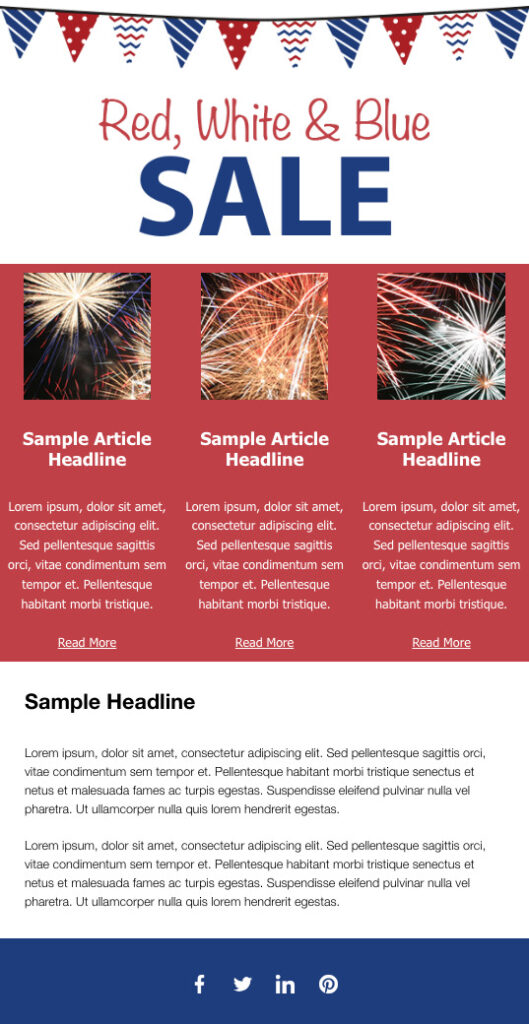
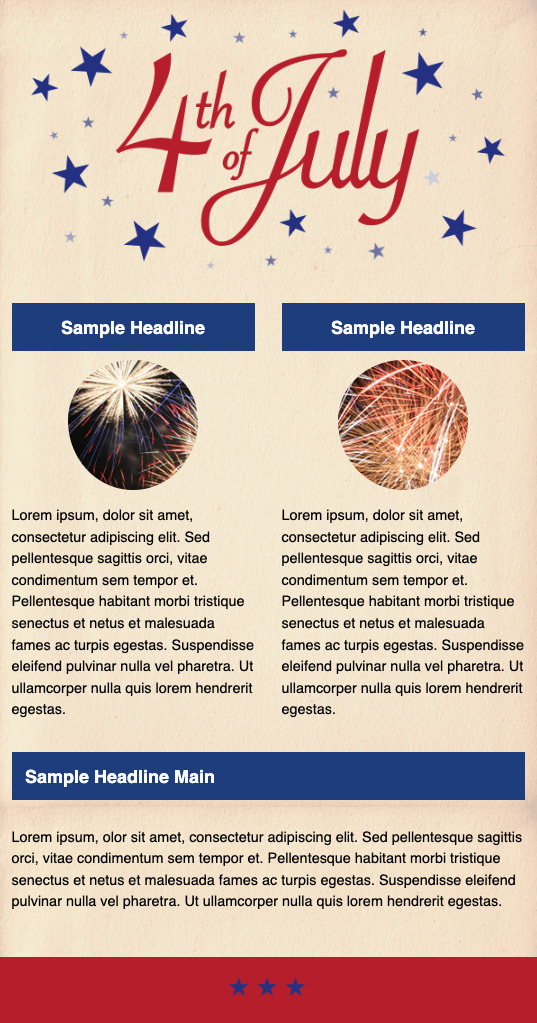
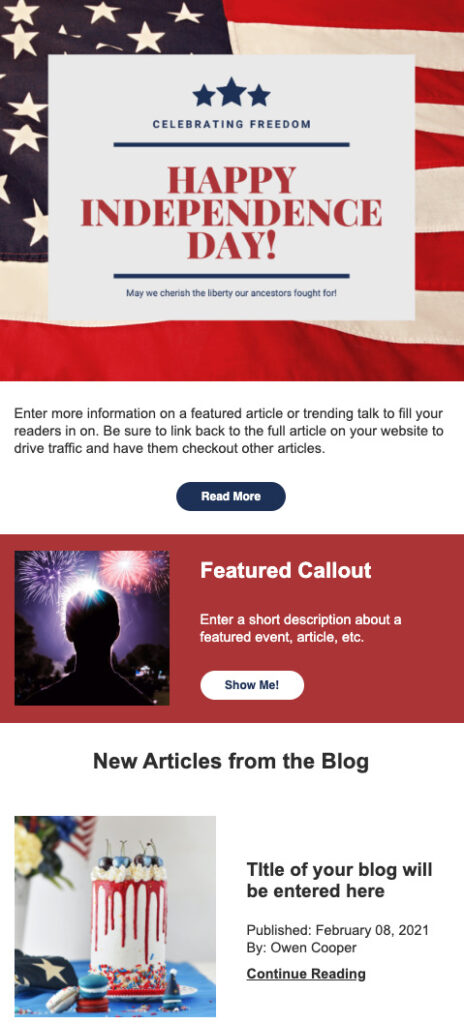
Here are a few Independence Day email templates that you can use in AWeber.
Use 4th of July images
You don’t need to create a whole new email template, just adding holiday-inspired images like a 4th of July email banner, GIF, or images to your email signature is perfect.
Email banner example
I love this example from Kindlendar. They do a great job incorporating the summer fun of an Independence Day holiday into their email banner.
You can create your own email banner in do it yourself graphic design tools like Canva. They make it so easy to create your own 4th of July email banner, when you’re done it will look like you paid someone to professionally design this graphic.
And if AWeber is your email provider, you can actually design in Canva within your email builder, making it that much easier to create your email.
GIF example
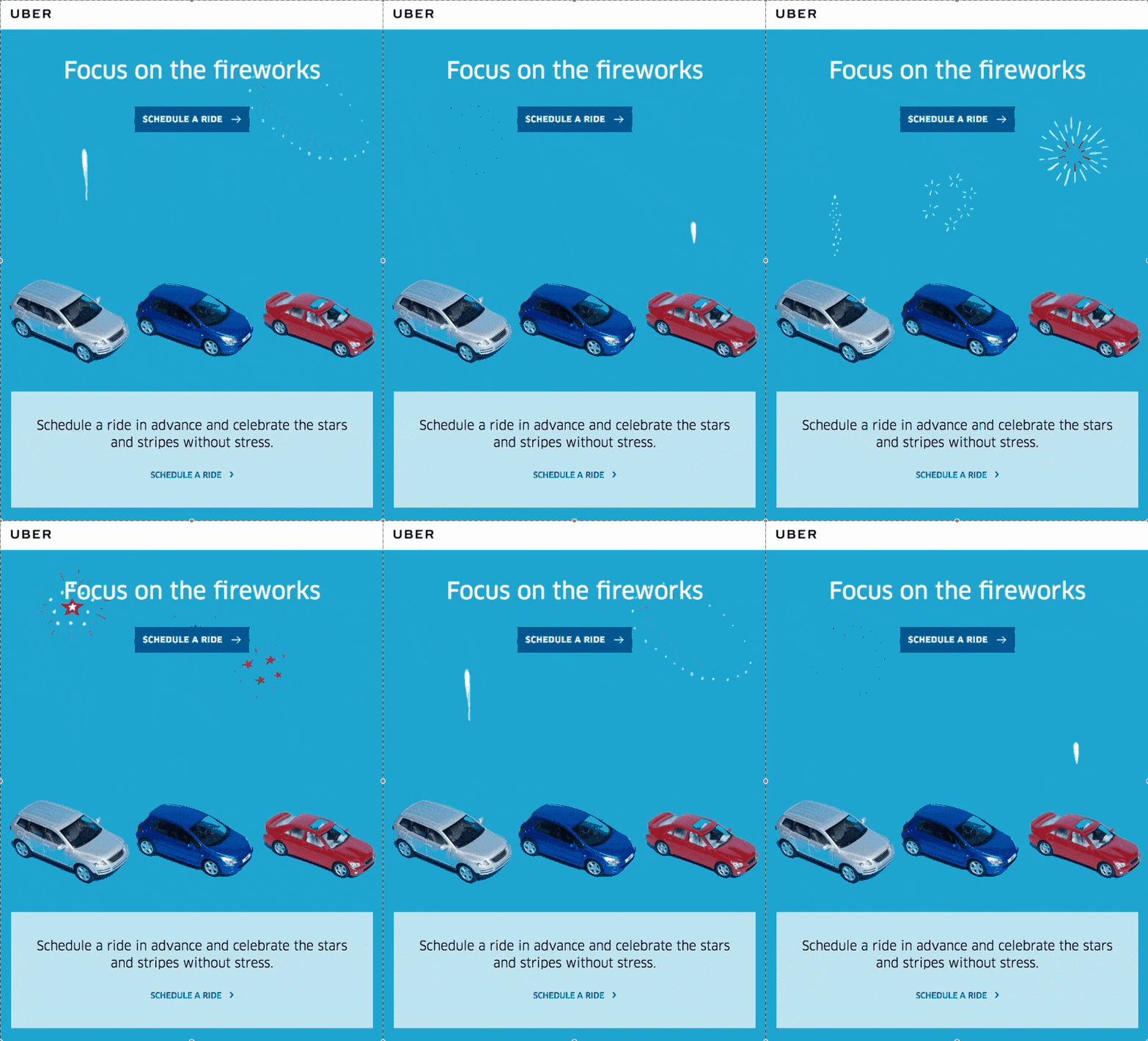
Check out this simple yet effective use of a GIF in UBERs email. The fireworks are a nice creative touch. And I especially like how the fireworks draw your attention to the CTA.
Looking for your own 4th of July GIFs? Here’s a few that our design team created. Feel free to use them in your emails.
Add some red, white, and blue to your email signature
Celebrate Independence Day in your emails by adding a touch of patriotic flair to your signature.
Include a small American flag icon or a festive red, white, and blue banner that showcases your holiday spirit.
Start creating your July 4th email
Sending holiday-themed emails keeps your brand relevant, but be sure to keep these tips in mind for success.
Are you sending any July 4th emails to your subscribers? Tell us about it in the comments below!
At the end of the day, we want to cut through the noise and leave a lasting impression that grabs market share. But an ever-crowded space filled with brands and creators means your relevancy is always at risk.
When a brand experience is consistently good, it champions powerful brand recall, turns customers into advocates and builds credibility that ultimately increases your repeat business.
In this guide, you’ll learn how to build an exceptional brand experience with a step-by-step brand strategy framework that adapts to your customers’ needs, plus social listening examples that show how sentiment mining drives ongoing customer growth and retention.
What is brand experience?
Brand experience is the sum of all the feelings—joy, nostalgia, excitement—consumers experience during their engagement with a brand. This could be via your social media channels, website, in-store, during events or with your customer care team. All these customer touchpoints contribute to shaping the overall brand experience and leaving a lasting impression.
Your audience’s reaction to your brand, or their brand experience feedback, helps you gain insights into their preferences and motivations, and predict future buying behaviors. Unlike customer experience, brand experience extends beyond the act of purchasing a product or service, so feedback may not be directly from a customer and instead reflect the general perception of your brand.
The elements of a good brand experience
A well-developed brand experience differentiates you from competitors and engages your audiences and customers on a deep emotional level. This, coupled with an exceptional customer experience, ultimately drives customer acquisition and retention to fuel your business growth.
Here are the key elements of a good brand experience:
Consistency across touchpoints
Giving your audience a consistent experience requires cohesive brand messaging, visual elements, online user experience and customer service. It also means a unified experience across all the channels you use such as your website, social media, mobile apps, advertising or physical stores.
Effective communication
Consistency in your content and communication across all touchpoints is crucial for a great brand experience. Your brand voice and storytelling need to match the wavelength of your target audience so it resonates with their needs while staying rooted in your brand.
Choose what narrative you want to build and follow it through in all your communications. For example, if you want to focus your brand narrative around your product, ensure your content has the same flow across all social channels. In fact, The Sprout Social Index™ 2022 shows that posts about products are the most effective type of content among consumers.
Emotional connection
A successful brand experience evokes a positive emotional connection with its audience. Customers go through a range of emotions (like happiness, inspiration or nostalgia) when they interact with a brand, and when the experience is positive, it creates a lasting impact that fosters brand loyalty.
By giving them something they want, you make customers feel like they are important and their opinions matter.
Personalization
Personalizing your brand experience to match customer personas and preferences adds value and creates a sense of personal connection with your brand. Analyze feedback data with sentiment analysis to develop targeted content and customized offers that increase customer delight.
Customer engagement and participation
When customers feel like they are part of your brand, it instills a sense of ownership in them. This means encouraging customer-generated content, social media interactions, soliciting customer feedback and choosing relatable brand ambassadors to encourage advocacy.
Why does brand experience matter?
A memorable brand experience boosts brand recall and nurtures current and potential customers. This further strengthens your efforts to build brand loyalty and trust—two things that influence up to 58% of consumers’ decision to choose a brand over competitors, according to The Sprout Social Index 2022™.
Let’s dive into the advantages in detail.
It helps with market differentiation
A unique brand experience separates you from the competition. Whether it’s a catchy jingle, a mascot (think: the Gerber baby), exclusive behind-the-scene footage or curated in-store interactions, an immersive brand experience establishes a distinct and memorable identity for your brand.
Enhances customer experience
A unique brand experience captures customers’ attention, provides excellent customer care and encourages authentic engagement, leading to an elevated customer experience. Happy and engaged consumers are more likely to spend time interacting with your brand and explore your offerings with an open mind.
Fosters customer loyalty
When a good brand experience fuels your customer experience, it enables businesses to connect with customers on an emotional level that turns casual buyers into repeat customers. It increases the chances of customers becoming brand advocates, sharing their positive experiences on social or through word-of-mouth.
Builds brand equity
When a customer has a powerful brand experience and feels the brand aligns with their personal value, they use that as a benchmark when engaging with other brands. Our 2022 Index shows that 40% of consumers will choose such a brand over its competitors. This raises your brand’s perceived value, which ultimately leads to higher brand equity.
Drives profitability
All the above advantages of a great brand experience contribute to a higher customer lifetime value (CLV) that increases profitability. Customers who truly feel connected to a brand tend to be less price sensitive because they value quality over price. They also contribute to a recurring sales revenue model.
What is a brand experience strategy?
A brand experience strategy is a framework outlining your plan of action to develop and implement an impactful brand experience throughout the customer journey. It is based on customer interaction, engagement and relationships and aims to measure and improve all these aspects.
How to monitor and improve brand experience in 5 steps
Building a brand experience strategy that provides a foundation for business longevity and customer retention needs foresight and structure. Here are five critical steps to develop a stellar brand experience.
1. Understand yourself, your customers and your competition
A strong brand experience starts from an understanding of your strengths and weaknesses so you know how best to provide value to your customers. In addition, you’ll need to know your target audience’s purchase motivations, buying behavior and opinions on competing brands. And, of course, keep an eye on how your competitors are playing the field and how audiences are responding to them.
That is a lot of information to keep track of and social listening data is often a crucial partner in this endeavour. According to The 2023 State of Social Media Report, 91% of business leaders say social listening impacts their critical customer insights.
Social listening involves analyzing conversations on social media and review platforms related to your brand and industry, which you can use to make better decisions. Sprout’s social listening tool analyzes hashtags and keywords, and captures trends from conversations across social networks like Twitter, Instagram and Reddit.
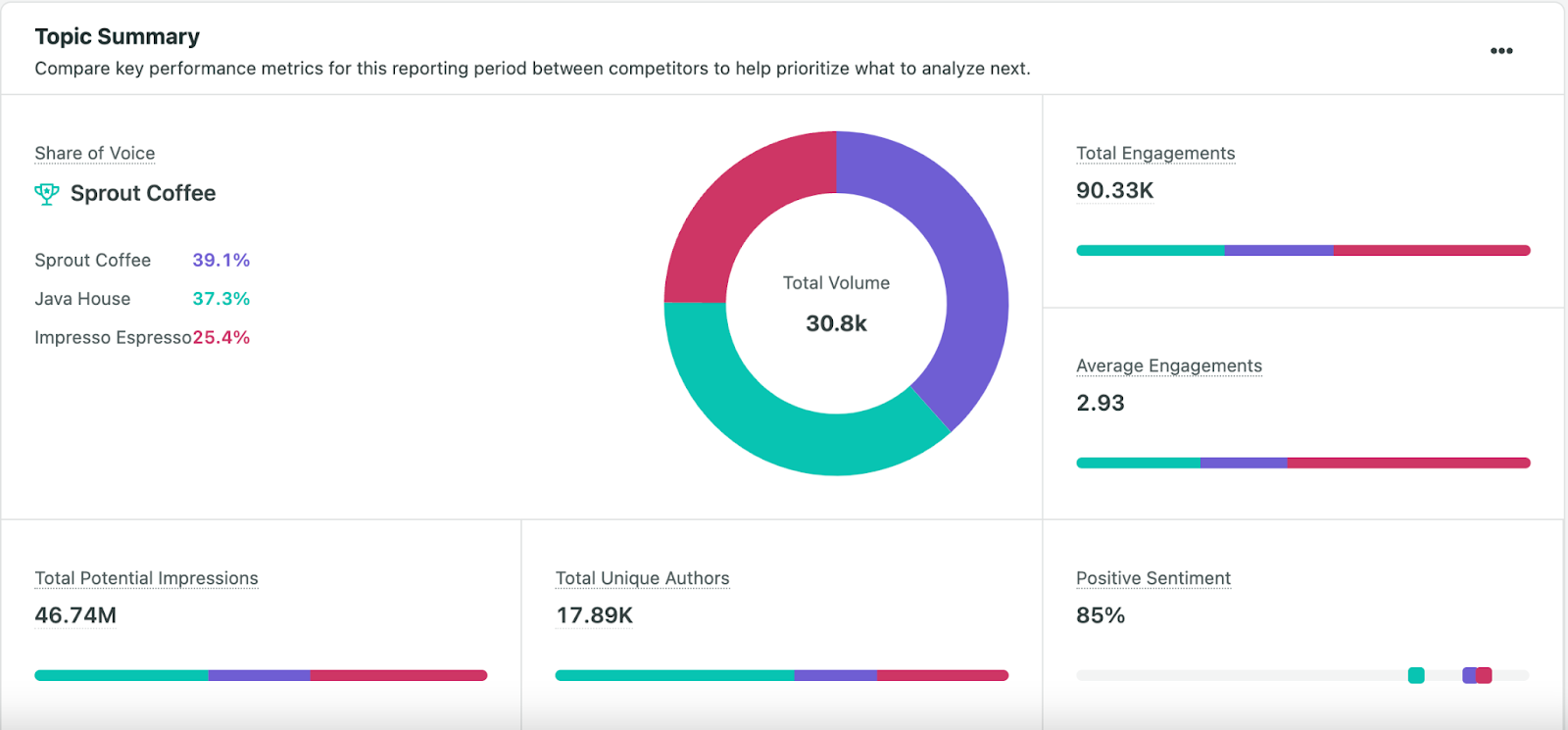
We synthesize the results into insightful reports that show how people are talking about and engaging with your brand, competitors and industry. These reports, when combined with other business intelligence you’ve gathered, give a holistic view of your entire brand experience so you have tangible insights into how you can elevate your brand.
2. Define your goals and objectives
Once you have a full scope of your business environment, you must define your goals and objectives. This could mean deciding what brand perception you want to build, how you want to differentiate from competitors or what emotions you want associated with your brand. Ensure your targets are achievable and connected to business goals.
Establishing this direction will help you obtain buy-in across teams, as you’ll need support from your entire organization to build and improve your brand experience.
3. Collect and analyze customer feedback
To get unbiased, relevant and targeted brand insights, this step requires collaboration between human expertise and intelligent automation that leverages artificial intelligence (AI) techniques like natural language processing (NLP), text analysis and emotion mining. Here’s how to use both to get relevant customer feedback:
Data collection
Collect customer feedback from a variety of data sources to get reliable and holistic results. These include social listening data from relevant social networks (TikTok, YouTube, Instagram, Twitter, etc.), review websites (TrustPilot, G2), forums (Reddit), sales emails and other business-critical channels.
If you conduct a survey to solicit feedback, ask customers specific questions about their interactions with your brand such as “What do you like most about our products?”. Allow for open-ended responses, like the example below from Yves Rocher, so customers have a chance to mention information on topics you may have missed in your questionnaire.
Once you’ve chosen your feedback sources, use a social listening tool, like Sprout, to capture and synthesize accurate brand experience insights from the data.
Text analysis
Text analysis classifies and processes text from social and review sites using NLP and machine learning (ML) to understand the conversational lingo and break it down into topics and themes for thorough data mining.
Sprout automatically collects and consolidates information from a variety of sources such as Facebook, Instagram, TripAdvisor and Google My Business, and analyzes the feedback data through text analysis.
NLP tasks such astopic classificationuse machine learning toattach a theme (food, drink, accommodation) to the feedback data. Semantic classification further ensures there are no duplicates. Named entity recognition (NER) helps Sprout to recognize brand names, locations and other named entities so it can draw insights based on authors, competitors or store locations.
All these AI and ML techniques ultimately analyze massive amounts of qualitative data quickly and accurately to give insights most relevant to your brand.
Sentiment analysis
Once all the data is processed and run through the text pipeline, sentiment analysis interprets it for brand sentiment. Sentiment is measured for topics and categories and assigned positive, negative and neutral scores. These are aggregated so you get a holistic sentiment score for your brand and individual topics.
With Sprout, customize listening topics based on specific social campaigns and get targeted insights. These insights are presented as intuitive reports that can then be shared with multiple teams to improve the overall brand experience.
AI-driven business intelligence tools depend a great deal on the quality and relevance of the data they analyze to provide accurate results. For this, you need to choose data sources most relevant to your objectives based on key factors like social media demographics, market segmentation and audience demographics. This is where your experience and expertise become most essential to the process.
4. Adjust your strategy based on learnings
Once you’ve completed the data analysis, apply the results to your brand strategy. Consider taking these actions:
Categorize insights from your feedback analysis for a holistic view of your current brand experience.
Prioritize areas that need immediate attention and take actions to address customer pain points consciously.
Build on what customers expect from you and cover all customer-journey touchpoints, such as in-store experience, website user interface (UI) and user experience (UX), social networks, sales and customer service.
Make sure your brand experience is consistent across all mediums (videos, social posts, events, TV ads).
Pay special attention to your social media presence for stronger customer engagement and support. This is key, given that 22% of customers expect you to respond on social media within 1-2 hours, per 2022 Index data.
5. Measure your brand experience and track it regularly
Monitor and measure your brand experience continuously with metrics that speak to your customer experience, customer engagement, brand perception and reputation, customer retention and revenue.
Assess the effectiveness of your brand strategy against these metrics in conjunction with your objectives on an ongoing basis to proactively meet customer and market shifts.
3 Brand experience examples
These examples demonstrate how brands can use social listening analytics to truly understand their audience and build thriving brand experiences that support their growth.
1.Netflix
Netflix garners tons of social media comments from its 232 million subscribers. They leveraged this massive source of customer opinions for robust insights to build a brand voice that’s authentic and differentiated from others.
They also leaned into social listening to draw inspiration for relatable content and create unique, ownable moments on social (Netflix memes). Based on their audience’s social conversations, they developed new content categories like “Netflix is a joke” and “strong black lead” and dedicated Twitter handles to drive awareness with compelling storytelling that added to the conversation while increasing engagement.
2. Chicago Bulls
The Chicago Bulls wanted to revitalize their brand experience to engage and connect with fans on a deeper level. Through Sprout’s analytics and Advanced Listening, the Bulls sought to uncover emerging trends amongst their audiences and better understand what content resonated most. They also dove into audience attitudes and opinions for insights based on audience demographics and geographic location.
As a result, they found opportunities to level up their entire social presence by creating compelling and interactive content (behind-the-scenes footage, interactive fan contests and player features), and responding to fan comments and posts that don’t tag them but are about the team.
This further solidified their place amongst the passionate sports fan community. With improved content, community management and authentic engagement, the Bulls raised their brand experience on social while implementing efficient data flows that enable timely optimizations.
3. NutriSense
Health technology company NutriSense wanted to reinforce its brand mission to achieve better health with a compelling brand experience on social that educates while impacting the marketing funnel. They used Sprout to gain data-driven insights into customer opinions and preferences that would transform interactions with their audience. They discovered user-generated content was the key to achieving their goal and fueling audience engagement.
NutriSense adjusted their content strategy to incorporate posts that encouraged customers to share candid feedback about using NutriSense’s health suite. Using Sprout’s Smart Inbox, they actively monitored and engaged with respondents to keep the conversation going and collect user-generated content.
This personalized interaction created a deeper sense of community, built a safe and supportive environment for customers and helped develop social proof around the brand. With this elevated brand experience, Nutrisense’s social media engagement grew by 45% within 18 months and their community saw an increase of 469%.
Start building a brand experience your customers love
Your brand experience is a dynamic process that needs to be continuously refined to reflect your customers’ changing preferences and adapt to moving market trends. It starts with a strong foundation that takes advantage of the billions of customer insights waiting to be harnessed with social listening. By listening to the conversations that reveal your audience’s needs, aspirations and ideas, you create an environment that continually feeds customer loyalty while proactively improving your brand’s reputation.
Read how you can take measured steps to refine and polish your brand perception in the market on an ongoing basis.
What if you could do twice the work in half the time?
It’s not always the best-case scenario. Case in point: artificial intelligence. AI is starting to get so spooky-good, 38% of employees expect their job will be automated by the end of this year.
But that doesn’t mean AI has to be something to fear. In many cases, AI simply means letting technology handle some of your workload.
If you’ve ever used an AI voice assistant on your phone, for example—and 97% of people with phones have done this—then you’ve used AI.
These days, however, artificial intelligence tools can do more than the occasional voice-activated search. It can also help you craft original content, optimize your emails, and edit videos for the web.
If you’re a content creator who runs your business as a one-person show, AI may be the best thing to happen to your calendar.
Let’s explore what this means for your content creation by exploring some of the top AI marketing tools you can implement today.
Using AI tools for email
What if you have an email newsletter to manage your community, but you also run a full-time creator business?
Then you may not always have time to generate picture-perfect emails.
One option is to outsource this to someone who can help generate those emails. Maybe they can research and brainstorm great email topics, or put together a first draft for you to review.
But that can get a tad cumbersome—not to mention expensive.
You can turn to AI for some help. AWeber’s email AI features are still in the works, but you can join the waitlist for early access and get a head start. When you do, you’ll discover all sorts of features, like:
Email brainstorming. You can ask AI to brainstorm ideas within a specific niche. An example: “brainstorm five ideas in fitness” or “give me an example of a person who benefited from getting more fit.” Suddenly you have the spark of an idea that can lead to a compelling email.
Research. Yes, you can use Google or Bing to help you conduct some background research. But that also means occasionally sifting through the results you don’t want to see. An AI assistant can handle a lot of the legwork and come up with a more direct answer to the question you have in mind, like: “What is an example of someone who got fit while working a full-time job?”
Drafting. If you tell AI, “Generate a list of the five most helpful tips in my niche,” you can work off of that as you create a draft. Even if you don’t use them all, it can get the juices flowing—and much more quickly than staring at a blinking cursor on an empty screen.
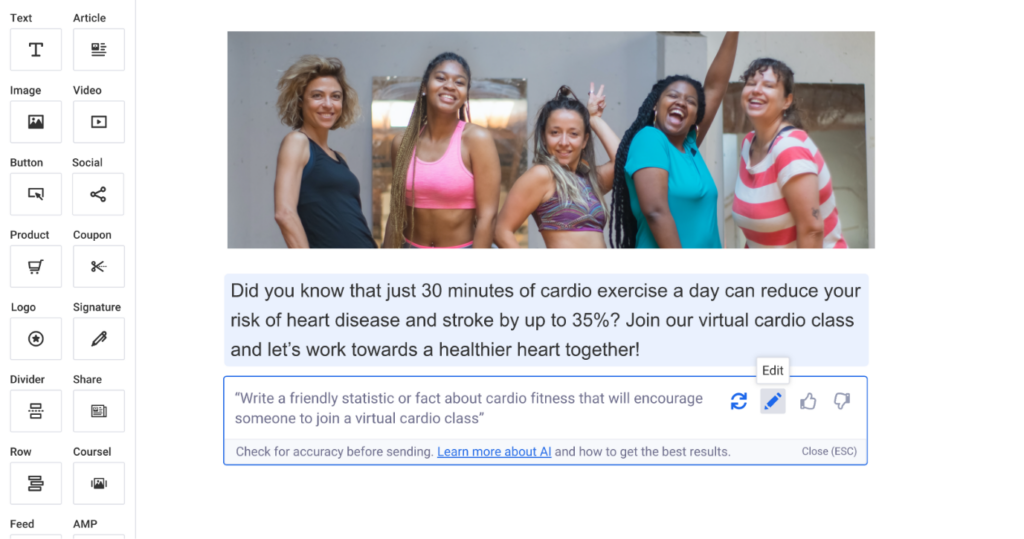
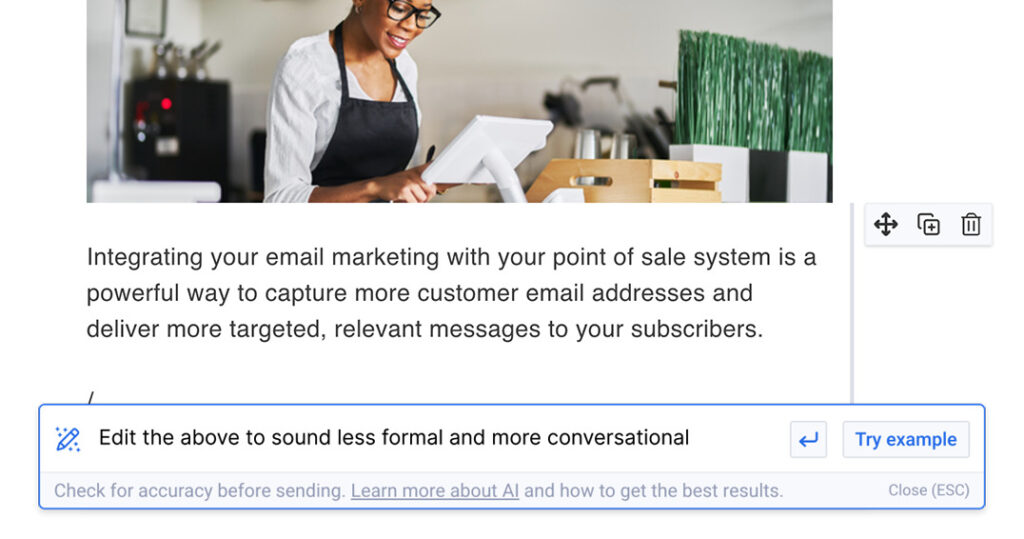
Editing and polishing. Maybe you have an irresistibly engaging draft, but it’s not quite ready for sending out yet. You can tell AI to shorten and summarize a long paragraph. You can have it edit an entire selection for a tone—more upbeat, more friendly, more professional.
While still in “waitlist” mode, expect to see these features with AWeber AI in the not-too-distant future.
Think of it as a handy way of untangling the knots of writer’s block so you can spend more time on your business.
Using AI tools for video creation
No matter what kind of creator you are, there’s a good chance video is your bread and butter.
After all, if your email subject line includes the word “Video” in it, people know exactly what they’re going to get.
The problem with videos? They’re not always easy to put together. Even on the best days, they can require a lot of work: scripting, editing, and uploading time all add up.
But artificial intelligence tools aren’t limited to what you can do with a cursor and a text box, either.
Here are a few tools you might want to consider to shorten how much time it takes to create each video:
Synthesia is an AI video generator that lets you type in text, then takes that text and uses an AI avatar to read it out loud and speak directly into the screen. It’s a bit like hiring a professional actor to handle video instructions or even turn an email into a video you can share with your audience.
Vidyo.ai works better if you want to record yourself, but don’t have as much time to clip it down, edit it, or prep it for different platforms. Upload a video file and Vidyo can re-size it for specific platforms, automatically caption it, or even clip it for YouTube Shorts or TikTok.
Pictory is another AI tool for thriving in the era of short, digestible clips. Let’s say, for example, that you have a long webinar or Zoom recording and you want to highlight it. Pictory can grab the most compelling moments and turn them into bite-sized videos you can share with your audience.
With AI assistance, you can take a long-form video like a webinar and dice it up into clips you can use across every platform. That’s exactly how some creators use videos to drive their revenue.
But you won’t have to sit in front of a computer with expensive video editing software to do it. Just upload and move on.
Generating blog articles with AI
A valuable blog post can do all sorts of great things for creators.
It can attract organic traffic by placing high in search engines. It can demonstrate thought leadership. It can build credibility.
Whenever someone visits your creator website, a blog that has all sorts of useful articles says: I’ve been thinking about this topic for quite a while.
But maybe you don’t have the kind of time to handle all the posts yourself.
You can use AI tools to help with keyword research, for example. Enter in a phrase and you’ll get keyword suggestions that double as SEO tips and idea generators.
NeuralText can help generate paragraphs when you get stuck. You can even outsource the entire process of generating an outline to NeuralText so you don’t have to spend as much time staring at a blank screen and wondering what’s next.
You likely won’t have great results if you use AI tools to generate new articles wholecloth. You’ll still want to incorporate your unique spin as a creator, since that’s what draws people to your web presence.
But if you use these tools, you can cut down how long it takes to produce each fresh piece of content.
AI tools for saving you time as a creator
Want some more shortcuts that won’t subtract from the quality of your creative work? Consider:
Fireflies can take transcripts and meeting notes and repurpose them so you have something that AI can later turn into a blog or email—with minimal work here.
Anyword can generate copy for your page or landing pages so you’re not stuck generating out how to build your sign-up form because you can’t think of what to say.
ChatGPT is especially great for research and brainstorming ideas. It can also run checks of your tone for emails and articles so everything you write has greater consistency, almost like hiring an editor.
Using AI to become a better creator
If you’re a creator, you’ve probably learned that building an audience is all about finding what makes you unique and different.
AI doesn’t have to take that away from you.
Use the best AI tools like AWeber’s AI writing assistant to handle the menial tasks you never liked doing. You’ll still have the unique perspective that makes you different—it’s just that you’ll be a lot more efficient at being you.
Localizing a dynamic application like Sprout Social into multiple languages is a complex undertaking. Translating the text that appears in the application is only one half of the story. It also involves developing our application in a way that makes it easy to extract and swap out that text for the translations. At Sprout, we lean on third-party vendors for translations. But we still need tools to extract, bundle and submit translation requests to those vendors and then serve and render the translations to end users.
For years, the Sprout engineering team got by with a custom localization solution, since open source solutions were still maturing. It allowed us to accommodate our largest customers in our supported languages, but lacked some useful features. In this article, I will outline our new localization system, how it tackles the most complicated localization scenarios, and how we incrementally introduced those changes across the web engineering organization.
Our old system
To understand our new localization system, you first need to understand how our old system worked and the areas where we could improve it.
Message Syntax
Application localization works by abstracting the text that is visible to the end user into string units, called messages. These messages are extracted and submitted to translators. By abstracting these strings, we can easily swap them out depending on the end user’s preferred language.
These messages can be simple static strings like “Hello, world” or have placeholders like “Hello, {name}” or rich text formatting like “Hello, world”. Since these features need to be serialized into strings, you need a syntax that both the translators and the application code understands to properly translate and render the text.
Part of what made our old localization system difficult to use was that we made up our own syntax and maintained a homemade “parser” for said syntax. This code was time consuming to maintain and the syntax was pretty minimal. We wanted additional features to help render more complex messages.
Example: In the Sprout application, we need a way of rendering “You have X posts” where X is a dynamic numeric value.
Consider the plural case, “You have 5 posts”. Consider the singular case, “You have 1 post”. Consider the “0” case. Consider languages that might have a grammar for the “1” case like Chinese and Japanese. Consider languages that have a grammar for the case when X is a “large number” like Arabic, Polish and Russian.
Message management
We have messages that we can send to translators and swap out in our application. Our application needs a way of storing these messages and serving them to our end users.
Our old system stored all our messages in JSON files (we called “lang files”), which were managed manually. We referenced the messages in these files by using IDs in our source javascript code. When a user wanted the application in Spanish, we would serve our Spanish language files, and then the javascript would render the corresponding Spanish message using the ID.
For performance reasons, we tried to only serve the user messages that were on that page, so we had separate lang files for the different pages of the application. This was a valid system, but as our team and application scaled, it meant more manual developer time creating and managing these IDs and lang files.
To add a new message to the application, developers had to manually add them to the correct lang file with a unique ID to reference that message. At times, we would run into issues of ID collisions and ID typos leading to missing lang in the application. Adding text to the web application felt tedious with numerous steps that weren’t intuitive.
Our new solution
Knowing these shortcomings, web engineers from across the Product organization created a localization working group to develop a solution. We met regularly to brainstorm. After an in-depth research process, we decided to migrate the Sprout application from our homemade localization system to use FormatJS’s react-intl library and build infrastructure around it for managing our messages. React-intl was the most feature-rich and popular open source localization library in the javascript ecosystem and integrated well into our codebase.
Message syntax
We wanted a more robust solution and didn’t want to create something from scratch. We adopted the ICU message syntax, a standardized syntax that is used in Java, PHP and C applications, and captures the complexities of dynamic application messages. The react-intl library also supports parsing and rendering ICU message syntax messages.
This is an example of how ICU message syntax captures plural cases. This is the message in English and Russian. Notice how when the translators convert this message into other languages, they can add and remove cases as necessary to properly support the language. The Russian translation of this message adds “few” and “many” cases.
The ICU message syntax has been battle-tested by many applications in countless languages. We could trust that it could support our sophisticated customer needs, and that there were many solutions and/or educational resources for any localization questions we ran into.
Message management
We developed a system using tooling provided by FormatJS that would automate the process of adding, removing and storing messages. This involved some philosophical changes in how we approached message storing and referencing.
A major change from our old system that FormatJS encourages was using our UI code as the source of truth for messages. In our previous system, the source of the messages and the usage of the messages were in two different places, which meant we had to keep them in sync. Our new system keeps the message sources with the rest of the UI code. We simply need to run a script that will extract all the messages from the UI files to generate our lang files, and the message content becomes the unique IDs with the help of a hash function.
This change colocates the messages with the UI code and had several benefits:
More readable: No more IDs that are designed for robots in our UI code. Now we can read the English messages in the UI code and understand what text the user will see.
No manual IDs: These IDs which were only used by machines are now generated by machines, and by definition, unique per message.
No manually managed lang files: Developers should not need to touch these lang files. Our scripts manage the adding and deleting of the messages.
How did we migrate?
But how did we migrate our entire web engineering team and codebase to this new system? We broke this out into four milestones: piloting the new system, educating our team, deprecating the old system and migrating to our new solution.
Piloting the new system
The working group piloted the new system in specific sections of the application to get a sense of its best practices and the full migration scope. This got the new system set up on the client-side (poly-fills, etc.) and the build side of the application. This allowed us to iterate on the developer experience and mitigate risk.
Education
We took what we learned from the pilot and used it to educate the entire web engineering team. We developed an FAQ and other educational documentation and presentations to aid developers using the new library. It’s easy to undervalue this step, but this part of a migration is extremely important. It doesn’t matter how good your new system is—people need to know how and why they should use it.
We also developed an ambassador program where each web feature team at Sprout had an appointed Localization Ambassador, who was responsible for helping educate their team on the new system and reporting issues or pain points to the working group.
This allowed us to delegate the education responsibilities and identify issues specific to individual teams.
Deprecating the old system
After we felt confident in the developer experience, shared knowledge and scale potential of the new system, we deprecated the old system. We created some custom eslint rules and used the linting tool, esplint, to block usage of the old system while allowing existing usages. From this point on, web engineers were expected to use the new system when writing new code.
Migrating to our new system
With confidence in our new system and a fixed number of old usages, we started migrating.
A lot of usages had one-to-one equivalents in the new system. Where these equivalents exist, we were able to automate the migration by writing a code-mod using jscodeshift. We were able to iteratively run the code-mod over sections of the codebase, learning and fixing issues as we went. There were few enough remaining edge cases that could not be easily code-moded that we felt comfortable fixing them manually.
Rollout
Why did we opt for such an iterative approach instead of trying to migrate everything at once? Using an iterative approach is part of Sprout’s Engineering culture, and we believe in constantly learning and improving.
By approaching the migration this way, we were able to learn as we go, adjusting and fixing issues in real time. We could also roll back the changes if the migration started to block application development. Our iterative approach allowed us to make progress while working on other initiatives, and empowered us to feature-flag major changes with a smaller group before rolling it out to everyone. The same principles of feature development for an application apply to the development of internal developer tools.
Learnings and takeaways
Reimagining our localization system was a massive undertaking across the entire web engineering organization. My advice to others facing similar projects or challenges would be to:
Use widely adopted standards: Why create a custom message syntax when engineers who have spent years thinking on this problem space already developed ICU message syntax?
Consider collocating related items: It will make adding, changing and deleting them much easier.
Embrace an iterative rollout: Design the rollout of your change in a way that allows you to learn as you go. You can’t anticipate everything, so build in space for recourse into your plan.
Share your learnings: Education is half of a rollout. It doesn’t matter how good your new system is if people don’t know how to use it or why it is better.
For more information about Sprout’s Engineering culture, check out our careers page today.
Unfortunately, creating your own high-quality GIFs can be frustrating and time consuming.
That's why we want to make it super simple for you. Our AWeber designers made these brand new, FREE summer GIFs. Download one, two, or all of them, and use them in your summer email campaigns.
You may remember some of these from past GIF guides. We're always adding and updating GIFs to give you tons of options and fun images to include in your emails.
How to Download Your Summer GIFs
Step 1: Find the summer GIF below that you want to use in your email.
Step 2: Save it to your computer by either right clicking the GIF and selecting “Save Image,” or by dragging the GIF to your desktop.
Step 3: Upload the GIF into your email template inside your AWeber account. Under image size, choose "original." That's it!
AWeber has been helping small businesses and entrepreneurs connect with their audiences and crush their business goals for more than 20 years. If it's time for you to get up and running with email marketing, landing pages and web push notifications for free, create your free account today!