Writing good sales copy can be a daunting task, even for experienced writers. But the key to writing copy that sells isn't a mystery. There are some basic principles that anyone can follow to write engaging copy that converts an audience into customers.
What is sales copy?
Sales copy is any written text with the purpose of selling a product or service. This is a basic definition, but it’s important to have a solid understanding of what sales copy is and isn’t.
Here are a few things that sales copy is not:
a product page with every feature and detail
a commercial full of clickbait language
a how-to guide for the product
Sales copy aims to hook the reader and encourage them to learn more, with the ultimate goal of purchasing the product or service.
How do you pull your reader in and convince them to give you their hard-earned money? Follow these six principles to turn your copy into content that sells.
Know your target audience
Knowing your target audience might seem obvious. But many companies struggle with targeting a specific audience. The more specific your audience profile, the easier your copy will be to write well.
Don’t fall into the trap of saying your target audience is everyone. Sure, your product might be able to benefit everyone. But it’s a lot harder to write sales copy that speaks to everyone.
Let’s imagine you are selling paper towels. Are paper towels beneficial to just about every person you know? Yes, of course.
How do you write copy about paper towels that will convince every single person to buy your brand? You can’t. It’s impossible.
Now let’s whittle our target audience down to someone more specific. Can you think of someone who cleans up many messes, makes shopping decisions, and always looks for ways to save time?
In general, mothers check these boxes. This doesn’t mean college students and grandparents can’t use your product. But, if we write our sales copy for moms of young kids, we can create engaging, targeted copy that converts.
Solve a problem
Your product or service likely solves a problem or two. Your sales copy should clearly outline how your product is a solution for your target market.
Once you’ve got your target audience in mind, you can imagine the specific problems they need solving. How does your product or service solve this for your target audience?
Focus on one problem and solution in your sales copy to avoid long-winded writing. The more succinct your copy, the better. People don’t have time to read about every problem and solution. If they want to know more, they can read further information on a product page, FAQ, or reviews.
Let’s return to our paper towels example. Moms clean up messes all day, and they want to save time. Your paper towels are extra absorbent, so messes clean up quickly with little residue, while using fewer towels.
The paper towels might also be affordable and environmentally friendly, but the meat of your copy should only focus on one main problem.
Paint a picture
You don’t need to be the next Charles Dickens to paint a picture with your words. However, using engaging, vivid language and storytelling will take your boring copy to the next level.
Use strong verbs and adjectives when describing your product or service instead of dry facts. Leave that information for the “learn more” part of your ad.
Writing about the layers in paper towels and how they’re woven together isn’t going to convince most people yours are the best. Leave out the cutting edge technology that keeps your paper towels from falling apart. Words like absorbent, durable, effortless, speedy, and heavy-duty create an image in your audience’s mind—and it’s an image they want.
Storytelling is another great way to raise the quality of your sales copy. Stories make your product or service personal. It allows your audience to imagine your product in their lives.
This doesn’t mean to write a novel about your product. A sentence or two is enough to tell a story that is relatable to your audience.
Here’s an example:
Moms, when you’re cleaning up your third mess before 9 a.m., don’t spend a minute more wiping up spills.
It’s one sentence, but it’s a story that your target audience can see themselves in. You’ve appealed to their emotional side, and now they’re invested because your sales copy “gets” them.
Write clearly and concisely
One of the hardest parts of copywriting is packing everything you need to say in as few words as possible. Each word is valuable real estate.
We’ve already discussed the importance of picking one target audience and one problem to solve for the sake of conciseness. It’s also important to eliminate the fluff. Unnecessary words and phrases make your message weaker.
Pick the clearest words and the shortest way to say what you need to say whenever possible. Avoid jargon, and make your word choice accessible to people of varying backgrounds. Good spelling and grammar are also crucial to clear writing.
A free editing tool like ProWritingAid can help by giving you feedback on your writing. Here are some things you should watch out for when writing sales copy:
high readability scores
wordy sentences
inaccessible word choice
passive voice
awkward sentence construction
Sell without being salesy
Good sales copy will sell a product or service without using gimmicky language. People are turned off by language that is overtly salesy. Instead, we want customers to feel as if the product sold itself.
This is a strategy that can take some practice. Start by reading your sales copy out loud. Does it sound like it’s being read in the voice of a 1990s car dealership commercial announcer? Does it evoke memories of watching QVC at Grandma’s house?
Here are some words that sound salesy and will quickly turn your audience off:
guarantee
once-in-a-lifetime
cheap
limited
Avoid generic adjectives that don’t tell customers anything about your product. These include words such as innovative, amazing, incredible, or exceptional.
Instead use descriptors that evoke a clear image. Any sort of superlative, like best, most, always, etc., also sounds gimmicky.
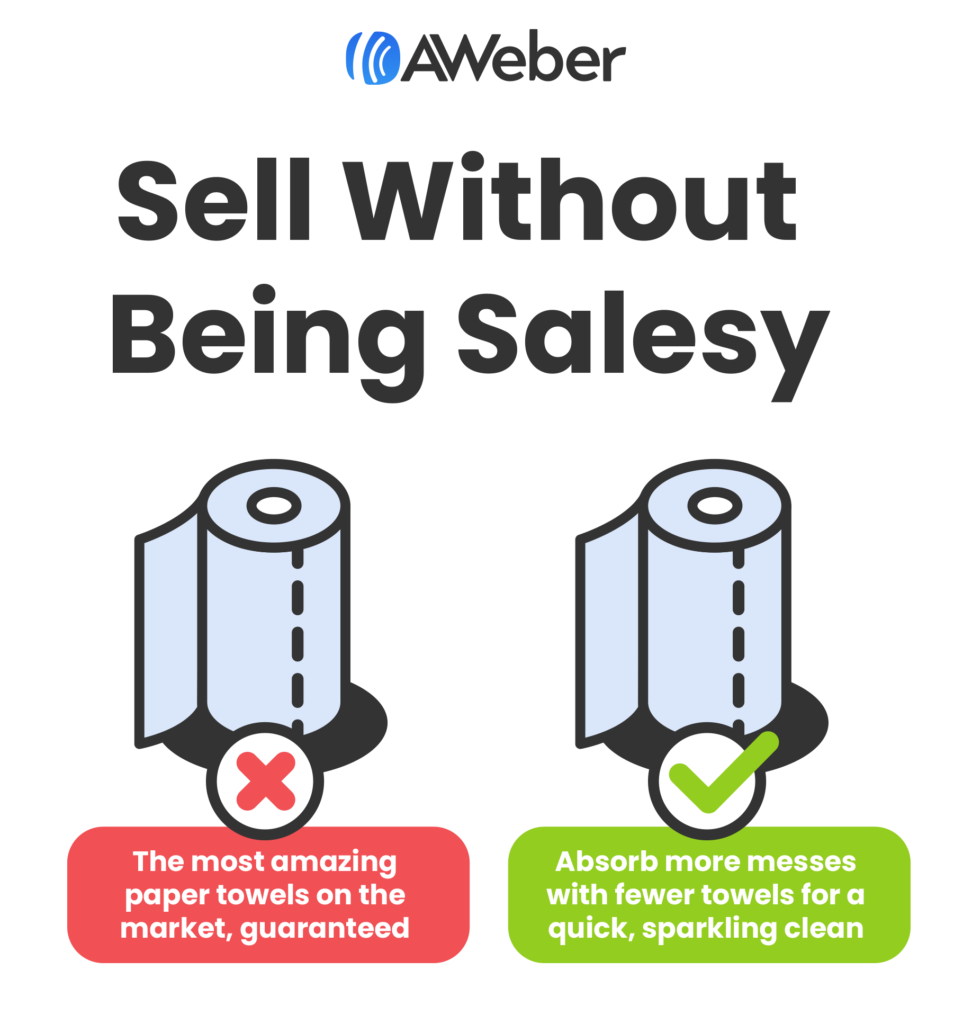
Let’s return to our paper towels example. If your copy says that your paper towels are “the most amazing paper towels on the market, guaranteed,” we still don’t know anything about them. Why should we trust that they’re the best if you’ve given us no reason to back up your claim?
Instead you might say that the paper towels “absorb more messes with fewer towels for a quick, sparkling clean.”
Craft a killer call-to-action
Ultimately, we want our sales copy to sell a product or service. We can’t do this without a clear, effective call-to-action.
A call-to-action doesn’t have to be a “buy now” button. You can invite customers to learn more about a product, schedule a consultation, subscribe for a coupon or discount, or watch a video to see the product in action.
Don’t overload your sales copy with multiple CTAs—pick one. A good CTA should be one short sentence.
The customer should know exactly what they’re getting when they follow your CTA.
If your CTA says “click to learn more,” don’t redirect them to a contact form. If your CTA is to schedule a consultation, don’t make them click through two more pages of information to get to the contact form.
Putting it all together
Good copywriting is a recipe. Once you have all six of the ingredients down, you can create excellent sales copy that converts your audience into customers.
Whether you’re selling a coaching service, a software, or even a brand of paper towels, the principles of great copywriting are the same. Start with your focused target audience and craft copy that speaks to them.
If there’s one thing we know for sure about social media, it’s that you can always expect to see new features, content types and ways to engage your audience.
One of the latest features by YouTube is YouTube Shorts.
Haven’t heard it? No worries, you’re not behind the curve. In fact, you’ve probably already been creating this type of short-form video content on other platforms.
What are YouTube Shorts?
Because the vertical micro-videos have proven to be so popular, a number of platforms are trying to get a piece of the pie (we’ve got our eyes on you too, Instagram Reels).
YouTube is filling the gap of vertical short-form videos on its platform as well.
And while many brands are repurposing content and sharing them across platforms, this provides yet another way for brands and businesses to engage their YouTube subscribers.
And if you’re new to micro-video content in general, here’s a great example of a YouTube Short (click the image to view):
How can brands benefit from YouTube Shorts?
Now that we’ve covered the basics, let’s talk more about why this matters. YouTube Shorts can be a great way for brands to further engage and increase brand awareness with their customers.
Additionally, more than 70% of all YouTube watch time comes from mobile devices. And since YouTube Shorts is a mobile-first feature, you may reach that expanded viewership with more than horizontal, long-form video content. It’s time to switch things up.
Since YouTube Shorts was released in July 2021, this feature has reached 15 billion daily average views. People are watching—and loving—YouTube Shorts. So if your brand already has a presence on YouTube, consider adding some micro-vertical video content into your YouTube marketing strategy.
Plus, if a new potential customer finds your brand via Shorts and subscribes, they’re automatically subscribed to your long-form content as well. So this gives you an entirely new outlet to increase your channel subscriptions. Win-win, right?
How to make YouTube Shorts
Ready to start creating your own YouTube Shorts? You can create them from scratch right inside the app or upload previously created videos. The latter tactic is ideal if you’re repurposing your TikToks, Instagram Reels or YouTube videos onto your channel.
But if you want to create native, unique YouTube Shorts content, follow these steps:
Step 1. Open up the YouTube app on your mobile device and tap the plus sign at the bottom of the screen.
Step 2. Tap Create a Short. If you’ve never created a Short before, you’ll need to Allow Access to your camera.
Step 3. Start recording your video by tapping the red record button. By default, Shorts are set for up to 15 seconds. But if you tap the 15 above the record button, you can change that to 60 seconds.
Like most short-form video apps, you can flip your camera, adjust the recording speed, set a timer before recording or add filters to your video. Each of these options are available in the menu on the right side of your screen.
To record multiple segments, tap the record button when you’re finished recording your first clip, then tap it again to resume recording for your next segment.
Or, instead of recording a new video, you can tap your camera roll in the bottom left corner of the screen to upload a pre-recorded video.
Step 4. Once you’re happy with your video, tap the white check in the bottom right corner of the screen. Here, you can preview your video, add music or include text overlays. Then tap Next.
Step 5. Create a caption for your video, then tap Upload Short.
YouTube Shorts best practices
Let’s cover a few best practices first to help you get the most out of this new marketing avenue.
Post consistently
Just as most platforms do with new features, it’s safe to assume that YouTube is prioritizing Shorts for performance and views. One creator’s analysis looks to verify that after seeing a “massive jump in views in the last month since uploading a Short every day”.
Creating YouTube Shorts consistently will help you boost your brand reach to a wider audience. If you’re struggling with staying organized, making a content calendar that will help you plan out ideas and stay on schedule.
Keep it below 58 seconds
Although your Shorts can be up to 60 seconds, the sweet spot seems to be at 58 seconds or less. And with this type of video content, the shorter, the better. After all, people are watching YouTube Shorts as a quick way to consumer content.
Get creative with your captions
Your caption can be up to 100 characters, so make it count. Tease the content, use a funny line, summarize what viewers can expect to see and the like.
While your video is the most important part, captions are still shown when Shorts pop up on the YouTube home feed, so having a compelling caption can be what makes someone decide to watch your video or keep scrolling.
Record in vertical format
No one wants to turn their screen as they watch YouTube Shorts, so make sure you’re always shooting in vertical format to make your videos easy to consume. Even a horizontal video with black bars bordering it to make it vertical isn’t an ideal viewing experience. So just keep it easy and stick to vertical.
Make content relevant to your audience
What is your audience going to enjoy most? If you’re not sure what to create, spend a while exploring the platform to see what other businesses are putting out there. A few ideas include:
How-to videos
Quick reviews
A relevant story
Industry tips
Fun facts
An experiment
Use a trending sound byte
If your short-form video content is relevant, engaging, educational and valuable to your target audience, then you’re on the right track.
Focus on making the first few seconds captivating
If those first few seconds don’t immediately hook your viewer, they’re going to keep scrolling. Those first few seconds of your video are the most important part. Find a way to reel your viewers in right as they start to watch your video that makes them want to stay for the rest of the clip.
Use trending songs, hashtags and events
One great way to increase views and get people interested in your content is using trending songs, events, audio clips, hashtags and challenges. Because of the viral nature of the content, you can boost visibility and reach new audiences. Just make sure that it’s still relevant to your business and makes sense for your brand.
Use your authentic voice
Don’t forget your brand voice when creating YouTube Shorts. You still want to follow your guidelines to ensure your video content still makes sense for your brand and aligns with your messaging and mission. If your content seems out of place for your brand, it can hurt your image and reputation.
Show behind-the-scenes moments
Consumers love a good behind-the-scenes moment. Use your Shorts videos to showcase product creation, product packaging, office tours, behind-the-scenes from filming, bloopers and other fun video clips. Giving your audience a glimpse behind the logo can help to humanize your brand and make your viewers more interested in what you have to share.
Remember that Shorts loop
YouTube Shorts (and all other micro-videos) loop back to the beginning once the video clip ends. Use this to your advantage by tying the beginning and end of your video together, creating a seamless loop that will keep viewers entertained and interested in watching more of your videos.
Monetize your YouTube Shorts
You can monetize your YouTube Shorts using the YouTube Shorts Fund. This is a $100 million fund dedicated to creators who are publishing YouTube Shorts specifically as a way to incentivize creators and businesses to use this new feature. If you’ve monetized your YouTube channel, creating Shorts is yet another way to increase the revenue you’re generating.
Start creating your own YouTube Shorts
YouTube Shorts are a great way to improve the performance of your YouTube channel overall. Don’t forget to check out our guide to find more ways to increase your video views. Then start creating, publishing and promoting your YouTube video content.
All it takes is one click to kickstart a relationship between a consumer and your brand. Social shopping links the online culture and e-commerce worlds—and it’s not going anywhere. Over one-third of consumers expect their use of social to purchase products and services will increase through 2024.
There’s no time like the present to reach consumers through social media. Thanks to social shopping, businesses can start demonstrating the bottom-line, revenue impact of that reach.
In this article, we’ll explore:
What social shopping is and why it’s huge for brands
The different types of social shopping
A round up of expert predictions for social shopping in 2022
What is social shopping?
Social shopping is the intersection of social media and online shopping. Users make purchases from social media platforms like Facebook, Instagram and Pinterest, either in the apps themselves or after clicking through to a product web page.
Social platforms mimic the in-person experience of browsing in physical malls and stores with techniques like group buying, messaging and interactive content.
Social shopping centralizes a consumer’s touch points with a brand all in one place, from discovery and engagement to actual purchasing. It’s a convenient way to meet consumers where they are, turning browsers into buyers.
What social media shopping does for brands
Social shopping is a win-win for brands and consumers. Purchasing doesn’t have to be a separate event. In many instances, consumers can buy without leaving their chosen platform. Both consumers and brands benefit from the accessibility and conversational opportunities social media offers. Other advantages include:
It increases conversions by removing friction. Buyers don’t need to leave the comfort of their home, office or commute, nor do they have to talk with multiple salespeople to buy from a brand. They also don’t have to leave the social media platform they’re on. In just a couple of clicks, buyers can access a product page and move to purchase.
You can bake social proof into campaigns. Customer reviews are one of the most influential sources on purchasing decisions. Social shopping makes it easier for consumers to buy your product and share authentic feedback all in one place. Even better, you can weave this social proof into your future marketing campaigns for added credibility.
You’ll have better data about what works. The more time consumers spend on and buy from social, the more social becomes a trove of insights about your target audience. With the right tool, you can quickly glean actionable information to serve your consumers better. Sprout, for example, makes it easy to identify which types of social content convert best and monitor conversations about your brand, all in one view.
Social shopping examples
There are already numerous forms of social media shopping (with more to come as the technology evolves).
Social commerce
Social shopping is fairly synonymous with social commerce, or buying and selling goods through social media platforms. Around 8 in 10 businesses anticipate selling products or services via social media platforms by 2024.
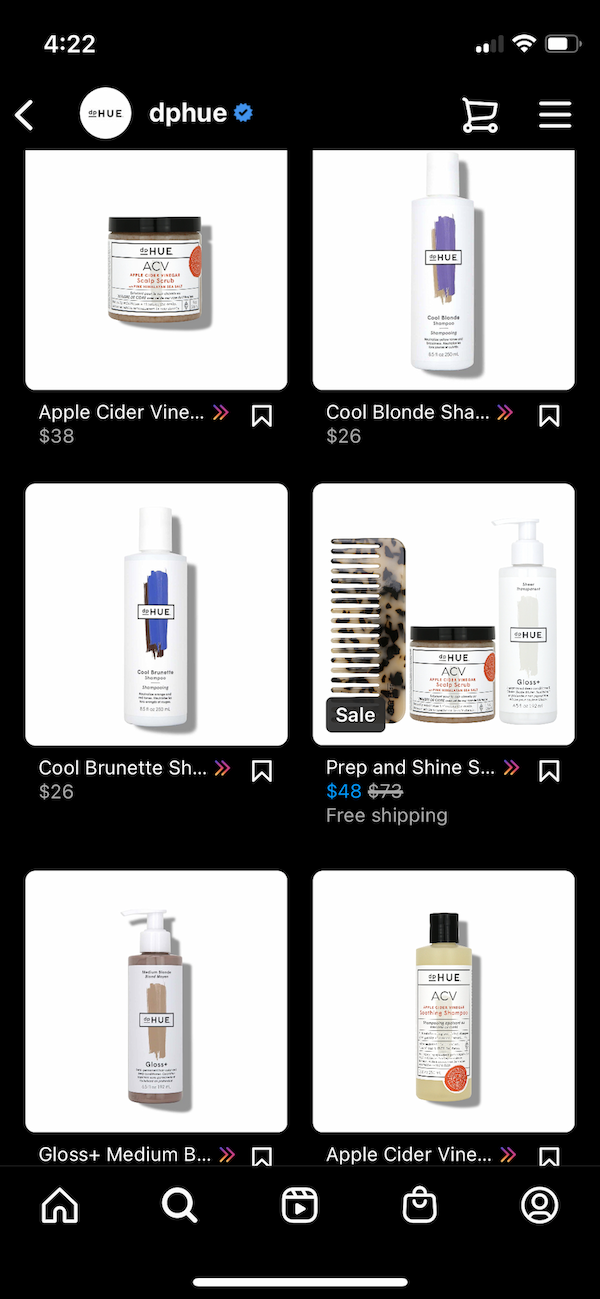
One brand with a strong social presence is hair care brand dpHUE. Consumers can swipe through Instagram Stories that spotlight its individual products, then browse the brand’s Instagram Shop to purchase a range of products without leaving the app.
Group shopping
Group shopping is when several people show interest in or buy a product at once. Peer-to-peer connection drives the experience: recommendations from friends are the most influential factor over consumers’ social purchasing decisions, according to Sprout research.
This method is popular in Eastern countries but still nascent in the US. Squadded and Supergreat are two brands that offer collaborative shopping experiences. They are niche communities that allow users to connect with groups of friends and shop together. Users can also ask each other for advice about specific products, and share verified reviews.
Conversational commerce
Conversational commerce is when merchants and consumers engage in real time through platforms like messaging apps and chatbots. This lets brands create a more personalized digital experience, whether it’s clarifying questions about an order or recommending specific products to purchase.
Livestream and virtual shopping
With livestream shopping, brands can create their own digital QVCs—without the long hold times or rates charges. You can reach new audiences and give consumers a glimpse at your products in action.
In 2021, Walmart partnered with TikTok to provide a shoppable livestream experience. TikTok users could purchase from Walmart directly from the app. Walmart earned seven times the views it anticipated and grew its TikTok userbase by 25%. Poshmark’s “Posh Parties” are another example of successful virtual live events. During these parties, users can interact with other shoppers, view over 200 million items for sale and see what brands are trending.
AR commerce
Augmented reality (AR) commerce uses 3D mapping technology so shoppers can try or interact with a product before buying. The experiences could be as small as trying on clothing and as large as entering a virtual “store.” One company going all-in on AR is L’Oréal, which acquired its own AR firm in 2018. It has since rolled out the ability for shoppers to try on hair and makeup colors across its brands’ Instagram Shops before purchase.
The 3 biggest social shopping platforms right now
Facebook Shops
Over 250 million users and 1 million sellers actively use Facebook Shops each month. Other Meta apps like WhatsApp and Messenger are convenient for supporting the buyer journey and answering questions about specific products.
Instagram Shopping
Instagram’s focus on visual content naturally lends itself to a retail experience, which may be why 41% of consumers say they’re likely to buy from the platform. Instagram Shopping connects users to products and purchases with just one swipe.
Pinterest
Thanks to an integration with Shopify, millions of merchants can turn their inventory into shoppable Product Pins on Pinterest—but that’s just one of the platform’s latest moves into commerce.
“As part of TikTok’s ongoing growth and push to implement monetization opportunities, it has helped products take off—from leggings to cleaning products and everything in between,” says Amy Stamper, Paid Social Lead at Impression, a UK-based digital marketing agency. “In 2022, TikTok will continue to make products viral, but more of this will be driven by ads and brands, now waking up to the power of TikTok.”
What’s next for social shopping, according to experts
Curious what the next year has in store for social shopping? We spoke to multiple experts to see what we should expect in the months ahead.
Shopping gets personal
“Macro trend-based, personalized shopping will fuel the social commerce experience,” says Meghan Salgado, Associate Growth Manager at Poshmark. “We’ll continue to meet consumers where they are—whether on our own platform or widening our reach by integrating with others. That integration will happen more directly into social content, with a focus on seamless shopping.”
Conversation is king
“I think 2022 will continue to see growth not only in social commerce but conversational commerce,” says Ian Leslie, Senior Director of Retail Advocacy at Bolt, a checkout experience platform. “Brands will continue to invest in channels and technology that allow them to not only converse with their customers via social but help them make their way all the way through the funnel to checkout.”
Checkout gets easier
“We will see better integrations and less friction in the purchase funnel,” says Alessandro Bogliari, Co-Founder and CEO of The Influencer Marketing Factory. “And thanks to new payment integrations and the ability to save billing and shipping information, users will be able to easily pay for anything with one click, no matter the platform they are buying on.”
Peer proof sells
“We know that an overwhelming majority of shoppers rely on others’ reviews of products,” says Stephanie Gutierrez, Senior Social Media Strategist at Online Optimism, a digital marketing & design agency. “With this in mind, we can also expect platforms like Instagram to take advantage of their photo and video-sharing capabilities to allow users to turn their content into reviews.”
Prepare for the future of social shopping
Consumers continue to crave richer, easier and faster ways to buy. Social shopping delivers on all three fronts.
Anyone who manages their company’s social media for a living operates every day in fear of being the one at the helm when the company Twitter account is hacked. But most of them don’t really do much to mitigate that fear. This is a critical error of epic proportions.
Let’s state the obvious: Social media governance is not the sexy side of social. It is about as exciting to most social media managers as getting a tooth pulled. But focusing on it is the number one way to avoid your company being in the headlines because criminals hacked your account and something terrible was posted. View it as job security if you have to.
At its core, social media governance equates to one thing: eliminating risk. And there are a lot of risks. You tackle these by putting proper processes and procedures in place and managing your social media accounts in a centralized manner.
If you still need convincing that focusing on governance is worth your time and energy, or if you need help making the argument for the resources you need to do governance well, let me help. Here are the top seven risks of not focusing on social media governance for your operation:
1. Risk to your brand
Obviously, if hackers gain access to your social media accounts, they’re not there to be nice. Ask yourself how much damage would be done if criminals gained access to your social media accounts and Tweeted something nasty, changed your account to look like your primary competitor’s account or converted it over to make it look like it supports terrorist groups (note: all are real examples). How much would your credibility be damaged? And what about your brand?
The EQ you need to run social media is really high. But even brands with money don’t apply themselves when hiring people to run their accounts. Moreover, there’s a tendency to be cheap, when SM is a high risk platform.
Depending on your industry, you may have additional rules guiding what your company can and cannot say publicly. Companies in the financial, medical and pharmaceutical industries all have additional considerations. If I pull out my crystal ball, I’d predict other industries like travel and energy are not out of the woods yet.
Industry aside, all companies have to worry about violating government regulations regarding social media. If you have trouble getting budget to do some of this governance work, tell your leaders this could cost them $50 million, or more. Not paying attention to governance can land you in hot water with a number of regulatory agencies, from the FTC to the governing body in Europe that hands down GDPR fines. Some of these fines are whopping amounts in the millions (and they’re in Euros!) And, be extra aware if you manage a major brand. Regulatory bodies love to make examples of big companies that will get big headlines.
Again, sitting with my crystal ball, I predict it is only a matter of time until we have a U.S. equivalent of GDPR. Individual states including California and Virginia already have instituted their own versions.
3. Legal risk
As companies rely more on social media as a form of customer service and communication, chances are higher that lawsuits based on social media will emerge. If you cannot say definitively who had access to your accounts at a given time or who posted a specific item or comment, you may find yourself unable to defend yourself to your supervisors, your legal team or a court of law.
4. Human risk
To err may be human, but if the human happens to be a social media manager, forgiveness is a hard thing to come by. Bottom line, people absolutely make mistakes. But the proper tools and procedures make it a lot less likely that someone will accidentally post from the company account instead of their personal account or that they will do something else that causes you a self-imposed PR “incident.” It also saves you from having to fire someone.
5. Risk from your own people (internal risks)
A lot of companies do not have firm rules about what employees are allowed to do on social media. Employees may accidentally share items that include confidential information (such as financial or HR data) or air personal grievances against the company or coworkers in a very public forum. Not having official policies and rules makes it hard to hold people accountable, and it makes it hard for employees to know what is and is not OK.
Making it clear in your organization's Social Media Policy and Strategy who is in charge of engagement on platforms helps cut down in duplicate and erroneous posts by well meaning employees.#PSC560#MarketingTips
Criminals gonna criminal. That’s the bottom line. But hackers and cybercriminals like easy targets. They go for the ones with terrible security and no tools in place. So don’t make yourself an easy target. And if you are a Fortune 500, you are most definitely being targeted.
Make sure you know all of your account passwords (or better yet, are using a password management tool). Make sure you’ve turned on two-factor authentication (2FA) for all accounts where available. Know who has access to your accounts at all times, including partners and agency teams. And ensure there is a process and standard operating procedures for starting new accounts, maintaining existing accounts and shutting down retired accounts.
7. Third-party apps risk
Many times, criminals find their way into your systems via a less-secure third-party app or tool that you’ve connected to your main account. View it as a kind of unsecured back door. Make sure that you are regularly evaluating any third-party tools you have connected to your social media accounts, and make sure you are vetting their security as well as your own.
With all of these risks out there, the smart bet is to take the steps needed to master social media governance. Do this with process, protocols and the right tools. In the end, it will save you much more grief than it causes.
When it comes to social media, video is king, queen and the entire royal court. After all, who hasn’t lost two hours scrolling the infinite feed?
Video has exploded in popularity on social media. People are twice as likely to share video over other content types…and Instagram knows it. With the platform doubling down on video content in 2022, it goes without saying that video should be part of your Instagram content strategy.
But behind every 15-second video is hours of unseen work. That’s why it’s worth getting as much use, and reuse, out of your Instagram videos as possible.
By the end of this article, you should have a good sense of how you can repurpose your Instagram content—new and old—in ways that will maximize your reach and impact.
With Instagram making recent changes (RIP, IGTV…), let’s review the video formats available on the platform:
Reels: Vertical, full-screen videos that can be up to 60 seconds long with major impact.
Instagram Videos: Replacing the IGTV tab on your profile, all videos that aren’t Reels fall into this category. Including Lives you’ve posted and formerly-branded IGTV videos. These can range from seconds to an hour (for certain accounts).
Stories: Ephemeral vertical content that appears in 15-second clips.
Lives: Live videos that you can share to your feed as a regular video after the fact.
So what works best?
“Our top videos on Instagram over the last year have been Reels. Specifically Reels that inspire and offer immediate value for viewers,” Sprout Social’s Social Media Strategist Olivia Jepson tells us. But it depends on what you want to showcase and what fits your brand. “The shorter the video the better, but don’t sacrifice good storytelling. Consider what’s absolutely essential for viewers to get out of a video you’re producing.”
Not every video is worthy of your repurposing efforts. Identify your most popular Instagram videos. This will help you choose videos that resonated with your audience and have potential to perform well on other platforms.
Repurposing video in new formats and on new channels can expand your audience, give you more content and increase opportunities for engagement.
You might even find more success with a video on a new channel. Take this sea otter video, for example. It performed very well on Instagram, earning more than 300,000 views and 18,000 Likes.
But when repurposed on TikTok, the video blew up, receiving more than 1 million views and gaining the Shedd Aquarium account thousands of followers.
On that note, let’s dive into 47 ways you can repurpose Instagram content to get the most out of your videos.
47 ways to repurpose your Instagram video content
Repurposing Instagram video within Instagram
We know, super meta (not thatkind of meta). Repurposing an existing video into new formats extends its impact and helps fill your Instagram content calendar.
Here are a few ways to do this:
1. Reformat as a Reel
Meta CEO Mark Zuckerberg recently said that Reels has become the main driver of engagement growth on Instagram.
“Reels are and will continue to be king for discoverability and awareness,” Olivia tells us. With Instagram prioritizing Reels in 2022 and Reels displaying in multiple Feeds, now is a great time to add them to your strategy. Repurpose longer videos into snackable Reels to make them more shareable and discoverable.
Pro tip: If you have a horizontal video that you want to turn into a vertical Reel, use an editing app like Canva to crop your video into a Reels-ready aspect ratio.
2. Create carousels
Bannersnack found that carousels (posts containing multiple photos or videos that you can swipe through) have the highest engagement rates of all types of Instagram posts, especially when they feature a mix of videos and photos. Carousels typically appear multiple times in the feed and require more engagement from viewers.
Here are creative ways to repurpose Instagram videos as carousels:
3. Quote posts
Turn shareable quotes in your video into graphics.
4.Facts or statistics
Transform data in your video into a carousel “data report.”
5.Tips or how-tos
Is your video a “how to” guide? Break each step down into a carousel of clips, or screenshots and graphics.
6.Featured clips
Feature “best-of” clips.
7. Use Stories
With 500+ million people using Stories daily, they get your content in front of an active audience and beat the algorithmic feed. Break up your longer videos into Stories. Build a step-by-step Story guide, a listicle viewers can tap through, feature top five moments or quotes from a longer video—get creative.
Pro tip: Olivia says, “Resharing Reels/videos on Stories almost always gives it more life and views. Consider sharing it more than once across a week or a few weeks to capture different people within your audience.”
8. Build Story content into Highlights
Turning Stories new and old into Highlights gives your ephemeral content new life. Use Highlights as areas to tell different stories, and choose a Highlight cover that brings your brand colors and graphics to life.
9. Turn longer videos into short-form
2021 data found 58% of viewers will watch a whole video if it’s under a minute, but only 24% of viewers will watch an entire video that’s more than 20 minutes. Repurpose longer videos—like former IGTV or Live content—as shorter clips.
Sprout did this with our Always On Instagram series. We shared 3-4 minute videos on Instagram, then created 30-second cutdowns for our Feed and stories. “The cutdowns create intrigue and offer immediate value, while the longer video shares a full story with multiple takeaways that our audience could digest,” Olivia tells us.
Give old videos a refresh by posting them with branded frames, logos, title cards, graphics and more with an app like Canva.
11. Get new life out of your Lives
You can share your Instagram Lives—both new and old ones from your archive—as Instagram Videos in your feed. Share your entire Live, or break it up into short, shareable chunks.
As defined by Instagram, Guides are “a curated flow of posts with commentary—which is great for step-by-step guides, tips and recommendations.” These curated posts can be yours or from other accounts. Include existing video posts in a Guide to use this relatively new feature.
15. Re-share your greatest hits
If enough time has passed—around six months or more, ideally—reshare old, successful content as a throwback, reminder or as a culturally-relevant piece. This will please existing fans who recognize the video, as well as new fans who are seeing it for the first time.
Repurposing Instagram content on other social media platforms
Not everyone is on Instagram. Repurposing your Instagram content on other social media platforms extends your reach, helps you fill your content calendar and extends the life of your videos.
16. Turn to TikTok
It’s TikTok’s world—we just post in it. If you’re using TikTok to grow your business, extend the reach of your Instagram content by posting your Reels on TikTok. Be sure to add captions and text in TikTok’s editor—the more native a video feels to a platform, the better it tends toperform. Check out our Instagram Reels vs TikTok account.
Reels can be viewed in a new, dedicated News Feed section, or at the top of the regular News Feed where Stories and Rooms display.
Elect to have your Instagram Reels shared on Facebook automatically when you publish, or save them after publishing to reshare them on Facebook. (Heads up—you may need to add music back in on Facebook.)
If you have the budget for paid ads, stay competitive against Facebook’s organic reach and other brands’ paid content by turning your videos into ads.
22. Share your video to Twitter
Tweet out horizontal and square videos you originally made for Instagram on Twitter—as long as it’s 2 minutes and 20 seconds long or less. Just make sure you’ve resized to the ideal aspect ratios—square, portrait or horizontal.
In the race to compete with TikTok, Twitter also announced they’re testing a short-form video “Explore” page feature. While this feature isn’t yet available to all, now is a good time to get used to video post best practices and identify which top-performing short-form Instagram videos you want to repurpose for this new vertical video Twitter feed.
Six updates including drag and drop content calendar have arrived!
Similar to the carousel ideas above, breaking out tips from your video into an informative thread is a great way to encourage engagement and to educate your audience.
Step on the gas. It’s time to accelerate into the future of social. [Thread]
Breaking down your video into short snippets to share as a series of Tweets over time is a great way to get more posts out of just one piece of content.
Pro tip:Scheduling your content with a tool like Sprout Social can help you stay on track and ensure your posts are spaced out.
26. Lead with a question
Tweet out a question or poll to encourage engagement, then Tweet out the video later as the answer.
27. Share your video to LinkedIn
LinkedIn is no longer a place to share job postings and nothing more. The platform has gone through an overhaul of changes recently and has become a go-to hub for high-level content.
Here are a few ideas…
28.Share data points
Share stats and discoveries mentioned in your video as graphics or screenshots. As a professional network and learning tool, LinkedIn is a great home for thought leadership and industry insights.
29. Create a Live stream
Utilizing LinkedIn Live is a great way to reach new audiences with your previously live-streamed content—just be transparent that the event is a rebroadcast.
30. Repurpose short-form video posts
LinkedIn will be one of the next social media platforms focusing on short-form video—feeling déjà vu yet?
This could be a great fit for repurposing educational, product-focused, company culture or thought leadership Instagram videos. Recent data shows 68% of video marketers plan to include LinkedIn in their video marketing strategy in 2022—up 5% from last year. Give your LinkedIn an audit to see where video could fit in.
31. Use video to create a helpful Product Page
LinkedIn’s Product Pages are where brands with multiple products can feature each offering, its features and even its customers. If you have any case study videos, product demos or tip videos, use them to beef up your Product Pages.
32. Share quotes
If you have Instagram videos featuring inspiring thought leadership ideas or quotes, turn those into shareable content on LinkedIn in text posts or as graphics.
33. Create thought leadership content
Repurpose a video by translating the tips and ideas it features into a shareable thought leadership post or LinkedIn article.
Or, break down the key takeaways from the video into a text post and share the video alongside it to give viewers multiple ways to consume the content.
34. Share PDFs or slides
If you have a long, informative Instagram Video, turn it into a shareable PDF or set of Slides. This is a unique kind of content you can share on LinkedIn and fits in well with this professional network.
35. Upload your video to YouTube
You can always upload your content as a single video and call it a day. But here are a few ways to take it a step further.
36.Use YouTube Shorts
You know where this is going, right? In an appeal to creators, YouTube debuted Shorts as a place to share short, often funny videos that can be monetized. Shorts recently reached fivetrillionviews, making it a proven tool to consider using to repurpose your Reels and more.
37. Create a playlist around shorter video clips
If your video is longer and contains multiple concepts or how-tos, consider breaking it up into clips that can be shared together in a playlist. This can boost SEO for several topics, and can make each section shareable on its own.
Pro tip: Why does SEO matter for videos? YouTube is a video sharing platform, but it’s also one of the world’s most popular search engines. Videos you host on YouTube can show up in a Google search, as well, so make sure you think about SEO when crafting your video’s title and description.
38. Pin on Pinterest
If you’re looking to grow your Pinterest account, using video is a great way to start. The platform is investing in video and creators. According to Pinterest, video views on the platform increased 100% year-over-year in Q4 2020, and the platform is growing in popularity with younger populations.
Here are a few video features to look into:
39. Idea Pins
Made for creators to be more active on Pinterest, this video feature is somewhere between Stories and TikTok. With Idea Pins getting 9x the average comment rate compared to normal Pins, try wearing your creator hat and repurposing your vertical Reels and Stories on Pinterest.
40.Video Pins
If you’ve added your Instagram video to YouTube, Pin the video directly from YouTube. Or, upload the video as a Video Pin. You can also include a head-turning cover image that emphasizes your brand.
41. Share on Snapchat
If your brand has a younger Gen Z and millennial audience, leveraging Snapchat for business could give your vertical video content another place to reach your target audience.
42. Keep an eye out for new opportunities
Even Reddit recently rolled out a short-form video button. With platforms quickly evolving and adapting to keep up with the popularity of short-form video, there are bound to be more and more new features rolling out in the social space.
Repurpose your Instagram video outside of social media platforms
43.Add Instagram videos to your website or portfolio
Video can bring your brand’s story to life. Recent data shows 68% of consumers prefer watching a video to learn about new products or services vs reading articles, presentations, infographics or ebooks.
Using videos from Instagram that demo your product, tell you brand’s story or (if you’re a filmmaker or videographer) highlight your work can add a dynamic element to your website or portfolio.
44.Use your video in email campaigns and newsletters
If there’s one key takeaway from this article, it’s that video is powerful. According to Vidyard, Igloo Software boosted their email click through rate by 189% by using more video.
Embedding video in your email newsletter, like the example below, is a great way to give your content new life and drive viewers to your website, YouTube or social channels.
45. Create GIFs or screenshots
GIF responsibly—this can easily be cheesy. But making informative, sharable or even funny GIFs out of your content can create visual elements that can be used in everything from emails to Tweet responses.
While we live in a video-centric social world, blog posts are important tools for SEO, education and thought leadership. Create a blog post from the content of your video, and include the video in your blog post to give readers two ways to interact with your content and to integrate your content marketing efforts.
Infographics are a shareable and visually creative way of sharing educational information, data points, guides and more. They’re super shareable, especially on highly visual platforms like Pinterest, can build your backlinks and are classically effective.
Stay organized: Create an Instagram content calendar to track your repurposed content
Repurposing just one Instagram video can provide you with dozens of pieces of content. Make sure you’re peppering that content throughout your channels and over time strategically—not all at once.
Create an Instagram content calendar to keep yourself organized. And to take this a step further, save time by using a publishing tool to schedule your content at peak posting times.
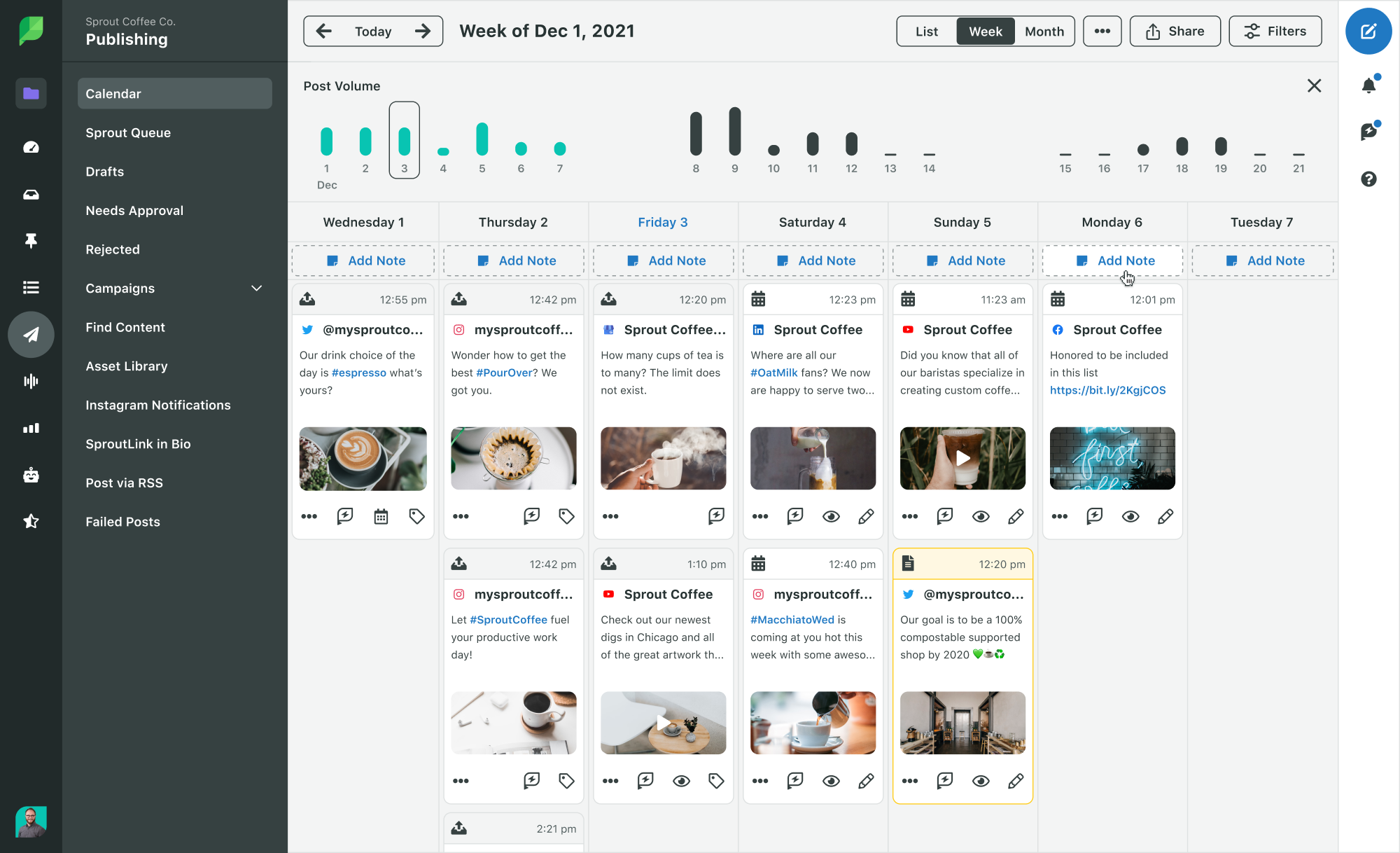
Sprout’s publishing calendar can serve as a way to view how your content is being distributed over time, as well as a way to schedule ahead of time, giving you more time to think strategically.
Give your Instagram content new life
If a picture is worth a thousand words, a video is worth millions—why let that content go to waste?
It’s easy to stress about how to create content for Instagram or how to create enough content for all of your social channels. Starting with what you have and maximizing the impact of one video can go a long way.