Wednesday, 21 August 2024

Email personalization: Using dynamic content to speak to your audience

Daniel Pink tells a story in his book “Drive” about a university struggling to collect donations for a food drive. Researchers had the notion that adding context to make the ask feel more for an individual, and not just blanket marketing, they’d see a better response.

So they decided to run a test with their outreach emails. They split tested two versions of their message:

  • Half of the students got a generic email about the food drive.
  • The other half got a personally addressed message with details about their closest donation drop offs. They also got a followup call.

What happened (you can probably guess)?

Donations went up. Way up.

Before the test, researchers evaluated whether students had a high, or low likelihood of donating. The personalized emails saw an increase from folks who were likely to donate and even greater growth in the group of people who they were assuming wouldn’t donate.
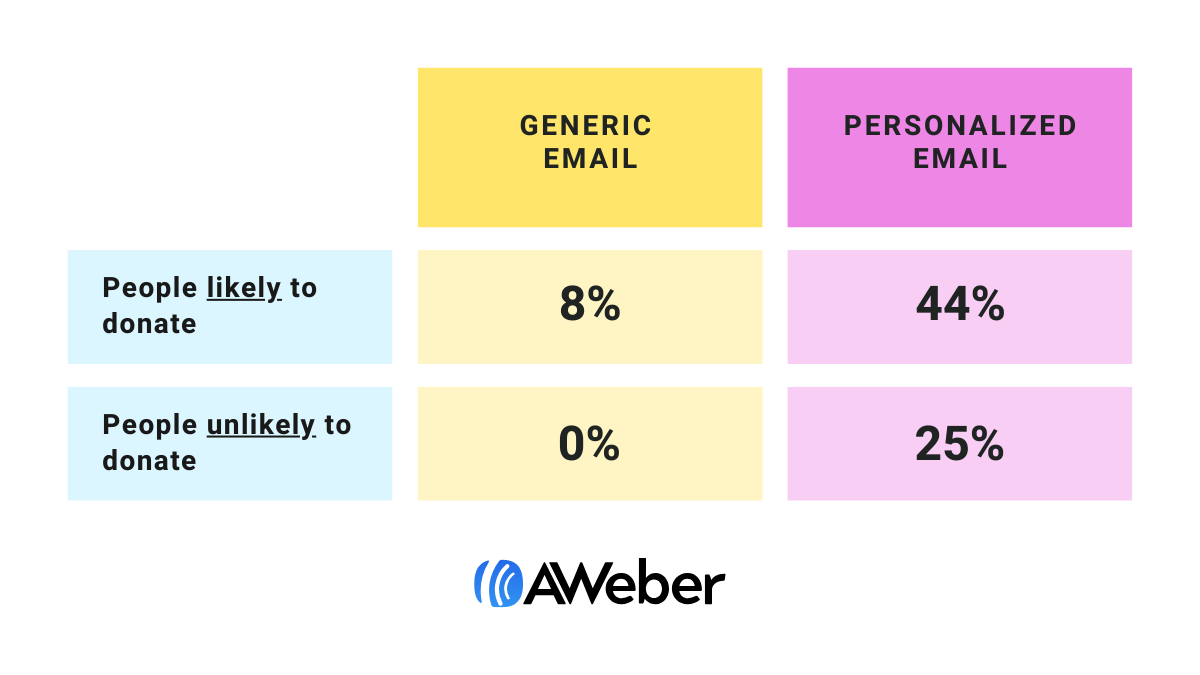
 

chart showing how personalized emails outperformed generic emails

Yes, you’re reading that right. The personalized, contextually relevant email got more donations from people researchers weren’t expecting to donate than the generic email got from the most likely donors.

Personalization works. Let’s talk about how to do it right.

Personalization is more than just a name

When people talk about personalization in email, the example they give is often

“Hi [FIRST NAME],”

That’s a good start and if you do nothing else do that because it’s so easy.

But don’t stop there. There’s so much more you can do with simple personalization.

  • Reference the site or community they signed up from in your welcome message if you're working with partners to build your audience.
  • Include information that is relevant to someone’s location, like nearby stores or news that is relevant to different regions.
  • Send people similar content to what they've clicked through to in the past(you can tag people based on the links they click in broadcasts and automated campaigns).
  • Recommend products based on what they’ve purchased in the past.
  • Ask people their goals or interests when they sign up. Then reference those goals or interests in welcome series and newsletters.

Benefits of email personalization

By personalizing your emails so they solve your subscribers’ unique problems, you provide immediate value. And the sooner you can do that, the sooner your subscribers will understand what you bring to the table.

Increased engagement

Personalized emails are more likely to be opened and read. By addressing the specific interests and needs of your subscribers, you can craft messages that capture their attention and prompt them to take action. This leads to higher open rates, click-through rates, and overall engagement with your content.

Higher conversion rates

When your emails provide relevant value to your subscribers, they're more likely to convert into customers. Personalized offers, product recommendations, and targeted content can dramatically increase the chances of a sale. According to research, 80% of consumers are more likely to make a purchase when the offer is personalized to them.

Improved customer retention

Personalization helps in building stronger relationships with your customers. By consistently delivering relevant content, you can keep your audience engaged and interested in what you have to offer. This leads to higher customer satisfaction and loyalty, reducing churn rates and increasing lifetime value.

Better customer experience

Personalized emails enhance the overall customer experience. When subscribers receive emails that are tailored to their preferences and behaviors, they feel valued and understood. This positive experience can set your brand apart from the competition and foster long-term loyalty.

Enhanced brand perception

By showing that you understand and care about your subscribers, you can improve the perception of your brand. Personalized emails demonstrate that you are attentive to their needs and preferences, which can lead to a stronger emotional connection with your audience.First, let’s talk about why you should be personalizing your email marketing efforts. 

Where to gather information for personalization

Just like any relationship, the best ones are established when you get to know one another. As you learn more about the people signing up to your email list, you can target them with the right kind of content to build your relationship.

To help you personalize your emails for your audience and start seeing stronger results, let’s take a look at how you can gather the information you need to begin personalizing.

On your sign up form

To effectively personalize your emails, you need to collect information about your subscribers. Since your sign up form is often the first step a subscriber takes before joining your email list, it's a great opportunity to get started.

If you want to send targeted emails that include a subscriber’s first name, confirm you’re collecting first names in the sign up form. Or adjust your form to include a first name field, like this sign up form for Fable & Folly’s podcast updates.
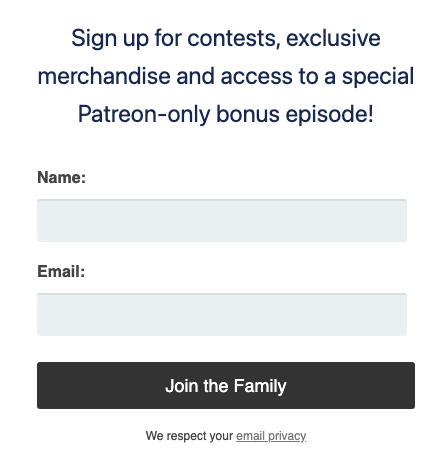
Sign up form example which includes name and email fields

In addition to asking for name and email, you can include custom fields that require subscribers to provide more information about themselves, such as the city where they live or type of content they prefer.

Try to avoid asking for too much information up front. Including too many fields can be overwhelming for your potential subscribers. Don’t create a barrier that could prevent them from joining your list.

If you do include more than just name and email address, emphasize the value of your emails. Explain what kind of targeted content they can expect.

Here’s an example:

Let’s say you write content for a diet food blog and you want to send targeted content based on a subscriber's dietary needs. Setting up a form with selections for the type of diet they’re most interested in will make it much easier to identify and send relevant information to your subscribers.
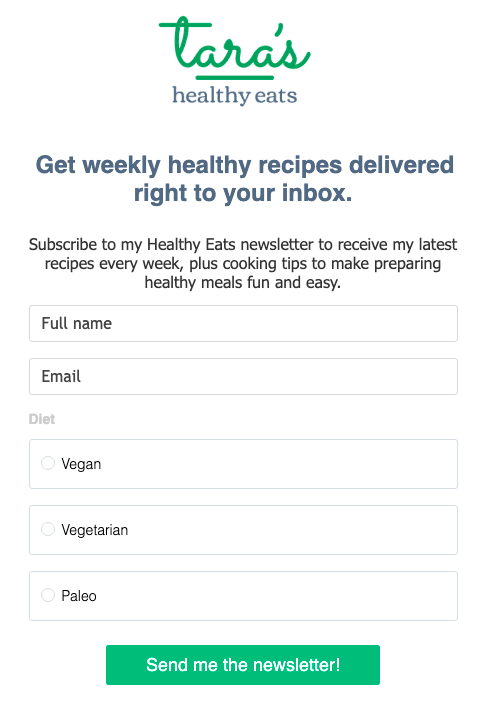
Sign up form example which ask additional information that can be used to personalize emails

Through a customer survey

If you need information about your subscribers that are already on your list, you can try to gather that information through a survey.

But keep in mind that on average only 30% of your subscribers will respond to your survey. So while a survey is a great way to learn more about your audience, everyone on your list won’t respond so keep your expectations in check.
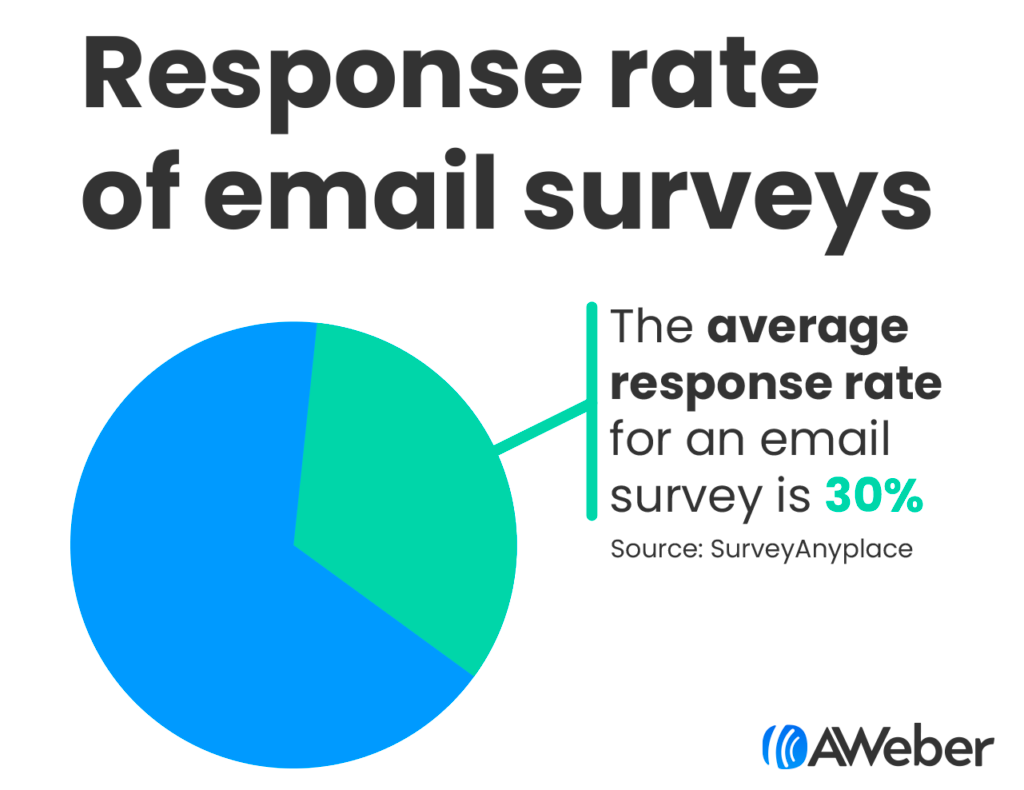
Pie chart showing 30% response rate for email surveys

However, when you reach out to your customers directly, you not only get valuable feedback in return, you also show them you care about how they are doing.

As you hear from your audience, you can use your survey insight as you craft your next emails.
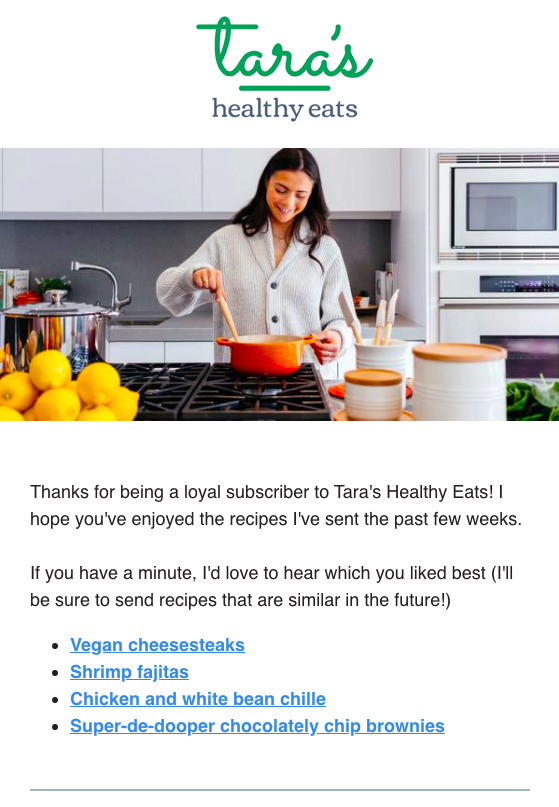
Email that includes a survey

Interactions with your emails

You can add a tag when a subscriber clicks a link in your email to more easily categorize them into groups (or segments). 

For example, at the bottom of AWeber’s weekly newsletter, we include our most recent blog posts. Based on what someone clicks, I learn what they’re interested in. 

Now I create email content specifically for that segment of customers. In the example below one group may want more content on artificial intelligence, another on optimizing subject lines, and the third on growing their email list.
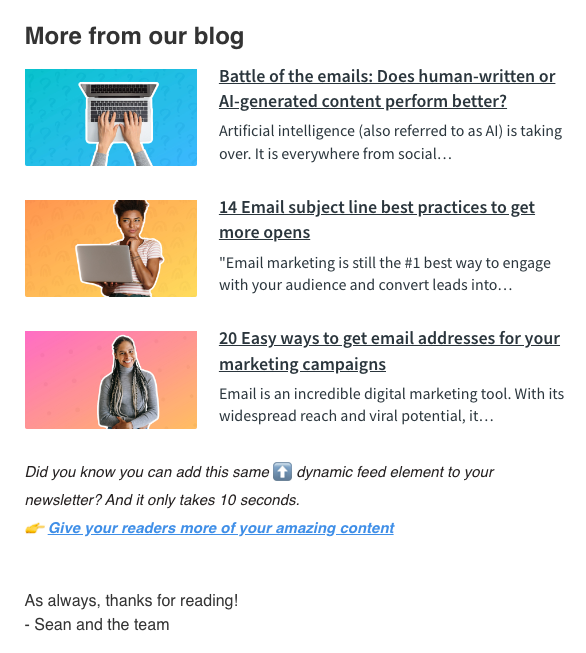
Example from an AWeber newsletter

Interactions with your website

Use the pages visited or links clicked on your website to gauge what they may be interested in. 

To be able to properly track page visits a cookie is required. To receive this cookie, a subscriber will need to first visit the website through a link in the email. Once a subscriber has received this cookie, an email provider can track a page visit regardless of where a subscriber came from. 

To allow tracking of your customer’s interactions on your website, you’ll need to add a piece of code to your site. 

For example, if a subscriber visited our landing page builder page, we can start sending targeted messages to them talking about the benefits of using our platform for creating their landing pages.
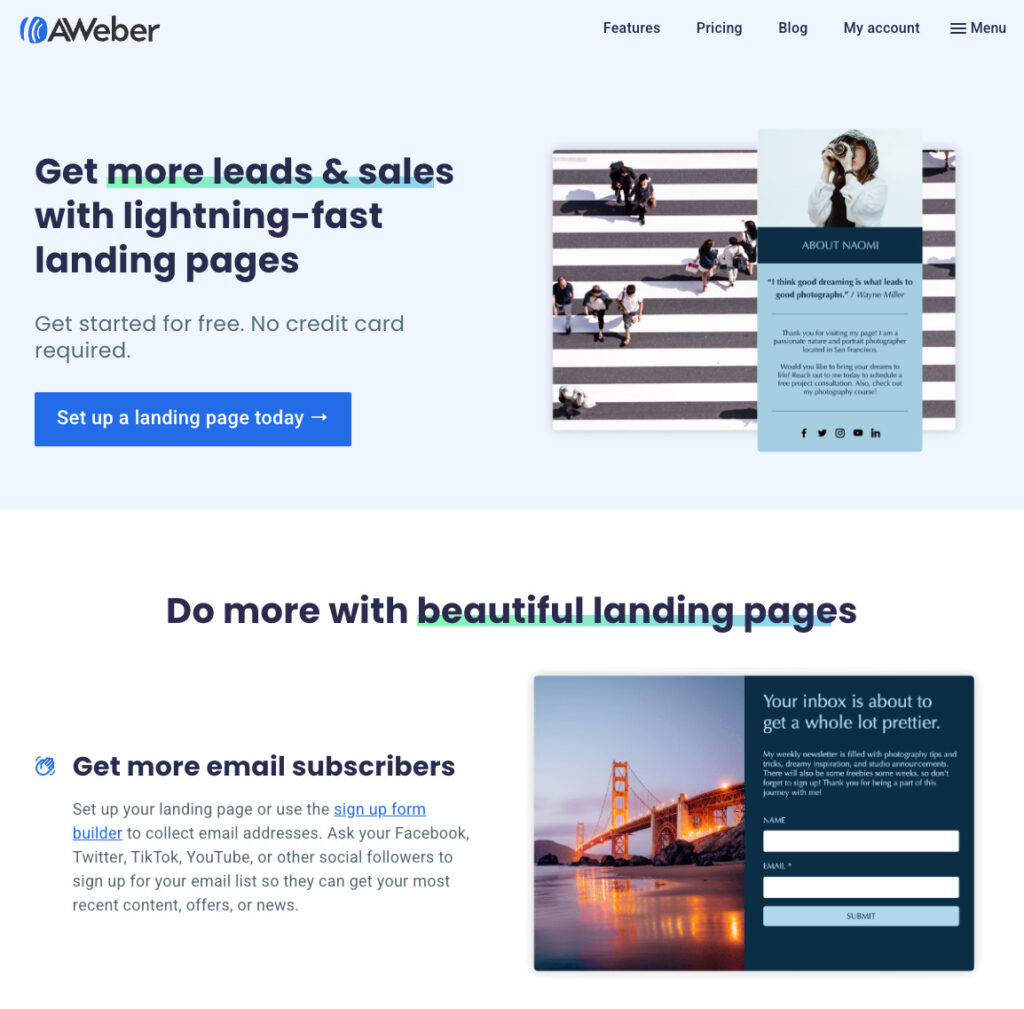
An example of a landing page on AWeber's website

Purchase behavior

Using purchase behavior data to personalize your emails allows you to tailor your messaging and offers to individual customers based on their previous buying habits. You can use this to create targeted campaigns that will increase the likelihood of repeat purchases and foster loyalty. 

Personalization based on purchase behavior data can also help you cross-sell or upsell related products or services to customers who have shown interest in similar items.

Here’s an example from Fanatics. Based on my purchase history, they’ve segmented me as an “Philadelphia Eagles” fan. In this email they most likely used dynamic content to change the image to show fans in Eagles gear. A New York Giants fan would receive an email reflecting their favorite team.
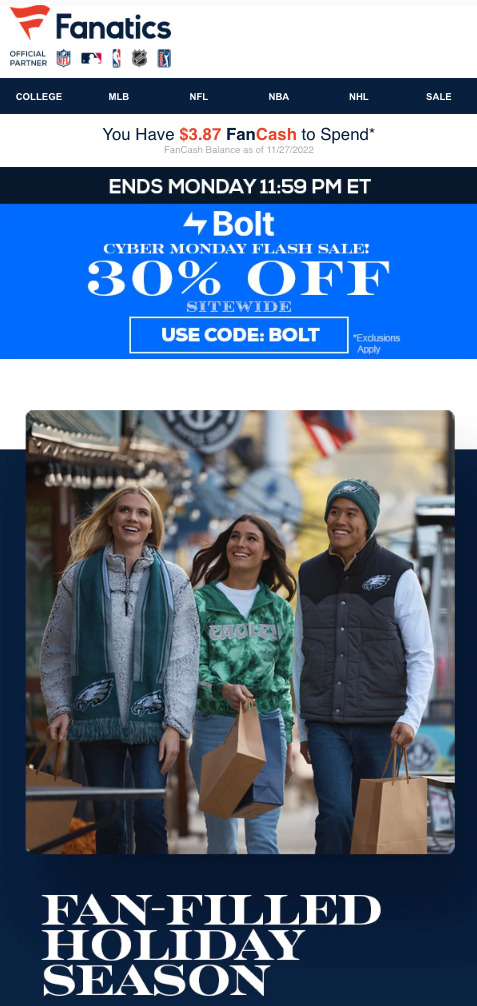
Personalized email example from Fanatics

What to personalize in your emails

Once you’re collecting the right data, there’s one rule to keep in mind: With great personalization power comes great responsibility.

Personalized email content should feel natural and not forced. It’s so much more than including a first name in a subject line or salutation. 

When you show your subscribers that you understand their needs, desires, fears, preferences and other aspects of their personality, it will lead to an increase in conversions. And more importantly, a more loyal customer..

Truly personal emails look at things like:

  • Which emails someone has opened and clicked through from in the past
  • Where on your site they visit
  • How they originally found you and what inspired him/her to sign up to your list
  • Products or services they’ve purchased in the past
  • Location or demographic information
  • Or other criteria that you collect from your subscribers 

By personalizing your emails so they solve your subscribers' unique problems or give them content related to their specific interests, you’re able to immediately provide value. And the sooner you can do that, the sooner your subscribers will understand how important your emails are.

Here are some examples of using personalization emails to delight your subscribers.

Set expectations early 

Your welcome message is your first opportunity to do this. In your welcome message, establish yourself as an expert in the field. Make sure to provide original content on a topic you know subscribers are interested in and they’ll be more likely to trust you when they're ready to make a purchase.

Here’s a great example of a targeted, personalized welcome email from WeddingWire, a go-to resource for everything wedding related, which subscribers receive immediately after signing up for an account:
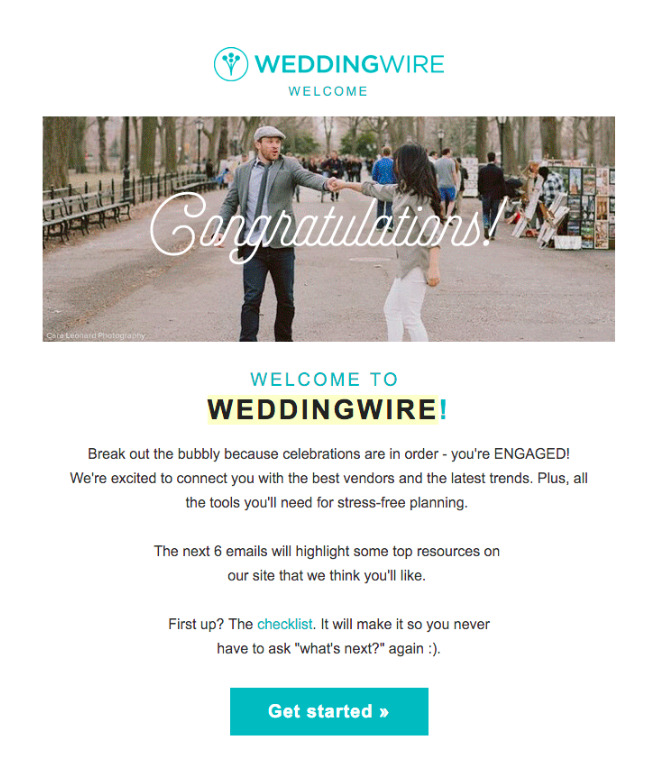
Personalized email example from WeddingWire

In the sign up form, visitors are asked to provide their expected wedding date. With that information, WeddingWire knows to send content related to where you are in the wedding process.

They use this message to congratulate you on your engagement and go the extra step to clarify what you’re likely to receive in the future. The checklist is also the perfect resource for couples during the early planning process.

As the wedding date gets closer, WeddingWire sends content based on other checklist tasks the engaged couple should be completing, such as choosing attire, picking out invitations and more.

By continuing to send content to your subscribers throughout your relationship with them, you can increase awareness of what you have to offer, show you care and keep your brand top of mind.

Celebrate milestones

Another great way to show you care is by celebrating the big milestones together. It can be as simple as a birthday message to let your customers know you’re thinking about them. Facebook does a great job of this in their birthday celebration emails, like the one below:

They provide a quick and simple email that is totally contextual, and the goal is just to make you smile.

You can celebrate important business milestones as well. Kickstarter’s congratulatory emails are a delightful example of how they celebrate their users' successes. Check out the message you receive when you hit 100 backers:
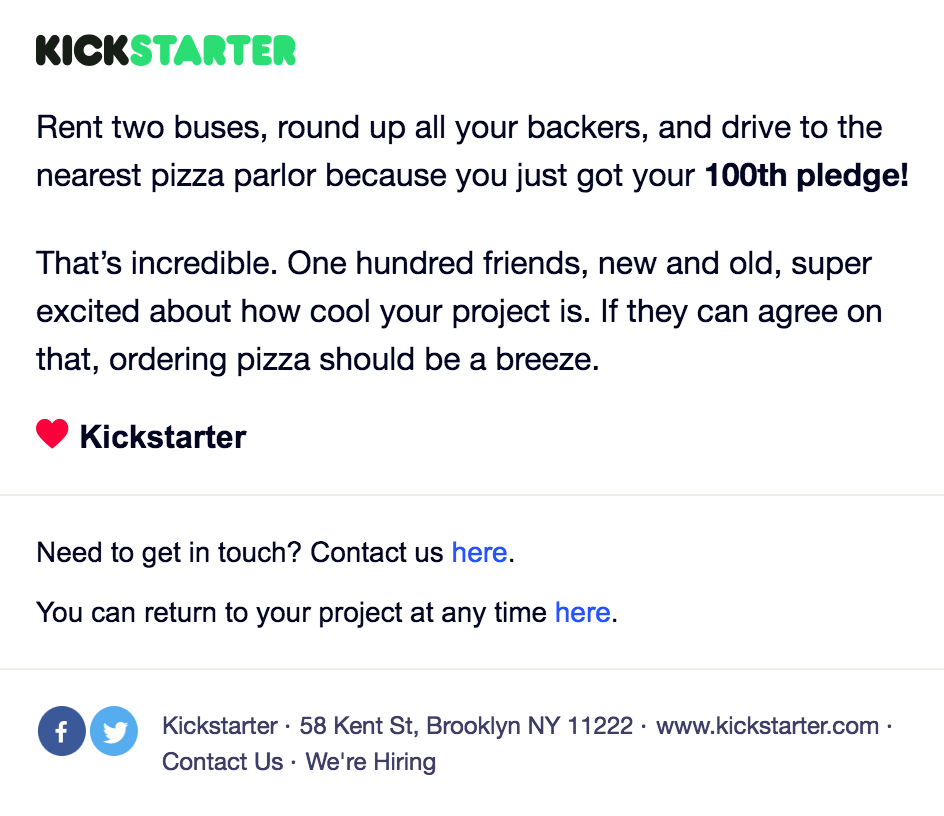
Personalized email example from KickStarter

While these are only a few examples of how you can send personalized emails, consider how you might be able to do the same for your own audience.

Geography

Personalizing emails based on your subscribers’ geographical location is another great way to provide value to specific segments of your email list. If you’re running an event in their area, or want to reach out and let people know that your nearby store is open, you can collect their geographical information through your forms directly.

Your turn

Email personalization is a powerful tool that can significantly enhance your email marketing efforts. By understanding your subscribers' preferences, behaviors, and needs, you can create tailored content that resonates with them and drives engagement. From increasing open rates and conversions to improving customer retention and satisfaction, the benefits of personalized emails are clear.

As you gather more data and refine your personalization strategy, you'll build deeper connections with your audience and foster long-term loyalty. Start personalizing your emails today and experience the positive impact on your business.

Already personalizing your emails? Share your successes in the comments!

The post Email personalization: Using dynamic content to speak to your audience appeared first on AWeber.


from AWeber https://ift.tt/aBW4FC9
via IFTTT

Best times to post on Instagram in 2024

Many people are wanting to know when is the best time to post on Instagram. Instagram’s visual nature makes it a desirable marketing platform for brands to get their offerings in front of as many eyes as possible, and knowing the best times to post on Instagram can be a major benefit to your social media strategy.

Remember: with Instagram as a discovery platform of trends, brands, products or services, it’s important to get high-quality photos and content in front of potential consumers’ eyes at the right time.

Learn how to identify your best times to post on Instagram with a free trial of Sprout Social and test our ViralPost® feature.

Start a free Sprout Social trial

Disclaimer: Data from Sprout Social include users from various plan types, industries and locations. All time frames are recorded globally (not by Central Time), meaning you should be able to publish with the times provided in any timezone and see positive engagement results. Number of engagements represents total engagements a brand received on the specific channel during that hour time frame. Industry-specific data includes mid- to high-level engagement times. We recommend testing with your own accounts to find the most optimal send times.

When is the best time to post on Instagram in 2024?

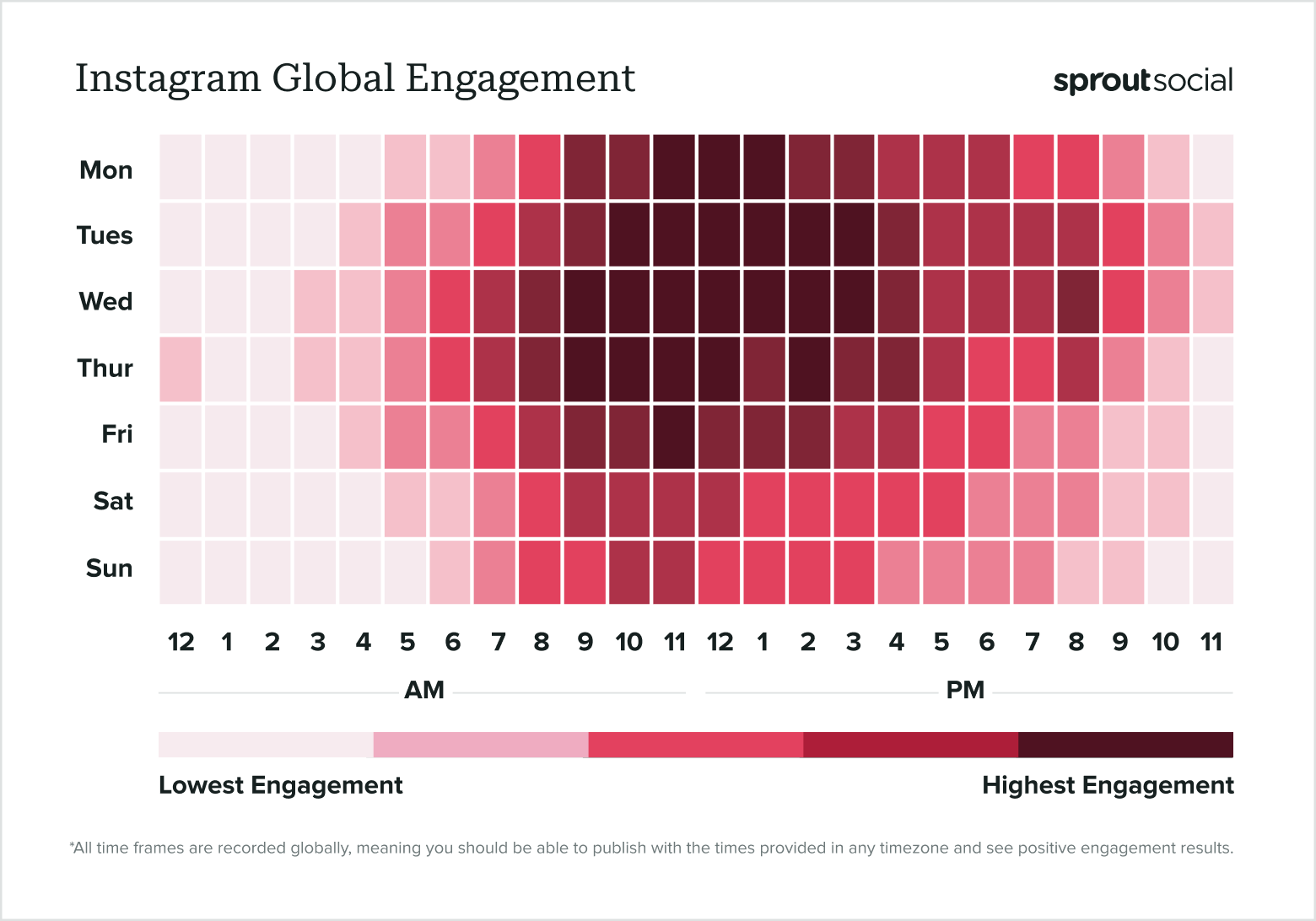
  • Best times to post on Instagram:
    • Mondays from 11 a.m. to 2 p.m.
    • Tuesdays from 10 a.m. to 4 p.m.
    • Wednesdays from 9 a.m. to 4 p.m.
    • Thursdays from 9 a.m. to 1 p.m. and 2 p.m.
    • Fridays at 11 a.m.
  • Best days to post on Instagram: Tuesdays, Wednesdays and Thursdays
  • Worst days to post on Instagram: Sundays
Based on data from Sprout Social, a data heat map show shows the best times to post on Instagram globally in 2024.

Where Facebook was the most-used platform by marketers worldwide, Instagram comes in second at 80%. Interestingly, Instagram ties with Facebook for the social media platforms that offer marketers the highest ROI at 29%. This is because social media continues to evolve with ecommerce and offering frictionless experiences to users. And even though the competition for short-form video between Instagram and TikTok continues to heat up, Reels still generate more likes and saves than static Instagram posts.

The best times to post on Instagram are weekdays generally between 10 a.m. and 2 p.m., with Tuesdays and Wednesdays engagement times extending to 4 p.m. We recommend scheduling posts Tuesdays through Thursdays between 10 and and 3 p.m. for optimal engagement. It’s wise to test these benchmarks against your current metrics too.

Instagram has grown a long way since its photo-only days. The app, which has 2 billion monthly active users, is a platform to share images, videos, Reels and live streams, just to name a few creative content types. It is also an avenue to collaborate and partner with other brands and provides a stream of revenue through its ecommerce capabilities.

The Instagram algorithm is unpredictable. To be successful on the platform is a balance of consistently posting high-quality content that will engage and entertain your audiences. That’s a lot to ask for with each piece of content published. But using that as a guiding post can help with your Instagram marketing strategy.

When are the best times to post Reels on Instagram?

Are the best times to post on Instagram different for static posts versus Reels? Perhaps there’s a definitive answer to that question, however, our data source is inclusive of posts, Stories and Reels. The information in this article should guide you to uncover the best times to post any content on Instagram to see positive engagement, whether it’s a static post, a Story with polls or a creative Reel.

The best times to post Reels on Instagram will be similar to our data above: weekdays generally between 10 a.m. and 2 p.m., with Tuesdays and Wednesdays engagement times extending to 4 p.m. Our optimal send time data for Instagram is aggregate for Posts, Reels and Stories – both images and videos.

For that reason, we recommend you test posting Reels at different times to uncover the highest engagement times for you. Keep in mind that several factors go into Reels’ performance, whether it’s using trending sounds, the Instagram algorithm or having an engaging video hook to capture your audience’s attention.

What is the best day and time to post on Instagram?

We know the best time to post on Instagram overall, but what about for each day of the week?

  • Mondays between 11am and 2pm.

  • Tuesdays between 10am and 4pm.

  • Wednesdays between 9am and 4pm.

  • Thursdays between 9am to 1pm.

  • Fridays at 11am.

  • Saturdays between 9am to 12pm.

  • Sundays between 10am to 12pm.


Graphic of best times to post on Instagram for each day of the week.
If you’re looking for the best day and time to post on Instagram, read the analysis below:

Best time to post on Instagram on Monday

The best time to post on Instagram on Mondays is between 11 a.m. and 2 p.m., coinciding with typical lunch hours, although engagement is good from 9 a.m. to 4 p.m.

Best time to post on Instagram on Tuesday

The best time to post on Instagram on Tuesday is between 10 a.m. and 4 p.m and engagement is almost double compared to Mondays.

Best time to post on Instagram on Wednesday

Best times to post on Instagram on Wednesdays are 9 a.m. to 4 p.m. and it has the highest engagement period of the week.

Best time to post on Instagram on Thursday

The best times to post on Instagram on Thursdays are from 9 a.m. to 1 p.m. and again at 2 p.m. The 1 p.m. hour drops slightly in engagement.

Best time to post on Instagram on Friday

The best time to post on Instagram on Fridays is at 11 a.m., but there’s almost as much engagement the few hours prior and after that peak engagement time.

Best time to post on Instagram on Saturday

The best times to post on Instagram on Saturdays is 9 a.m. to 12pm, but weekends generally have less engagement when compared to the rest of the week.

Best time to post on Instagram on Sunday

The best time to post on Instagram on Sundays is 10 a.m. to 12pm, but similar to Saturdays, we’ve noticed Sundays have less engagement throughout the day.

When is the best time to post on Instagram in the UK?

The overall best time to post on Instagram in the UK is weekdays between 10 a.m. and 2 p.m. Midweek, engagement rates remain high until 4 p.m. Things are noticeably quieter at the weekend across many social platforms, including Instagram in the UK. Taking this into account, the best time to post on Saturday is 9 a.m. to 12 p.m. and 10 am to 12 p.m. on Sundays. If Instagram is the platform your UK audience engages with most, remember your industry, business goals and content will also play a part in the success of your social posts.

What are the best times to post on Instagram by industry?

There’s no definitive answer to what the best times to post on Instagram are. We can only offer insight with the data we have. Industry is just one factor that plays into the success of your social posts. Consider as well as your target audience, business goals and the content itself.

Use this industry-level data to help inform your publishing calendar, and test your optimal send times with social experiments.

Best times to post on Instagram for hospitals & healthcare

  • Best times to post on Instagram for Hospitals & Healthcare:
    • Mondays at 10 a.m. and 1 p.m.
    • Tuesdays from 11 a.m. to 4 p.m.
    • Wednesdays from 10 a.m. and 3 p.m.
    • Thursdays from 10 a.m. to 1 p.m.
    • Fridays from 11 a..m. to 3 p.m.
  • Best days to post on Instagram for Hospitals & Healthcare: Tuesdays through Fridays
  • Worst days to post on Instagram for Hospitals & Healthcare: Sundays
Based on Sprout Social data, a graph of data that gives you the best times to post on Instagram for the hospitals & healthcare industry in 2024.

Hospitals, clinics and healthcare providers use social media for more than navigating healthcare crises. Social media is used by hospitals and healthcare providers to educate the public, help patients feel more comfortable with healthcare visits and doctors’ appointments, promote their programs for aspiring physicians and establish themselves as pillars in the community.

The best times to post on Instagram for healthcare and hospitals nearly tripled compared to the year prior. Hospitals, healthcare and clinics see average to above average engagement every day starting at 8 a.m. through most of the day, as late as 10 p.m. However, the best times to post on Instagram for hospitals and healthcare are predominantly Mondays through Fridays between 10 a.m. and 3 p.m. For more specific time frames, see the table above.

Hospital and healthcare social media resources

Best times to post on Instagram for restaurants

  • Best times to post on Instagram for Restaurants:
    • Mondays from 10 a.m. to 1 p.m.
    • Tuesdays from 11 a.m. to 2 p.m.
    • Wednesdays from 11 a.m. to 2 p.m.
    • Thursdays from 10 a.m. to 1 p.m.
    • Fridays from 11 a.m. to 1 p.m.
  • Best days to post on Instagram for Restaurants: Weekdays
  • Worst days to post on Instagram for Restaurants: Weekends
Based on Sprout Social data, a graph of data that gives you the best times to post on Instagram for the food & beverage industry in 2024.

Online orders and delivery service apps saw an increase in use over the last few years, innovating the way restaurants interact with their audiences. And restaurants saw over 2x more engagements on Instagram than last year’s analysis. Target audience and platform goals factor into how businesses connect with their customers, such as offering unique promotions or updates.

Those in the food and beverage restaurant industry see most of their engagement concentrated to the lunch hour during weekdays. The best times to post for restaurants on Instagram are Mondays through Fridays between 10 a.m. and 2 p.m., generally.

Restaurant social media resources

Best times to post on Instagram for schools & education

  • Best times to post on Instagram for Schools & Education:
    • Wednesdays from 2 to 4 p.m. and 9 p.m.
  • Best days to post on Instagram for Schools & Education:
    • Wednesdays
  • Worst days to post on Instagram for Schools & Education:
    • Sundays
Based on Sprout Social data, a graph of data that gives you the best times to post on Instagram for the schools & education industry in 2024.

Universities, higher education institutions and schools saw a significant increase in high engagement times on Instagram compared to last year’s analysis. Keep in mind that some schools manage multiple social profiles (per college, athletics, etc.) to meet these needs and effectively target distinct audiences at the right time. 

High opportunities for engagement for schools reflect a typical school day plus evening hours. Mondays through Fridayys see consistent engagement from 10 a.m. until about 6 p.m. However, the hours with the highest engagement and therefore the best time to post on Instagram for schools are Wednesdays from 2 to 4 p.m. and again at 9 p.m.

From highlighting student life to sharing school updates, a social media strategy for schools needs to fulfill various purposes: from engaging with students past, present and future, to keeping a pulse on brand health.

Schools and education social media resources

Best times to post on Instagram for travel & hospitality

  • Best times to post on Instagram for Travel & Hospitality:
    • Wednesdays from noon to 2 p.m. and 4 p.m.
    • Sundays from 11 a.m. to 1 p.m.
  • Best days to post on Instagram for Travel & Hospitality:
    • Wednesdays and Thursdays
  • Worst days to post on Instagram for Travel & Hospitality:
    • None; all days receive moderate engagement
Based on Sprout Social data, a graph of data that gives you the best times to post on Instagram for the travel & hospitality industry in 2024.

Travel and hospitality industries once again doubled their engagement on Instagram relative to last year. Hospitality businesses pivoted their strategies as the post-pandemic spike in travel continues, and they saw a return on their efforts throughout most of the day.

The best times to post on Instagram for travel and hospitality businesses saw average engagement between 9 a.m. and 5 p.m. nearly every single day of the week. However, two days saw the highest engagement and are the best times to post on Instagram for travel and hospitality: Wednesdays from noon to 2 p.m. and 4 p.m., and Sundays from 11 a.m. to 1 p.m.

Travel and hospitality social media resources

How to find your own best times to post on Instagram

Social marketers can plan content more effectively when they’re armed with data. And as platforms evolve, how brands and consumers use social will evolve with them, or vice versa. Staying aware of new content formats and trends might help you reach your audience in unexpected ways, or even find new segments and personas you weren’t focusing on before.

How to find your best time to post on Instagram with Insights

While you may be ready to jump in and post at these provided peak engagement times as part of your strategy, consider pairing this data with your own Instagram analytics. You may discover that your specific target audience is active at different times.

If you have a creator or business account already, find your best times to post with Instagram Insights following these steps:

  • From your profile, tap ≡ in the top right corner.
  • Tap Insights.
  • Tap the metrics underneath the Overview section or specific content you’ve shared for more details. From here, tap Total Followers and scroll to see their most active times.

How to find your best time to post on Instagram with Sprout Social

A social media management tool like Sprout Social can help you drill into your analytics and develop tailored findings for your brand accounts across all networks, holistically and individually. Gain competitive insights by comparing your performance to your competitors, to find new opportunities for engagement.

With features like post tagging and cross-network reporting, you can separate different factors like post author or types of content, and drill down into how your posting time influenced your social success.

Screenshot of Sprout Social's cross-network post performance report that shows the total number of engagements and by engagement type.

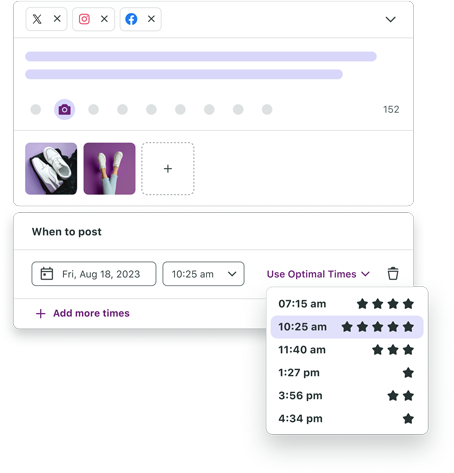
Sprout’s patented ViralPost® technology uses the same data we’ve used to look at all our customer accounts to determine the best time to post tailored for your account. ViralPost® algorithmically determines the results for our Optimal Send Times feature, a publishing option available in all plans. Our proprietary machine learning feature isn’t new, but we’re constantly learning and improving our product to help brands surface insights faster. Our goal is to help people who use our product work more effectively.

Screenshot of Sprout Social's Compose box with the "Use Optimal Times" dropdown selected with several times provided as options of when to schedule social media posts for the highest engagement.

With Optimal Send Times, the specific times offered are based on when your audience engages the most using your publishing history. ViralPost® also continually updates and refines to save you time from doing the repeated analysis and allowing you more time to craft great content.

Want to see it in action? Sign up for a free 30-day trial of Sprout Social or request a personalized demo and try it for yourself.

Start a free Sprout Social trial

If you’re looking for more of our findings from this year’s study of our customer data, see what we learned about the best times to post across eight industries on these networks:

How Sprout gathered the data

We understand that these reports can raise questions about just where the data is coming from. That’s why we want to be clear about the data we pulled and how we got here.

Sprout Social’s Data Science team gathers this information by analyzing nearly 2 billion engagements across 400,000 social profiles across Twitter, Facebook, LinkedIn, Instagram, Pinterest and TikTok.

Start a free Sprout Social trial

The post Best times to post on Instagram in 2024 appeared first on Sprout Social.


from Sprout Social https://ift.tt/YCkyzSw
via IFTTT

Monday, 19 August 2024

9 key social media listening metrics every marketer needs to know in 2024

Social media can sometimes feel like the wild west.

Brands know they should post content on social media. But without the right metrics, it’s hard to understand if these efforts are moving the needle and helping them reach their target audience.

Social metrics such as comments and likes provide a basic look at whether a post resonates with an audience. However, using social media listening metrics can help you understand what content your audience wants and how they feel about your brand on a deeper level.

These metrics provide valuable insights into what consumers are saying about your brand, how you measure up against competitors‌ and what trends are driving engagement in your industry.

In this post, we’ll explore which metrics can be used to listen to different parts of a social media campaign to drive results. Also, learn how to use listening metrics to edge out the competition‌ and improve your social media strategy.

Why should you track social media listening metrics?

Social media listening metrics, like volume of brand mentions and sentiment score, help you understand who’s talking about your brand and products online, what they’re saying and how they feel.

Tracking social media listening metrics isn’t just useful—it’s essential. These metrics are an important part of any marketing strategy as they tell you about people’s emotions about a brand. Monitoring audience sentiment toward your brand can help you understand your audience, identify trends and respond to customer needs effectively.

You can also apply the learnings from these metrics to other parts of a business, like customer service or social media strategies, to align messaging with your target audience.

9 key social media listening metrics to track

Social media listening metrics are key to understanding how your brand is perceived, how your campaigns are performing‌ and what opportunities exist for improvement.

However, there are different social media listening metrics to use across your strategy. Some metrics track brand and sentiment, while others track engagement and campaign performance.

Here are nine key social media listening metrics every strategy should use.

1. Brand mentions

Tracking how often your brand is mentioned on social media is a way to gauge brand awareness and reputation. On a basic level, this metric monitors how actively people are talking about your products or services.

Brand mentions can be used in different ways to track how your audience is feeling, such as:

  • Product launches. Monitor the public’s reaction during and after a new product launch and tweak your strategy based on real-time feedback.
  • Customer service. Track customer mentions across platforms and respond quickly. If someone is unhappy with your product and mentions your brand, dealing with it as soon as possible is best to avoid reputation damage.
  • Overall sentiment. Tracking your brand across social media can measure whether your audience is happy, upset or indifferent. This can help your brand make decisions over everything—from the content you post to how you reply to customers and resolve issues.

To simplify how to track brand mentions, a tool like Sprout’s Listening Query Builder for Brand Health makes it easy to build a granular campaign to track your mentions. It can track brand mentions and monitor common phrases or keywords (including nicknames and misspellings) associated with your brand to gauge how audiences feel about your company or products.

Sprout Social's query builder showing how to track topics

These insights are essential for making informed decisions that’ll drive your social media strategy forward.

2. Engagement metrics

Tracking likes, comments, shares and overall social media engagement rates is one of the best ways to understand which listening topics you should be focussing on to understand customer intent and experience.

Engagement metrics are important to see who is interacting with your brand and how often, and each engagement metric indicates a slightly different level of interest. While likes indicate initial approval of an overall message or topic (think of it as the lowest form of engagement), comments show a deeper level of interest in what your brand is saying or other specific keywords that you’re tuning into.

The bonus of tracking audience engagement is that it also helps you understand the demographics of the people talking about your brand. Analyzing who is engaging with specific topics and keywords makes it easier to identify patterns and craft future strategies.

3. Hashtag performance

Tracking the performance of specific hashtags can help marketers understand which topics or campaigns resonate with your audience.

Relevant tags make it easier for your target audience to find your content. But it’s important to know which hashtags are performing best to optimize this strategy. Sprout’s Hashtag Analytics can track multiple hashtags for your overall brand alongside specific hashtags for different demographics.

Sprout Social's hashtag analytics with informaiton about popular hashtags

Tracking this metric allows you to swap out hashtags for better-performing tags and maximize post reach to your target audience.

4. Demographic insights

Understanding who is talking about your brand and their demographic features can help tailor your marketing strategies more effectively.

Demographic insights track information like age, gender and location to see if the people who are looking at your content match your target audience. For example, Sprout’s demographic data in Listening tracks what topics your audience is engaging with, where they live and the level of engagement they have with your campaigns.

Sprout Social's demographic insights showing locations of target audiences

Social media marketers can also see how different groups interact with content at different times. This can help them target people for seasonal campaigns.

5. Share of voice

Share of voice tracks your brand’s visibility on social media against your competitors. This metric lets you see exactly how strong your brand’s market presence is and whether you outperform the competition.

This metric gathers multiple different data points. For example, it can track social media engagement metrics like shares, comments and likes and benchmark them against your competitors. This will then determine if your target audience is engaging with your brand more than others.

Sprout’s Competitive Analysis Listening template has a Share of Voice tool that tracks all of these separate data points and aggregates them into user-friendly graphs.

Sprout Social's competitive analysis listening tool showing performance metrics

Collecting and aggregating data can also be used for other marketing efforts, like PPC, SEO and media market share. It’s a quick and easy snapshot to understand how well you’re reaching your audience compared to the competition across various channels.

6. Sentiment analysis

Sentiment analysis is a temperature check on how your target audience feels about your brand. It analyzes the tone and emotions behind your brand’s social media mentions and conversations.

What makes sentiment analysis different from other metrics like brand mentions or engagement is that it tracks your audience’s net sentiment over time. Tracking helps you spot patterns and link positive and negative sentiments to specific campaigns or events.

A sentiment analysis tool, like Sprout’s, tracks overall sentiment across social media and bundles it into a positive or negative score. It also tracks how sentiment trends change over time, which helps understand how efforts like marketing campaigns or crisis management land with your audience.

Sprout Social's sentiment analysis tool showing sentiment summary from users

7. Trend analysis

When you identify and analyze social listening trends within your industry or topic-related conversations, it helps you adjust strategies to current events or changes in consumer behavior.

Listening trend analysis goes beyond jumping on the latest meme trend. It looks at niche and industry-specific trends to see what words, brands and products your target audience is talking about.

A simple way to analyze these trends is with Sprout’s Conversation Overview. It gathers trending keywords and hashtags to help you see what content resonates with your audience during a specific timeframe.

Sprout Social's conversation overview showing metrics for specific keywords

8. Campaign performance

Campaign performance is an overarching measure of a specific campaign’s effectiveness and how an audience responds to your messaging.

Monitoring campaign performance allows you to understand the sentiment and interaction with specific hashtags and keywords related to your brand’s campaign. This broad look at a social media campaign helps marketers understand how well it met its objectives and what messaging resonated with your audience the most.

To stay ahead of the game when tracking campaign performance, a tool like Sprout’s Campaign Analysis Listening template can help. You can set up your Listening topic before launching your campaign, adding specific keywords and hashtags related to your campaign messaging. This helps you monitor conversations promptly, so you can see spikes and sentiment trends and make campaign adjustments as needed.

9. Influencer engagement

Finally, if your social media campaign also involves influencers, it’s important to measure the impact of their efforts.

Influencers are used to add a little extra fuel to a social media campaign, introduce your brand to a broader audience‌ and generate more interest in your posts. When measuring influencer engagement, look at metrics like engagement rate on influencer posts, the reach of these posts‌ and if their posts positively impact conversion rates.

Sprout’s influencer analytics tool, Tagger by Sprout Social, can accurately measure and report ROI from your influencer campaigns alongside other campaigns you run.

An image of Tagger by Sprout Social with a desktop and mobile image of the platform

These insights not only monitor the progress of influencer campaigns in real-time, but give you real data around how your target audiences respond to the influencer’s content.

Using Sprout Social to track social media listening metrics

Social media campaigns are looked at through various lenses to decide if they are successful or not.

The key for social media managers is to pick the right metrics to gauge performance. Social media listening metrics can go deeper into a campaign and track how your target audience feels, what people say about your brand and how well your posts tap into trending topics.

Sprout Social’s extensive social media listening tools provide insights into every piece of a campaign. Marketers like you can use social media listening tools to generate customizable reports with real-time data‌, see what posts are resonating most with an audience and make informed decisions to drive your social media strategy forward.

To start using social media listening metrics, you need a fail-proof framework. Download Sprout’s social media listening template and map out your strategy to get insights into every area of your campaigns.

The post 9 key social media listening metrics every marketer needs to know in 2024 appeared first on Sprout Social.


from Sprout Social https://ift.tt/posYcF9
via IFTTT

Friday, 16 August 2024

AI disclaimers: What marketing leaders need to know

AI-generated content has become pervasive on social media in a relatively short time—creating a lot of gray area when it comes to brands using AI technology responsibly.

Some platforms, like Meta, have proposed AI content disclaimers. In May 2024, the company began labeling posts they detected were AI-generated with a “made with AI” tag. Considering a recent Q2 2024 Sprout Pulse Survey found that 94% of consumers believe all AI content should be disclosed, this AI disclaimer seemed like an apt solution.

Stat call-out card that says 94% of consumers believe all AI-generated content should be disclosed

But there were unexpected roadblocks. Artists and creators claimed the label misidentified their original work as AI-generated. Marketers who only used AI Photoshop tools for light retouching claimed the label was misleading. Meta eventually clarified the use case of AI disclaimers and created more nuanced, creator-selected labels.

Key questions still hang in the air. Who is responsible for enforcing the ethical use of AI? Do platforms or marketers bear the responsibility of consumer transparency?

In this guide, we weigh in on the growing debate around AI disclaimers, and break down how platforms and brands currently approach them.

The growing debate around AI disclaimers

While almost all consumers agree AI content should be disclosed, they’re split on who should do the disclosing. The Q2 2024 Sprout Pulse Survey found that 33% believe it’s brands’ responsibility while 29% believe it’s up to social networks. Another 17% think brands, networks and social media management platforms are all responsible.

According to digital marketing consultant Evangeline Sarney, this divide is caused by the relative infancy of AI-generated content and the ambiguity surrounding it. “First, we need to consider what we are defining as AI content. If Adobe Generative Fill was used to add water droplets to an existing image, is disclosure necessary? With the backlash that many companies have faced from AI-generated campaigns, it’s easy to see why they’d hesitate to disclose. AI content isn’t the norm, and there aren’t clear guidelines. There isn’t a one-size-fits-all approach to labeling that will work for every scenario.”

What governing bodies say

Sarney’s point is underscored by the fact that the US Federal Communications Commision (FCC) has doled out AI disclosure requirements for certain advertisements, but has yet to release guidance for AI-generated content on social media. Some states have introduced their own legislation to protect consumer privacy in the absence of federal regulation.

Abroad, it’s a different story. The European Commission formally introduced the EU AI Act in August 2024, which aims to stop the spread of misinformation and calls upon creators of generative AI models to introduce disclosures.

The act says: “Deployers of generative AI systems that generate or manipulate image, audio or video content constituting deep fakes must visibly disclose that the content has been artificially generated or manipulated. Deployers of an AI system that generates or manipulates text published with the purpose of informing the public on matters of public interest must also disclose that the text has been artificially generated or manipulated.”

However, the AI Act stipulates that content reviewed by humans and that humans hold editorial responsibility for does not need to be disclosed. The act also categorizes the risk of AI content, and seems to focus most heavily on “unacceptable” and “high-risk” scenarios (i.e., exploitation, negatively impacting people’s safety and privacy, individual policing).

While this act could be a step toward universal AI disclosure standards, it still leaves a lot of room for interpretation and needs further clarification—especially for marketers and brands.

Consumers’ ethical concerns

Where legislation falls short, consumer expectations (and concerns) can guide brand content creation. For example, the Q2 2024 Sprout Pulse Survey found that 80% of consumers agree that AI-generated content will lead to misinformation on social, while another 46% are less likely to buy from a brand that posts AI content. These two stats could be correlated, according to Sarney.

Stat call-out card that says 46% of consumers are less likely to buy from a brand that posts AI content

“Consumers don’t want to feel they are being lied to, or like a brand is trying to hide something. If an image is generated with AI—and clearly looks like it—but isn’t disclosed, a consumer may question it. To maintain trust and authenticity, brands should build out frameworks for what needs to be disclosed and when.”

She also urges marketers to think critically about why they’re using AI. Is it to further their creative capabilities and speed up manual processes?

Sarney recalled a recent incident where a lifestyle magazine that had previously been criticized for their lack of diversity created an AI-generated BIPOC staff member. “Their Instagram account was flooded with negative feedback questioning why the company couldn’t just hire a real POC. Commenters called out the shrinking number of jobs for the BIPOC community within the fashion industry and many wondered why—instead of making a fake fashion editor—the company didn’t just hire one.”

There are many use cases that fit under the AI-generated content umbrella, and what makes sense to disclose will vary depending on your brand, industry and risk to the public. But, in general, brands should stay clear of creating AI-generated humans (especially to represent children, the BIPOC community and disabled people) without specifically disclosing they’ve done so and their purpose. They should almost always avoid creating AI content about current events, or that’s heavily inspired by others’ intellectual property. These areas are where the greatest AI risks for brand health—and, more importantly, public safety.

How different networks handle AI disclaimers

Amid the growing debate about AI disclaimers and the surge of AI-generated content overall, social networks are taking steps to stifle the spread of misinformation and maintain trust in their platforms. Primarily, by making it easier for creators to clearly label their content as AI-altered. Here are the ways each network is currently tackling AI disclaimers, and what that means for brands.

Meta

As mentioned, Meta changed their AI disclaimer label in July 2024 to better align with expectations of consumers and brands alike. They describe their new “AI info” label in their blog post: “While we work with companies across the industry to improve the process so our labeling approach better matches our intent, we’re updating the ‘Made with AI’ label to ‘AI info’ across our apps, which people can click for more information.”

The company has begun adding these labels to content when they detect industry standard AI image indicators or when people disclose they’re uploading AI-generated content. When users click the label, they are able to see how AI could’ve been used to create the image or video.

The AI info disclaimer at the top of an AI-generated Facebook image
Source: Meta

YouTube

YouTube unveiled a tool in their Creator Studio to make it easy for creators to self-select when their video has been meaningfully altered with generative AI, or is synthetic and seems real. Creators are required to disclose AI-generated content when it’s so realistic a person could easily mistake it for a real person, place or event, according to YouTube’s Community Guidelines.

As YouTube describes, “Labels will appear within the video description, and if content is related to sensitive topics like health, news, elections or finance, we will also display a label on the video itself in the player window.”

An AI disclaimer that says "altered or synthetic content," on top of a YouTube Short
Source: YouTube

While YouTube mandates creators self-disclose when they’ve used altered or synthetic content in their videos, they may also apply the label in cases where this disclosure hasn’t occurred, especially when the content discusses the sensitive topics mentioned above.

TikTok

TikTok’s creator label for AI content allows users to disclose when posts are completely AI-generated or significantly AI-edited. The label makes it easier for creators to comply with TikTok’s Community Guidelines’ synthetic media policy, which they introduced in 2023.

The policy requires people to label AI-generated posts that contain realistic images, audio or video, in order to help viewers contextualize the video and prevent the potential spread of misleading content.

A screen explaining TikTok's AI content labelling guidance side-by-side with another screen showing a TikTok video with an AI disclaimer that reads "Creator labeled as AI-generated."
Source: TikTok

If creators don’t self-disclose AI-generated content, ​​TikTok may automatically apply an “AI-generated” label to content the platform suspects was edited or created with AI.

LinkedIn

In May 2024, LinkedIn partnered with the Coalition for Content Provenance and Authenticity (C2PA) to develop technical standards for clarifying the origins of digital content, including AI-generated content. Rather than strictly labeling content as AI-generated—like most platforms have done—LinkedIn’s approach would see all content labeled.

The platform explains, “Image and video content that is cryptographically signed using C2PA Content Credentials will be noted with the C2PA icon. Clicking on this label will display the content credential and available metadata, such as content source (e.g., camera model noted or AI tool noted to have been used to generate all or part of the image), and issued by, to and on information.”

But it should be noted that this verification only works if your content already contains C2PA credentials. If not, it’s best to disclose AI-generated content in your caption, if that aligns with your brand guidelines.

AI disclaimer examples from 3 brands

With most platforms starting to offer AI disclaimer labels, it’s not as important how you disclose AI-generated content (i.e., using their labels)—just that you do. Whether it’s in the caption, or a watermark on an image or video. Not only to remain compliant with community guidelines (and prevent your content from being flagged or deleted), but also to maintain trust with your followers.

Here are three brands who create AI-generated content, and how they opt to disclose it.

Meta

On Instagram, the platform identifies their AI-generated images and videos by including the hashtag #ImaginedwithAI in their captions and an “Imagined with AI” watermark in the lower left corner of their photos.

The company also tells a story about the use of AI in their captions, and encourages their followers to try specific prompts in their Meta AI platform (like “culinary mashups,” pictured in this post).

An Instagram image posted by Meta of AI-generated scenes interpreting food names as real scenes (like bread boats)

MANGO

The Spanish fashion retailer MANGO unveiled their first completely AI-generated campaign on LinkedIn. Their statement was less disclosure-focused, instead emphasizing the technological advancements that made the campaign possible. In their post caption, the brand explained why they decided to create an entirely AI-generated campaign, and how it impacts their business strategy.

A LinkedIn post from MANGO that explains their entirely AI-generated campaign and a photo from the campaign

Toys“R”Us

Toy store Toys“R”Us recently unveiled a one-minute video about their company’s origin story that was entirely created by AI. The brand claims the video is the first ever brand film created with OpenAI Sora technology, which they explained in their YouTube caption and press release.

An AI-generated film created for ToysRUs about their brand's conception

Since the film’s launch at the Venice Film Festival, Toys “R” Us has promoted its AI origins—proving that disclosures can be potent opportunities for creating brand buzz. Even if AI-generated content stirs up negative sentiment, Toys “R” Us is proof that (sometimes) all press is good press.

Disclose at your audience’s discretion

As AI-generated content becomes more prevalent on social media, brands need to navigate the balance between innovation and transparency. That includes creating brand guidelines that define when AI disclaimers are necessary. While platforms are implementing individual policies and some governing agencies are stepping in, the bulk of the responsibility still falls on brands.

When deciding when it’s appropriate for your brand to make AI disclosures, think of your audience. Disclosures are essential for maintaining credibility when AI significantly manipulates reality or involves sensitive topics. However, minor enhancements may not require explicit labeling.

By understanding these nuances, you can use AI responsibly and in a way that furthers your team’s bandwidth and creativity (rather than creating a brand crisis).

Looking for more ways you can ethically weave AI into your team’s workflows? Read how CMOs are using AI in their marketing strategies.

The post AI disclaimers: What marketing leaders need to know appeared first on Sprout Social.


from Sprout Social https://ift.tt/X01sBKf
via IFTTT

How to get verified on Facebook: Your step-by-step guide

As a brand or business, building credibility with your online audience should be part of your Facebook marketing strategy. Learning how to get verified on Facebook is a great way to do this.

A Facebook blue check mark indicates to your audience that your Page is legitimate and trustworthy. This makes it a must for public figures, brands and companies that are well-known and susceptible to being replicated or parodied.

In this post, you’ll discover some essential steps on how to get verified by Facebook. We also walk you through a few additional details to give you a thorough understanding of how Facebook verification works.

Let’s get started.

What is Facebook verification?

Facebook verification involves getting your Page verified by Facebook. The main intention is to show that it genuinely represents you. A verified Facebook Business Page or account has a blue checkmark appearing next to the name. This puts a clear distinction between the real Page and the Pages run by fans or imposters.

Barkbox Facebook Page showing a brown and black dog with a pink soft toy in its mouth as the cover photo and a red arrow pointing to the blue check mark next to the page name

Source: BarkBox on Facebook

Businesses and public figures may often see people creating Pages and profiles similar to theirs. This may either be to imitate them or to build a fan community. Even if there’s no malicious intent behind those Pages and profiles, there’s still a huge risk of other Facebook users mistaking them for the real thing.

In addition, Facebook prioritizes verified profiles and Pages in its search results. So Facebook verification ensures that your Page prominently shows up at the top of relevant searches. This could further improve your reach. See how the official verified Page for Workday gets top priority when you search for the company name on Facebook.

Facebook search results for Workday showing the company's verified page at the top of the results

Source: Facebook

Who can get verified on Facebook?

In theory, anyone can get verified on Facebook using any of the two options:

  • By subscribing to Meta Verified
  • By applying for a verified badge

That’s provided they meet the strict eligibility criteria Meta has in place to verify Facebook Pages and profiles.

In both cases, you’ll need to follow the company’s terms of service and the Facebook Community Standards. Besides this, Facebook will consider your verified badge application if your account is:

  • Authentic: It should represent a real person, entity or business.
  • Unique: It should be the unique presence of the person, entity or business it represents. Facebook only verifies one account per business or person. The only exception is with language-specific accounts. And note that it doesn’t verify accounts for general interests. For example, it won’t verify a Page dedicated to healthy food. But it will verify a Page representing a registered publication that’s dedicated to healthy food.
  • Complete: It should be active and have all the necessary details, such as an “About” section and a profile photo. In addition, it should have at least one post.
  • Notable: The person, entity or business it represents should be well-known and get plenty of searches. Facebook is more likely to approve your application if it features in multiple news sources and publications.

The above requirements are only the bare minimum and don’t necessarily guarantee that you’ll get verified. To improve your chances of getting verified, make sure that your account looks highly credible. Start by publishing highly informative and engaging posts instead of sticking to the minimum requirement of one post.

The eligibility requirements for a Meta Verified subscription are more lenient. But you need to pay for any of the Meta Verified plans starting at $14.99 per month. To qualify for it, you must:

  • Be at least 18 years old
  • Live in a region where Meta Verified is available
  • Have full control over a business portfolio on the Meta Business Suite
  • Not max out the permitted number of changes in your business portfolio within the specified timeframe.

Why should you get verified on Facebook?

There are a number of reasons that getting verified is a good idea—let’s cover the bases.

Boosts credibility for your brand

Getting verified shows that you’re a legitimate, credible brand. The process isn’t easy (as you’ll see shortly) and many people/brands have tried to get verified and failed. Even if you pay for a Meta Verified subscription, you still need to meet certain eligibility criteria and provide a government ID.

So Facebook users know if they see that blue checkmark, it’s for real.

Protects against imposter accounts

Some people create fake accounts; others create fan accounts. Getting verified helps separate your Facebook Page from the rest. This assures customers that they’re following or reaching out to the real deal and not an imposter.

Facebook prioritizes verified profiles and Pages

The Facebook algorithm gives priority to verified Pages and public figure profiles. Having that blue check means you’ll show up at the top of search results. This helps boost eyes on your brand’s Facebook Page.

8 steps for how to get verified on Facebook

While most of the process for getting verified is simple, some parts are more complicated than others. If you’re opting for Meta Verified, you can easily sign up through the Meta Verified for Business page. Note that you’ll need to provide a government ID during the verification process.

If you’re applying for a verified badge, the process requires a few additional steps. Let’s show you how to get your Facebook verification.

Step 1: Open the verification request form

Start the verification process by logging into Facebook and making sure you have admin permission to the Facebook Page you’re trying to get verified.

From there, you can head to Facebook’s verification request form. This is where you’ll complete all of the following steps.

(Note: the link to the Facebook verification request form will appear broken unless you’re logged into Facebook with admin permissions to a Facebook page.)

Facebook verification form showing the different steps to complete your application for a verification badge

Source: Facebook

Step 2: Choose your verification type

You have the option to verify your personal profile if you are a public figure. Or, as long as you’re logged into your Facebook account, you can select from a dropdown menu which business Page you’d like to verify. Each business Page you manage will appear, making it easy to complete this process for each of your businesses or clients.

section of the Facebook Page verification form showing the option to choose a type of verification and a drop-down menu showing different Facebook Pages to select

Source: Facebook

Step 3: Confirm authenticity

The next step is proving that your Facebook Page is authentic. Remember, verification proves to your audience that it’s authentic. So it’s important that Facebook looks for credible documentation in order to approve verification.

The documentation options that you can upload a copy of include:

  • Driver’s license
  • Passport
  • National identification card
  • Tax filing
  • Recent utility bill
  • Articles of incorporation
section of Facebook Page verification form to confirm authenticity with a drop-down menu showing the different document types to choose from

Source: Facebook

Click the Choose files button and upload the relevant document.

Step 4: Confirm notability

This next step is called “confirming notability,” but essentially, you’re selecting a category for your business Page or profile. This is especially important when verifying profiles. Facebook wants to ensure that your profile or Page is something that people are actually interested in or searching for.

Categories to choose from include:

  • News/Media
  • Sports
  • Government & Politics
  • Music
  • Fashion
  • Entertainment
  • Digital Creator/Blogger/Influencer
  • Gamer
  • Business/Brand/Organization
  • Other
section of Facebook Page verification form to confirm notability with a drop-down menu showing the different categories to choose from

Source: Facebook

Step 5: Add your country

The next step is to add the country where you or your business is most well-known. Even if you have a global company, you’ll want to choose the country or region where you have the largest audience. If you’re unsure, you can easily discover this by looking at your website’s Google Analytics or your Facebook analytics.

section of Facebook Page verification form to select region or country with a list of pre-filled options to choose from when typing "unite"

Source: Facebook

Step 6: Add your audience and also known as

This step is completely optional. But the more information you provide, the easier it is for Facebook’s team to confirm your verification. We recommend inputting basic information about your audience demographics. If you have no other “AKA” names for your business, you can of course leave that section blank.

section of Facebook Page verification form to describe your audience and other names you're known as

Source: Facebook

Step 7: Add 5 articles that show your Page or profile is in the public interest

This step is also optional, but take our word for it: do not skip this step. This is one of the best ways to help prove your case. Include some sort of proof that people are interested in, following or talking about your brand. It could be anything from popular social media accounts to articles that talk about your business or Wikipedia profiles. This helps you make a much more compelling argument that your Page should get the Facebook blue check mark.

section of Facebook Page verification form showing 5 fields to add links to articles or social media accounts mentioning your brand

Source: Facebook

Step 8: Submit the form

Hit the “Send” button, and voila! You’ve submitted your application for Facebook verification. The only thing left to do now is wait.

What happens if Facebook rejects my application?

Keep in mind that meeting the basic verification criteria doesn’t guarantee that you’ll get verified. Facebook might still reject your application without specifying a reason. When this happens, you’ll have the option to reapply for verification after 30 days. But make sure you put in some extra effort to improve your chances of getting verified this time around.

Here are the possible next steps in case Facebook rejects your application:

  • Reach out to Facebook support and try to get more information about why your application was rejected. In case you can get this info, you’ll know exactly what you need to do to get verified the next time you apply.
  • Create high-quality content and post regularly while ramping up your Facebook marketing efforts. If necessary, use Facebook automation to keep up with your posting schedule.
  • If you have brand accounts on other social networks, make sure you boost your presence there as well. This will also help you improve your chances of getting verified on those platforms.

Top 4 tips for getting verified on Facebook (and staying verified)

Struggling to get verified? We’ve got four top tips to help you out. And, once you’re verified, you’ll want to continue these best practices to make sure you’re able to stay verified.

1. Keep your business information up-to-date

We mentioned that one of the factors for Facebook verification is having a complete Facebook profile. But you also need to make sure you keep up with any changes. If you get a new website, change store locations, adjust store hours, add new product lines, etc., you need to update those things on your Facebook Page.

2. Be strategic with your posting schedule

If you haven’t posted any new content on your Facebook Page in months, you’ve given the platform no incentive to offer you verification status. Make sure you’re staying active on Facebook and regularly posting new content to engage your followers.

But keep in mind that simply posting regularly won’t result in higher engagements, according to the latest Facebook stats.

Instead, it’s all about timing. You need to send out your Facebook posts at a time when your audience is active. This improves the chances that they’ll see and engage with your posts.

The best times to post on Facebook start from 9 a.m. during the weekdays. But this varies from Page to Page. Check your content performance to see when your audience is most engaged. Then schedule your posts to go out at those times.

Third-party Facebook tools like Sprout Social even come with optimal send time suggestions. Sprout’s ViralPost® technology helps automate the entire process. It automatically finds the best times to post for your brand and publishes your posts at those times.

Sprout's scheduling window with a drop-down menu to choose form different Optimal Send Time suggestions

3. Engage with the community

If you have an engaged Facebook audience, it proves to the platform that you’re a notable brand and people want to follow you. This increases your chances of getting verified.

Ramp up your Facebook engagement efforts to build an engaged community. Respond to comments, share content that your audience enjoys and hold live broadcasts to interact with them in real-time.

4. Stick to community guidelines

Just because you’ve been verified doesn’t mean you’re going to stay verified. If you’re consistently violating community guidelines, the platform can rescind your verification.

At the bare minimum, make sure you’re always compliant (which isn’t difficult to do). Besides this, strategically marketing your Page will also help you to stay verified. Don’t forget to protect your account with two-factor authentication. This will prevent unauthorized access by individuals who could violate the community guidelines.

Get verified on Facebook today

Meeting all the eligibility criteria is only the first step. Want to know the best secret on how to get your Facebook verification? It’s all about stepping up your game. Make sure you’re marketing effectively on the platform and growing your presence organically.

Use Sprout’s marketing tools to drive growth on the platform. Sign up for a free trial to see how the platform helps you boost your chances at getting verified by Facebook.

The post How to get verified on Facebook: Your step-by-step guide appeared first on Sprout Social.


from Sprout Social https://ift.tt/uCOjtxe
via IFTTT

Instagram hashtags: How to find best hashtags for Instagram [+ list]

In today’s competitive social media landscape, simply posting and hoping for the best isn’t going to cut it. Instagram hashtags can be the difference between your brand getting lost in the feed or reaching new customers.

Hashtags on Instagram can help your posts reach a target audience, gain new followers and increase brand engagement.

In this guide, we’ll explore the secrets of Instagram hashtags and help you unlock their full potential. We’ll also share the best Instagram hashtags for 2024, introduce you to some of the top hashtag generator tools‌ and provide expert tips and strategies for optimizing your hashtag game.

What are Instagram hashtags?

Instagram hashtags are a way to categorize your Instagram content with words, phrases or numbers preceded by the hashtag symbol (#) in Instagram captions. Using Instagram hashtags allows your content to be more easily found through the app or served to relevant users.

Here’s an example of what an Instagram caption with hashtags might look like:

A screenshot of an Instagram post with hashtags in the caption

How to use hashtags on Instagram

Using hashtags strategically can help you grow your account and keep your content organized. But, don’t assume hashtags are a set-it-and-forget-it strategy. Regularly monitor which hashtags are ‌driving the most engagement on Instagram and adjust your strategy accordingly. Here are four tips on how to use hashtags on Instagram:

1. Research relevant and popular hashtags for your brand

Start by identifying hashtags that are relevant to your content and target audience. You can do this by exploring posts within your industry, analyzing competitor hashtags‌ and using Instagram’s search function to find trending and related hashtags.

A mix of broad and specific hashtags is the key to success. While popular tags can boost your visibility, more specific ones can help you zero in on a more engaged audience. For example, if you’re in a Chicago-based restaurant, consider pairing a broad tag like #restaurants with more targeted ones like #chicagorestaurants or #glutenfreechicago to draw in a more focused following.

2. Place hashtags within the caption or in the first comment: 

You can either include hashtags within the caption of your post or add them as the first comment. While there’s no significant difference in terms of reach or engagement, some users prefer to keep their captions clean and concise by placing hashtags in the first comment. Of course, we recommend you test which hashtag placement is most effective for your posts.

3. Use the right number of hashtags

Instagram allows up to 30 hashtags per post, but that doesn’t mean you should use all of them. In fact, using too many hashtags can‌ decrease engagement. Aim for 3-5 relevant hashtags per post, and don’t forget to include a mix of general and specific hashtags (See tip #1 above).

Screenshot of an Instagram post by the official Instagram Creators account that outlines a list of 5 "Hashtag Dos".

4. Monitor the performance of your hashtags and adjust your strategy

Keep an eye on the performance of your hashtags by checking insights and analytics. See which hashtags are generating the most reach, impressions‌ and engagement. Use this information to fine-tune your hashtag strategy and optimize your posts for better visibility and engagement. Using an Instagram growth tool will help you monitor and scale your marketing efforts.

Bonus resource: If you’re looking for a way to streamline your Instagram post creation, templates are a great place to start. Use our template collection (with guidance for tweaking colors, typography and icons) to start expanding your content library today.

Download the templates

5 Benefits of hashtags on Instagram

Hashtags should be a major part of your Instagram marketing strategy. There are many use cases for them—but also many benefits. Let’s cover five major benefits that hashtags can provide.

1. Increases exposure and discovery

First and foremost, hashtags are known for increasing exposure and discoverability for posts. They’re good for overall brand awareness. Think of hashtags as digital gateways that connect your content with a broader audience, not just your immediate followers. When you use relevant and trending Instagram hashtags, users who are looking for content about those topics will find your posts. This will increase your chances of attracting new followers and, ideally, customers.

Screenshot of the Instagram results page for the hashtag #InstagramTips.

2. Encourages audience interactions

Hashtags are a powerful tool for encouraging engagement and interaction on Instagram. When users find your content through relevant hashtags, they’re more likely to engage with your posts by liking, commenting‌ and sharing. This increased engagement not only boosts your post’s visibility but also helps to build a stronger relationship with your audience, creating a sense of community and loyalty.

Branded hashtags are a custom tag specifically crafted for a brand or social media campaign. They can be used as a rallying point for both the brand and its followers. Having branded Instagram hashtags encourages users to share their experience with your products or service and could be seen as a type of brand advocacy.

3. Competitor analysis

How much digital space are your competitors taking up in your market? Chances are that you and your competitors will have overlapping hashtags, especially if you’re using industry and location hashtags. With a social media competitive analysis, you can analyze the share of voice, sentiment and engagement of those posts.

Instagram hashtags can help you analyze the content strategies of your competitors. By observing the hashtags used by your competitors, you can see what they post, how often they post and the engagements of their posts. This insight helps you identify trends and successful content that appeals to your target audience. It can also help you find ways to improve your own content strategy to better meet your audience’s needs.

4. Content research

Instagram hashtags aren’t just for show; they are a treasure trove of performance indicators. By keeping an eye on the reach, impressions and interactions linked to your chosen hashtags, you can gain valuable insights into what makes your audience tick. Similar to what you’d do for SEO keyword research, hashtags can help you research different content ideas. What seems to be working for similar brands? Is there a certain style or caption that’s trending now? This data-driven approach allows you to fine-tune your hashtag game, optimize your content calendar and tailor your posts to better connect with your followers.

5. Connects digital and IRL campaigns

Whether shopping online or in stores, chances are you’ll come across a hashtag marketing campaign. These types of campaigns gets in front of in-store customers and offers an easy way to connect digital and in-real-life (IRL) campaigns. Remember, you want your customers talking about your brand positively online, and the incentive needs to be visible to them outside of Instagram.

Top Instagram hashtags in 2024

If there’s one rule to keep in mind when using Instagram hashtags, it’s to always keep them relevant to your business and the content you’re posting. However, there’s nothing wrong with using popular hashtags in your industry—so to help you find those, here are some of the top Instagram hashtags of 2024 for a variety of different industries.

To discover hashtags specifically for Reels, we recommend checking out our article on Instagram Reel hashtags.

Top 50 Instagram hashtags in 2024

  1. #love (2.1B)
  2. #instagood (1.8B)
  3. #instagram (1.3B)
  4. #fashion (1.1B)
  5. #photooftheday (1.1B)
  6. #art (1.1B)
  7. #photography (1.1B)
  8. #beautiful (849M)
  9. #nature (824M)
  10. #reels (809M)
  11. #travel (751M)
  12. #picoftheday (734M)
  13. #follow (734M)
  14. #happy (720M)
  15. #instadaily (710M)
  16. #cute (682M)
  17. #style (674M)
  18. #trending (638M)
  19. #tbt (588M)
  20. #repost (568M)
  21. #summer (568M)
  22. #followme (558M)
  23. #beauty (556M)
  24. #instalike (555M)
  25. #fitness (549M)
  26. #food (530M)
  27. #photo (514M)
  28. #like4like (481M)
  29. #music (476M)
  30. #life (462M)
  31. #me (460M)
  32. #friends (453M)
  33. #family (454M
  34. #selfie (451M)
  35. #smile (445M)
  36. #girl (431M)
  37. #motivation (399M)
  38. #design (383M)
  39. #model (378M)
  40. #handmade (372M)
  41. #lifestyle (369M)
  42. #artist (342M)
  43. #sunset (337M)
  44. #likeforlike (326M)
  45. #dogsofinstagram (325M)
  46. #beach (304M)
  47. #drawing (300M)
  48. #cat (298M)
  49. #instamood (294M)
  50. #amazing (288M)

Top 10 Instagram hashtags for B2B

  1. #b2b (3.6M)
  2. #work (152M)
  3. #smallbusiness (143M)
  4. #business (123M)
  5. #entrepreneur (109M)
  6. #marketing (52.7M)
  7. #branding (47.8M)
  8. #digitalmarketing (39.9M)
  9. #sales (22.3M)
  10. #ecommerce (17.1M)

Top 10 Instagram hashtags for fashion and beauty

  1. #fashion (1.1B)
  2. #style (674M)
  3. #beauty (556M)
  4. #ootd (445M)
  5. #makeup (414M)
  6. #hair (253M)
  7. #fashionblogger (171M)
  8. #shopping (162M)
  9. #outfit (159M)
  10. #fashionista (140M)

Top 10 Instagram hashtags for fitness

  1. #fitness (549M)
  2. #gym (283M)
  3. #workout (231M)
  4. #fit (198M)
  5. #health (174M)
  6. #training (152M)
  7. #fitnessmotivation (155M)
  8. #bodybuilding (144M)
  9. #fitfam (125M)
  10. #gymlife (84.6M)

Top 10 Instagram hashtags for food, beverage and restaurants

  1. #food (530M)
  2. #foodporn (310M)
  3. #foodie (258M)
  4. #instafood (244M)
  5. #yummy (205M)
  6. #delicious (154M)
  7. #foodstagram (126M)
  8. #foodphotography (117M)
  9. #foodblogger (90.1M)
  10. #foodlover (83.2M)

Top 10 Instagram hashtags for technology and software

  1. #technology (30.2M)
  2. #tech (22.8M)
  3. #innovation (18.1M)
  4. #engineering (17M)
  5. #programming (7.7M)
  6. #coding (7.3M)
  7. #electronics (6.9M)
  8. #software (6.9M)
  9. #developer (5.9M)
  10. #technews (2.4M)

Top 10 Instagram hashtags for travel

  1. #travel (750M)
  2. #explore (673M)
  3. #travelphotography (245M)
  4. #travelgram (183M)
  5. #vacation (160M)
  6. #wanderlust (154M)
  7. #adventure (152M)
  8. #instatravel (131M)
  9. #traveling (96.1M)
  10. #travelblogger (90.9M)

Top Instagram hashtag generators

If you’re looking to expand on the lists of hashtags with more ideas that align closer to your business, you can use an hashtag generator tool to help. Here are the top six Instagram hashtag generators you might want to try to build the perfect list of hashtags for your business.

1. Sistrix Instagram Hashtag Generator

The Sistrix hashtag generator tool is a straightforward hashtag generator that offers suggestions with a single keyword input. The tool is user-friendly, so it’s easy for even the most novice social marketer to generate Instagram hashtags for increased visibility. Sistrix is easy to use—but only allows limited use with a free account. You can get 25 free queries a day before you’ll need to pay for a premium account.

A screenshot of Instagram hashtag generator Sistrix

2. Keyword Tool

Keyword Tool is a useful tool that can help brands find keywords across several sites—including for Instagram. With this tool, you can even use a geolocation to ensure you’re finding top hashtags in a certain area. This is a plus for local brick-and-mortar businesses who service customers in a specified location. It also has the option to select which language you want hashtags to appear in.

A screenshot of Instagram hashtag generator Keyword Tool

The results you’ll receive are limited for the free account—just a list of hashtags without details on their usage. But if you want more information, you can upgrade to a paid account. Plans start at $69/month.

3. Inflact

Inflact uses AI technology to analyze your photo, URL or keyword to suggest the most relevant hashtags. This tool is particularly useful for social marketers because it provides tailored suggestions that can enhance content discoverability. The AI-driven recommendations ensure that the hashtags are not only relevant but also up-to-date, improving the overall effectiveness of social media campaigns. This can be useful if you’re not even sure of which keyword to start with.

A screenshot of Instagram hashtag generator Inflact

Once you input your query, the tool will provide you with hashtags from three categories based on how often the hashtag is used: Frequent (hard to rank in top posts), Average (medium chance of ranking) and Rare (easy to rank). The tool also gives you a recommendation of how many hashtags to use from each category.

4. All Hashtags

All Hashtag is a tool that generates hashtags based on a single keyword input. It includes several tools, including a Hashtag Generator, Hashtag Creator and Hashtag Analytics. The generator helps you find relevant hashtags to increase the visibility of your posts. For social marketers, the analytics feature is particularly beneficial as it allows them to track the performance and effectiveness of specific hashtags.

A screenshot of Instagram hashtag generator All Hashtag

5. Ahrefs Hashtag Generator

Ahrefs Hashtag Generator is a tool designed to help users find relevant hashtags for their Instagram posts by analyzing an image file or the description. When you upload an image, the tool generates a list of 5, 10 or 20 related hashtags. Results can be provided in either a bullet list or a single line.

A screenshot of Ahref's webpage titled "Free AI Instagram Hashtag Generator" which allows users to upload an image and generate relevant hashtags for that image.

This tool is particularly useful because it analyzes the image and offers suggestions without any additional input. Providing a written description is optional and can offer more guidance to Ahrefs AI hashtag generator tool.

6. Canva Hashtag Generator

The Canva Hashtag Generator integrates seamlessly with its design platform and offers a convenient way for users to generate hashtags as they create content.By prompting the tool to generate ideas based on your theme or industry, Canva suggests 10 relevant hashtags that align with the content’s theme. The tool can also generate hashtags for Instagram in up to 20 languages, which can be useful for international or global brands with multiple audiences.

A screenshot of Canva's webpage titled "Free AI Instagram Hashtag Generator" which allows users to upload an image and generate relevant hashtags for that image.

Types of Instagram hashtags

There are a few different types of hashtags that brands should know about, each with its own benefit and application. Learn more about the types of Instagram hashtags you’ll want to use.

Branded hashtags

Branded and product hashtags are hashtags that you create that are unique to your company or campaign. These types of hashtags might include your brand name, product names or specific taglines. Branded hashtags are a great way to build community around your brand and encourage user-generated content.

Here’s an example of a branded hashtag from Grove Collaborative and their hashtag #GroveHome. With this hashtag placed prominently in their Instagram bio, they’re encouraging their followers to participate and share their products.

A snapshot of the Grove Collaborative Instagram account, displaying the total number of posts, followers, and accounts followed, as well as the #GroveHome hashtag in its bio.

Campaign hashtags

Campaign hashtags are used for specific marketing campaigns. If you’re running a promotion, a contest‌ or launching a new product, campaign-specific hashtags can help track participation and engagement. These are typically used for a limited time.

One example of a campaign hashtag is the #EssenceFestxTarget one used to promote their collaboration. For all posts related to this campaign, both Target and Essence Festival, and any influencers they work with, will use the unique hashtag.

Campaign hashtags don’t need to be tied to a product or sales. REI’s #OptOutside campaign encouraged people to go out rather than shop on Black Friday and wasn’t centered around purchasing.

Product or service hashtags

Product and service hashtags describe what you offer in a straightforward way, like #EnterpriseSoftware or #MarketingSolutions. They are practical and descriptive, making your posts searchable for users specifically interested in those products or services.

Community hashtags

Nearly every brand community has at least one hashtag that connects like-minded users around a specific subject. They are broader than branded hashtags and can be used to reach a wider audience interested in related topics. To find yours, head to some popular community and industry influencer posts and check out their hashtags. Many of these hashtags are simple.

For craft beer enthusiasts, several exist: #CraftBeerLover, #CraftBeerLife and #CraftBeerNotCrapBeer are just a few of them. All three of these are pretty straightforward and natural to create and include in posts for relevant brands.

Location hashtags

Location hashtags are pretty self-explanatory. Most brands are based somewhere, and if you have a physical location, this is even more useful for you. Adding a location to your hashtags can help you reach a local audience. Whether it’s a city, neighborhood‌ or venue, location hashtags are useful for businesses trying to establish a presence in a particular area.

One example is the above #ChiEats. This is one of those location + topic hashtags. The posts tagged with these are relevant for anyone searching for food recommendations or users in the Chicago area. Other location hashtags to explore include any branded ones that your city’s and state’s tourism boards have already established.

Holiday or daily hashtags

Participating in relevant social media holidays can be a fun way to engage your audience. Things like #InternationalSushiDay and #InternationalDogDay can be great for sushi restaurants and veterinary offices to post about. The latter can be a great opportunity to highlight your team members’ dogs and create a more authentic and personal look into your brand.

Daily hashtags aren’t limited to Instagram, and they’re easy to find. These hashtags include the day of the week and a specified topic. There are generalized ones such as #MondayMotivation and #ThrowbackThursday. Nearly any brand can take part in these, and there are plenty of niche topics covered.

Niche hashtags

Niche hashtags are used to reach a specific audience on Instagram. For instance, #VeganRecipes is a niche hashtag that targets people interested in vegan cooking. Niche hashtags can help you attract a highly engaged audience.

Event hashtags

These are used for specific events like conferences, festivals or workshops. They are a great way to connect with attendees and increase visibility for event-related posts. For example, #SDCC is a great example of an event hashtag for the San Diego Comic Con.

Trending hashtags

This type of hashtag is one of the more difficult ones to post because it requires keeping up with the latest trends as well as how to apply them to your brand. Using these can increase the visibility of your posts to a massive audience, but they are highly competitive.

For example, one of the trending memes last year was a superimposed video of Jennifer Lawrence from the Hot Ones wing-eating challenge crying and asking, “What do you mean?” on a loop. By searching for the hashtag #WhatDoYouMean, we can see many brands and creators using this meme for their content.

Keep in mind that memes and trends are short-lived. You need to catch on early to participate and reap the benefits of jumping on the trend. You may need to up your trendspotting skills for social media to get the most out of jumping on memes and trends in a timely and brand-relevant way that resonates.

Tracking and analyzing Instagram hashtags

You have a list of hashtags and you’re ready to get started on the new social strategy. What’s next? It’s time to check in on how all these hashtags are working out for you. Tracking your hashtag analytics is important to ensure you’re improving performance with the ones you selected. If not, you may need to find better hashtags to use.

As you start to use the same hashtags, you’ll start noticing when you receive more engagement or more spam comments. To make sure that you’re using the right hashtags for you, find a social media tool that offers Instagram hashtag analytics.

Sprout Social’s Instagram Business Profiles Report helps you understand your audience and their behaviors as they interact with your content. More specifically, the Outbound Hashtag Performance Report tracks ‌all the hashtags in your posts during the report period versus the hashtags that brought it the most engagement. By reviewing your analytics, you may see new trends on which hashtags are‌ drawing in the most engagement and shift your Instagram hashtag strategy.

7 Best practices for Instagram hashtags

Gone are the days where brands throw in every popular hashtags into their Instagram captions, regardless of its relevance. While there’s no single right way to use hashtags on Instagram, there are some best practices to improve performance. Here are several tips to consider:

1. Test how many hashtags to use on Instagram

How many hashtags should you use? This is a tricky question because the answer varies wildly. Although Instagram allows for 30 hashtags per post, it’s best to use them sparingly. If you’re including them within your caption, stick to 3 to 5—like Instagram recommends. If you’re going to use the first comment for hashtags, then testing to use 30 hashtags could be acceptable. But, remember to focus on using highly relevant and effective hashtags that will truly add value to your content.

2. Find the best hashtags for you

Make sure your hashtags are directly related to the content of your post. Don’t use generic or trending hashtags if they have nothing to do with your post. You want to attract a relevant and engaged audience that’s interested in your content.

There are several ways to find the best hashtags for your brand. Research and identify the most relevant and effective hashtags for your content. The first and easiest is to look at the influencers and accounts you follow and note which hashtags they’re already using. Another way is to begin brainstorming various ones and type them into the Instagram search bar.

In the example above, #DigitalMarketing is a popular hashtag on Instagram. But you may want to find more niche ones that are targeted and relevant to your audience.

3. Use hashtags in the first comment

Too many hashtags in a caption can overwhelm valuable real estate and make posts look messy. Keep captions simple, and if you’re using more than a handful of hashtags, move them to the first comment. With Sprout’s Compose box, you can schedule the first Instagram comment when you create your post.

4. Follow relevant hashtags

Instagram offers the ability to follow any hashtag, as they would another user. When you do this, these posts appear in your feed, alongside all the other posts from accounts you follow. This is a good tactic to use for following industry or community hashtags because it helps you keep tabs on them. It should not be used as a solution for branded hashtags, though, because it doesn’t guarantee that every post will show up in your feed.

5. Encourage the use of branded hashtags

Once you’ve created your list of branded hashtags, make sure to start using them in every relevant post. The most general branded hashtags are often placed in the Instagram bio along with a call-to-action for using them. Remember the #GroveHome hashtag we mentioned earlier?

6. Create a list of hashtags

Instead of copying and pasting the same set of hashtags for every post, divide them up into topical lists. For example, informational posts might have different hashtags than product announcement posts. Instead of generating a new list for each post, keep different lists handy for the various types of content topics that you post.

Save these lists and text Sprout’s Asset Library to make it easier to attach the right hashtags to each Instagram post.

7. Add hashtags to Instagram Stories

While Stories do disappear after 24 hours, don’t discount the use of hashtags on them. These show up in the search results, too, and are another easy way of getting more interested followers. Have too many hashtags to put into a Story? Enter your text like normal and then hide them behind a gif or sticker.

Get started with Instagram hashtags today

Using hashtags on Instagram has many benefits for brands: increased brand awareness, higher ‌engagement and improved competitor analysis insight. Before jumping into hashtags, it’s recommended to understand the various types that are out there and some best practices to follow.

Ready to get into more #InstagramStrategy? Take a look at our guide on how to create an Instagram strategy for your brand.

The post Instagram hashtags: How to find best hashtags for Instagram [+ list] appeared first on Sprout Social.


from Sprout Social https://ift.tt/LAdkWlY
via IFTTT