Social media platforms are now the main channel for brand interactions and customer discovery. According to Sprout’s State of Social Media 2026 report, 49% of people go to social media first for breaking news, while consumer expectations from brands gear towards educational and community-focused content. Today’s social platforms are also becoming increasingly noisy, fragmented spaces, with billions of accounts fighting for attention every day.
Traditional workflows and manual processes are becoming outdated, if not completely obsolete, in the face of these changes. Siloed workflows represent a critical bottleneck for marketing teams, making it harder to work efficiently and stopping their brand from thriving on social media.
Instead of relying on slow, reactive processes, the most successful brands have moved to a predictive workflow model. This is doubly important with the arrival of technologies like agentic AI, which have changed the way many people work. A whole new standard for efficiency has been introduced, one where teams can integrate AI with cross-functional care and creative tools. Set up properly, this kind of workflow means social teams can adapt and create quickly, while keeping pace with the demands of their audience.
We’ve outlined eight best practices you can start using today to optimize your social workflows, empowering your team to do more across all your social accounts.
Benefits of using a social media management workflow
Using an effective social media workflow comes with a myriad of benefits that can transform your online presence from the inside out. Social teams earn more time by streamlining tasks and automating processes, but that’s just the tip of the iceberg.
Here are the top ways businesses benefit from adopting a scalable and more efficient social media workflow:
- More time for creativity: Switching between multiple profiles and interfaces for native content creation and scheduling can take up the bulk of a workday. Add meetings to the mix and one day’s to-do list quickly spans many. A social media workflow that incorporates centralized profile management and automation frees up time and resources for more creative, high-impact work.
- More quality control checkpoints: Social media management workflows enable better quality control, especially when they’re backed by AI-driven technology. These measures do more than just mitigate errors and typos—they play a crucial role in risk prevention, brand safety and social media governance.
- Stronger accountability and collaboration: By assigning specific tasks and deadlines to designated team members, everyone understands their responsibilities and expectations while also eliminating duplicate work. This supports stronger collaboration.
- Easier onboarding and adaptability: Without the right tools and documentation, the average social media manager’s to-do list can become unmanageable. And it’s only a matter of time before a network change makes all that effort obsolete. These ever-changing, complex processes make scaling and training a team challenging, but a well-crafted workflow adds simplicity and future-proofs your team by making it easier to adapt to rapid changes.
- Easily manage campaign results: Using a social media workflow makes measuring the results of your campaigns easier by integrating metrics and analytics tools into the process. It ensures alignment with overarching goals by defining key metrics and automating how insights are gathered for data-driven decision-making.
8 best practices for creating a social media workflow
Social media practitioners use a variety of different workflows. For any given account, you could be managing workflows related to ideation, creation, copywriting, content editing, scheduling, promotion, community management, reporting and more. Additional tasks are often embedded in each of these processes, from sourcing images or templates to aligning your schedule across different teams and accounts.
It goes without saying that this can quickly become a lot to keep track of. These eight workflow optimization strategies offer multiple ways of improving your overall social media workflow so your team can maximize its efforts across platforms.
1. Establish clear roles and responsibilities
Establishing roles and responsibilities is the first step to creating a productive social media workflow. Outline expectations for each person on your team and discuss who will be responsible for what within the workflow.
Document your process in a standard operating procedure (SOP) so everyone understands the required steps and guidelines. Creating an SOP also helps ensure your social media workflow is simple and easy to follow.
Craft guidelines for collaborating with the external and internal partners your team works with frequently. Outline the deliverables and deadlines for each person and various scenarios for cross-team functions. For example, social media and customer care teams should establish protocols for interactions on social and case management.
2. Build your strategy around content pillars
Today’s high-performing social brands are built around creative, repeatable content formats. By building your overall content strategy around pillars and focusing on reliable processes, you can streamline content production while building a familiar, reliable brand of content that speaks to your audience.
This optimized approach to content creation involves three approaches; defining your content pillars, ideating episodic content and keeping track of it in a living content calendar.
Create content pillars
Social media content pillars are a list of key topics, themes or types of post that you rely on regularly when creating content. They’re called pillars because they’re used to support your whole strategy.
Define a handful (ideally 3–5) pillars that form the basis of your entire strategy. For example, if you’re managing a fast food brand, your pillars could be influencer collaborations, recipe videos, product showcases, events/giveaways and meme content. Having these pillars in place makes it easier to determine the type of content you should focus on at any given time. For the best results, align your pillars with your analytics and what’s performing best on your socials.
Develop episodic series
Episodic content refers to any content you’re making that repeats regularly, with the same format followed across each post. Episodic content is great for streamlining ideation and production, and is similar to a recurring podcast or video series, giving your followers a series of familiar posts they can invest in over time.
Here’s one example from London-based, Folio Society. The company publishes books and created a new episodic series where they partner with authors who pick their favorite editions. Though similar to other recommendation content like Letterboxd’s four faves or the Criterion Closet, Folio Society has put a bookish spin on the formula to create a recurring series unique to its brand.
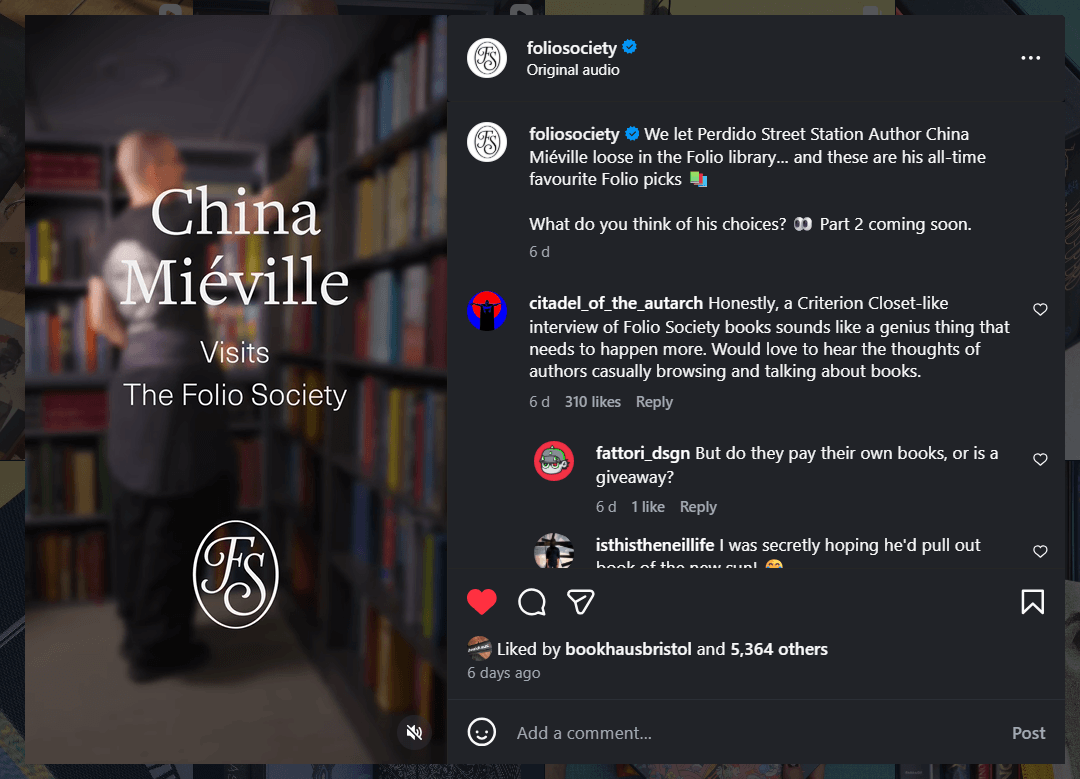
When designing your episodic series, think about how you can iterate on popular trends, or offer your own creative approach to popular formats. Once you’ve started producing your series, it’s much easier to get into a rhythm of ideation, creation and publishing that keeps content creation time low while filling up your calendar.
Maintain a living content calendar
A living social media content calendar differs from a normal calendar because it’s less static. It’s designed to be able to adapt to trends.
First, design a traditional calendar. Use a centralized system to plan, track and manage posts throughout the month. Then, build in flexibility. Tag posts based on whether they’re time-sensitive or evergreen, so you know where you can pivot if needed. This means you can keep posts tied to physical events or holidays in place, and move less timely content if something urgent comes up that you need to react to.
Your living content calendar helps organize your publishing, which is especially useful for reporting. Use tags to establish taxonomies and organize your content types, so you can analyze which resonate most. Planning topics, publishing dates and approval timelines through a content calendar also adds a layer of quality assurance, along with saving time.
3. Integrate real-time listening into your workflow
Being proactive with your workflows means maximizing your social intelligence. By using real-time tools like Sprout’s social media listening, you can gather recent insights into how your followers really feel about your brand.
These insights enable you to react to existing trends by revealing detailed information about your customers. It also enables you to be proactive by predicting which trends are just around the corner. Listening keeps you prepared for these shifts in expectation, and enables your team to keep pace with evolving demands. Build in time to analyze and interpret this data often, and use it to inform your upcoming strategy shifts; by listening and adapting regularly, you can start tracking the moments that really matter for your brand and its reach.
4. Consider legal compliance and crisis management
Everything you post across socials must be fully compliant with online and local regulations. As you’re crafting your various workflows, you need to account for best practices within your industry. For example, social media teams in healthcare must follow the Health Insurance Portability and Accountability Act (HIPAA).
You should also consider governance based on your country of origin. If you’re in the UK, you need to follow regulations set by the Advertising Standards Authority. This is also important if you’re working with influencers. Here’s a partnership example between Johnny Novo and Ben’s Original rice, where the influencer has used the tag #ad to clearly signify their paid partnership.

As well as keeping your content compliant, you need to build crisis management into your overall social workflow. Nobody wants to have to prepare for a crisis, but the more you focus ahead of time, the easier it’ll be to navigate should a tricky situation occur.
Design a social crisis management strategy and keep it updated regularly. You can refer to this process during any urgent situations. Use predictive media intelligence tools like NewsWhip by Sprout Social, which can help you predict bad news outbreaks that might impact your brand.
5. Design feedback and approval workflows for speed
Your approvals should be designed to protect your brand, not bottleneck it. Refer to the roles and responsibilities you determined earlier, and build your approvals process around them.
Tie your approvals to a list of priorities, so you’re not getting snagged by an approval that isn’t crucial. It’s important to strike a balance between reliability and a process that works at the speed of social. By setting up a seamless approval process, you’ll save time that you can use for more creative, strategic work.
6. Leverage artificial intelligence and automation
Embracing artificial intelligence (AI) and automation not only saves time and effort, but can also enhance reporting accuracy and scalability. Teams can automate repetitive tasks like scheduling posts, responding to customer inquiries or collecting performance data. For example, in Sprout you can use AI Assist to help spark draft ideas for social media copy, which give you an instant jumping off point when writing captions. With the right balance, you’ll maintain consistent, high-quality posts at a faster rate.
Agentic AI gives you even more opportunities to optimize your workflows. Instead of waiting for prompts like with generative AI, agentic AI can continuously parse large amounts of data and work towards its goals. For example, Sprout’s agentic AI, Trellis, makes it easier to act on your social listening data, and can reveal how conversations have evolved over time. Embedding agentic AI solutions into your workflows helps your team do less mining and more action.
7. Create a publishing and engagement rhythm
Efficient social workflows are often all about creating a rhythm with your accounts. Here’s an example of this working well for Jollibee, which often ties its content to holidays and calendar events.

Scheduling your posts in your calendar ahead of time can help you get ahead of production, but make sure to build in time to react to new memes, trends or breaking news. Design clear automations to route mentions and messages to the right teams, enabling your customer support team to get through several replies quickly. Also use AI to assign sentiment to messages, so your care team knows who needs the most immediate response.
Apply this thinking to all sides of your social media management strategy; you should prioritize consistency and reliability, while adhering to your brand’s unique voice.
8. Audit and revise your workflows as needed
Social media constantly evolves and so will your internal processes. Maintain flexibility and adapt your workflows as your business scales and your team navigates changes.
Schedule a regular workflow audit so you’re tracking the effectiveness of these procedures. Perform audits every time you open an account on a new platform, so you’re set up to adapt to the increase in output. Don’t be afraid to make changes; just make sure to audit again further down the line so you can continue to adapt.
Types of social media workflow in Sprout
At Sprout, our customers are our north star. That’s led to some pretty cool features designed to integrate social across a business. Here are a few fan-favorite social media workflows our customers use every day:
Scheduling and publishing workflow
The old way: Manually logging in and out of native platforms to publish social posts, minimizing visibility across teams.
The Sprout way: Use AI and automation to schedule posts across multiple channels at once using a centralized content calendar.
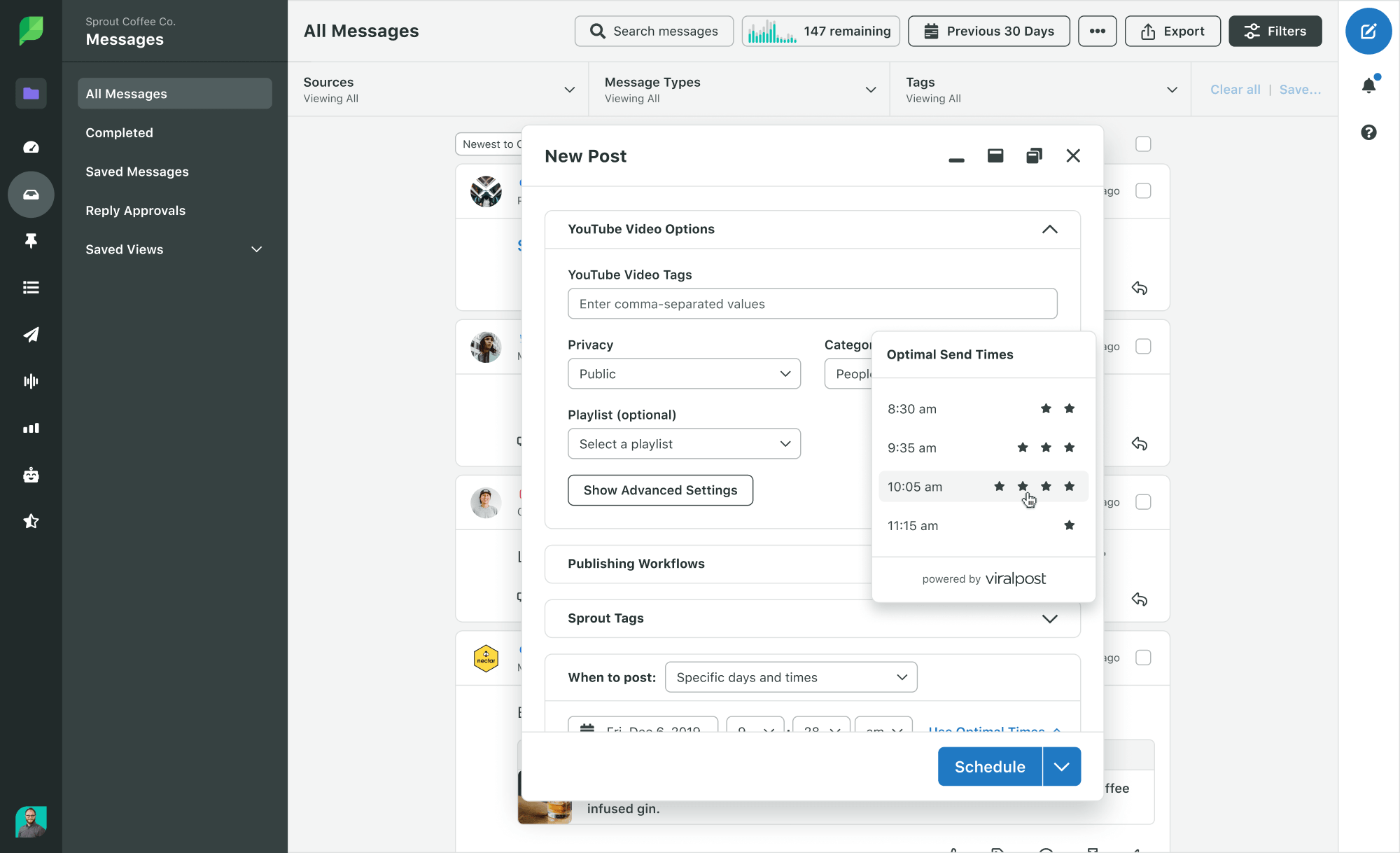
Sprout’s social media content workflows are flexible and easy to use. It centralizes once disjointed publishing workflows into a single location, equipped with AI and automation tools that provide real-time insights into optimization opportunities.
There’s a ton you can do in Sprout, but here are a few of our favorite social media workflow enhancements for publishing and scheduling:
- Use Sprout’s Optimal Send Times to take the guesswork out of posting at the best time for engagement and impressions.
- Use AI Assist to improve your content quality with suggested copy and tone edits, powered by OpenAI.
- Always on the hunt for third-party content to build out your social calendar? The Sprout Social Google Chrome Extension takes the Compose window with you as you browse for relevant articles to share. This is especially useful for brands that rely on industry-specific news to boost thought leadership.
- Waiting for details before drafting and scheduling a post? Use Calendar Notes to let your team know you have the task on your radar and that you’re waiting for next steps.
- Bridge the gap between design and scheduling using Sprout’s Canva integration. Instead of uploading your designs, you can use the integration to push designs from Canva directly onto Sprout. When exporting, you can also pre-fill details like captions, tags, profile group and a scheduled time. And if you’re designing in Sprout itself, use the “Canva Button” in Sprout Composer to pull Canva assets without leaving the tab.
Content approval workflow
The old way: Tagging stakeholders in a shared document or spreadsheet for content reviews and moving things over to email if they require further discussion.
The Sprout way: An in-app content approval process that can be tailored by need, department or client—depending on your business structure.
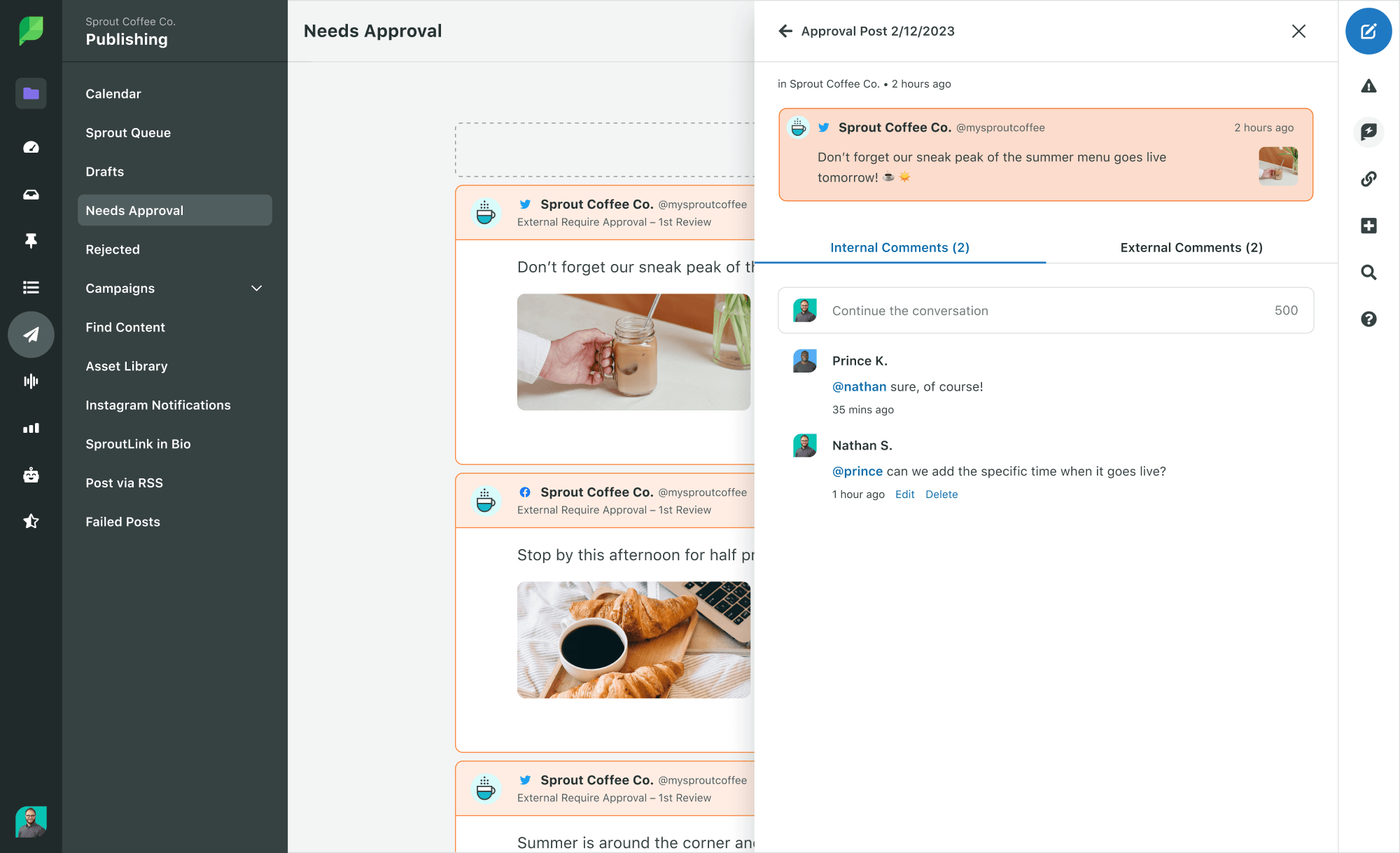
Sprout’s approval workflow makes it easy to share content with external and internal stakeholders.
I’d estimate that Sprout’s Message Approval Workflow is single-handedly responsible for preventing millions of lengthy email threads and shared document requests. This tool creates a shared space for feedback by enabling teams to create multi-step, multi-user workflows that meet the needs of their specific organization.
Here’s what it looks like in action, depending on your role:
- Director of Social Media: Tailored notification settings help you review content in a way that works with your schedule. Choose between hourly or daily approval request notifications to keep your day running smoothly.
- Legal Compliance Specialist: Let your social team set you up with External Approver access so you can review sensitive content for legal risk.
- Account Manager: Strengthen agency-client relationships by setting up a customized approval workflow for each of your individual accounts.
Further streamline your approvals workflow with Sprout’s Adobe Express integration. Install the Sprout add-on directly in the Adobe Express editor, and once you finish designs, you can send the draft straight to Sprout’s Publishing Calendar. This makes it much easier for social and design teams to collaborate and share creative assets quickly.
Customer care and engagement workflow
The old way: Checking all your social inboxes first thing in the morning and at the top of every work hour to respond to messages in a timely manner. Manually responding to inquiries and sharing individual messages to your customer care teams.
The Sprout way: Centralizing inbound messages in a single stream, while automating the message prioritization process, off-hours support and FAQs assistance. Unify your social care capabilities to provide a seamless customer experience and provide greater transparency into customer satisfaction and sentiment across teams.
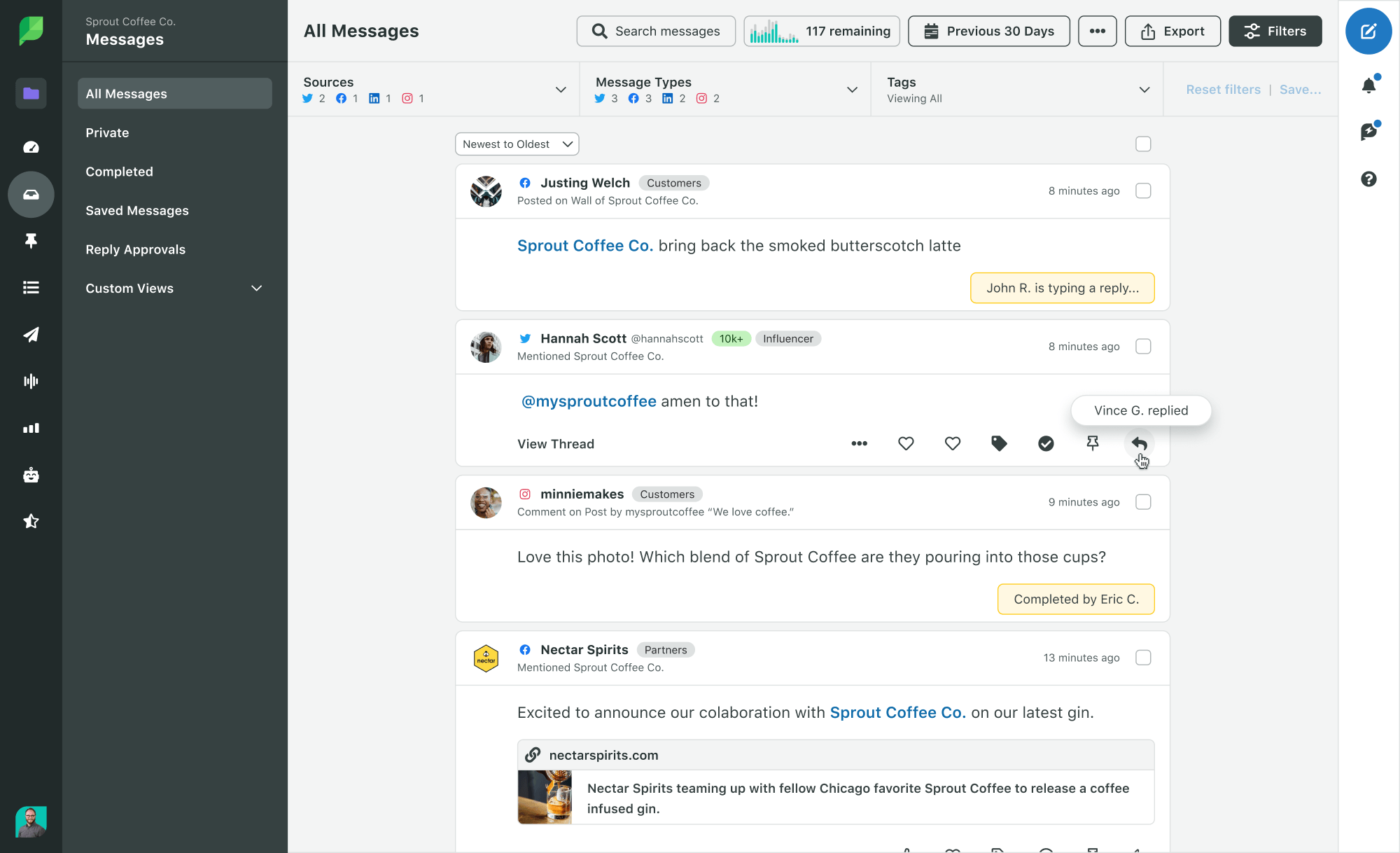
The Smart Inbox is the key to unlocking relationship-building experiences on social. This tool tightens your social media workflow by unifying all your brand accounts across social networks. From there, you can operate Smart Inbox like a mission control center. Avoid flooded inboxes and frustrated customers, and use its single interface to manage a customer-centric social media presence.
Brands managing a high volume of inbound messages can also benefit from the following Sprout tools:
- AI and automation: Sprout’s Q4 2025 Pulse Survey found that 69% of users are comfortable with brands using AI to deliver faster personalized care. Use Sprout’s AI capabilities to automate triaging, categorize based on sentiments and draft initial messages that your team can proofread before sending.
- Salesforce integration: Use Sprout’s Salesforce integration to enrich your Salesforce cases with full context drawn from your social analytics. This happens natively within your workflow, meaning your team can focus on faster, more empathic service.
- Slack integration: Improve coordination across your team using Sprout’s Slack integration. Enable everyone to stay up-to-date on your approvals and your case workflows in real-time.
- Bot Builder (Advanced Plan): Use social chatbots designed on rule-based logic to respond to your messages even when your support team isn’t available.
- Case Management: Strengthen your social customer care efforts with automatic Case Assignments from team queues based on agent availability and capacity. You can also route cases to team members based on keywords and sentiment changes to better deliver for your customers.
- Listening: Countless potential conversations are happening around your brand and industry every day. Use AI-powered tools like Sprout Listening to keep tabs on the market insights that can drive your business forward.
Social intelligence and analysis workflow
The old way: Manage a completely reactive workflow system that’s always looking back rather than forward. Guess how your audience really feels about certain content, and use those guesses to define your entire strategy.
The Sprout way: Become proactive with your social planning based on detailed, real-time insights on who your audience is and what they expect from your accounts. Build this accurate intelligence into your workflows so you’re always ready to adapt to how the market shifts.
Your social data should be flowing into every corner of your business. It shouldn’t just inform new approaches to content and marketing; it should enlighten product teams, educate c-suite execs, bolster the capabilities of your customer support department and more.
Sprout can help you act on social intelligence across your company. Here are a few ways to get you started:
- Predictive intelligence engine: Be proactive with your trend predictions using predictive media intelligence tools like NewsWhip. NewsWhip informs your social team of topics and how they’re spreading, which could impact your brand.
- BI and search optimization: Integrate Sprout’s social insights directly into Tableau and Google Analytics. Learn not just how your audience feels, but why. Then optimize your workflows, including optimization for social search, as more people use social platforms for discovery.
- Understand consumer behavior: Use Listening and Sprout’s in-built analytics tools to determine how your customers feel about and interact with your brand right now. Use this to create more detailed target personas, and optimize business strategies that truly meet your audience’s needs.
- Gather competitive and market intelligence: With Sprout’s competitive and market analysis features, gather insights into your competitor’s social performance as well as your own. Figure out where your brand is positioned, and what you can do to stand out.
Reporting workflow
The old way: Hours spent pulling metrics from native analytics solutions, making sense of them in a spreadsheet and creating data visualizations manually to explain your team’s impact across the business.
The Sprout way: Presentation-ready reports that directly tie social activity to business objectives. Sprout’s social media automation tools make quick work out of cumbersome reporting tasks by combining templated reports with user-friendly customization options.
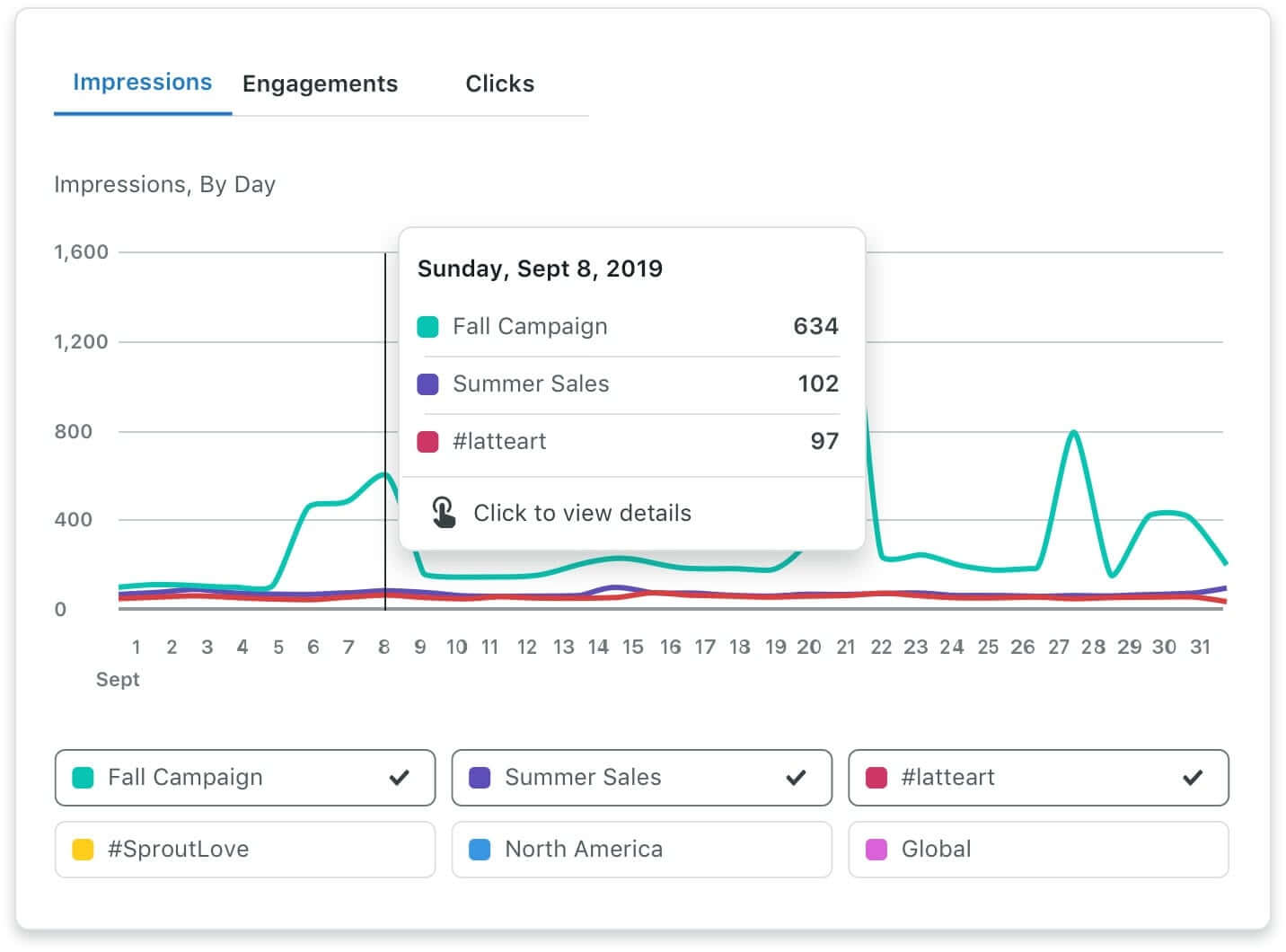
Of all our reporting features, Tagging has the most potential to revolutionize your workflows. Sprout Tags enable our customers to group inbound and outbound messages for more flexible reporting on content, creative and campaigns. Use Tags to automate data collection processes and say goodbye to cherry-picking specific post-level metrics for strategic insights.
Tagging is available to all Sprout customers, but for Advanced Plan users, it’s one of many automated reporting tools that include:
- Automated Rules: Automatically Tag inbound and outbound messages that include specific keywords or hashtags to ensure every post is recorded and reported on.
- Scheduled Reports: Schedule weekly or monthly PDF reports to keep stakeholders informed on campaign progress.
- My Reports: Create custom reports with metrics that matter most to your executives, with text widgets that provide the context needed to capture social’s impact.*
- Link Sharing: Share real-time, interactive report links that provide all the necessary context and data visualizations needed to increase transparency with external stakeholders. Our social media metrics dashboards offer integrations with Tableau enabling teams to incorporate data with other business intelligence for a comprehensive view of the customer journey.
*These features are available with the Sprout Social Premium Analytics add-on.
Other social media workflow tools
We recommend using a social media management software like Sprout to set up the best social media workflows for your business. But, if you’re not ready to invest in a robust tool, here’s a quick overview of three project management tools you can use to help facilitate your social media workflow:
Google Sheets
Google Sheets is a spreadsheet tool teams can use throughout a social media management workflow. For example, use Google Sheets to create content calendars, track performance metrics and collaborate with team members in real-time. We even created a social media calendar template you can use. This template will help you create customizable categories like event promotions and product launches while ensuring all content is aligned to a specific key performance indicator (KPI).
Smartsheet
Smartsheet is another spreadsheet tool you can use throughout your social media workflow. The platform allows you to automate workflows and notifications to streamline your communication and ensure seamless collaboration. They offer a variety of social media management templates.
Monday.com
Monday.com is a project management software and another organizational tool to use within your social media workflow. Marketing teams can use Monday.com for content calendars, asset management, content creation and campaign management. You can use a template or start your project from scratch.
Automate your workflow with Sprout
Your social media workflows shouldn’t be clogging your potential. Optimized workflows do more than streamline; they form the backbone of an efficient social presence that meets and anticipates what your audience wants.
But those benefits are only possible with the right tools. Sprout’s centralized social management platform provides powerful data, flexible tools and an accessible user experience that helps you harness social data and turn it into powerful social intelligence for business impact.
Learn how to optimize your social media workflows in a unified platform by signing up for a Sprout demo today.
The post 8 best practices for optimizing your social media workflow appeared first on Sprout Social.
from Sprout Social https://ift.tt/tEAX4H1
via IFTTT

No comments:
Post a Comment