ou open your inbox first thing Monday morning and sigh. A dozen new emails, most of which you'll ignore until later, if at all. Timing matters.
If you've ever wondered when is the best time to send emails, you're not alone. Hitting send at the right moment can make the difference between being read immediately or buried beneath a flood of messages.
The best time to send emails isn't a one-size-fits-all answer, but years of data point to clear trends that can help you reach your audience when they're most likely to open, read, and act. Below, you'll find a day-by-day breakdown of the best send windows, plus a section on how to find your own ideal send time using GA4.
When is the best time to send emails?
For most businesses, the best time to send emails is between 9:00 AM and 11:00 AM in your recipient's local time zone. This is when people are typically catching up on their inbox after starting their workday.
Here’s why timing matters:
- Open rates typically peak mid-to-late morning, with a secondary bump early afternoon.
- Engagement (replies, clicks) is highest when you send while your audience is active and checking their devices.
- Day of the week is just as important as time of dday. Audience habits shift significantly between Monday and Sunday.
Best time to send emails by day of the week
Now, let’s dig into daily specifics.
These times are starting points. Your audience's behavior is the final authority. Use these as a baseline, then refine with your own data.
Best time to send emails on Monday
Recommended time: 10:00 AM – 12:00 PM local time
People tend to catch up on emails after the weekend, but the very first hours (8–9 AM) can be overwhelming as inboxes fill up. Aim for late morning when things have settled, and your message won’t get lost in the Monday rush.
Example: If you’re launching a new announcement or newsletter, send it around 10:30 AM for better visibility. On platforms like AWeber, you can easily schedule for this precise window.
Best time to send emails on Tuesday
Recommended time: 9:00 AM – 11:00 AM
Multiple large-scale studies consistently rank Tuesday as the top day for email open rates. People have settled into the workweek, and it's typically the most productive day.
Pro tip: For B2B audiences, aim for 9:30 AM. For consumer-focused emails, closer to 11:00 AM tends to work better.
Best time to send emails on Wednesday
Recommended time: 8:00 AM – 11:00 AM
Wednesday is another reliably strong day for email engagement. The same midmorning window applies, and inbox competition tends to be slightly lower than Tuesday.
Best time to send emails on Thursday
Recommended time: 9:00 AM – 12:00 PM
Treat Thursday much like Tuesday. Activity is high before the end-of-week slowdown. Across multiple studies, Thursday ranks as one of the best days for email-driven orders, making it a strong choice for promotional or conversion-focused sends.
Why it works: Recipients are still focused and haven’t begun the mental shift to weekend mode. A timely, relevant email can stand out and drive action.
Best time to send emails on Friday
Recommended time: 9:00 AM – 10:00 AM or early afternoon (1:00–2:00 PM)
Engagement drops off by late afternoon as people wind down for the weekend. Send early in the day to get your message in before attention shifts. For consumer-based audiences (retail, hospitality), a pre-weekend email sent just after lunch can prompt last-minute purchases or bookings.
Best time to send emails on Saturday
Recommended time: 10:00 AM – 12:00 PM
Saturday is the lowest-performing day overall for most business types. If your audience skews toward consumer categories (entertainment, fitness, ecommerce), aim for late morning when people are up and scrolling but not yet deep into their day.
Best time to send emails on Sunday
Recommended time: 9:00 AM – 12:00 PM, or after 8:00 PM
Many people skim emails over morning coffee on Sunday. There's also a lesser-known "Sunday night effect": research shows email opens on Sunday peak around 9 PM, as people check their inboxes to prepare for the week. If you're experimenting, test late Sunday evenings. You may be surprised by the open rates.
How to find your own best email send time using GA4
Industry averages are a useful starting point. Your own audience data is more useful.
Here's the simplest way to identify when your subscribers are most active on your site, which correlates closely with when they're most receptive to email.
Step 1: Open GA4 and go to Explore
From the left navigation, click Explore and create a new blank exploration.
Step 2: Add the Hour dimension
In the Variables panel, click the + next to Dimensions and search for "Hour." GA4 records hour as a value from 0 to 23 (midnight to 11 PM). Add it to your exploration.
You can also add "Day + hour" if you want to cross-reference by day of week.
Step 3: Add a metric
Add "Sessions" or "Engaged sessions" as your metric. This shows you when your visitors are most active.
In the example below, AWeber traffic is highest between 9am - 11am. So the best time to send an email would be 9am.
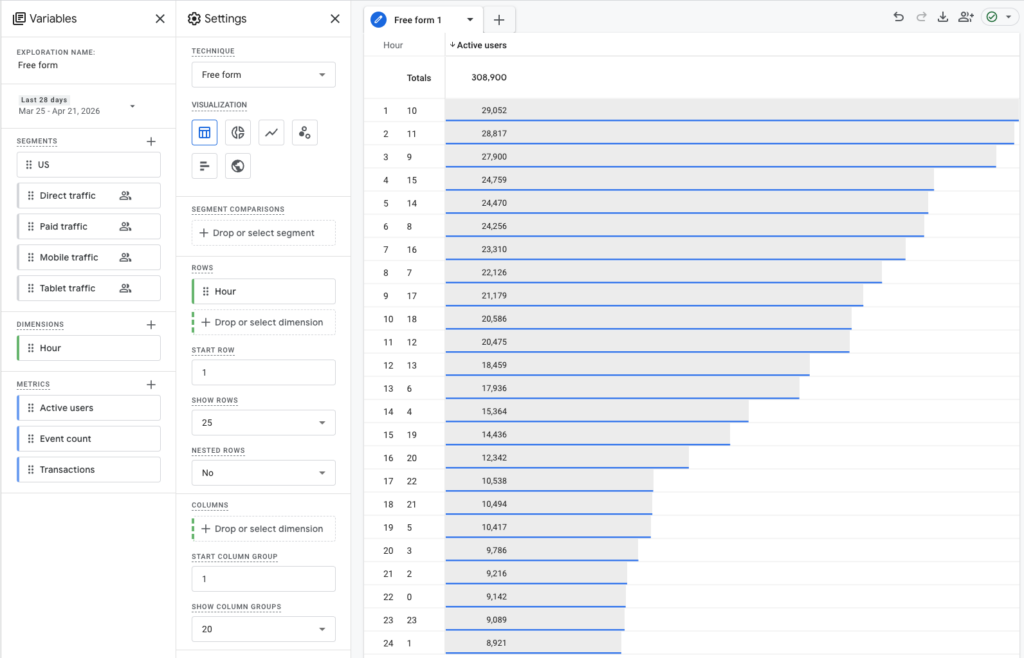
This approach takes about 15 minutes and gives you audience-specific data rather than industry averages.
Best send time by goal
Beyond general newsletters, timing varies by what you're trying to accomplish.
Sales or promotions: Early in the week and midmorning. Avoid sending major promotions late Friday or Saturday afternoon unless your audience is consumer-based. Late afternoon, around 4 PM, tends to drive stronger order rates for ecommerce-type sends, so it's worth testing for promotional campaigns.
Event reminders: Send 24 hours before the event, then a one- to two-hour "last call" reminder.
Newsletters or educational content: Tuesday or Thursday late morning delivers the highest engagement for most lists.
For more details on email marketing best practices, see AWeber’s email newsletter best practices guide.
How to test and refine your timing
Check your analytics. Use AWeber's reports to see when people actually open and click. This is your most reliable signal.
Segment by time zone. If your list spans multiple zones, schedule emails in local time.
Run A/B tests. Send the same email at two different times to different segments. Compare results.
Monitor and iterate. Adjust based on real results. Your audience may prefer slightly different timing, especially around weekends or holidays.
Your successful timing will reflect your readers' habits, not industry benchmarks. If most of your opens happen at 8 PM, schedule accordingly.
Key takeaways
The best time to send emails comes down to three things: know your audience, start with proven windows (midmorning on weekdays), and test your assumptions.
Tuesday and Thursday mornings are the safest default. But the real answer lives in your own data. Use GA4 to find when your audience is active, then match your send schedule to that window.
That's when your emails get read.
The post Best Time to Send Emails: What the Data Really Says (Day-by-Day Guide) appeared first on AWeber.
from AWeber https://ift.tt/DhwSqg0
via IFTTT

No comments:
Post a Comment