You're already sending emails, or you're about to. Either way, the habits you build early determine whether your list becomes a reliable revenue channel or a collection of people who stopped opening.
These are the practices that separate the ones seeing results from the ones that aren't.
1. Create emails that are easy to scan and read
Your subscribers' inboxes are busy. To cut through the clutter and immediately catch your reader's attention, your emails need to be easy to read and scannable.
A scannable email lets busy subscribers get the information they need faster. So instead of opening an email, seeing an overwhelming block of text, and sending it to the trash, they'll read and click.
A few tactics that help:
- Use descriptive or interesting headlines to quickly summarize your point
- Write short paragraphs and sentences
- Use images and whitespace to separate chunks of text
2. Make your emails accessible
Ensuring your emails are accessible to all recipients, regardless of their abilities or disabilities, not only aligns with legal requirements but also reflects your commitment to reaching a diverse audience.
Prioritizing accessibility improves the experience for individuals with disabilities and improves overall engagement and effectiveness of your email marketing.
Key strategies to make your emails more accessible:
- Use simple fonts. The most accessible fonts are Tahoma, Calibri, Helvetica, Arial, Verdana, and Times New Roman.
- Align your copy to the left. Screen readers handle left-aligned text better than centered or right-aligned text.
- Create clear spacing. Your line height should be 1.5 times the font size.
- Add descriptive alt text. Include alternative text that clearly conveys the subject or context of every image. This lets assistive technologies provide accurate descriptions for individuals who rely on them.
3. Set up automation before you need it
Most small businesses treat automation as something to tackle later. That's backward. Your new subscriber's attention peaks the moment they sign up. That window is short and you don't get it back.
Set up your welcome series before your first subscriber arrives. Studies have shown a welcome email can generate 320% more revenue per email, 4 times higher open rates than other emails, and 5 times higher click-through rates than promotional emails.
A basic welcome series for a small business:
- Email 1 (immediately): Deliver what you promised. If someone signed up for a lead magnet, send it now. Set expectations for what's coming.
- Email 2 (2 days later): Tell your story. Why you started this business, what you believe, what makes you different. This is where trust gets built.
- Email 3 (4 days later): Your best content. A resource, a lesson, or a behind-the-scenes look that reminds the subscriber why they signed up.
- Email 4 (7 days later): Social proof. Customer stories or real results that let others tell your story.
- Email 5 (10 days later): A soft introduction to your product or service. Not a hard sell. More of a "here's what we do and who it's for."
Beyond the welcome series, three automations drive the most consistent results:
Lead nurture sequences build the relationship between someone who opted in and someone ready to buy. Answer the questions prospects have before they decide: What does this cost? What does getting started look like? Who is this for?
Re-engagement campaigns identify subscribers who haven't opened in 90 days and send a short sequence designed to rekindle interest. If they don't respond, removing them improves deliverability and list quality.
Behavioral triggers respond to what subscribers actually do. Abandoned cart sequences, post-purchase follow-ups, and milestone emails all outperform broadcast campaigns because they arrive at the moment they're relevant.
AWeber's Workflow builder lets you set each of these up visually without writing code. You map the sequence, set the triggers, and AWeber handles the rest.
For a complete guide to building each sequence, see Email Marketing Automation for Small Businesses.
4. Design for the phone first
Most emails are opened on phones. An email that looks good on desktop and breaks on mobile loses those opens permanently.
Design decisions that hold up on mobile:
- Single-column layouts that stack cleanly on small screens
- Buttons large enough to tap with a thumb (at least 44px tall)
- Font sizes readable without pinching (16px minimum for body text)
- Short subject lines. The Gmail app on iPhone cuts off at 38 characters.
- White space that gives the content room to breathe
Put your most important information and your call to action high in the email. On mobile, most people don't scroll to the bottom.
Always send a test email to your phone before sending to your list. What looks fine in a desktop preview often breaks on a 6-inch screen.
5. Segment early
Segmentation means sending different content to different subscriber groups based on what you know about them. Even basic segmentation outperforms sending the same email to everyone on your list. The right message to the wrong segment doesn't convert, regardless of how well it's written.
Three segmentation approaches that work at any list size:
1. Behavioral segments group people by what they've done: what they purchased, how often they open, which lead magnet they downloaded, where they are in your sales process. This is the most actionable segmentation because it reflects actual intent.
2. Preference-based segments let subscribers tell you what they want. A simple question in your welcome email, "What are you most interested in?" with two or three options, routes people into relevant sequences automatically.
3. Engagement segments separate your active subscribers from your inactive ones. This matters for deliverability. Sending primarily to your engaged segment keeps your open rates healthy and your sender reputation strong.
You don't need a complex system to start. One meaningful segment is better than none.
For a step-by-step guide to building your first segments, see Three Ways to Segment Your Email List as a Small Business.
6. Personalize your emails
Which email would you respond to: one that mentions your city, references something you've purchased, and speaks to your specific situation, or one clearly written for everyone?
Email personalization lets you create more targeted messages that stand out in the inbox. Personalize everything: the subject line, the email content, and the offer itself.
You don't need a large list or a complex setup to personalize. Tags added at signup give you enough context to send meaningfully different messages from day one.
7. Use AI to close the content gap
The biggest bottleneck in small business email marketing isn't strategy. It's time. Most small business owners know what they want to say. They don't have the hours to say it consistently.
AI writing tools address that directly.
Where AI adds the most value:
- Generating multiple subject line options to test
- Creating first drafts from a brief outline or bullet points
- Developing newsletter topic ideas based on your audience and industry
- Writing variations for A/B testing quickly
AI produces starting points, not finished emails. The voice, the specific details, and the judgment about what your audience actually wants, those still require you. Use AI to get past the blank screen faster, then edit to match your voice.
AWeber's Newsletter Assistant generates email drafts and subject line suggestions directly inside the platform, so you never have to leave your workflow to get unstuck.
8. Create engaging email content
The purpose of your emails is to get people to read them so they take the desired action. Every email should be compelling enough to earn the next one.
The ratio that works: roughly 80% of your emails should deliver value without a sales pitch. Information, insight, a useful tip, a story. The remaining 20% can sell. Subscribers who trust you buy when they're ready.
If you're not sure what to write, AWeber has a free guide on what to write in your emails that gives you a framework for every type of message.
9. Keep your list healthy so your emails get delivered
Your emails can only work if they reach the inbox. Deliverability is the behind-the-scenes factor that determines whether that happens. It's easier to protect than most people think.
Inbox providers like Gmail, Outlook, and Yahoo pay attention to how subscribers respond to your emails. When people open and click, that signals your emails are worth delivering. When they ignore or report them as spam, your future emails get routed away from the inbox.
Two things protect your deliverability without requiring technical expertise.
1. Keep your list clean. Remove subscribers who consistently bounce. Run a re-engagement email to anyone who hasn't opened in 6 months. If they don't respond, remove them. A smaller engaged list delivers better than a large unengaged one.
2. Authenticate your sending domain. This tells inbox providers your emails are genuinely coming from you. AWeber handles most of this automatically.
10. Use confirmed opt-in
Setting up a signup form on your landing page or social media is a great way to grow your email list. Once someone signs up, send an email to confirm their address.
Getting a subscriber to verify that they want to receive your emails improves your delivery rate. Since they confirmed their address, you know they genuinely wanted to sign up. That makes them more responsive and leads to higher engagement.
11. Do not purchase an email list
Never purchase an email list. Sending emails to people who didn't give you permission is spam, and in many cases it's illegal.
When you use a purchased list, you're setting yourself up for failure. Since these people didn't opt in, they'll mark your messages as spam. That leads to lower delivery rates and emails that go straight to the spam folder, where they'll never be seen or opened.
AWeber, along with other reputable email marketing platforms, will not allow you to import a purchased list.
12. Give every email one call to action
Every email should have one primary call to action. Two competing CTAs don't double your clicks. They split attention and reduce both.
AWeber's research found that businesses using button CTAs achieve click through rates of 6% or higher 58% of the time, compared those using text links only.
What makes a CTA work:
- A button rather than a text link for your primary action (easier to spot, easier to tap on mobile)
- Action-oriented language: "Download the guide," "Register for the webinar," "Get started today"
- Specific over generic. "Get the checklist" outperforms "Click here."
- Position above the fold when possible. Don't make subscribers scroll to find the action.
One primary CTA. One clear goal. Test the wording, color, and placement. Small changes here have outsized impact on results.
13. Use a professional email address
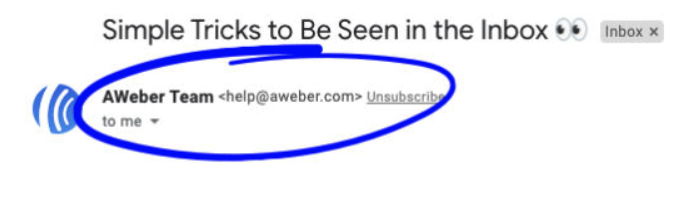
The address your email comes from is part of your brand. A subscriber who sees sarah@yourbusiness.com in their inbox is looking at something different from sarahsmith247@gmail.com. One signals a real business. The other signals a side project, or worse, a scam.
A professional email address, one that matches your website domain, avoids all of this.
What a professional email address does for you:
- Improves deliverability. Inbox providers treat branded domains as more trustworthy than free ones.
- Builds sender reputation. Every send from your domain either strengthens or weakens how inbox providers see you over time.
- Increases trust. Subscribers are more likely to open an email from hello@yourbusiness.com than from a free domain they don't recognize.
- Reinforces your brand. Your domain appears at the top of every email. It's a small detail that compounds.
14. Do not use a no-reply email address
Sending from a no-reply address tells subscribers you don't want to hear from them. It also hurts deliverability. Inbox providers look for signs that emails come from real people who want real conversations. No-reply signals the opposite.
The practical consequences:
- Higher spam complaint rates (subscribers can't reply, so they report instead)
- Deliverability damage that affects every future send
- Missed feedback and sales conversations that happen in email replies
What to use instead:
- A personal address from someone in your organization (name@yourcompany.com)
- A role-based address someone actively monitors (hello@ or support@)
- Your own name if you're a solopreneur
Set up an auto-responder if you can't monitor replies in real time. The two-way communication signal is worth it.
15. Test every email before it sends
A broken link in a campaign that goes to 2,000 people can't be recalled. A simple pre-send checklist prevents the mistakes that damage trust and waste sends.
Technical checks:
- Send to yourself on at least two devices (desktop and mobile)
- Click every link and confirm it goes to the right page
- Confirm images load and alt text is present
- Check rendering in at least two email clients (Gmail and Apple Mail cover most of your audience)
Content checks:
- Proofread for spelling, grammar, and accuracy
- Confirm the subject line matches the email content
- Verify your "from" name and address are correct
- Check that the unsubscribe link works
Experience checks:
- Read it on your phone. If you wouldn't read the whole thing, your subscribers won't either.
- Confirm the most important information appears early
- Make sure the email makes sense if images don't load
AWeber's pre-send checklist feature runs several of these checks automatically before your campaign goes out, flagging broken links, missing alt text, and rendering issues so you catch them before your subscribers do.
Start with one. Build from there.
You don't need to implement all of these at once. The businesses that see the best results from email marketing aren't the ones that do everything on day one. They're the ones that pick one practice, execute it consistently, and add the next.
If you're starting from scratch, begin with your welcome series. It's the highest-return automation you'll ever set up, and it works while you're focused on everything else.
If you're already sending but not seeing the results you want, look at your list health first. A clean, engaged list is the foundation everything else builds on.
AWeber gives you the tools to run every one of these practices without a marketing team or a technical background. Start free today.
Keep reading
- Email Marketing for Small Businesses: The Complete 2026 Guide
- Email Marketing Automation for Small Businesses
- Three Ways to Segment Your Email List as a Small Business
- How to Write Email Subject Lines That Get Opened
- How to Test Your Emails Before Hitting Send
The post 15 Email Marketing Best Practices High-Performing Small Businesses Follow appeared first on AWeber.
from AWeber https://ift.tt/PypegqI
via IFTTT

No comments:
Post a Comment