If you are treating email like a megaphone, something to shout through when you have a sale to announce or a newsletter to send, you are leaving real money behind.
According to AWeber's research of over 1,200 small business owners, only 60% say their email strategy is effective. The ones in that top tier are not writing better subject lines. They are sending more types of emails, each one doing a specific job at a specific moment.
A welcome email converts while a new subscriber still remembers signing up. An abandoned cart email recovers a sale that was already almost yours. A re-engagement email keeps your deliverability healthy before a cold list starts hurting you. None of that happens with a newsletter alone.
Here are the email types that drive revenue, keep subscribers engaged, and build the kind of audience that does not need to be constantly re-acquired.
Welcome email
What it is
Your welcome email is the first message a new subscriber receives after signing up. It triggers automatically the moment someone joins your list.
Why it matters for your business
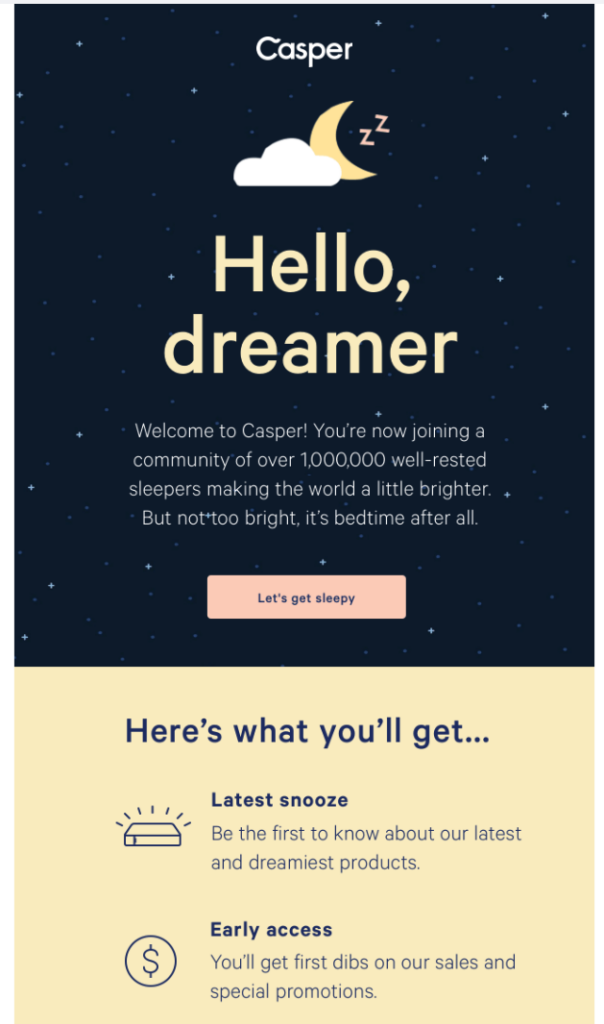
Welcome emails regularly see open rates above 50%, two to three times what a typical promotional email gets. Your subscriber just raised their hand. They are paying attention right now, more than they ever will be again until they are ready to buy. If your welcome email is a generic "thanks for signing up," that window is being wasted.
How to get results from it
Give them something useful immediately: a discount, your best piece of content, or a free resource. Tell them exactly what to expect from your emails. Then invite a reply. That single ask does more for your relationship and your deliverability than any subject line trick.
If you want to go further, a three-email welcome sequence outperforms a single message. The first delivers your promise. The second adds something useful. The third makes a soft offer. By email three, your subscriber knows who you are and what you stand for.
Send within one hour of sign-up. The window closes fast.
Can you automate this?
Yes. Always. Trigger it the moment someone subscribes to your list. There is no version of this email that should be sent manually.
Read more: How to create a welcome email series for your small business
Newsletter
What it is
A newsletter is a regularly scheduled email that keeps your audience connected to you between campaigns. It can include original perspective, curated content, behind-the-scenes updates, or a mix, as long as it shows up on a consistent schedule.
Why it matters for your business
A newsletter is the engine that makes every other email work better. Subscribers who read your newsletter regularly open your promotions, click your launches, and buy when you ask.
AWeber's research found that 54% of small businesses send at least once a week. Emailing on a consistent schedule is how you train your subscribers when and what to expect from you.
How to get results from it
The newsletters that build real audiences are not the ones with the best design. They are the ones with a genuine point of view. Emmy Award-winning producer Paula Rizzo, who has sent a regular newsletter for years, describes it this way: "There are things that I only really share first with my newsletter. It's that intimate thing." That intimacy is the value. Not content you could publish anywhere. The perspective that only comes from you.
Pick one topic per issue. Start with the insight, not the setup. Write to one person, not a list. Show up on the same day every week. Predictability earns loyalty.
Can you automate this?
Most do not automate their newsletter. But, small businesses that use AWeber for their email can.
If you publish new blog or YouTube content regularly, you can set up an RSS-to-email automation that sends your latest posts automatically. This content works great if you're a blogger or YouTube. But a newsletter built around your own perspective should be written fresh. The human voice is the value.
This is where AWeber's Newsletter Assistant can help. You get an AI-generated newsletter, written in your voice, each week. You can edit and send rather than start from a blank screen.
Read more: See how you can automate the writing of your newsletter, every week.
Promotional email
What it is
A promotional email announces an offer, a sale, a discount, or a limited-time opportunity. Its job is to drive a specific action before a specific deadline.
Why it matters for your business
Done right, a promotional email is your most direct revenue driver. Done wrong, it trains your subscribers to ignore you.
How to get results from it
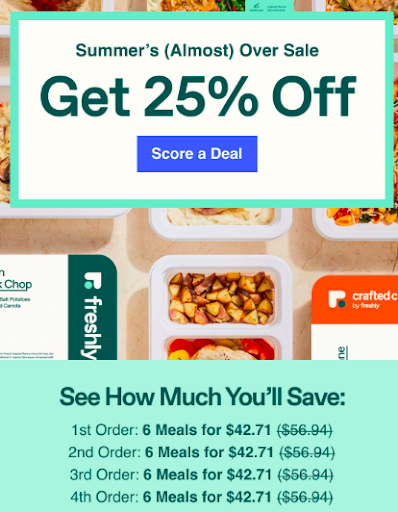
Build the email around one offer, one deadline, and one call to action. One path. If the offer is actually good, a clear email will convert. If you find yourself writing elaborate copy to justify the promotion, the offer needs work before the email does.
Not every subscriber wants the same thing. Using tags and segments to send the right promotion to the right portion of your list consistently outperforms sending the same email to everyone. A subscriber who clicked your hiking gear content last month is a better target for your trail shoes promotion than someone who only ever engaged with your casual footwear emails.
Limit promotional emails to a handful per month. Every time you send one without real value behind it, you spend a little trust with your list. That account is not unlimited.
Can you automate this?
No. Promotional emails are usually tied to specific dates, campaigns, or inventory decisions that require manual judgment. The exception is a post-signup promotional offer, a discount that fires automatically as part of a welcome sequence. That can and should be automated.
Read more: How to use tags and segmentation to send smarter campaigns
Abandoned cart email
What it is
An abandoned cart email goes to a customer who added products to their cart but left without completing the purchase. It is triggered automatically by that action.
Why it matters for your business
Roughly seven in ten online shoppers abandon a cart before buying. That is not a lost sale. It is a paused one. The hesitation is usually price, distraction, or doubt. An abandoned cart email answers that hesitation before the customer decides somewhere else. If you sell products online, this is one of the highest-return automations you can build.
How to get results from it
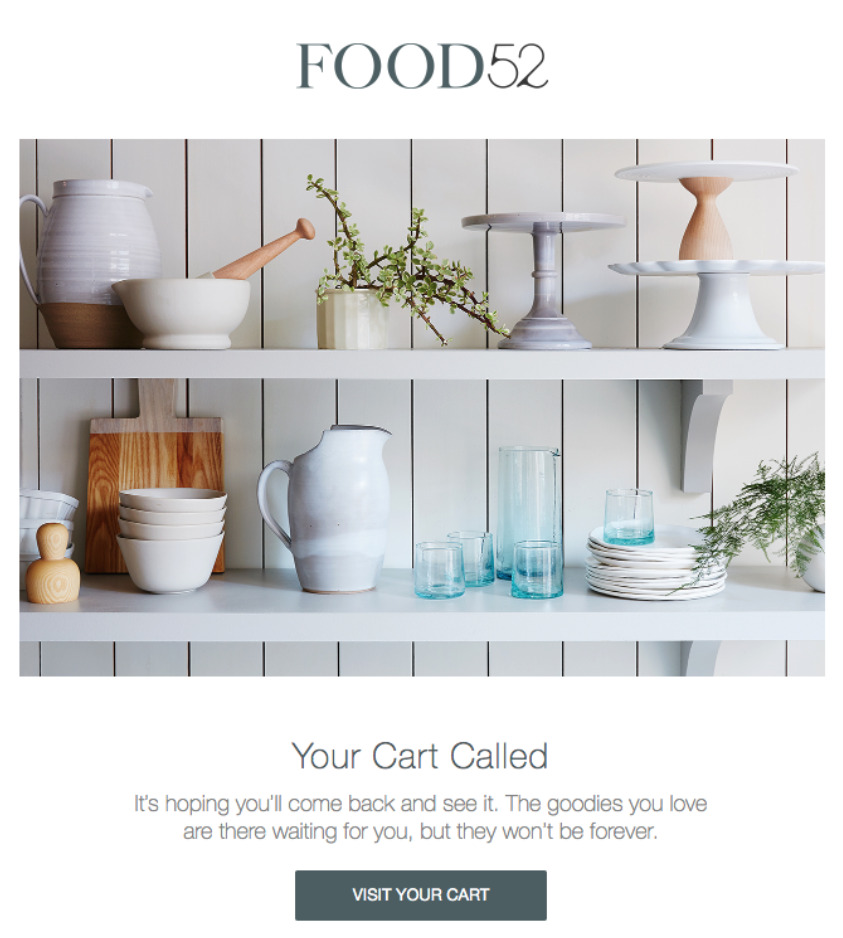
A single reminder recovers some revenue. A sequence of three recovers significantly more. Send the first within one to two hours: a simple reminder with the product image, no discount yet. Many people just forgot. Send the second at 24 hours and address the real objection: shipping cost, a return policy note, a review from someone who bought it. Reserve the discount for the third email at 72 hours.
The abandoned cart emails that convert best treat the moment as a conversation, not a chase. What made this person pause? Answer that, and the email practically writes itself.
Can you automate this?
Yes. Always. Set up an integration between your email provider, like AWeber and your ecommerce platform, say WooCommerce. Then when someone adds items to their cart and does not checkout, you can have your abandoned cart email automatically triggered.
Re-engagement email
What it is
A re-engagement email targets subscribers who have gone inactive, a good rule of thumb is 6 months without opening or clicking. It asks, directly, whether they still want to hear from you.
Why it matters for your business
Every list has cold subscribers. Left alone, they drag down your deliverability for everyone on your list, including the people who do want to hear from you. A re-engagement sequence protects your sender reputation before it costs you opens across the board. A smaller, engaged list outperforms a large, disengaged one every time.
How to get results from it
Be direct. "We have not heard from you in a while and we do not want to keep filling your inbox if you have moved on" outperforms manufactured urgency every time.
Give them two options: stay and get something valuable, or unsubscribe easily.
Subscribers who choose to stay are among your most reliable openers going forward. They opted back in deliberately. Remove the ones who do not respond. Your open rates and sender reputation will improve almost immediately.
Can you automate this?
Yes. Set the trigger based on an inactivity window in your email platform. It's recommended 6 months with no opens or clicks. The sequence runs automatically from there.
Read more: Re-engagement emails: how to win back inactive subscribers
Transactional email
What it is
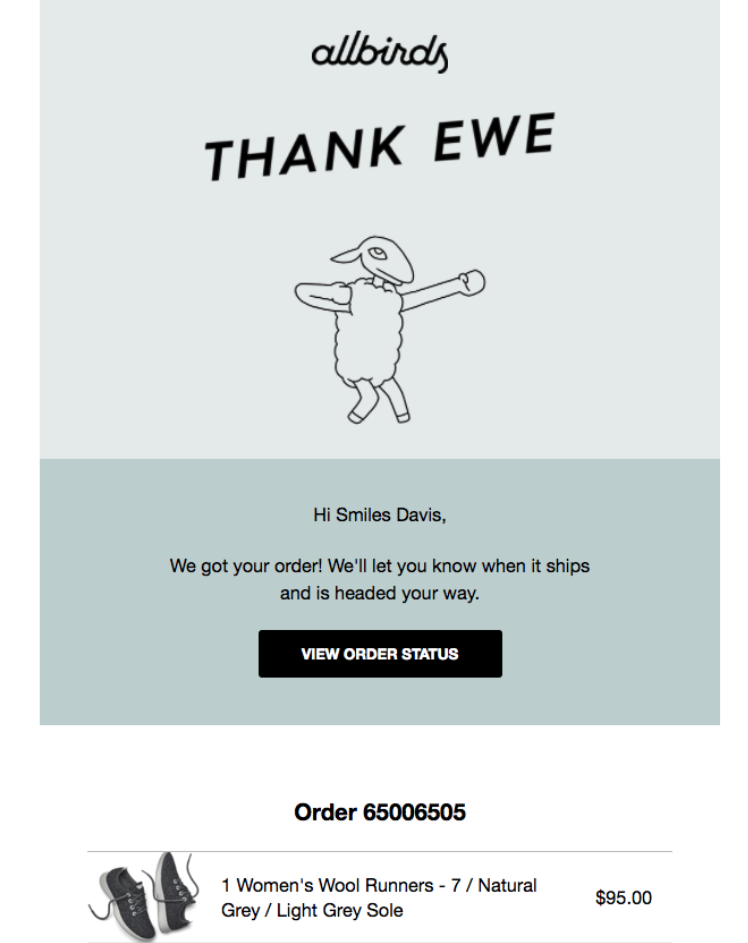
Transactional emails are triggered by a specific customer action: a purchase, a booking confirmation, a password reset, an account creation. They deliver information the customer needs, not marketing they did not ask for.
Why it matters for your business
Transactional emails get opened at rates promotional emails rarely reach, because your customer is actively looking for them the moment they arrive.
How to get results from it
Give them everything they need first: confirmation details, what happens next, how to get help. Then, below the functional content, add one thing. A relevant recommendation. A note that reinforces their decision. An invitation to your community or a useful resource. Keep it short. The transaction is the headline. You are making the most of a moment that is already going well.
Can you automate this?
Yes. Always. Transactional emails are always triggered by a specific action and are never sent manually.
Lead magnet follow-up sequence
What it is
A lead magnet follow-up is an automated sequence triggered when someone signs up for a free resource from you. It delivers the asset and then builds on it over a short series of emails.
Why it matters for your business
A lead magnet does two things. It grows your list. And if you build the follow-up right, it tells you exactly what each new subscriber is interested in. So every email you send after that can match what they actually want.
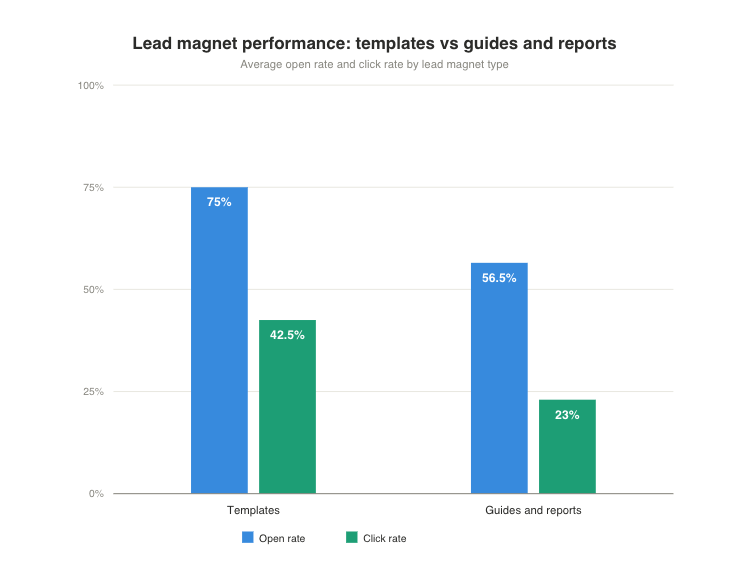
At AWeber, we analyzed over 42,000 lead magnet follow-up emails and found that lead magnets giving subscribers something they can use immediately, like templates, drive significantly higher engagement than ones that do not. Template-based lead magnets averaged a 75% open rate and 42.5% click rate on the delivery email. Guides and reports averaged 56.5% and 23%.
How to get results from it
Trigger the first email, with the lead magnet, immediately. Then send two to four more over the next two weeks. Each one should add something useful that connects directly to what they signed up for.
Can you automate this?
Yes. Trigger the sequence when someone submits the lead magnet sign-up form. Everything after that runs automatically.
Product launch email
What it is
A product launch sequence is a short series of emails that introduces something new to your list, before and after it goes live.
Why it matters for your business
A single announcement email works. A launch sequence works better. It builds anticipation before the day arrives, delivers the full case on launch day, and recovers the people who missed it before the window closes. When you are launching a new product, service, or course, a sequence consistently outperforms a one-shot send.
How to get results from it
Each email in the sequence has one job. The teaser builds curiosity without giving everything away. The launch email answers one question for the reader: why does this matter to me right now? Not what the product does. What it does for them. The last-chance email creates urgency without manufacturing it.
Give email subscribers early access before you announce publicly. They joined your list for a reason. A 24-hour head start costs nothing and earns real goodwill.
Can you automate this?
Yes and no. You can pre-schedule each email in the sequence and let your platform send them at the right time. Some elements, like a triggered last-chance email for non-openers, can be automated. The writing and timing decisions require a human call.
Birthday and milestone email
What it is
A birthday or milestone email is an automated message that sends on a date that is personally significant to your subscriber: their birthday, their subscription anniversary, or another milestone you track.
Why it matters for your business
A birthday email does not feel like a broadcast. It feels like a message sent to one person. That shift in perception drives open rates and click rates that most other email types do not match. Someone who has been on your list for a year has chosen to stay through every unsubscribe opportunity. Acknowledging that builds loyalty that shows up in every email you send after it.
How to get results from it
Pair the message with a real gesture: a discount, early access, something exclusive. An empty birthday email feels like software sent it. One with an actual offer feels like a relationship. Collect the data you need on your sign-up form or through a preferences update email sent to your existing list.
Can you automate this?
Yes. Trigger on a date field stored in the subscriber record. Set it up once and it runs every year.
Where to start
Start with the two most important types of emails
- Welcome Email - starts your relationship
- Newsletter - builds on that relationship over time
Once those are working, add a re-engagement automation. Then an abandoned cart sequence if you sell products. Layer in the others as your business grows.
The businesses that see the most from email are not the ones with the most complex systems. They are the ones who covered every meaningful moment in the subscriber relationship and showed up consistently in between.
Frequently asked questions
What types of emails should a small business send?
Start with three: a welcome email, a regular newsletter, and promotional emails when there is something worth promoting. From there, adding abandoned cart emails, re-engagement automations, and post-purchase sequences significantly increases revenue and subscriber retention. Most effective email programs use five to seven email types in total.
What is the difference between automated emails and broadcast emails?
Automated emails send based on a trigger, a subscriber action or a date, without manual effort after setup. Examples include welcome emails, abandoned cart reminders, and re-engagement sequences.
Broadcast emails are written and sent manually to your list or a segment on a date you choose. Examples include newsletters and promotional campaigns. Both types are necessary. Automated emails handle individual moments in the customer relationship. Broadcast emails build the ongoing connection.
Which email types have the highest open rates?
Welcome emails and transactional emails consistently see the highest open rates, often above 50%, because subscribers are actively expecting them. Milestone emails such as birthday messages also outperform average benchmarks because of their personal timing. Newsletters and promotional emails typically see open rates between 20% and 40%, depending on list quality and how consistently you have been showing up.
How often should you send emails?
For newsletters, weekly or biweekly works well for most businesses. Promotional emails should stay at one or two per week at most to protect engagement. Automated emails send based on subscriber behavior, so their frequency is determined by what your subscribers do, not a calendar. The most important factor is consistency. Setting an expectation and meeting it outperforms any specific frequency.
The post Types of emails every small business should be sending appeared first on AWeber.
from AWeber https://ift.tt/PfRQyUZ
via IFTTT

No comments:
Post a Comment